Sorry, there were no results found for “”
Sorry, there were no results found for “”
Sorry, there were no results found for “”
Hiring for a new role is often as simple as looking at the desk next to you. Yet most organizations lose their best people because of a lack of growth opportunities.
Even worse, when talent can’t see a clear path forward, they look elsewhere.
To stop the churn, you need a way to make talent visible. These 10 talent mobility strategy templates in ClickUp help you audit current competencies and standardize internal applications.
Use them to fill roles internally faster. This reduces the need to hire from outside and increases retention.
| Template name | Download link | Ideal for | Best features | Visual format |
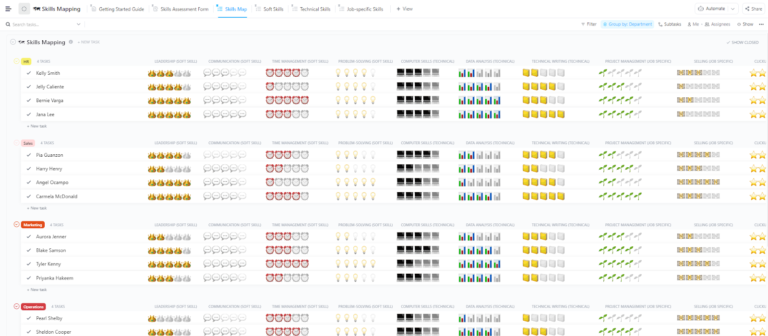
| Skills Mapping Template by ClickUp | Get free template | HR managers auditing team-wide technical and soft skill proficiency | Custom Fields for skill scoring; talent density heatmaps; gap analysis tracking | Centralized List and Table database |
| Capability Matrix Template by ClickUp | Get free template | Recruiting teams comparing candidate competencies side-by-side | Spatial skill plotting; collaborative sticky notes; direct task conversion | Interactive Whiteboard canvas |
| Career Path Template by ClickUp | Get free template | People managers designing transparent, non-linear growth roadmaps | Multi-directional growth mapping; promotion criteria Docs; milestone tracking | Visual flow-based Whiteboard |
| Employee Development Plan Template by ClickUp | Get free template | L&D leads creating structured, individualized upskilling programs | Goal-to-task alignment; automated check-in reminders; department-wide status views | Actionable List and Timeline workflow |
| Training Matrix Template by ClickUp | Get free template | Operations leaders managing complex certification and compliance schedules | Real-time qualification tracking; training ROI Dashboards; skill-per-department views | High-level tracking Table |
| Succession Planning Template by ClickUp | Get free template | Executives mitigating risk for mission-critical leadership roles | Nested subtasks for knowledge transfer; priority labels for vacancies; candidate readiness audits | Organized Folder-based structure |
| Internal Employment Form Template by ClickUp | Get free template | Recruiters standardizing the internal application and screening process | Standardized intake Forms; 6 hiring statuses; applicant screening boards | Digital intake and Board workflow |
| Employee Onboarding Template by ClickUp | Get free template | Department leads managing lateral moves and internal “re-onboarding” | 25 custom employee attributes; Gantt-based ramp-up timelines; automated milestone updates | Comprehensive Folder and Calendar |
| Internal Communication Strategy Template by ClickUp | Get free template | Comms leads promoting internal opportunities and growth culture | Measurable mobility Goals; cross-departmental outreach tracking; linked policy Docs | Strategy-to-Action Folder |
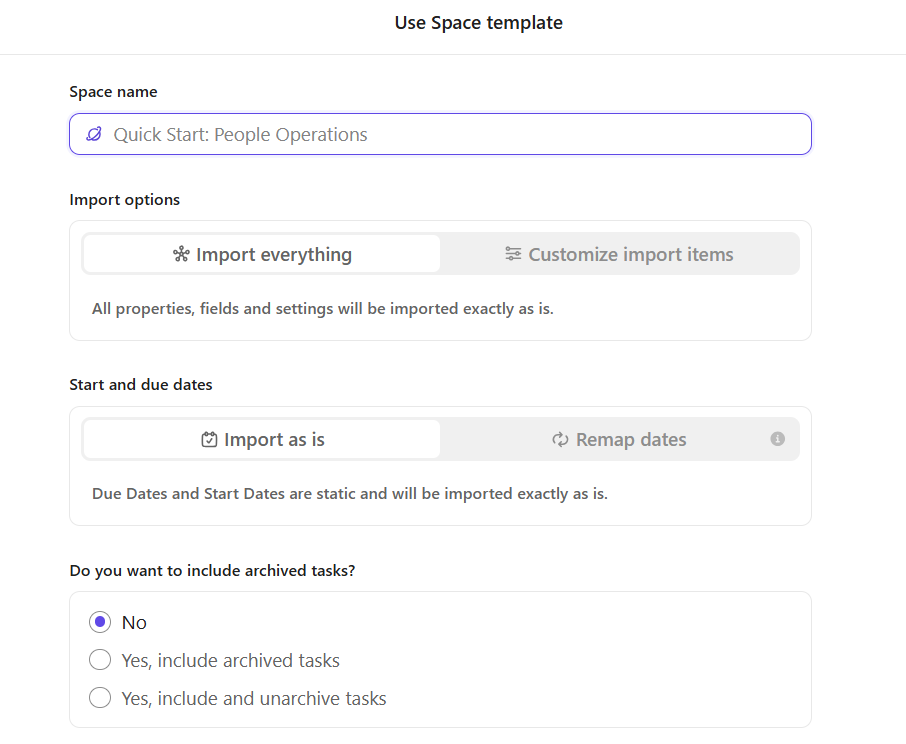
| Quick Start: People Operations Template by ClickUp | Get free template | Scaling startups needing an all-in-one lifecycle management system | 19 custom statuses; built-in team wiki; pre-configured performance review cycles | End-to-end People Ops Workspace |
📚 Also Read: Best HR Talent Management Software
A talent mobility strategy template is a tool to track employee skills. It helps you map career paths and identify internal candidates for open roles.
These templates focus specifically on moving people within the company. They let you match people to opportunities based on their skills. This helps you put skills, competencies, and succession plans into clear career pathways. Hence, you create sharper internal job postings for effective hiring.
Instead of fragmented spreadsheets, they create a single database of your organization’s collective skills.
Bonus: Combine these templates with the world’s first converged AI workspace, ClickUp, to save 4 hours a week. ClickUp brings together your chat, documents, tasks, and goals in a context-aware AI space. Your data in this ecosystem updates in real time, making talent-hunting and career planning easier.
📮ClickUp Insight: 92% of knowledge workers risk losing important decisions across chat, email, and spreadsheets. Without a unified system for capturing and tracking decisions, critical business insights get lost in the digital noise. With ClickUp, you never have to worry about this. Create tasks from chat, task comments, docs, and emails with a single click!
You can use each template below individually to solve an immediate problem. Or, combine them in ClickUp to build a connected talent management system.
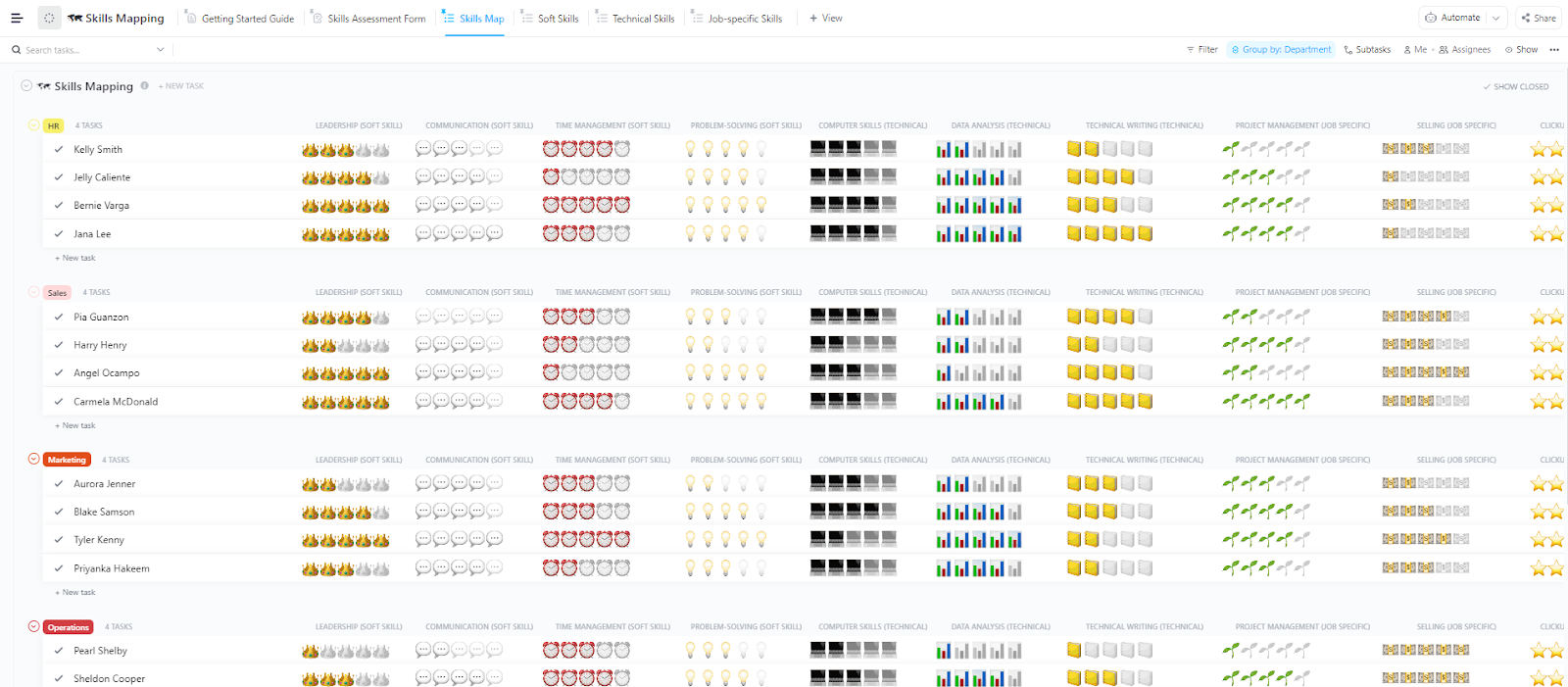
You can’t plan hiring or growth without knowing your team’s skills. When that visibility is missing, decisions turn vague. The ClickUp Skills Mapping Template gives you a clear view of your team’s strengths and gaps.
It works like a shared skills database. Go beyond resumes and capture both technical and soft skills in one place.
You can rate proficiency, compare roles, and see who’s ready for more responsibility. This makes promotions, role changes, and training plans much easier to manage.
🧑💻 Ideal for: HR teams and managers who want a clear, data-backed way to plan hiring, training, and internal growth.
💡Pro Tip: Once your skills data is in ClickUp, you don’t have to manually search to find the right person. Use ClickUp Brain and its Enterprise AI Search to ask questions like:
ClickUp Brain scans your tasks, docs, and Custom Fields to surface the exact internal candidate for a role in seconds. It turns your skills mapping template into a searchable directory. Identify potential successors before you ever have to look at an external job board.
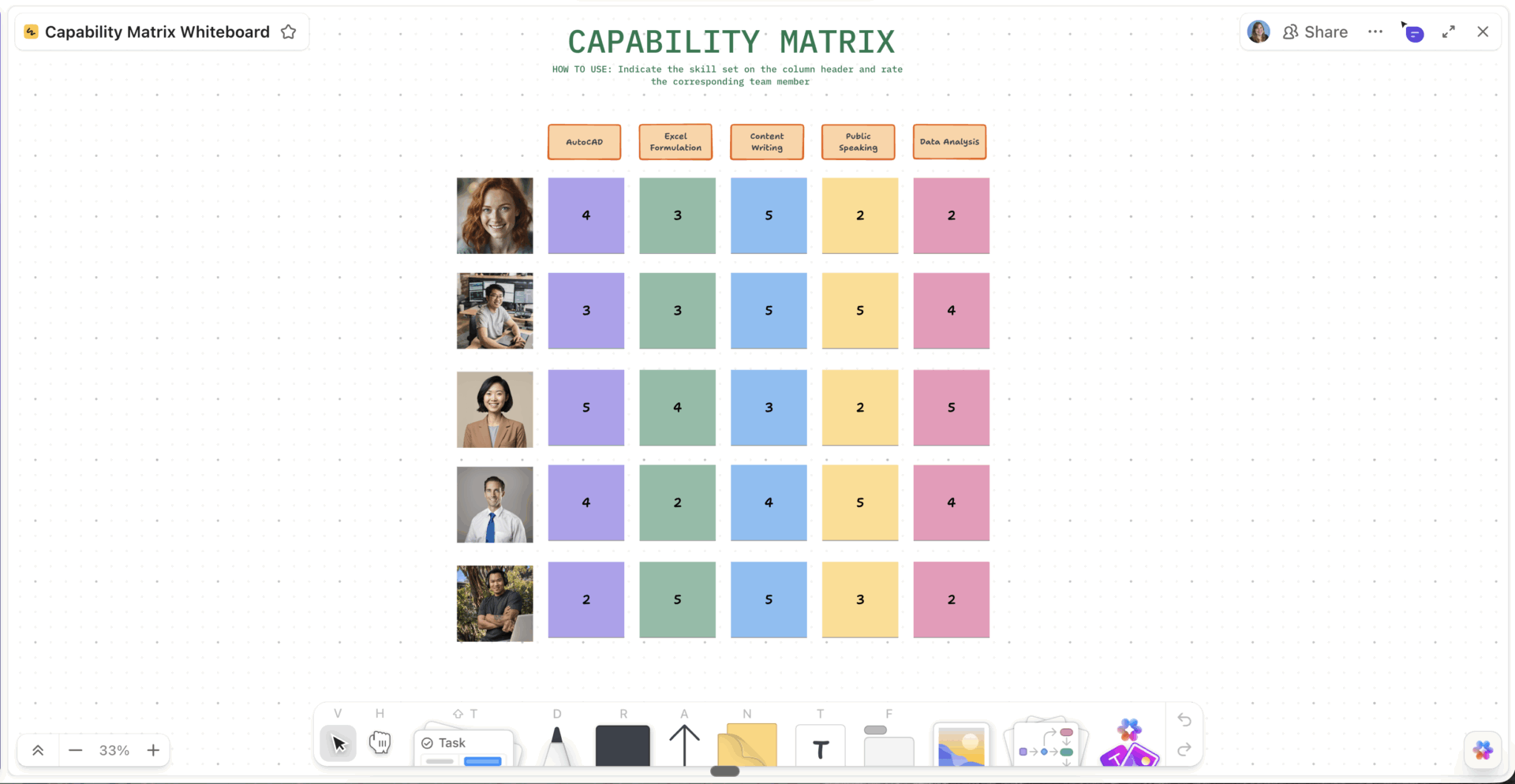
Knowing your team’s skills is helpful, but it’s not enough. You also need to see how those skills fit the overall capability map. This is easier with the ClickUp Capability Matrix Template.
It gives you a clear, visual way to compare people against role requirements. Instead of digging through resumes, you can see competencies side by side. This makes hiring, promotions, and training decisions much easier.
This template also brings your team into the process. Everyone can review and comment on roles. This keeps teams aligned on what each role needs.
🧑💻 Ideal for: Recruiting teams and department heads who want a clear, visual way to assess skills and make talent decisions.
🔎Did You Know? Only 33% of employees say their organization has a clear process for internal career growth. Clearly, having a policy and the means to execute it are two different things.
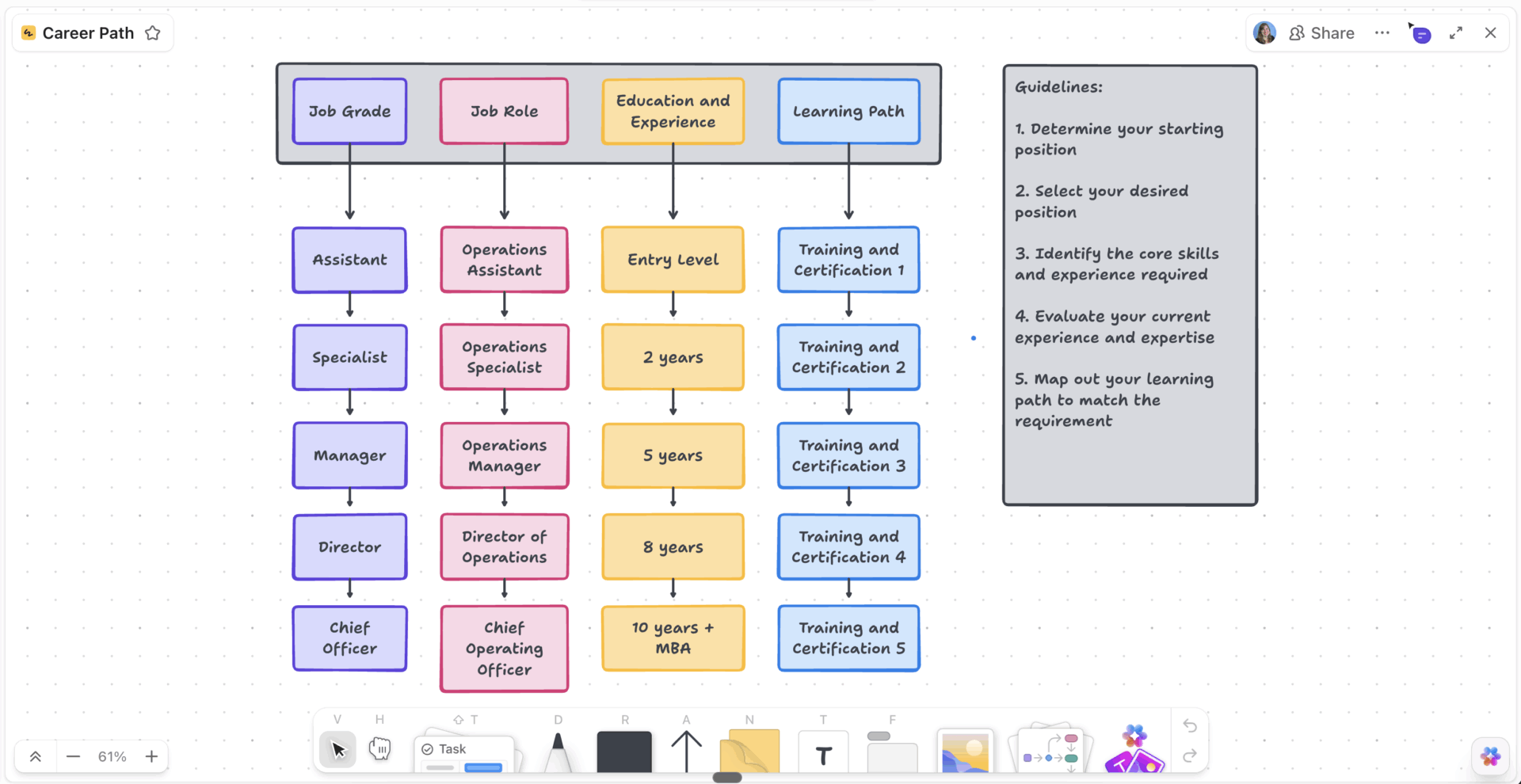
Your employees will leave if they can’t see a future with your company. To retain them, use the ClickUp Career Path Template. It gives your team a clear path forward.
Show employees what it takes to move from one role to the next. Define the skills, milestones, and goals at each step. You can also show lateral moves, so growth isn’t limited to promotions alone.
This turns career planning into an ongoing conversation. Both managers and employees can update progress and adjust goals as things change.
🧑💻 Ideal for: HR leaders and managers who want to improve retention with structured career growth plans.
🔎Did You Know? ‘Manager hoarding’—where managers actively hide high-performers to keep them on their own teams—limits mobility. A transparent tracking system like ClickUp makes talent visible to everyone.
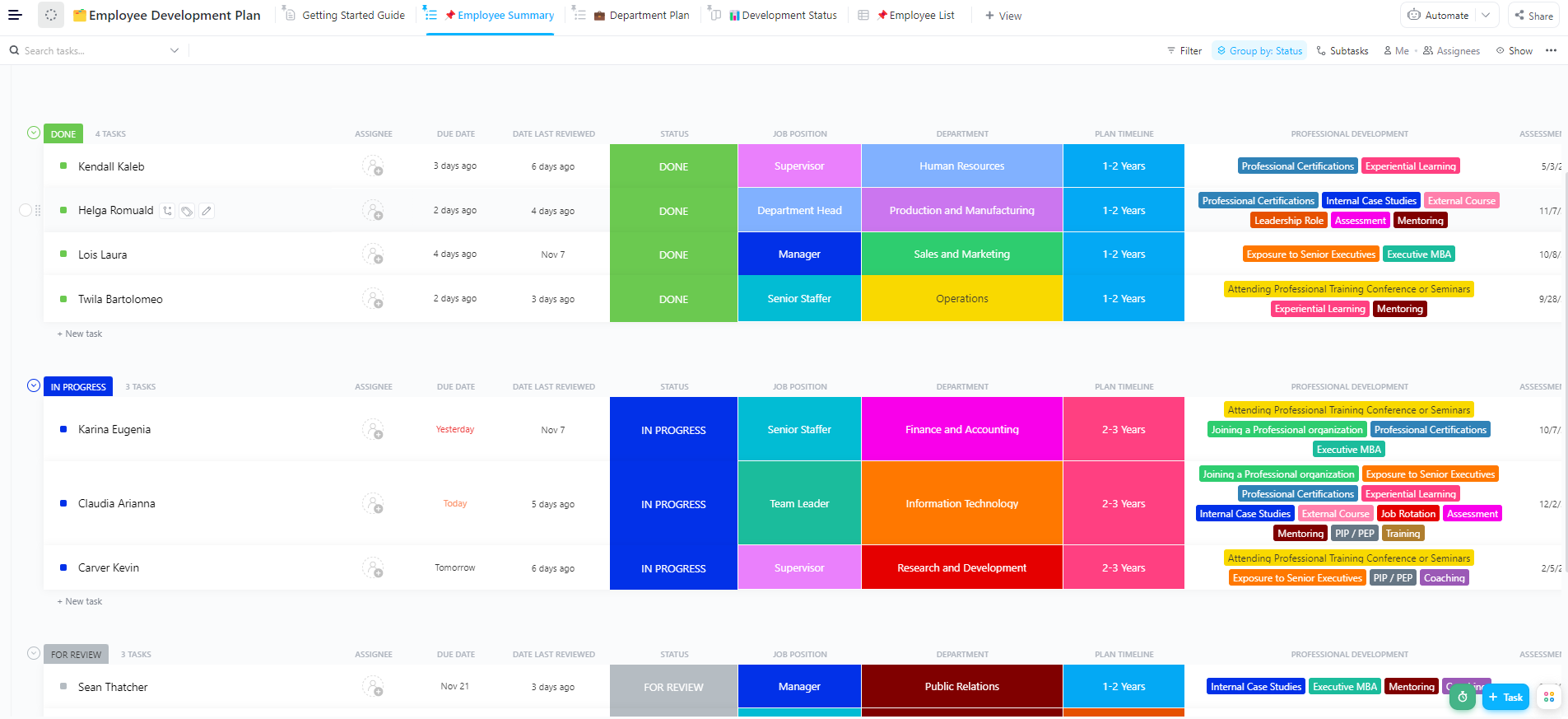
Once you know where an employee wants to go, the next step is getting them there. Without a plan, progress feels unclear and slow. Remove this ambiguity with the ClickUp Employee Development Plan Template.
Create development plans that match personal goals with business needs. Give each employee a clear roadmap with defined steps.
This way, development is visible and consistent. No one gets overlooked, and every plan stays on track. At the same time, HR can track progress across the whole team in one place.
🧑💻 Ideal for: HR teams and managers looking to support employee growth.
Pro Tip: Use ClickUp Super Agents to map skills
Think of Super Agents as your smart HR assistants. You can teach an agent to look at a worker’s past projects and instantly suggest which new roles they are ready for. Instead of hunting through files, just ask the agent to find the best person for a job based on their real work history. This saves time and ensures you never miss a great internal candidate.
Pick from a ready-made suite of Learning and Development Agents!
Learn more about using Super Agents for your daily tasks:
Is employee training at your company scattered and vague? It could be that there’s no clear link between training and career development plans. Some employees take courses, others don’t, and gaps still remain.
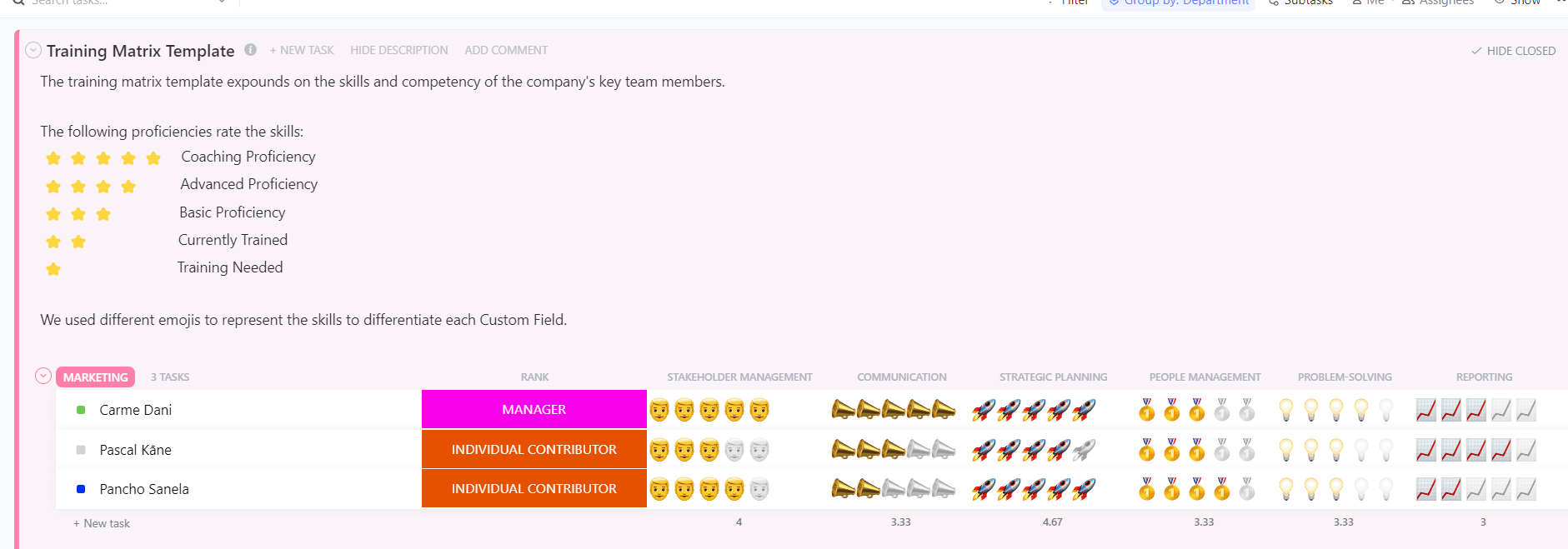
The ClickUp Training Matrix Template simplifies this. See who’s trained, who’s learning, and who needs a refresher—all in one place. It gives managers a clear view of team readiness. You can quickly check if a team has the skills needed for a new project or shift.
🧑💻 Ideal for: L&D teams and operations leaders who want an organized way to manage training and skill readiness.
🔎Did You Know? Only about 45% of employees take advantage of training offered by employers to build new skills. This leads to a scattershot approach to learning and development. Despite spending training budgets, skill gaps remain.
Losing a key leader without a backup plan can disrupt business. The ClickUp Succession Planning Template helps you plan ahead and stay prepared.
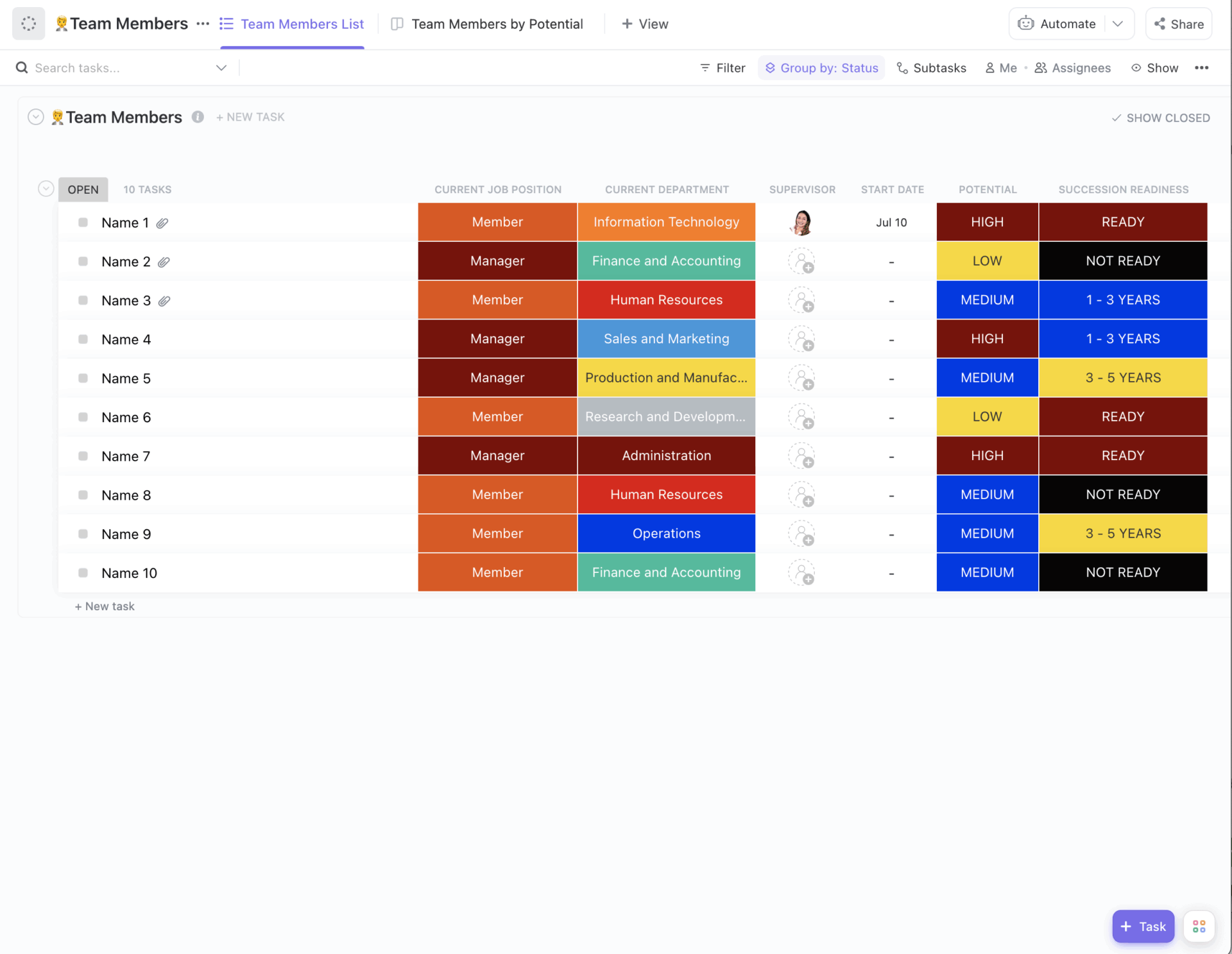
Use it to map out future candidates for critical roles. Track potential successors, their skills, and what they need to grow. This keeps your team ready for any change.
It keeps role details, transition plans, and development steps in one place. When the time comes, the handoff is smooth and well planned.
🧑💻 Ideal for: HR leaders and executives planning for leadership continuity.
🧠Fun Facts: The word ‘Promotions’ comes from the Latin ‘Promovere’, meaning ‘to move forward.’ Historically, it wasn’t about a pay raise. It meant moving a soldier to the front of the line so they could lead. A mobility strategy is just the modern version of this. It ensures the right people are at the front of your business lines.
If applying for an internal role feels confusing, employees won’t try. That means you miss out on strong internal talent. The ClickUp Internal Employment Form Template helps avoid this.
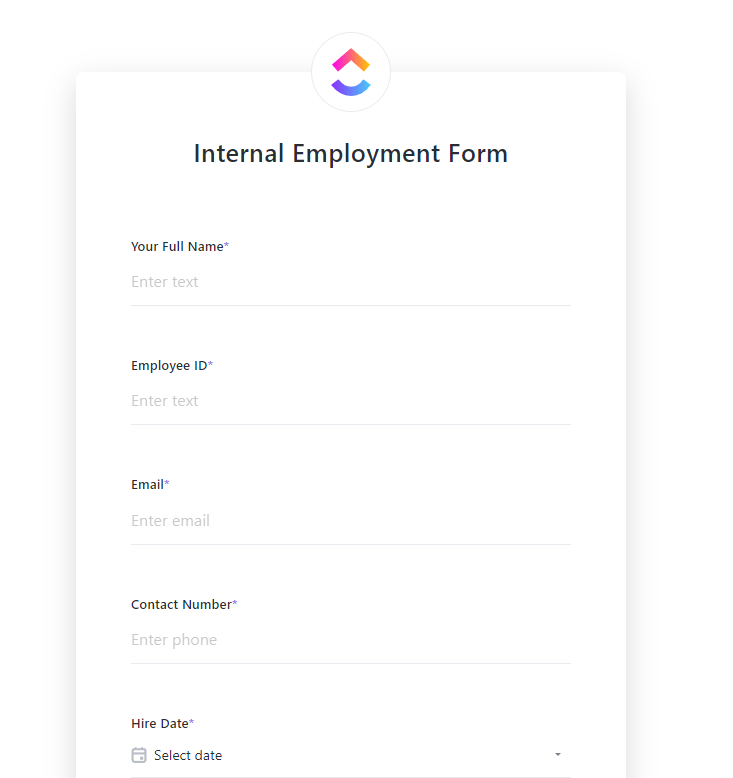
The template makes it easy for employees to apply for new roles. It also ensures you have all the right details about candidates. Every application follows the same format, so it’s easier to review and compare.
It also keeps things organized behind the scenes. Applications move through clear steps, and candidates stay informed.
🧑💻 Ideal for: HR teams and internal recruiters who want a smooth way to manage internal hiring consistently.
Moving to a new role inside the company still takes adjustment. Without a clear plan, employees can feel lost. This slows them down and affects their confidence.
The ClickUp Employee Onboarding Template makes these transitions as smooth as a fresh hire’s first day. It also keeps employees, managers, and teammates on the same page.
Give employees the context, tools, and support they need from day one. This helps them settle in faster and start contributing sooner. Everything stays organized and easy to follow.
🧑💻 Ideal for: HR teams and managers who want to make internal transitions smooth and successful.
If employees don’t hear about internal opportunities, they won’t use them. Over time, this leads people to seek growth outside the company.
To prevent this, build an internal communication strategy. You can use the ClickUp Internal Communication Strategy and Action Plan Template for this.
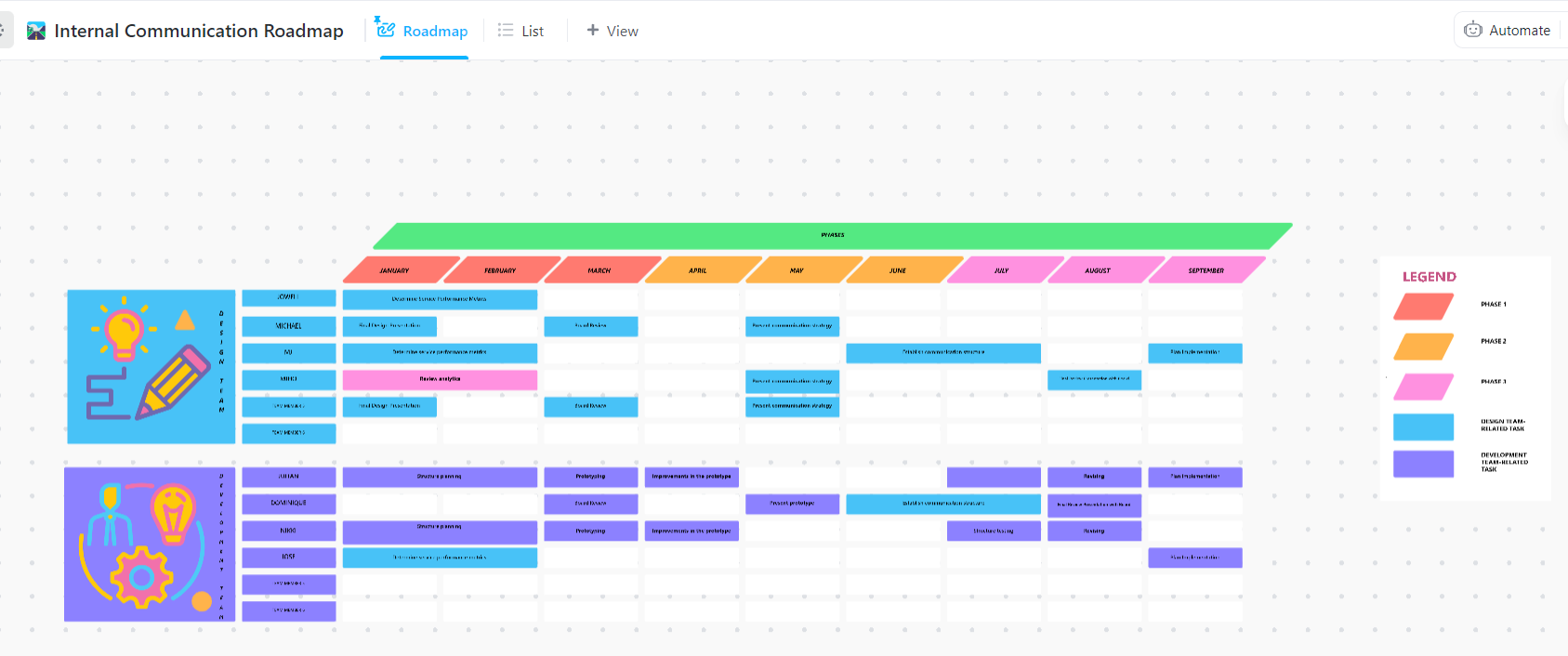
Plan when and how you’ll share updates on roles, training, and career programs. Make sure the right people get the right message at the right time. This keeps everyone informed and engaged.
🧑💻 Ideal for: Internal comms leads and HR directors who want a consistent way to promote growth opportunities.
When your HR work is spread across tools, things get messy fast. Data sits in silos, and it’s hard to see the full picture. The ClickUp Quick Start: People Operations Template is an ideal solution.
This template helps you manage the full employee journey. From hiring to onboarding to growth, everything lives in one workspace. This makes it easier to track progress and connect different stages of an employee’s experience.
It also saves time, as you don’t have to build systems from scratch.
🧑💻 Ideal for: HR teams and growing companies that want a simple, all-in-one system for people operations.
A template only works if you have a good plan. To do more than just track open jobs, you must make these tools part of your daily work. This helps you build a strong team that grows from within.
These best practices ensure your ClickUp templates drive success:
Cristhian Carreño, a Teacher at ISTG, reviewed ClickUp:
“A few years ago we implemented ClickUp in the educational institution where I work because we had to improve the processes in the organization, it was very complicated in a company with around 150 employees, knowing what they are doing and measuring progress, something that has been achieved through the use of ClickUp.”
Talent mobility strategy templates help with internal talent development. They let you efficiently track skills and career paths, and manage internal hiring. This helps you keep your best performers and spend less on hiring from the outside.
A converged AI workspace like ClickUp keeps all your efforts in one place. It ties professional growth directly to performance and skills. Not only can you attract and keep top talent, but also get results faster.
Try ClickUp for free and build your talent mobility program in one connected workspace.
A talent mobility strategy is a broad plan for all internal movement, including promotions, lateral moves, and project assignments. A succession plan focuses only on preparing replacements for critical leadership roles.
Small teams can use simplified versions of these templates to focus on core activities such as skills mapping and career conversations. Large enterprises will need the full suite to manage succession planning, compliance, and global mobility.
Yes, the biggest benefit comes from connecting them. In ClickUp, you can use Relationships to link data between templates, creating a unified system. Skills data informs development plans, which in turn feed into your succession and internal hiring workflows.
You should review skills data and development plans quarterly, succession plans biannually, and career path frameworks annually. However, any major organizational change, such as a restructuring, should trigger an immediate review.

Praburam Srinivasan
Max 10min read
Praburam Srinivasan
Max 19min read
Praburam Srinivasan
Max 20min read

© 2026 ClickUp