


When you’re busy managing multiple projects, the last thing you need is the added stress of falling behind on your schedule.
Setbacks like improper resource allocation, scope creep, and other unexpected disruptions can delay your project, sometimes indefinitely.
This is precisely why you must learn how to track project progress.
Tracking your project’s progress throughout its lifecycle helps you make informed decisions at every stage and adjust project activities to stay on course.
In this blog, we discuss some best practices and strategies you can use to track project progress.
How to Effectively Track the Progress of Your Project
- Challenges in Tracking Project Progress
- 10 Ways to Track Project Progress
- 1. Set clear goals and milestones
- 2. Assign clear responsibilities
- 3. Maintain detailed documentation
- 4. Schedule regular status meetings
- 5. Implement proper progress-tracking methods
- 6. Use Agile methodologies
- 7. Use Gantt charts to visualize timelines
- 8. Use consistent reporting
- 9. Compile effective project reports
- 10. Use a project management tool
- The First Step Toward Effective Project Progress Tracking

 Summarize this article for me please
Challenges in Tracking Project Progress
As a project manager or team leader, you may have faced several challenges when tracking projects and recording the status of tasks from inception to successful project completion. Some of the most common ones we’ve observed include:
- Lack of clear objectives: Projects may not have clearly defined objectives and outcomes—leading to scope creep, which in turn makes it challenging to keep up with the project schedule
- Improper communication: Poor communication among stakeholders and team members can create confusion around project deliverables, objectives, timelines, and responsibilities
- Inconsistent data collection: Lack of a structured data collection process results in incomplete progress reports, which makes it difficult to assess the project’s status
- Lack of real-time updates: Without regular real-time updates, you may find it difficult to identify and address issues proactively
Summarize this article for me please10 Ways to Track Project Progress
If you’re looking to track and measure project progress, here are the 10 steps to follow.
1. Set clear goals and milestones
Sit with team members and stakeholders to discuss project goals in detail. Break down these goals into key milestones so that your team knows exactly what needs to be achieved at each project stage.
For instance, if your goal is to launch an e-commerce website within six months, key project milestones will look like:
- Month 1: Finalize project scope and assemble the project team
- Month 2: Complete market research and document requirements for the website
- Month 3: Finalize website design and develop a UX strategy
In this process, milestones act as checkpoints throughout the project, enabling you to measure the actual progress of the project against the schedule.
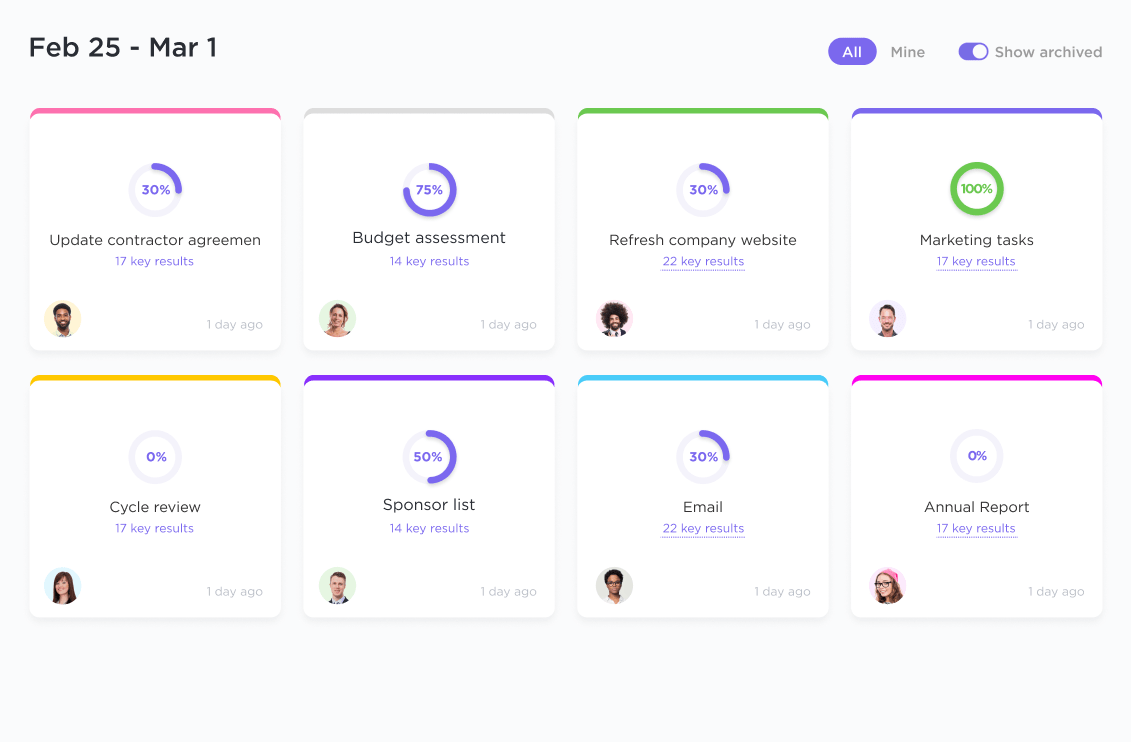
Use ClickUp Goals to define clear, trackable goals for your project. Add timelines and targets for each goal so that you know exactly how your project is progressing.
Read more: 10 Best Goal Tracking Apps for 2024
2. Assign clear responsibilities
If you don’t want team members using the phrase ‘I wasn’t aware of that,’ you need to establish clear accountability for every task on your project’s to-do list.
Start by dividing your project into stages. Add tasks under each stage and review them with stakeholders before finalizing your task list.
- Use ClickUp’s Kanban Board to create different columns to represent each stage of the project
- Group corresponding tasks under each column along with deadlines and priority levels. You can move each task across the board using the drag-and-drop function
- Assign these tasks to appropriate team members. They will receive a notification once a task has been assigned, meaning there is no misplaced accountability

💡Pro Tip: Measure the estimated time of completion by considering the different tasks, activities, and probable delays. Use this as a benchmark to set realistic timelines and prioritize necessary tasks to streamline the project and improve efficiency.
3. Maintain detailed documentation
If you’ve spent time preparing and updating project management documentation—project plans, change logs, risk registers, and project status reports—you know how these details are usually scattered across email threads, notes, chats, and endless spreadsheets.
When critical documents are not centralized in a shared space, accessing them can be difficult and time-consuming. You’d have to ask multiple stakeholders for access and sift through multiple tools (Word, PowerPoint, MS Teams, Google Docs, etc.), and you may still not be able to find the latest versions of these documents.
What if we told you that you can consolidate all project-related documents and information in a centralized repository using ClickUp Docs?
Use its inbuilt formatting options to help you neatly structure the document, add sections, upload images, and embed videos so that it is easy for everyone to grasp. Plus, collaboration detection allows stakeholders to edit the document in real time, ensuring the information is always updated.
Think of Docs as a single source of truth that helps everyone work from the same information, minimizing oversight and reducing delays.

💡 Pro Tip : Consider using project progress tracker templates as a pre-defined blueprint to oversee progress, organize important information centrally, and save valuable time without sacrificing the integrity of your project.
4. Schedule regular status meetings
Regular team meetings allow everyone to discuss their progress and provide updates on the status of their tasks. It is a way for your team members to know what has been accomplished, what’s pending, and how much time is left.
As a manager, this is when you identify smoke signals before they become full-blown issues and prevent schedule delays. Regular check-ins help everyone in the team coordinate better and encourage collective problem-solving.
You could have a daily standup meeting lasting 15-20 minutes, during which everyone shares updates about what went well, what went wrong, and what they plan to achieve today.
On the other hand, weekly meetings of 30-60 minutes include discussing the long-term goals, project challenges, and status reports.
💡Pro Tip : Leverage project status report templates to monitor your project’s health and progress. These templates can be tailored to the type of project and the details you want to track so you can start managing your project schedule quickly.
5. Implement proper progress-tracking methods
Tracking project progress without deciding what tracking methods to use is like navigating a road trip without a GPS.
Use a combination of qualitative and quantitative methods to track the progress of your tasks and activities efficiently:
- Quantitative methods include monitoring numerical data such as task completion rates, time tracking, budget variance, and throughput data
- Qualitative methods include stakeholder feedback, client observations, meeting notes, feedback, and project documentation
If you want a pre-defined framework for tracking project progress, use the ClickUp Project Tracker Template.
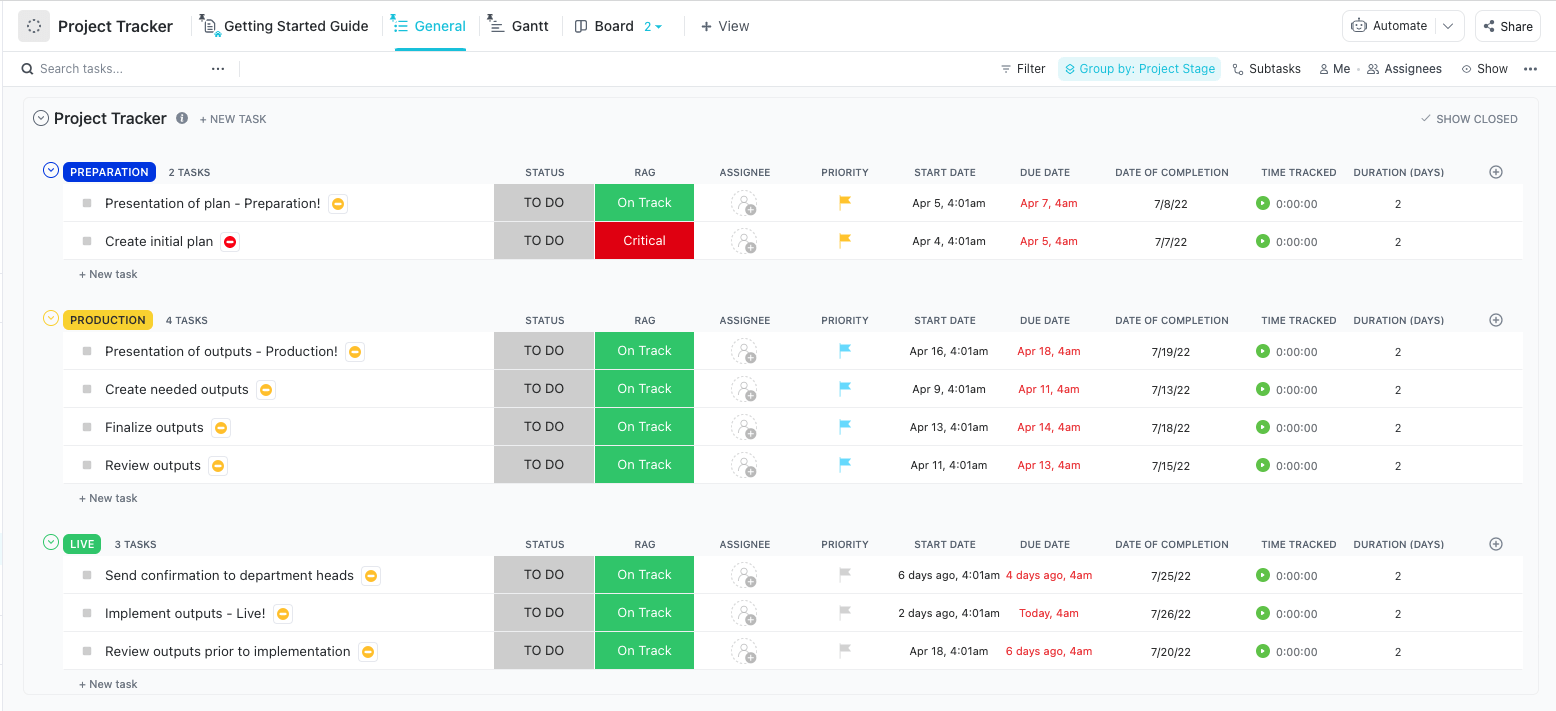
It offers a comprehensive structure with multiple custom views to help you track the various tasks in a project and visualize timelines. It also lets you get a quick overview of your progress and view tasks by category, assignee, and due date.
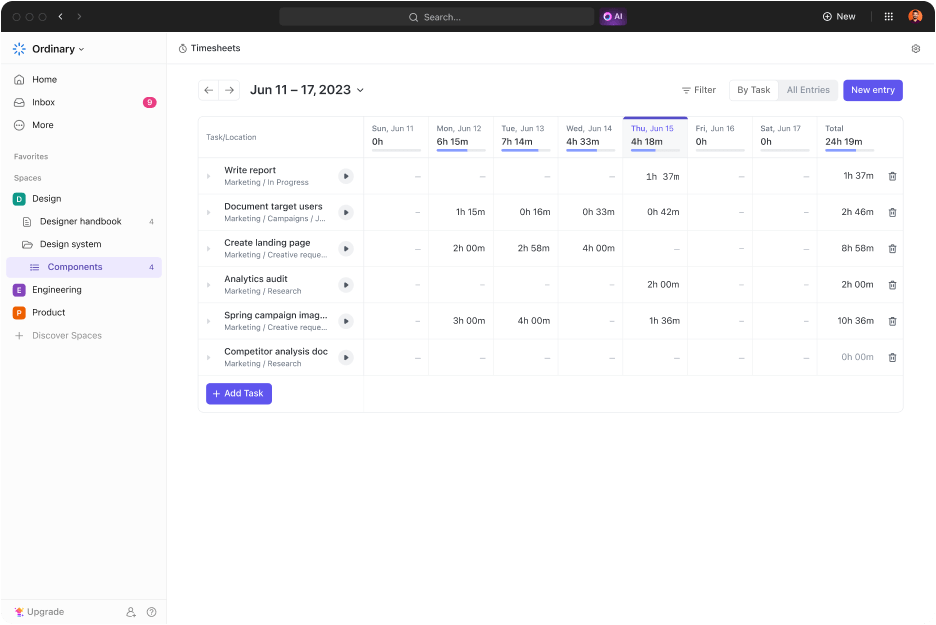
💡 Pro Tip: Use the ClickUp Project Time Tracking to track the time team members spend on individual tasks and activities. Consolidate these insights into a timesheet to identify which tasks are eating into your team’s bandwidth and how they can be optimized.
6. Use Agile methodologies
Project managers use Agile methodologies to divide complex projects into smaller iterations called sprints.
Rather than delivering results at the end of the project, Agile methods focus on delivering incremental value at the end of each project phase or sprint. Shorter delivery cycles make tracking progress and making timely adjustments much easier.
The top three benefits of using Agile project management techniques include:
- The ability to handle changing priorities
- Enhanced visibility for stakeholders
- Improved business alignment
Two of the most commonly used Agile frameworks are Scrum and Kanban.
Scrum
Work is divided into time-boxed iterations, which are regular checkpoints to measure progress. Each box is approximately 1-4 weeks long, and a specific set of activities must be completed within this time frame.
The ClickUp Agile Scrum Management Template offers a customizable workflow to manage your Agile Scrum development process. You can use custom statuses to create different project stages and understand how a task is progressing along these stages.

Kanban
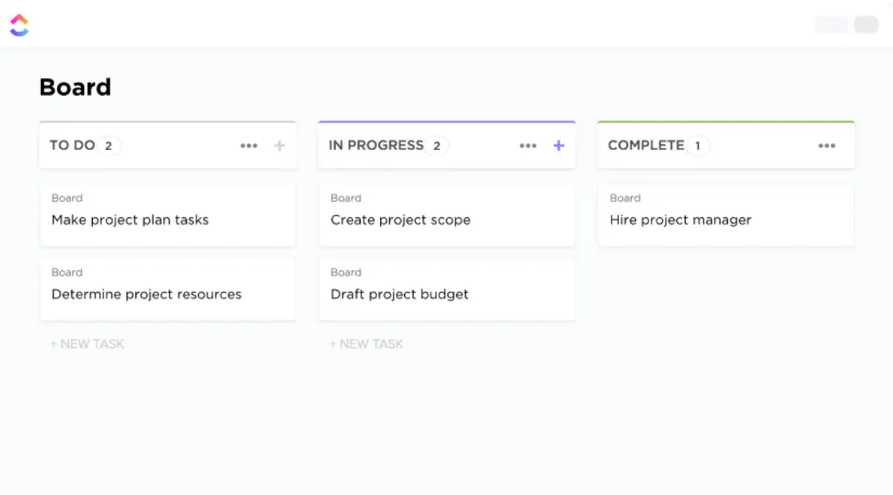
Work is visualized as different stages in a workflow. The stages could be ‘To-Do,’ ‘In-Progress,’ and ‘Under Review.’ Limit the number of tasks under each stage to maintain a steady workflow.
Use the ClickUp Kanban Template to represent your project’s workflow. Custom fields allow you to categorize tasks according to their stage and add details about the task to improve visibility into what’s completed and what’s pending.
7. Use Gantt charts to visualize timelines
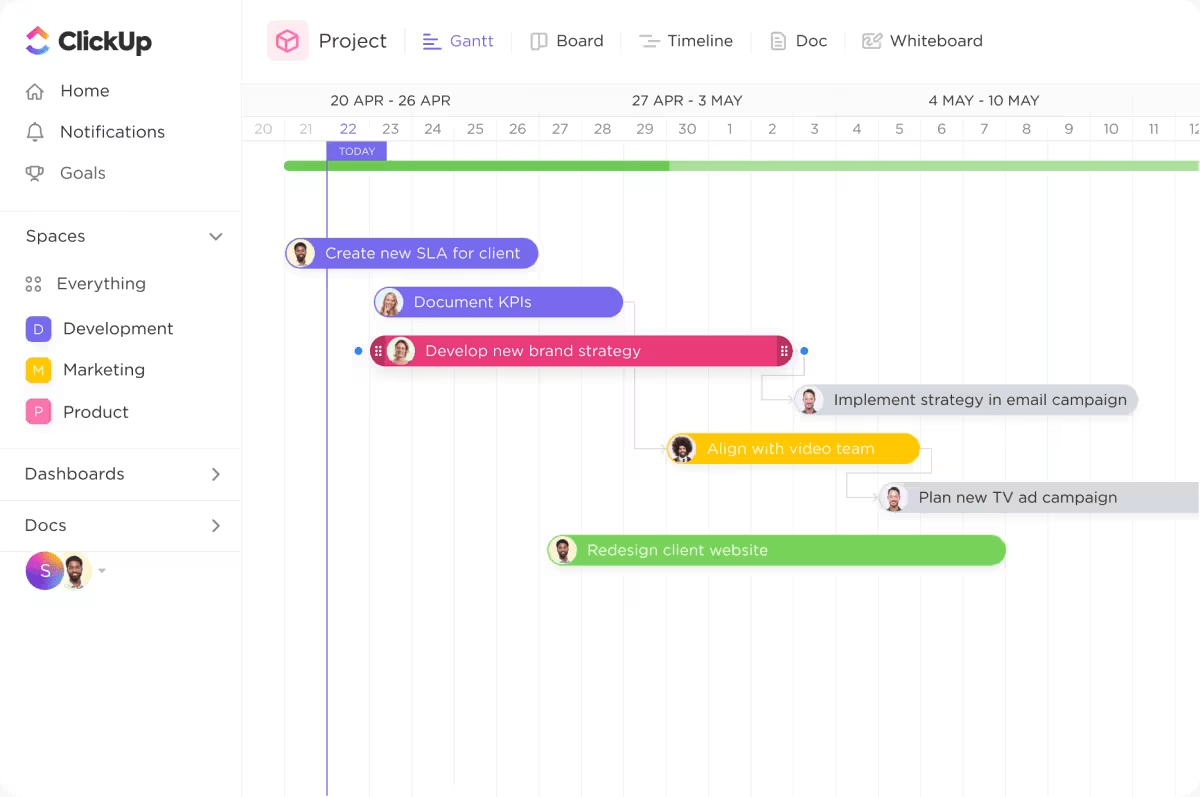
Gantt charts are used to visualize the start and end of a project across a timeline.
When your project timeline has multiple milestones in between to mark the project’s progress along with tasks, deliverables, and timelines—Gantt charts provide a clear view of the project schedule, showing everyone when a task needs to start and when it needs to be completed.
- Use the ClickUp Gantt Chart View to organize your tasks along a timeline and set priorities for each task
- Create tasks along the timeline and add dependencies so that you know exactly what subtasks need to be completed and how long it will take
- Share the timeline with your team so that everyone receives real-time updates when a task is completed or when the project schedule is modified
💡 Pro Tip: Use project monitoring to anticipate potential risks, delays, and budget overruns and take quick action to correct them. It ensures the project stays on track, increasing the chances of successful, high-quality outcomes.
8. Use consistent reporting
Team members may often compile reports with inconsistent or inaccurate data, which could lead to misinformed decision-making and make it difficult to identify problems in the project delivery timelines.
Avoid this by:
- Establishing clear guidelines for reporting
- Emphasizing what project metrics and key performance indicators need to be tracked, as well as formats, frequency, and sources of information
- Ensuring the same criteria are consistently used to measure progress so that there is no ambiguity or confusion
Solution? Create and use standardized templates for all reports. Educate your team members on the importance of standardized reporting for better progress tracking.
For instance, ClickUp’s Project Progress Report Template includes everything you need to keep stakeholders and team members updated about the project’s progress.
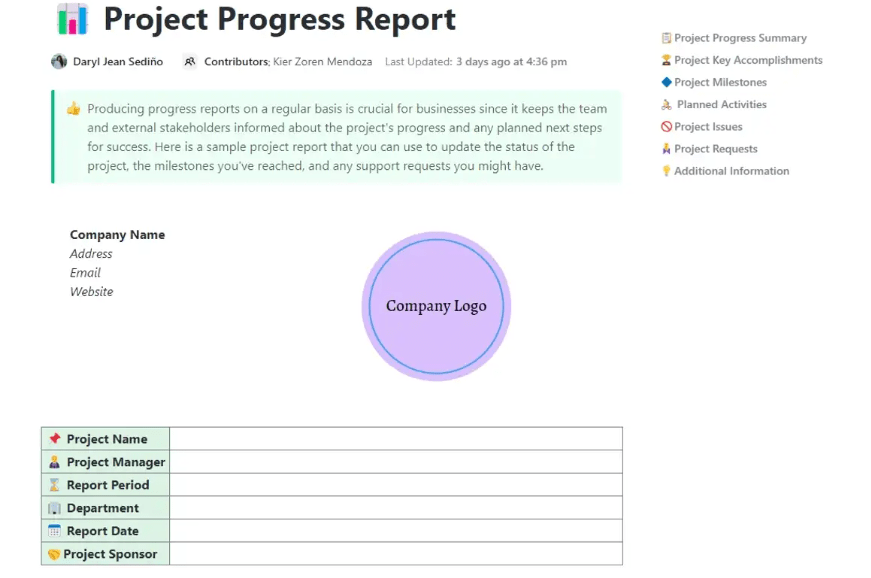
The template offers multiple views to visualize your work differently. Custom views allow you to add important details to manage and track tasks with ease. You can even set real-time notifications to get timely updates every time an action or task is completed.
9. Compile effective project reports
A comprehensive report can give a clear view of the project’s status and deliverables. It highlights how different resources are utilized and provides data on critical project KPIs (key performance indicators). These metrics measure a project’s performance and track each team member’s responsibilities.
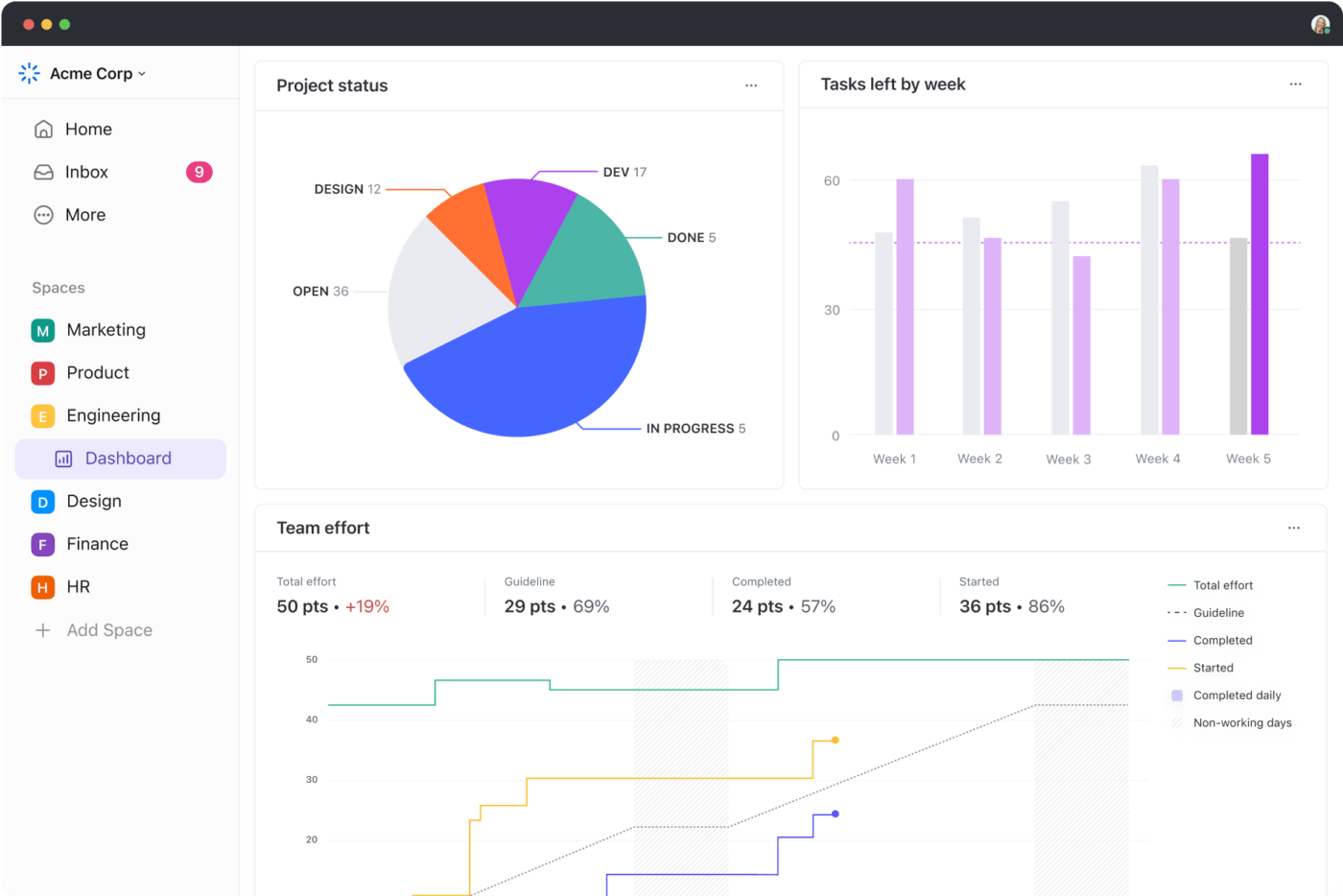
The ClickUp Dashboard allows you to create detailed reports on project progress, view data on various tasks and activities in a single place, and track important project metrics.
ClickUp’s Dashboard is fully customizable, and you can beautifully present critical data using charts, graphs, or other visualization tools. Add interactive buttons, such as buttons and dropdowns, to make it easier to filter data and gain actionable insights into project progress.
10. Use a project management tool
When figuring out how to track project progress effectively, your best bet is to use a project management software.
A project management tool provides a centralized source to store all project-related information and multiple features to improve collaboration, automate tasks, track projects, and manage tasks.
For instance, the ClickUp Project Management Software offers multiple robust features that make planning and prioritizing your work easier.
Chelsea Benett, Brand Engagement Manager at Lulu Press, raves about how ClickUp has streamlined their team’s efficiency:
Here’s how project managers can use ClickUp to improve their project workflow.
- Create and assign tasks to team members along with due dates using ClickUp Tasks
- Collaborate with your team members and provide real-time updates in a blink with the ClickUp Chat View
- Brainstorm with teams virtually on a digital canvas using ClickUp Whiteboards
- Create efficient workflows for your team and automate repetitive tasks by choosing from over 100+ automations using ClickUp Automations
- Use ClickUp Dashboards to prepare detailed project reports at every stage
- Generate project updates, compile meeting notes, and summarize documents in no time using ClickUp’s very own AI – ClickUp Brain

💡Pro Tip: Use project management templates to save time and expedite your project to completion. Simply plug in the relevant information in the pre-built structures so your teams can manage their tasks quickly.
Summarize this article for me pleaseThe First Step Toward Effective Project Progress Tracking
Effective project tracking is far from micromanaging. It is a systematic blend of clear communication, detailed documentation, streamlined workflows, and effective reporting.
As a project manager, you must adopt the right practices to maintain a clear overview of your project’s progress and swiftly identify issues.
However, it can be challenging to go from zero to one in no time when implementing the best practices we’ve mentioned above. Instead, ease into it by taking it one step at a time.
For instance, the most practical step would be implementing a flexible project management tool like ClickUp that can be customized to fit your team’s needs. You can start by experimenting with basic features like ClickUp’s Dashboards, views, pre-built templates, and tasks and gradually move on to more advanced features as you get used to the tool.
Sign up on ClickUp today and discover how the platform’s powerful functionalities make progress tracking a breeze.


Everything you need to stay organized and get work done.

Recent Articles
Jira Project Management: What It Does Well and Where It Taps Out 
Jira Project Management: What It Does Well and Where It Taps Out
8 Communication Strategies That Actually Fix Team Chaos
8 Communication Strategies That Actually Fix Team Chaos
