






Still downloading templates?
There’s an easier way. Try a free AI Agent in ClickUp that actually does the work for you—set up in minutes, save hours every week.
Sorry, there were no results found for “”
Sorry, there were no results found for “”
Sorry, there were no results found for “”

When you’re overwhelmed with work responsibilities, determining which parts of your operations might need improvement can feel like running through a dark maze—you may know your goal but not how to reach it.
Luckily, you can rely on needs assessment templates as your trusty companions on the road toward optimized workflows. They help you gain insights into your team’s operations and enhance work efficiency by shining light on the gap between your reality and your potential.
In the sea of options, we’ve found the 11 best needs assessment templates to help you detect and prioritize pain points in your operations. Say goodbye to doing needs analysis from scratch, and join us in exploring these exceptional templates’ distinctive features and benefits!
A needs assessment, often referred to as “gap analysis” or “needs analysis,” is a process of finding gaps and weaknesses within an organization or a workflow. This evaluation offers valuable insights into areas that could use improvement and helps tailor resource allocation to achieve organizational goals more effectively.
A needs assessment template is a structured framework that helps organizations identify, document, and analyze data during the needs assessment process.
Although they come with a pre-designed structure, you can customize these templates to suit the specific needs of your business or project. They typically comprise three key sections:
There are a few necessary steps project managers should follow to successfully carry out a needs assessment:

Make gathering data manually a thing of the past with the best needs assessment templates. We’ve handpicked the cream of the crop tools from ClickUp, SlideTeam, and other reputable providers to help you assess your business needs as effectively as possible.
Let’s take a look at what they bring to the table.
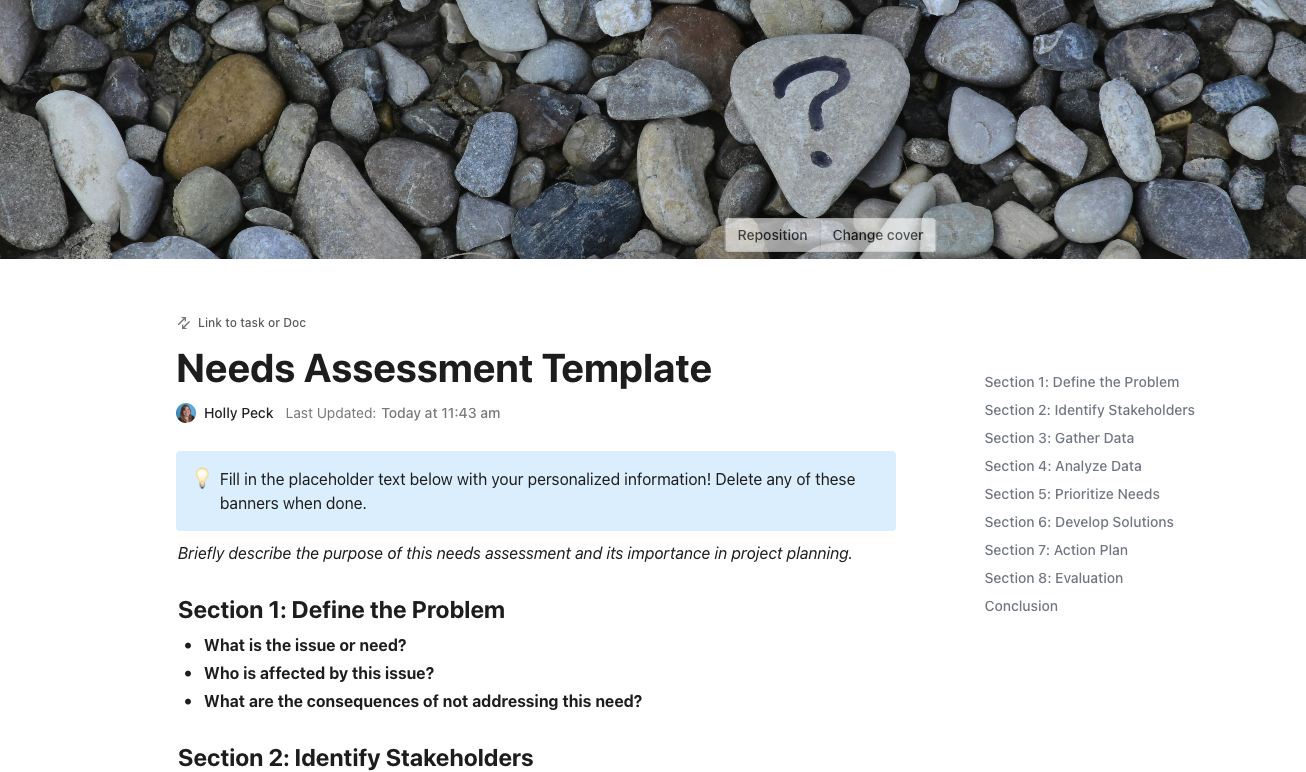
ClickUp’s Needs Assessment Template is designed to simplify the process of evaluating project complexity and ensuring alignment with your strategic objectives. With a structured, customizable layout, this template enables you to identify key improvement areas, define clear goals, and develop a focused plan of action—right from the start.
The template includes dedicated sections to guide you through each stage of the assessment:
By integrating ClickUp Views such as Calendar for scheduling and Dashboards for tracking progress, you can keep every detail in focus and drive your project forward with confidence.
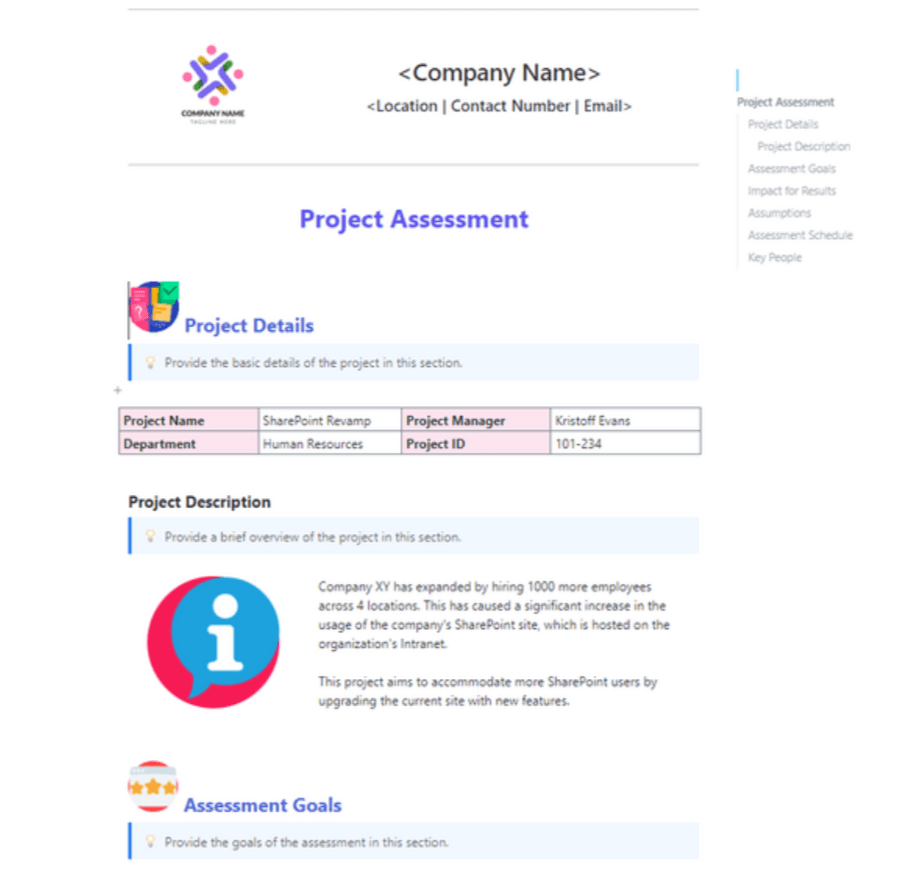
Determining any project’s level of complexity is a piece of cake with the ClickUp Project Needs Assessment Template.
This handy Doc template helps you position your project on the path to your goals, pinpoint potential areas for improvement, and create a clear and easy-to-follow plan of action. It comes with pre-designed sections for every step of your project assessment, which you can customize to fit your needs.
Let’s say you want to enhance customer support response time on your project. The template will prompt you to write a project description in which you’ll briefly outline the relevant information. Once you do that, you can begin filling out the dedicated template sections:
All that’s left is to stick to your planned tasks with the help of the Calendar view. For guaranteed success, keep an overview of all project details in one place using the Dashboard view and meet all requirements.
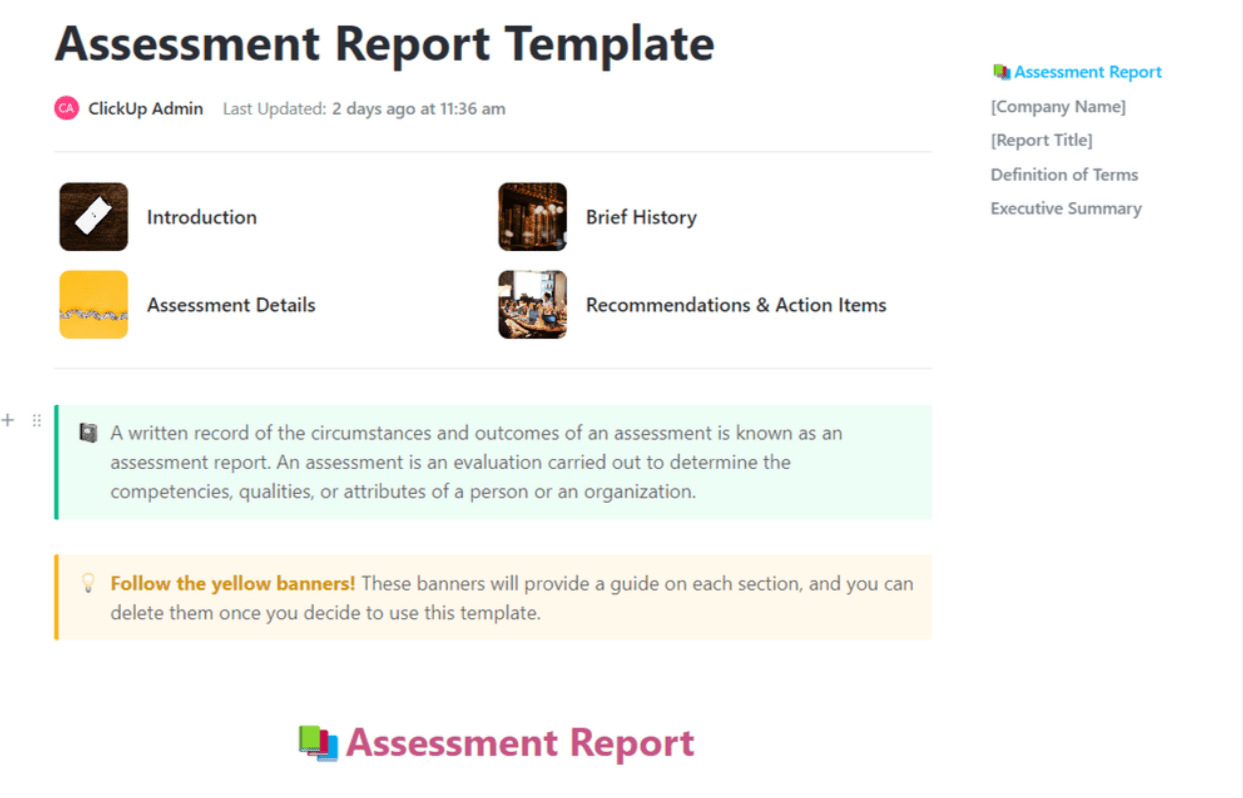
Assessing projects, customer feedback, or employee performance is a walk in the park with the ClickUp Assessment Report Template. It streamlines tasks like collecting metrics, analyzing data, and sharing reports with key stakeholders.
Another Doc template on our list, this one is a real time saver—it’s a ready-to-go document with pre-made fields, and the data within the template is organized logically to ensure reporting accuracy.
This powerful tool consists of four pages:
This free template is your key to capturing insights and monitoring progress with minimal effort. Leverage the flexibility of Custom Statuses to oversee assessment stages and use adaptable fields for clear categorization.
Plus, you can open it in various views, including the Calendar view for intuitive schedule tracking and a Gantt chart view for a dynamic task timeline.
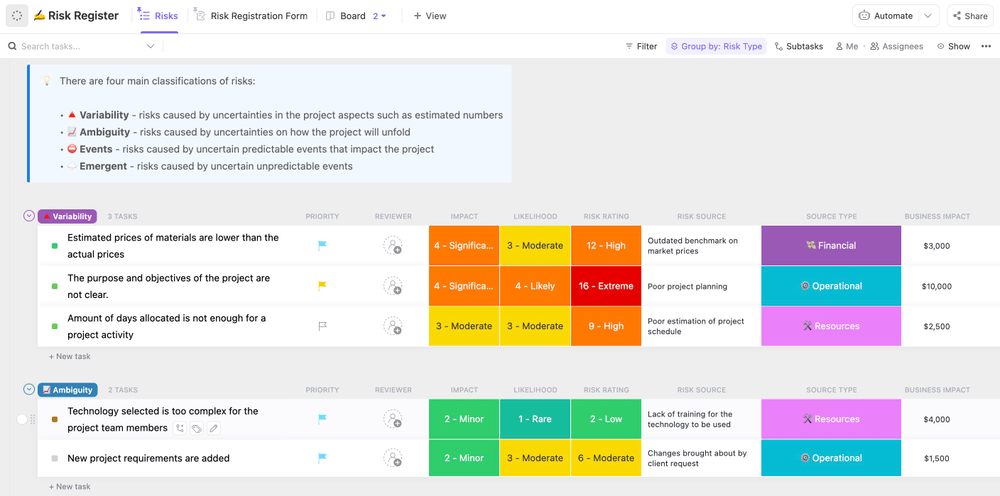
Take control of your project and stay ahead of potential challenges with the ClickUp Project Management Risk Analysis Template. It helps you pinpoint potential risks, assess their probability, and develop preventive strategies. ⚠️
Get a bird’s-eye perspective of your project through the Overview List view—it organizes all your tasks based on their status, providing a convenient way to monitor pending and ongoing activities.
The Risk Register List comprises three key components for efficient risk management of your project. Use the Risk Registration Form to provide details regarding potential risks you identified. Then, arrange all your identified risks using the Risks List section. Categorize them by factors such as:
Finally, use the Analysis Board for a clear overview of your project’s progress in dealing with risks. It’s an easy way to see if you’re making progress in handling the risks and whether any new ones have occurred. You can track the task statuses of each risk and see all relevant action items.
Reduce risks using the Mitigation Actions List with views like the Actions List view, which outlines actions your team can take to avoid risks in the future.
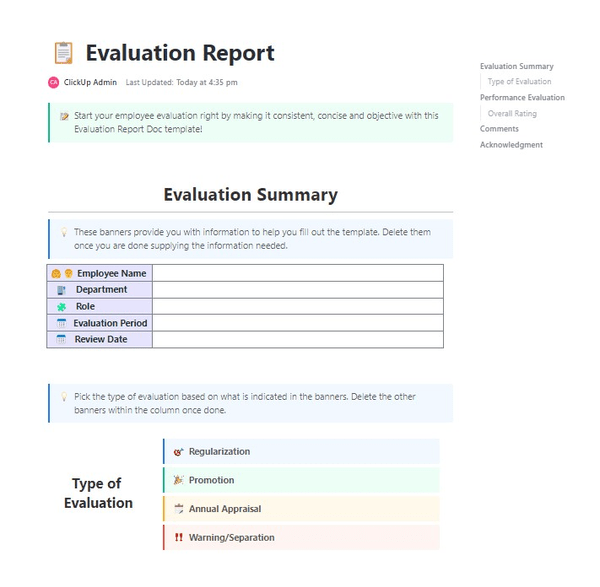
Start your employee evaluation on the right foot by ensuring it’s objective, consistent, and concise using the ClickUp Evaluation Report Template!
The template is a ClickUp Doc that helps you collect and analyze employee data to determine how well your team members performed when it comes to:
Use the Evaluation Summary section to fill in details like the evaluated person’s name, role, department, and evaluation period. Then, pick one of the convenient quick-selection choices for the type of evaluation (regularization, promotion, annual appraisal, or a warning).
The template has a grading section with employee Key Performance Indicator (KPI) ratings. The premade and fully customizable table allows you to quickly check the level that correlates to how well the employee meets your expectations. This is a great way to determine their strengths and areas in need of improvement.
You can customize the entire document to fit your business needs—add or edit text, delete sections and tables, or include new ones. The choice is all yours!
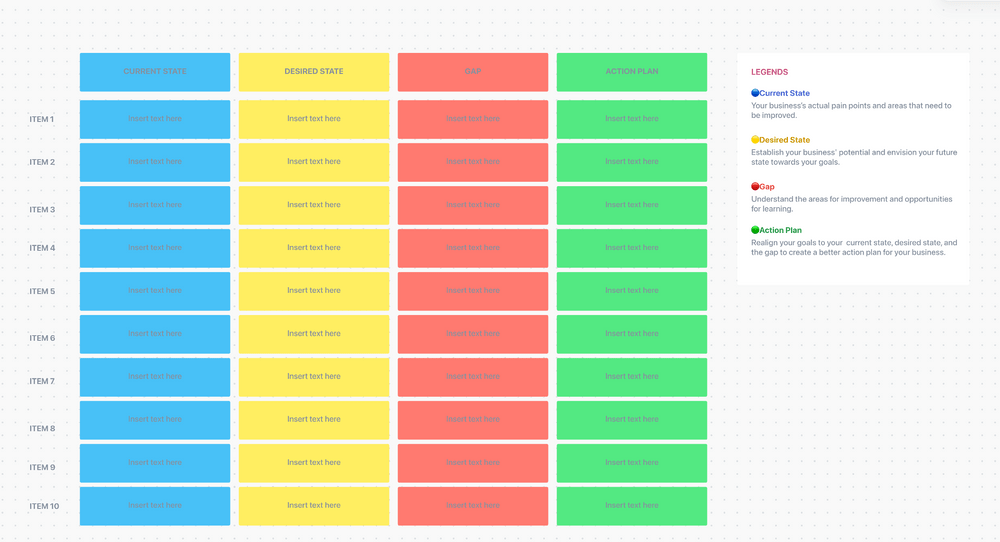
Easily identify the gaps standing between your current state and your wildest business dreams with the ClickUp Gap Analysis Template. ✨
This versatile strategic planning tool simplifies assessing your business’ performance with color-coded sections for each analysis stage in a table-like format on a Whiteboard. All that’s left for you to do is customize it to make it uniquely yours.
The user-friendly ClickUp Whiteboard helps you map out the whole process through four main gap analysis framework sections:
The sections are color-coded, and you can customize their shapes and colors to your liking, allowing you complete autonomy over the content and appearance of your gap analysis template.
Foster collaboration by sharing the Whiteboard with your team and allow all members to work on the template in real-time, find the gaps, and develop a plan of action more efficiently.
Use the Legend for easier navigation, and resort to colored text blocks or sticky notes to structure and arrange your content for maximum effectiveness.
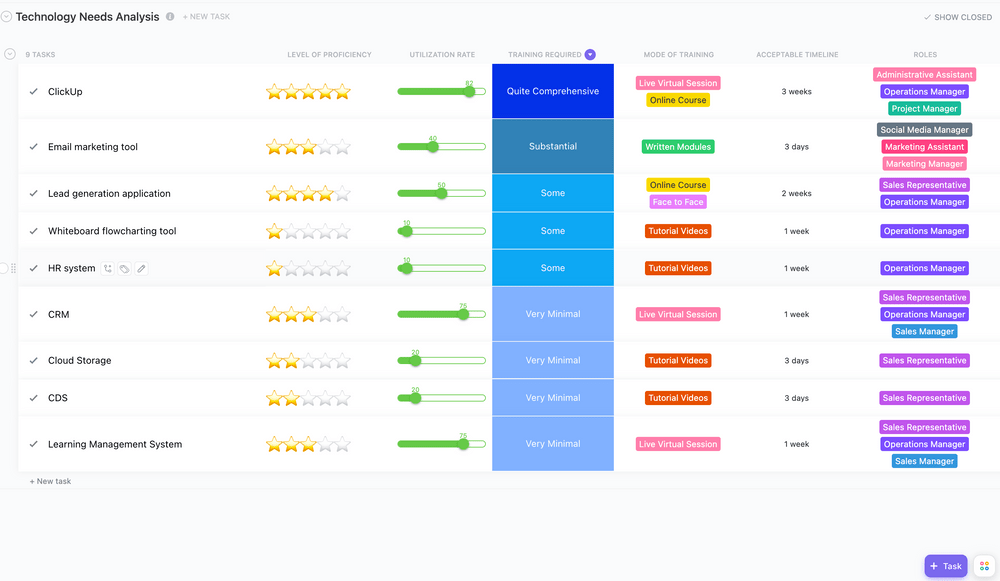
Gain insights into how your team uses technology solutions by assessing employees’ training needs with the ClickUp Technology Needs Analysis Template. Use this practical framework to determine what tools your employees use regularly and those that require additional training for optimal use.
This List template helps you assess your employees’ proficiency and training required for each tool or software they use. The following Custom Fields provide rating scales for you and your team:
See all the tools your company uses in the Technology Solutions List view, along with Custom Fields for nitty-gritty details like Level of Proficiency, Utilization Rate, and Training Mode.
Use the Training Required Board view to find a well-organized display of all the tools grouped by their training requirement status to start developing a training plan.
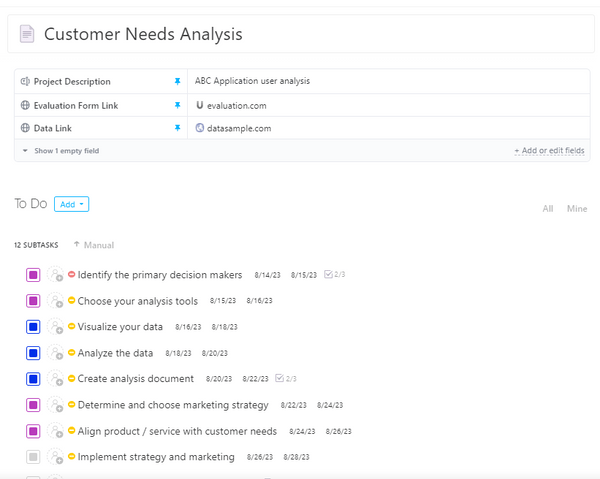
Ensure you’re always in tune with your customers’ wants using the ClickUp Customer Needs Analysis Template. It helps you gather and organize customer feedback into actionable tasks with minimal effort.
This template incorporates subtasks and checklists to help you cover all the necessary analysis steps like choosing the right analysis tools and gathering and analyzing customer data.
Use a pre-designed project description table to mark relevant needs assessment details. It helps you identify the specific product or service assessed, the responsible individuals, and the methodology used in the assessment process. The sections you’ll find in the table include:
First, state the project objectives (e.g., improving customer satisfaction by enhancing the user interface of the website) and include the manager’s name.
Next, provide information on the customer base, e.g., current and prospective customers who visited the website for product information and online shopping in the past two months.
Finally, list the tools you used to conduct the assessment, e.g., evaluation forms and online surveys.
Turn the gathered customer feedback into tasks and assign them to your team members to begin the improvement process as soon as possible. Set priorities from Low to Urgent to let the team know what to tackle first.
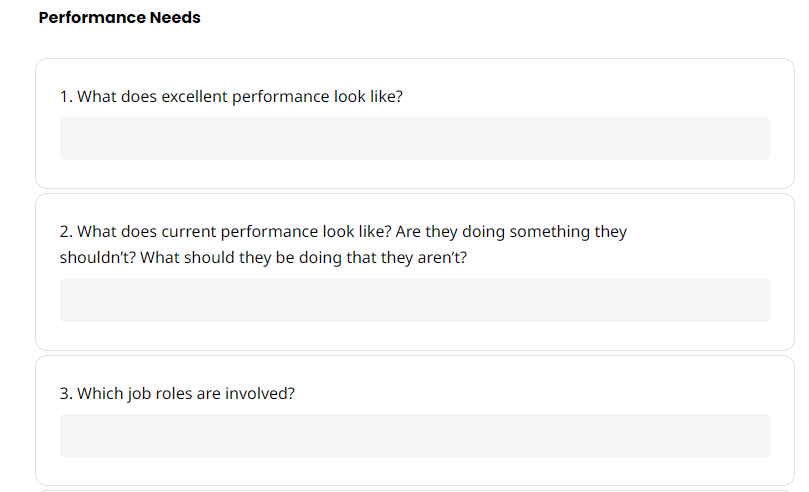
If you’re seeking a comprehensive way to gather essential information about your business or department’s needs, consider the PDF Needs Assessment Template by SafetyCulture.
This tool is perfect for leaders and managers aiming to assess performance, pinpoint learning requirements, and gather valuable team feedback to enhance areas needing improvement. The template comes with pre-made sections and questions to save time on question formulation. ❓
Use the Business/Department needs section to identify the problems preventing you from meeting your business goals. Think about the issue in greater detail by answering questions related to its duration, frequency, and place of occurrence.
Answer questions in the Performance Needs and Learning Needs sections to identify more specific gaps, like how well the employees perform or which skills require improvement.
Find the root causes of your business gaps by answering a list of yes/no questions regarding work expectations, measurements of how well you’re doing, and potential consequences.
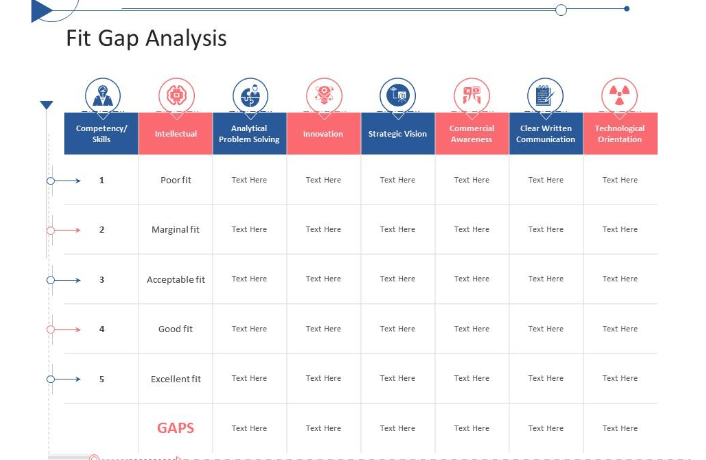
With the PowerPoint Fit Gap Analysis Tactical Planning Needs Assessment Template by SlideTeam, you can create a visually engaging fit gap analysis presentation in the blink of an eye.
This user-friendly PowerPoint template comes with a customizable table for every step of the process. Fill it in with information like category, origin, criticality, and additional notes for every identified gap.
Insert graphs, comparison charts, and images, or new elements. And you can choose from thousands of icons to illustrate your points and grab the audience’s attention. Change the letter color, size, and font to fit your preference, and create your own color scheme and background that better represents your business.
Since you can add as many slides as you’d like, this tool is excellent for presenting a gap and needs assessment and providing a plan of action, all within a single template.
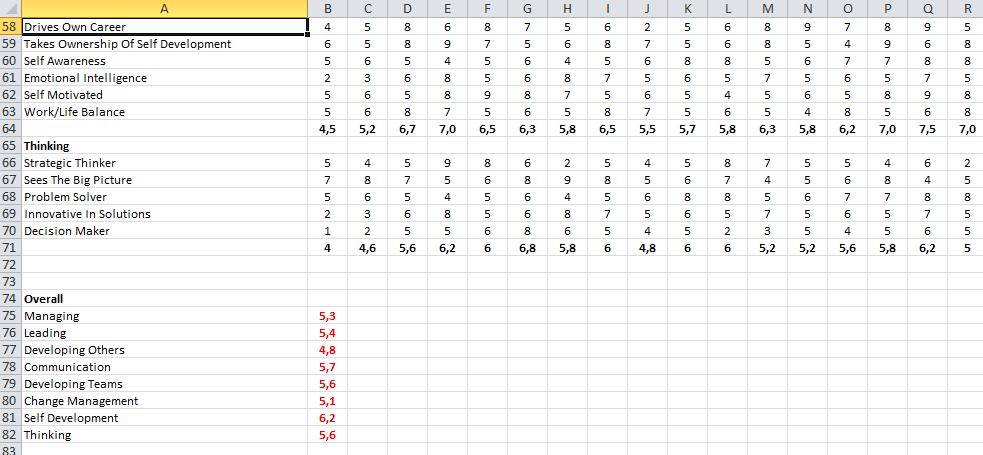
Excel Training Needs Assessment Template by SkillHub comes with detailed instructions and real-life examples of how to conduct training needs assessment without breaking a sweat.
A training needs analysis helps identify knowledge and skill gaps in professional roles, allowing for customized training. This process typically involves rating individuals or teams based on these gaps, with lower scores indicating priority areas for training.
To conduct a training needs analysis using this Excel template, follow these steps:
You can tailor this template by changing the letter size, choosing your cell style, picking your preferred table format, and adding as many rows and columns as needed.
Whether you wish to assess risks, gaps, or needs, these top 11 needs assessment templates will help streamline the process and obtain valuable insights. Use them for guidance in your decision-making process, customize pre-built documents to your liking, and share them with your team for collective planning.
Seeking more options? Explore the ClickUp template library with over 1,000 pre-designed, user-friendly templates! You’ll find everything from task prioritization and strategic planning to project management and action plans, all in one place.

© 2026 ClickUp

There’s an easier way. Try a free AI Agent in ClickUp that actually does the work for you—set up in minutes, save hours every week.