11 Best Workspace Software Tools for 2025

Sorry, there were no results found for “”
Every manager’s been there: a team member leaves, and suddenly, so does the context behind half your projects.
Why was this deadline set? What’s the latest on that vendor call? Where are the files they swore they shared?
If your team’s work lives inside people instead of shared spaces, you need to try workspace software. In this blog post, we’ve shortlisted 11 of the best tools to restore calm after the storm hits. ⚒️
Here’s a sneak peek at all the free project management software. 📊
| Tool | Best for | Best features | Pricing |
| ClickUp | Customizable, all-in-one workspace for teams Team size: Ideal for design, marketing, and agency teams managing multiple client projects | Tasks, AI assistance (ClickUp Brain), docs, knowledge management, dashboards | Free forever; Customizations available for enterprises |
| Google Workspace | Unified communication within the Office 365 ecosystem Team size: Ideal for project managers and mid-sized agencies | Real-time collaboration in Docs/Sheets, AI Gems chatbots powered by Gemini | Starts at $8.40/month per user |
| Microsoft Teams | Unified communication within the Office 365 ecosystem Team size: Ideal for project managers and mid-sized agencies | Copilot AI for live meeting transcripts, summaries, and task generation | Free; Starts at $9.99/month per user |
| Basecamp | Simple, client-friendly project coordination Team size: Ideal for small to midsize agencies and consultancies | Client Access, Hill Charts, Message Boards, reports, to-do tracking | Free; Starts at $15/month per user |
| Trello | Intuitive Kanban-style task tracking Team size: Ideal for freelancers and creative collaborators | Kanban boards, card covers, Slide Power-Up, Timeline view | Free; Starts at $6/month per user |
| Wrike | Structured project portfolios with Gantt and reporting Team size: Ideal for small businesses and freelancers | Gantt charts with dependencies, resource and budget tracking | Free; Starts at $10/month per user |
| Zoho Projects | Affordable, full-featured project management Team size: Ideal for small to midsize agencies scaling delivery | Task dependencies, resource management, client/vendor portals | Free; Starts at $5/month per user |
| Airtable | Building flexible data-driven apps with visual diversity Team size: Ideal for teams needing database-style control | Relational tables, interface designer, automation rules | Free; Starts at $20/month per user |
| Coda | Doc-as-app workflow with interactive building blocks Team size: Ideal for strategy teams, knowledge ops, and hybrid teams | Interactive tables, packs, automations, meeting, and productivity templates | Free; Starts at $12/month per user |
| ProofHub | Comprehensive project control and proofing Team size: Ideal for internal comms, training, and creative review teams | Proofing tools, built-in chat, role-based access | Free; Starts at $50/month |
| Zoom | Hybrid teams needing seamless video, AI, and async tools Team size: Ideal for enterprise distributed teams running recurring meetings | HD video, breakout rooms, AI Companion, whiteboards | Free; Starts at $16.99/month per user |
Here are some must-have features that make a workspace software tool effective for your digital transformation strategy:
🔍 Did You Know? According to Mark Kozak-Holland’s book, The History of Project Management, historical projects, from ancient construction to empire-scale initiatives, used many of the same principles we use today: project sponsorship, defined teams, and structured processes.
Here are our picks for the best workspace software. 👇
Our editorial team follows a transparent, research-backed, and vendor-neutral process, so you can trust that our recommendations are based on real product value.
Here’s a detailed rundown of how we review software at ClickUp.
Work today is broken.
Our projects, knowledge, and communication are scattered across disconnected tools that slow us down.
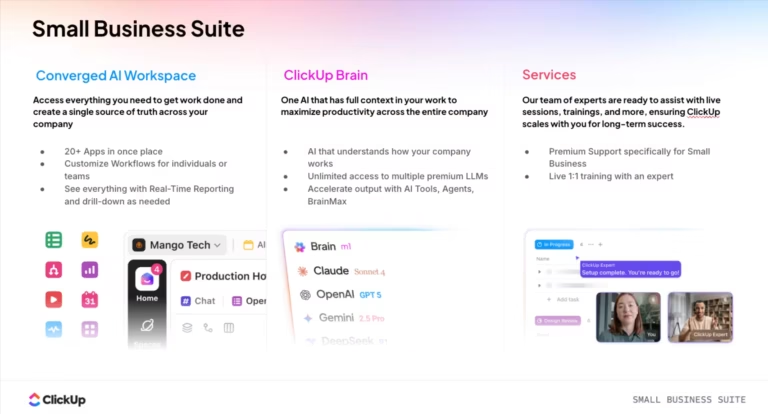
The ClickUp Project Management Software fixes this with the everything app for work that combines project, knowledge, and chat in one place—all powered by AI that helps you work faster and smarter.
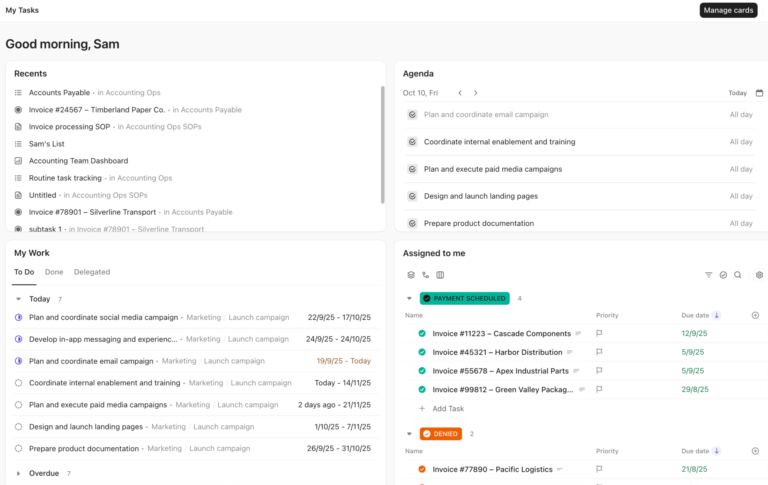
ClickUp Tasks is where planning turns to execution. These building blocks act as steps to help your teams see what needs to be done, when, and by whom.

Say you’re managing a product launch. Create a task for ‘Launch Landing Page,’ then break it into subtasks for copywriting, design, dev integration, testing, and go-live. Each piece has its own assignee, deadline, and dependencies.
Need to customize your workflow? Add ClickUp Custom Fields to track things like channel type, region, or asset type. Plus, you can use Custom Task Statuses in ClickUp to reflect how your team works, like ‘In Legal Review’ or ‘Blocked by Dev.’
Now, here’s where your workspace gets really powerful.
ClickUp Brain is your built-in AI assistant that’s woven into every part of your workspace.

Need help writing task descriptions or summarizing updates? Use ClickUp Brain to generate next steps, summarize progress, or even auto-block your calendar based on workload.
Trying to catch up after a week off? Just ask: What changed in the onboarding project last week? Or which tasks are overdue in the website redesign?
ClickUp Brain searches your entire workspace, like comments, updates, documents, chats, and timelines, to give you clear, actionable answers. You can even drop in tasks, link related docs, and use AI to auto-generate image concepts or campaigns.
Need help drafting reports, summarizing updates, or turning raw ideas into actionable tasks—without typing everything out? ClickUp Brain MAX is your AI co-pilot built for speed, clarity, and deep workspace integration.

Whether you’re in back-to-back meetings or processing long project briefs, Brain MAX helps you:
Use case example: Say your marketing team just wrapped a product launch debrief. Instead of writing minutes manually, record the discussion, upload it to Brain MAX, and get a ready-to-share Doc with all the key takeaways and next steps.
💡 Pro Tip: Combine ClickUp Brain MAX with Docs Hub and Recurring Tasks to set up automated review workflows that keep your internal knowledge fresh and actionable—no manual upkeep required.
Once tasks are moving and your team’s aligned, the next challenge is figuring out where all the knowledge goes.
ClickUp Docs is where your team drafts wikis, edits SOPs, and collaborates in real time, whether it’s a product spec, an onboarding checklist, or a launch plan.

Let’s say your team is working on that ‘Landing Page’ task from earlier. You spin up a doc directly inside the task to write a draft copy. Marketing jumps in to edit, Product leaves comments, and Legal adds final approval, all in one place.
Now, creating a doc is one thing. Making sure it’s organized, accessible, and usable six months from now is another.
That’s where the ClickUp Knowledge Management system steps in. Every doc your team creates is automatically indexed in the Docs Hub, a central place where you can organize by folder, tag by topic, and control access with advanced permissions.
As your project picks up speed, ClickUp Dashboards give you the visibility to stay on top of everything. The all-in-one software lets you build custom Dashboards using visual cards for task statuses, sprint velocity, time tracking, goals, burndown charts, and more.

For instance, you’re planning a Q3 product launch. Set up a dashboard with a workload widget to check if design or dev is overloaded, a burndown chart to track task progress, a goal tracker tied to launch milestones, and a time tracking card to keep an eye on billable hours or focus.
This G2 review really says it all:
ClickUp has completely transformed the way we manage our internal tasks at the agency. It allows me to track the entire team’s workflow in one place, prioritize urgent matters, and keep communication centralized. The ability to automate processes, switch between multiple views (like list, board, and calendar), and integrate with other tools has significantly boosted my daily productivity. It’s an all-in-one platform that adapts perfectly to our workflow and makes team management much more efficient.
📮 ClickUp Insight: Context-switching is silently eating away at your team’s productivity. Our research shows that 42% of disruptions at work come from juggling platforms, managing emails, and jumping between meetings. What if you could eliminate these costly interruptions?
ClickUp unites your workflows (and chat) under a single, streamlined platform. Launch and manage your tasks from across chat, docs, whiteboards, and more—while AI-powered features keep the context connected, searchable, and manageable!

via Google Workspace
Formerly known as Google Apps and then G Suite, Google Workspace is a cloud-based productivity and collaboration suite developed by Google. It combines essential tools, including Gmail, Calendar, Drive, Docs, Sheets, Slides, Meet, and Chat.
The tool stack provides a collaborative workspace with features such as custom business email addresses, shared cloud storage, video conferencing, instant messaging, and integrated AI assistance.
Here’s what one user had to say:
Google is simply better than everyone else when it comes to designing a workspace that helps you get as much done as fast as you can. However, it does crash more frequently than Microsoft 365.
🔍 Did You Know? The Nine Knowledge Areas of Project Management, defined by PMBOK®, cover everything needed to manage a project effectively: Integration, Scope, Time, Cost, Quality, Human Resources, Communication, Risk, and Procurement.

via Microsoft
Microsoft Teams is a cloud-based collaboration platform, part of the Microsoft 365 suite, designed for chat, meetings, calling, file sharing, and app integration. The tool brings real-time groups and one‑on‑one chat together with high‑quality video and audio conferencing.
Compared to Google Workspace, you get more detailed administrative control. It allows users to create dedicated ‘Teams’ or channels around projects, departments, or topics, enabling threaded conversations, rich media sharing, and searchable histories.
🧠 Fun Fact: 1954 was a big year for modern management. That’s when US Air Force General Bernard Schriever coined the term ‘project management’, and Peter Drucker introduced Management by Objectives in his book The Practice of Management.

via Basecamp
Basecamp is a streamlined, browser-based project management and team collaboration platform designed by 37signals (now back to its original name). It helps you create workspaces where each project includes to‑do lists, message boards, file storage, real-time group chat (Campfire), and integrated schedules.
The platform also offers automated check-in questions, prompting teammates to respond to recurring queries like ‘What did you work on today?’.
Straight from a G2 review:
It does the job for tracking the project tasks and users can get set up and running fairly quickly. But the user interface is not that great and somewhat limited/bloated with things…User interface is not that great and somewhat limited/bloated with things. When it gets to too many open points, it becomes harder to track, so we still need to use another cleaner tools for to-do tasks. Limited integration.

via Trello
Trello is built for teams who think in motion. Its visual boards help turn scattered ideas and to-dos into organized workflows that are easy to manage and even easier to act on.
You can break down any workflow into steps, assign tasks, set deadlines, add checklists, and even automate actions with its built-in AI assistant, Butler. Plus, you can use PowerUps to enhance Trello’s functionality, adding calendars, time tracking, analytics, and deeper integration into your ecosystem.
🔍 Did You Know? A study found that people respond faster and more decisively to shorter deadlines, not just due to urgency, but because these deadlines better align with action-focused goals. However, deadlines alone aren’t enough. They’re most effective when they match the person’s current mindset.

via Wrike
Wrike is a cloud-based, enterprise-grade work management platform that helps teams plan, track, and deliver both simple and complex projects efficiently. Its customizability when projects scale makes it stand out. You can create custom dashboards to see exactly what matters: team workloads, project health, overdue items, or high-priority campaigns.
Plus, for creative teams, Wrike Proof brings built-in markup and versioning tools. You can review PDFs, images, and videos, leave time-stamped comments, compare file versions, and route files for approval.
Here’s what a real user had to say:
I appreciate how I can easily do my requests and follow up with where everything is in the steps. It would be nice if I could write the brief directly in the application, which is having to write it elsewhere and then upload it after.

Zoho Projects keeps your work organized with task lists, milestones, and Gantt charts that update as your plans change. Time tracking is built in: you can log hours through timers and timesheets without leaving the platform.
Additionally, to cut down repetitive work, the platform offers workflows, SLAs, webhooks, and scheduled business rules. Zoho Projects also integrates with other Zoho apps and external tools like Slack and Microsoft Teams, and includes a mobile device functionality for on‑the‑go updates.
🔍 Did You Know? The 80/20 rule behind Pareto charts means 80% of your missed deadlines may come from just 20% of your task types. With one chart, you can spot those troublemakers fast, making it a must-have for simplifying retros and post-mortems.

via Airtable
Airtable is a cloud-based workspace software that combines the familiarity of a spreadsheet with the power of a relational database. You build bases, which are like mini apps, composed of tables where you define fields (e.g., text, attachments, dropdowns) and link records across tables to model relationships.
Start by setting up tables and linking them, say, like connecting clients to projects or inventory to orders. Then switch between views: grid (like a spreadsheet), Kanban, calendar, gallery, or timeline/Gantt to suit different workflow needs.
A quick snippet from a real user:
Airtable is an excellent data store that combines spreadsheet simplicity with app-like functionality, making it highly flexible for a variety of use cases. However, Airtable may not be the best fit for projects involving large datasets, as record limits can become a bottleneck depending on your needs.

via Coda
Coda is what you get when a doc grows up to run your entire workspace. If you’re documenting decisions, building internal tools, or spinning up custom apps, this digital workspace software makes it feel as easy as writing a doc (but way more useful).
The platform combines rich text editing with tables that can reference each other, support formulas anywhere, and act like mini-databases. Plus, you can build custom apps with Formulas and Buttons so anyone, regardless of coding ability, can replace niche tools or automate busywork.
💡 Pro Tip: Always review your workspace software’s role-based permissions and access logs weekly. Data security precautions start with knowing who can see what and when.

via ProofHub
ProofHub’s workspace software offers teams project planning, real-time collaboration, and proofing capabilities. You can build projects, delegate them with tasks, and view progress in Kanban boards, Gantt charts, tables, or calendars.
Communication happens through groups and one‑on‑one chat, threaded discussions, announcements, and inline proofing tools that let you mark up files and manage version history.
According to one reviewer:
I like ProofHubs ease of use for all users on our team. I feel like the UI for developing dependencies can be a little challenging.

via Zoom
Zoom started as a simple, high-quality video conferencing tool in 2011 and has since evolved into a remote work platform often referred to as Zoom Workplace. It remains a go-to with easy-to-use HD video meetings, screen sharing, recording, breakout rooms, virtual backgrounds, and security features such as waiting rooms and end-to-end encryption.
More than just a team communication app, it offers a module that enables teams to co-author documents, plan tasks, and build wikis together.
📮ClickUp Insight: According to our meeting effectiveness survey, nearly 40% of respondents attend between 4 to 8+ meetings per week, with each meeting lasting up to an hour. This translates to a staggering amount of collective time dedicated to meetings across your organization.
What if you could reclaim that time? ClickUp’s integrated AI Notetaker can help you boost productivity by up to 30% through instant meeting summaries—while ClickUp Brain helps with automated task creation and streamlined workflows—turning hours of meetings into actionable insights.
While all the workspace software tools on this list offer unique strengths, ClickUp stands out as the everything app that brings tasks, docs, communication, and AI together in one place.
It caters to everything, including complex projects, critical campaign strategies, and internal knowledge hubs, all in a single platform. ClickUp’s dynamic Docs, robust task management, and ClickUp Brain give you the control and clarity to move faster.
So, what are you waiting for? Sign up to ClickUp for free today! ✅
© 2025 ClickUp