Sorry, there were no results found for “”
Sorry, there were no results found for “”
Sorry, there were no results found for “”
They used to call them commonplace books: notebooks where thinkers and writers collected quotes, ideas, and insights worth remembering. Long before apps or cloud systems, these books acted as personal libraries, idea factories, and memory extensions all in one.
That same habit lives on today as personal knowledge management (PKM), the art of capturing, connecting, and using what you learn.
In this blog post, we’ll walk through the best Notion templates for personal knowledge management that can help you organize your thoughts and notes. 🎯
P.S. Stay until the end to find some excellent ClickUp templates for better collaboration and efficiency.
These are the best personal knowledge management templates out there! 👇
| Template name | Download Template | Ideal for | Best features | Visual format |
| Notion Personal Knowledge Hub Template | Download this template | Students, researchers, lifelong learners | Hub for notes, tasks, and goals; linked resources; tag-based navigation | Notion page |
| Notion Eisenhower Matrix Template | Download this template | Professionals, managers, productivity enthusiasts | Four-quadrant prioritization, drag-and-drop tasks, and visual urgency tracking | Notion board |
| Notion Knowledge Vaults Template | Download this template | Writers, analysts, creators | Structured folders, smart filtering, reference database | Notion database |
| Notion Ultimate Notes Template | Download this template | Knowledge workers, learners, teams | Nested notes, backlinks, smart tags, quick search | Notion page |
| Notion Notes Manager Template | Download this template | Students, content creators, project leads | Categorized note capture, templates for meetings or study notes | Notion database |
| Notion Notes, Ideas & Research Template | Download this template | Writers, thinkers, researchers | Unified workspace for brainstorming, note-taking, research tracking | Notion page |
| Notion CyberVault Password Manager Template | Download this template | Freelancers, remote teams, IT admins | Secure password storage, access logs, sharing permissions | Notion database |
| Notion Zettelkasten Note System Template | Download this template | Writers, academics, thinkers | Note linking, ID-based structure, idea graph view | Notion database |
| Notion PARA Dashboard Template | Download this template | Productivity enthusiasts, managers, creators | Organize projects, areas, resources, and archives in one dashboard | Notion page |
| ClickUp Knowledge Base Template | Get free template | Teams, startups, support teams | Centralized FAQs, searchable docs, real-time updates | ClickUp Doc |
| ClickUp HR Knowledge Base Template | Get free template | HR teams, managers, employees | Policy library, onboarding guides, HR requests tracking | ClickUp Doc |
| ClickUp Documentation Template | Get free template | Developers, PMs, product teams | Version control, content structure, linked tasks | ClickUp Doc |
| ClickUp Wiki Template | Get free template | Cross-functional teams, startups | Shared wiki space, internal links, rich media | ClickUp Doc |
| ClickUp Innovation Idea Management Template | Get free template | Product, R&D, marketing teams | Idea capture, tagging, prioritization, approval workflows | ClickUp List |
| ClickUp Daily Notes Template | Get free template | Students, creators, project teams | Daily logs, reminders, quick note capture | ClickUp Doc |
| ClickUp Change Management Plan Document Template | Get free template | Project managers, operations, IT teams | Change tracking, stakeholder notes, approval stages | ClickUp Doc |
Let’s break down the key elements that make a personal knowledge management (PKM) template effective and easy to use. 👇
🧠 Fun Fact: In the 18th century, women who couldn’t attend university turned to commonplace books to record their reading, ideas, and reflections. They created personal libraries and lifelong learning journals. Notable writers, such as Virginia Woolf, used commonplace books to organize their thoughts.
Why start with a blank page when someone else has already figured out a good system? Here are some ready-to-use Notion templates designed to help you capture, align, and apply your knowledge efficiently. 🏁
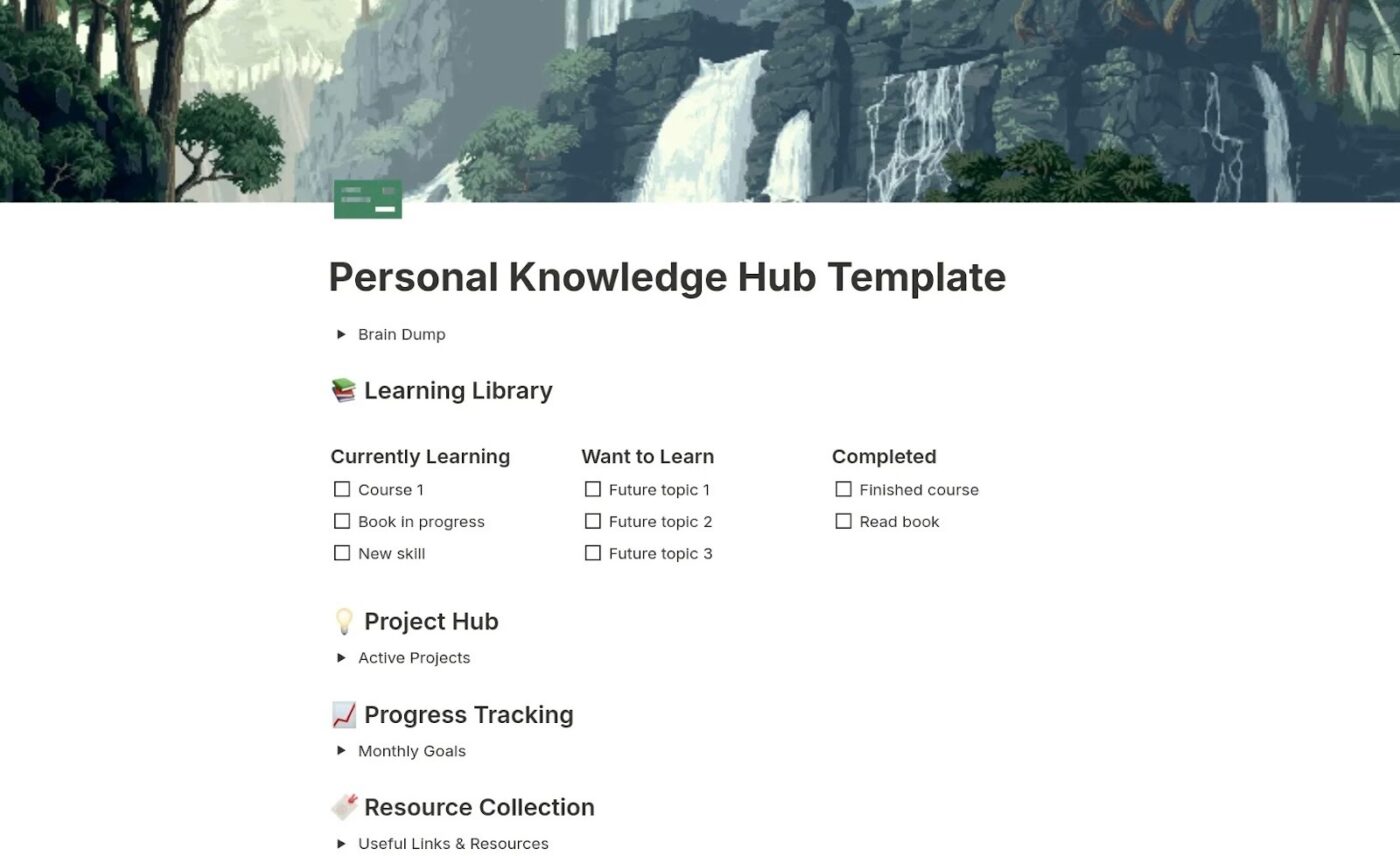
The Notion Personal Knowledge Hub Template holds your fleeting ideas, active projects, learning goals, and even the resources you’ve bookmarked for later.
The design combines a quick capture for raw notes with neatly divided areas for deeper knowledge. Add to that a Project Hub for active endeavors and a central Resource Collection to get a system that promotes growth.
📌 Ideal for: Learners, creators, or professionals who want both a free space to brainstorm and a framework to turn scattered inputs into progress.
🔍 Did You Know? In 1605, Francis Bacon’s The Advancement of Learning proposed a universal taxonomy of knowledge based on three mental faculties: Memory (history), Imagination (poetry), and Reason (philosophy). He then broke these broad categories into detailed subjects and subheadings.
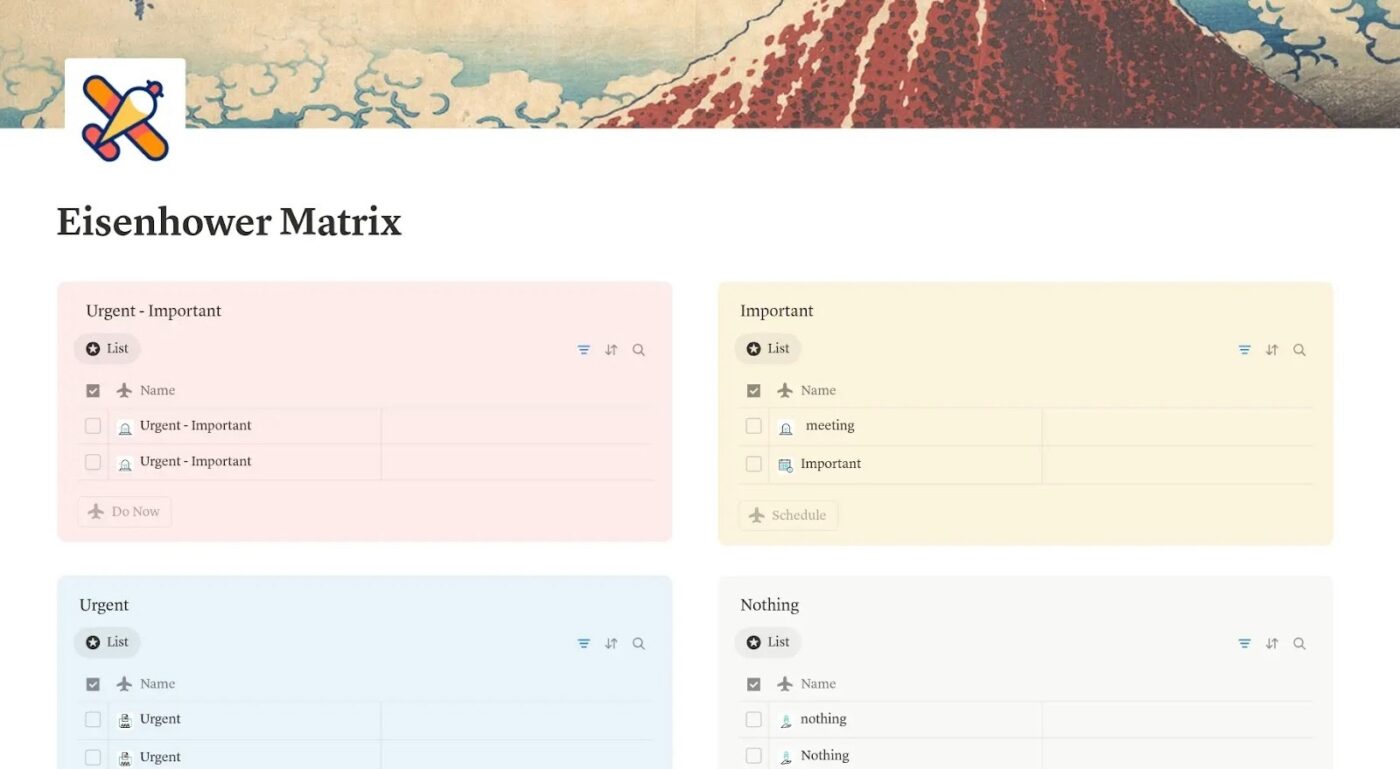
The Notion Eisenhower Matrix Template brings clarity to task prioritization with its clean four-quadrant layout.
At just a glance, you know what needs immediate attention and what you need to schedule, delegate, or drop entirely. Each quadrant functions as a Notion list, allowing you to add new tasks instantly and search and filter.
📌 Ideal for: Decision-makers, managers, and productivity enthusiasts who want a visual, no-nonsense system for prioritizing tasks.
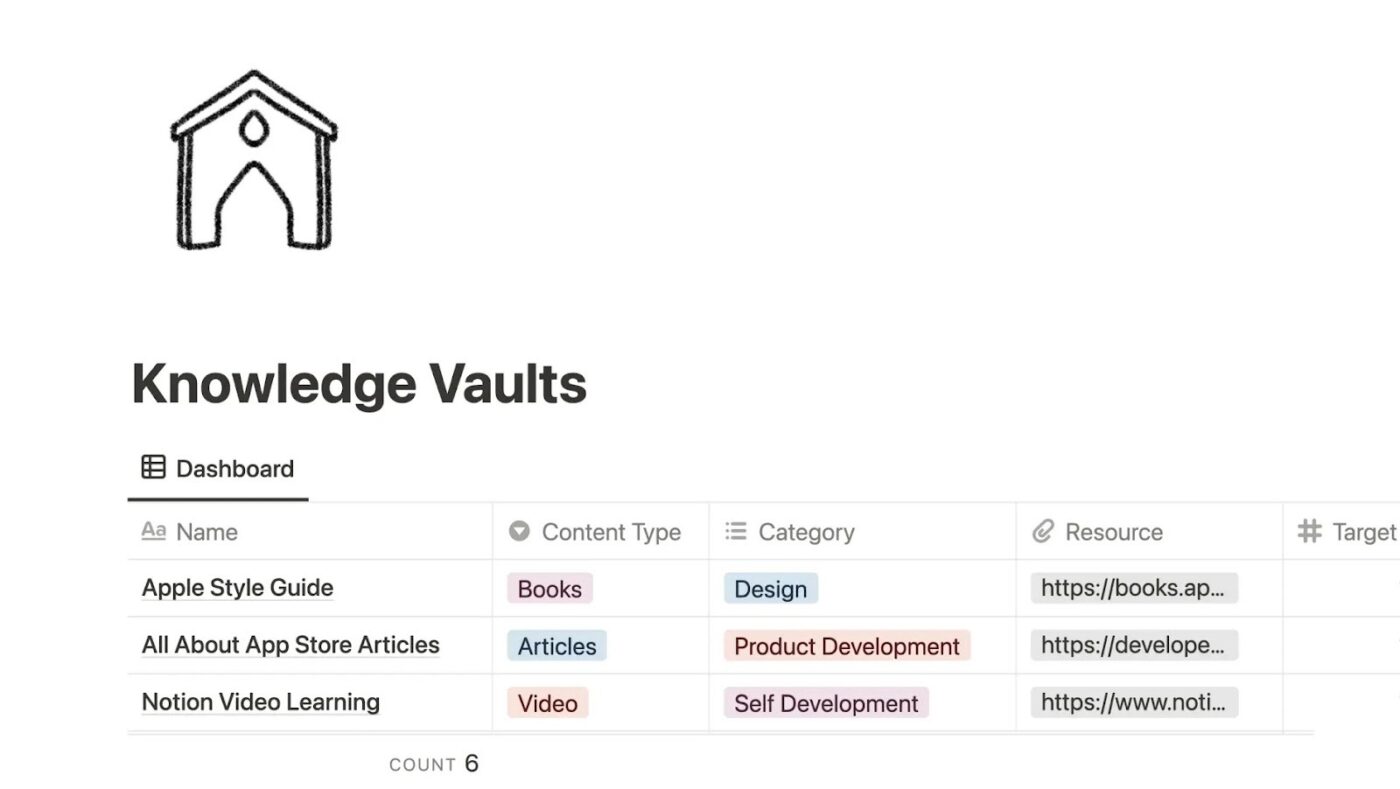
The Notion Knowledge Vaults Template stores learning resources while giving you the tools to track your progress.
The dashboard centers around a master database where each entry comes with its own metadata: type of content, category, direct link, goals, and completion status. Use the progress bar to see how far along you are, whether it’s a book, podcast, or video course.
📌 Ideal for: Readers who collect resources, researchers who want a categorized reference library, or anyone looking to turn scattered bookmarks into a trackable system.
🧠 Fun Fact: The invention of the printing press in the 15th century by Johannes Gutenberg led to an unprecedented surge in book production, making literature more accessible and affordable. This rapid dissemination of knowledge sparked concerns among scholars about information overload.
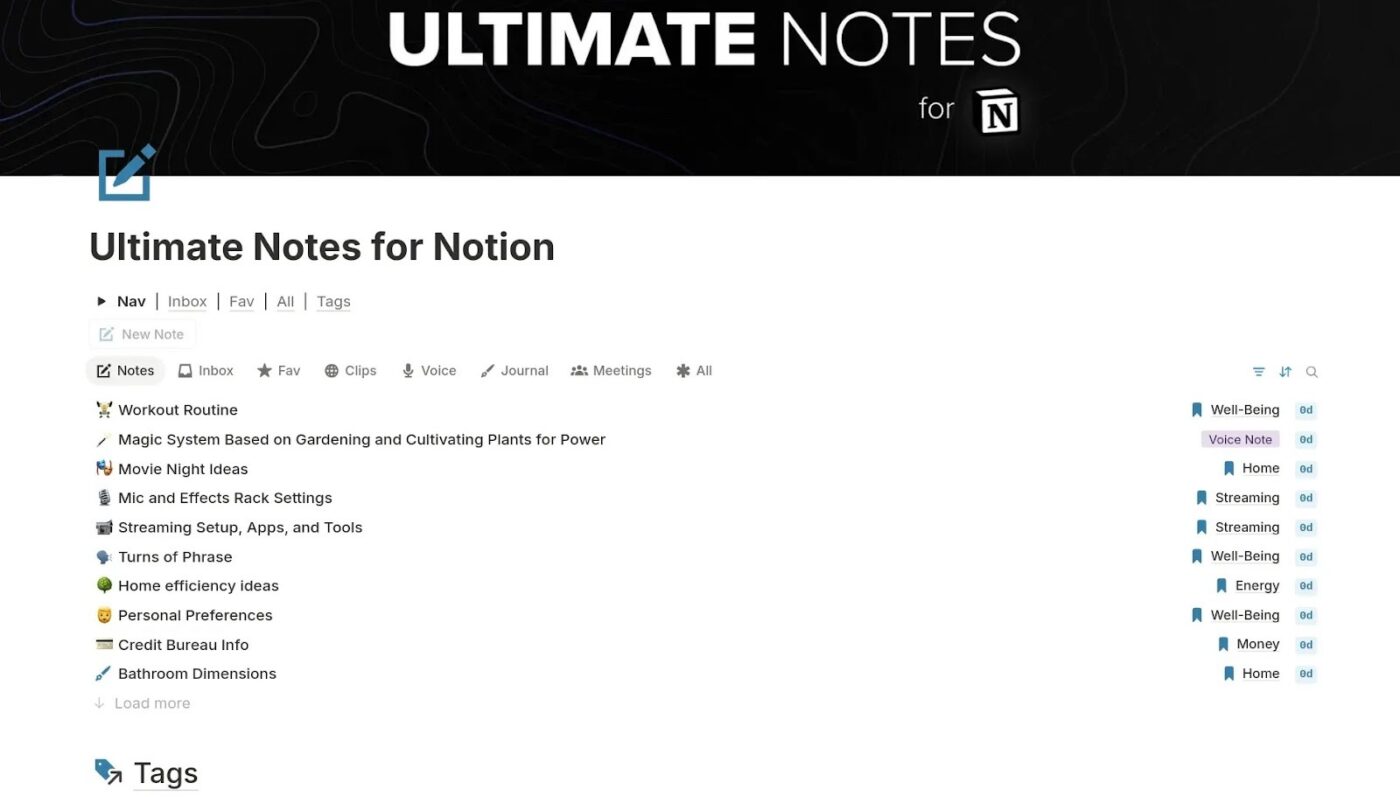
The Notion Ultimate Notes Template (by Thomas Frank) provides a comprehensive note-taking hub where every piece of information in your knowledge base has its designated place.
At its center is a master Notes Database with multiple views for easy navigation. When you need a visual overview of all your categories, switch to the Kanban-style Note Board grouped by tags like AI, Apps, or Well-Being.
📌 Ideal for: Writers, content creators, and anyone who wants a single trusted system for notes that can flex between quick log and deep organization.
📮 ClickUp Insight: Work shouldn’t be a guessing game, but too often, it is. Our knowledge management survey found that employees often waste time searching through internal docs (31%), company knowledge bases (26%), or even personal notes and screenshots (17%) just to find what they need. With ClickUp’s Connected Search, every file, doc, and conversation is instantly accessible from your home page, so you can find answers in seconds, not minutes.
💫 Real Results: Teams are able to reclaim 5+ hours every week using ClickUp—that’s over 250 hours annually per person, by eliminating outdated knowledge management processes. Imagine what your team could create with an extra week of productivity every quarter!
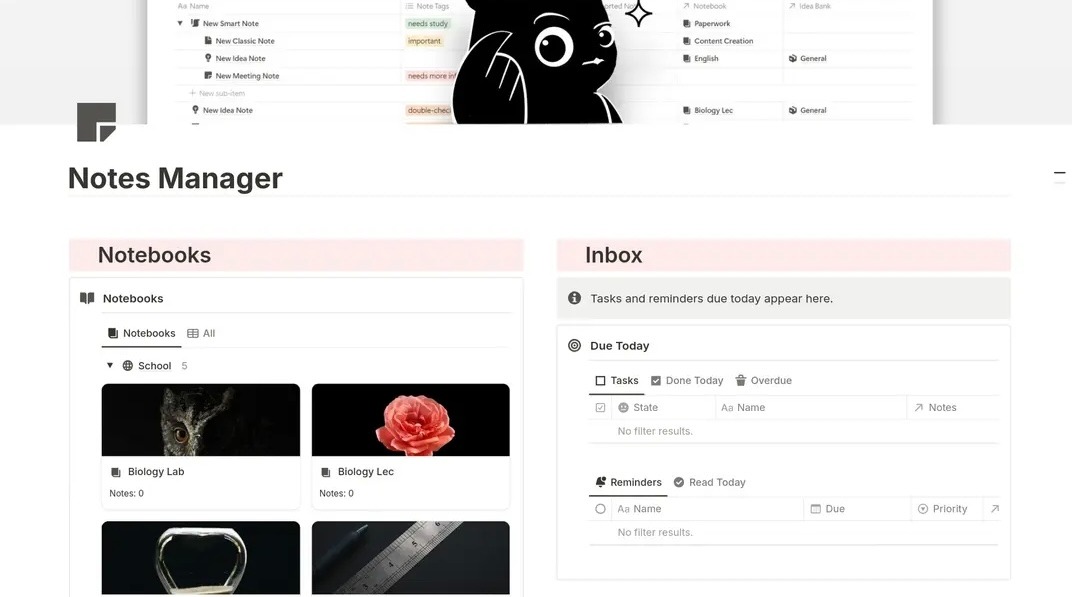
The Notion Notes Manager Template gives you a workflow for processing, tagging, and organizing files and folders into meaningful contexts. Think of it as a hybrid between a notes app and a task management system customized for a Notion workspace.
It even introduces clever systems, such as The Chair (for half-finished ideas) and a DIY workspace where you can build your own structures.
📌 Ideal for: Students balancing coursework and research, or knowledge workers who need both tidy notebooks and flexible spaces to manage half-formed ideas.
🔍 Did You Know? Episodic memory, our ability to recall personal experiences, helps shape our sense of self. A personal knowledge base enables you to store your insights, decisions, and reflections so you can revisit and build on them over time.
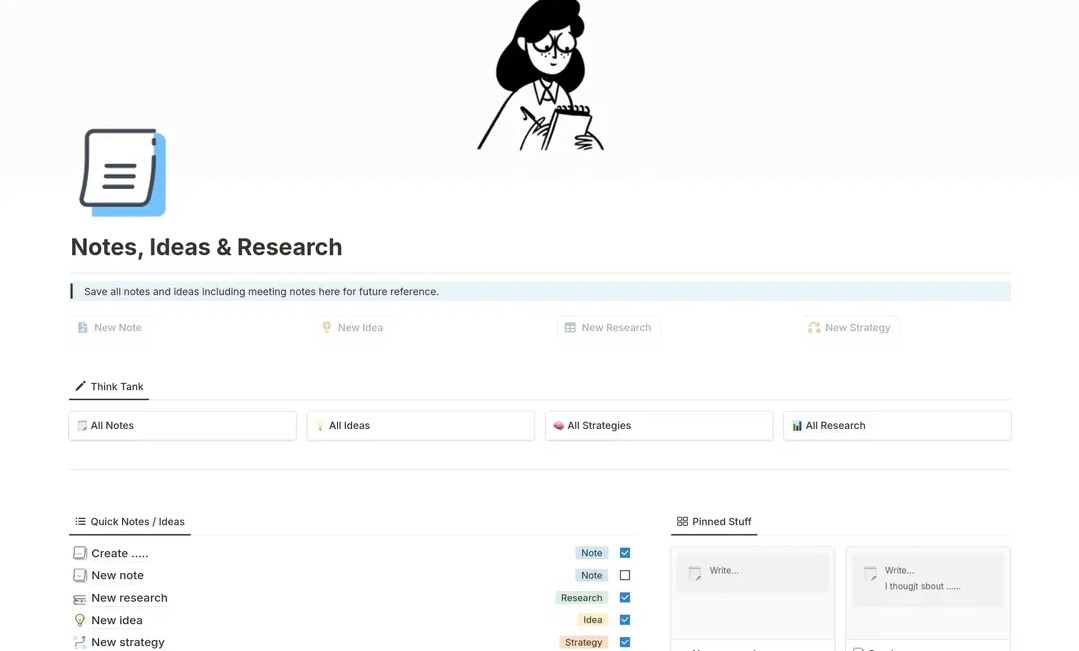
Some ideas strike in the middle of a meeting. Others appear at 2 am when you’re supposed to be asleep. The Notion Notes, Ideas & Research Template is built to frame your flashes of inspiration and half-formed strategies.
Unlike the previous templates, this one is a creative vault where notes, ideas, strategies, and research live together. Add rich metadata properties (Type, Area, Tags, Project links) to make finding information effortless later.
📌 Ideal for: Creators, researchers, or anyone struggling with raw ideas, research, and half-baked strategies, and wants a space to grow them into polished work.
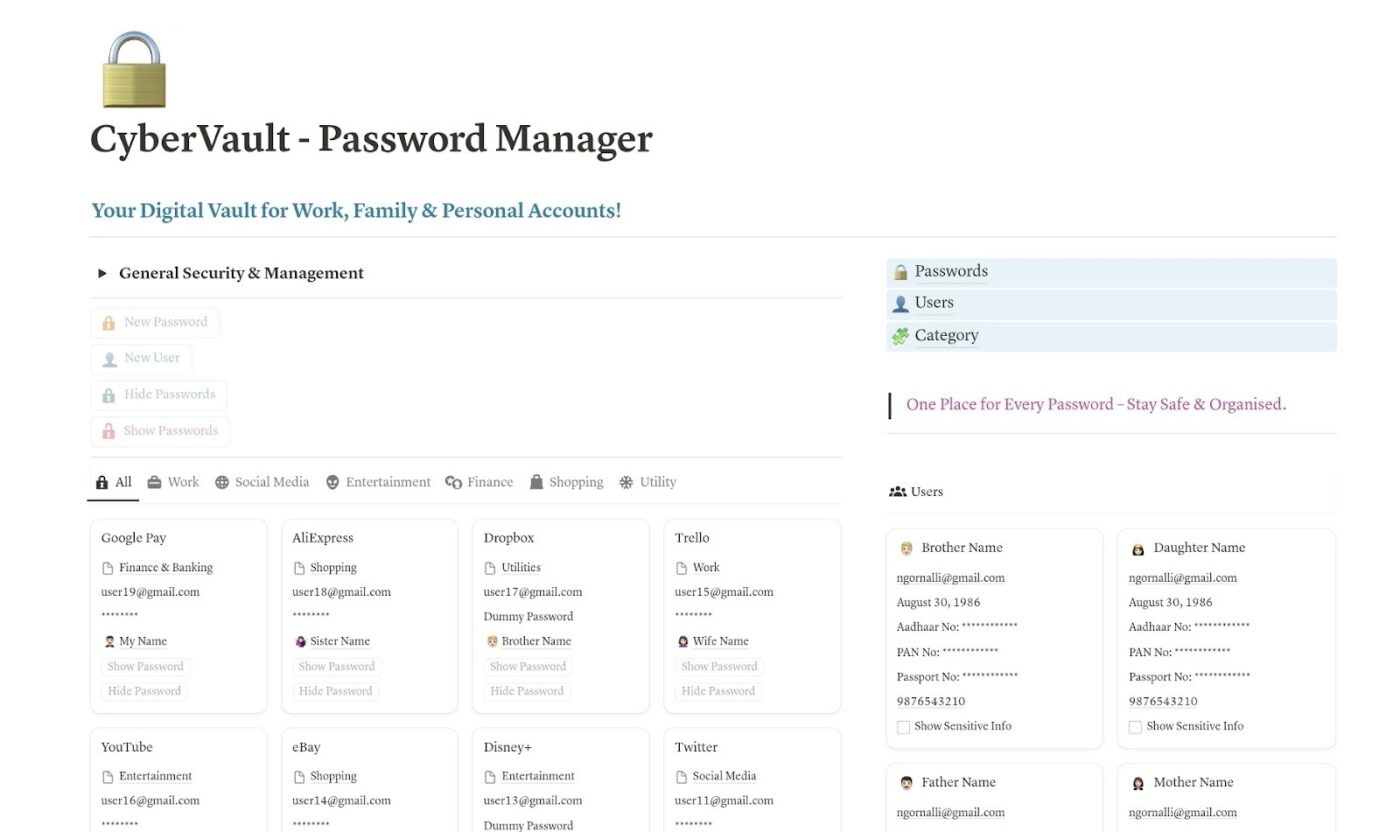
Misplacing login info can be very risky. The CyberVault Password Manager Template turns Notion into a secure digital vault, keeping your most sensitive credentials encrypted and accessible only when you need them.
Its security-first design includes password visibility toggles, expiration tracking, recovery options, and reminders for regular updates.
📌 Ideal for: Families, small teams, or individuals who want a controlled system to manage aspects of their digital identity and passwords.
🧠 Fun Fact: In 1685, philosopher John Locke created a clever system for organizing notes. His method used a double-page index subdivided by letters and vowels, letting scholars store and quickly retrieve ideas.
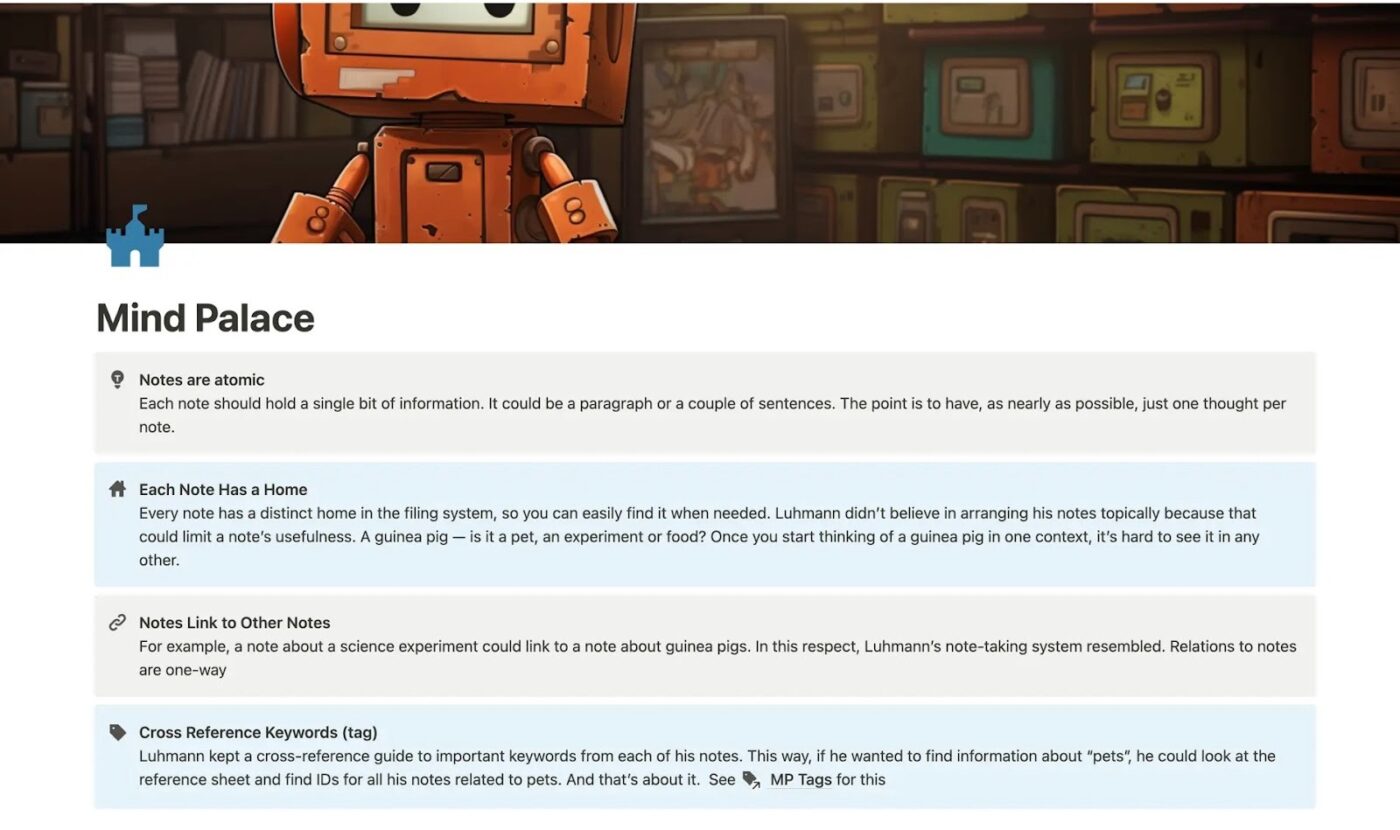
Developed by sociologist Niklas Luhmann, the Zettelkasten method breaks knowledge into small, self-contained ‘atomic notes’ and then connects them through links and keywords. Over time, these connections form a web of insights that help you see patterns, spark new ideas, and deepen your understanding.
The Notion Zettelkasten Note System Template (Mind Palace) brings this method into a digital space. With guided principles built right into the layout, you’ll learn to pinpoint single thoughts, give each note a permanent home, link related ideas, and cross-reference keywords.
📌 Ideal for: Writers, researchers, and lifelong learners who want a personal knowledge management system that grows with them.
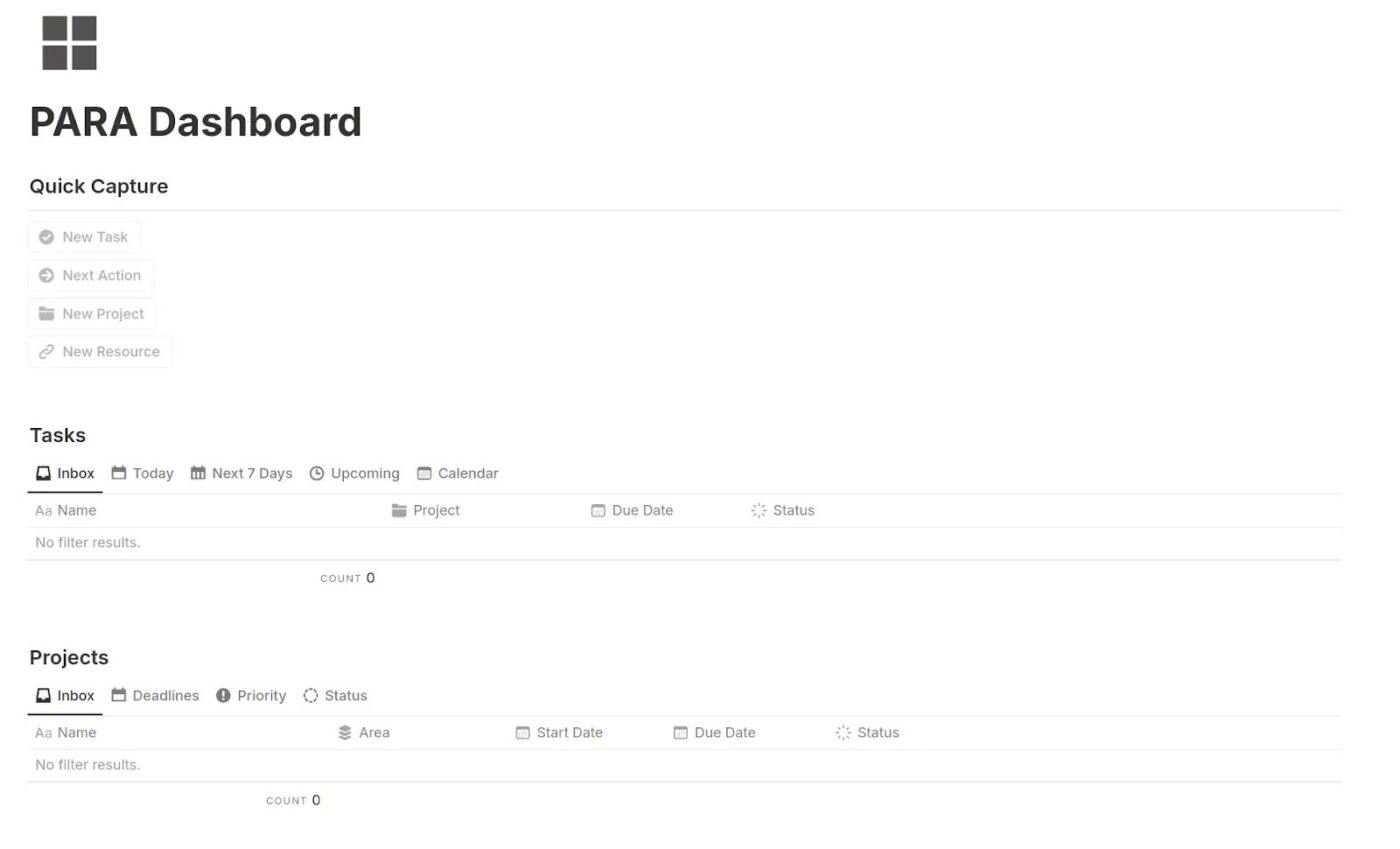
The PARA Method, created by Tiago Forte, is a proven system for organizing your digital life. The acronym stands for:
The Notion PARA Dashboard Template brings this system into a clean, minimalist workspace. It’s designed as a hub for daily action and a long-term catalog for everything else in your life.
📌 Ideal for: Anyone who wants to integrate both the big picture and the small details, including professionals managing multiple projects and students balancing studies and personal goals.
📖 Also Read: How to Use Knowledge-Based Agents in AI
While Notion is a versatile tool for personal organization, it has notable limitations as a dedicated knowledge management system:
🔍 Did You Know? In the 1970s, management theorists like Peter Drucker and Paul Strassman recognized knowledge as a valuable organizational asset. This laid the groundwork for what we now call knowledge management.
Notion offers flexible templates, but they often feel disconnected from actionable workflows.
ClickUp is the everything app for work that combines project management, documents, and team communication, all in one platform—accelerated by next-generation AI automation and search.
The Notion alternative offers templates that link your notes, projects, and tasks seamlessly. Let’s explore some of the best! 🤩
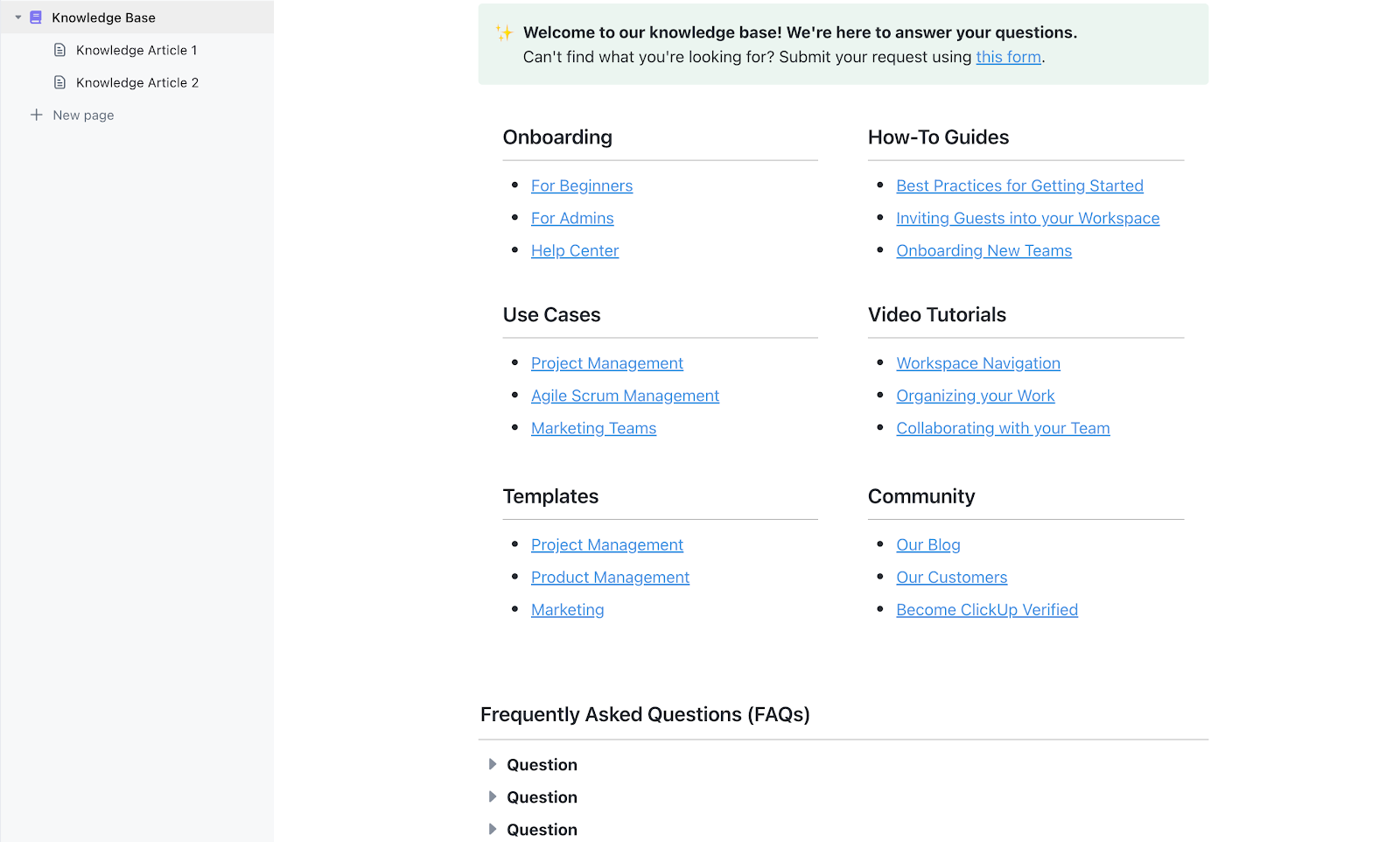
The ClickUp Knowledge Base Template provides a centralized hub for storing and sharing all the information your team needs to know. Modeled after a help center experience, it makes navigation effortless.
For example, toggle lists in the FAQ keep the page uncluttered, while project documents stored under Resources remain a single click away. The sidebar navigation on the left keeps content sorted by category, and the welcome banner at the top directs users to a form for submitting requests.
📌 Ideal for: Project managers maintaining a data library or trainers curating tutorials, videos, and best practices for quick employee enablement.
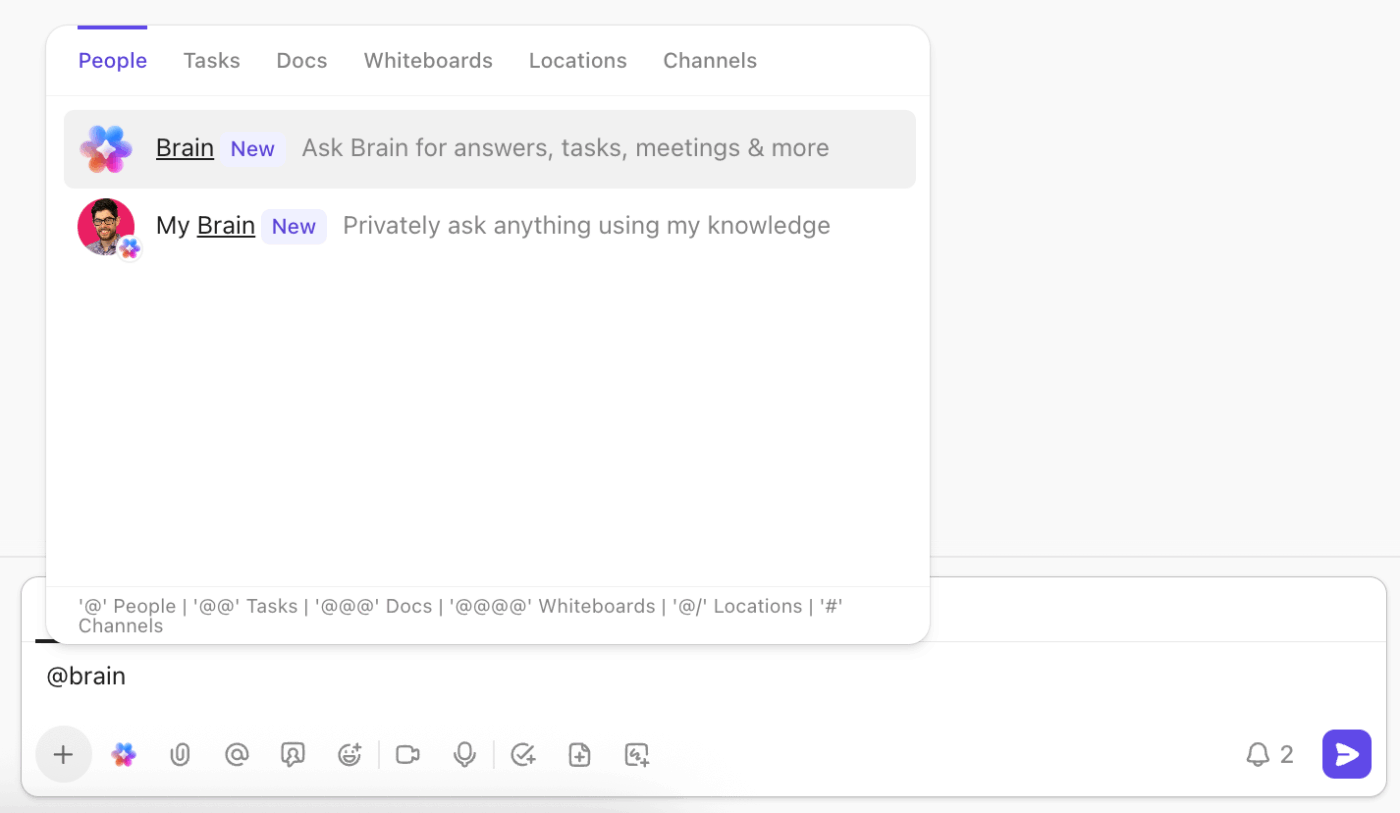
💡 Pro Tip: Need to quickly get some info while working on a task? Simply type @brain in task comments or Chat, just like you would mention another person.
Brain will reply right away, using knowledge and context from your Workspace and any private items you share with it.
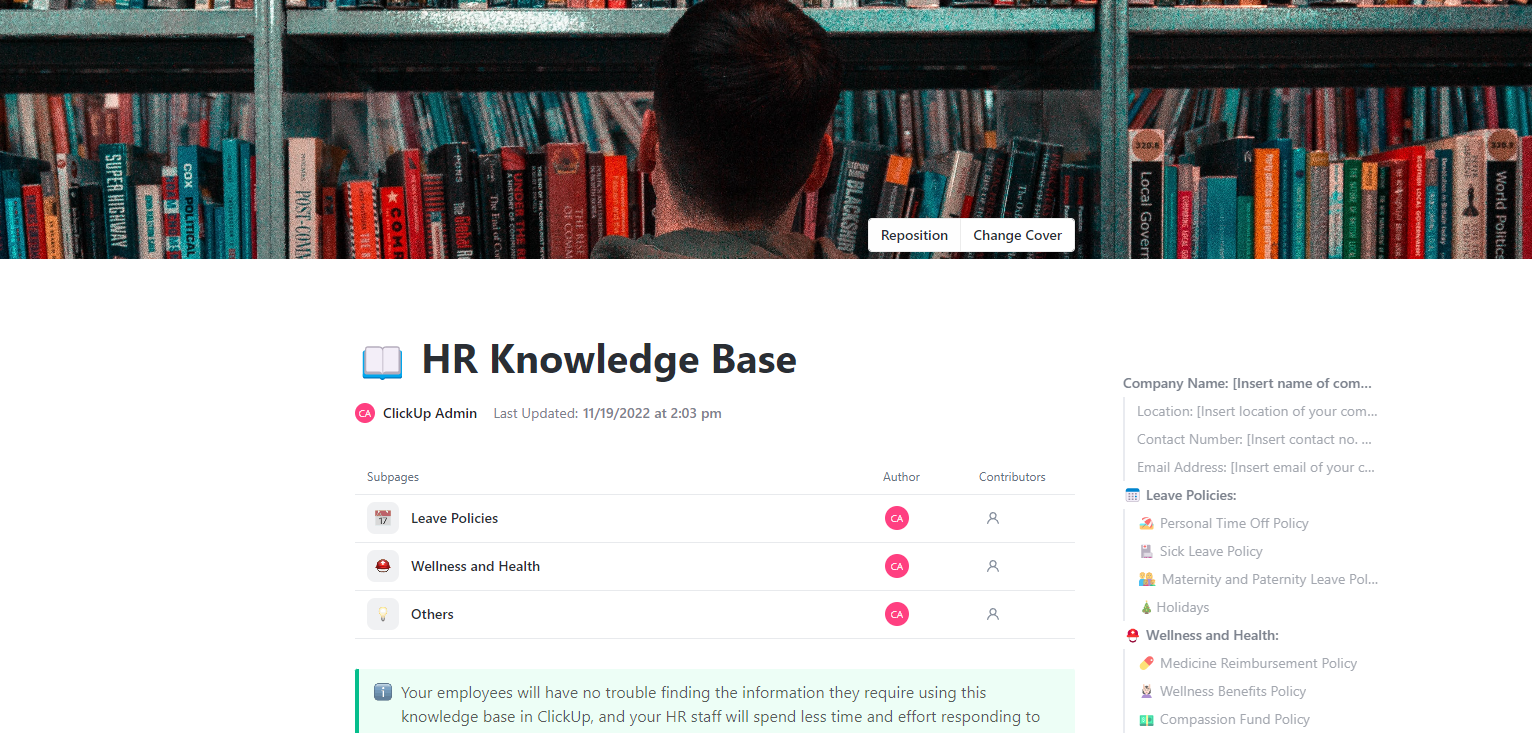
Keeping policies, processes, and regulations updated is just as important as storing them. The ClickUp HR Knowledge Base Template compiles valuable information that changes over time.
Instead of letting critical documents scatter across folders and files, you can manage them here with version control, searchable fields, and categorized views.
While built for HR teams, this AI knowledge base is just as valuable for anyone who needs to maintain and share knowledge over the long term. If you’re studying fields with shifting guidelines, building a personal library of professional standards, or managing evolving research material, this template might be the pick.
📌 Ideal for: Students working on thesis research or compliance-heavy coursework and professionals who need to keep an eye on regulatory updates in their field. It works well for knowledge workers who build libraries of policies and processes.
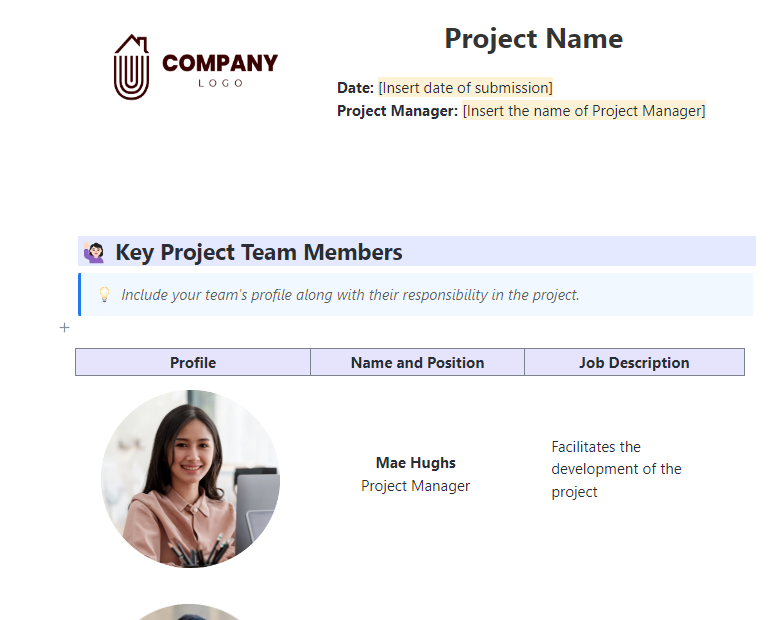
The ClickUp Documentation Template helps you save project goals, roles, and progress in an accessible format. Start with the essentials: the project title, submission dates, and assignees.
Then, move to the dedicated sections to map out team members, their responsibilities, and supporting details. Additionally, it’s built inside ClickUp Docs, so you can pair it with task tracking, timelines, and workflows.
📌 Ideal for: Academic researchers and professionals looking for a document collaboration software to maintain client-facing records, internal workflows, or cross-department initiatives.
🚀 ClickUp Advantage: ClickUp’s AI Knowledge Management enhances your personal data by turning your workspace into a smart, searchable resource.
ClickUp Brain’s Enterprise Search lets you ask questions in natural language and receive context-rich, real-time answers from across your entire workspace. It seamlessly integrates with tools like Gmail, Notion, and Google Drive, ensuring that all your data is searchable from one central location.
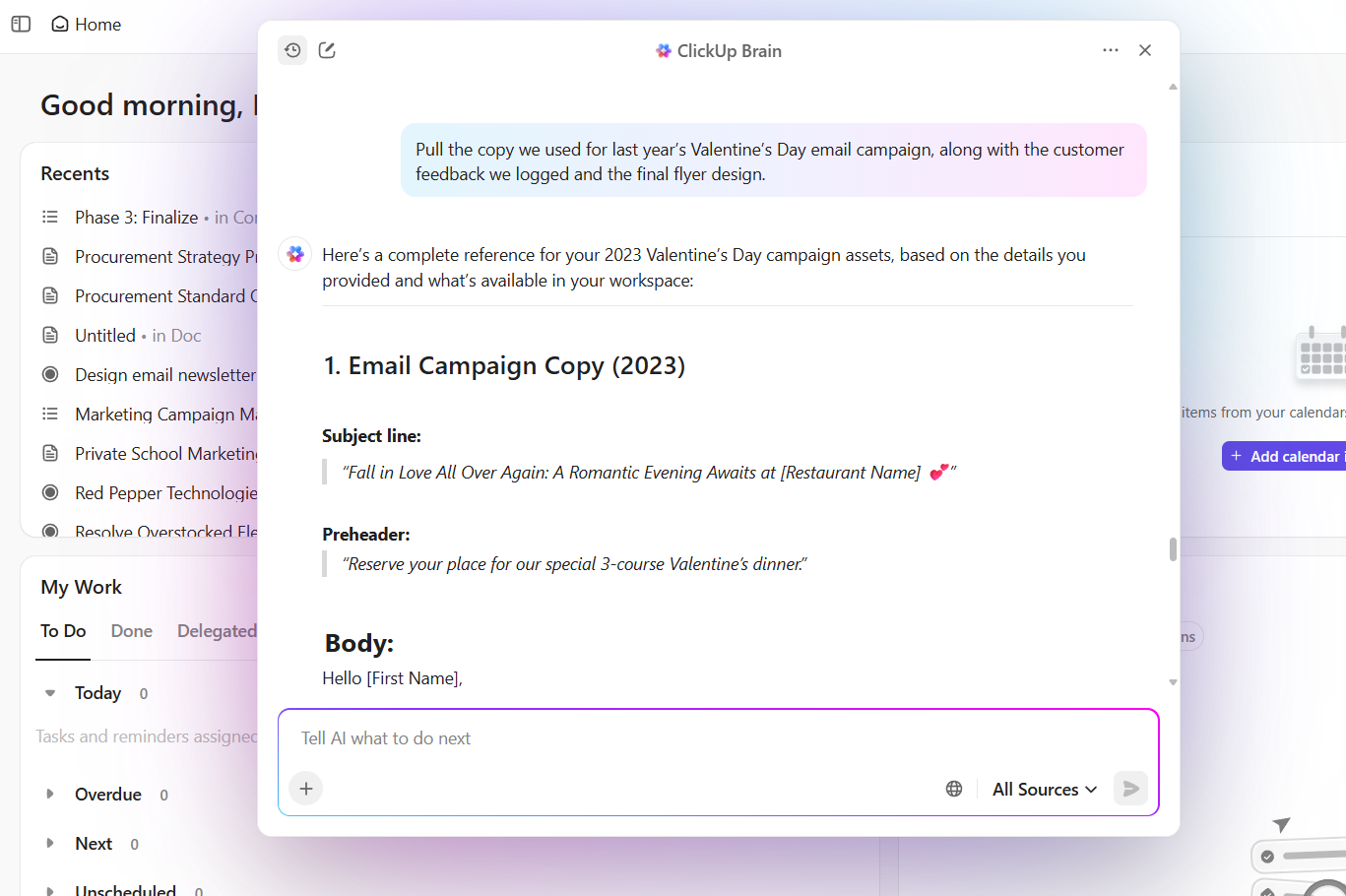
Just ask the connected AI to ‘Summarize,’ and you don’t have to reread pages of notes or research articles.
✅ Try these prompts:
The ClickUp Wiki Template provides a logical framework for your team’s documentation. You can categorize information into sections like Company Policies, Product Specs, Design Guidelines, or Client Onboarding.
Each page is created as a task or doc inside ClickUp, making it easy to assign ownership and keep updates on a schedule. When a process changes or a new hire joins, updating the knowledge base template is as simple as editing a page.
📌 Ideal for: Students mapping research projects, knowledge workers creating a wiki, and professionals documenting SOPs or team processes who need a multi-level reference system.
Get quick tips to manage your AI knowledge base with this video:
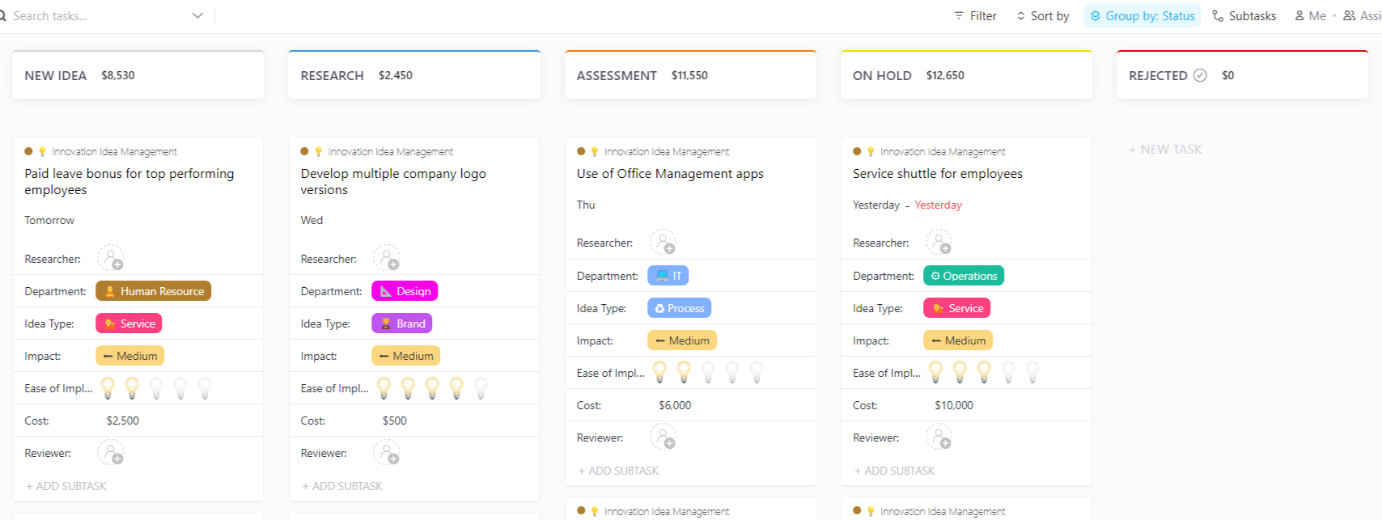
The ClickUp Innovation Idea Management Template archives every spark of creativity and groups it into an actionable workflow. Here, you can organize innovation projects, research insights, or personal creative experiments, from conception to implementation.
Each idea card is packed with detailed fields, allowing you to assign reviewers, estimate costs, measure impact, and rate ease of implementation.
📌 Ideal for: Students exploring research projects and professionals capturing innovative solutions.
🚀 ClickUp Advantage: ClickUp Brain’s AI Writer for Work makes the content creation process easier. You can draft essays, reports, or outlines from scratch, or refine your writing with better phrasing and structure.
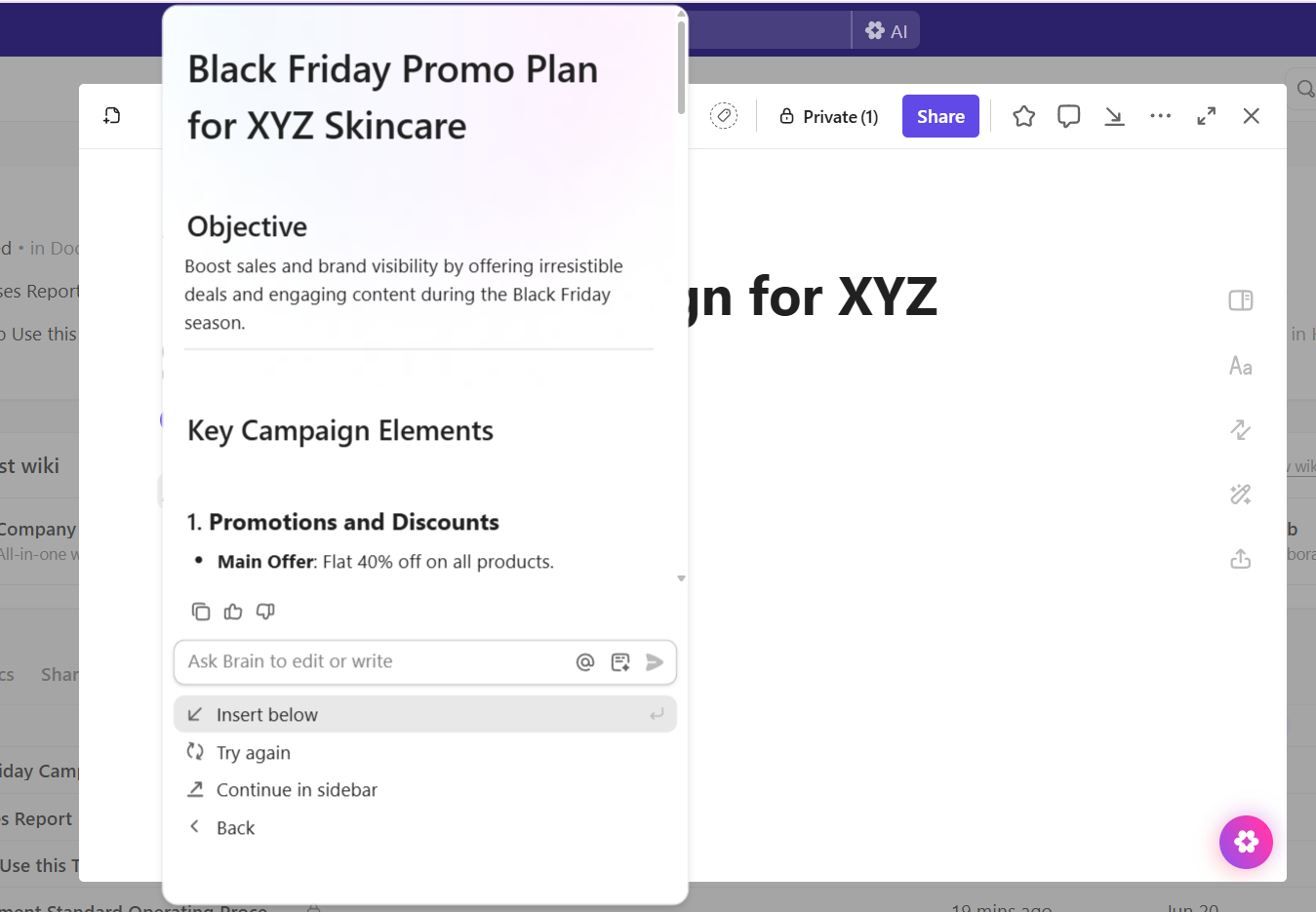
✅ Try these prompts:
📖 Also Read: Best Knowledge Sharing Software Tools for Teams
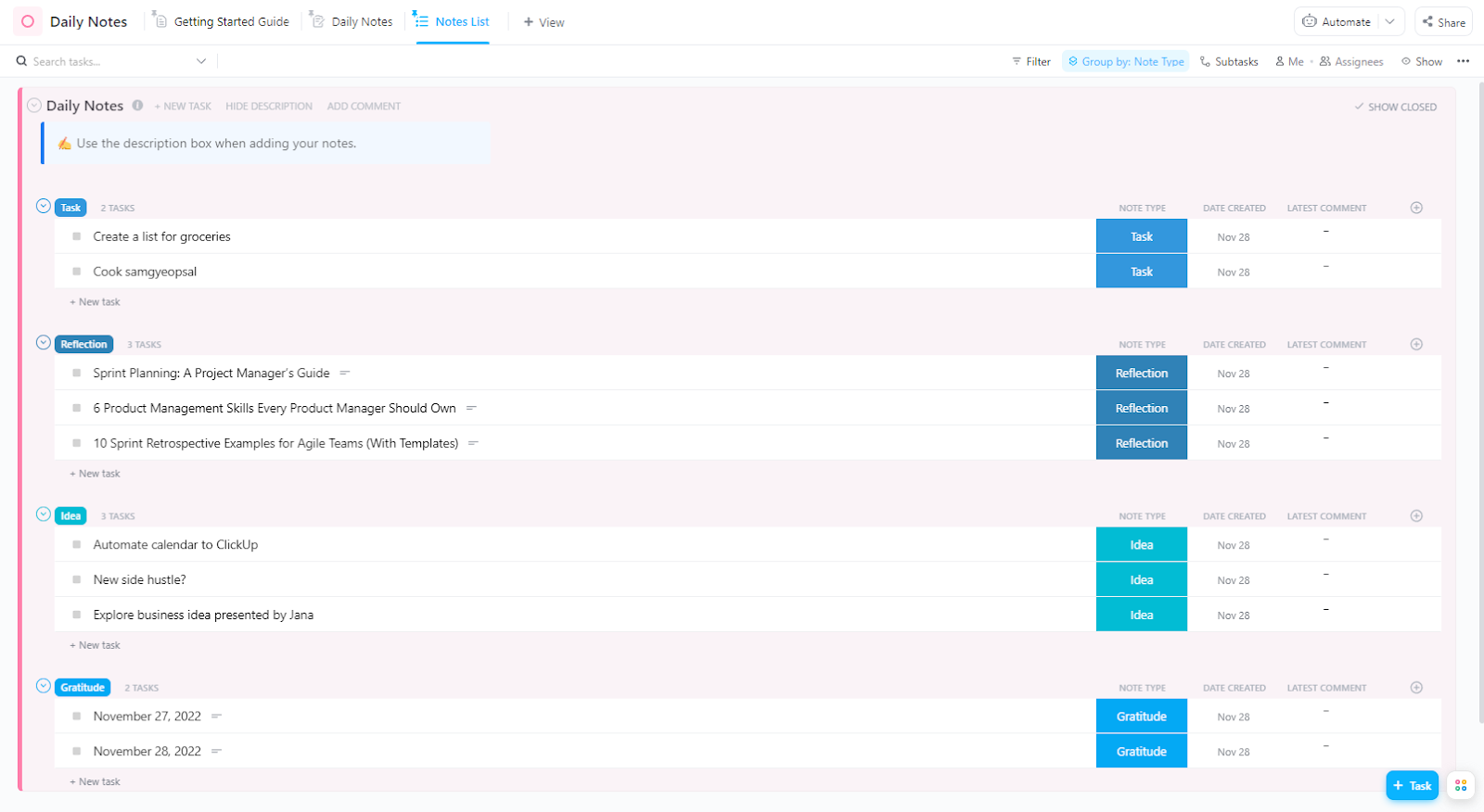
The ClickUp Daily Notes Template is built for students and anyone else who needs to compile day-to-day insights and log progress. You can quickly add tasks, jot down new ideas, or record lessons learned.
Beyond personal notes, the template also encourages self-reflection and prioritization. Using visual cues, grouping by note type, and filtering options, you can focus on what matters most each day.
📌 Ideal for: Anyone who wants to structure daily thoughts, pursue small wins, brainstorm ideas, or reflect on learnings for later reference.
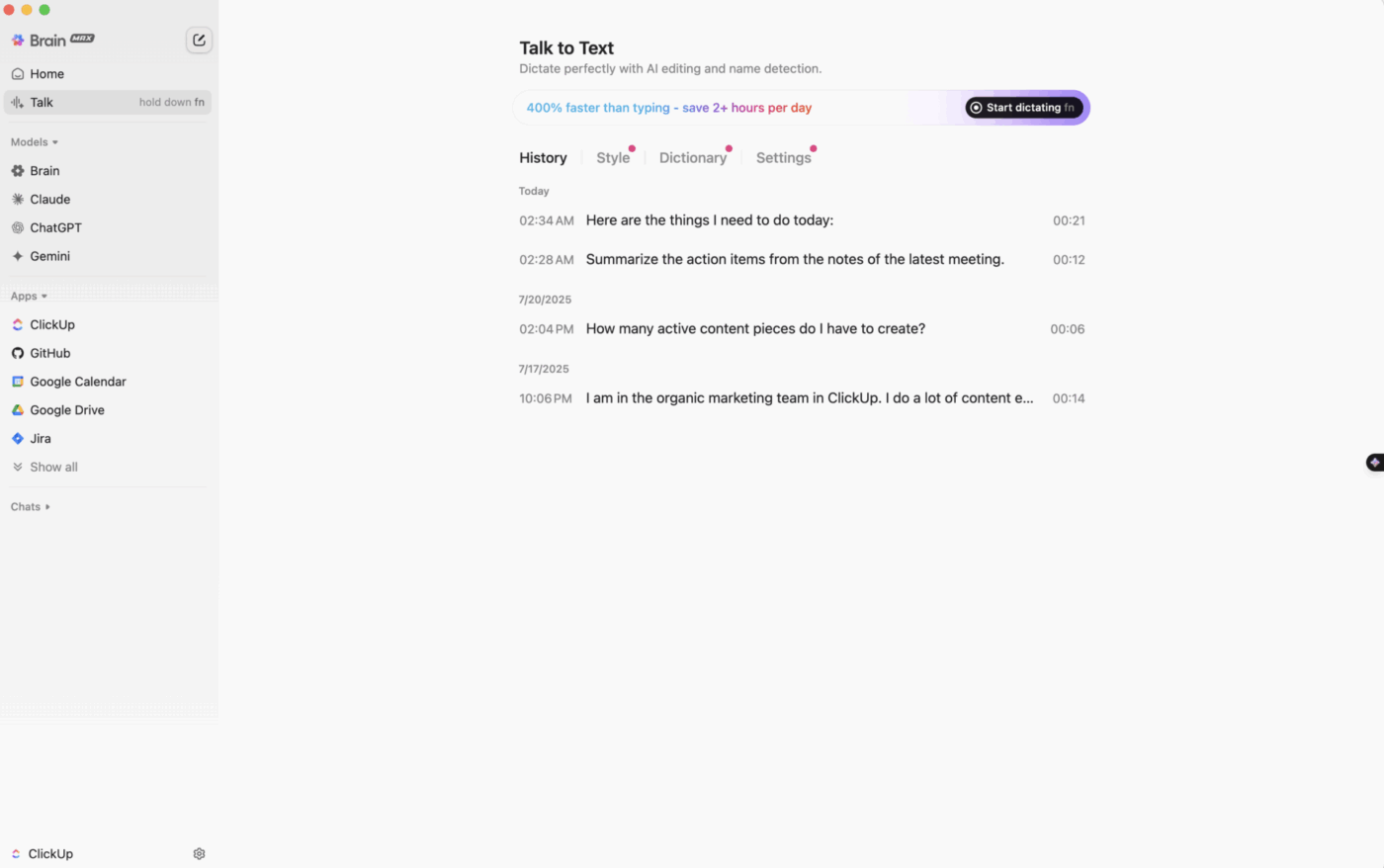
💡 Pro Tip: Want to make quick notes on the go? Just go hands-free with ClickUp Brain MAX’s Talk to Text. Your speech is converted to text and improved using AI, then pasted into the Brain MAX search bar or wherever else on your computer.
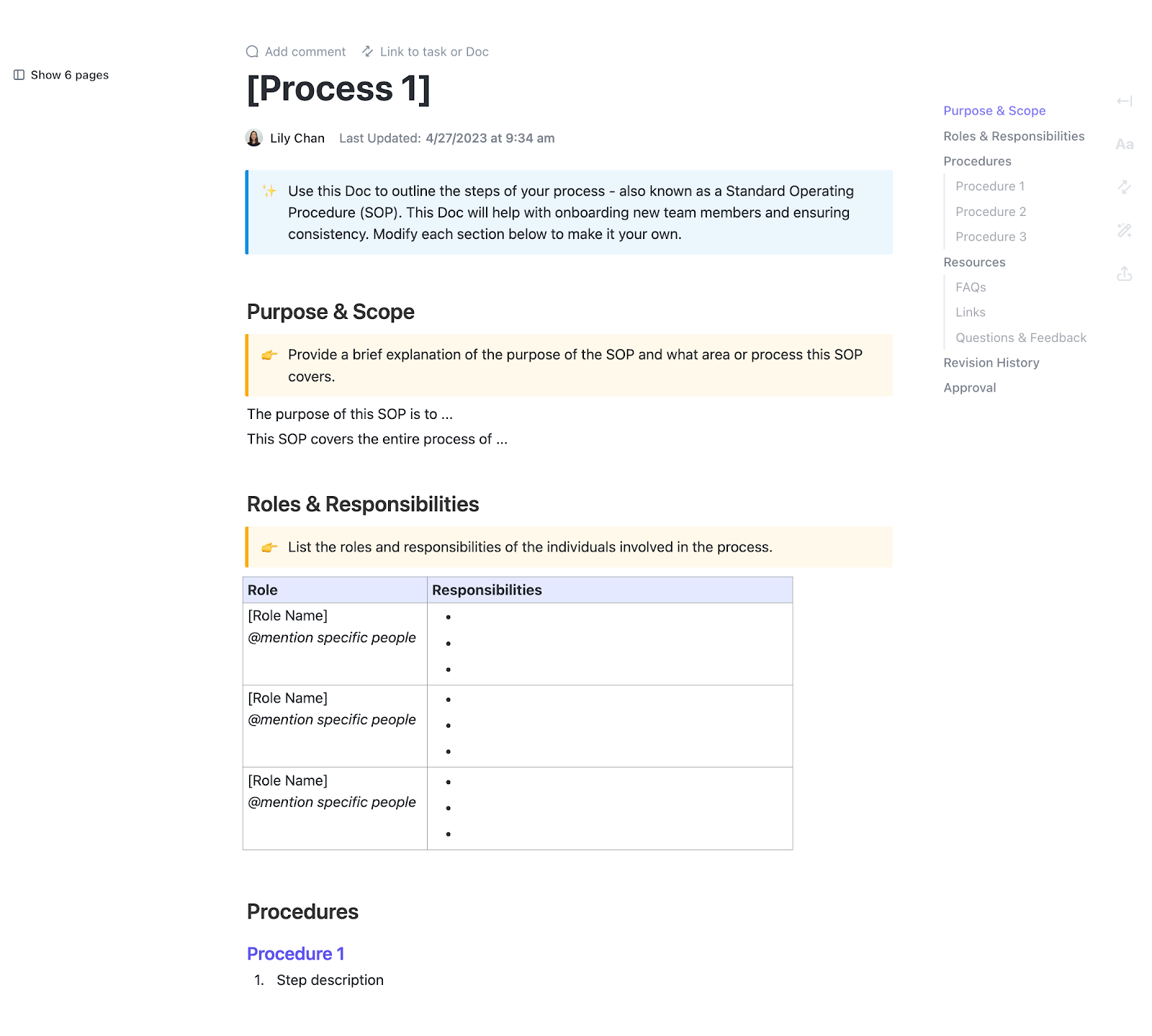
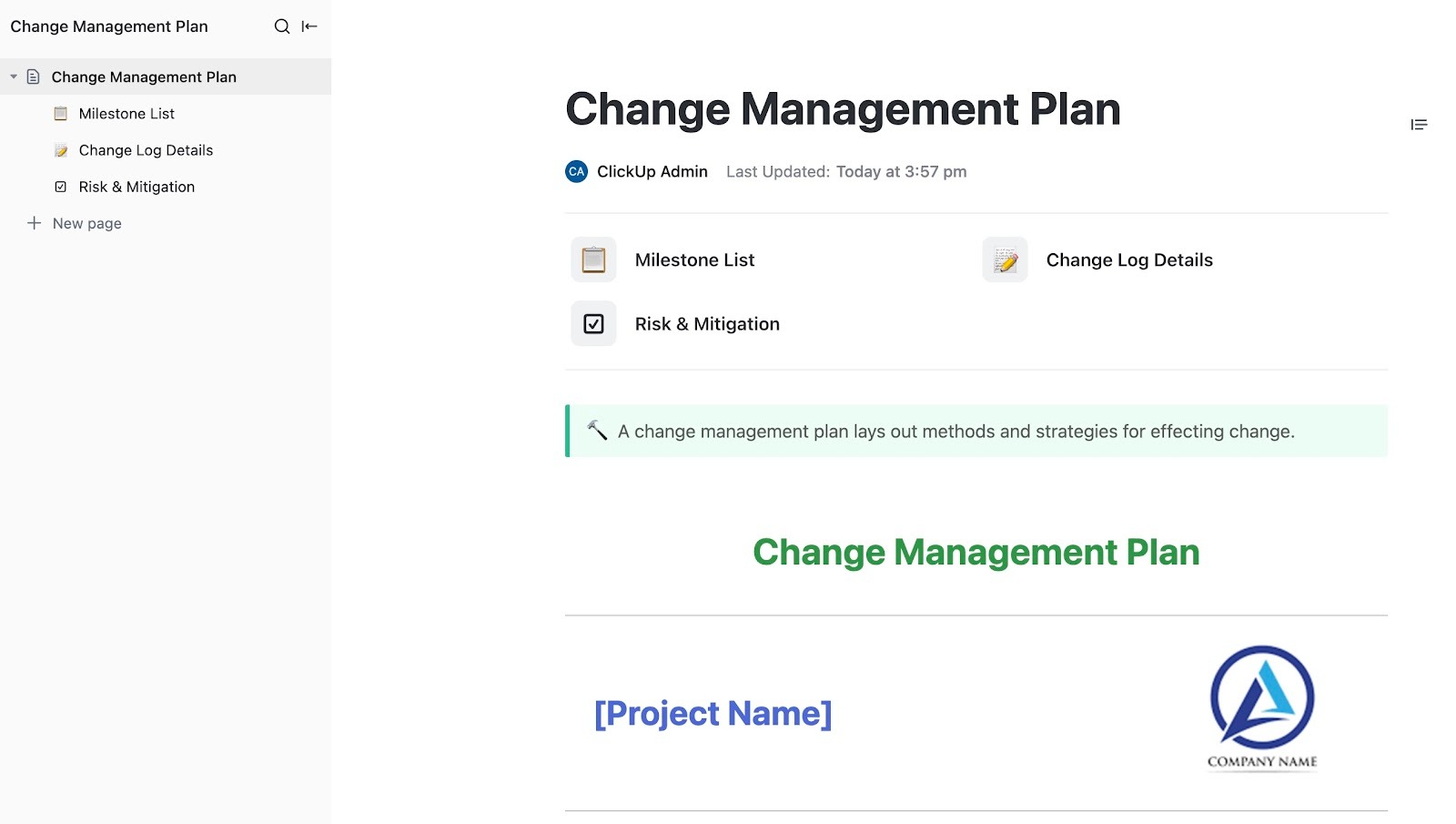
The ClickUp Change Management Plan Document Template provides a framework to document every step of a new transition, map out milestones, record changes, and anticipate potential risks.
With embedded instructional banners and quick-access links, you can guide your team through each stage of the change process. Plus, the document’s built-in metadata audits authorship and updates, while customizable sections allow you to adapt the plan to different areas.
📌 Ideal for: Professionals overseeing process updates and students managing group projects or course changes.
🚀 ClickUp Advantage: ClickUp Brain MAX combines multiple AI tools into one unified platform. You get contextual answers, automations, and insights tailored to your organization within seconds without AI sprawl.
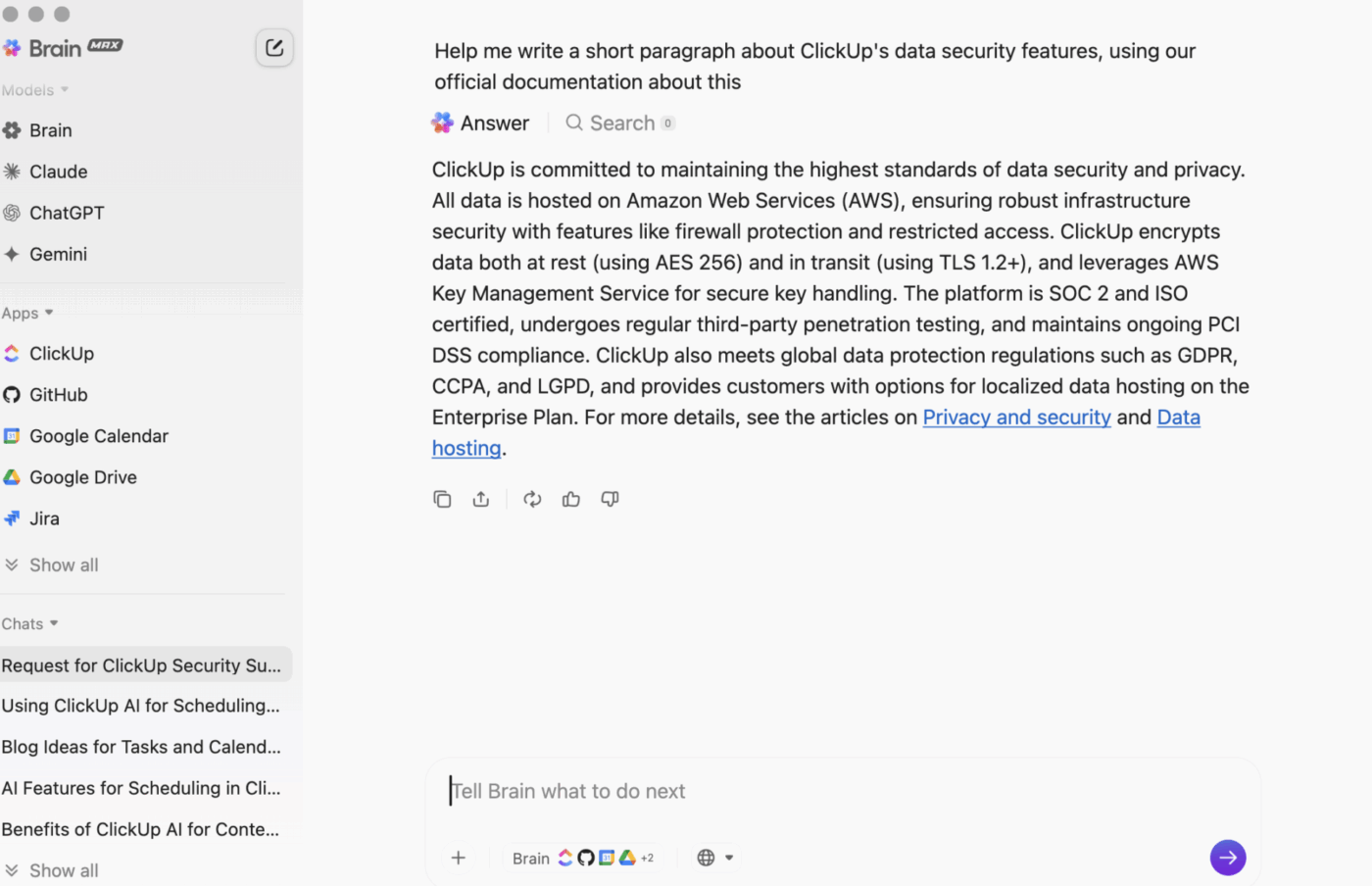
Unlike generic chatbots, Brain MAX understands tasks, projects, meetings, and connected apps, giving you highly relevant, actionable responses. You can trigger workflows across Google Drive, Notion, GitHub, and more, and choose the best AI model for any task.
Here’s what Thomas Clifford, Product Manager at TravelLocal, had to say about using ClickUp:
We use ClickUp for all our project and task management, as well as as a knowledge base. It has also been adopted for monitoring and updating our OKR framework and several other use cases, including flow charts and holiday request forms and workflows. It is great to be able to serve all of these within one product, as things can very easily be interlinked.
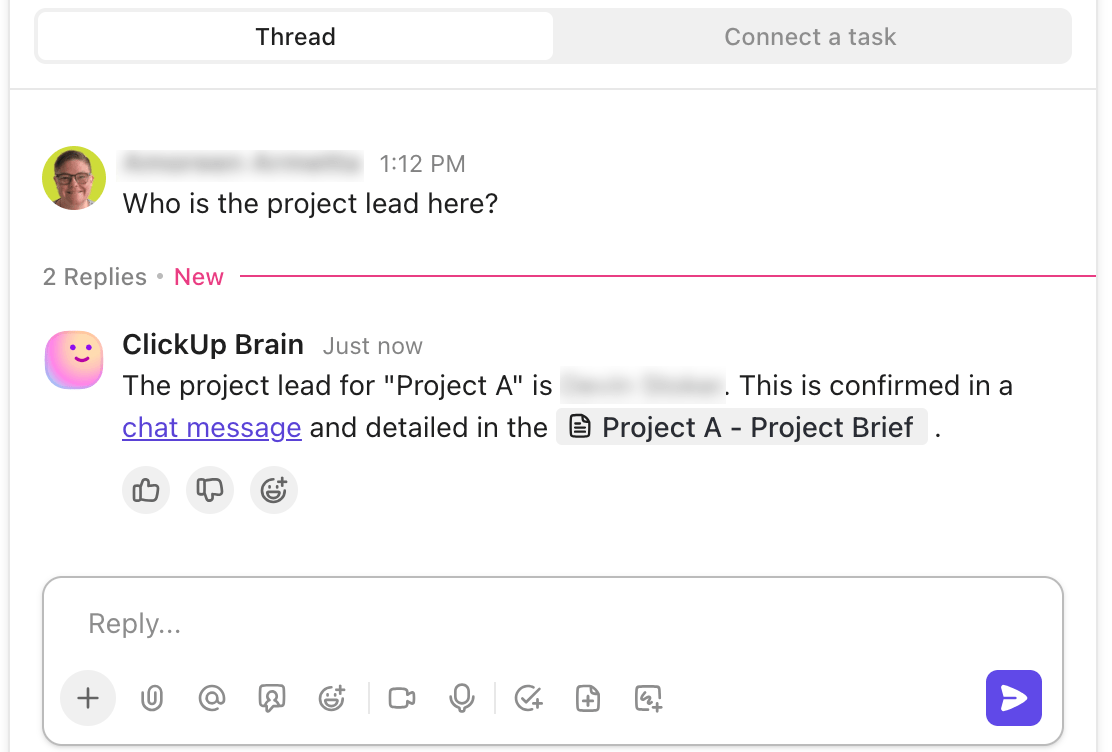
🌟 AI Agents in ClickUp make knowledge retrieval easier than ever!
For example, specify the data your Prebuilt Answers Agent can search, and it’ll use this knowledge to respond to team members’ questions in the channels you’ve activated it in.
Even though Notion lets you save notes and create pages for personal knowledge management, it often stops at organization. The platform doesn’t automatically connect ideas, track progress, or turn insights into action.
But ClickUp tells a different story. It brings everything, including your projects, tasks, and docs, together in one workspace. With ClickUp Docs, you can build structured, searchable knowledge hubs. On the other hand, ClickUp Brain links your notes, surfaces insights, and suggests connections you might otherwise miss.
Together, tasks, documents, notes, voice clips, dashboards, and AI create a Converged AI workspace that cuts the sprawl.
Sign up to ClickUp for free today!

Praburam Srinivasan
Max 19min read
Praburam Srinivasan
Max 20min read
Praburam Srinivasan
Max 27min read

© 2026 ClickUp