

As a project manager, your goal is to complete each project on time, stay updated on the progress, envision roadblocks, and ensure ongoing projects align with the desired outcome.
Whether you use the Waterfall project management methodology for planning and Agile for execution or Agile development with Waterfall execution, the key is to deliver projects within budget and scope and on time.
We see modern-day project managers use a hybrid project management approach for continuous learning, detailed planning of each project phase, and delivering successful outcomes.
If you’d like to learn more about combining different project management (PM) methodologies (also called blending project management methodologies) for an efficient workflow and faster time to market, we’re here to help.
In this blog, we cover hybrid project management in detail and explain how you can implement hybrid project management methodologies to optimize your project workflows.
How to Implement Hybrid Project Management

 Summarize this article for me please
Different Types of Project Management
Let’s take a look at the two commonly used project management methodologies:
1. Agile project management
In Agile project management, a complex project is divided into multiple phases called sprints. Each sprint focuses on iteratively delivering outcomes based on feedback from previous iterations.
Agile methods focus on delivering functional outcomes regularly rather than just at the end of the project. This allows you to see progress continuously, adapt to new feedback, and adjust as needed.
Advantages of Agile project management
- Adapt project processes quickly to evolving marketing conditions, customer feedback, stakeholder feedback, and shifting project requirements
- Deliver frequent deliverables to keep your clients satisfied and engaged
- Identify potential issues faster with the iterative process and address bottlenecks before they escalate
- Monitor spending across different sprints to keep track of costs and control your budget
Let’s see how the project team implements Agile development using the following example.
Develop and launch a fully functional eCommerce mobile app for an online retailer
The project can be split into multiple sprints, each one lasting two weeks.
- Sprint 1: Implement user account management functionalities
- Sprint 2: Develop product catalog browsing
- Sprint 3: Create a shopping cart feature
- Sprint 4: Add payment processing and gateways
- Sprint 5: Develop order tracking page
Note: Some other project management methodologies include Critical Chain Project Management (CCPM), Critical Path Method (CPM), and Lean Six Sigma.
2. Waterfall project management
The traditional Waterfall methodology is mostly used in projects with clearly defined outcomes and minimal changes. A project is organized into linear, sequential phases, and each must be completed before the next one begins.
Each phase in this project management methodology has specific deliverables and milestones, making it predictable and easily manageable.
Waterfall project management requires thorough documentation at each phase—including details on requirements, deliverables, scope, capacity planning, test plans, design specifications, and user manuals.
Advantages of Waterfall project management
- It is easier to track progress since each phase has specific objectives and deliverables
- Minimal scope creep since all requirements are gathered at the very beginning
- It is easier to control since project schedules and timelines are fixed
- Better risk management since the structured approach allows you to plan better and predict risks early on
Let’s see an example of the high-level project phases in the Waterfall methodology.
Develop a CRM system to manage leads and customer interactions and track sales pipelines
The project will be divided into multiple phases with specific objectives.
- Requirements gathering: Evaluate stakeholder requirements from the CRM and outline the desired functionalities of the system
- Design: Create mockups for both software and hardware modules of the CRM
- Implementation: Install the CRM for a limited number of beta users. Configure the system so that it works seamlessly for lead management, sales tracking, and detailed reporting
- Testing: Assess how well the system matches the specified requirements
- Deployment: Release the completed CRM to the rest of your users
- Maintenance: Provide ongoing support and service maintenance to your customers
🎯Read More: 11 Free Waterfall Project Management Templates
Key differences between the Agile and Waterfall method
| Feature | Waterfall | Agile |
| Approach | Sequential | Iterative |
| Flexibility | Rigid | Flexible |
| Planning | Extensive upfront | Minimal upfront, ongoing planning |
| Delivery | Final product at the end | Incremental delivery |
| Customer Involvement | Limited | High |
That said, let’s see how hybrid project management methodologies bring together the best of both worlds and offer an adaptable approach to managing dynamic projects.
Summarize this article for me pleaseWhat Is Hybrid Project Management?
As the name suggests, hybrid project management is an approach that combines elements from multiple strategic project management methodologies. By doing so, you leverage the strengths of different methods to address the specific demands of your project and deliver higher-quality outcomes.
In most cases, hybrid project management combines practices from agile methodologies like Scrum and traditional methods like the Waterfall approach.
Hybrid project management: Blending the best of Agile and traditional PM methods
Let’s take an example to better understand the hybrid strategy. Say you have to develop and launch a smart home device. The device should seamlessly integrate with the various other devices in your home.
In this case, the Waterfall method best suits the initial market research and hardware development. Here’s why:
- Market research requires a structured approach with detailed documentation
- Similarly, hardware development also follows a standard, sequential approach that follows fixed baselines derived from market research and planning. Any changes to hardware development can be quite expensive
- Hardware development also requires rigorous testing and compliance. Using the Waterfall approach here would ensure that testing is done in a systematic and controlled manner
- Lastly, hardware development needs proper resource allocation, and the Waterfall method helps you plan and allocate resources in advance
On the other hand, software development would follow the Agile method, such as the Scrum method. That’s because:
- Software development projects are subject to changes depending on user feedback and technological requirements
- It’s best if software development follows a process where value is delivered incrementally throughout the project lifecycle. This makes it easier to track progress and make continuous adjustments
- The agile approach allows you to detect problems early on, helping you manage risks without overspending
As you can see in this example, hybrid project management combines the strengths of Agile and traditional approaches by combining Waterfall and Scrum methods.
Key points to note
The Agile methodology is flexible and adaptable and focuses on the rapid delivery of outcomes. The traditional approach allows you to define structured processes and introduce predictability to project phases.
In combination, blended project management brings innovation in some areas while maintaining consistency in project phases that require stability. In short, it helps you cater to the diverse needs of a complex project.
Other approaches to hybrid project management
Scrum and Kanban are Agile methodologies that can work well as components of hybrid project management.
Scrum focuses on iterative phases called sprints, while Kanban focuses on a visual method where workflows are visualized in stages to track and manage tasks while continuously improving the process.
When combining the two, Scrum project management can be applied to parts of the project that require development work. Kanban works best for ongoing tasks.
For instance, Scrum’s iterative approach is better suited for software development. The Kanban method works best for providing post-launch support, bug tracking, and continuous product improvement.
Scrum and Kanban can be combined as Scrumban or worked in parallel. In the Scrumban approach, teams work in sprints but use Kanban boards to manage their workflow meticulously.
💡Pro Tip: Use Scrum tools for sprint planning, backlog management, and release management to improve team synergy, streamline your workflow, and adapt to changes quickly.
Summarize this article for me pleaseHow to Implement Hybrid Project Management
Ideally, you want to consider using hybrid project management methodologies when managing complex, multi-step projects. The next step is to learn how to implement this approach effectively in your projects.
Here’s a step-by-step breakdown of how a project manager can do this using project management software like ClickUp.
1. Assess project requirements
To apply the hybrid methodology, you need to understand which phases of your project will require a more traditional approach and which ones need to follow Agile practices.
Start with proper research and stakeholder meetings to gather detailed project requirements. Conduct workshops and brainstorming sessions with your teammates and stakeholders to work collaboratively on identifying critical project details.
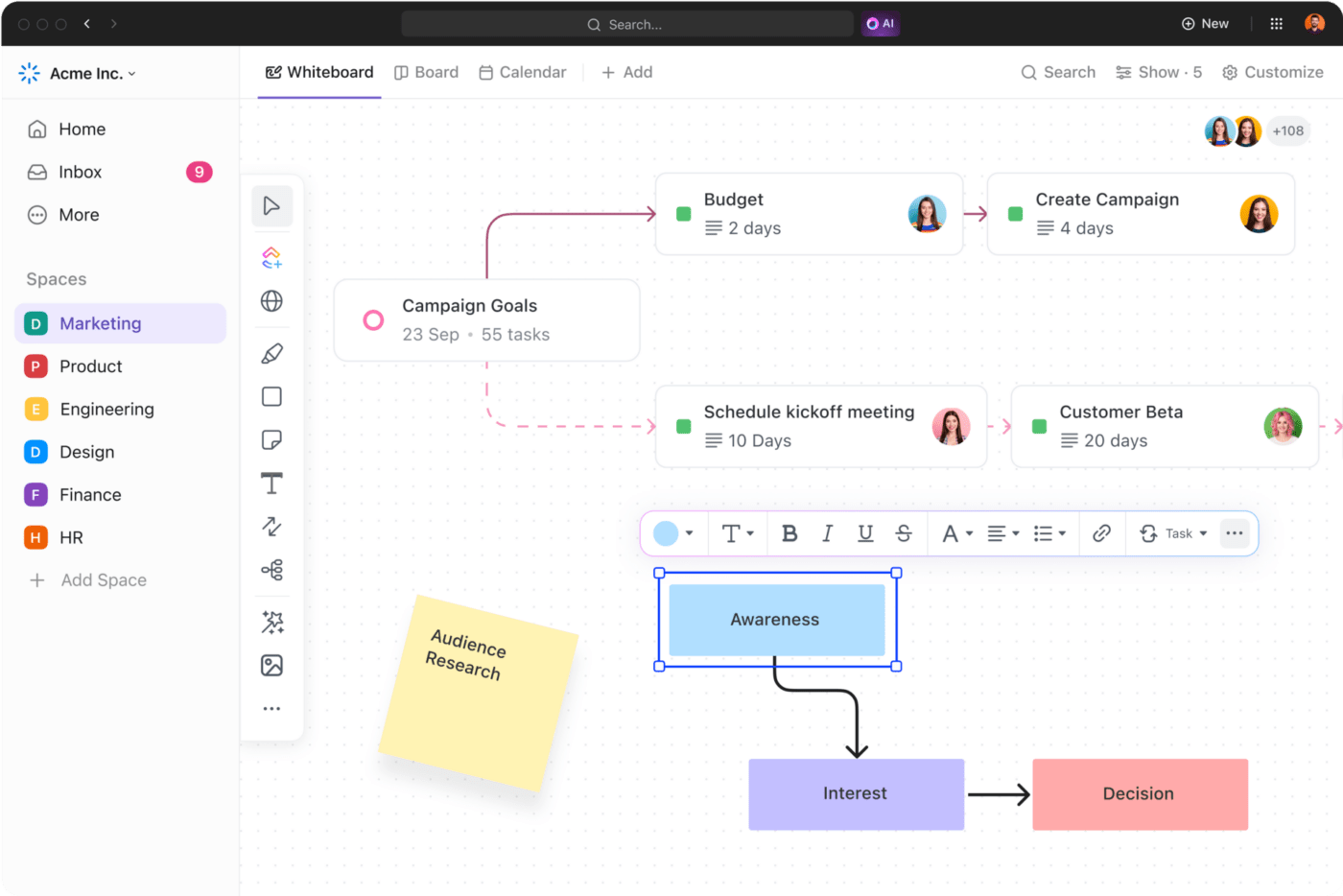
Use visual brainstorming tools like ClickUp Whiteboards to discuss ideas, explain concepts, and write notes on a digital canvas. Draw freehand, create workflows, and turn your final ideas into trackable tasks within the whiteboard.
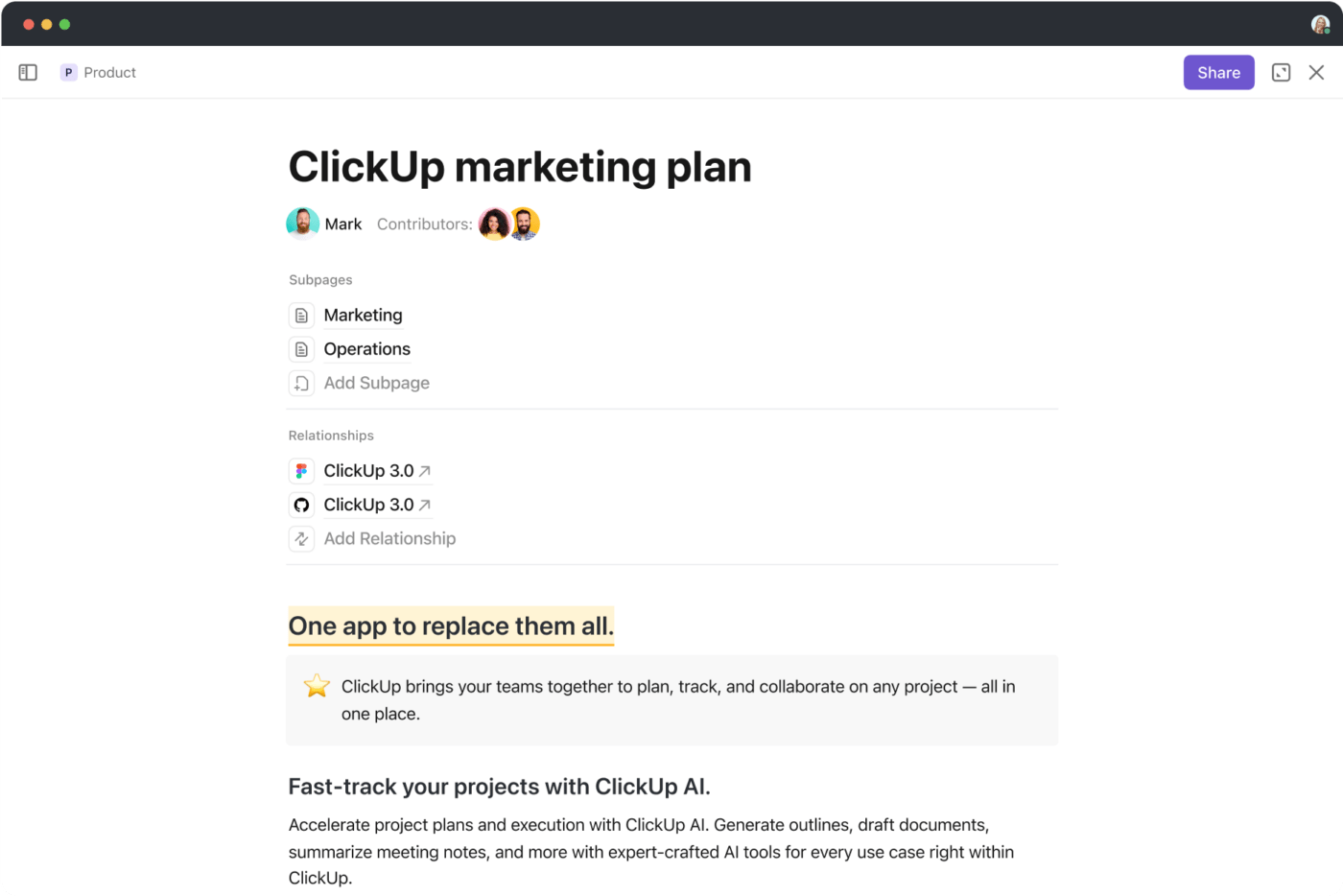
Once you’ve reached a consensus on the different phases and requirements, create a detailed project document or wiki using ClickUp Docs.
Format the document in a way that makes sense for your team, and invite members to collaborate and share their insights. Link the document to relevant tasks so task owners can access project information whenever needed.
2. Outline the project scope
Project scope refers to the goals, objectives, tasks, deliverables, and timelines associated with a project. It defines the project’s boundaries and provides a clear overview of what’s included and excluded.
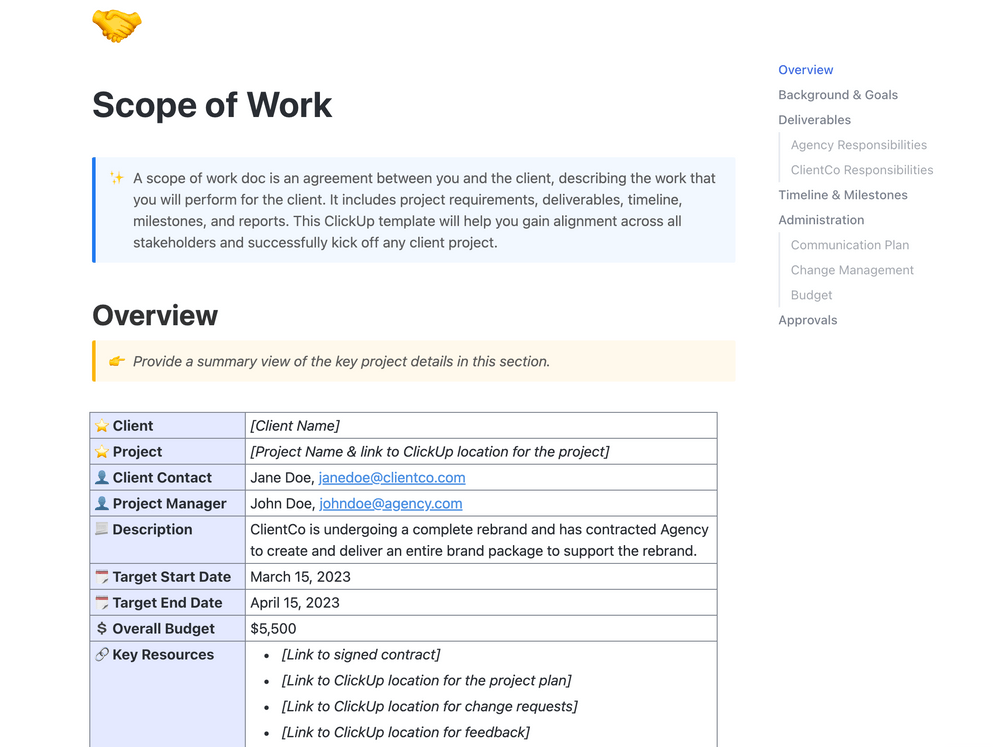
Here, you can use the ClickUp Scope of Work Template to capture important details about your project, outline a clear plan of action, and ensure everyone is on the same page about what needs to be done.
Scope of work templates like these offer a structured approach to minimize the risk of project failure. You can input details like the task types, deliverables, timelines, and high-level project phases to determine the hybrid agile methodology best suited for your project.
What are the benefits of using ClickUp’s Scope of Work Template?
- Add custom statuses to view the progress of different tasks in the project
- Use custom fields to add details like budget, contact information, important dates, and other key information needed to complete tasks
- Categorize and add attributes to provide visibility into the project outcomes for stakeholders and cross-functional teams
3. Define roles and responsibilities
As a project manager, you must define how your team members will handle different tasks to maintain cohesion and team coordination. This is especially important in hybrid project management, where different aspects of the project will follow different methodologies.
Use the ClickUp Project Management Roles and Responsibilities Template to visualize who handles what task within the project.
The template leverages ClickUp Views, such as the Box View, Activity View, or Workload View, to see who is working on what, see everyone’s activities, and analyze your team’s capacity. Equipped with these insights, you can assign workloads so everyone works optimally and no one is overworked.

The benefits of using this template for hybrid projects are:
- Establish accountability and ensure the project progresses smoothly since expectations are communicated to the team members
- Outline the expectations for each role and track the team’s performance against these expectations using custom fields
- Allow for smoother project management with reminders to notify task owners about deadlines and when changes are made to a task
4. Create a project schedule
When using hybrid project management, plotting different tasks, deliverables, and timelines along a visual timeline is always a good idea. This allows you to get a unified view of all the activities in a project and see which tasks need to be completed sequentially and which ones can run in parallel.
You can use the ClickUp Gantt Chart View to visualize your project workflows on a flexible timeline.
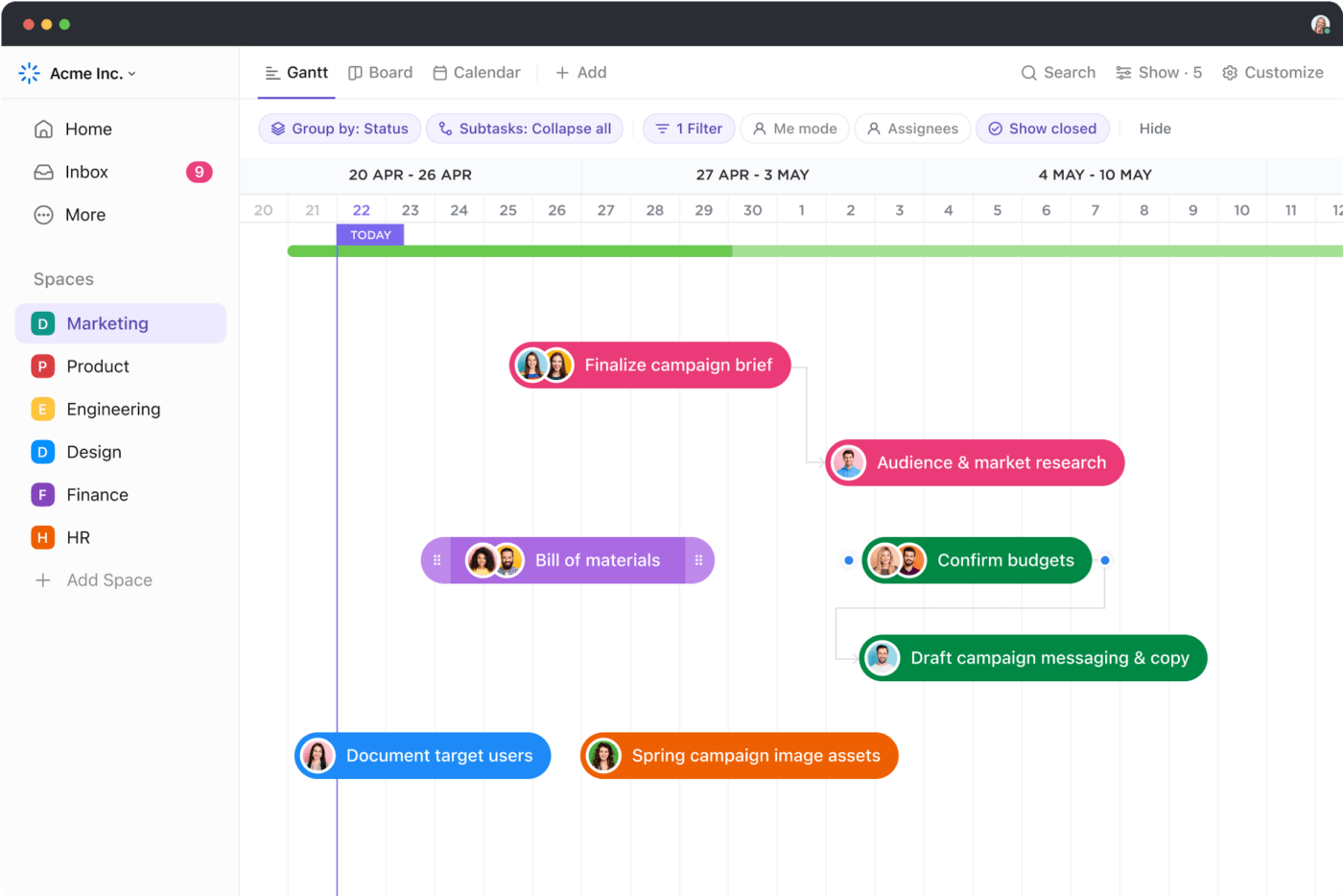
Track progress against key milestones and view which tasks depend on another task’s initiation or completion. Gantt charts also help you organize your tasks according to their priority, allowing you to focus on completing what matters most.
💡Pro Tip: Leverage project management automation to automate repetitive admin tasks, standardize processes, and make data-driven decisions.
5. Use tools to support hybrid project management
Managing projects using the hybrid project management methodology requires you to continuously coordinate tasks and activities across your teams, allocate resources, collaborate with stakeholders, and track progress.
Doing all this manually over spreadsheets is a recipe for failure.
Regardless of your hybrid approach, a project management tool helps you streamline all the activities over a centralized location.
Here’s how ClickUp’s Project Management Software helps you manage various aspects of your hybrid PM project by combining Agile and Waterfall project management methodologies.
Manage tasks with ease
As a project manager, the last thing you want to do is micromanage and constantly follow up with your team members.
Instead, use ClickUp Tasks to create and assign different project tasks to team members.

For added accountability, you can add task due dates and custom statuses to track whether a task is ‘Open,’ ‘Closed,’ or ‘In-progress.’ To avoid confusion and misunderstandings, add context to every task using task descriptions and custom fields.
Lastly, create checklists that the respective team member can tick off once the task is completed.
Enable seamless collaboration
You don’t want the lack of communication between cross-functional teams or even within teams to be a roadblock that leads to missed project delivery timelines.
That’s where ClickUp Chat View allows your development team to share updates in real time, chat with stakeholders, and collaborate on tasks.
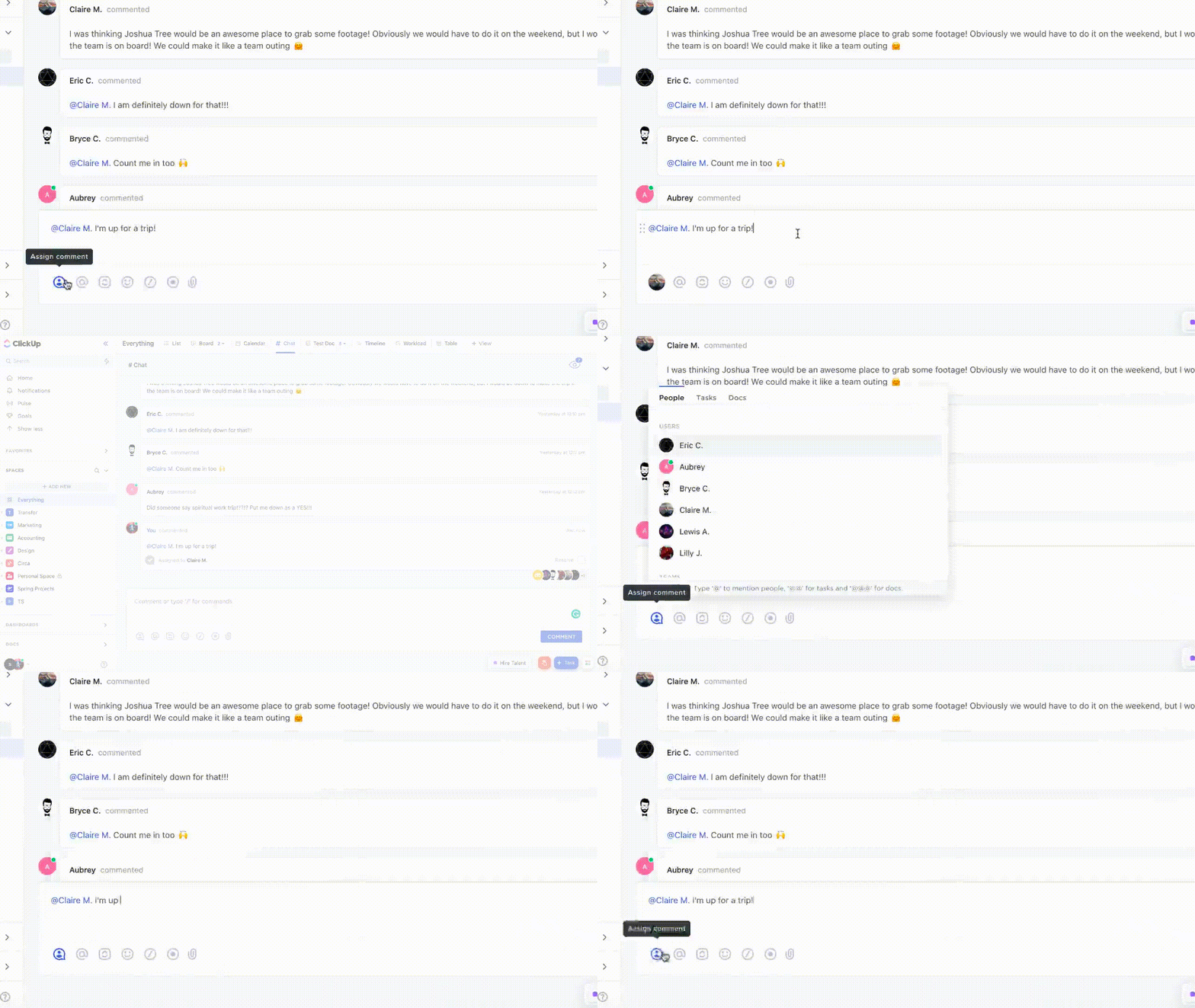
Use the Chat View to resolve issues quickly, get clarifications on project activities, and communicate urgent requests right from your ClickUp workspace.
Create sprint lists
Hybrid project management is an iterative process. To better manage the project phases, divide them into time-boxed iterations called Sprints.
ClickUp Sprints allows you to organize tasks and deliverables to be completed under each Sprint into sprint lists. Use these sprint lists to coordinate team tasks, discuss completed activities, and identify blockers.
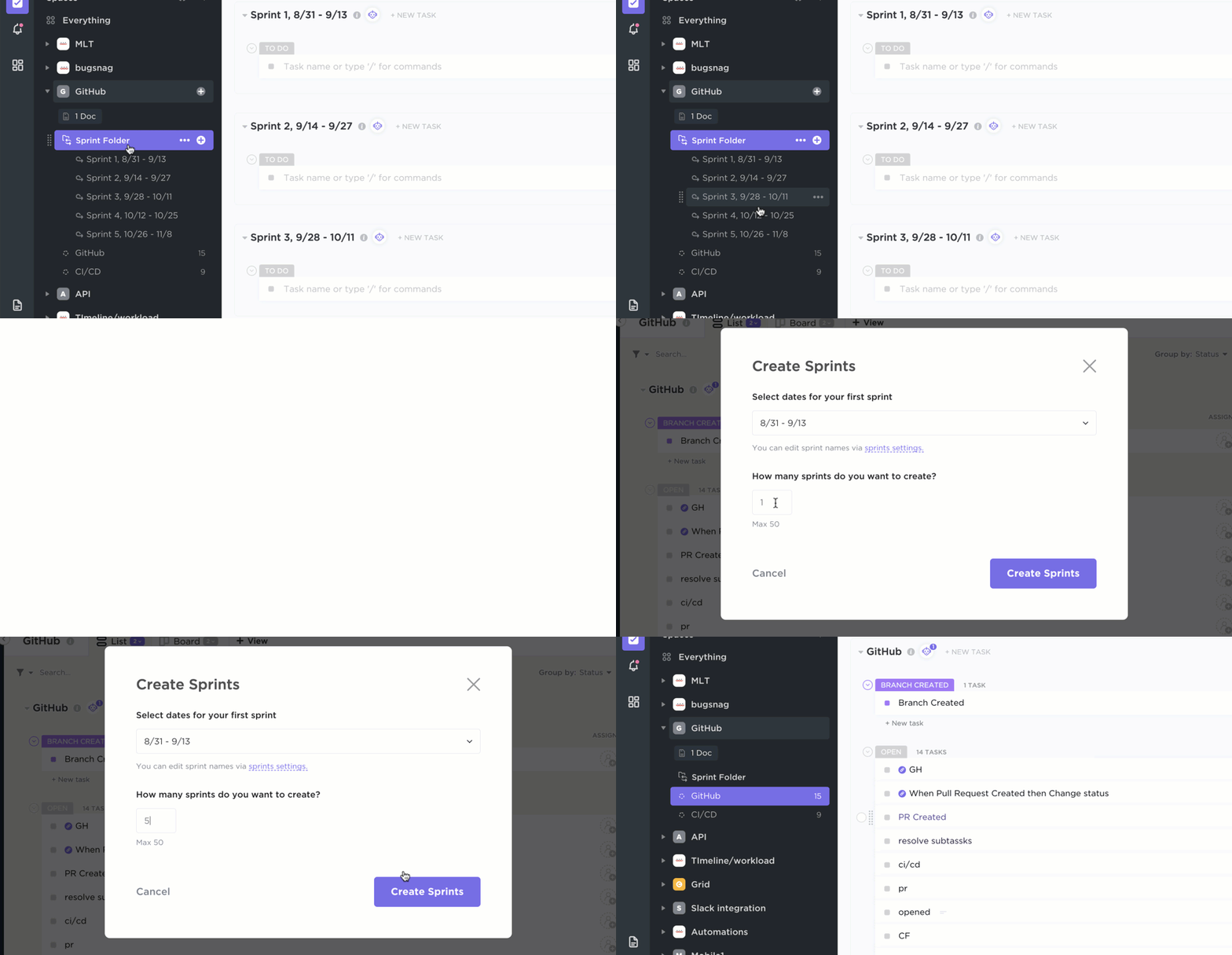
Visualize project workflows and manage priorities
ClickUp’s Kanban Board lets you organize your tasks under different columns or lists to represent the various stages of your entire project. Mark important tasks using color-coded labels and priority tags.
Drag tasks from one column to another to update their status. Limit the number of tasks in each column to improve efficiency and deliver value at each project stage.

Leverage AI
Get instant answers to work-related questions by asking your questions to ClickUp Brain. The AI assistant sorts through your workspace and pulls insights from your tasks, docs, and chat to give you the most relevant information.
With ClickUp Brain, the AI project manager and AI writer, you can automate creating project summaries, progress reports, and project updates to ensure everyone is updated about the project’s current state and delivery plans.

💡Pro Tip: AI project management tools improve your project management process by predicting project data, improving decision-making, estimating costs, and monitoring potential risks.
Use pre-built templates
ClickUp has 1,000+ pre-built templates that you can use and customize according to the specific needs of your project.
For instance, the ClickUp Project Management Template is a fully customizable, pre-built framework that helps you manage everything from project initiation to completion. As a Scrum master, you can use this template to view task status, visualize project progress, and get detailed information on each activity to be carried out.

ClickUp’s Project Management Template simplifies complex projects by providing a pre-organized workspace with folders for each project phase, making it easier to manage your work efficiently.
Plus, it features a flexible list and a Kanban-style board view to easily enter task details and track your tasks. You can also use six custom task statuses to indicate if tasks are in progress, open, or completed.
Project managers often prefer this template for agile development as it removes data silos by helping teams communicate project information in a centralized location.
6. Track progress in real time
When you have detailed insights into the status of every task, it is easier to identify delays and spot roadblocks in specific project stages.
ClickUp’s Dashboards are a great way to visualize the project’s progress and the dependencies hindering its completion.
This project dashboard provides insights into key project milestones and KPIs and gives everyone a bird’s-eye view of deadlines, tasks, and dependencies.

What gives ClickUp a step up over spreadsheets is that you can visualize workflows using different project management dashboards based on your specific use case.
Summarize this article for me pleaseBenefits of Choosing Hybrid Project Management
The benefits of hybrid project management include:
- Risk management: The blended project management methodology uses a structured approach, which is useful in proactively identifying and mitigating risks
- Better resource allocation: The hybrid method allows project managers to utilize resources effectively by assigning tasks based on the strengths of their team members.
- Faster time to market: Integrating agile and traditional project management methods results in a structured and innovative approach to handling large-scale projects. This results in consistent outcomes across key milestones, enabling project teams to deliver value faster
Summarize this article for me pleaseChallenges of Hybrid Project Management
Here are some of the most common challenges associated with hybrid project management and how you can overcome them.
1. Implementation complexity
Combining different project management methods and getting them to work in one smooth flow can be a complex task.
How to avoid this:
✅ Document your project requirements at the onset using AI tools
✅ Define how each project management approach will be applied to different parts of the project
✅ Use frameworks and templates to standardize processes
2. Confusion around roles and responsibilities
Agile and Waterfall methodologies may have different expectations from various team members, leading to overlapping responsibilities. There may also be a lack of clarity on how tasks align with the project goals.
How to avoid this:
✅ Clearly outline the different roles and tasks and how these roles should work together for the best results
✅ Conduct regular stand-ups and meetings to discuss updates, progress, and challenges
✅ Offer ongoing support and training for team members
3. Challenges with communication
The terminologies and documentation used in one project management method may differ from those used in the other. Also, communication styles and frequency may vary in each method—creating gaps in workplace communication and hindering the effective flow of information.
How to avoid this:
✅ Establish communication protocols to outline the frequency and communication channels to avoid information overload
✅ Create shared documentation to establish a common understanding of all the terminologies and practices involved in hybrid project management
Summarize this article for me pleaseStreamline Hybrid Project Management with ClickUp
Using hybrid project management methodologies, you can create scalable processes, foster innovation, and deliver valuable products faster as it combines the strengths of multiple PM approaches.
Of course, while hybrid project management offers many tangible benefits, integrating multiple approaches and getting them to work in cohesion can be quite challenging for project managers.
This is where project management tools like ClickUp make your job easier with features that streamline task management, facilitate collaboration, centralize information, and consolidate critical reports.
Features like sprint lists, Kanban boards, and pre-built templates can help you tailor your workflows to fit agile, hybrid, or traditional project management methods while keeping your teams organized.
Sign up to ClickUp for free today and learn how to stay efficient throughout the project lifecycle.


Everything you need to stay organized and get work done.

Recent Articles
Jira Project Management: What It Does Well and Where It Taps Out 
Jira Project Management: What It Does Well and Where It Taps Out
8 Communication Strategies That Actually Fix Team Chaos
8 Communication Strategies That Actually Fix Team Chaos
