






Still downloading templates?
There’s an easier way. Try a free AI Agent in ClickUp that actually does the work for you—set up in minutes, save hours every week.
Sorry, there were no results found for “”
Sorry, there were no results found for “”
Sorry, there were no results found for “”
One missed approval can throw off a launch, even when your creative work is strong.
Adobe research across 1,600+ marketers found 96% have seen content demand at least double in the last two years, with 62% saying it has increased 5x or more.
When your media workflow spans shared drives and multiple platforms, your manual processes multiply. Your review cycles slow down, and you spend too much time on administrative tasks instead of improving creative output.
Media workflow management gives you a system for planning, production, asset management, and approvals. When you add media workflow automation to the mix, you can start automating repetitive tasks and routine administrative tasks like handoffs and status updates
In this guide, we will discuss what media workflow management includes, why it matters, the core stages, and a step-by-step build.
🧠 Did You Know? The IPTC Photo Metadata standard exists to carry descriptive and copyright information with image files. That kind of metadata is a big reason media teams can track usage rights and asset history without relying on memory.
Media workflow management is the workflow management system that keeps your media workflow moving from request to results. It turns “creative work in progress” into a repeatable process, so teams can plan, produce, review, distribute, and learn from performance without losing track of versions, approvals, or assets.
In practice, media workflow management usually includes:
Modern media teams need this structure because the media landscape is multi-format by default. The same campaign may require video content, audio, social assets, paid ads, long-form content, and graphics, each with different handoffs and quality checks.
Adobe describes this end-to-end approach as a “content supply chain” that connects planning, creation, delivery, and measurement.
🎥 Before we move ahead, you might like to know how companies are using AI for workflow management.
📖 Also Read: Google Sheet Automation Ideas for Your Workflow
Media management gives your teams a way to plan, produce, review, and distribute content. You don’t always have to rely on manual processes, and the workflow can generate results each time.
✅ Here’s why media workflow management matters:
If you’re constantly worried about scattered files and ad hoc updates, coordination can cut into production time. Microsoft’s Work Trend Index found that the average employee spends 57% of their time communicating, and 43% creating.
Likewise, 62% of respondents say they spend too much time searching for information. Strong media workflow management reduces that by making tasks, files, feedback, and decisions easier to find and act on.
📖 Also Read: How to Use Google Sheets for Project Management
Delays usually come from handoffs across several teams. These include editors, brand, legal, and marketing, especially when external stakeholders need to approve work.
Gartner reports that only 55% of product launches happen on schedule, with 45% delayed by at least one month. A clear workflow management process helps you keep production and approvals aligned to the launch calendar.
When workflows are unclear, teams repeat work and re-edit assets that were already “done.”
The Project Management Institute reports 11.4% of investment is wasted due to poor project performance.
Media workflow automation can reduce those losses by standardizing routing and minimizing repetitive tasks that don’t improve creative output.
In media operations, usage rights and metadata determine what you can publish and where you can publish it. It also determines how quickly teams can find the correct version of an asset.
Workflows often face unique challenges around metadata organization and rights management, along with searchability. They combine many types of media from many sources, and building these checks into the system protects distribution speed and brand risk at the same time.
📮ClickUp Insight: Context-switching is silently eating away at your team’s productivity. Our research shows that 42% of disruptions at work come from juggling platforms, managing emails, and jumping between meetings. What if you could eliminate these costly interruptions?
ClickUp unites your workflows (and chat) under a single, streamlined platform. Launch and manage your tasks from across chat, docs, whiteboards, and more—while AI-powered features keep the context connected, searchable, and manageable!
📖 Also Read: How to Automate Processes with AI
A high-performing media workflow connects planning, production, approvals, distribution, and analytics in one system. Here are its main stages:
📖 Also Read: How to Use Google Sheets for Project Management
🧠 Did You Know? In a survey by McKinsey, employees said “seamless integration into existing workflows” is one of the top things that would increase their Gen AI use day-to-day. In other words, people want automation inside the system they already use, not in another tool.
When your media workflow spans too many tools, you end up managing the work and the workarounds.
Briefs live in docs, approvals live in email, while reporting is somewhere entirely else. That kind of work sprawl slows production and makes it harder to keep teams aligned on the same project. AI sprawl adds another layer. 75% of employees use disconnected AI tools without oversight, increasing risk and fracturing context.
This is where ClickUp, a converged AI workspace, can help your team. It offers a single platform where tasks, Docs, collaboration, and AI stay connected, so your media workflow management system can scale effectively.
Here’s the step-by-step process for building your media workflow management system:
Start by tracing one real asset from intake to publishing. Follow where files move, where feedback shows up, and where handoffs slow down.
📌 Example: A video request comes in as a Slack message, the brief gets rebuilt in a Doc, the editor exports two versions from Adobe Premiere Pro, then a client reviews the wrong link because nobody knows which cut is final.
Capture your current workflow in a visual map, including:
Pro Tip: If you use ClickUp Whiteboards for the mapping step, you can turn the process map into work by converting key steps into ClickUp Tasks, so the plan does not live in a separate slide deck.
📖 Also Read: How to Automate Google Sheets with AI
One workflow rarely fits everything. A paid ad cutdown has different checks than a long-form blog, and a podcast episode has different dependencies than a social carousel.
Standardizing by media type helps you reduce manual processes without forcing every team into the same rigid system.
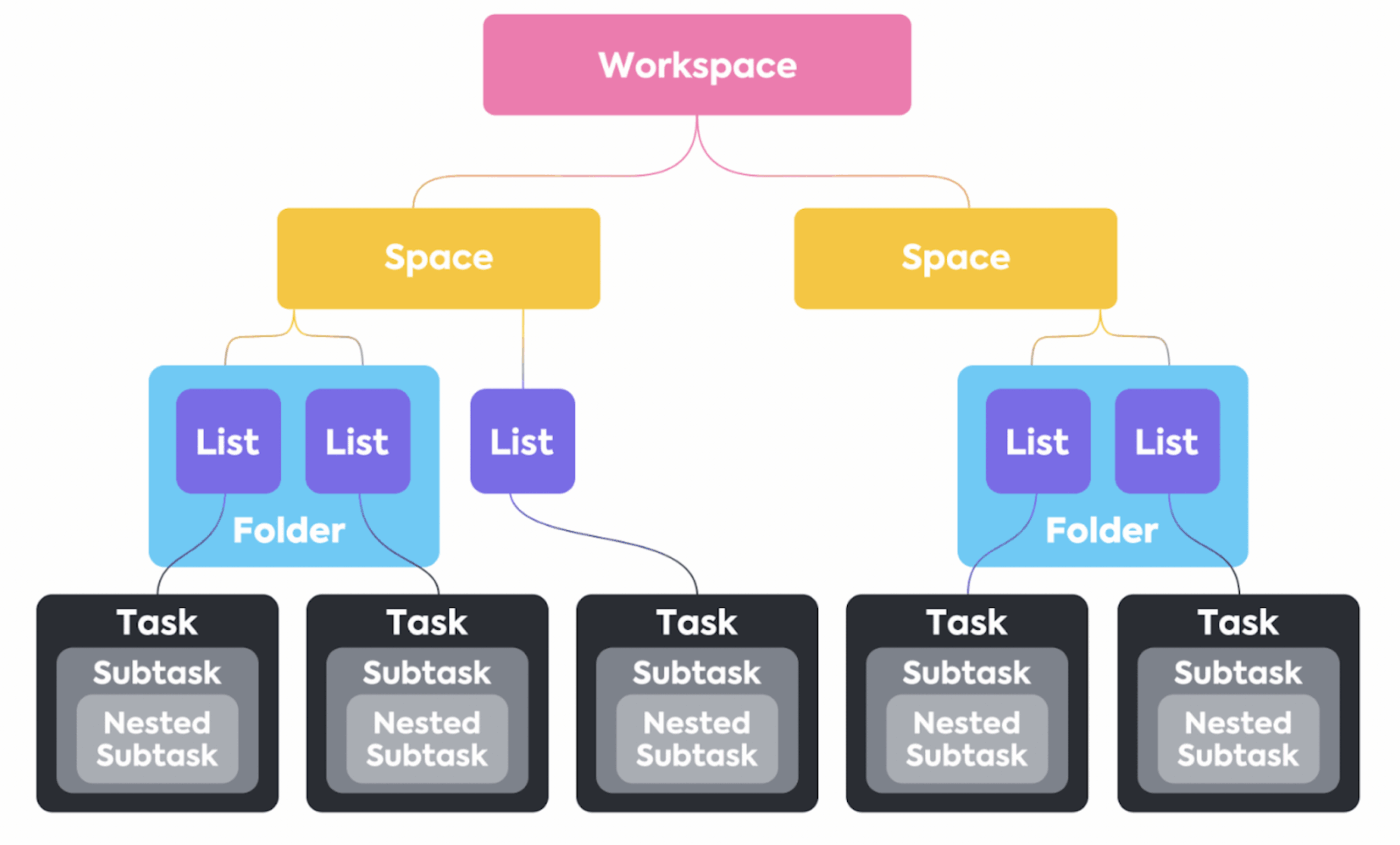
Build standardized workflows in ClickUp by creating a dedicated Space or Folder, then setting custom statuses (e.g., “Drafting,” “Review,” “Scheduled,” “Published”) for tasks at the List level to match specific media types
Create a baseline workflow for each content type with:
In ClickUp, production managers often separate pipelines using Spaces, Folders, or Lists, so video content, ads, and long-form work each have a consistent path while still living in one platform.
💡 Pro Tip: Set up a single media operations hub with ClickUp for Media.
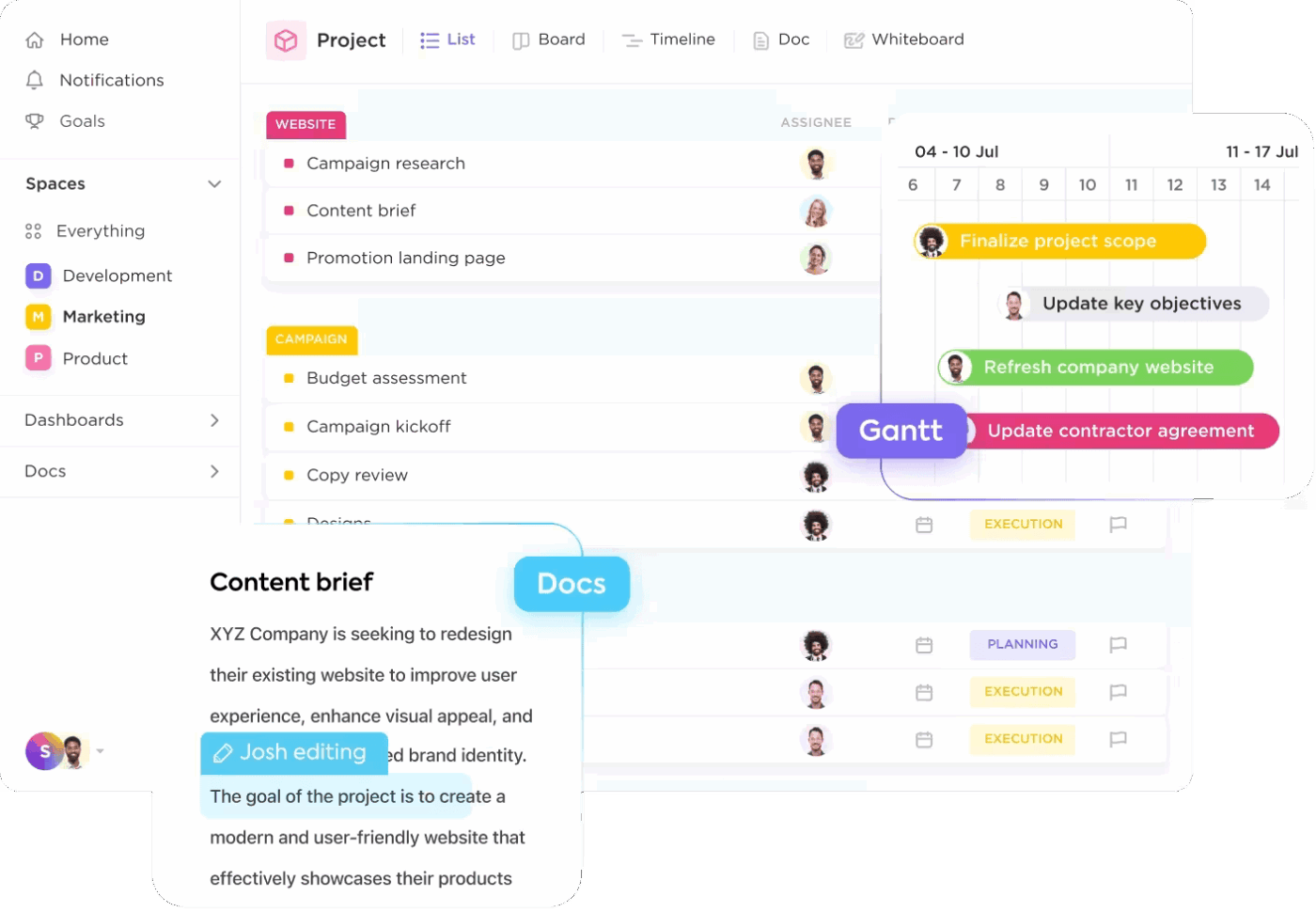
ClickUp’s media setup helps you manage and track campaigns in one place. With this, your workflow stays consistent across formats and stakeholders. You can visualize the same pipeline in multiple ways and keep performance reporting tied to production.
📖 Also Read: Blog Integration Tools
Most workflow delays come from unclear ownership. When nobody knows who owns “final approval” or who resolves conflicting feedback, work stalls and teams repeat edits.
Define roles for every stage, including:
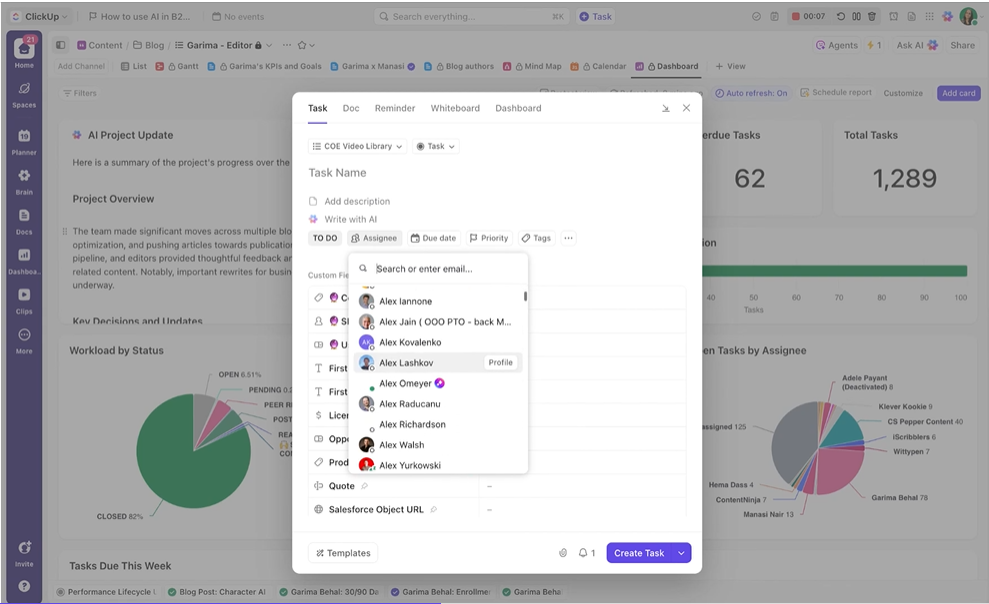
In ClickUp, you can assign task owners for overall responsibility and assign specific comments as actionable items.
📖 Also Read: How to Automate Processes with AI
When briefs vary too much, editors lose time chasing context, and producers spend cycles correcting avoidable gaps. This is where templates can keep intake consistent, which reduces rework later.
Build templates for:
ClickUp Templates can standardize how requests enter your workflow, while ClickUp Docs can hold scripts and working drafts that stay tied to the same project and its tasks. You can also turn one of your own commonly used workflows into a template for your team.
📖 Also Read: Workflow Automation Examples
Asset management is where workflow speed is won or lost. Multiple files scattered across drives and tools can lead to review delays and missed distribution windows, especially when you repurpose existing content.
Set up simple rules your whole team follows:
In ClickUp, files can live with the task that owns the deliverable, so editors and reviewers do not have to hunt across other tools to find the right attachment and the latest decision trail.
Pro Tip: With ClickUp Integrations and the benefits of Enterprise AI Search, you can pull in your work from any of your connected tools like Figma, Google Drive, and more!
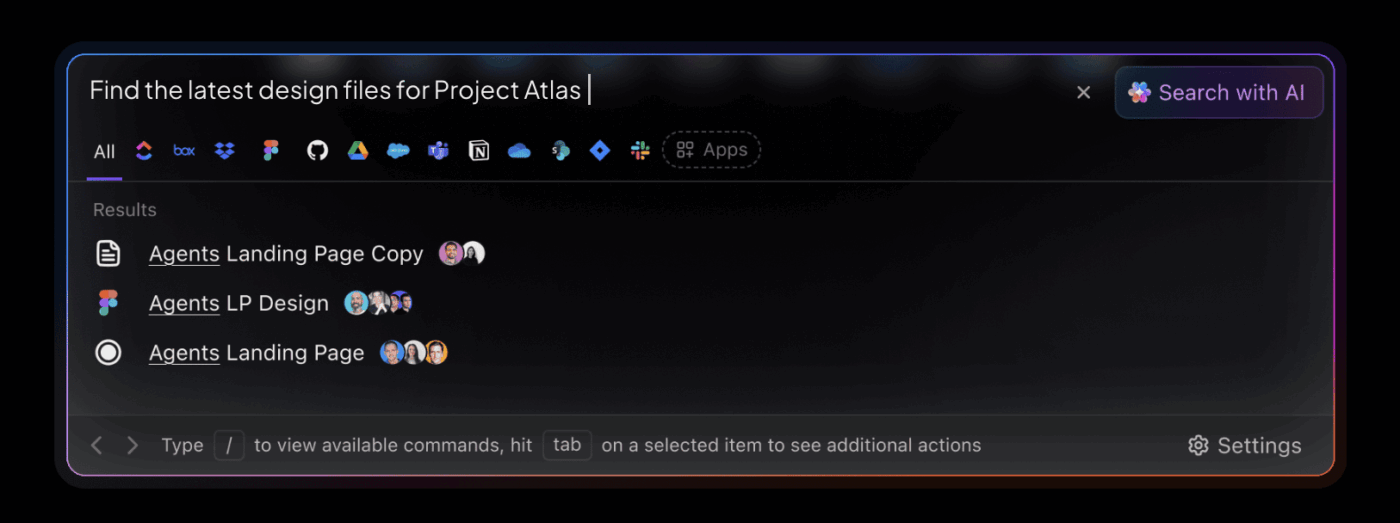
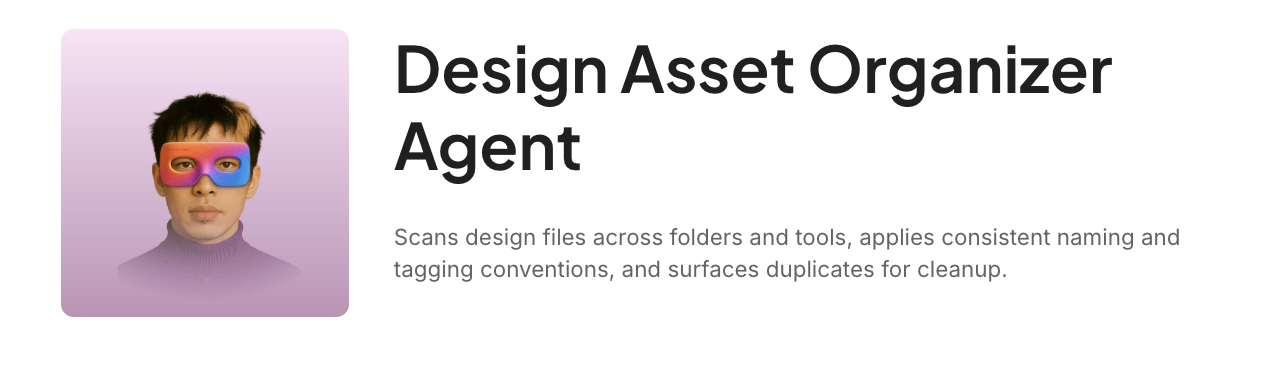
⭐️ Struggling to locate design assets across half a dozen platforms? Let the Design Asset Organizer Agent sort it for you.
Approvals are where high-volume workflows often slow down, especially when reviews happen across email threads, chat messages, and comments on different file copies.
Two moves make approvals run cleaner:
✅ Keep feedback attached to the asset and assign comments to the right owner
Review cycles break down when feedback lives in too many places. With ClickUp Proofing, reviewers can annotate supported images, PDFs, and videos directly on the task, so editors get clear, location-specific feedback without guesswork.
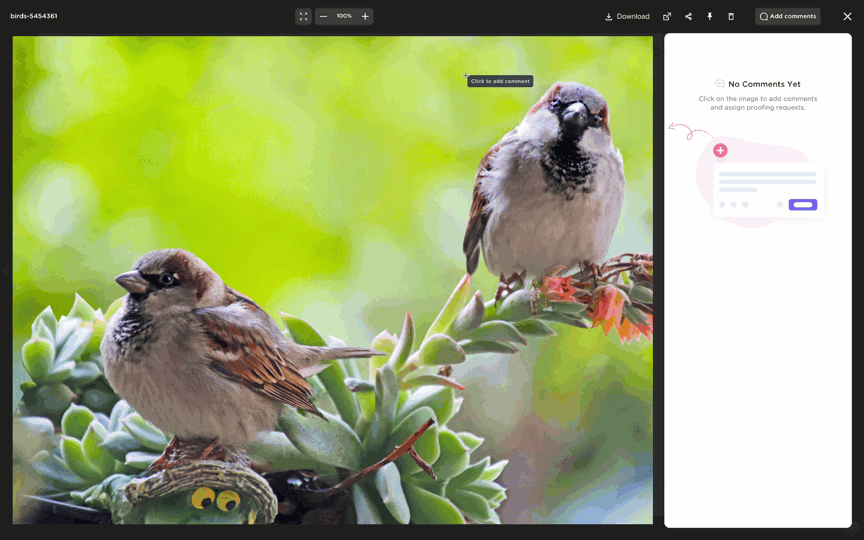
It supports assigning comments, so feedback becomes actionable.
ClickUp Proofing can help you:
✅ Automate handoffs so work moves when a status changes
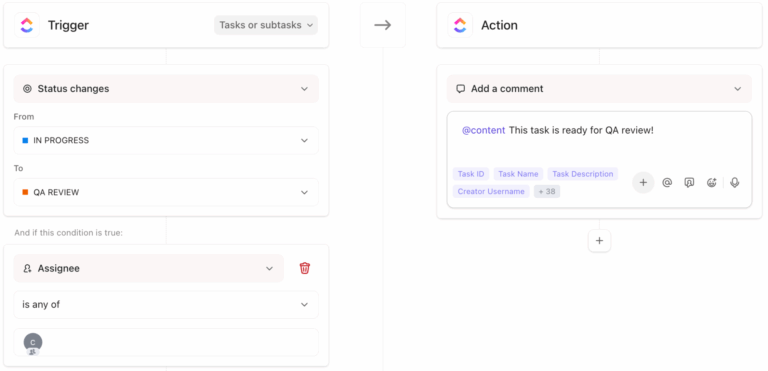
Most teams struggle with routing approvals and updating statuses, and a huge amount of production time gets absorbed by coordination. ClickUp Automations automate task-related work using triggers and actions, ensuring the workflow continues to move forward.
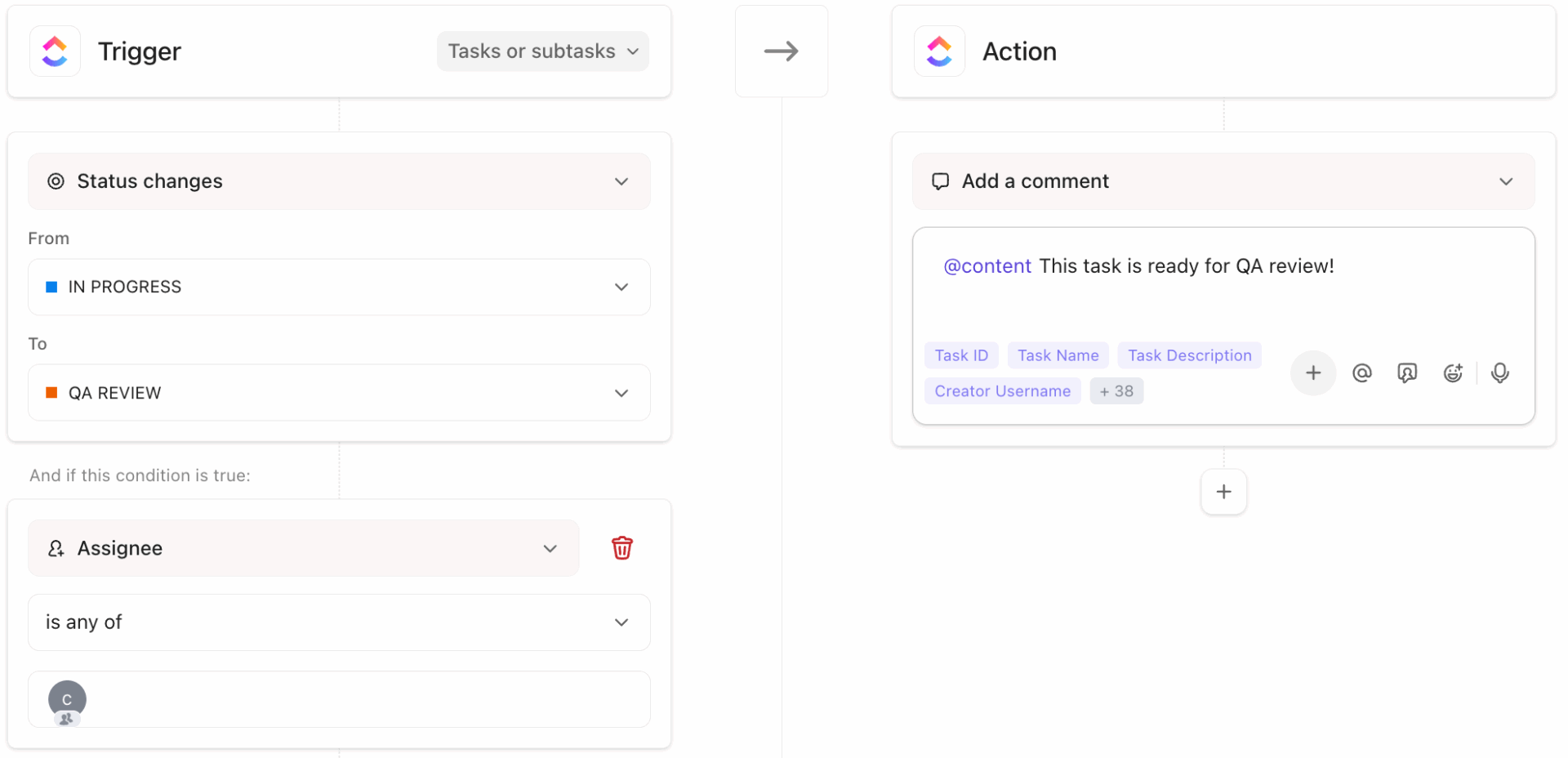
ClickUp also supports AI-driven automation actions (like generating updates or analysis into fields), which can help production managers stay informed without changing workflows.
With ClickUp Automations, you can:
💡 Pro Tip: Delegate repeatable work with ClickUp Super Agents
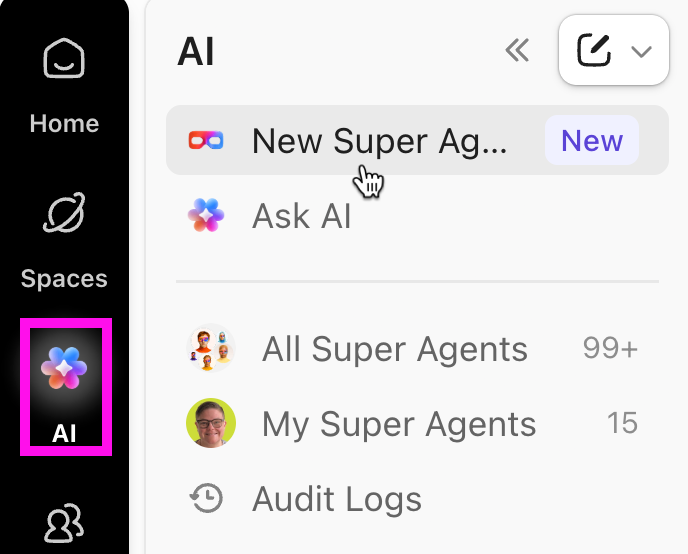
ClickUp Super Agents act like AI-powered teammates inside your workspace. You can trigger them in a few different ways, like @mentioning them in comments or chat, assigning them a task, scheduling them to run, or launching them through automations.
Here are some practical ways teams use Super Agents for media workflows:
📖 Also Read: Top Automation Software to Boost Productivity
Distribution is not “one final step.” Each platform has specs, timing constraints, tracking needs, and compliance requirements. Treat distribution as its own workflow stage with a checklist that travels with every deliverable.
Include channel checks like:
In ClickUp, you can attach distribution checklists to tasks so teams don’t have to rely on memory during tight deadlines.
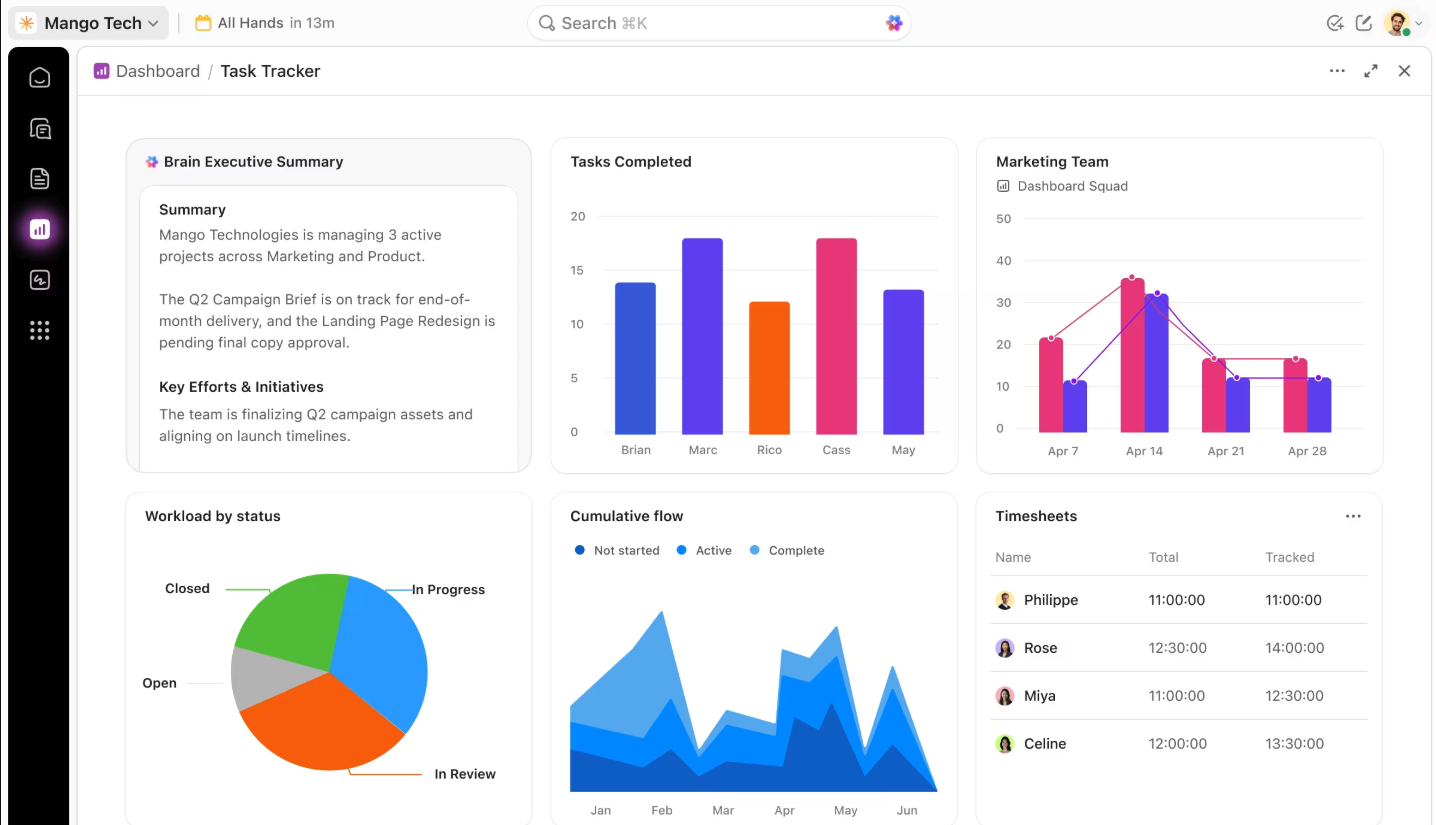
Media workflow management should help you make data-driven decisions, not just ship content. If analytics sits outside the system, teams repeat what feels familiar instead of what performs.
Track two categories of signals:
ClickUp Dashboards can bring progress, workload, and delivery visibility into one view so production managers can spot slowdowns and plan resources before deadlines hit. Then your next brief can reflect what the data showed, not what the team guessed.
Looking to create your own custom dashboards? Watch this quick setup guide video and learn how you can set up your ClickUp Dashboard:
📖 Also Read: Free Project Management Templates
When work details are scattered across chats and shared drives, teams lose time reconciling decisions and feedback.
McKinsey Global Institute found that improving communication and knowledge sharing can raise the productivity of interaction workers by 20% to 25%, which is exactly what a well-run workflow management system supports. Standardize intake so production starts with complete inputs
📌 Example: A client asks for “short video content,” but nobody confirms aspect ratio, CTA, brand requirements, or whether existing content can be reused, so the team re-edits twice under tight deadlines.
Use a consistent intake checklist for every request:
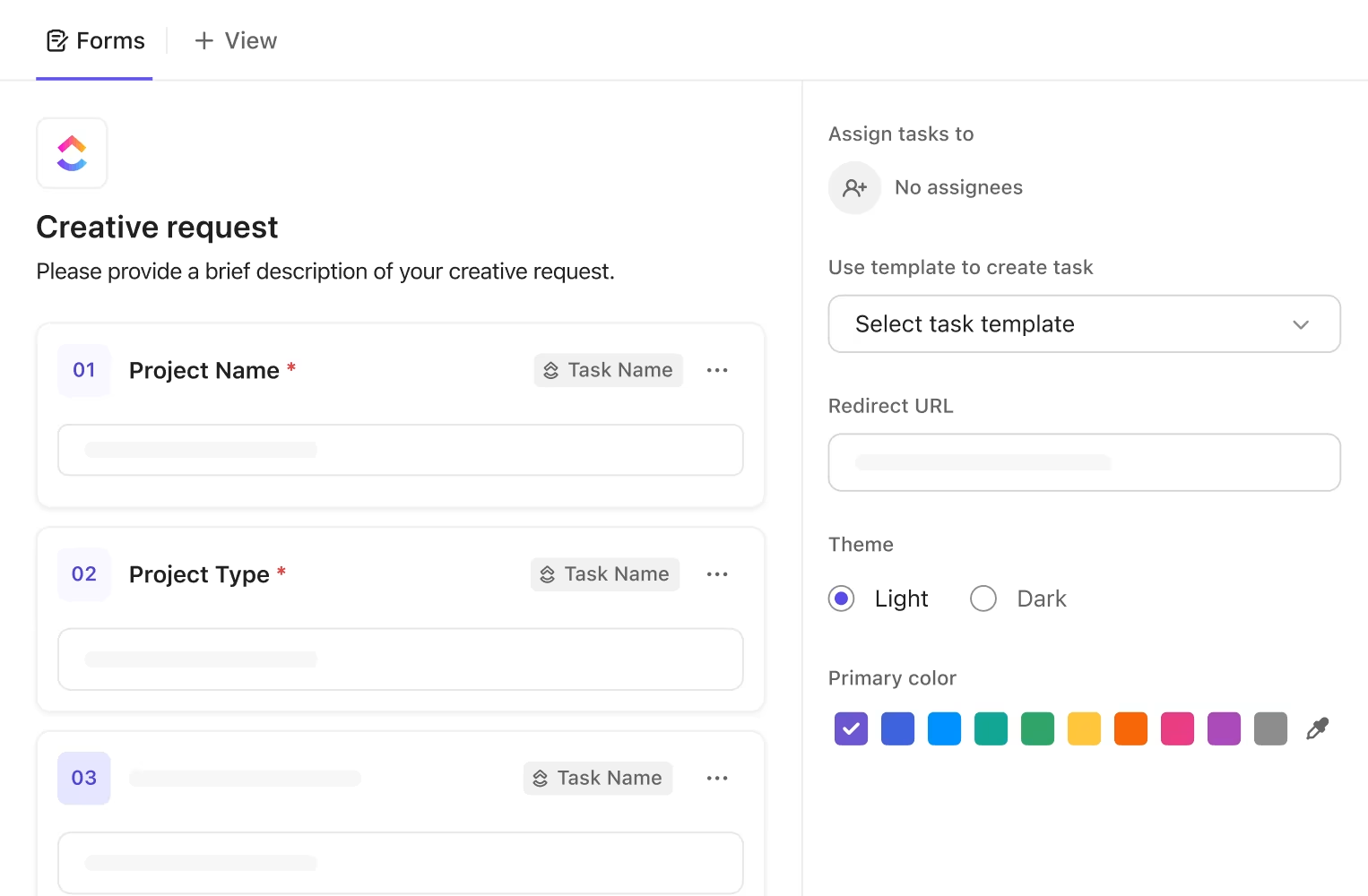
💡 Pro Tip: Standardize and automate your creative intake process using ClickUp Forms. You can customize them to your brand, add conditional logic, and set up automations to convert responses into tasks.
In the media landscape, metadata is not busywork. It is what keeps asset management searchable and safe to distribute. Rights and licensing checks also become faster when they are part of the workflow.
Here’s a practical approach you can follow:
📖 Also Read: Project Management Tools
Review cycles slow down when feedback lives in too many places: email threads, chat messages, comments on different file versions, and “quick notes” that never get captured as tasks.
A structured approval workflow is meant to define who approves what, in what order, including internal and external stakeholders.
📌 Example: A producer shares a new export, but a stakeholder reviews last week’s link, and the editor implements changes on the wrong cut.
Here’s a smoother review practice you can follow:
Creative teams collaborate best when decisions are clear. If everyone can comment but no one can decide, work stalls.
Define:
This matters most when multiple deliverables ship in parallel and teams collaborate across time zones.
⭐️ Automate task assignment and reminders with Super Agents in ClickUp!
Media workflow automation works best when it removes repetitive and routine tasks that don’t improve the creative output: reminders, assignments, status updates, and handoffs between stages. Keep judgment-heavy work (creative direction, final approvals, and brand calls) with people.
📌 Example: Every time a task moves to “Ready for review,” someone manually tags the reviewer, sends a message, and updates a tracker, then repeats the same manual work for the next stage.
Here are some common automation opportunities you can try out:
If you’re running high-volume production across remote teams and external stakeholders, the goal is to centralize work and reduce repetitive tasks. However, bottlenecks in your media workflow management system can reduce the efficiency of your processes.
Here are the most common of those bottlenecks, as well as ways you can overcome them.
Media workflow bottlenecks often start with incomplete briefs. Missing usage rights, unclear technical metadata, or no definition of “done” force editors to chase inputs under tight deadlines.
ClickUp Templates help you standardize how work enters your workflow, so each request starts with the same structure and expectations. Every request includes creative direction for your content production and deliverables, along with the review steps.
✅ This is how ClickUp Templates help:
Creative output stalls when the team lacks full visibility into the project’s status.
It often happens that teams collaborate less effectively because they’re using multiple tools where the information gets scattered.
ClickUp Lists give you a structured way to run workflows as pipelines. Each task moves through clear stages, and custom statuses reflect your real process (for example: “brief approved,” “editing,” “internal review,” “client review,” “scheduled,” “published”).
This structure matters most in complex workflows where multiple formats ship in parallel. Views allow teams to visualize the same process differently (List for production managers, Board for stage-based flow, Calendar for distribution), while keeping one source of truth for tasks, files, and progress.
✅ Here’s how ClickUp Lists can help:
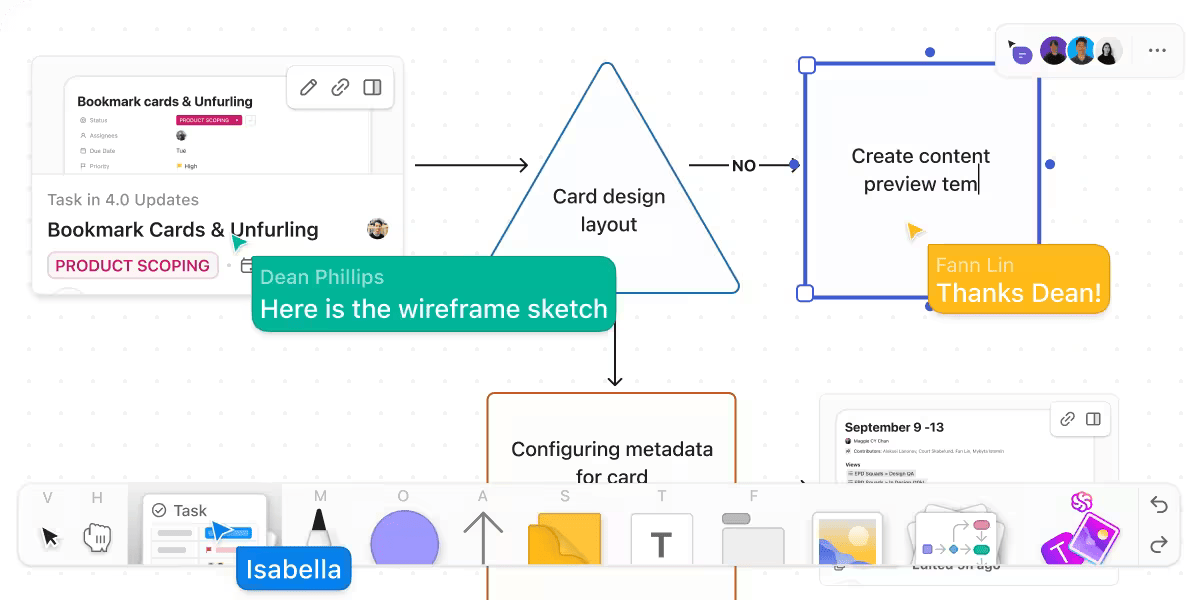
Teams often brainstorm in one place and execute in another. Somewhere in the handoff, the “approved direction” gets diluted, and you end up doing extra rounds of edits just to get back to what everyone originally agreed on.
ClickUp Whiteboards reduce that disconnect by letting you plan visually and directly convert Whiteboard items into tasks, while also embedding tasks and Docs on the canvas.
This ClickUp feature is especially useful when creative teams need careful planning across story arcs and releases. You can map a production process and convert notes into tasks while connecting dependencies (like “final script” before “voiceover record”).
✅ This is how ClickUp Whiteboards can help your project:
📖 Also Read: Best Marketing Automation Software
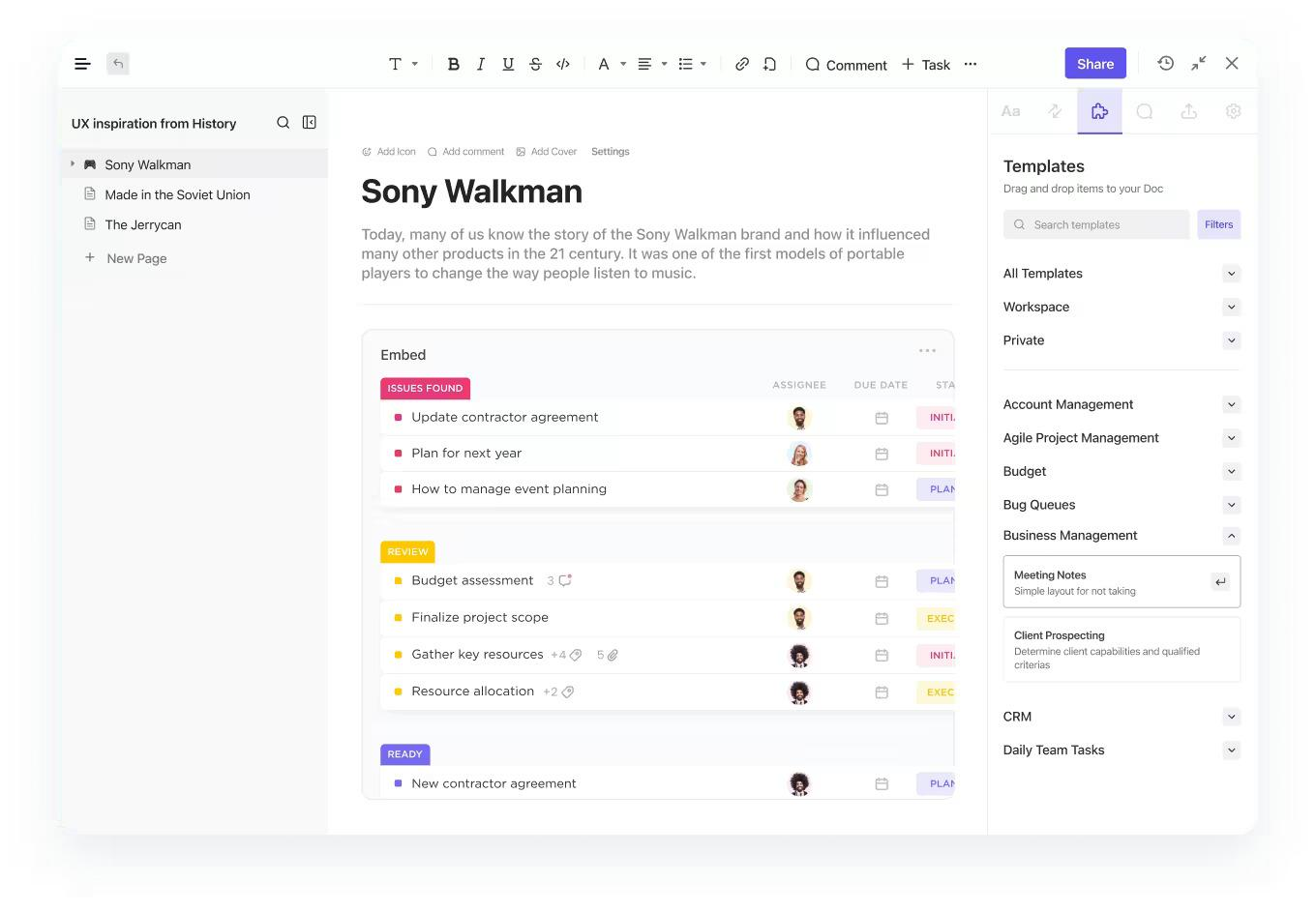
Scripts and specs change fast. If they live in scattered files, it’s easy for someone to review an older draft or for an editor to build against outdated guidance pulled from existing content.
ClickUp Docs keeps scripts and production notes closer to the work. It also supports turning highlighted comment text into tasks, plus assigning comments so decisions become trackable action items.
This is useful when reviewers leave feedback that should become structured work rather than loose notes.
✅ ClickUp Docs helps you:
💡 Pro Tip: Keep scripts and specs searchable with ClickUp’s Docs Hub.
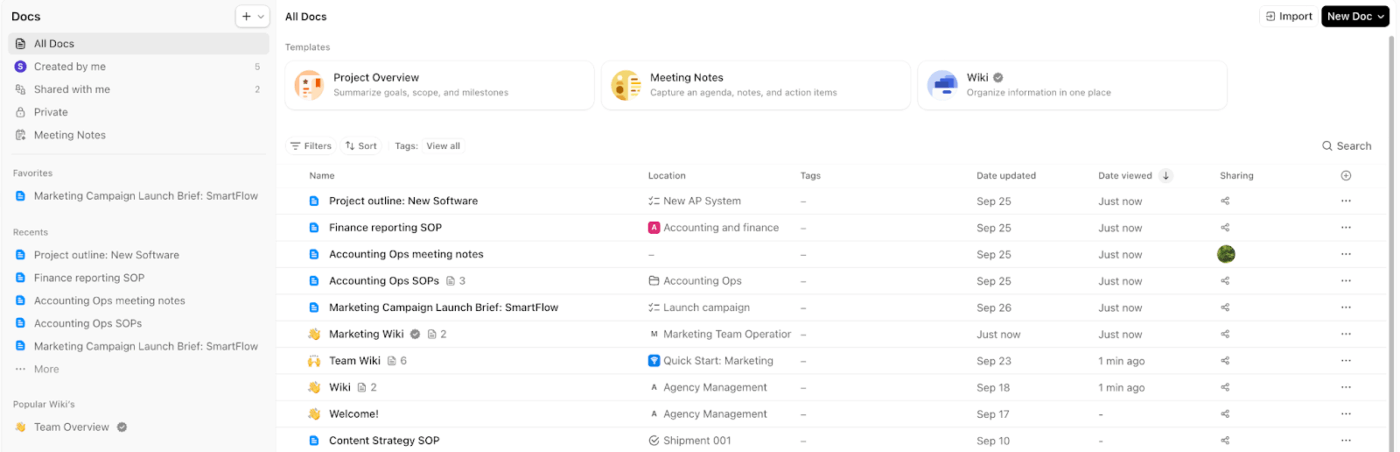
When scripts, shot lists, and brand notes live in scattered files, editors end up working from outdated guidance. Docs Hub gives your team a central place to organize and create Docs and wikis, including access for guests to what’s shared with them.
Here’s how you can utilize ClickUp’s Docs Hub:
📖 Also Read: Best Productivity Tools
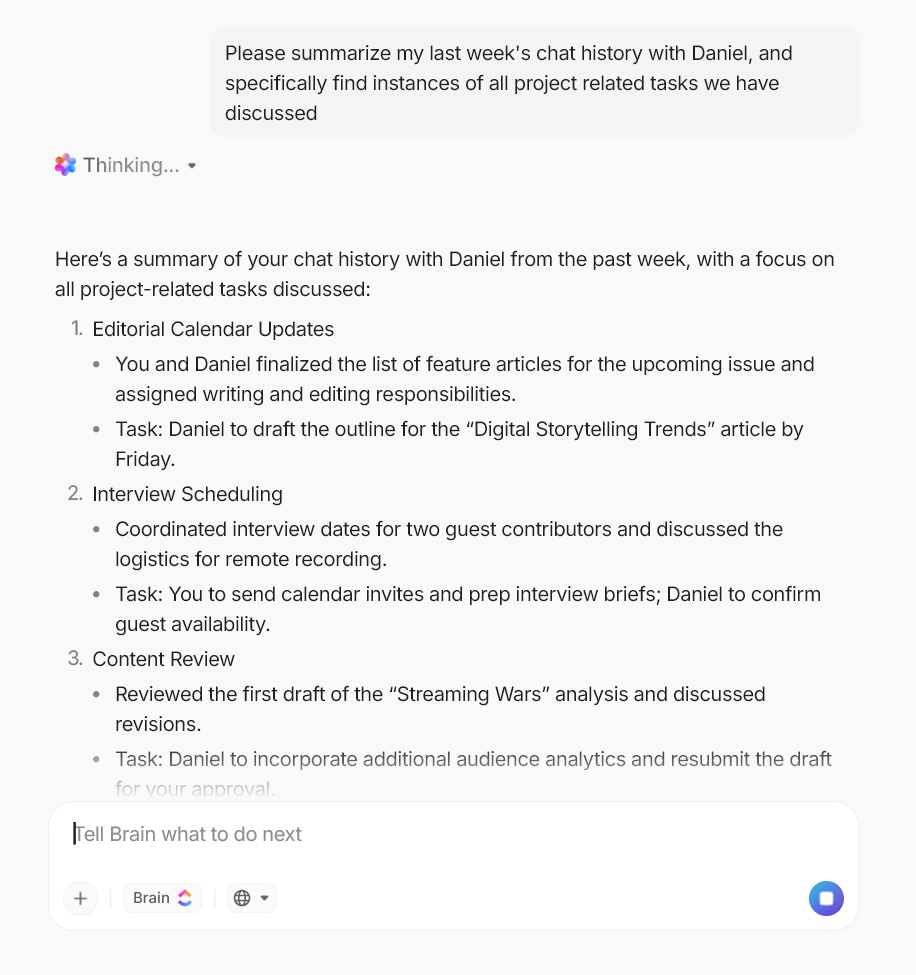
In a high-volume media workflow, delays often come from missing context. Someone needs the latest approved brief, while someone else needs clarity on what changed since the last review. If that information is buried across tools and threads, teams spend time searching instead of moving work forward.
ClickUp Brain acts as a contextual AI layer across your workspace, where it can answer questions and summarize work that matters using the structure of your tasks. For teams, it also helps reduce AI sprawl by keeping AI use inside a single platform with unified permissions and security controls.
✅ This is how ClickUp Brain can help:
💡 Pro Tip: Speed up reviews with ClickUp Brain MAX.
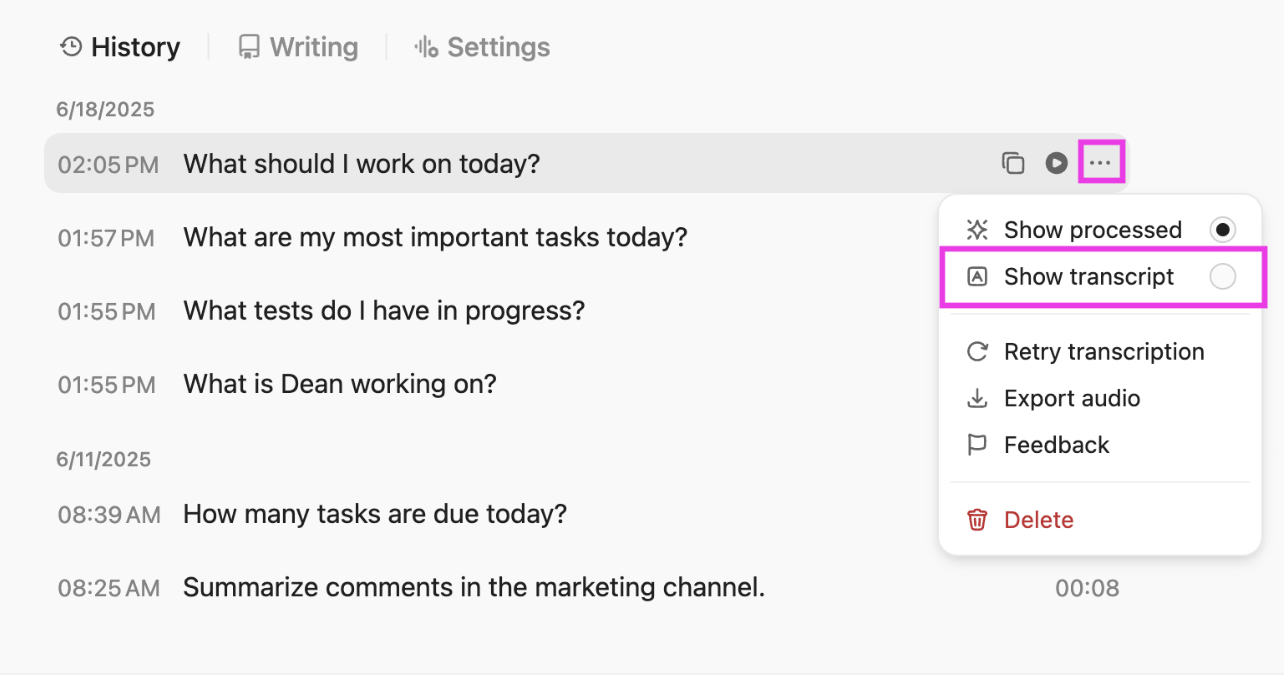
In high-volume production, delays often come from slow context retrieval. ClickUp Brain MAX, with its host of AI features, helps improve your team’s productivity and ensures you always have access to the latest information.
Here’s a quick overview of how ClickUp Brain MAX can help:
High-volume production breaks when briefs, files, feedback, and approvals are scattered across too many places. This creates delays and rework across planning and production.
If you want to run the full workflow on a single platform, ClickUp is built for that operating model. ClickUp for Media Teams supports customizable workflows for media management in one place, while ClickUp Proofing keeps feedback attached to the right file, so editors spend less time decoding comments across tools.
Add in ClickUp Brain, and you get an AI layer across your entire workspace to pull context from tasks and docs when you need answers fast.
If you’re ready to bring planning and performance tracking into one workflow, sign up for ClickUp for free ✅.
Media workflow management is how you run a media workflow from intake to reporting using a clear process for sequencing tasks, managing files, controlling versioning, routing review cycles, and coordinating distribution.
It turns scattered manual processes into a repeatable system that supports high-volume production without losing context.
Media workflows help creative teams scale by making repeatable work predictable. When stages, ownership, and approvals are consistent, teams spend less time on administrative tasks (status chasing, link hunting, and re-explaining context) and more time on creative work. It also makes it easier to spot bottlenecks early and improve throughput over time.
Most teams use a mix of media workflow management tools: a workflow management platform for tasks, handoffs, and approvals, plus a digital asset management (DAM) system for organizing and distributing files at scale.
Teams can also use a converged AI workspace like ClickUp to handle their entire media workflow management and stay updated.
Media workflow automation works best when you target routine coordination. Use automated workflows to assign the next reviewer, notify stakeholders, update statuses, and apply checklists when a task hits a new stage.
Many workflow automation systems run on triggers and actions, so the workflow moves forward automatically when something changes.
Digital asset management is primarily about the library, about how you organize and distribute files. Media workflow management is about the process around those files: how work gets created, edited, reviewed, approved, published, and measured. In practice, many teams use both together.

© 2026 ClickUp

There’s an easier way. Try a free AI Agent in ClickUp that actually does the work for you—set up in minutes, save hours every week.