

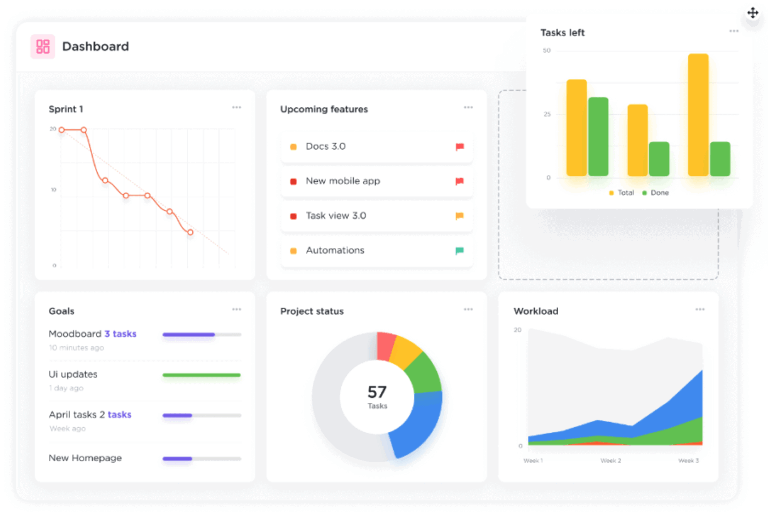

Sorry, there were no results found for “”
Sorry, there were no results found for “”
Sorry, there were no results found for “”
One of the first lessons entrepreneurs pick up in business school is that competition isn’t the enemy. Surprising, right?
Sure, your main competitors can feel like a pain sometimes, but competition keeps us on our toes. It forces us to constantly compare data, refine our products and marketing strategy, and—bonus—it can even lead to a better deal for customers.
Most importantly, though, a lack of competition might just mean there are no customers to fight over in the first place.
This obsession with specific competitors is necessary to become a successful business.
Fortunately, there’s an efficient way to do it that won’t keep you up at night: monitoring tools that review sites and a competitor dashboard.
In this article, we will explore how you can create a competitor dashboard and cover some best practices for using them effectively.
A competitor dashboard is a dynamic, real-time document that tracks all the details, insights, and key metrics about your competitors.
When you’ve got a well-maintained competitor dashboard, your entire company gets a front-row seat to the action outside. An effective competitor dashboard helps you react faster to market events, stay competitive in your space, and make smarter business decisions.
A good competitor dashboard doesn’t just dump data on you; it gives you visuals. Graphs, charts, and data maps provide quick, digestible insights so teams can make informed decisions without digging through pages of data.
Here are the essential components of a winning competitor dashboard.
The heart of any dashboard is a detailed profile for each key competitor. We’re talking about everything from company history to product breakdowns and revenue estimates. Think of it as a dossier on your top industry rivals—ready whenever you need to get inside their strategic minds.
This section gives you a clear, real-time view of how competitors are positioning themselves. Are they targeting specific industries? Focusing on customer experience? Highlighting “best-in-class” features? Having this information at a glance helps you spot gaps or overlaps and adjust your messaging to stand out.
Side-by-side product and feature comparisons let you easily track who’s offering what. With this, your teams can see where you’re leading, where you’re lagging, and where the market could be headed next.
Keeping tabs on competitors’ pricing and promotions means you’re not caught off guard by sudden discount campaigns or pricing shifts. This component helps both marketing and sales stay competitive, adjusting their pitches and campaigns.
Get a pulse on what customers really think—of you and your competitors. This analysis gathers feedback from reviews, social media, and forums, showing you what’s resonating with customers and what’s raising eyebrows, so you can stay in tune with market expectations.
This classic breakdown (Strengths, Weaknesses, Opportunities, Threats) for each competitor makes it easy to see their weak spots and untapped areas for potential growth. A well-updated SWOT analysis is an instant action plan for Sales and Product to exploit any vulnerability. If you’re struggling to get started and bring structure to your analysis, try kicking things off with SWOT analysis templates.
Track competitors’ key performance indicators (KPIs)—such as web traffic, social engagement, and brand mentions. It’s like keeping a scoreboard in the background so you know exactly where you stand in the market!
Knowing why you’re winning (or losing) against a competitor is crucial intel. This component allows Sales to track competitive wins and losses, revealing which pitches, features, or objections have been deal-breakers and which have sealed the deal.
📌 In addition to these basics, it’s also good to have an ongoing feed of news articles, press releases, and industry developments around your competitors attached to your dashboard, so you’re always up to date on their antics and tactics.
Chances are, every team in your company is already doing some level of competitor research.
But here’s the kicker—without a centralized competitor dashboard, all that important insight stays locked away in silos, with teams often duplicating the same work.
A well-designed dashboard gives teams immediate visibility into new developments, product launches, or shifts in competitor strategies. This agility helps you stay one step ahead.
Marketing, Sales, Product, and the execs all finally get on the same page—literally.
Here’s a detailed list of reasons why you should go to the trouble of building a competitor dashboard:
In short, a competitor analysis dashboard doesn’t just store data; it’s the tactical playbook every team needs. It keeps everyone aligned, focused, and nimble—like a secret weapon no competitor saw coming.
Creating a competitor dashboard in ClickUp is an added advantage for your business.
ClickUp is an all-in-one productivity platform designed to centralize your work. With features for task management, real-time collaboration, and custom dashboards, it enables teams to build a seamless, shareable competitor analysis hub that’s accessible and adaptable for everyone.
Here’s a step-by-step guide to setting up a dashboard that gives you the upper hand.

Start by creating/logging into your ClickUp account and setting up a dedicated Space in for your competitor dashboard.
This area will be your data haven, where you’ll consolidate all the intel on your competitors.
Think of ClickUp Spaces as your headquarters for competitive analysis.
With ClickUp, you can add Custom Fields to your dashboard to track key metrics like market share, customer sentiment, and sales figures.
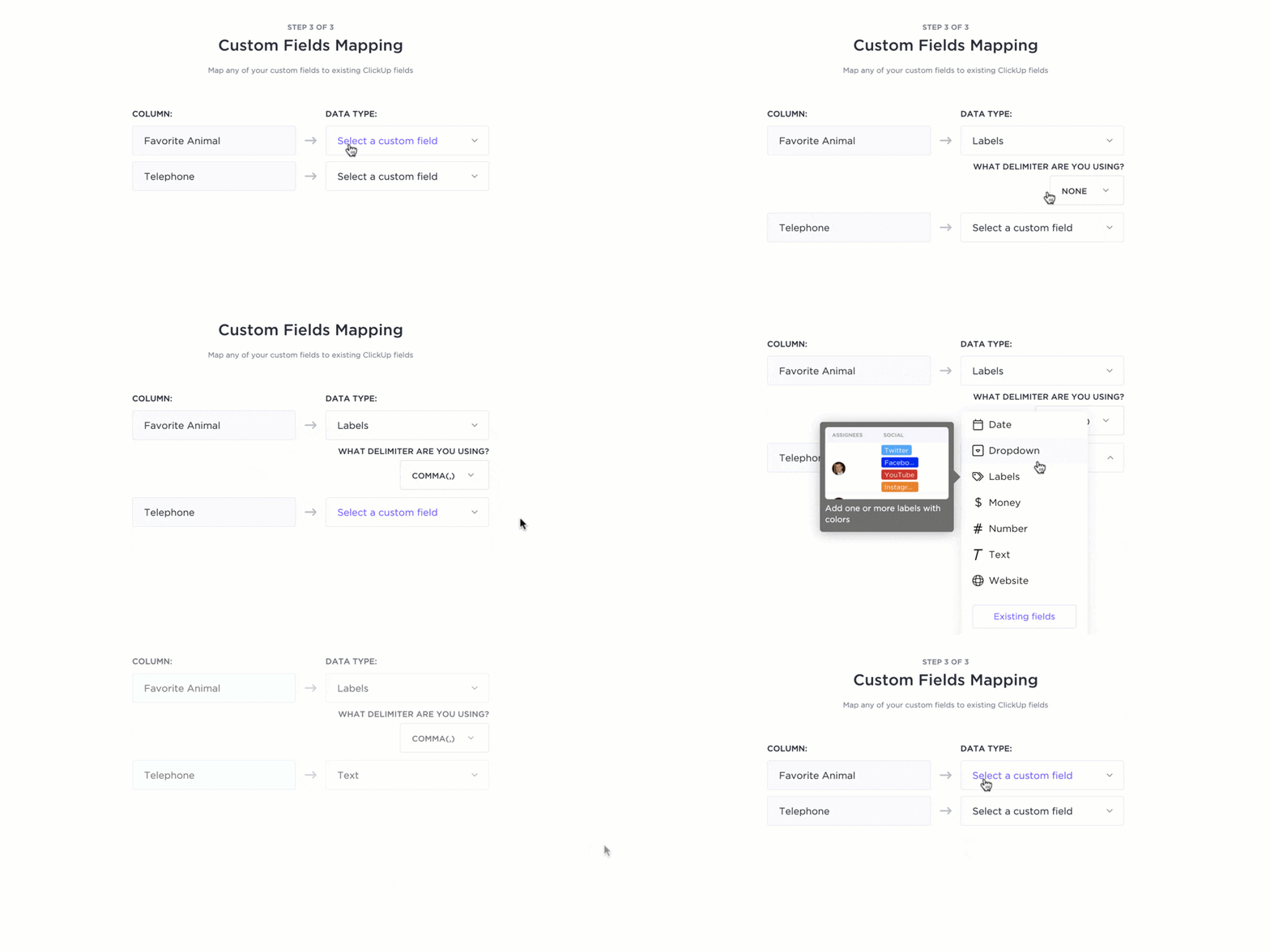
By using ClickUp Custom Fields, you can tailor these fields specifically to track top competitors or analyze competitive strategies, which helps you stay relevant and focused.
💡 Pro Tip: Use ClickUp’s Gantt Charts to visualize timelines and dependencies for competitor analysis projects. They’re perfect for staying on track and spotting gaps in your competitive intelligence strategy.
Now, for the fun part—data visualization!
ClickUp Dashboards lets you track KPIs, view competitive analysis dashboards, and make sense of it all with graphs, scorecards, and progress bars.
Want to monitor the performance of top-performing keywords or track changes in market trends? Dashboards have got you covered with real-time industry and consumer insights that look as cool as they are informative.

Say goodbye to manual updates!
ClickUp’s integrations with tools like Google Analytics and HubSpot (plus hundreds more through Zapier) allow automatic data collection. This keeps your competitor dashboard automatically updated without you lifting a finger.
Now, you can spend more time strategizing and less time refreshing spreadsheets.

For collaboration with your team, ClickUp Docs and ClickUp Whiteboards are lifesavers.

ClickUp Docs provides a centralized hub for all your research, competitor profiles, and strategies. You can add comments, share them with the team, and even integrate directly with tasks in ClickUp.
Meanwhile, ClickUp Whiteboards lets you brainstorm and analyze insights with mind maps, sticky notes, drawing tools, and highlighters. Use them to conduct virtual whiteboard sessions, minus the squeaky markers.

For instance, your marketing team can use ClickUp Whiteboards to brainstorm how to differentiate your product from a top competitor. They can map out strategies and connect ideas with sticky notes. They can also link ClickUp Tasks and Docs to Whiteboards to assign and track action items.
Do you know what this means? Collaboration in real-time with visuals that help them strategize more effectively.
Also Read: How to Create a Product Management Dashboard
With ClickUp, you can schedule regular reviews of your competitor dashboard. This keeps you from missing crucial updates.
This consistency will help you act quickly when a competitor launches something new.
Regular reviews are your secret to keeping the competitive analysis dashboard relevant and actionable.
💡 Pro Tip: Use ClickUp Brain for automated progress reports. The AI assistant can scan through your data and deliver insights, so you don’t have to dig around for them. Just ask ClickUp Brain a question in natural language, and it’ll give you the answers in seconds.
ClickUp’s Competitive Analysis Template has got you covered when it comes to competitor analysis.
It offers an interactive Whiteboard where you can freely add, tweak, and position your insights.
Each quadrant reveals how different elements measure up based on your set metrics, with a handy legend to keep you on track.
With this template, you can identify competitor strengths and weaknesses, understand the industry landscape, and craft strategies to stay one step ahead—whether you’re rolling out a new product or expanding an existing one.
56% of executives use competitive intelligence to monitor their potential competitors and strategize for conquering new markets within the next three years.
Which means you’re not the only one working on a competitor dashboard.
So, how do you ensure it is as effective as possible? Here are a few tips.
Building a competitor dashboard doesn’t need to be intimidating.
Focus on the essentials first: pick a few crucial metrics tailored to your team’s needs and grow from there. Quality and consistency are the name of the game here.
It’s easy to want to monitor every competitor, but unless you have an army of researchers, that’s a tall order. The 80/20 rule works wonders.
Set a regular schedule for dashboard updates and reviews.
This keeps your data fresh and helps your team make informed decisions. Sync these reviews with key strategy meetings for even more impact.
Automate data collection with tools like web scrapers and social media monitors. Visuals—like charts, graphs, and heat maps—can reveal trends at a glance.
You can even use AI tools for competitor analysis to handle large data sets with much greater accuracy and speed than humans can manage.
Compare what your competitors offer with what your users need.
Monitor social media traction and reviews to gauge how consumers feel about competitors’ moves and make informed adjustments based on real user sentiment.
Regularly run “what-if” scenarios to anticipate competitors’ actions.
Stay nimble by building flexibility into your roadmap—whether it’s for a competitor launching a hot new feature or making an unexpected acquisition.
Refine your metrics regularly based on what’s truly valuable.
Gather feedback from your team on how competitor insights are shaping their work, and hold retrospectives to learn from past decisions.
When that competitor released their flashy analytics dashboard, did you choose the right path in response?
Also Read: 11 Best Reporting Tools & Software
It’s easy to get caught up in competitors’ moves, but don’t let that derail your vision.
You don’t need to respond to every change—sometimes, it’s best to see how the market reacts before you change your roadmap.
Ready to see some competitor dashboard templates in action?
These examples will show you how ClickUp can help you gather insights, monitor the competition, and build effective strategies.
Staying on top of competitors’ pricing is key to maintaining a competitive edge.
ClickUp’s Competitive Analysis Pricing Template lets you gather and analyze competitor pricing data, compare different pricing strategies, and identify customer segments to target with customized offers.
The template provides a clear snapshot of competitors’ pricing structures, offers insights into potential pricing advantages, and helps refine your own pricing strategy based on market insights.
Want to know where your product stands in the market?
ClickUp’s Market Analysis Template equips you with matrices and various views to visualize market trends and competitor performance, making it easier to plan your next move.
This template helps identify key market trends and customer behaviors, offers an in-depth view of the competitive landscape, and aids in gauging market size and growth opportunities for better decision-making.
Outrank the competition with ClickUp’s SEO Competitor Analysis Template.
This tool lets you analyze your competitors’ SEO tactics, spot opportunities, and track your progress, giving you the insights needed to boost your SEO game.
The template reveals which keywords competitors are targeting and their content strategies. It highlights areas where you can improve your SEO to outperform rivals and monitors shifts in competitors’ SEO performance so you can adjust your strategy as needed.
We started with one lesson, so let’s wrap up with another, shall we?
Only a fool learns from his own mistakes. The wise man learns from the mistakes of others.
Competitor analysis has become one of the most crucial tools in the 21st-century business toolkit.
When the stakes are high, your competitors might become your greatest teachers, and you can’t afford to miss their next move.
With ClickUp, you get the whole package: customizable dashboards, insightful analytics, and collaborative tools like ClickUp Docs and Whiteboards to keep your team in sync. It’s all you need to stay one step ahead of your competitors.
Ready to give it a shot? Sign up on ClickUp for free today!

Manasi Nair
Max 44min read
Manasi Nair
Max 18min read
Manasi Nair
Max 20min read

© 2026 ClickUp





