


According to research, a typical employee spends 2.6 hours daily managing emails alone, and 40% of employees don’t even track this time. This oversight can lead to a staggering loss for businesses that bill clients based on time entry.
It’s always worth asking—how much of total work time is productive? What’s the ideal balance of billable and non-billable hours?
Time tracking is helpful in answering these questions.
A basic time-tracking app helps you understand the true costs of your business operations and gives executives, managers, and employees valuable data. By analyzing this data, leaders can gain important insights into how efficiently their operations are running.
Whether you’re a project manager or a business owner, using a time-tracking app is essential for:
- Staying organized and on top of projects
- Making data-driven decisions to optimize resources
- Improving employee performance
- Identifying hidden costs and maximizing profits
In this guide, we’ll explore the benefits of a time tracker, how to implement it effectively, and how it can transform your organization.
How to Optimize Efficiency with Time Tracking Reporting

 Summarize this article for me please
What Is a Time Tracking Report?
A time tracking report, or timesheet, evaluates how much time is spent on various components of a project, during a specified length of time. It can also compare the actual time spent to prior projections and estimates.
Thus, a time-tracking report empowers you to make data-driven decisions, optimize how your team spends their time, and ensure projects stay on track. Its purpose is to make the best use of time without constant interruptions for progress updates.
Project time reporting can bridge the gap between the ideal project estimate and the challenges of real-world execution. It is especially valuable for forecasting resources, managing them effectively, and setting realistic deadlines.
Time-tracking reports are also indispensable for client billing. Time tracking data ensures that every hour worked is accounted for, which not only prevents revenue leakage but also helps you bill clients accurately.
Also Read: The 10 Best Time Tracking Software 2024
Summarize this article for me pleaseHow to Use Time Tracking Software to Track Time Effectively
Time tracking can often feel like a chore. Employees may dislike the extra work of manually filling out a time tracker and the supervision implied by monitoring their activities. That said, managers are expected to ensure accurate and timely submissions to their clients and leadership, too.
For many businesses, time-tracking reports are essential. Accurate time data provides valuable insights, whether billing clients by the hour or analyzing team productivity. The key is to choose efficient methods and tools that minimize effort while delivering the necessary information.
ClickUp for Time Management offers a robust set of features to make time tracking effortless and an integral part of your project management process.
Let’s explore how these features can help you optimize project time management.
💡Pro Tip: Make sure to get prior consent from your employees about time tracking. It is helpful to inform them that this is purely to measure time spent on tasks. This will help build trust among your employees and not be seen as an intrusive exercise.
Enabling time tracking and task logins in ClickUp
The first step is to enable the time tracker within your workspace. Once activated, your team can start logging hours directly in ClickUp and track hours without disrupting their workflow.
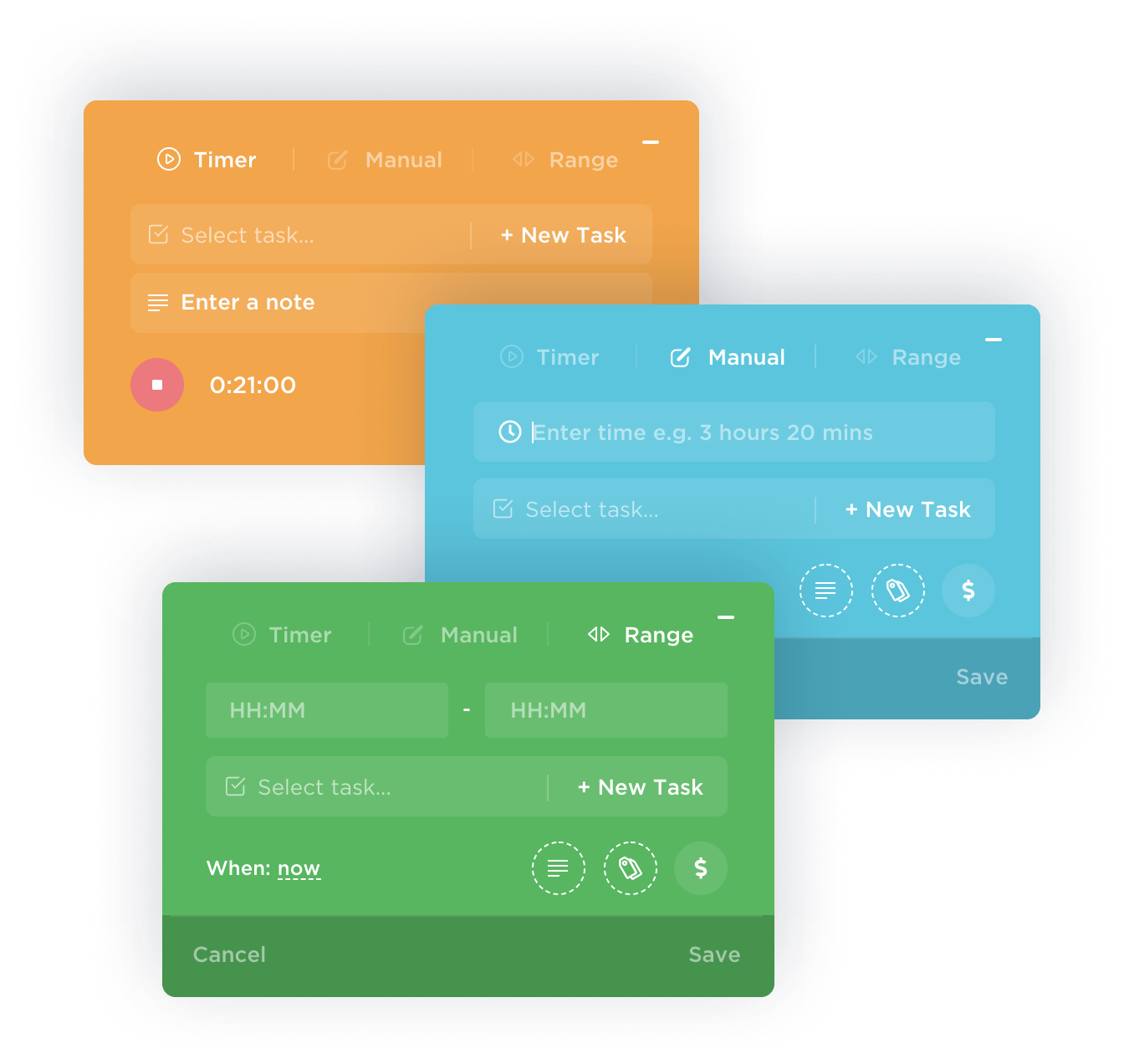
Tracking time in ClickUp is easy. When starting a task, simply click the timer. ClickUp will record your time. When finished, stop the timer to log your hours.
For tasks that don’t fit the timer (like meetings or research), you can manually log your time. This ensures every minute of work is captured for accurate reporting.
Automated Timesheets
Automated timesheets can be a time-saver for teams that handle a high volume of tasks or have complex reporting needs.
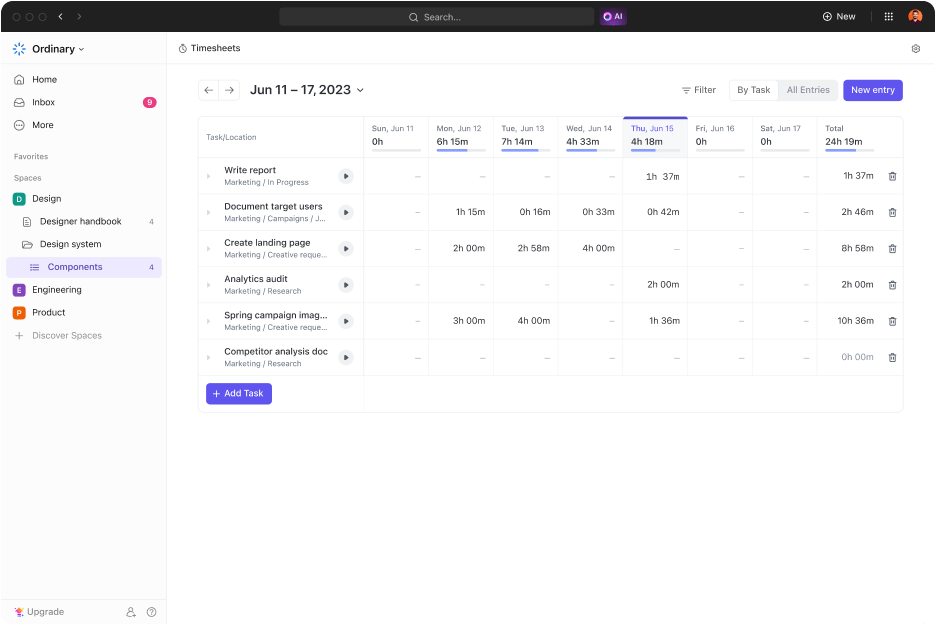
It reduces errors and creates accurate, easy-to-view reports. It also compiles time logs into accurate records of work hours. This frees up time for team members and managers.
Teams can focus on their work, while managers can see project progress and team workload in real-time.
Integrating with Google Calendar
🧠 Did You Know: Nearly 21% of employees don’t track their time spent in meetings, costing businesses an average of $32,000 per year per employee in lost revenue.
To make this effortless, ClickUp seamlessly integrates with Google Calendar, ensuring that updates made in one app are instantly reflected in the other. This eliminates the need to switch back and forth.
ClickUp Project Time Tracking
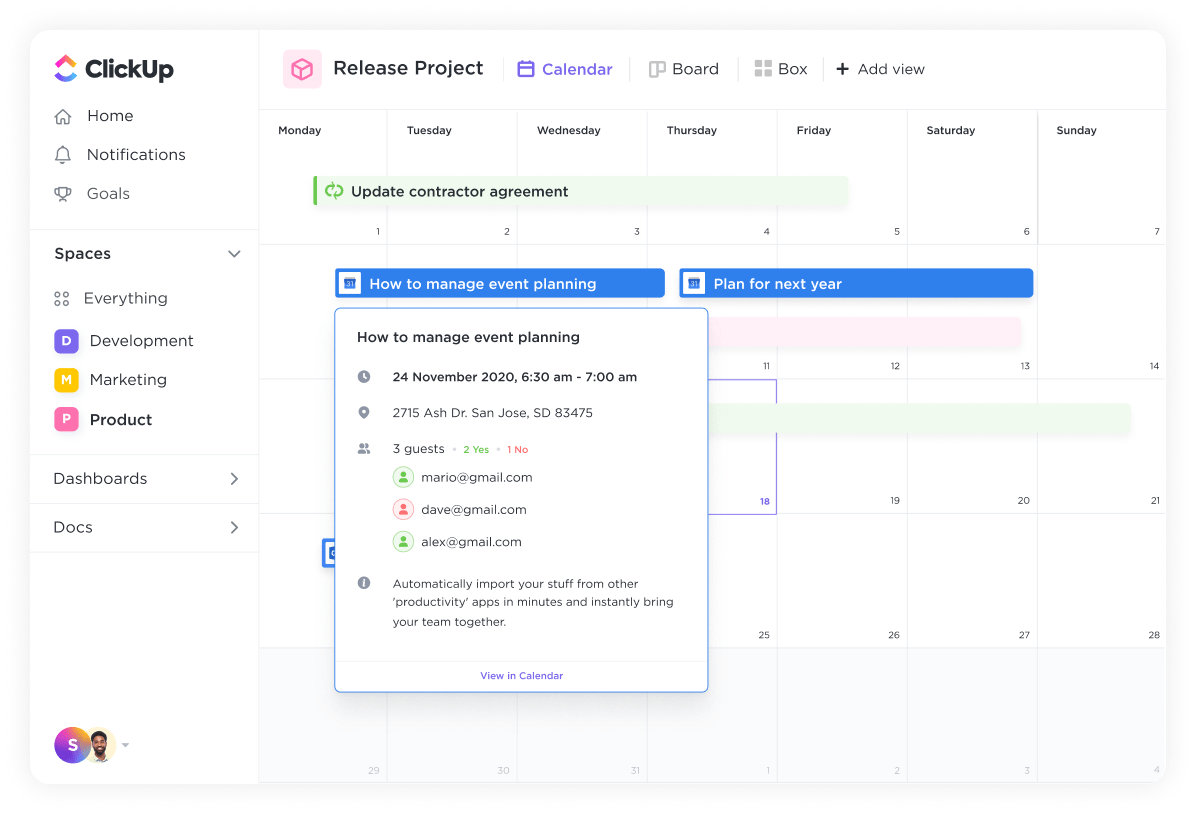
- Creating Tasks from calendar events: With ClickUp’s Project Time Tracking, teams can create ClickUp tasks directly from Google Calendar events. This means that every appointment or meeting becomes a trackable task in ClickUp
- Leveraging automations for reminders: Automate reminders for upcoming events and never miss an important meeting or deadline. ClickUp will send notifications directly to your workspace, keeping you organized and on top of your schedule
- Transforming events into actionable tasks: When you schedule a meeting, ClickUp will automatically create a task with all the relevant details, allowing you to add more information like agendas, assignees, checklists, and more. This centralizes your events and tasks, making it easier to track time without switching between tools
Generating custom reports
One of the most powerful aspects of ClickUp’s time-tracking feature is its ability to generate custom reports.
With custom reports, you can view cumulative time tracking logs for each team member to understand the time spent on a selection of tasks.
ClickUp allows you to customize reports based on various metrics, such as time tracked by day, week, month, or any custom range, such as the total time spent on a project, the time allocated to specific tasks, or the productivity of individual team members.
For project managers, custom reports help to:
- Identify projects needing more attention, assess team workload, and adjust resource planning as needed
- Spot opportunities for increased efficiency and predict project timelines better
- Avoid project setbacks like resource overallocation, bottlenecks, team burnout, and missed deadlines
This continuous improvement leads to accurate planning, better resource allocation, and ultimately, successful projects.
Utilizing templates for efficient time tracking
ClickUp offers a library of templates designed to streamline your time-tracking processes. These templates can be customized to fit the specific needs of your projects, ensuring consistency in time logging and reporting across teams.
ClickUp Consultant Time Tracker Template
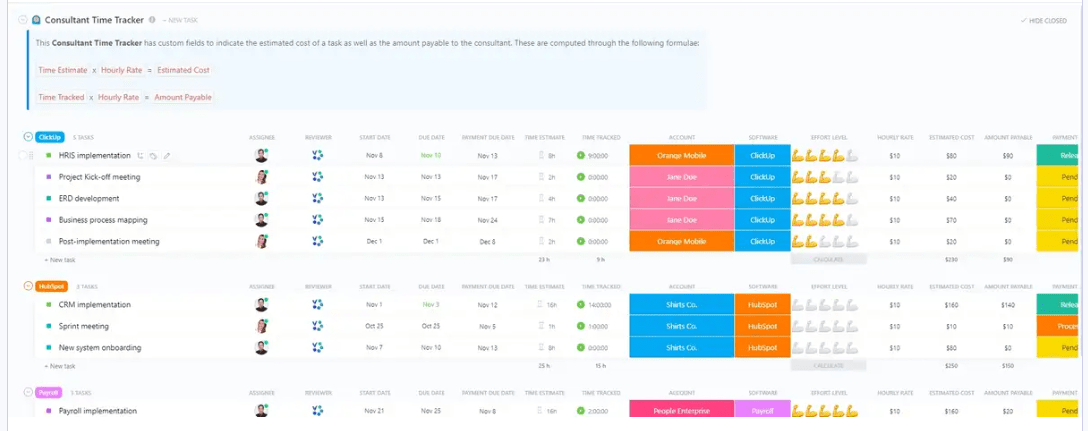
ClickUp’s Consultant Time Tracker Template is specifically designed to help consultants efficiently manage their time against various client projects.
The time tracker seamlessly integrates with ClickUp’s project management features, offering a comprehensive platform for tracking billable hours, boosting productivity, and improving client relationships.
It also simplifies time tracking for consultants, allowing them to easily log hours manually or using timers. This is valuable for consultants managing multiple projects, ensuring that all client work is accurately recorded.
This creates clear categorization of their hours as billable or non-billable, facilitating precise invoicing and financial accountability.
ClickUp Time Allocation Template
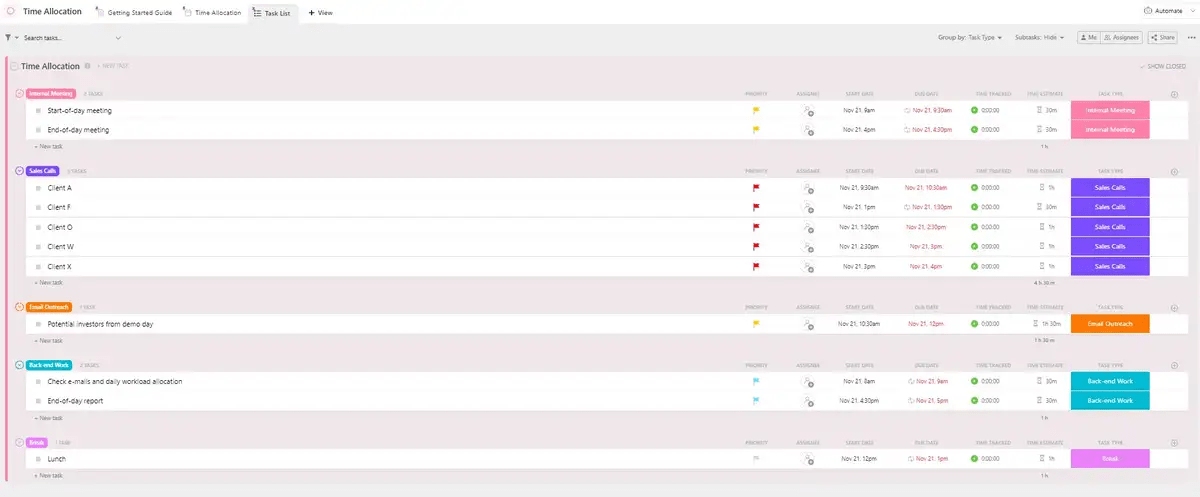
ClickUp’s Time Allocation Template is also an excellent tool for project managers who need to track time across multiple tasks and team members. This template allows you to pre-set categories for different types of work, such as development, design, and meetings.
💡 Pro Tip: For agencies managing multiple clients, implementing agency timesheet templates can be useful. These templates standardize time tracking across different clients and projects, making it easier to ensure that all billable hours are captured and reported accurately.
Automating time tracking
ClickUp Automations takes off the load on your team to track work hours. You can configure automations to start tracking time automatically when a task’s status changes to ‘In Progress’ and stop it when the task is marked as ‘Complete.’
This feature automatically updates when teams and responsibilities change and keeps projects moving while freeing up your team from sharing regular project updates.
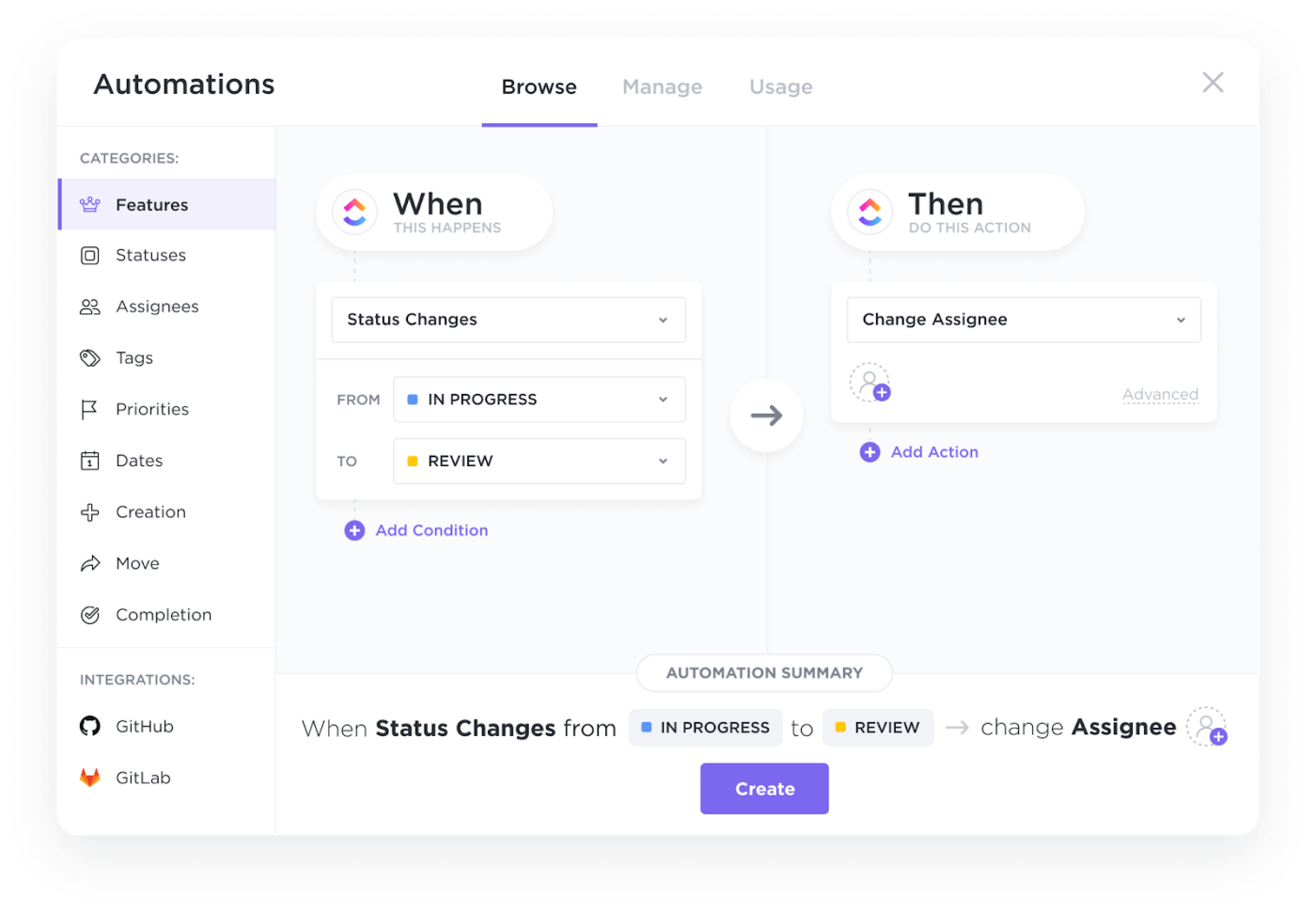
Automations ensure consistent time tracking, reducing human error and ensuring accurate data recording.
Summarize this article for me pleaseWhy Time Tracking and Reporting Matter
Time-tracking reports provide the data needed to optimize resources and ensure that projects are completed on time and within budget. They also help improve team productivity and accountability and avoid revenue leakage.
Let’s explore them further.
⏰ Understand resource demand
Employee work hours are a vital indicator of resource allocation. Using a free time tracking app can help identify tasks that consistently exceed budget estimates, allowing for early intervention.
Time tracking can reveal skill gaps in personnel, highlighting the need for more training. It also helps identify tasks that are under-resourced. Identifying disparities in workload can signal the need for adjustments, like redistributing responsibilities or sharing tasks more equitably.
By addressing these issues, you can create more accurate quotes, leading to potentially higher billing rates in the long term.
⏰ Improve how teams work
Employees are productive only for 2 hours and 53 minutes in a day.
A time-tracking app can increase focus as employees become more aware of the hours they’re spending on tasks. By reviewing their time, employees can identify patterns and reduce non-billable work.
Time tracking isn’t about setting unrealistic expectations; it’s about self-awareness and data-driven decisions. With the right time-tracking software in place, teams often realize that they’re switching tasks too frequently or not dedicating enough time to focus on one.
By identifying inefficiencies, such as unnecessary meetings or process bottlenecks that waste billable hours, teams can make small adjustments to their workflows to significantly improve overall efficiency over time.
👀 Bonus: Apply timesheet templates to ensure that all team members log their time in the same way. This makes it easier to identify trends and make data-driven decisions.
⏰ Gain insights into your team’s performance
Time-tracking apps offer detailed information on employee performance. You can analyze this data to identify your most efficient workers and acknowledge their contributions. This recognition will boost morale and encourage continued high performance.
Beyond identifying top performers, time tracking can also reveal strengths and weaknesses. Tracked time entries, habits, and patterns can help you identify areas where employees may be struggling.
This information allows you to provide targeted support and help them improve their efficiency.
⏰ Create a record of time spent
Time tracking not only provides summary data but also creates a detailed record of your team’s work.
For example, if a client questions the work hours spent on a project, you can generate a report that clearly outlines the specific tasks completed and the time invested. This data can help justify the costs and address unreasonable expectations. In industries like construction, where audits are common, time tracking is crucial for demonstrating that resources are being used effectively.
An accurate record of work performed and the time taken is essential for proving compliance and preventing accusations of wasted funds.
⏰ Avoid revenue leakage and bill clients accurately
Time tracking data reveals revenue-draining issues like inefficient workflows, overstaffing, infrequent progress monitoring, and more.
These problems are often interlinked. Inefficient workflows can lead to overstaffing, which in turn increases overhead, and infrequent monitoring leads to project delays.
A time tracking software can address the following:
- Identify workflow bottlenecks: Pinpoints where time is wasted
- Optimize staffing: Determines if resource allocation aligns with workload
- Improve project progress updates: Teams can better communicate their ability to meet deadlines
Time-tracking software helps create a historical record of project data. You can see how long projects took, their costs, and profitability. This information can help you provide clients with detailed and transparent invoices.
You can use ClickUp’s reporting features to compare the time spent on each task with the budget allocated for it. This allows you to identify areas where you might be overspending and take corrective action before the project goes over budget.
Further, integrating a PTO tracking software ensures that billable and non-billable hours are accounted for, giving you a more accurate picture of your team’s availability and workload.
⏰ Build trust through transparency in team operations
Time-tracking data can foster trust and transparency within your organization, benefiting both employees and managers. Providing visibility into work hours can also alleviate concerns about micromanagement.
With the right time-tracking software, managers stay informed about project activities, ensuring that the right tasks are being prioritized.
Time tracking often reduces the need for frequent check-ins, so employees feel trusted and empowered in their roles. Ultimately, when both managers and team members track time, it creates a level playing field and strengthens relationships.
Summarize this article for me pleaseTrack Hours With Ease Using ClickUp
Leveraging time-tracking software can lead to successful project management. It provides the insights needed to optimize workflows, improve productivity, and ensure that projects are completed on time and within budget.
ClickUp’s time-tracking features are designed to integrate seamlessly into your existing workflow, providing the flexibility needed to manage time more effectively.
Whether you’re a business owner or overseeing complex projects, ClickUp offers the tools you need to keep everything on track. Log hours accurately, generate custom reports, and leverage templates to ensure that work hours are recorded and your team is operating at peak efficiency.
With ClickUp, you can turn time tracking from a mundane task into a powerful tool for driving project success.
Get started with ClickUp for free today!


Everything you need to stay organized and get work done.

Recent Articles
What Is a Tiger Team? Definition, Origin, and When to Use One 
What Is a Tiger Team? Definition, Origin, and When to Use One
Marketing Agency Productivity: Where Your Margin Actually Goes
Marketing Agency Productivity: Where Your Margin Actually Goes
8 Communication Strategies That Actually Fix Team Chaos 
8 Communication Strategies That Actually Fix Team Chaos
