

Sorry, there were no results found for “”
Sorry, there were no results found for “”
Sorry, there were no results found for “”
Disclaimer: This article is intended to provide information on productivity tools and strategies. It is not intended to be a substitute for professional medical advice, diagnosis, or treatment of shiny object syndrome or any other health condition.
Imagine this: you start the week with a plan. A solid, well-thought-out plan. But then—bam! A LinkedIn post swears that SEO is dead and an AI-powered content strategy is the only thing that will save your content. A YouTube guru insists you must start a newsletter.
Oh, and there’s a new project management tool that everyone is raving about.
Suddenly, your to-do list is abandoned, your focus is scattered, and you’re drowning in half-finished ideas. That’s Shiny Object Syndrome, or Magpie Syndrome, aka the silent killer of momentum.
It tricks you into thinking you’re making progress when, in reality, you’re just jumping from one thing to another. If you’re tired of chasing what’s new instead of finishing what matters, it’s time to break the cycle.
Let’s talk about how to outsmart distractions, stay on track, and actually follow through.
Shiny Object Syndrome (SOS) is that sneaky habit of jumping from one exciting idea to the next, convinced that this new tool, trend, or strategy is the one. It’s the business version of starting a Netflix show, only to abandon it halfway because something else looks more interesting.
The cycle goes like this: You kick off a project, full of enthusiasm. But before it really takes off, a new, shinier idea winks at you. Your focus shifts, leaving the old project in the dust. Rinse and repeat.
The result? A trail of half-finished ideas, wasted energy, and frustration. You’re always busy but rarely productive.

🧠 Fun Fact: Magpies are drawn to shiny things just like us with new ideas. That’s how Shiny Object Syndrome got its name! It’s now the go-to term for jumping from trend to trend without ever finishing what we start!
Why do we keep falling for new, shiny things? Your brain acts like a monkey who’s seen a banana or something so exciting it can’t resist.
Here’s why psychologists say it happens:
🧠 Novelty trap: New ideas give your brain a dopamine boost, making you feel like you’ve found the next big thing. It’s a quick thrill that pulls you off track
😨 FOMO factor: “What if this is the opportunity?” That fear pushes you to drop everything and chase the latest trend
🔄 Endless chase: The excitement fades fast, so your brain craves the next big thing, keeping you stuck in a cycle of unfinished ideas
🚨 Remember: New technology isn’t always better. Focus and follow-through win every time. Before jumping ship, ask yourself: distraction or real progress?
Want to stop falling into the SOS trap? Spot it early and avoid shiny object syndrome with these signs:
🤝🏻 Friendly Reminder: It may seem like our brains are constantly distracted, but it’s not just you or your lack of self-control. Today’s world is built for constant engagement and attention, and sometimes, it’s hard to resist. A starting point to tackle this is from a place of self-awareness, catching yourself getting distracted, and taking note of why and how.
Shiny objects may seem fun, but they come with consequences that can’t be ignored:
In a nutshell, SOS can knock you off, of course. But with the right approach, you can get back on track and stay focused on what truly matters.
Chasing every new idea may seem exciting, but it only leads to chaos, not progress. Want to stop this endless cycle and actually finish something? Here’s how to beat SOS:
If you can identify why you’re so easily distracted by new ideas or opportunities, you can take steps to stop the cycle.
🔍 To spot your triggers:
💡 Bonus Tip: Use the ‘Pause-and-Reflect’ method. The next time a shiny object grabs your attention, pause for 2-5 minutes to assess it. Use this time to ask yourself:
A quick pause can help you make smarter decisions and avoid chasing distractions.
To stay on track, set SMART goals. Instead of projects running after vague goals like “I want to be successful,” break it down: “I want to write two blog posts each week.” This makes it easier to say no to distractions.
Then, focus on what matters now. Which task moves you closest to your goal today? Do that first, and leave the rest.
✔️ Some tips to prioritize your tasks the right way:
Even with strong task management skills, prioritizing can feel overwhelming when everything seems urgent and your to-do list keeps growing. What you need is a clear, effective system to prevent you from working on low-impact tasks and missing your bigger goals.
That’s where ClickUp can help. It’s an all-in-one task management software that comes with features that keep your team engaged, organized, and on track.
Let’s take ClickUp’s Task Priority feature, for instance. You can assign priority levels to each task (Urgent, High, Medium, Low) to create a clear roadmap of what you need to focus on right now.

📌 For example, here’s a priority level breakdown for a digital marketer:
| Priority Level | Descriptions | Examples |
| Urgent | Tasks that demand immediate attention and cannot be ignored. | Finalizing and publishing a blog post due today Fixing a website bug before a product launch |
| High | Tasks that are less urgent, with more flexible deadlines. | Finalizing and publishing a blog post due today. Fixing a website bug before a product launch |
| Normal or Medium | Organizing digital files and updating old blog posts. Casual social media engagement | Writing a detailed article for an upcoming campaign out to a potential guest post partner |
| Low | Tasks that indirectly support a goal can be delegated, outsourced, or automated. | Tasks that don’t need immediate attention can still be completed during downtime. |
With ClickUp, you can drag tasks into your task tray for a constant reminder of what’s urgent. Need to ensure tasks are done in the right order? Set task dependencies to keep projects running smoothly.
📮ClickUp Insight: 92% of workers use inconsistent methods to track action items, which results in missed decisions and delayed execution.
Whether you’re sending follow-up notes or using spreadsheets, the process is often scattered and inefficient. ClickUp’s Task Management Solution ensures seamless conversion of conversations into tasks—so your team can act fast and stay aligned.
Prioritization templates can also give your team a clear, repeatable structure without confusion. The best part? They’re flexible, adjusting as your projects evolve.
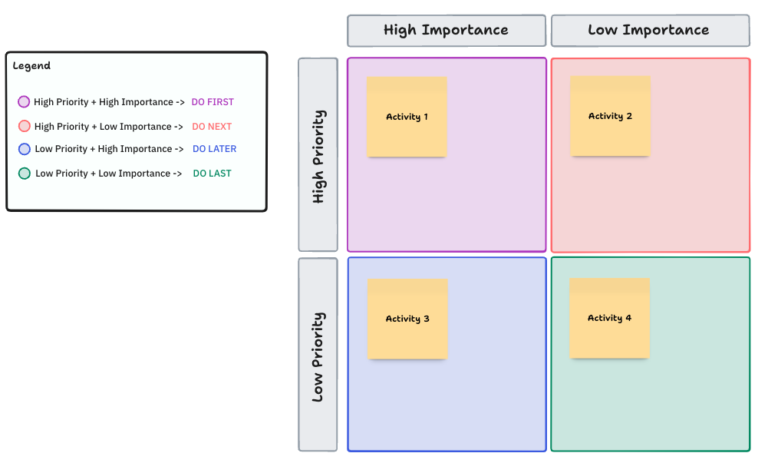
The ClickUp Priority Matrix Template divides tasks into four quadrants, helping you instantly spot what needs attention, what can wait, and what you can skip altogether.
Here’s how it organizes the priority matrix:
🌟 Bonus: You can try the ClickUp Action Priority Matrix Whiteboard Template to visually sort tasks by their impact (how valuable they are) and effort (how much work they take). It clears up confusion and helps everyone focus on what truly matters
Another tried-and-tested way to prioritize your tasks and stay focused? The Eisenhower Matrix. Check out the video below to learn more.
Before jumping into the next shiny thing, take a breath. Not every shiny new idea deserves your attention. Here’s how to evaluate if it’s worth your time:
🛠️ Here’s what to consider:
If it checks out, it might be time to dive in. If not, put it on hold and keep your focus on what really matters.
💡 Quick Hacks:
With ClickUp Dashboards, you can get a clear visual comparison to see if pursuing the new idea will detract from the progress you’ve already made or if it complements and accelerates it.

📌 For example, you’re aiming to finish a data analytics certification in six months, and the dashboard keeps track of your progress and milestones to stay on track. Now, let’s say you’re thinking about learning project management tools. The dashboard can quickly show if this new skill will delay your certification or if you need to adjust your schedule to fit both.
To make things easier, ClickUp Brain can also help by:
📌 Example prompts:

Shiny object syndrome is like having too many tabs open in your brain and constantly jumping between them drains your focus. Time blocking helps you shut out the noise by dedicating specific slots to what truly matters. You can even set aside ‘idea time’ without derailing your main goals.
🕒 How to master it:
ClickUp’s Calendar View can help here as you get a clear visual layout of your tasks, meetings, and deadlines in daily, weekly, or monthly views.
It also alerts you before tasks and meetings so you don’t drift off to new things.

The best part? You don’t have to ditch your shiny ideas. Just drag and drop them into a dedicated ‘brainstorm’ time slot. This way, you stay focused without losing those bursts of inspiration.
To make time blocking even easier, the ClickUp Daily Time Blocking Template helps you map out your day, tackle high-priority tasks when your energy is at its peak, and still leave room for the smaller stuff (or a well-earned break).
Customize your workflow with views that match your style—List, Calendar, Whiteboard, and Doc. Plus, tailor your tasks with custom fields:
Shiny object syndrome is like the classic ‘grass-is-greener’ mindset. Every new thing looks like a shortcut to success, but consistency and focus are the real winners.
ClickUp can help you smoothen your workflow and avoid getting sidetracked by the latest distractions.
With Dashboards, you can weigh new opportunities without losing sight of your goals. Task priorities make it easy to tackle what truly matters, so distractions don’t slow you down. And with time-blocking templates, you can structure your day to stay productive without feeling burned out.
Want to make real progress in areas you know will help you grow? Sign up for ClickUp today! 🙌

Sudarshan Somanathan
Max 23min read

Manasi Nair
Max 28min read
Sudarshan Somanathan
Max 26min read

© 2026 ClickUp





