









Still downloading templates?
There’s an easier way. Try a free AI Agent in ClickUp that actually does the work for you—set up in minutes, save hours every week.
Sorry, there were no results found for “”
Sorry, there were no results found for “”
Sorry, there were no results found for “”
McKinsey’s research found that 51% of respondents from organizations using AI say their companies have already seen at least one negative consequence from it, and nearly one-third report consequences tied to AI inaccuracy. That makes the handoff point a lot more important.
And that’s because the hard part is rarely building the workflow itself. It is deciding where human judgment should step in, what context should travel with the handoff, and how to keep the process moving without creating delay.
In this post, we’ll look at 10 free human-in-the-loop workflow templates, what each one helps you structure, and how to choose the right setup for your team.
| Template Name | Download Link | Ideal For | Best Features |
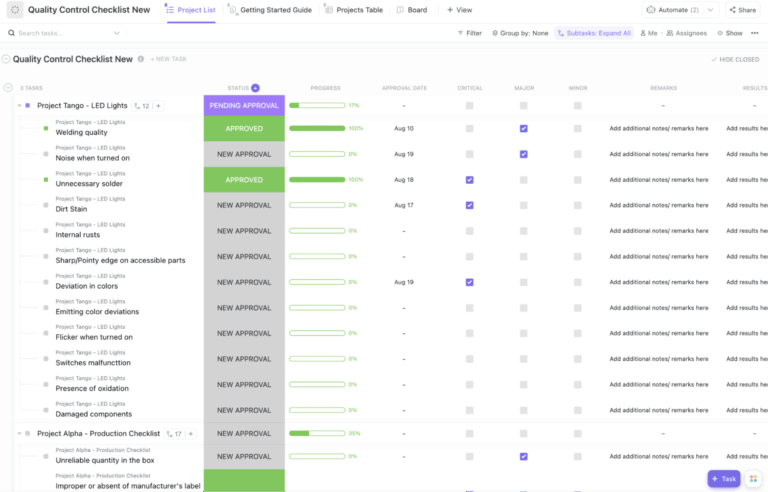
| ClickUp Quality Control Checklist Template | Get free template | QA leads and operations teams reviewing AI-flagged outputs before final approval or release. | Severity-based issue review; Custom Statuses for approval flow; built-in record of remarks, approval dates, and results |
| ClickUp Design Review Template | Get free template | Creative leads and design ops teams reviewing AI-assisted drafts before final sign-off. | Centralized review brief in Docs; Assigned Comments for feedback ownership; visible revision and approval stages |
| ClickUp User Acceptance Testing Checklist Template | Get free template | Product teams running final human acceptance checks before a feature release. | Structured test case validation; clear expected vs. actual result tracking; automation-ready bug escalation |
| ClickUp Process and Procedures Template | Get free template | Operations managers and process owners documenting review-heavy workflows before publishing them across teams. | Documentation stages from research to live; built-in approval structure; department-based organization |
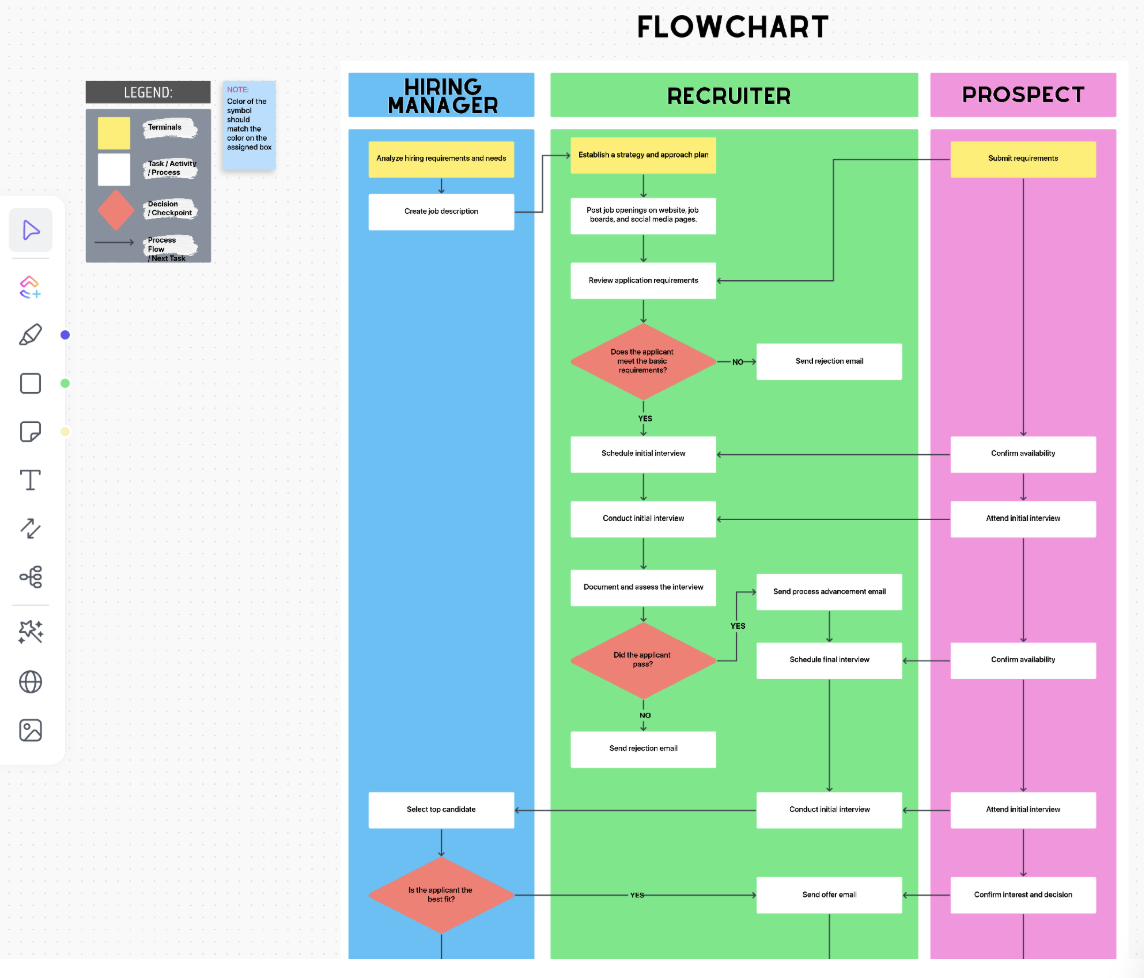
| ClickUp Process Flow Chart Template | Get free template | Process designers building human-in-the-loop workflows with multiple handoffs and approval points. | Visual workflow mapping in Whiteboards; exception and rejection path planning; role-based swimlanes |
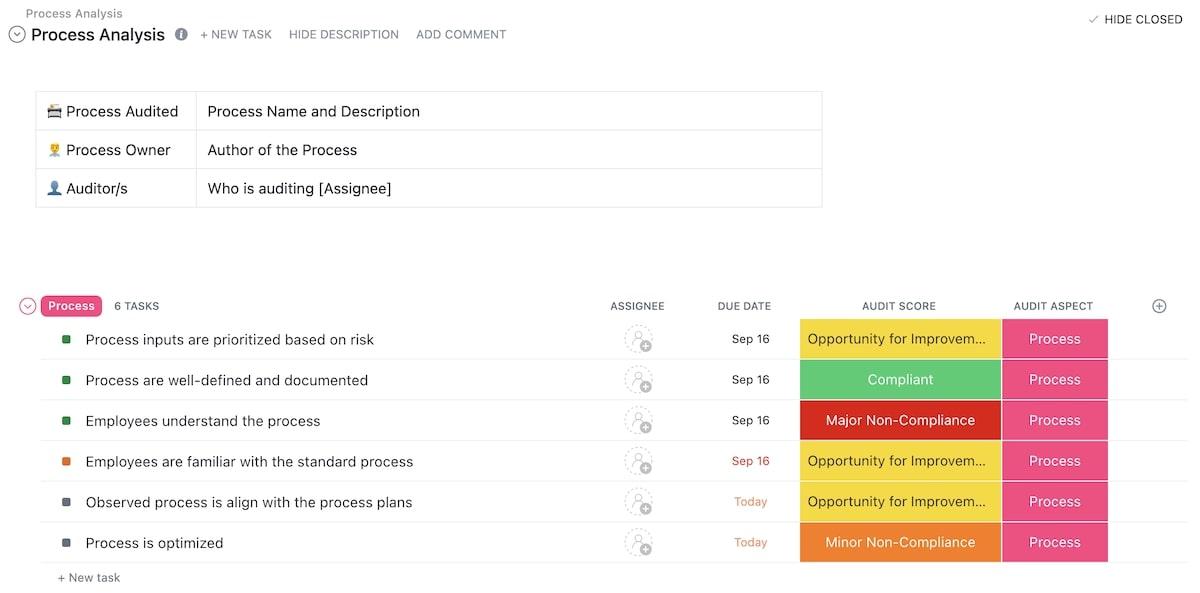
| ClickUp Process Audit and Improvement Template | Get free template | QA managers and operations teams reviewing human-checked workflows and tracking corrective actions after audits. | Audit scoring by finding type; organization by audit area; follow-through with owners and due dates |
| ClickUp Create Process Efficiently Template | Get free template | Process owners designing new workflows before handing them off for execution. | Multi-view planning with process maps and Gantt; dependency mapping; AI-assisted first-draft process design |
| ClickUp Software Integration Template | Get free template | Implementation managers building integration workflows with approval steps, exception checks, and cross-team handoffs. | Needs Input statuses for review checkpoints; visibility by integration type; step-by-step handoff tracking |
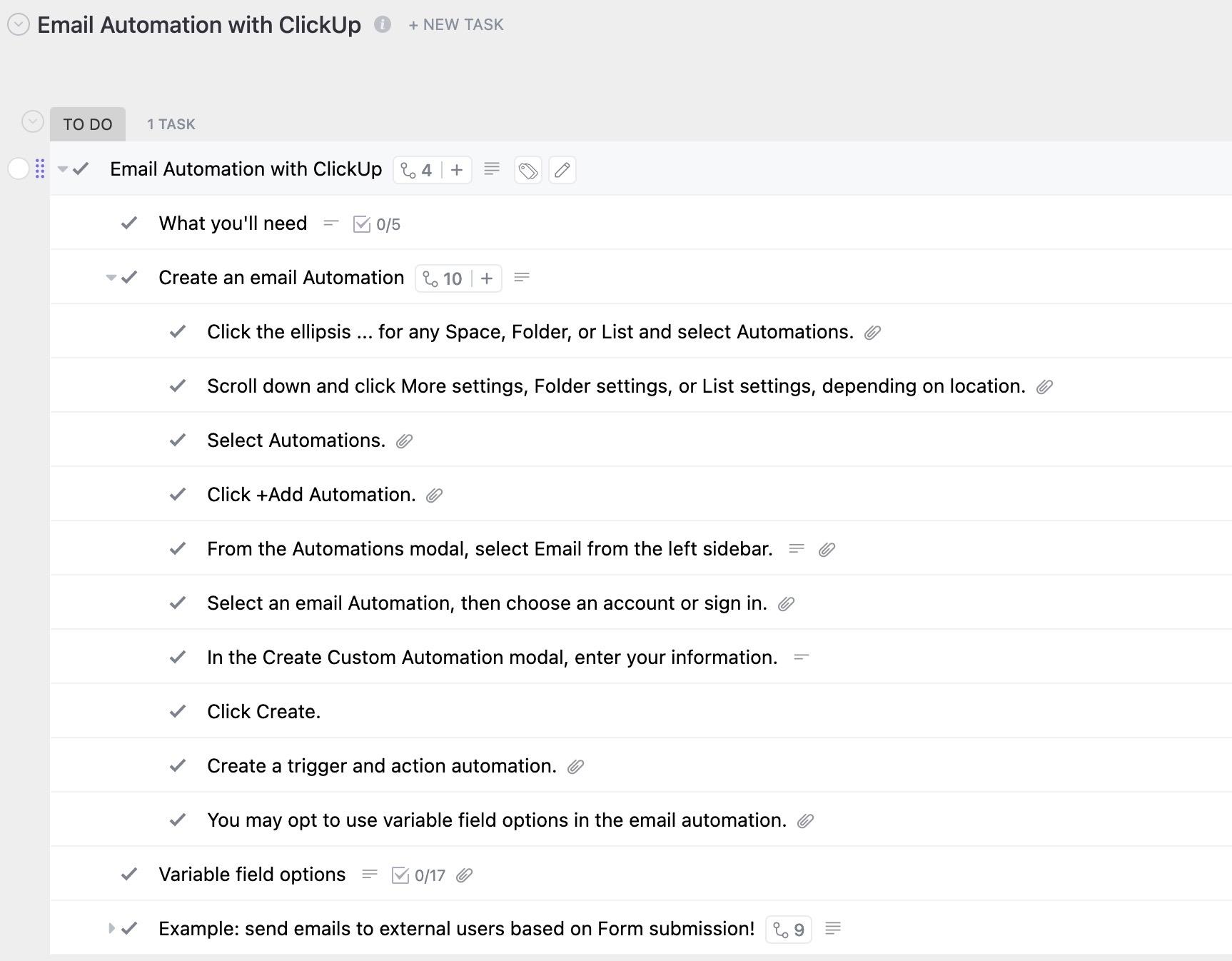
| Email Automation with ClickUp Template | Get free template | Customer success ops managers setting up onboarding and renewal emails that need approvals and manual follow-up paths. | Review gates for copy, recipients, and timing; defined exception handling; repeatable automation setup checklist |
| ClickUp Editorial Calendar Template | Get free template | Content operations managers running multi-channel editorial workflows with AI-assisted drafting and human editorial review. | Status-based editorial flow; built-in content metadata; shared publishing oversight across review and release stages |
A human-in-the-loop workflow is a process where automation or AI does part of the work, but a human steps in at important moments to review, approve, correct, or guide what happens next. In other words, the system does not run fully on autopilot—it pauses for human judgment where accuracy, safety, quality, or accountability matter.
In practice, that usually looks like this:
📌 Common HITL scenarios include:
These human-in-the-loop workflow templates cover a range of use cases—from quality control and design reviews to process audits and content calendars. Each one is free, customizable, and built to help you insert human checkpoints exactly where your workflow needs them.
Because they all live inside ClickUp, you can connect them to powerful automations and AI for smarter, faster workflow orchestration.
Let’s take a look:
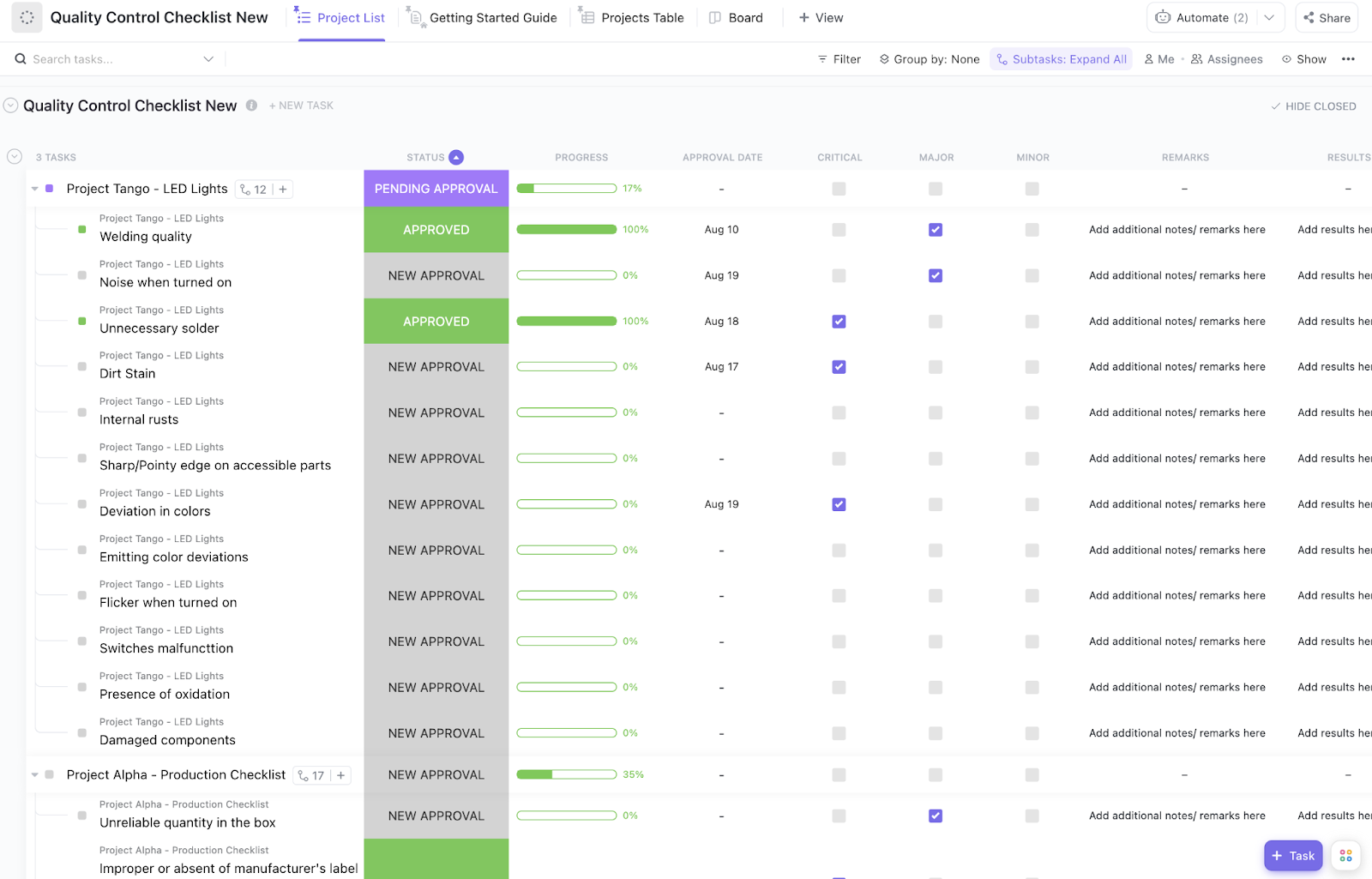
When AI, automation, or any first-pass system performs the initial processing, the ClickUp Quality Control Checklist Template provides human reviewers with a place to inspect the output. Further, they can classify the issue, record remarks, and decide whether it passes, needs another approval, or should be flagged for further action.
It’s useful when one project contains many review points, and each one needs its own judgment call. You can track checklist items under a parent project, monitor progress at both the item and project level, and keep the final decision attached to the issue being reviewed.
✅ Ideal for: QA leads and operations teams reviewing AI-flagged outputs before final approval or release.
🧠 Fun Fact: DeepMind built an AI agent that beat the human baseline on all 57 Atari 2600 games. Yes, all 57. It was called Agent57, which is somehow both very technical and very arcade-core.
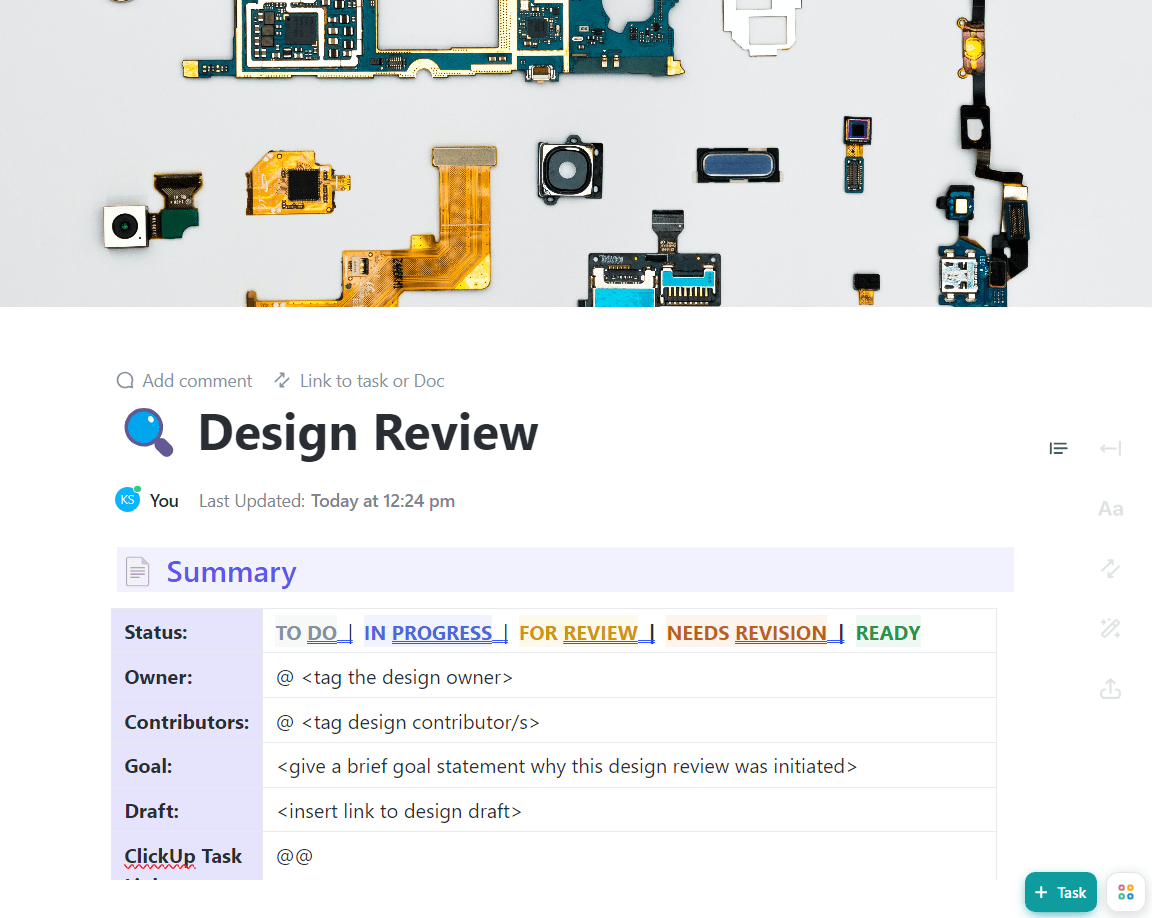
Creative teams often struggle with feedback getting lost in emails or Slack threads, leading to confusing revision cycles and delayed approvals. The ClickUp Design Review Template routes design assets through structured feedback and approval stages, covering initial review, revision requests, and final sign-off in one place.
Why you’ll like this template:
✅ Ideal for: Creative leads and design ops teams reviewing AI-assisted drafts before final sign-off.
🚀 ClickUp Advantage: Got an idea mid-thought? Use Talk-to-Text to speak naturally and turn rough voice notes into polished text, ready for ClickUp’s AI to act on!
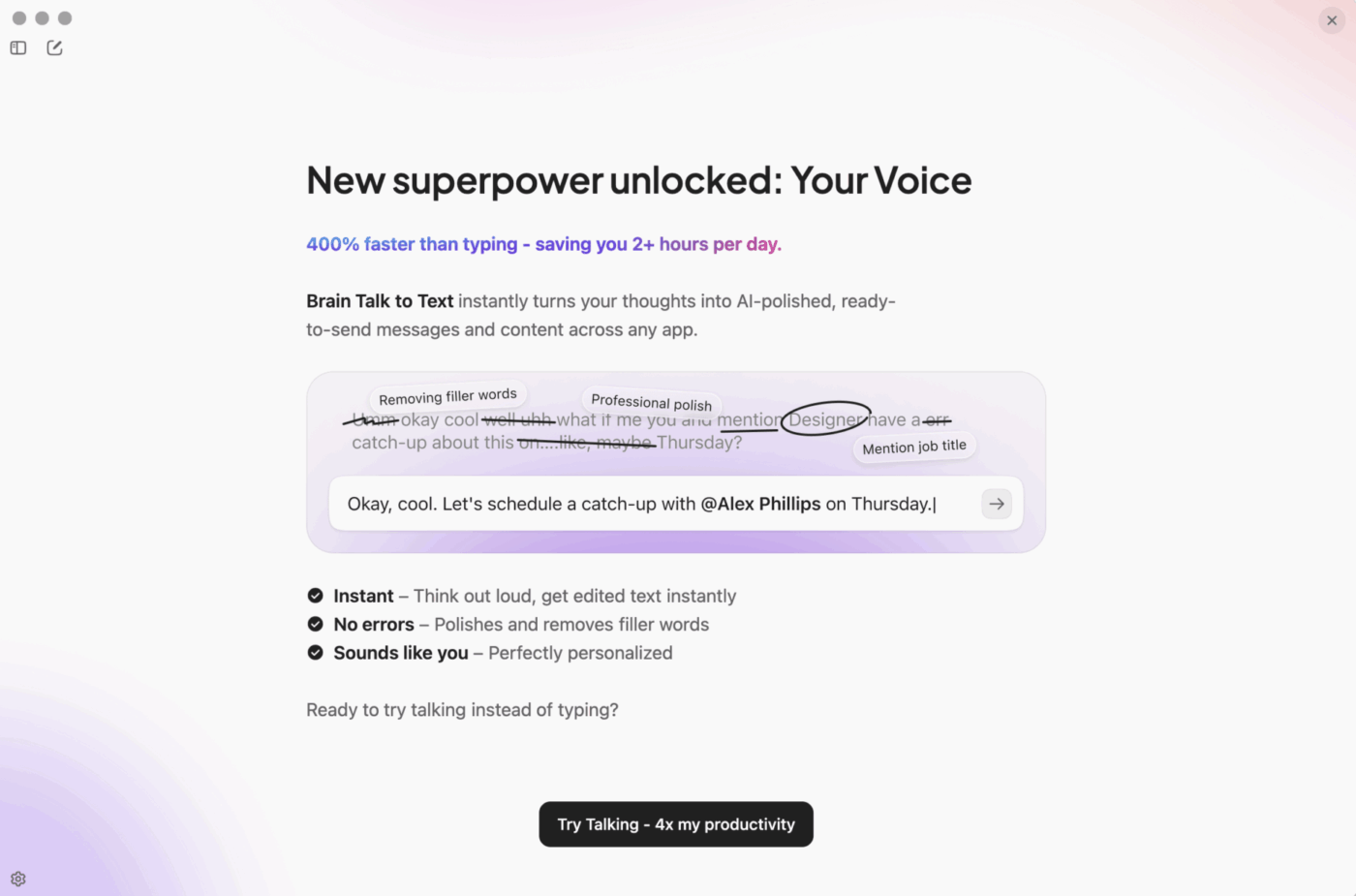
It’s a fast way to capture ideas, draft updates, and keep work moving when typing would only slow you down.
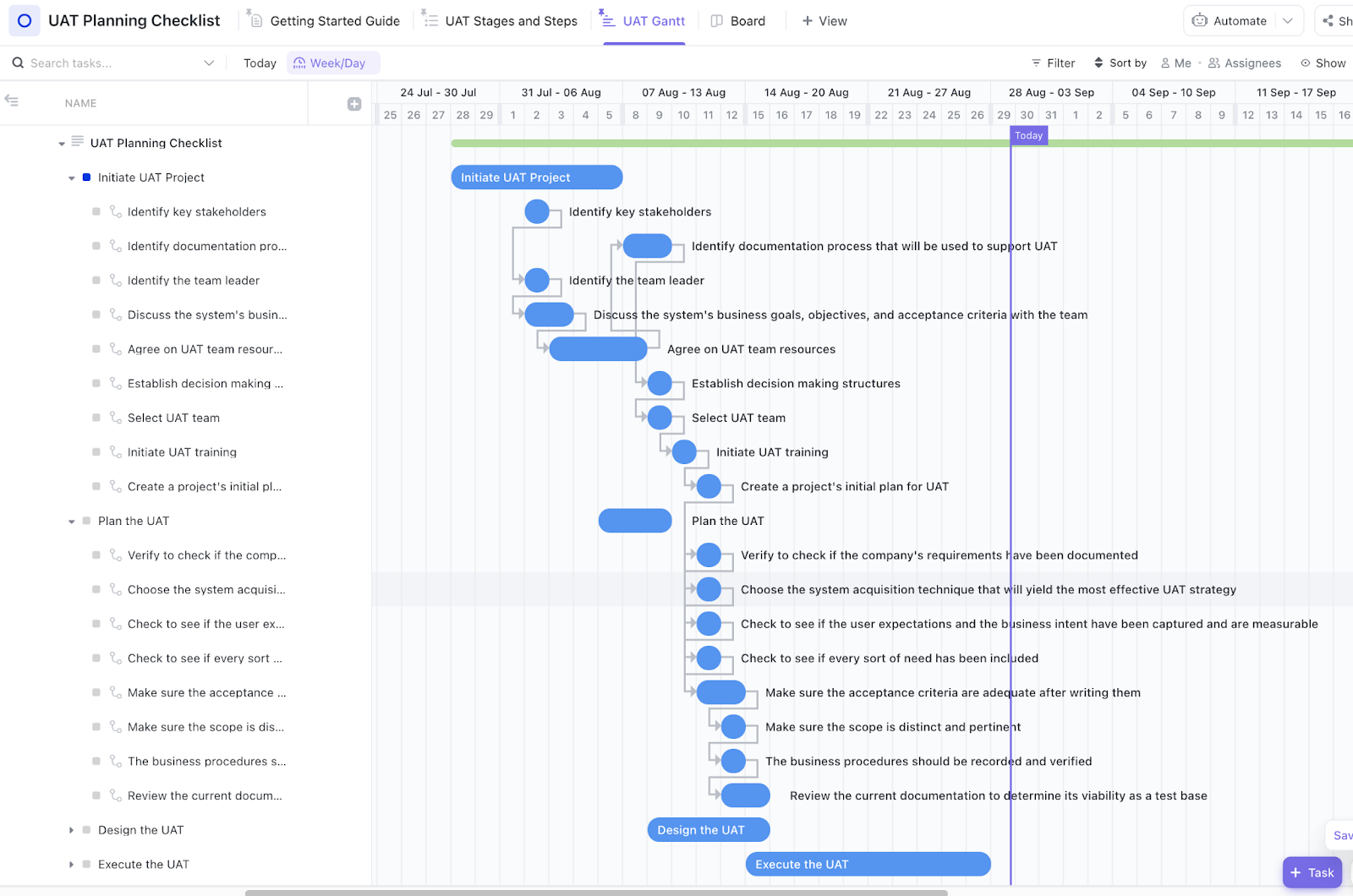
Automated tests are great for catching code regressions, but they can’t tell you if a new feature feels right to a user. The ClickUp User Acceptance Testing Checklist Template helps validate whether your software meets requirements and provides a good user experience before it goes live.
✅ Ideal for: Product teams running final human acceptance checks before a feature release.
👀 Did You Know? 88% of executives surveyed by PwC said they plan to increase AI-related budgets because of agentic AI.
Keeping SOPs updated and accessible is a constant challenge. But again, outdated documentation can lead to compliance issues or inconsistent work!
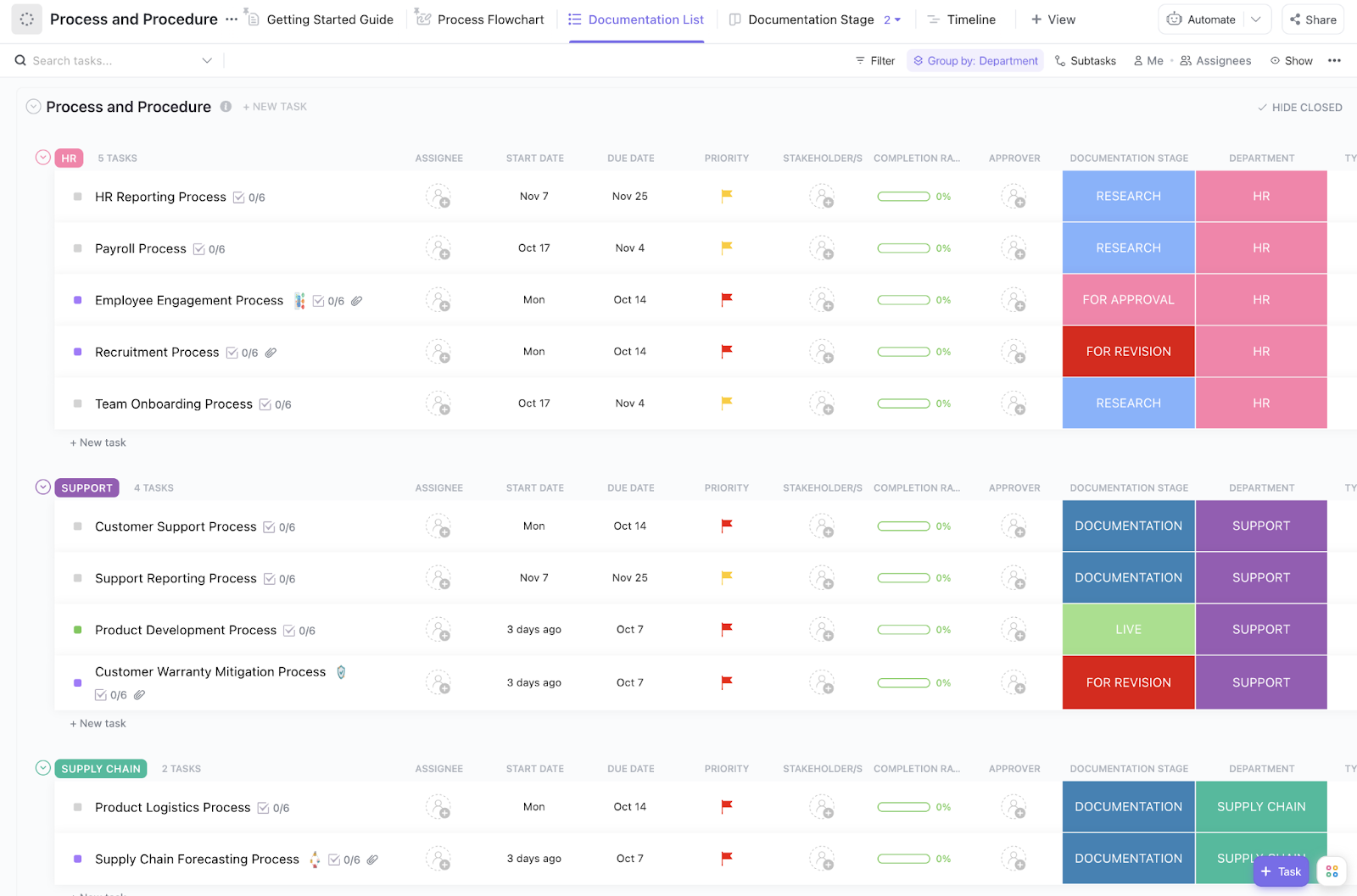
The ClickUp Process and Procedures Template helps you capture standard operating procedures with built-in review and approval steps. Essentially, the first draft comes from AI, routed further to a human with multiple approval steps across different departments. This ensures your documentation is always current and accurate.
✅ Ideal for: Operations managers and process owners documenting review-heavy workflows before publishing them across teams.
🎥 Interested in building your own human-in-the-loop workflows with an AI Agent? Watch this video to learn how.
When you’re designing a new automated workflow, it can be hard to visualize where things might go wrong or where human intervention is necessary. This visual ClickUp Process Flow Chart Template helps you map your workflows, decision points, and handoffs, so you can clearly see where to insert human checkpoints.
✅ Ideal for: Process designers building human-in-the-loop workflows with multiple handoffs and approval points.
📮 ClickUp Insight: 36% of respondents say trust and security concerns are the main reason they hesitate to use AI agents more.
Most of the time, a user doesn’t know where an agent lives, what it can access, or how its actions are governed once it’s running.
Super Agents are built as first-class users inside a governed workspace. They inherit the same user-level permissions as your team, ensuring explicit, controlled access from day one.
Every action they take is logged in real time, and for high-impact decisions, a human stays in the loop for approval.
Intelligence can move faster, operating firmly within the lines teams rely on for security and accountability.
Auditing existing workflows to find bottlenecks is often a manual, time-consuming process that gets put off indefinitely. Fortunately, the ClickUp Process Audit and Improvement Template provides a framework for auditing your processes, identifying inefficiencies, and tracking improvement actions.
Pair it with ClickUp Dashboards to monitor audit trends, open issues, and follow-up progress at a higher level.
✅ Ideal for: QA managers and operations teams reviewing human-checked workflows and tracking corrective actions after audits.
🎥 Bonus: Want AI that acts like a real teammate? ClickUp Super Agents stay human-in-the-loop by design.
They work within your permissions, use only the tools and knowledge you’ve granted access to, and can bring people in for review when a workflow needs judgment or approval. So whether you’re asking them to research, delegate, or act on a task, you stay in control while the work keeps moving.
Designing a new process from scratch without a clear framework is a sure shot to unclear roles and a messy rollout. Not with the ClickUp Create Process Efficiently Template, though. It guides you through designing new processes, capturing all the necessary steps, roles, dependencies, and approval gates before you go live.
✅ Ideal for: Process owners designing new workflows before handing them off for execution.
Managing a software integration project means chasing technical requirements, development tasks, and stakeholder approvals, often across multiple tools. The ClickUp Software Integration Template centralizes the entire process, from tracking requirements and development to managing testing and go-live approvals.
✅ Ideal for: Implementation managers building integration workflows with approval steps, exception checks, and cross-team handoffs.
The Email Automation with ClickUp Template helps you build an email workflow that still has unmistakable human checkpoints. Use it to document what triggers the email, what data gets pulled in, and exactly when a teammate must review, approve, or take over before anything sensitive goes out.
✅ Ideal for: Customer success ops managers setting up onboarding and renewal emails that need approvals and manual follow-up paths.
📚 Also Read: How AI is Transforming Compliance & Audits
AI is great for generating content ideas or first drafts, but your editors provide the critical human touch, reviewing for quality, approving final versions, and scheduling content to align with your brand’s strategy. The ClickUp Editorial Calendar Template includes content pipeline stages (idea → draft → review → publish), assignee fields, due dates, and a publication calendar.
✅ Ideal for: Content operations managers running multi-channel editorial workflows with AI-assisted drafting and human editorial review.
⚡️ Template Archive: Free Monthly Calendar Templates to Organize Your Time
So, how do you actually build a human-in-the-loop workflow in ClickUp?
Let’s take a look:
A human-in-the-loop workflow works because it adds judgment where it matters most.
But that only works when the process is clear and easy to run.
ClickUp helps you take a template and turn it into a real operating system. You can document the workflow, assign review points, automate the routine steps, and keep every handoff visible in one place. With AI in the workspace, you can also summarize context, prep approvals, and move faster without losing the human layer.
The main difference is human involvement. HITL (human-in-the-loop) workflows keep people involved at key points to review, approve, correct, or escalate AI outputs, which makes them better for higher-risk or nuanced work. Fully automated workflows let the system complete tasks end to end without human input, which is faster but best suited to low-risk, rules-based processes.
You should use a HITL workflow for any process involving creative judgment, compliance reviews, exception handling, or high-stakes decisions where context is critical and automation alone is too risky.
Yes, ClickUp Brain can support human-in-the-loop workflows. Brain can build automations in plain English, while ClickUp’s approval and automation features let teams pause work for review, route tasks to the right approver, and require sign-off before the next step moves forward. That means Brain can help generate, summarize, or trigger actions, while humans stay in control at key review points.

© 2026 ClickUp

There’s an easier way. Try a free AI Agent in ClickUp that actually does the work for you—set up in minutes, save hours every week.