Sorry, there were no results found for “”
Sorry, there were no results found for “”
Sorry, there were no results found for “”
Web projects usually blow up when someone says, “We’ll figure it out as we go.” Nobody writes anything down. Then everything falls apart.
PMI’s Pulse of the Profession found that the worst-performing teams hit 37% scope creep on average. That’s almost double the rate of the best teams. And it happens before anyone draws a single wireframe.
This guide covers the five phases every web build moves through, three real tool setups (spreadsheet, doc-and-board, dedicated PM tool), and five methodologies and their trade-offs. We also include a thirteen-item checklist, the mistakes that turn a six-week build into a six-month argument, and the practices that compound across projects.
Website project management is the discipline of coordinating designers, developers, QA, content, and SEO. It ensures that the site ships on time, on budget, and does what the business needs.
Every web project moves through five phases: planning and discovery, design and development, testing and QA, launch, and maintenance. Teams that ship on time work from a signed scope brief, clear maintenance limits, and a 15-20% buffer on every estimate.
Website project management is the discipline of coordinating cross-functional teams to deliver a website on time, within budget, and aligned with business objectives.
Any team building or redesigning a site needs it. That’s true whether it’s a five-page marketing site or a complex app with user logins and API integrations.
Unlike most project types, website PM never really ends. The build is one phase. After launch, you still have maintenance, performance checks, and content updates. Teams that treat launch as the finish line end up with security holes, broken pages, and falling search rankings within months.
Three things make web projects distinct from most other project types:
Website project management exists to prevent four things that kill web builds: missed handoffs, scope fights, budget overruns, and post-launch work nobody paid for. Skip it, and the work still gets done. It just lands late, over budget, or both.
A good website project plan covers the work, the people, the rules, and the handoffs. Skip any one of these, and the gaps show up in week six, not week one. Build the plan around these elements before kickoff:
The real constraint in every web build isn’t time, budget, or scope. It’s deciding who signs off on “done” at each phase, and writing down what “maintenance” means before anyone touches code.
This is where web projects differ from most other work:
The Project Management Institute found that the top two causes of scope creep are ambiguous scope definition and lack of formal scope management. Both are decision problems, not documentation problems. A signed scope brief without a named decision-maker is just paperwork.
Moving from a static wireframe to a live staging environment is the most common trigger for scope creep. Seeing something work is different from approving a document that describes it.
Teams that ship consistently do two things: they get written sign-off at each phase before moving forward, and they define what “maintenance” means before anyone writes code. Both happen in the first week, or they don’t happen at all.
When they don’t, the project usually falls apart six months after launch. The client asks for more changes. Nobody agrees on what’s covered.
Most website projects run on one of three setups: a shared spreadsheet, a document-and-board combination, or a dedicated project management tool. Each one fits a different scale of build. Pick the one that matches your team size and stakeholder count.
A single sheet with tasks in rows and dates in columns. One tab for the plan, one for the launch checklist, one for the bug list.
Best for: A five-page marketing site with one designer, one developer, and one stakeholder. Six-week timeline or shorter.
Skip it if: You have more than three people on the build, more than one stakeholder reviewing work, or any task that depends on another task finishing first.
The scope brief lives in a doc. The tasks live on a kanban board. The team works off both, switching between them as needed.
Best for: A mid-size build with three or four people across two disciplines (design and development), one or two stakeholders, and a six-to-ten-week timeline.
Skip it if: You need to see the full timeline in one view, track time against estimates, or coordinate across four or more roles (design, development, QA, content, SEO).
One workspace contains the scope, tasks, timeline, files, and reporting. The team works off shared views: a Gantt for the PM, a board for designers, and a list for developers.
Best for: A build with four or more roles, multiple stakeholders, a timeline of six weeks or longer, or any project where the team will run a similar build again.
Skip it if: You’re a solo builder shipping a static site for one client with a fixed deadline. A spreadsheet will be faster.
A common pattern: Many teams start a build in a dedicated tool, then move to a lighter setup for post-launch maintenance. The full tool earns its place during the busy weeks. A simple board is enough once the work shifts to monthly patches and content updates.
Every build goes through five phases: planning and discovery, design and development, testing and QA, launch and deployment, and maintenance and support. Here’s a closer look.
This phase gets every stakeholder on the same page before anyone opens a design tool or writes a line of code.
Base time estimates on past projects. Build a buffer into every milestone. Optimistic estimates are the most common cause of missed deadlines. The deliverable here is a signed project brief, the single source of truth for everything that follows.
What this looks like in practice: In a spreadsheet, the scope brief is a Google Doc, and the timeline is a separate sheet with one row per deliverable. In a doc-and-board setup, the brief lives in Notion or Google Docs and links out to a Trello board for risks and owners. In a dedicated PM tool, the brief, risks, owners, and milestones are all on a single task hierarchy, so a date change in planning updates the downstream timeline.
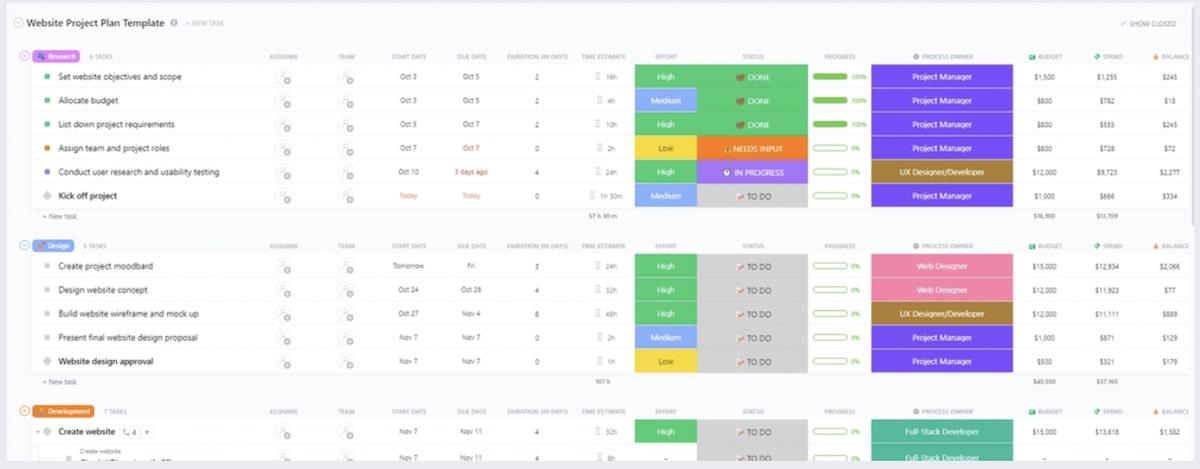
To make sure your launch goes off without a hitch, you need to plan and organize every step of the way. That’s where ClickUp’s Website Project Plan Template comes in.
This template can help you:
This phase turns the project brief into a visual design, then into working code.
Design comes first. Start with low-fidelity wireframes before investing in high-fidelity mockups. Wireframes are easy to change. Pixel-perfect designs are not.
Build or adopt a design system (typography, color palette, component library) so every page stays consistent. Get stakeholder approval on wireframes before moving to visual design. This stops layout feedback from arriving after the developer has already built it.
Development follows. Set up three environments: development (where code is written), staging (where QA and stakeholders review), and production (the live site).
Front-end and back-end work can run at the same time if the API contract is defined first. Keep one shared source of truth for all files and specs. That way, designers and developers are always working from the same version.
What this looks like in practice: In a spreadsheet, you track design status in one tab and dev tickets in another, with a shared Google Drive for files. In a doc-and-board setup, designers work in Figma and push tickets to a board (Trello, Asana) for developers to pick up. In a dedicated PM tool, the Figma file links directly to the dev task, and the handoff is a status change, not an email.
The handoff between design and development is where things either work or fall apart. Be clear about what gets handed off (annotated files, asset library, interaction specs), when (after sign-off on visual designs), and in what format (Figma with developer-ready exports).
QA exists to catch every defect before real users do. Testing happens on staging, never on production. Here’s what to test:
What this looks like in practice: A spreadsheet bug list has columns for page, browser, severity, and owner. A doc-and-board setup uses a separate “Bugs” board with critical and non-critical lanes. A dedicated PM tool lets QA file bugs as tasks linked to the feature they belong to, so developers can see the bug, the spec, and the staging link in one place.
Pro Tip: Label every issue as either a critical bug (blocks launch) or a non-critical bug (fix after launch). Keep one distinction clear: a bug is when something doesn’t match the approved spec. A change request (“Can we move this button?” or “Let’s add a section”) goes through scope review, not the bug tracker. Mixing the two bloats the QA timeline and creates scope creep.
Move the approved build from staging to production without downtime or missed steps:
What this looks like in practice: In a spreadsheet, the launch checklist is a tab with checkboxes and an owner per row. In a doc-and-board setup, it’s a Google Doc checklist paired with a board column called “Launch Day.” In a dedicated PM tool, it’s a recurring template you copy for every launch, with dependencies so DNS can’t be marked done until the backup is.
Deploy during a low-traffic window. Have a rollback plan ready in case something breaks in production that staging didn’t catch.
This phase keeps the site secure, fast, and up to date. It never ends. In 97 Things Every Project Manager Should Know, Barbee Davis explained the 60/60 Rule: maintenance accounts for 60% of a software project’s total cost.
Build it into every project scope from the start:
What this looks like in practice: A spreadsheet maintenance log tracks patches and uptime checks by month. A doc-and-board setup moves to a Kanban board with columns for incoming requests, in progress, and done. A dedicated PM tool runs the same board, plus automatic reminders for SSL renewals and recurring tasks for monthly performance checks.
Be clear about what “maintenance” covers (security patches, uptime monitoring, minor edits) and what counts as a new project (new features, redesigned sections, new integrations).
The right PM method depends on three things: how complex the build is, how fixed the requirements are, and how often the client needs to review progress. No method is best for every project. Each trades flexibility for predictability in a different way.
Before we explore each in detail, here’s a quick summary of each.
| Methodology | Best for | Review cadence | Strength | Trade-off |
|---|---|---|---|---|
| Agile | Builds with changing requirements or unclear scope | End of each 1-4 week cycle | Fast feedback, easy to shift priorities mid-build | Hard to commit to a fixed budget or deadline |
| Scrum | Complex builds with 4+ people across design, dev, and QA | Daily standups + sprint reviews | Clear ownership, regular rhythm, built-in retros | Ceremonies eat time on teams under four people. |
| Kanban | Ongoing work like content updates, bug fixes, post-launch | Continuous, no fixed cadence | Simple setup, easy to spot bottlenecks | No built-in planning rhythm; can drift |
| Waterfall | Fixed-scope builds in regulated or enterprise settings | Phase-gate sign-offs | Predictable budget, clear milestones | Late-stage changes mean redoing finished phases |
| Critical Path Method (CPM) | Large builds with hard deadlines and many dependencies | Layered on top of another method | Flags deadline risk early; maps every dependency | Falls apart if time estimates are wrong |
Agile breaks a web project into short cycles, typically one to four weeks, with working results reviewed and adjusted at the end of each one.
A contrarian note on Agile: Speed comes at a cost. As UX architects at Frontend.com argue, Agile builds features one at a time instead of planning the whole experience up front. That’s how you end up with “Frankenstein UX”: six sprints of shipped functionality that don’t look, behave, or feel like the same product.
For a website, where design consistency is the product, that’s a real risk. If you go Agile, lock the design system in week one and treat it as non-negotiable. Otherwise, every sprint slowly fragments what users see.
Scrum is a structured version of Agile with defined roles (product owner, Scrum master, development team), fixed-length sprints, daily standups, and sprint reviews.
The main difference: Scrum sets specific roles and meetings. Agile is the bigger idea that Scrum is built on.
This method uses a visual board with columns (To Do, In Progress, Review, Done) and work-in-progress limits to manage a steady stream of tasks.
Kanban pairs well with the maintenance phase. Many teams switch from Scrum during the build to Kanban post-launch.
Waterfall is a linear, step-by-step approach where each phase must be completed and approved before the next begins.
Many teams use a “modified Waterfall” where design and development overlap slightly to shorten the timeline without dropping the step-by-step structure.
CPM identifies the longest chain of tasks that determines the project’s shortest possible timeline.
It works best as a planning layer on top of another method. Pair it with Agile sprints, and you get flexibility in each sprint, while keeping the hard deadline in view.
The project type decides which phase matters most and which failure mode is most likely to derail the build. The five phases and five methods stay the same. The emphasis shifts. Here’s how that plays out across three common project types.
A B2B SaaS company rebuilds its homepage and four product pages. Scope is fixed. Two decision-makers. The deadline is tied to a product launch.
Modified Waterfall fits here: two weeks for design, three for development, one for QA.
The most common failure: the two stakeholders disagree on visual design after development has already started. Written sign-off on wireframes from both stakeholders is the only way to prevent it.
A SaaS platform redesigns its onboarding flow, user dashboard, and API docs. Requirements change as the product team reviews working features in staging.
Scrum fits here: two-week sprints, a clear product owner, and sprint reviews that keep the client close to the work as it develops.
The most common failure: front-end and back-end work running without an agreed API contract. When the front-end gets ahead, the team finds the gaps in QA, not during development.
Define the API contract in the planning phase and treat it as a real deliverable. That removes this failure entirely.
A retailer migrates 3,000 product pages, rebuilds navigation, and launches a new checkout before a peak trading window.
CPM on top of Scrum works here. The critical path shows that content migration and QA can’t run at the same time. A delay in migration pushes the checkout launch past the trading window.
The most common failure: treating content migration as a task, not a phase. It always takes longer than expected. Content is messier than it looks: missing images, inconsistent descriptions, broken category structures.
Give content migration its own sprint with clear acceptance criteria. That’s the only way to stop it from eating into QA time.
A website project management checklist covers thirteen items across planning, build, launch, and post-launch review. Copy it, adapt it to your scope, and update it as the project moves forward.
Note: The most commonly skipped items are numbers 3, 12, and 13. They’re also the ones that prevent the next project from repeating the same mistakes.
Most failed web projects come from five mistakes: unclear scope, building before wireframes are approved, testing on the live site, no maintenance plan, and skipping the post-launch review.
Most teams have made at least three of them.
Kickoffs are for alignment, not decisions. The scope conversation has to happen before the kickoff, in writing, with sign-off. Teams that use the kickoff to figure out what’s in scope spend the next three months re-arguing it every time someone asks for something new.
The fix: Send a draft scope document to all stakeholders five days before the kickoff. The kickoff then becomes a confirmation meeting.
It sounds reasonable: start the header and footer while the middle pages are being approved. What actually happens is that the approved header conflicts with the layout that comes out of pages 3-7. The developer has to rebuild work that was already “done.”
The fix: Development begins when wireframes have a sign-off date from every named stakeholder.
This usually happens under time pressure. A broken checkout on production is a live incident. The same bug on staging is just a task in the tracker. That’s why the environments exist.
The fix: A hard rule that no feature is tested on production. If staging is not available, the launch date moves.
Six months after launch, the client asks for a new feature. The team says that’s a new project. The client says it’s covered under maintenance. Neither side is wrong. Neither side wrote anything down.
ClickUp’s Decision Debt Survey (June 2025) found that 1 in 3 employees say decision ownership on their projects is unclear or constantly changing. On a website build, that confusion is what turns a single “can we move this button?” comment into a three-week scope debate.
The fix: The maintenance scope is a deliverable, just like the project brief. It gets written, reviewed, and signed before launch.
The project ships on time. The client is happy. Everyone moves on. But the small inefficiencies (three email rounds that could have been one call, a two-day delay because nobody owned the DNS change) get carried into the next project as normal.
The fix: A 45-minute review within two weeks of every launch, whether it went well or not. The questions don’t change: what worked, what didn’t, what changes next time.
The checklist tells you what to do on this website project. The mistakes section tells you what not to do. This section covers what to carry into the next one. These five practices don’t change a single week of the current build. They change every build after it.
After your first web project, you have real numbers: hours per phase, hours per role, hours lost to scope changes. By project three, your estimates should be within 15% of actual. The team that doesn’t track time on project one is still guessing on project five.
How to start: Log hours against tasks during the current build, even roughly. At the end, compare the estimated vs. the actual per phase. The pattern is almost always the same: design and QA take longer than you think, launch takes less. Adjust your next quote.
A static marketing site, a web app, an e-commerce migration, and a CMS replatform each have different launch steps. The team that copies one generic checklist misses something specific every time. The team that keeps four variants ships cleaner launches with less thinking.
How to start: After each launch, save the actual checklist you used (not the one you planned) as a named template. By project four, you’re no longer building checklists. You’re picking the right one.
Six months after launch, the client asks why you used one CDN instead of another. If the answer lives in a Slack thread, it’s gone. If it lives in a short decisions doc (the call, the options, the reason, the owner), the next project starts smarter and the client argument ends faster.
How to start: One row per decision. Five columns: date, question, options considered, choice, and why. Update it during the project, not after.
Teams that renegotiate the handoff format for every project waste a week per build. Annotated Figma file, exported asset library, interaction specs, and named owner for questions. Same format every time.
How to start: Write the handoff spec as a one-page doc. Every new project copies it. Update it once a year, not every project. The point is to stop having the same meeting six times a year.
This is the only practice on the list that creates institutional memory. The project that ships clean teaches you more than the one that blows up, because the lessons are subtle: the email round that could have been a call, the two-day delay nobody flagged, the handoff that worked because of one person’s habit, not the process.
How to start: Set aside forty-five minutes, within two weeks of launch. Three questions: what worked, what didn’t, what changes next time. Write the answers in the decisions log. Use them to actually change something next time.
The compounding effect: Teams that do all five see margins improve by project three, not project ten. Teams that skip them ship the same project five times in a row and call it experience.
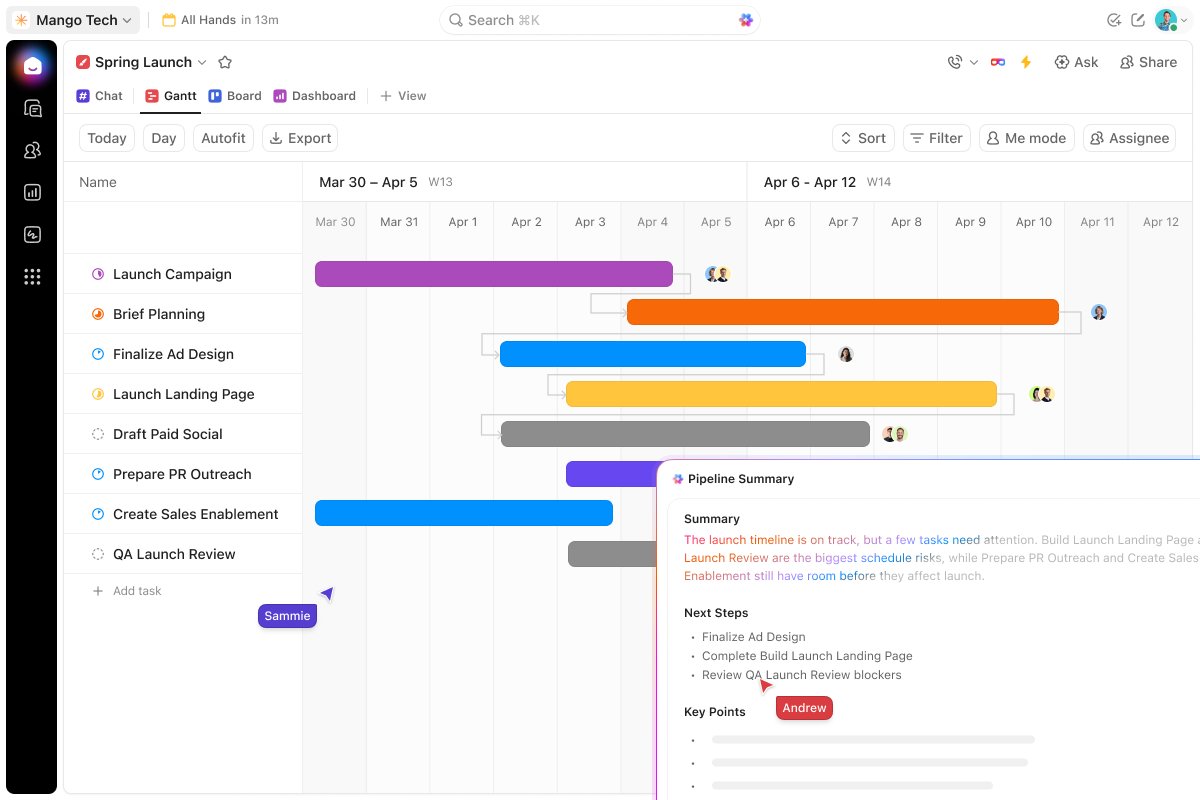
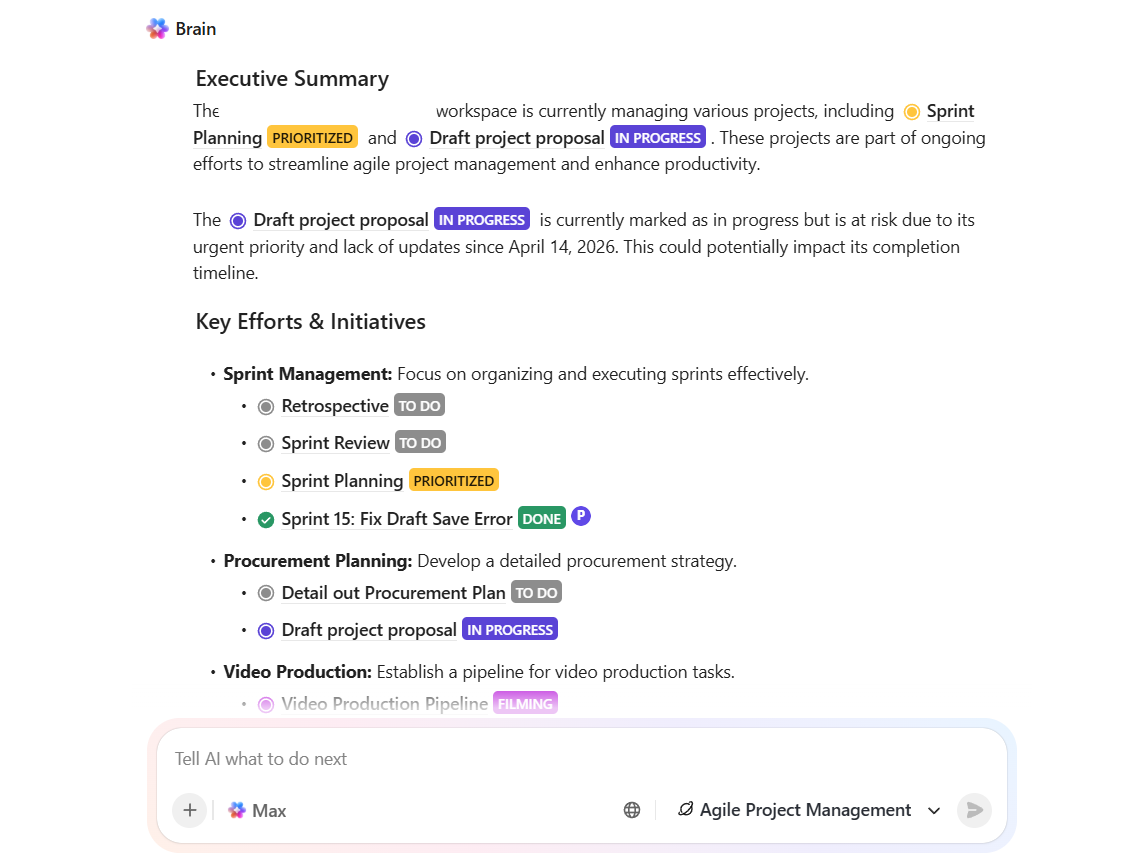
ClickUp keeps designers, developers, QA, and content working off the same plan. It ensures handoff slips surface days early instead of blowing up your launch date.
Skip it if: You’re running a single-person build with one stakeholder and a fixed deadline. A spreadsheet will ship faster.
Best for: Teams managing three or more roles (design, development, QA, content, SEO) across multiple weeks, with stakeholders who need different views of the same project.
Trinetix, a digital services company, moved their web project workflows into ClickUp to manage complex builds across remote teams. They cut meetings by 50% and increased design team satisfaction by 20%.
Kateryna Sipakova, Portfolio Manager at Trinetix, shares:
ClickUp has been pivotal to scaling our design operations. New designers are ramping up quicker than before, and our management team has a new level of insight into our workload and goals.
Want to see this in action? Illia Shevchenko from System Integrators walks you through building an AI Project Manager using ClickUp Super Agents to get your time (and margins) back.
Web projects fail for boring reasons: unsigned scope, wireframes that skipped approval, QA running on production, “maintenance” that nobody defined. The methodology you choose won’t fix any of that. Agile, Scrum, Waterfall, CPM, all of them ship websites when the scope brief is signed, the handoffs have written gates, and the maintenance terms exist before anyone writes code.
Pick the methodology that matches how often your client wants to see the work. Run it somewhere the whole team can see the same plan.
One honest note: ClickUp is better suited for teams to scale or coordinate across functions. For a simple five-page build with a two-person team and a single stakeholder, a shared spreadsheet and a calendar app will cover 90% of what you need. If that’s the situation, use the simpler tool.
If you’re coordinating four disciplines across six weeks with multiple stakeholders, sign up for ClickUp and build out the hierarchy from the checklist in this article.
Five-page marketing sites run 6-12 weeks end-to-end. Complex web applications with authentication and integrations run 4-9 months. The difference comes from scope clarity and stakeholder review cycles.
Web development is the act of building a site. Website project management coordinates designers, developers, QA, content, and SEO. The goal is to ship on time, on budget, and in line with business objectives. One produces the code; the other creates the conditions for the code to be useful.
Include a 15-20% buffer per milestone. It absorbs scope clarifications, stakeholder review delays, and late “one more thing” requests without pushing launch.
Define this in the original scope. The agency or build team handles security patches, uptime monitoring, and minor edits under a maintenance agreement. The client owns content updates and new features unless a new statement of work is signed.
A website project manager owns the scope, timeline, budget, and stakeholder communication for a build. They coordinate designers, developers, QA, content, and SEO from start to finish. On a mid-size build, that means running the scope brief, managing the design-to-dev handoff, and defining maintenance terms before launch. Keeping QA clear of scope creep is part of that, too.
Strong scope management, written communication, and an instinct for when to escalate. Technical knowledge helps (knowing what a staging environment is, why an API contract matters), but it doesn’t replace the habit of writing things down. The best web PMs treat the scope brief as the most important document in the project. Everything else flows from that.

Manasi Nair
Max 22min read
Manasi Nair
Max 15min read

Praburam Srinivasan
Max 16min read

© 2026 ClickUp