
Sorry, there were no results found for “”
Sorry, there were no results found for “”
Sorry, there were no results found for “”
The average digital agency earns a 35% margin on client projects, but finishes the year at 13% net. That 22-point gap doesn’t live in the creative. It hides in intake, scoping, timesheets, approvals, and reporting that no client pays for directly.
Yet when agencies reach for automation, they point it at the deliverable, the one place where taste is the product and speed just makes them look cheaper. The margin math sits in the operational middle nobody logs.
This guide draws a hard line between the work you should automate and the judgment you never should. It then walks through the seven steps of marketing agency automation that turn recovered hours into profit instead of a smaller invoice.
Most agencies already have automations running, so audit those before building more. For each one, ask two questions: does a client receive the output, and did anyone change the price after it launched?
Client-facing output with no price change means you automated the delivery and passed the gain to the client. They now get the same work faster at the same rate. Internal output means you automated overhead: those hours were never on an invoice, so nothing needs to be repriced, and the recovered time lands in your margin.
That count usually comes out lopsided, with several automations aimed at client deliverables and none at intake, timesheets, or approvals. This guide closes that gap.
Marketing agency automation uses software, workflow rules, and AI to run an agency’s repeatable internal work without manual effort. It covers client intake, project setup, staffing, approvals, time capture, status reporting, and billing triggers.
The term spans two very different scopes of work.
Campaign automation handles the marketing you deliver for clients: email sequences, lead scoring, and ad bidding.
Operations automation covers everything that happens between winning the work and invoicing it: intake, scoping, staffing, routing approvals, logging time, and assembling reports. It also protects your profit by eliminating hours that a client’s invoice never counts.
Here is the difference between campaign automation and operations automation:
| Dimension | Campaign automation | Operations automation |
|---|---|---|
| What it touches | Client-facing marketing | Internal delivery and admin |
| Typical tools | HubSpot, Klaviyo, Google Ads scripts | Zapier, Make, agency platforms |
| Who it benefits | The client’s funnel | The agency’s margin |
| Billable to the client | Usually yes | Almost never |
| Failure mode | Generic output that the client notices | Silent margin leak nobody notices |
| Positioning risk | High. Automating taste commoditizes you | Low. Nobody buys your timesheets |
Read the table this way: Campaign automation carries real positioning risk because the client is paying for taste, not speed. Operations automation carries almost none because no client evaluates your approval routing or how you build a project folder. Which is why the latter is the perfect place to start.
Automating operations moves four numbers: it converts non-billable hours into billable capacity, turns unpriced scope into a logged cost, makes project-level margin visible weekly instead of at year-end, and keeps process knowledge in the system when people leave. None of it improves the creative. All of it decides whether the creative was worth making at your price.
You recover the hours that never hit an invoice. Billable utilization fell to a record low 66.4% in 2025, meaning a third of every paid week goes to work no client sees on a bill. Operations automation targets that third. Utilization is the most sensitive number on an agency P&L. A 10-point improvement lifts gross margin 15% to 20% for a mid-size agency without a single new client, because the cost line stays flat while billable output rises
You stop giving away margin through invisible scope creep. 79% of creative agencies routinely work beyond scope without additional pay. Automated scope-change logging turns out-of-scope requests into a cost line in the quarterly review rather than a vague sense that the team overdelivered for free.
You surface the profitability problem before renewal season. 35% of agencies don’t track hours per project in detail. Without task-level time data, you find out which retainers lost money at year-end, too late to reprice. When time is captured as work happens, you see margin data weekly at the project level.
You protect institutional knowledge from turnover. Marketing agencies average roughly 30% annual turnover. Every departure takes process knowledge with it. When the process is an automation, a new hire inherits the system on day one instead of reconstructing tribal knowledge over three months.
Never automate the work a client is paying a human to judge. That means creative concepts, strategy calls, pricing, hard conversations, and final quality control. Here’s why:
Strategy drafts. A model can produce something structurally complete. What it cannot produce is a reason to reject the obvious option. That is the tell a senior client picks up on in about a minute, because nothing in the document is arguable, and nothing in it could have come from anyone on your team. The cost is not a weak deck. It is the client concluding they could have prompted this themselves, which is a conclusion you cannot walk back in a renewal conversation.
Relationship signals. These include scope pushback, a slipped deadline, an apology, or a renewal ask. A generated apology is fluent and symmetrical: it names the problem, commits to a fix, and risks nothing, which is exactly why it reads like a form letter. A person writing the same message names the actual cause and absorbs some blame. That is the part the client registers. Get it wrong, and they stop escalating to you and start escalating about you.
Final quality control. AI review reliably catches anything checkable against a rule: typos, broken links, missing fields, the wrong logo file. It cannot catch the deliverable where every element is correct, yet the whole thing is wrong for this client. The problem lies in what someone remembers from the last three calls, so a person stays as the last set of eyes.
The common mistake is sorting work by difficulty. Sort it instead by whether judgment is the deliverable. A difficult task that follows clear rules (assembling a report from live data) automates well. An easy task that requires taste (choosing which finding to lead with in that report) does not. Three tiers hold up in practice:
| Layer | What belongs here | Who decides | Agency examples |
|---|---|---|---|
| Automate fully | Rule-based, no taste needed | The system | Task creation from intake forms, timesheet reminders, status roll-ups, invoice triggers |
| Assist with AI | Judgment needed, but a draft saves real time | A named human reviews before it ships | First-pass scope estimates, meeting notes, QA checklists, report commentary |
| Keep human | The judgment itself is what the client is buying | A named person owns the call | Creative concept, strategy, pricing, bad news, saving an account at risk |
How to use this table: Every recurring task in your agency fits one of these three layers. The sorting question is never ‘is this hard?’ but ‘would the client be annoyed to learn a machine did this alone?’ If yes, it belongs in the assist or human layer. If no, automate it fully and stop spending human hours on it.
Start with client intake, time capture, and report assembly. Those three carry the highest repeat count per client cycle and the most downstream damage when someone does them by hand and gets them wrong. Agencies between 8 and 50 people almost always land on the same ten after an audit.
Use this as a reference list, not a substitute for the process: your version may reorder based on which tasks cost the most at your billing rates.
What ‘live capacity data’ looks like in practice at ClickUp:
Automating agency operations takes seven steps: audit where non-billable hours actually go, sort candidates by judgment, fix the process before automating, build within your system of record, assign a named owner to every automation, decide where recovered hours go, and measure margin instead of hours saved.
The whole sequence works in a spreadsheet, a connector tool, or a full work platform. The point is getting the decisions right before the tooling matters.
Track two weeks of real time at the task level. Include the admin nobody usually logs: rebuilding project folders, chasing missing timesheets, assembling reports, reconciling client data across tools. You are hunting for the categories that eat hours without landing on an invoice.
It can be tempting to name client communication as the biggest drain. But internal coordination almost always emerges as the bigger one.
Document three things for every recurring task:
A spreadsheet with a category column is enough for this. Anything that shows up more than five times in two weeks is a candidate.
This guide asks you to track non-billable time for two weeks. The report’s profitability calculator gets you a starting number in two minutes, before you commit to the audit.
The rest of the report covers the five operating shifts that separate agencies running 25%+ net margins from the industry average of 13%. Find six named case studies and the margin math behind each one.
Once you have your candidates, run them through the three tiers from the boundary table above: automate fully, assist with AI, or keep human. Write the label next to each task before you look at any tools.
When agencies skip the labeling, they start with the tasks that feel worth solving. These are almost always the ones involving writing or thinking, so report drafting gets an AI pass.
Meanwhile, the account manager is still sending Slack reminders about timesheets every Friday afternoon, because nobody thought that was an interesting enough problem to fix. One of those two things a client might notice. The other one is pure cost.
Pro Tip: Count your ‘assist’ rows. If most of your list landed there, go back through them and ask what the client receives from each task. If the answer is nothing, change the label to ‘automate fully.’ Timesheet reminders, capacity alerts, and status roll-ups all get parked in ‘assist’ out of caution, and none of them need a human in the loop.
Take only the tasks you labeled ‘automate fully’ and write out how each one actually runs today: every step, who does it, and where it passes to the next person. Then check three things before you build anything.
Automations should read and write the same data your team looks at every day. Connector-only setups that shuttle data between five apps create a second, invisible system nobody maintains.
The failure mode is specific and common:
What to do instead: Pick the marketing automation software that holds your tasks, time, and client work, then route connectors into it rather than around it.
Every automation needs one person responsible for it, along with a note explaining what it does and why. Undocumented automations become haunted plumbing the moment their builder changes roles.
Set up a simple register with three columns:
Agencies feel ownership gaps faster than most businesses because account and project roles turn over. A status automation built by a previous project manager keeps firing into a channel nobody reads. The team stops trusting automated updates and eventually gives up the tool.
Review this register whenever someone in a delivery role leaves. That single habit catches most failures before they compound.
Choose where recovered hours go before you launch anything: more client capacity, better work on existing accounts, or straight margin. Hours with no destination get absorbed by whatever shouts loudest, which is usually unbilled scope.
This is the step most agencies skip, and it is the reason automation often improves delivery speed without improving profitability. The math explains why.
Take a $15,000/month retainer. Your team currently delivers 120 hours against it. That is an effective rate of $125/hour. The client does not see this number, but your margin depends on it.
You automate intake, project scaffolding, and status reporting. Those three save 20 hours per month. Now your team delivers the same scope in 100 hours. Your effective rate just rose to $150/hour without changing anything on the invoice.
Here is where the trap opens. If the client measures value by visible activity (hours logged, meetings held, messages sent), the faster delivery looks like less effort. They ask why the retainer has not come down. You now have three choices, and only two of them protect your margin:
| Scenario | What happens | Effect on margin |
|---|---|---|
| You reduce the retainer to match the new hours | $15,000 drops to $12,500. You automated your own revenue away | Margin stays flat. You did free consulting on your own efficiency |
| You keep the price and reinvest hours into the account | Same $15,000, but the client now gets proactive strategy, deeper QA, or faster turnaround. The value proposition shifts from hours to outcomes | Margin holds. Renewal conversation gets easier because the work got better |
| You keep the price and take the margin | Same $15,000, 20 fewer hours of cost. Your delivery cost drops from roughly $7,200 (at $60/hour loaded cost) to $6,000. Net margin on this client rises from 52% to 60% | Margin improves, but only if the client never asks the hours question |
The second scenario is the safest. The third is the most profitable but requires a pricing model that never references hours. The first is what happens by default when you have no plan.
Lock down these decisions before the first automation goes live:
The best time to reframe pricing is at renewal or when adding a new service line. If you are mid-contract and cannot reprice yet, reinvest visibly. Send a proactive audit that the client didn’t request. Flag an opportunity before they see it themselves. The point is to fill recovered hours with visible value so the conversation never becomes “why am I paying the same for less time?”
Pro Tip: Run the math on one client before you roll out broadly. If you recover 10 hours per month on a $15K retainer, what does that do to your effective hourly rate? If the answer makes the retainer look overpriced under hourly logic, you need the pricing conversation first.
Judge every automation on project margin and billable utilization. Hours saved is a vanity metric. It does not show whether the time turned into anything.
Track three numbers per client, before and after:
Utilization deserves a stated target rather than a vague figure. Agency capacity planning is where that target is set honestly, and broader resource allocation habits decide if it holds.
Pro Tip: Show the margin number to the team monthly. People protect what they can see. A dashboard that updates as work is completed is more motivating than a quarterly report nobody reads until the all-hands.
Four layers, and headcount plus one acute pain decides which you buy.
| Setup | Named tools | Price | Choose it when |
|---|---|---|---|
| Spreadsheet + connector | Airtable or Google Sheets, wired to Make or Zapier | $20–$70/mo total | Under 8 people. One person can hold the whole process in their head |
| Work platform | ClickUp, monday.com, Asana, Productive | $7–$25/seat/mo | Past 10 people, or you can’t say which retainers are profitable |
| Point solutions | Harvest, Float, Filestage | $7–$20/seat/mo, per tool | One pain is acute enough to solve properly: time, resourcing, or creative review at volume |
| Client campaign layer | HubSpot, Klaviyo, GoHighLevel | Scales with contacts | Separate purchase. This automates the client’s funnel, not your margin |
The first three are where your own operations live. Here is what ‘inside the system of record’ looks like across the three main setups:
Work platform: Everything lives within the same system: automations, tasks, time entries, and reports. An intake form creates the project. A status change triggers the approval routing. A Dashboard pulls margin data from the tasks and time entries it already holds.
Spreadsheet + connector: The automation writes back to the same Airtable base or Google Sheet that the team checks daily. A new intake form submission creates a row in the master project tracker, not in a separate tool. Status changes, time logs, and deliverable links all live in that one base. The Zap’s job is to push data into the sheet, never to hold data that exists only within the Zap’s history. Note: If your automation register runs on Airtable, watch for pricing and packaging changes after their acquisition by Bending Spoons.
Point solutions: Pick one tool as the single source for each data type. Time lives in Harvest. Resourcing lives in Float. If your reporting tool needs that data, it pulls from those sources via API rather than maintaining its own copy.
Where an agency automates first depends on what the client is buying. Content and SEO shops automate intake because volume comes in through the brief. Brand and creative studios automate approval routing, because timelines die between review stages. Performance and paid media teams automate report assembly, because the data is live and the deliverable is the interpretation.
The seven steps hold across all three. What moves is the boundary line: a content agency draws it closer to the deliverable than a brand studio does, because the deliverable is writing.
Here’s what that looks like in practice.
A managing editor runs delivery for eight concurrent retainers. Each client gets a monthly content calendar, keyword-mapped briefs, drafts, revisions, and a performance report. The volume is high, the deliverable structure is repetitive, and the margin lives or dies on how fast a brief goes from signed scope to published page. The automation sits here:
The critical boundary: AI drafts the content brief based on a keyword cluster and competitor scan. A strategist still decides the angle, the differentiation point, and what not to cover. The client is paying for editorial judgment, not keyword density.
What makes this one different: The deliverable itself is writing, so the automation-versus-taste line sits closer to the work than in any other model. Automate the assembly and the reporting. Automate editorial decisions and you’ll eventually send the same angle to two clients.
A creative director oversees six concurrent brand projects. Each one runs through discovery, concept development, two or three internal review rounds, a client presentation, revisions, and final asset delivery. The work is high-touch and low-volume. Margin leaks not in production speed but in unbilled revision cycles and scope that drifts because nobody logged the ask. The automation sits here:
The critical boundary: AI assists with first-pass production work: resizing assets, generating layout variations, assembling style guide pages from approved elements. A creative director still owns the concept, the art direction, and the presentation of the work. No client paying $80K for a rebrand wants to learn that a machine chose the color palette.
What makes this one different: The approval chain is longer and messier than in any other model, so the biggest payback is in routing. A content agency automates intake first. A brand agency automates approvals first. Three days parked between internal review and client presentation rarely cost only three days. The window is where a stakeholder resurfaces with a new opinion, and the project absorbs a revision round nobody scoped while the fee stays fixed.
A head of media manages retainer accounts across a team of buyers, analysts, and one strategist. The work is fast-cycle: daily budget decisions, weekly optimization, and monthly reporting. Volume is extreme, the data is live, and the deliverable is measured in numbers that the client already has access to.
The margin question is not ‘Can we produce this faster?’ It’s ‘Can we prove the value of the thinking between the numbers?’ The automation sits here:
The critical boundary: AI surfaces optimization recommendations from platform data. A media buyer still decides whether to act. A recommendation that looks right in aggregate can be wrong for a client whose brand safety rules or seasonal patterns the model has never seen.
What makes this one different: The client has access to the same dashboards you do. They can see the spend and the conversions. So the deliverable is not the data. It is the interpretation and the next move. Automating the report layout is safe. Automating the read-out is what loses the account.
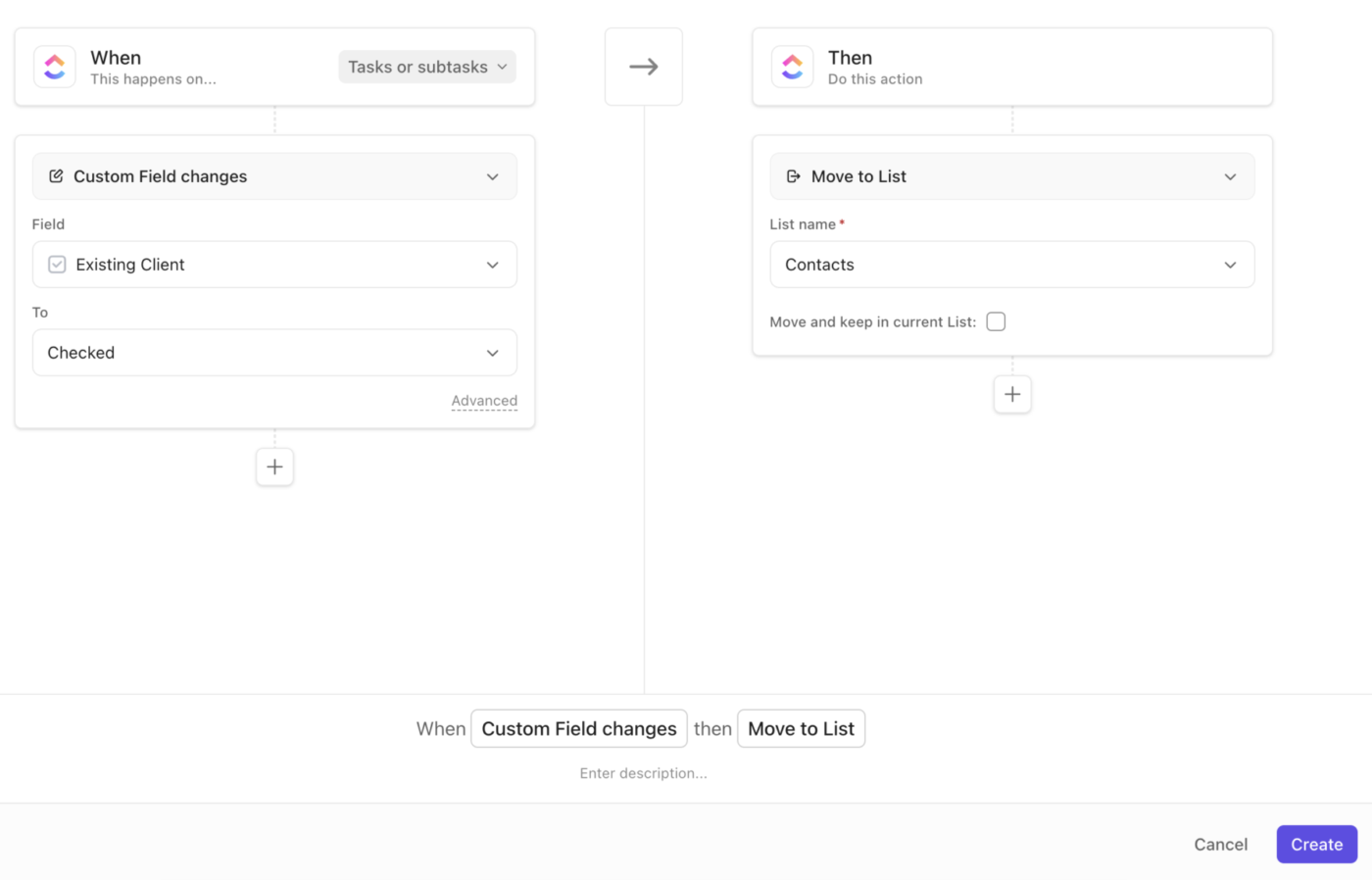
ClickUp holds projects, time tracking, docs, automations, and reporting in one system. The chain from intake to margin dashboard stays connected without exporting data between tools.
Unlike conversational AI that stops at answers, an agent handles end-to-end workflows. Here is how to build one in ClickUp without writing code:
What the workflow looks like when nothing leaves the platform:
Limitations:
Skip it if: Your agency is under eight people and coordination happens in a conversation rather than a process. A spreadsheet wired to a connector is cheaper and faster to set up at that size.
Best for: Agencies where the margin leak lives between steps (intake to kickoff, delivery to invoice) and nobody can currently say which clients are profitable at the task or retainer level.
Pick one category: intake, time capture, or report assembly. Build it, name an owner, and decide whether recovered hours become capacity, deeper work, or straight margin. If the project margin has not moved in a quarter, the hours landed somewhere you did not choose.
The one thing that breaks this is a rigid workflow with no way out. Automated intake handles the 80% of requests that look like previous requests, but the other 20% is where accounts are won or lost. If a client can’t reach a person without knowing your internal system, the exception path does not exist.
The same logic applies to output: the moment a client calls a deliverable ‘generic’ or ‘templated,’ something crossed the boundary. Either AI touched a layer it should not have, or the human review step became a rubber stamp. Move it back immediately.
The bottom line: Automate judgment and you lose the client. Leave operations manual and you lose the margin. Get it right once, and the gap starts closing from the only side where nobody has to reprice anything.
ClickUp holds your entire workflow in one system, so nothing breaks between steps. Start for free here.
Marketing automation runs the marketing you deliver for clients. It includes email sequences, lead scoring, and ad bidding in tools like HubSpot or Klaviyo. Marketing agency (operations) automation runs your own shop: intake, scoping, resourcing, approvals, time capture, and billing. The first is billable and client-facing; the second is where agency margin can leak. Conflating them is why agencies automate the visible deliverable and leave the profitable overhead untouched.
Automating marketing agency operations ranges from near-zero to a few hundred dollars a month per seat, depending on approach. A spreadsheet plus a connector (Google Sheets/Airtable with Zapier or Make) starts around $20–$50/month. Point solutions (Harvest, Float, Filestage) stack per-tool fees. A single work platform (ClickUp, Asana, monday.com, Teamwork, Productive) consolidates the spend but adds migration time. The real cost is upkeep and adoption, not license fees; an unmaintained automation costs more than it saves.
Budget two weeks just to audit where non-billable hours actually go before automating anything. A single workflow (intake, time capture, or report assembly) can be live within days on a spreadsheet-plus-connector setup. A full work-platform migration realistically takes several weeks, because the risk is a half-adopted system whose dashboards then lie. Automate one category, prove it, then expand.
Yes, automate the assembly, keep the interpretation human. Let the platform pull the numbers and build the layout (ClickUp Dashboards, AgencyAnalytics), then have a named strategist write the read-out and sign it. Reports that arrive from a system read differently from ones a person clearly analyzed, even when the data is identical. The client pays for the judgment layer.
Name it proactively. Agencies that disclose AI-assisted steps in the statement of work field fewer awkward questions later. It gives you the language to explain why pricing reflects judgment rather than hours. Keep a human name on every client-facing artifact and build an exception path so clients can always reach a person and skip the workflow. Trust survives automation when accountability stays visible; it erodes through anonymity.
AI is compressing execution work rather than replacing agencies, though it pressures anyone selling commoditized production. It is creating fresh demand for strategy, workflow redesign, and automation build-out while squeezing writing, analysis, and design exploration. The exposure sits in undifferentiated execution priced by the hour. Agencies selling judgment, category expertise, and accountability hold a defensible position, proving why it’s important to keep those layers human.

Manasi Nair
Max 23min read
Manasi Nair
Max 21min read

Sudarshan Somanathan
Max 26min read

© 2026 ClickUp




