
Laut einer aktuellen McKinsey-Studie verzeichnen Contact Center, die KI einsetzen, eine Verbesserung der Problemlösungsrate um 14 %.
Die meisten Teams arbeiten jedoch nach wie vor mit fragmentierten Tools, die Kundendaten auf fünf verschiedene Systeme verteilen. Das bedeutet, dass die Mitarbeiter Zeit mit der Suche nach Kontextinformationen verschwenden, anstatt Probleme zu lösen.
KI transformiert Contact Center, indem sie repetitive Aufgaben durch Automatisierung abarbeitet, Workflows vereinheitlicht und Ihrem Team die Echtzeit-Einblicke liefert, die es benötigt, um einen schnelleren und konsistenteren Service zu bieten.
In diesem Artikel stellen wir Ihnen die Vorteile und Best Practices der Implementierung von KI für Ihr Contact Center vor. Außerdem zeigen wir Ihnen, wie eine einheitliche Plattform wie ClickUp dies unterstützen kann.
Was ist KI für Contact Center?
Ihr Contact Center-Team ist überlastet. Es wird von einer Flut sich wiederholender Kundenanfragen überschwemmt, muss ständig zwischen einem Dutzend verschiedener tools wechseln und hat Mühe, einen konsistenten Service zu bieten.
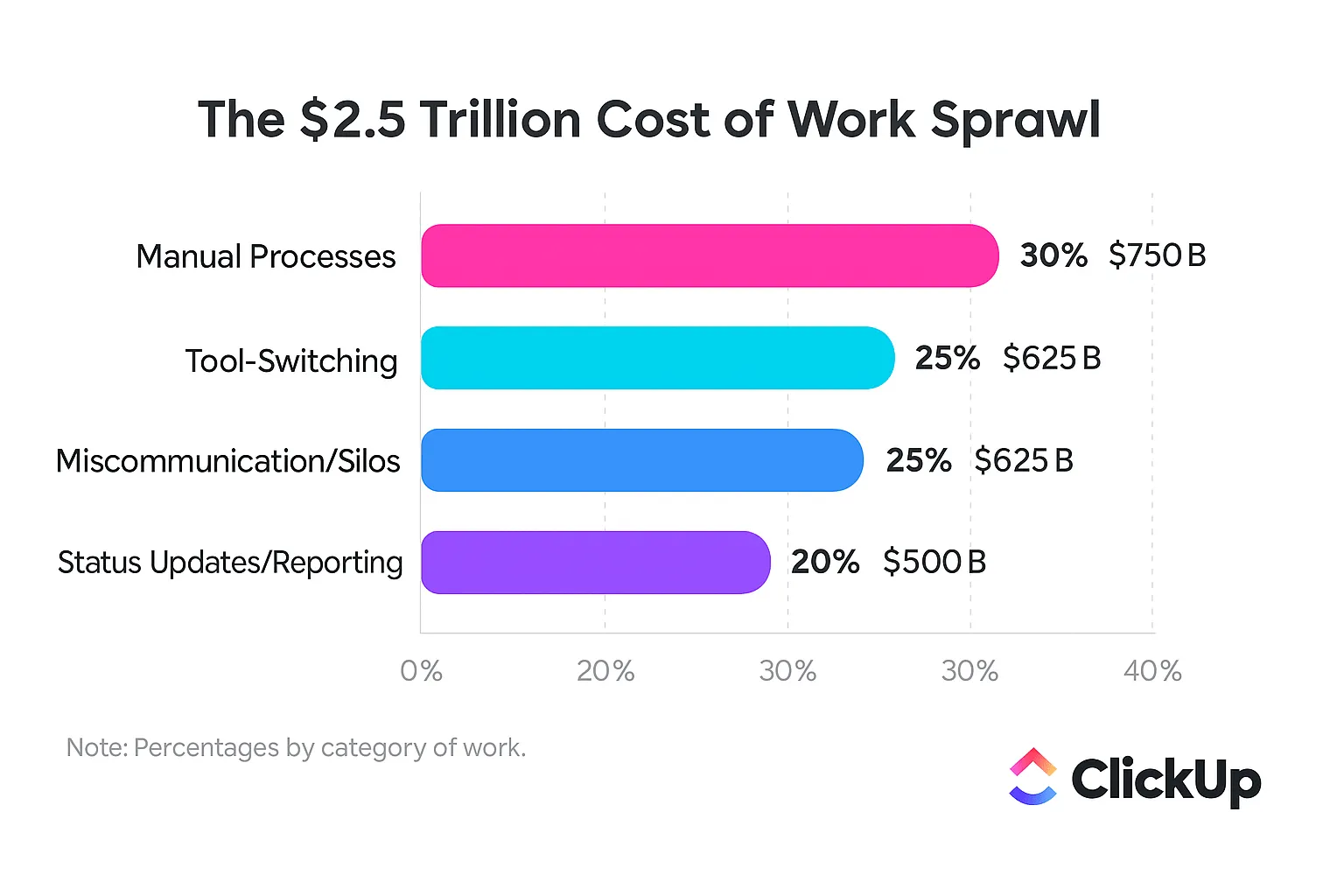
Dies ist die tägliche Realität der Kontextzerstreuung – wenn Teams Stunden damit verschwenden, zwischen Apps zu wechseln, Dateien zu suchen und nach den Informationen zu suchen, die sie für ihre Arbeit zu erledigen haben. Wenn Informationen verstreut und Workflows fragmentiert sind, sinkt sowohl die Zufriedenheit der Mitarbeiter als auch die der Kunden.
KI für Contact Center ist die Technologie, die dies ermöglicht. Sie umfasst eine Reihe von KI-Tools – wie Chatbots, Sprachassistenten und Echtzeitanalysen –, die Kundeninteraktionen automatisieren, menschliche Agenten unterstützen und aus jeder Unterhaltung wertvolle Erkenntnisse gewinnen.
Für Teams, die ein hohes Volumen an Anfragen über Chat, E-Mail und Telefon bearbeiten, entfällt dadurch die manuelle Arbeit, die die Lösungszeiten verlangsamt.
Anstatt mit fragmentierten Tools für Tickets, Anrufe und Berichterstellung zu arbeiten, vereinheitlicht KI Daten und Workflows. Sie bietet eine einzige Quelle der Wahrheit und gibt den Agenten den Kontext, den sie zur Lösung komplexer Probleme benötigen, während einfache Aufgaben durch Automatisierung abgedeckt werden.
Zu den Kernkomponenten, die dies ermöglichen, gehören:
- Chatbots und Voicebots für sofortigen Self-Service
- Natürliche Sprachverarbeitung (NLP), um zu verstehen, was Benutzer tatsächlich meinen
- Intelligente Weiterleitung, damit Benutzer beim ersten Versuch mit der richtigen Person verbunden werden
- Agentenunterstützungstools bieten während Unterhaltungen Echtzeit-Anleitungen.
- Sprach- und Textanalyse zur Auswertung jeder Interaktion hinsichtlich Trends und Compliance
📚 Lesen Sie auch: Wie KI-Agenten im Kundenservice arbeiten
Vorteile von KI für Contact Center für Teams
Bei der Einführung von KI geht es nicht nur um Kostensenkung, sondern auch darum, eine nachhaltige Arbeitsumgebung für Ihre Mitarbeiter zu schaffen und gleichzeitig die schnelle und präzise Erfahrung zu bieten, die Ihre Kunden erwarten. Wenn KI die Schwerarbeit übernimmt, verbessert sich die gesamte Arbeitsdynamik Ihres Teams.
Schnellere Reaktionszeiten und Verfügbarkeit rund um die Uhr
Ein Kunde hat um 22 Uhr eine einfache Frage, aber Ihr Team ist bis zum nächsten Morgen offline. Diese Verzögerung führt zu Frustration und einer schlechten Kundenerfahrung (CX), aber die Bereitstellung von Personal rund um die Uhr ist teuer und führt schnell zu Burnout.
KI-gestützte Chatbots und Sprachassistenten lösen dieses Problem, indem sie rund um die Uhr sofortigen Support für häufig gestellte Fragen bieten. Sie bearbeiten die zahlreichen einfachen Fragen, die Ihre Warteschlangen verstopfen, und entlasten so Ihre menschlichen Mitarbeiter, die sich dann um Probleme kümmern können, die ihr Fachwissen erfordern. Eine Studie der Stanford University zeigt, dass neue oder weniger erfahrene Mitarbeiter mit KI-Unterstützung 34 Prozent mehr leisten.
| Abfrage-Typ | Bearbeitet von | Durchschnittliche Lösungszeit |
|---|---|---|
| Passwort zurücksetzen | KI-Chatbot | In weniger als 60 Sekunden |
| Auftragsnachverfolgung | KI-Sprachassistent | 1–2 Minuten |
| Komplexe Abrechnungsstreitigkeiten | Menschlicher Agent | 8–15 Minuten |
Kunden erhalten Antworten innerhalb von Sekunden statt Stunden. Und Ihre Mitarbeiter können ihre Energie auf die Lösung komplexer, anspruchsvoller Probleme konzentrieren, bei denen die Zusammenarbeit zwischen Mensch und KI einen echten Unterschied macht.
Möchten Sie die Reaktionszeiten Ihrer Kundensupport-Teams verbessern? Beauftragen Sie die Super Agents von ClickUp mit der langweiligen, aber notwendigen Arbeit der Aufgabentriage! In diesem Video erfahren Sie, wie das geht:
Gesteigerte Produktivität und Effizienz der Agenten
Ihre Mitarbeiter verbringen viel Zeit mit Aufgaben, die nichts mit der Kundenbetreuung zu tun haben. Sie geben Daten manuell ein, suchen in einem separaten CRM-System nach Kundenhistorien und kopieren Informationen zwischen fünf verschiedenen Fenstern hin und her. Dies ist ein Beispiel für Kontextzerstreuung, die die Produktivität und Arbeitsmoral beeinträchtigt.
KI-gesteuerte Automatisierung macht diese Routinearbeiten überflüssig. Sie automatisiert Nachbesprechungen, Dateneingaben und die Kategorisierung von Tickets. Noch wichtiger ist, dass Echtzeit-Agentenunterstützungstools als Co-Pilot fungieren, relevante Informationen anzeigen, Antworten vorschlagen und während Live-Unterhaltungen die besten nächsten Schritte vorschlagen.
Agenten bleiben im Flow, anstatt ständig zwischen Registerkarten zu wechseln. Sie können mehr Anfragen bearbeiten, ohne sich überlastet zu fühlen, und die Qualität ihres Service verbessert sich, da sie den richtigen Kontext immer zur Hand haben.
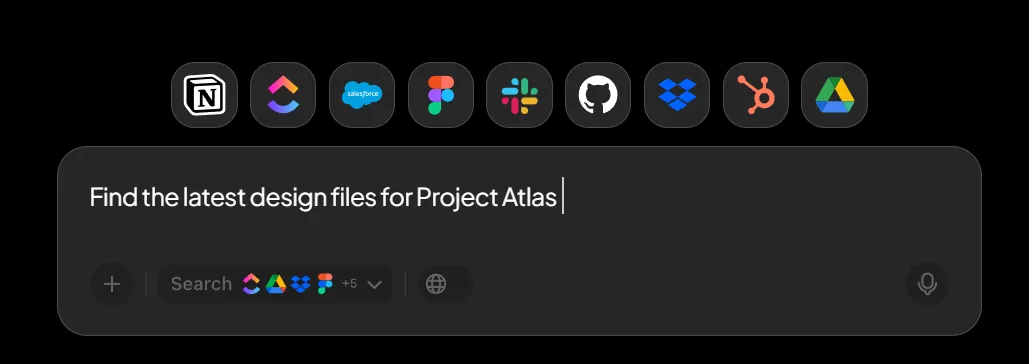
💡Profi-Tipp: Mit der Enterprise-Suche von ClickUp stehen Ihren Mitarbeitern alle Unternehmensinformationen, Support-Skripte, SOP-Dokumente und vieles mehr jederzeit zur Verfügung. Die Suche ruft Informationen aus Ihrem Workspace und Ihren verbundenen Apps ab, sodass Sie nicht mehr an Dutzenden von Orten suchen müssen.
Kostensenkung in großem Maßstab
Traditionell bedeutete die Skalierung eines Contact Centers eine einfache, mühsame Gleichung: mehr Kundenvolumen gleich mehr Agenten. Dieses lineare Wachstumsmodell macht die Erweiterung Ihrer Support-Aktivitäten unglaublich teuer und zwingt Sie, zwischen Budgetbeschränkungen und Kundenzufriedenheit zu wählen.
KI durchbricht dieses Muster. Indem sie einen erheblichen Teil der Anfragen an Self-Service-Kanäle umleitet, ermöglicht KI Ihnen, ein höheres Volumen zu bewältigen, ohne dass Sie dafür proportional mehr Personal einstellen müssen. Intelligentes Routing sorgt dafür, dass komplexe Probleme beim ersten Versuch an den qualifiziertesten Mitarbeiter weitergeleitet werden, wodurch kostspielige Weiterleitungen und wiederholte Kontakte drastisch reduziert werden.
Dabei geht es nicht darum, Mitarbeiter zu ersetzen. Vielmehr geht es darum, Ihre wertvollste Ressource – Ihre Mitarbeiter – von sich wiederholenden, wenig wirkungsvollen Aufgaben zu höherwertigen, beziehungsbildenden Interaktionen umzuschichten.
📮 ClickUp Insight: Jeder vierte Mitarbeiter verwendet vier oder mehr Tools, nur um sich einen Überblick über die Arbeit zu verschaffen. Ein wichtiges Detail kann in einer E-Mail versteckt, in einem Slack-Thread erweitert und in einem separaten Tool dokumentiert sein, sodass Teams Zeit mit der Suche nach Informationen verschwenden, anstatt ihre Arbeit zu erledigen.
ClickUp vereint Ihren gesamten Workflow auf einer einheitlichen Plattform. Mit Features wie ClickUp E-Mail Projektmanagement, ClickUp Chat, ClickUp Docs und ClickUp Brain bleibt alles miteinander verbunden, synchronisiert und sofort zugänglich. Verabschieden Sie sich von „Arbeit um der Arbeit willen” und gewinnen Sie Ihre Produktivität zurück.
💫 Echte Ergebnisse: Teams können mit ClickUp jede Woche mehr als 5 Stunden Zeit einsparen – das sind über 250 Stunden pro Person und Jahr –, indem sie veraltete Wissensmanagementprozesse eliminieren. Stellen Sie sich vor, was Ihr Team mit einer zusätzlichen Woche Produktivität pro Quartal alles erreichen könnte!
Echtzeit-Einblicke und Analysen
Als Manager agieren Sie oft blind. Bei herkömmlichen Qualitätssicherungsprozessen (QA) werden möglicherweise nur 1–2 % der Anrufe überprüft, sodass Sie einen großen blinden Fleck hinsichtlich der tatsächlichen Vorgänge haben. Sie wissen nichts über aufkommende Probleme der Kunden, Leistungslücken bei Agenten oder Compliance-Risiken, bis diese bereits zu großen Problemen geworden sind.
KI bietet Ihnen 100 % Sichtbarkeit. Sie analysiert jede einzelne Interaktion, transkribiert Anrufe und Chats und lässt sie durch leistungsstarke Analyse-Engines laufen. Dadurch werden Einblicke ermöglicht, die zuvor unmöglich waren.
- Stimmungstrends: Führen Sie automatisch die Nachverfolgung der Kundenzufriedenheit über alle Kanäle hinweg durch, um weit verbreitete Probleme zu erkennen.
- Compliance-Hinweise: Erkennen Sie sofort, wenn Agenten erforderliche Angaben versäumen oder von Skripten abweichen.
- Leistungsmuster: Entdecken Sie Coaching-Möglichkeiten, indem Sie erkennen, mit welchen Themen die Agenten am meisten zu kämpfen haben.
Endlich müssen Sie nicht mehr raten, sondern können datengestützte Entscheidungen treffen, um die Leistung Ihres Teams und das Kundenerlebnis insgesamt zu verbessern.
Gleichbleibende Qualität und Compliance
Kein Agent bearbeitet einen Anruf auf genau dieselbe Weise. Diese menschliche Variabilität kann zu einer inkonsistenten Servicequalität führen. Hinzu kommen komplexe Compliance-Anforderungen – wie vorgeschriebene Skripte und Datenverarbeitungsprotokolle – und das Risiko von Fehlern wird zu einer ständigen Quelle von Stress.
/AI fungiert als universelle Qualitätskontrollschicht. Sie überwacht jede Interaktion, um sicherzustellen, dass der Ton und die Verfahren Ihrer Marke eingehalten werden. Während eines Anrufs kann sie einem Agenten genau die Compliance-Formulierungen vorschlagen, die er verwenden muss, damit nichts übersehen wird.
Dadurch wird Ihr QA-Prozess von einer reaktiven, stichprobenbasierten Prüfung zu einem proaktiven, umfassenden System. Sie erhalten einen konsistenten Service auf allen Kanälen und reduzieren Ihr Compliance-Risiko erheblich, ohne Ihr Team mit manuellen Überprüfungsaufgaben zu überlasten.
📚 Lesen Sie auch: Welcher KI-Stack eignet sich für Customer-Success-Teams?
Wie KI in Kontaktzentren eingesetzt wird
KI im Contact Center ist kein einheitliches Ganzes. Es handelt sich um eine Reihe spezialisierter Technologien, die über die gesamte Customer Journey hinweg zusammenwirken. Jede Komponente erfüllt eine bestimmte Funktion.
KI-Chatbots und Sprachassistenten
Dies sind Ihre digitalen Agenten an vorderster Front. Chatbots wickeln textbasierte Interaktionen auf Ihrer Website oder in Messaging-Apps ab, während Sprachassistenten Telefonanrufe mithilfe von dialogorientierter KI verwalten. Beide verwenden Natural Language Processing (NLP), um die Äußerungen oder Eingaben eines Kunden zu interpretieren.
Im Gegensatz zu alten, schwerfälligen Bots, die nur einem starren Skript folgten, kann moderne KI komplexe, mehrteilige Unterhaltungen führen – mit Lösungen wie Erica von der Bank of America, die mittlerweile mehr als 3 Milliarden Client-Interaktionen verzeichnet.
Sie können häufig auftretende Probleme wie die folgenden selbstständig lösen:
- Verarbeitung einer Zahlung
- Terminvereinbarung
- Nachverfolgung des Bestellstatus
- Beantwortung häufig gestellter Fragen
Sie sammeln im Voraus die erforderlichen Informationen und leiten die Unterhaltung nahtlos an einen Mitarbeiter weiter, wenn menschliche Hilfe benötigt wird, wobei der gesamte Kontext erhalten bleibt.
Intelligente Anrufweiterleitung
Ihr Team verschwendet Zeit mit Weiterleitungen, weil herkömmliche Routing-Systeme nur begrenzt einsetzbar sind. Sie leiten einen Kunden einfach an den nächsten verfügbaren Agenten weiter, unabhängig davon, ob dieser über die richtigen Fähigkeiten verfügt, um das Problem zu lösen. Dies führt zu frustrierten Kunden, die ihr Problem mehrfach wiederholen müssen.
Intelligente Anrufweiterleitung ist die Lösung. Sie analysiert die Absicht eines Kunden, seine Geschichte mit Ihrem Unternehmen und sogar seine Stimmung, um ihn gleich beim ersten Mal an die am besten geeignete Ressource weiterzuleiten.
- Alte Methode: Weiterleitung nach Verfügbarkeit
- Neuer Ansatz: Weiterleitung nach Eignung
Das bedeutet weniger Weiterleitungen, schnellere Lösungen und ein deutlich reibungsloseres Kundenerlebnis.
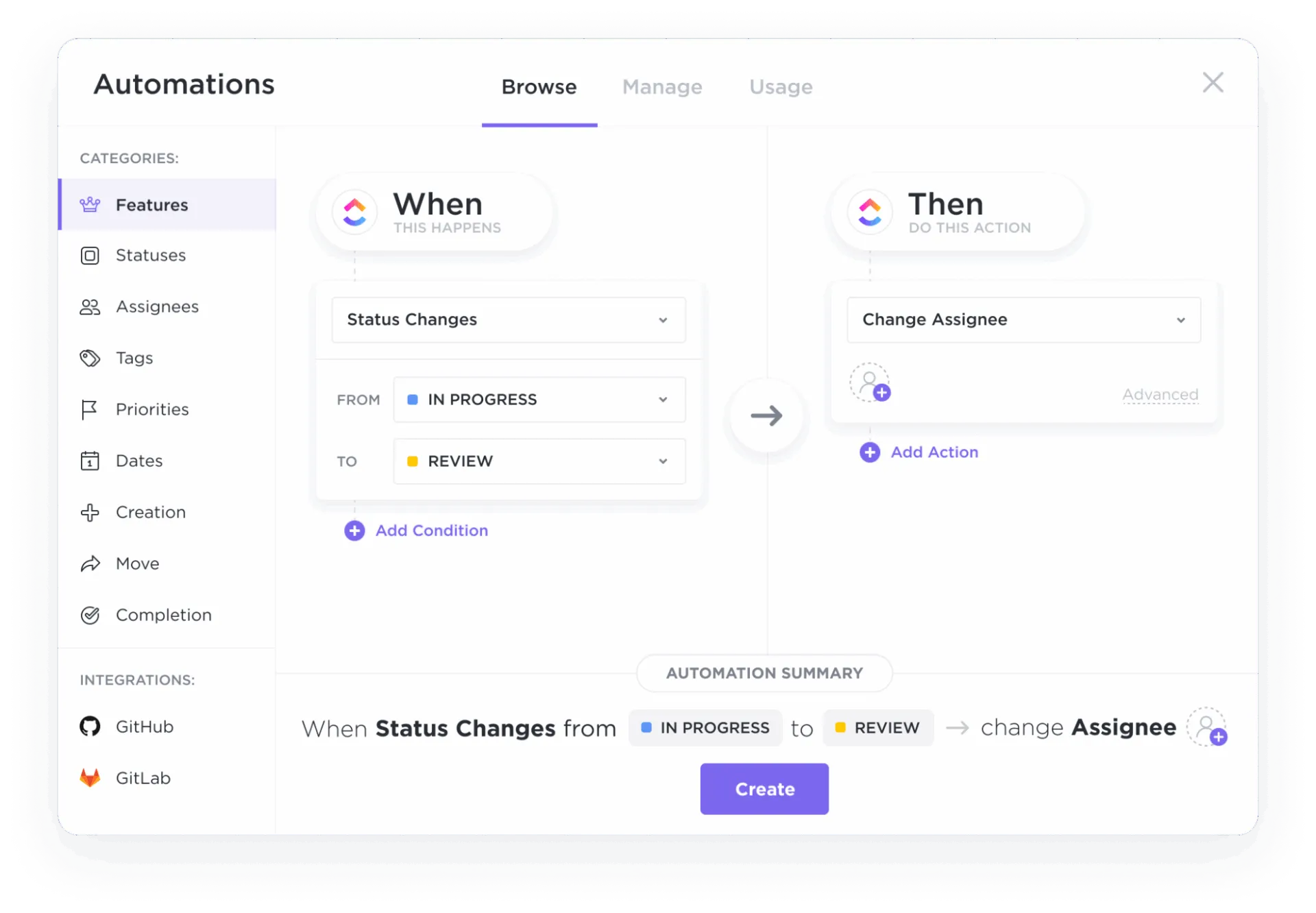
💡Profi-Tipp: Automatisieren Sie die Zuweisung von Aufgaben, die Priorisierung, Nachverfolgungen und vieles mehr für Ihr Team mit den Automatisierungen in ClickUp!
Echtzeit-Agentenunterstützung
Durch die Echtzeit-Agentenunterstützung erhält jeder Agent einen persönlichen Assistenten, der genau im richtigen Moment die richtige Antwort liefert. Diese KI-Tools arbeiten während Live-Unterhaltungen im Hintergrund und bieten kontextbezogenen Support.
Während ein Kunde sein Problem beschreibt, kann das Agent-Assistenz-Tool automatisch:
- Den richtigen Knowledge-Base-Artikel finden
- Vorgegebene Antwort vorschlagen
- Rufen Sie den vollständigen Interaktionsverlauf des Kunden auf.
- Anzeige einer Erinnerung für ein erforderliches Compliance-Skript
Agenten müssen Kunden nicht mehr in die Warteschleife legen, um nach Informationen zu suchen. Sie können sich voll und ganz auf die Unterhaltung konzentrieren und sich darauf verlassen, dass die KI die Kontextabfrage übernimmt.
📚 Lesen Sie auch: Wird KI Callcenter-Agenten ersetzen?
Stimmungsanalyse und Sprachanalyse
Was man nicht messen kann, kann man auch nicht verbessern. Mit Software zur Stimmungsanalyse und Sprachanalyse-Tools erhalten Sie eine klare Ansicht des emotionalen Tons und des Inhalts jeder Kundeninteraktion.
Sprachanalysen funktionieren, indem Anrufe in Text umgewandelt werden, der dann nach Schlüsselwörtern, Themen und Trends durchsucht und analysiert werden kann. Sentimentanalysen gehen noch einen Schritt weiter und erkennen Emotionen wie Frustration, Zufriedenheit oder Verwirrung anhand der Wortwahl, des Tonfalls und sogar der Sprechgeschwindigkeit.
Dadurch können Manager risikobehaftete Anrufe sofort zur Intervention durch einen Vorgesetzten kennzeichnen, weit verbreitete Kundenprobleme identifizieren und spezifische Schulungsmöglichkeiten für Agenten ermitteln.
📚 Lesen Sie auch: Wie KI-Agenten den Client-Service verbessern können (ohne die menschliche Note zu verlieren)
Prädiktive Analysen und proaktiver Service
Die meisten Contact Center reagieren nur – sie warten, bis ein Kunde ein Problem hat, bevor sie Maßnahmen ergreifen. Predictive Analytics-Funktionen stellen dieses Modell auf den Kopf. Diese Technologie nutzt KI, um Kundenbedürfnisse zu antizipieren, bevor sie überhaupt entstehen.
Durch die Analyse von Mustern im Kundenverhalten und in der Kundenhistorie können Vorhersagemodelle Kunden identifizieren, die wahrscheinlich abwandern, ein technisches Problem haben oder Hilfe bei einem kürzlich getätigten Kauf benötigen. So können Sie von der reaktiven zu einer proaktiven Dienstleistung übergehen.
Anstatt auf einen verärgerten Anruf zu warten, können Sie proaktiv eine Benachrichtigung über eine Dienstunterbrechung versenden oder einen Mitarbeiter bitten, sich mit einem personalisierten Angebot an ein gefährdetes Konto zu wenden.
Weitere Tipps zur Verwendung von KI im Kundenservice finden Sie in diesem Video 👇
Best Practices für die Implementierung von KI in Contact Centern
Der bloße Kauf eines KI-Tools wird Ihr Contact Center nicht auf magische Weise verbessern. Eine erfolgreiche Einführung erfordert eine klare Strategie, die Zustimmung Ihres Teams und die Bereitschaft zu kontinuierlichen Verbesserungen. Hier sind die Praktiken, die erfolgreiche Implementierungen von gescheiterten unterscheiden.
- Beginnen Sie mit wirkungsvollen, wenig komplexen Aufgaben: Automatisieren Sie zunächst die sich am häufigsten wiederholenden, zeitaufwändigen Aufgaben wie Passwort-Zurücksetzungen oder Anfragen zum Status der Bestellung. Schnelle Erfolge sorgen für Dynamik und zeigen Ihrem Team den Wert auf.
- Integrieren Sie KI in Ihre Kernsysteme: Ihre KI ist nur so intelligent wie die Daten, auf die sie zugreifen kann. Stellen Sie sicher, dass sie tief in Ihr CRM, Ihre Wissensdatenbank und andere Systeme integriert ist, um sowohl Kunden als auch Agenten ein wirklich kontextbezogenes Erlebnis zu bieten.
- Schulen Sie Ihre Mitarbeiter im Umgang mit KI: Positionieren Sie KI als ein Tool, das ihre Arbeit erleichtert, und nicht als Ersatz. Bieten Sie umfassende Schulungen zur Verwendung von Features zur Unterstützung der Mitarbeiter und zum Umgang mit Eskalationen durch Bots an.
- Überwachen Sie die Leistung und iterieren Sie ständig: Verwenden Sie Analysen zur Nachverfolgung der Leistung Ihrer KI. Identifizieren Sie, wo sie erfolgreich ist und wo sie versagt, und nutzen Sie diese Daten, um ihre Antworten und Workflows im Laufe der Zeit zu verfeinern.
- Sorgen Sie immer für einen klaren Weg zum Menschen: Nichts ist für einen Kunden frustrierender, als in einer Schleife mit einem Bot gefangen zu sein, der nicht helfen kann. Stellen Sie sicher, dass es immer einen einfachen, offensichtlichen Weg gibt, um an einen menschlichen Agenten weitergeleitet zu werden.
- Konzentrieren Sie sich auf die Lösung von Kontextproblemen: Das ultimative Ziel ist ein einheitlicher Workspace. Konsolidieren Sie Ihre Tools wo immer möglich, damit sowohl Ihre KI als auch Ihre Mitarbeiter mit einer einzigen Informationsquelle arbeiten.
📮ClickUp Insight: 88 % der Befragten unserer Umfrage nutzen KI für ihre persönlichen Aufgaben, doch über 50 % scheuen sich davor, sie bei der Arbeit einzusetzen. Die drei größten Hindernisse? Mangelnde nahtlose Integration, Wissenslücken oder Sicherheitsbedenken. Aber was wäre, wenn KI in Ihren Workspace integriert und bereits sicher wäre? ClickUp Brain, der integrierte KI-Assistent von ClickUp, macht dies möglich. Er versteht Eingaben in einfacher Sprache und löst damit alle drei Bedenken hinsichtlich der Einführung von KI, während er Ihren Chat, Ihre Aufgaben, Dokumente und Ihr Wissen im gesamten Workspace miteinander verbindet. Finden Sie Antworten und Einblicke mit einem einzigen Klick!
Die Zukunft der KI in Contact Centern
KI in Kontaktzentren entwickelt sich rasant weiter.
Generative KI geht über vorgefertigte Antworten hinaus. Bald wird KI dynamische, kontextbezogene und hochgradig personalisierte Antworten in Echtzeit generieren, die auf die individuelle Situation jedes Kunden zugeschnitten sind.
Autonome KI-Agenten übernehmen ganze Workflows von Anfang bis Ende. Sie beantworten nicht nur Fragen, sondern ergreifen auch Maßnahmen und lösen komplexe Probleme wie die Bearbeitung einer Rücksendung oder die Umplanung eines Termins, ohne dass ein Mensch eingreifen muss.
Eine tiefere Integration mit Arbeitsmanagement-Plattformen verbindet Kundeninteraktionen direkt mit internen Projekten und teamübergreifender Zusammenarbeit und baut so die Silos zwischen dem Support und dem Rest des Geschäfts ab.
Das Ziel ist kein Contact Center ohne Menschen. Es ist ein Center, in dem die Zusammenarbeit zwischen Mensch und KI nahtlos verläuft, sodass sich die Mitarbeiter auf die Lösung komplexer Probleme konzentrieren können, während die KI Routineaufgaben übernimmt.
📚 Lesen Sie auch: KI-Eingabeaufforderungen für den Live-Chat-Kundenservice
Wie ClickUp Contact-Center-Teams unterstützt
KI für Kundeninteraktionen ist nur die halbe Miete. Die größten Frustrationen Ihres Teams resultieren oft aus internem Chaos – Arbeitsüberlastung, die Fragmentierung von Arbeitsaktivitäten über mehrere unverbundene tools, die nicht miteinander kommunizieren. Sie jonglieren mit Tickets in einem System, Terminplänen in einem anderen und Teamkommunikation in einem dritten. Hier kommt ClickUp ins Spiel.
ClickUp ist der weltweit erste konvergierte KI-Workspace – eine einzige Plattform, auf der Projekte, Dokumente, Unterhaltungen und Analysen zusammen mit kontextbezogener KI als Intelligenzschicht zusammengeführt werden und so Ihre gesamte Arbeit auf einer einzigen Plattform vereinen.
Sie beseitigt die Kontextzerstreuung, die Ihre Mitarbeiter und Manager dazu zwingt, Zeit mit der Suche nach Informationen zu verschwenden. Anstatt Ihrem Stack ein weiteres tool hinzuzufügen, vereinheitlicht ClickUp Ihre Workflows.
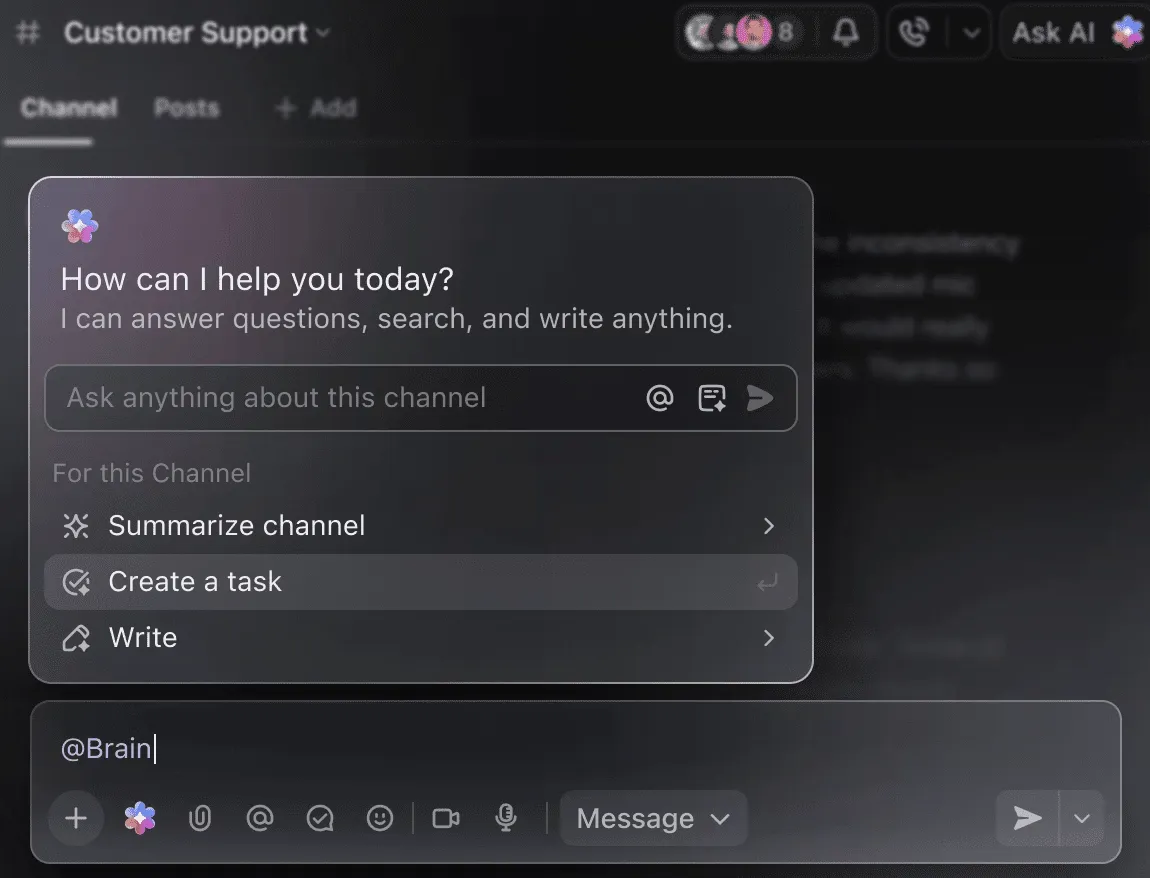
- Keine Suche mehr nach Antworten: ClickUp Brain ist ein KI-Assistent, der direkt in Ihren Arbeitsbereich integriert ist. Sie können ihm Fragen zu Ihren Abläufen stellen, Trends im Kundenfeedback aus Aufgaben zusammenfassen oder Antworten entwerfen. Da es über den Kontext Ihrer Aufgaben, Dokumente und Chats verfügt, liefert es Antworten, die eigenständige KI-Tools nicht bieten können. Erwähnen Sie ClickUp Brain einfach in einem Kommentar oder einer ClickUp-Chat-Nachricht, um eine sofortige, kontextbezogene Antwort zu erhalten.
- Verwandeln Sie Kundenprobleme in strukturierte, umsetzbare Aufgaben: Mit ClickUp Aufgaben und benutzerdefinierten Feldern können Sie jedes Problem von Anfang bis Ende verfolgen. Verwenden Sie ClickUp Benutzerdefinierte Felder, um wichtige Contact-Center-Daten wie Problemtyp, Kundenstimmung oder Kanal zu erfassen, und erhalten Sie so einen reichhaltigen, berichtsfähigen Kontext für jede Interaktion.
- Beenden Sie den Albtraum der manuellen Berichterstellung: Erstellen Sie ClickUp-Dashboards in Echtzeit, um eine Sichtbarkeit auf die Teamleistung, das Ticketvolumen, die Lösungszeiten und neue Trends zu erhalten. Diese visuellen Darstellungen Ihrer Arbeit werden automatisch aktualisiert, sodass Sie immer die aktuellsten Daten sehen.
- Automatisieren Sie Ihre internen Workflows: Verwenden Sie ClickUp Automations, um repetitive Aufgaben zu erledigen, die Ihr Team ausbremsen. Leiten Sie neue Aufgaben automatisch entsprechend ihrem Typ weiter, benachrichtigen Sie einen Vorgesetzten, wenn ein Problem eskaliert, oder ändern Sie den Status einer Aufgabe, wenn die Arbeit fertiggestellt ist. Diese Automatisierungen bestehen aus einfachen Auslösern, Bedingungen und Aktionen, die Sie in wenigen Minuten einrichten können.
- Zentralisieren Sie das Wissen Ihres Teams: Mit ClickUp Docs befinden sich Ihre Wissensdatenbank, Skripte und Verfahren direkt neben Ihrer Arbeit – und nicht in einem separaten, vergessenen tool. Agenten können sofort auf die benötigten Informationen zugreifen, und ClickUp Brain kann sogar Ihre Dokumente durchsuchen, um Antworten zu finden.
- Halten Sie die Kommunikation Ihres Teams mit der Arbeit verbunden: Verwenden Sie ClickUp Chat, um im Kontext zusammenzuarbeiten, anstatt zu einer separaten Messaging-App zu wechseln. Besprechen Sie ein bestimmtes Kundenproblem direkt in der Aufgabe oder in einem speziellen Kanal, damit die Unterhaltungen organisiert und später leicht zu finden sind. Sie können auch einen Ambient Answers Agent hinzufügen, der die Fragen Ihres Teams mit detaillierten, genauen und kontextbezogenen Antworten beantwortet.
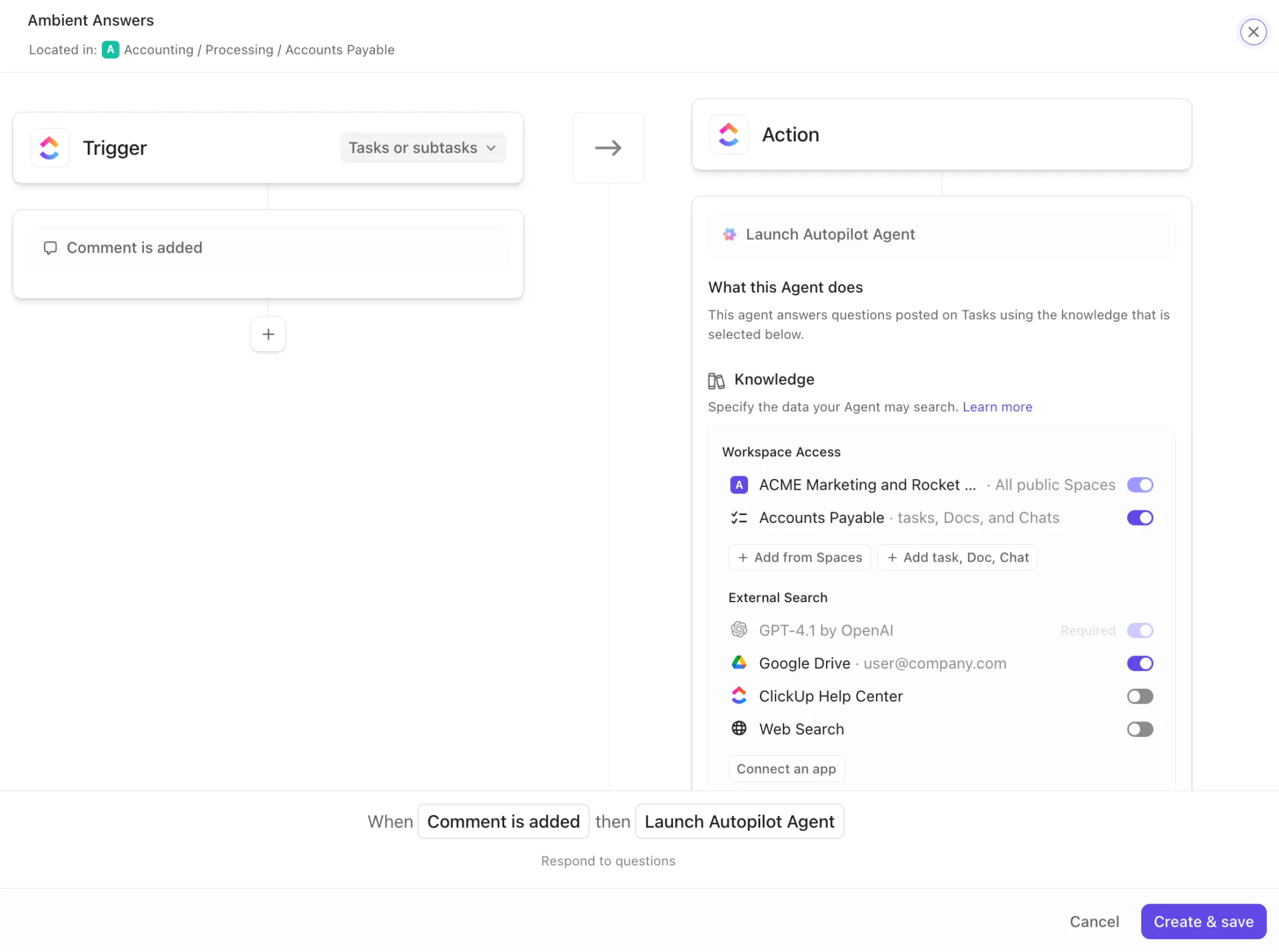
Vereinheitlichen Sie Ihre Arbeit, um Ihren Kundenservice zu transformieren
KI für Contact Center ist effektiv, kann jedoch keine mangelhaften Grundlagen beheben. Eine dauerhafte Verbesserung wird erzielt, wenn Sie sowohl die externe Kundeninteraktion als auch das interne Chaos im Workflow lösen. Indem Sie Ihre gesamte Arbeit in einem konvergenten KI-Workspace zusammenführen, beseitigen Sie die Fragmentierung, die Ihr Team behindert.
Wenn Ihre Aufgaben, Dokumente und Unterhaltungen alle an einem Ort gespeichert sind, kann sich Ihr Team ganz auf die Lösung von Kundenproblemen konzentrieren, anstatt sich mit den Tools herumzuschlagen.
Bringen Sie die Workflows Ihres Contact Centers an einen Ort und geben Sie Ihrem Team den einheitlichen Workspace, den es verdient. Starten Sie noch heute kostenlos mit ClickUp.
Häufig gestellte Fragen (FAQ)
KI-Chatbots folgen in der Regel vorgegebenen Flows, um bestimmte, einfache Abfragen zu bearbeiten. KI-Agenten sind autonomer und können anhand des Kontexts Entscheidungen treffen und mehrstufige Aufgaben ohne menschliches Zutun abschließen.
Nein, das Ziel ist Zusammenarbeit. KI eignet sich am besten für die Bearbeitung von wiederkehrenden Aufgaben mit hohem Volumen, wodurch menschliche Mitarbeiter entlastet werden und sich auf komplexe, empathiebedürftige Probleme konzentrieren können, bei denen ihr Urteilsvermögen am wertvollsten ist.
Die besten Systeme schaffen eine Verbindung zwischen Kundeninteraktionen und Projektmanagement-Plattformen und wandeln Unterhaltungen in umsetzbare Aufgaben um. So können Teams Workflows zur Nachverfolgung von Lösungen verfolgen und in einem einheitlichen Workspace wie ClickUp gemeinsam an Problemen arbeiten.
Konversations-KI versteht natürliche Sprache und reagiert darauf auf der Grundlage bereits vorhandener Daten und Skripte. Generative KI geht noch einen Schritt weiter und erstellt völlig neue, kontextbezogene Inhalte, wie personalisierte Antworten auf E-Mails oder dynamische Flows bei Unterhaltungen.