Sorry, there were no results found for “”
Sorry, there were no results found for “”
Sorry, there were no results found for “”
A project implementation plan is your roadmap to the finish line (read ‘successful project management’). 🏁
It helps you set the right objectives and milestones, craft a budget that ensures efficient resource utilization, and take calculated risks, enabling the overall success of your project.
In this blog, we discuss the key attributes of a project implementation plan and how you can create one.
We’ve also included practical insights and tools to guide you every step of the way. 🤝
A project implementation plan is a detailed document that guides your team through the project lifecycle—from initiation to completion. It ensures your project is executed, monitored, and completed while minimizing risks and maintaining clear communication among team members and stakeholders.
An effective project implementation plan includes:
💡Pro Tip: Explore project overview templates to demonstrate your vision clearly and ensure your project crosses the finish line without any roadblocks.
An implementation plan is crucial to avoid confusion and wasted resources. Here’s why:
A project will most likely fall flat without an implementation plan. Let’s look at its essential components:
A scope statement outlines precisely what the project is about—what’s included and excluded. It helps set realistic expectations and keep everyone on the project team aligned. Here’s what to include for a successful project execution:
✅ Project objectives: What are you aiming to achieve?
Keep your goals clear to guide and motivate the team.
✅ Deliverables: What specific outputs do you expect at the end of the project?
This helps everyone understand what project success looks like.
✅ Exclusions: Be upfront about what’s not included in the project plan to prevent scope creep.
This way, you avoid surprises later on.
Milestones act as checkpoints in your project. They help measure progress and celebrate small wins along the way. When setting milestones, aim for realistic targets that are:
📍Best practice: For goals and objectives, follow the SMART framework: Specific, Measurable, Achievable, Relevant, and Time-bound. For example, instead of saying, “We want to improve customer satisfaction,” you could say:
“Our strategic plan aims to increase customer satisfaction scores by 20% in the next three months.”
To ensure you achieve this clear target, let’s now break it into manageable pieces that are your objectives. So, for boosting customer satisfaction by 20%, your objectives will be:
Each of these objectives leads directly toward achieving the set goal.
Great ideas are only as good as the resources that fuel them.
Resource allocation refers to assigning the right tools, people, and budget to various tasks. Here are some questions you can ask to allocate resources and support high-level project planning:
🤔 What resources do we need to achieve our project goals?
Think about human, technological, and financial resources.
🤔 Which tasks require the most attention, and how should we prioritize resource allocation?
Focus on the tasks with the highest impact. For example, if customer feedback indicates that your app crashes frequently, prioritize fixing bugs before adding new features. To categorize tasks, use the MoSCow method (Must Have, Should Have, Could Have, Won’t Have).
🤔 How can we ensure a balanced distribution of resources to avoid overwhelming any single team member or department?
Use project management software to visualize workloads. If one developer is swamped, redistribute tasks to another developer with lighter assignments. Similarly, let’s say marketing expenses are high. Reallocate funds from a less urgent project to support critical ad campaigns.
💡Pro Tip: Your project management team can learn by observing how leading companies manage their projects while keeping their teams balanced and motivated. Here’s our list of project management examples from top brands that can help.
Creating a project timeline isn’t just about putting dates on a calendar—it’s about being strategic and realistic.
Here’s how to break it down for a successful implementation plan:
Milestones are the checkpoints where you pause, assess, and celebrate progress (or course-correct). Setting well-defined milestones gives your team structure, clarity, and momentum.
Here’s how to set up and track these essential markers:
1. Break the project into critical deliverables
Each major task or phase should have its own milestone.
For example, in a website redesign project, key milestones might include:
2. Clarity on goals
Each milestone should have a specific, measurable outcome.
Instead of vague objectives like ‘design phase done,’ aim for something more tangible, like ‘all homepage and landing page designs approved by stakeholders‘
3. Assign milestone owners
Every milestone needs an owner who is responsible for keeping things on track.
If the milestone involves getting marketing materials approved, the marketing lead should be the go-to person for that phase.
4. Schedule regular check-ins and celebrate progress
Celebrating milestones boosts team morale and provides a sense of accomplishment. A small team shout-out or a celebratory coffee break will keep energy levels up.
Setting goals is great, but how do you know you’re actually hitting them? That’s where Key Performance Indicators (KPIs) and metrics come in.
Without tracking these KPIs, you’re moving without knowing how fast or effectively. To define and track the right metrics in your implementation plan, work on the following:
➡️ Read More: 10 Implementation Plan Templates in Excel & ClickUp
Here’s a step-by-step process to create a project implementation plan that drives results:
What do you truly want to achieve? Pin down those aspirations.
For instance, if you’re launching a new software tool, your goal might be to achieve 1,000 active users within the first six months.
Break that down into measurable milestones. Clarity here is crucial. It will prevent uncertainty and keep your team motivated as they inch closer to the finish line.
Don’t just guess—dig deep! 😎
Engage with project stakeholders through interviews, conduct customer surveys, or observe patterns in customer behavior.
Here are some questions you can ask:
Use these insights to shape your approach.
💡 Pro Tip: As a project manager, you may sometimes miss out on factoring in stakeholder input at times. Avoid this common pitfall to create a strategy that resonates with everyone who’s involved.
Risk is a part of every project. Learn to adapt to it. Gather your team for a brainstorming session and address the biggest question:
What could go wrong here?🌋
Encourage open dialogue and create an environment where everyone feels comfortable sharing concerns. Use techniques like SWOT analysis to categorize and assess potential risks symmetrically.
Once identified, categorize risks into:
For each high-priority risk, brainstorm on mitigation strategies.
Break your project down into bite-sized tasks.
For example, let’s say you are launching a new marketing campaign. Match tasks to team strengths and decide who is best suited for each.
After delegating tasks, set clear expectations and an implementation schedule to eliminate confusion.
Once you’ve developed your project plan, it’s time to bring it to life.
Identify and allocate resources needed for each task. This includes human resources (team members and their skills), financial resources (budget allocation), technological resources (software tools), and physical resources (office space, equipment).
Create a visual resource allocation matrix to clarify who is responsible for what and ensure that resources are assigned efficiently.
Managing a project means constantly monitoring 1,000 moving parts. If you overlook even one, you risk missing key milestones.
The right project management software can eliminate that stress by streamlining your implementation process, automating tasks, tracking real-time progress, and keeping your team aligned.
As an all-in-one productivity platform, ClickUp fits right into the world of project managers.
It centralizes all project tasks, collaboration, and related activities into one place, allowing you to ditch the back-and-forth between tools. From task management to team collaboration, ClickUp’s Project Management Platform improves workflows, speeds up deliveries, and keeps everyone aligned.
For starters, it allows you to create customizable tasks, subtasks, and checklists, providing granular control over project organization. Collaboration is made easy with ClickUp Chat, assigned comments, and @mentions.
ClickUp also offers powerful features like Mind Maps for visual project planning, time tracking to monitor effort spent, and customizable dashboards to gain insights into project performance. Additionally, it integrates with various tools and platforms, enhancing its functionality and adaptability to diverse project needs.

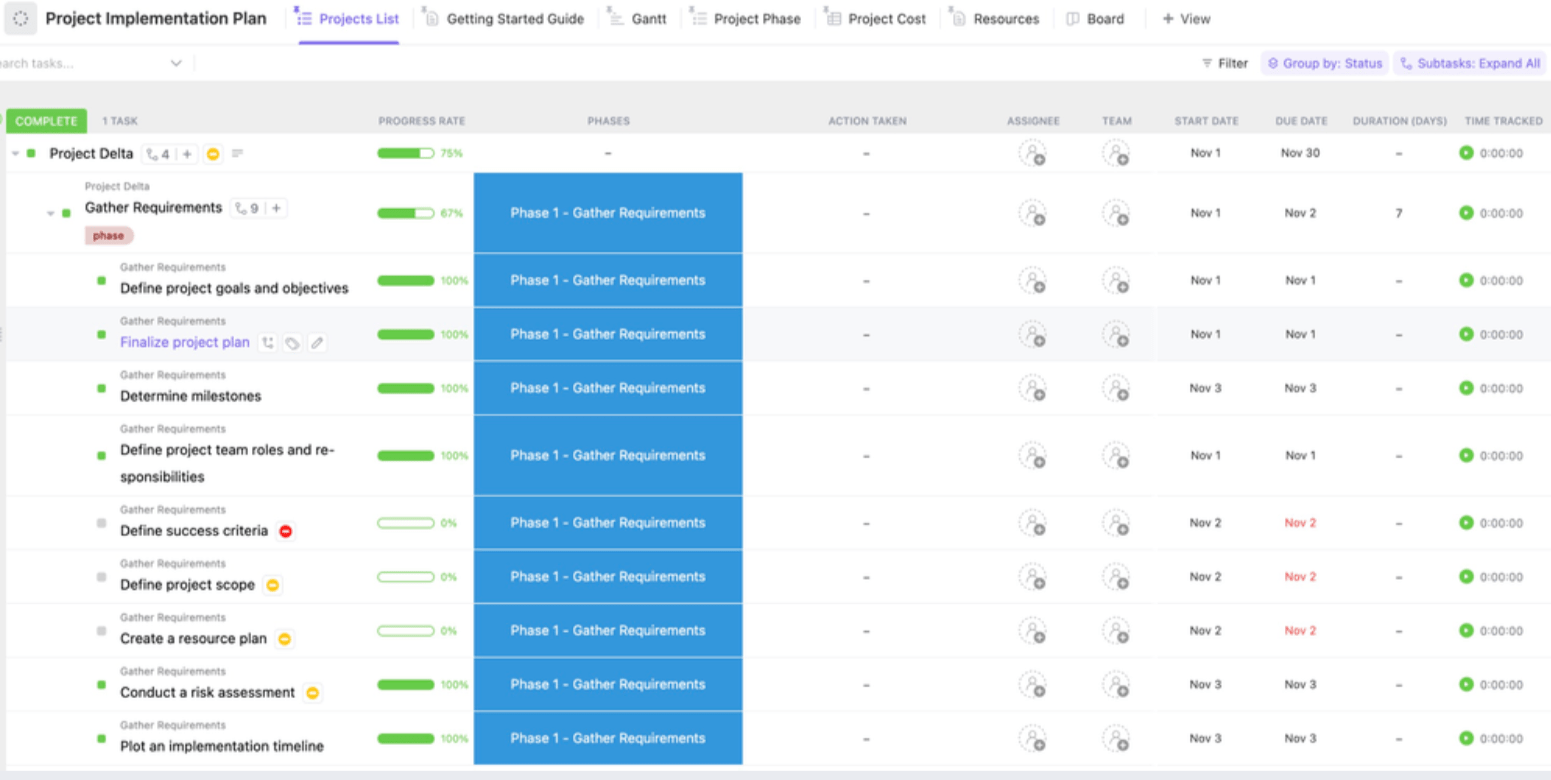
Not sure how to get started? The ClickUp Project Implementation Plan Template can help you stay organized with a clear workflow.
It is fully equipped with essential Custom Fields and pre-defined statuses to guide you through each project phase from initiation to completion. Here’s what it offers:
But that’s not all. There’s so much more you can do with ClickUp.
Ask ClickUp Brain to break down your larger project goals into detailed subtasks, each with precise descriptions and deadlines. This means nothing gets overlooked, and your team moves from one step to the next without constant supervision.

ClickUp Brain can also analyze project data and suggest the next best tasks to focus on. If user feedback indicates a need for design changes, it suggests updating the related tasks in the design phase.
Use ClickUp Brain to:
📌 Compile project documentation and insights into a centralized knowledge base
📌 Assess team workloads and skill sets to recommend optimal resource management
📌 Analyze historical data to forecast how long a similar project might take
Create, assign, and prioritize actions that sync directly with your implementation plan using ClickUp Tasks. Each task can include detailed descriptions, attachments, and checklists to ensure clarity and accountability.
Add attachments such as design files, links to relevant documents, and checklists to ensure the entire team knows their responsibilities and deadlines.

Once tasks are set, tracking progress is key. The Board View in ClickUp gives you a real-time, visual snapshot of your workflow with stages like To Do, In Progress, and Done.
At a glance, you can see exactly where each task stands and spot potential bottlenecks before they become issues. This visibility helps make quick adjustments that keep the project on track and moving forward without delays.

Lastly, ClickUp’s Calendar View offers a clear overview of all upcoming deadlines and milestones to keep your team on track.
Seeing everything laid out in a calendar ensures that your team can plan ahead and avoid last-minute rushes. This keeps the project implementation plan on schedule and running smoothly from start to finish.

When implementing a project plan, it’s crucial to see how tasks connect, when they’re due, and how delays can impact the overall plan. With ClickUp’s Timeline View, you can easily track tasks in chronological order, making it simple to see what’s happening at each stage of your project implementation plan.

This ensures that tasks are assigned at the right time, keeping the project moving smoothly and avoiding overlap or gaps in work.
For even more precision, the Gantt Chart View in ClickUp adds another layer by mapping out dependencies between tasks. You can see how one task impacts the next, allowing you to anticipate potential delays and adjust resources accordingly.

This is essential for complex projects where one delay could ripple through the entire timeline. By catching these dependencies early, you can avoid disruptions and keep your project on schedule.
Effective collaboration is crucial for smooth project implementation, and ClickUp Docs makes it easy to keep everyone aligned. You can create and share project documents, meeting notes, and guidelines in real time, all in one place.
With the ability to edit and comment directly within the document, your team can stay updated and work together seamlessly without switching between tools.

To enhance communication even further, ClickUp Chat makes it easy to discuss tasks within context. Whether it’s quick updates or deeper discussions, your team can chat within tasks, keeping all communication tied to the relevant work with public channels, threaded conversations, private DMs, and more.

Keeping track of your project’s success starts with monitoring key performance indicators (KPIs), and ClickUp Dashboards make this easy.
You can customize your dashboard to display exactly what you need—whether it’s task progress, deadlines, or team workloads. Having real-time data in one place will help you quickly spot trends, identify roadblocks, and ensure your project remains aligned with your goals.

The flexibility of these dashboards allows you to adjust what you see as your project evolves, keeping you in full control. Regardless of the nature of your projects, these dashboards provide the flexibility to track your progress with precision.
From time-tracking dashboards that help you easily calculate billable hours to sprint dashboards that accelerate software delivery to campaign dashboards for marketing initiatives, there’s a dashboard for every need.

Worried about sorting through all that data in different dashboards?
Not with ClickUp Brain! Simply ask a question, and it will sift through your dashboards to pull the most relevant data, saving you time and cutting through the complexity. Whether you need updates on project progress or specific metrics, ClickUp’s AI makes navigating your dashboards easier than ever.
An effective implementation plan ensures your project is executed in a way that generates results. That happens with having a clear project scope, setting realistic milestones, tracking the right KPIs, and measuring timely progress.
Keeping all these steps in sync requires investing in the tools complementing every step. Or you can save time by investing in an all-in-one project management software.
ClickUp offers a comprehensive suite of features designed to simplify your project planning and execution. From project initiation to completion, your team will stay aligned and focused on achieving your goals.
Sign up on ClickUp for free and see how easy creating a project implementation plan can get.

Sudarshan Somanathan
Max 23min read
Sudarshan Somanathan
Max 22min read
Sudarshan Somanathan
Max 22min read

© 2026 ClickUp