


A flowchart is no ordinary diagram—it’s a life hack.💡
Whether mapping out business processes or battling sales bottlenecks, a flowchart helps you visualize all variables and save the day with logical solutions. 🦸
Creating flowcharts manually and from scratch can be stressful, though, especially when dealing with lengthy and complex workflows. Luckily, there are numerous flowchart tools to come to your rescue—even if you’re a Mac user!
Gone are the days when Mac users had to jump through hoops to find decent applications for diagramming. Explore our selection of the 10 best flowchart software for Mac and find your perfect drawing buddy! 🖌️

 Summarize this article for me please
What Should You Look For in the Best Flowchart Software for Mac?
The best flowchart software for Mac should boast the following qualities:
- Ease of use: Flowchart software should have a drag-and-drop interface to help you create professional flowcharts with minimal effort or tech knowledge
- Integrations: It should enable crucial app integrations that help you incorporate flowcharts into your professional activities
- Collaboration options: The tool should support collaboration between teams. For example, a strategy team would want to brainstorm using flowcharts in real-time
- Built-in templates: You should get feature-rich and aesthetically pleasing templates for flowcharting across different industries and roles. Look for flowchart software with built-in diagram/flowchart templates so you don’t have to build them from scratch
- Handy editing toolbar: With a well-designed editing toolbar and built-in libraries of images, shapes, and symbols, you’ll be able to capture ideas and create cracking flowcharts without getting messy
- Scalability: The flowchart software should support large-scale data or complex flowcharting as your company grows
Summarize this article for me pleaseThe 10 Best Flowchart Software for Mac
Based on the criteria above, you can find basic to advanced flowchart software for Mac. Our list narrows down the 10 most reliable products that offer the best value. 💝
1. ClickUp
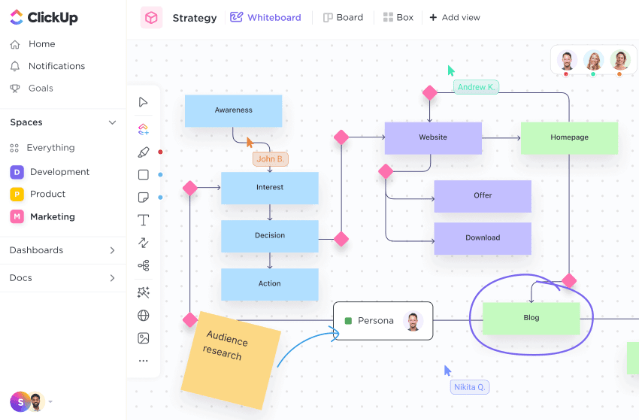
ClickUp is a free-to-use project management software that double-hats as a heavy-duty flowcharting tool. Rely on the platform’s intuitive interface to create stunning workflow diagrams of any type or complexity. 😍
Start your flowcharting adventure with ClickUp Whiteboards. Whether working on a project alone or with a team, Whiteboards are your canvases for collecting inputs in real-time, helping you put together a comprehensive flowchart for any purpose.
ClickUp offers another fantastic diagramming tool called Mind Maps, which is more suitable for complex strategizing scenarios. Use Mind Maps to structure your thoughts and ideas or facilitate fruitful brainstorming sessions with your team! 🧑🤝🧑
ClickUp’s sophisticated toolbar turns editing into child’s play. Add images, links, docs, and videos, connect objects to create a timeline, draw relationships, play with shapes and symbols, and more. Convert an element on your board directly into a task and get it executed—how’s that for team productivity? 🔥
If starting from scratch intimidates you, ClickUp’s pre-built templates will get you diagramming in no time. For instance, consider ClickUp’s Swimlane Flowchart template for visualizing the moving parts of a process alongside key players or departments. The template helps you identify and assign team roles and facilitate problem-solving with stakeholders like clients and investors.
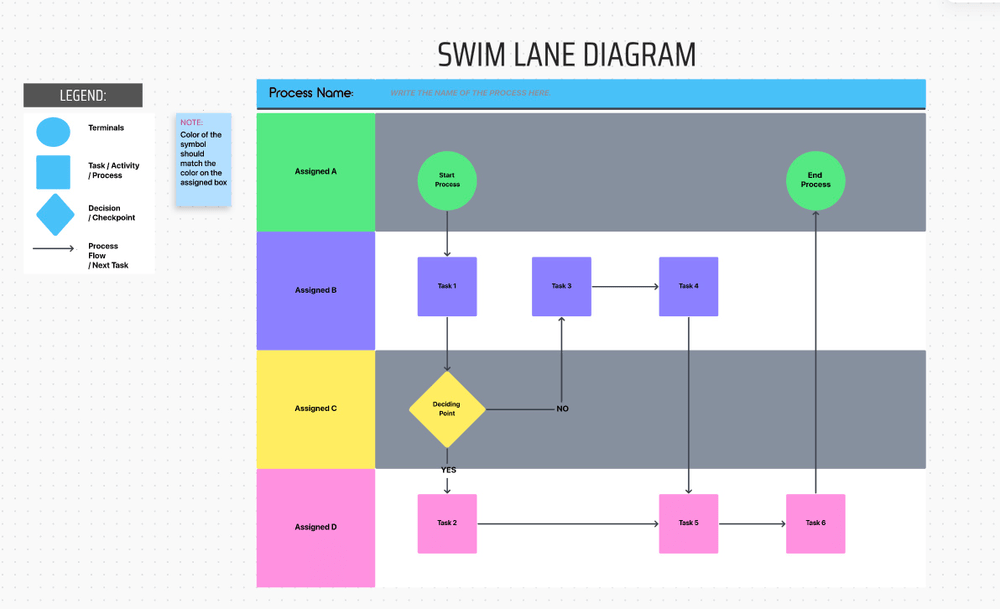
Some other options include templates for Fishbone Diagram, Force Field Diagram, and Kinship Diagram Whiteboard. 📈
ClickUp best features
- Growing library of customizable templates
- High-end Whiteboards and Mind Maps with exceptional editing tools
- Integrates with 1,000+ apps and programs like Miro, Zapier, and Google Drive
- All types of media can be added to flowcharts
- Intuitive drag-and-drop interface
- Available on all devices (besides Mac, you can use ClickUp on Linux, Windows, iOS, and Android devices)
ClickUp limitations
- Exploring all diagramming features takes time
- Some users find navigating the ClickUp mobile app difficult
ClickUp pricing
- Free Forever: $0
- Unlimited: $7/month per user
- Business: $12/month per user
- Enterprise: Contact for pricing
*All listed prices refer to the yearly billing model.
ClickUp ratings and reviews
- G2: 4.7/5 (6,500+ reviews)
- Capterra: 4.7/5 (3,500+ reviews)
2. EdrawMax
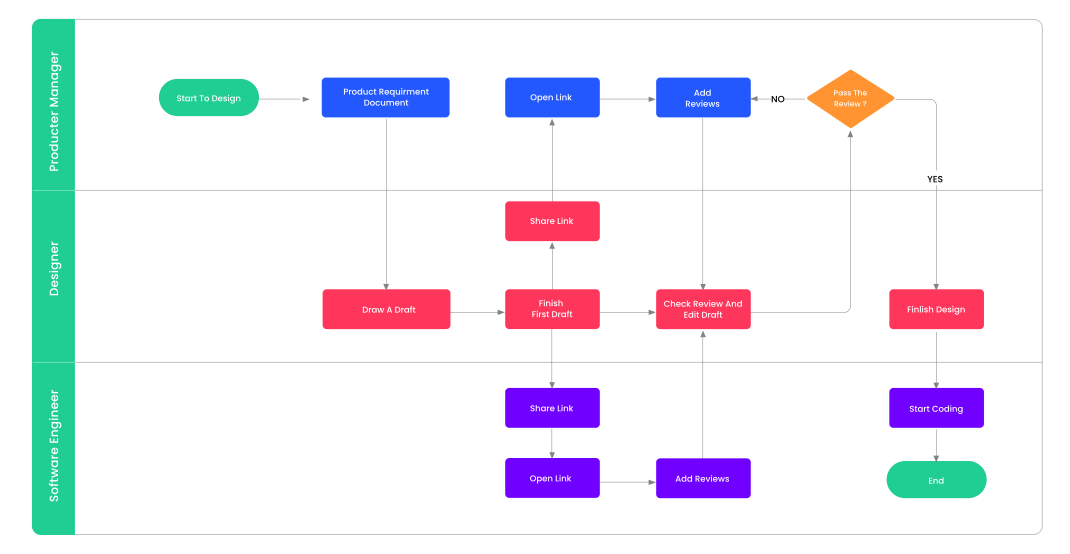
EdrawMax is an all-in-one diagramming software for crafting fishbone diagrams, mind maps, charts, and more. It offers various designs, features, and tools for creating flowcharts, infographics, and network and industry diagrams.
The drag-and-drop design is incredibly easy to grasp and lets you combine various flowchart elements in a few clicks. The toolbar is functional and especially handy for those experienced with graphic design and desktop publishing apps.
With EdrawMax, you can either start from scratch or use one of the tool’s many templates as a base. The app also comes with industry-standard symbols to create professional-looking flowcharts. Everything’s highly customizable, so you won’t have trouble visualizing your plans, projects, and designs. 🎨
EdrawMax is an excellent option for experienced designers, but rookie users may find the platform’s interface somewhat complicated.
EdrawMax best features
- Attachments can be added to flowcharts
- Drag-and-drop interface
- Hundreds of templates
- Extensive library of symbols
EdrawMax limitations
- Could benefit from more integrations
- Some Mac users mentioned issues with mouse sensitivity while using the platform
EdrawMax pricing (Team & Business)
- Team Annual Plan: $505.75 (for five users, billed annually)
- Business Plan: Contact for pricing
EdrawMax ratings and reviews
- G2: 4.3/5 (60+ reviews)
- Capterra: 4.6/5 (150+ reviews)
3. Miro
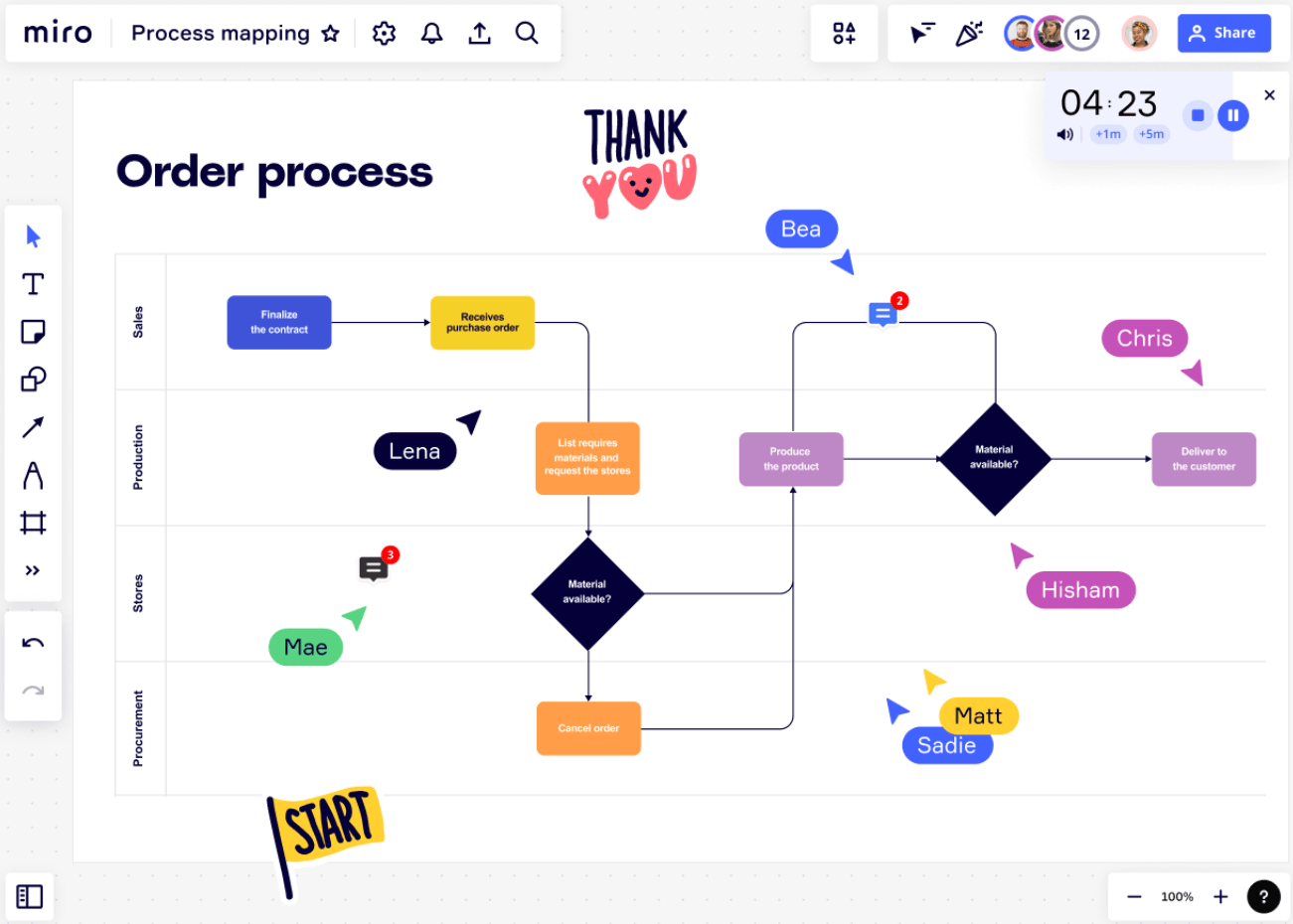
Miro is one of the best productivity tools offering plenty of options for visual collaboration. One of its flagship features is a top-notch zoomable Infinite Whiteboard for creating flowcharts. You can make a flowchart for any purpose, whether presenting complex workflows, breaking down processes into phases, or mapping out customer journeys.
Miro lets users pick a pre-built template to get started. There’s a vast gallery of options to explore, including Flowchart Template, Lotus Diagram Template, and Data Flow Diagram Template.
If you opt for a paid plan, you can design customized flowcharts from scratch and even share them with other users on the Miroverse community gallery.
As far as integrations go, Miro, like its top competitors, works well with popular productivity and communication apps, such as Zoom, Slack, Google Workspace, and Atlassian.
Miro best features
- Advanced visual collaboration features
- Decent integration capabilities to create flowcharts
- Community gallery of user-made templates
- Infinite whiteboard for flowcharts, mind mapping, and brainstorming
- Customizable templates (for paid users)
Miro limitations
- Users without stylus pens may find the platform challenging to use
- Could use some more templates for different use cases in its flowchart software
Miro pricing
- Free: $0
- Starter: $8/month per member
- Business: $16/month per member
- Enterprise: Contact for pricing
*All listed prices refer to the yearly billing model.
Miro ratings and reviews
- G2: 4.8/5 (4,500+ reviews)
- Capterra: 4.7/5 (1,000+ reviews)
4. Lucidchart
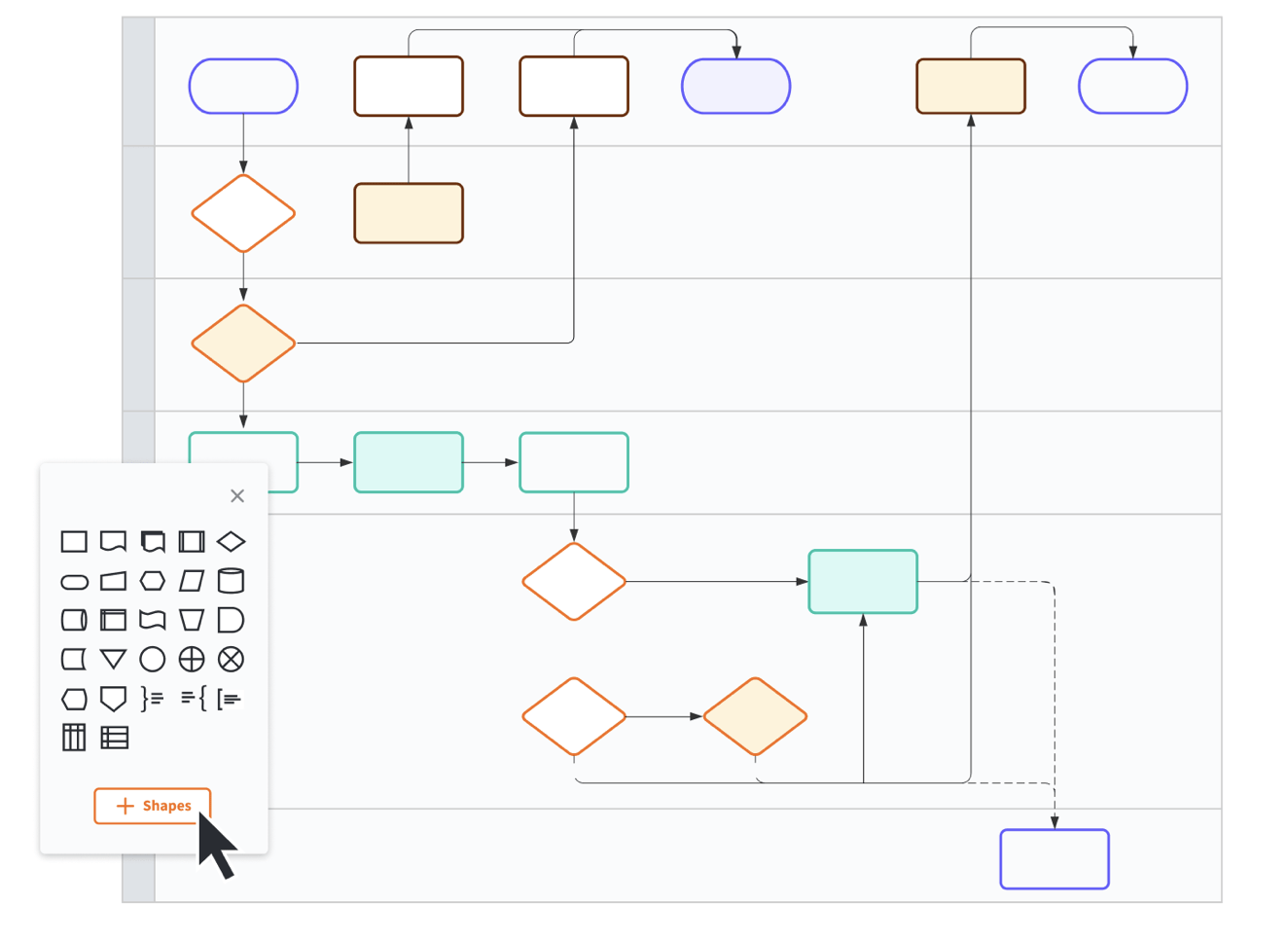
Lucidchart is a worthy diagram software to have by your side if you want to create professional-looking flowcharts, mockups, mind maps, and Unified Modeling Language (UML) diagrams.
The flowchart software is super easy to use, even for complete beginners—with just a few clicks, you’ll be conjuring executive-grade diagrams like a pro! 🦾
Lucidchart’s onboarding process is pretty supportive. The platform offers customized tools and templates based on the industry type you specify on signup. You can also import data for your flowcharts and play with the design, shapes, fonts, and colors to get the desired results.
Advanced real-time collaboration is one of Lucidchart’s strongest suits—add comments, share projects with team members, create tasks, and embed them within the flowchart!
Many users love Lucidchart’s automatic alignment feature, which lets you align a newly added object with another object’s edge—a true little joy for perfectionists! 🤓
While Lucidchart is primarily an online platform, Chrome users can sync some documents for offline use.
Compare Lucidchart Vs Microsoft Visio!
Lucidchart best features
- Supports the import and export of files (for programs like Microsoft Visio and OmniGraffle)
- Excellent user experience
- Offline mode (if you’re using Chrome on your Mac)
- Automatic alignment for objects to create UML diagrams and more
- Impressive template library
Lucidchart limitations
- Performance may take a hit while handling large and complex diagrams
- Sharing a single document can be confusing compared to other flowchart software for Mac users
Lucidchart pricing
- Free: $0
- Individual: Starts at $7.95
- Team: Starts at $9 per user
- Enterprise: Contact for pricing
Lucidchart ratings and reviews
- G2: 4.6/5 (2,500+ reviews)
- Capterra: 4.5/5 (1,500+ reviews)
Check out these Lucidchart alternatives!
5. MindManager
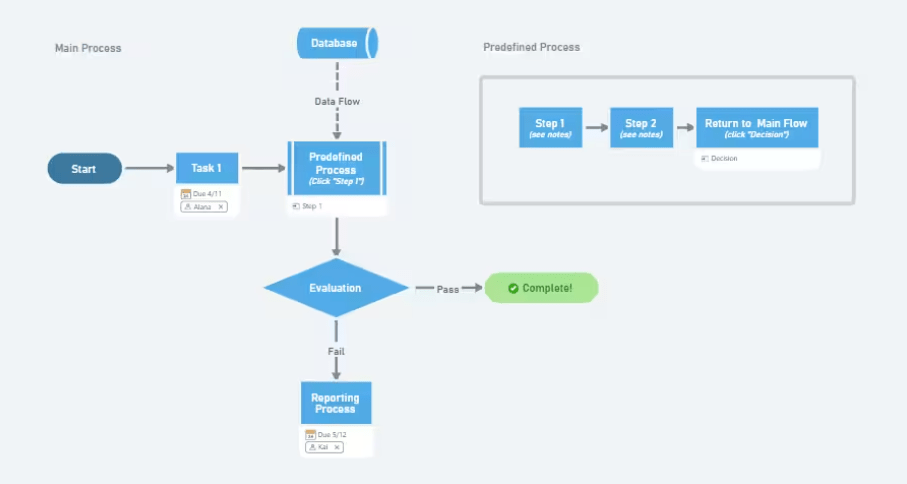
MindManager is a mind-mapping program (duh!) for creating visual assets like concept maps, matrices, and flowcharts. It aims to centralize information and turn strategic ideas into blueprints and actionable plans that evolve with your business.
MindManager helps generate flowcharts in a flash thanks to its abundant features, which include:
- Priority markers
- Drag-and-drop
- Built-in templates
- Filters for diagrams
Collaborating on MindManager is effortless with tools like text accelerators that let you add mentions (@name) or tags (#resource) to make your flowcharts digestible to cross-functional teams.
The co-editing option is another nice touch—it lets you work on flowcharts with other people and see changes in real-time compared to other flowchart software for Mac users.
It’s worth noting that MindManager was primarily built for Windows. While available on Mac, the user experience may differ due to the limited features and integrations.
MindManager best features
- Co-editing option on flowchart maker
- User-friendly interface for process flow diagrams
- Decent integration possibilities, especially with MS Office apps
- Huge collection of flowchart templates
- Perfect for brainstorming and mind-mapping
MindManager limitations
- Some users did not like the constant ads posted on their screen
- Mac users have fewer features and integrations than Windows users
- Not a great option if you’re looking for free flowchart software
MindManager pricing
- Essential: $99/year
- Professional: $179/year
- Enterprise: Contact for pricing
MindManager ratings and reviews
- G2: 4.5/5 (150+ reviews)
- Capterra: 4.6/5 (50+ reviews)
6. Microsoft Visio
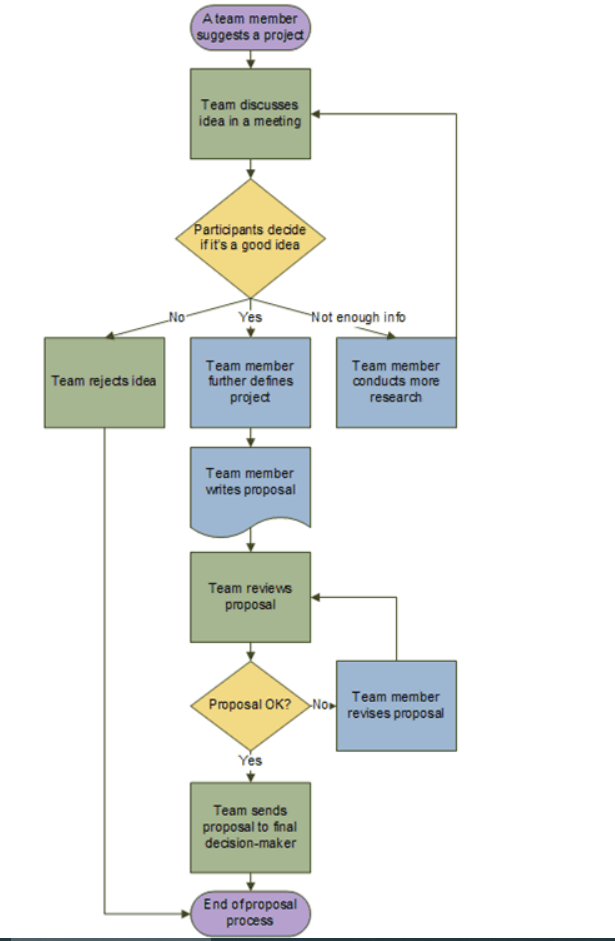
Introduced in 1992, Microsoft Visio is one of the oldest diagramming and vector graphic tools around. Over the decades, it has added several tools and templates under its belt to help you create easy-to-follow technical flowcharts.
Whether you need an organizational chart, a network diagram for API and system designs, or a building plan—Visio is that faithful old buddy that’s got your back! 🗝️
Visio is pro-collaboration—you can add co-authors to your projects, simultaneously view changes in real-time, and use comments to discuss conflicts. While it’s a neat setup, co-authoring sessions are prone to lags or hangs on the flowchart maker.
Being a Microsoft product, Visio integrates perfectly with apps like Google Sheets, PowerPoint, and Excel. It has limited compatibility with non-Microsoft software, which may be a pain point for some users.
Unfortunately, Visio doesn’t offer a designated desktop app for Mac devices. Still, you can use the Safari or Chrome browser to access the platform’s web version and view, create, and edit diagrams.
Microsoft Visio best features
- Web access for Mac users
- Co-authoring options
- Integrates well with other Microsoft apps and programs
- Flowchart maker is suitable for technical charts, data flow diagrams, and even organizational charts
Microsoft Visio limitations
- May not be the easiest to use for beginners
- Several users reported formatting issues and frequent glitches
- For Mac flowchart software, this flowchart maker might not be your favorite option
Microsoft Visio pricing
- Visio Plan 1: $5/month per user
- Visio Plan 2: $15/month per user
Microsoft Visio ratings and reviews
- G2: 4.2/5 (600+ reviews)
- Capterra: 4.5/5 (3,000+ reviews)
7. Mitra
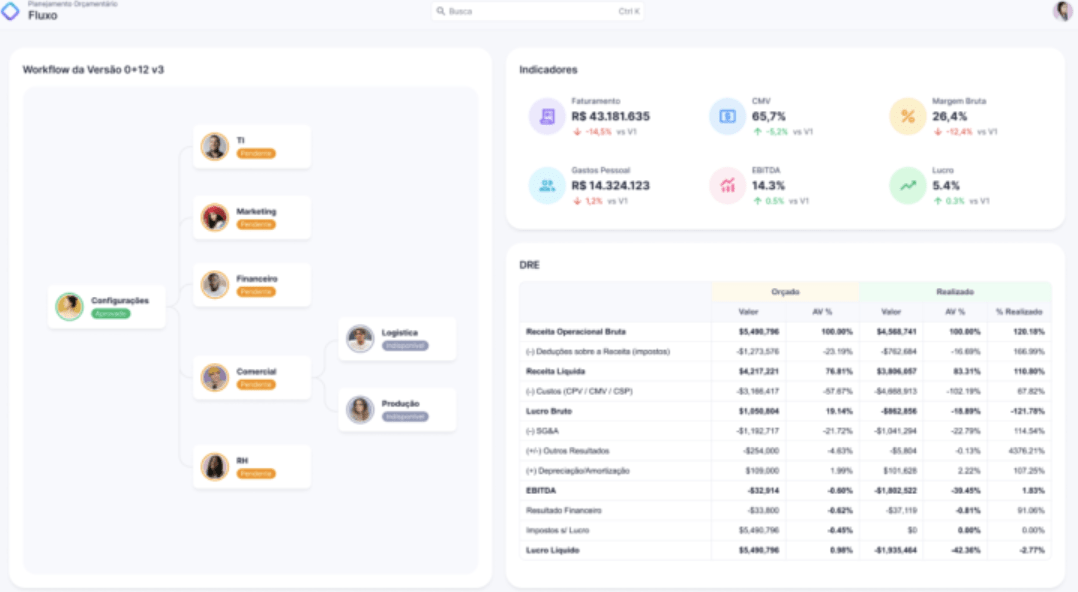
Mitra is a Brazil-based startup offering self-service business intelligence and analytics. It’s a unique entry on our list as it’s more of an enterprise resource planning (ERP) software than a flowchart-only tool.
The platform helps visualize business analytics, process flows, production management, and budget planning—one of its features is using diagramming to replace data management with spreadsheets. The resulting charts offer valuable insight into how a company operates, helping you identify areas for improvement.
With Mitra, you’re basically leveraging spreadsheet data to create flowcharts. You can establish business rules using formulas and build visual processes connected to a central database. Set up customized flowcharts for almost every critical business activity, like planning, budgeting, and capacity management. 👷
Mitra is customizable and integrates with your current ERP program or data software.
Mitra best features
- Process-centric diagramming
- Helps visualize spreadsheets
- No-code platform
- Integrates with any data software
Mitra limitations
- May not be available in all countries
- It’s a relatively new startup with a limited user pool
Mitra pricing
- Contact for pricing
Mitra ratings and reviews
- G2: No reviews
- Capterra: No reviews
8. OmniGraffle
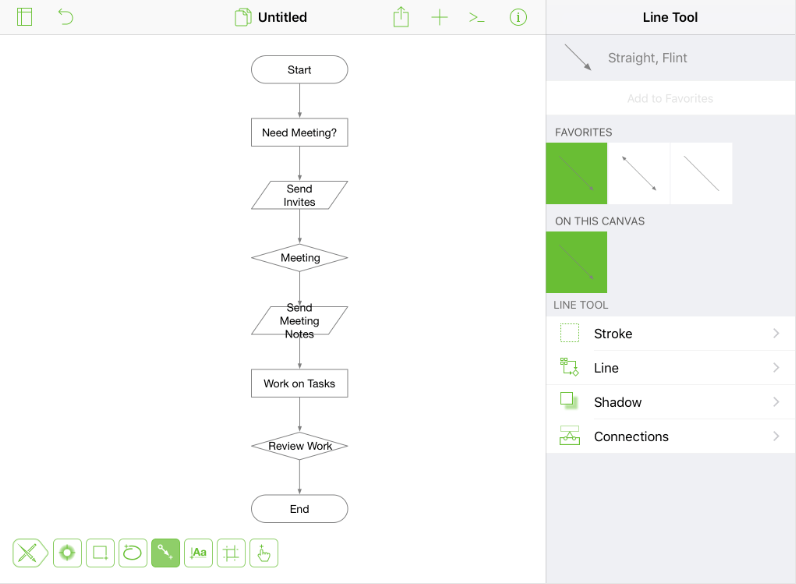
Looking for Mac-specific flowchart makers? You’ve found it! 💻
OmniGraffle is one of the best flowchart software for Mac devices. Create diagrams, wireframes, boards, and flowcharts from scratch, or use hundreds of free templates to get started. If you’re more into stencils, visit Graffletopia, the platform’s resource hub, to explore 10,000+ stencil files for your OmniGraffle documents.
You have complete freedom to customize your creations. Play with the drag-and-drop interface and use the abundance of colors, shapes, and fonts to ensure your flowchart is easy on the eyes. 👁️🗨️👁️🗨️
What Microsoft Visio is for Windows, OmniGraffle is for Mac. But unlike its Microsoft counterpart that keeps its features technical, OmniGraflle ventures into the aesthetic territory and offers more design options!
If you’re switching from Windows to Mac as a Visio user, OmniGraffle lets you import your existing files, but with limitations. You need a Pro plan to use this option, and the program can’t export to newer Visio formats.
OmniGraffle best features
- Flowchart makers designed for Mac devices
- Supports Visio import and export
- A huge selection of stencils and templates
- Drag-and-drop design across the flowchart tool
OmniGraffle limitations
- Print settings could be improved
- Some users reported issues with saving files
- Manipulating connection lines may be tricky
OmniGraffle pricing
- Subscription: $12.49/month
- Standard license: $149.99 (one-time payment)
- Pro license: $249.99 (one-time payment)
OmniGraffle ratings and reviews
- G2: 4.1/5 (100+ reviews)
- Capterra: 4.6/5 (30+ reviews)
9. Creately
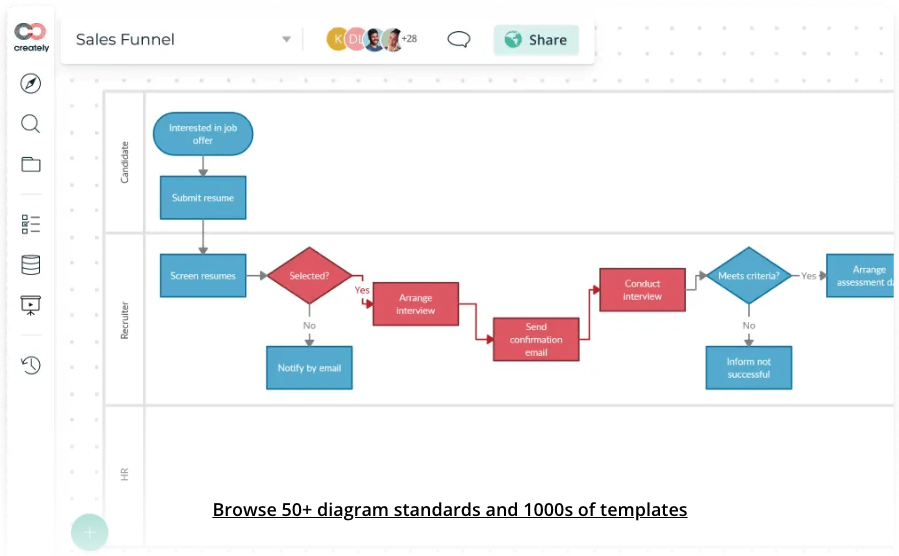
Creately is a no-code work management platform that comes with a smart visual canvas. Design flowcharts and diagrams to illustrate different stages of a process, outline project management structures, visualize workflows, or bring abstract business ideas to life! 💸
Flowcharting is a joyride with Creately’s intuitive interface. Your tools are displayed in the top menu, and you can work with real-time cursors to collaborate with your team, track changes, and view synced previews to ensure you’re on top of the latest changes.
Mac users can export their flowcharts in various formats like PNG and PDF or use Google or Microsoft add-ons to share them.
In terms of flowchart makers, Creately offers a free plan with limitations—you can’t access all functions, and everything you create is made public, which isn’t really an option for those working with sensitive information.
Creately best features
- Smart visual canvas
- Real-time cursor tracking
- Free templates to create things like workflow diagrams, organizational charts, and flowchart shapes
- 1,000+ shapes and connectors
- Mac users enjoy Github, Slack, Google Workspace, and Confluence integrations
Creately limitations
- Navigating the canvas can be challenging if you’re working on a complex project
- Your flowcharts become public if you use the free version
Creately pricing
- Free: $0
- Starter: $5/month per user
- Business: $89/month (unlimited users)
- Enterprise: Contact for pricing
Creately ratings and reviews
- G2: 4.4/5 (700+ reviews)
- Capterra: 4.4/5 (150+ reviews)
10. Diagrams.net
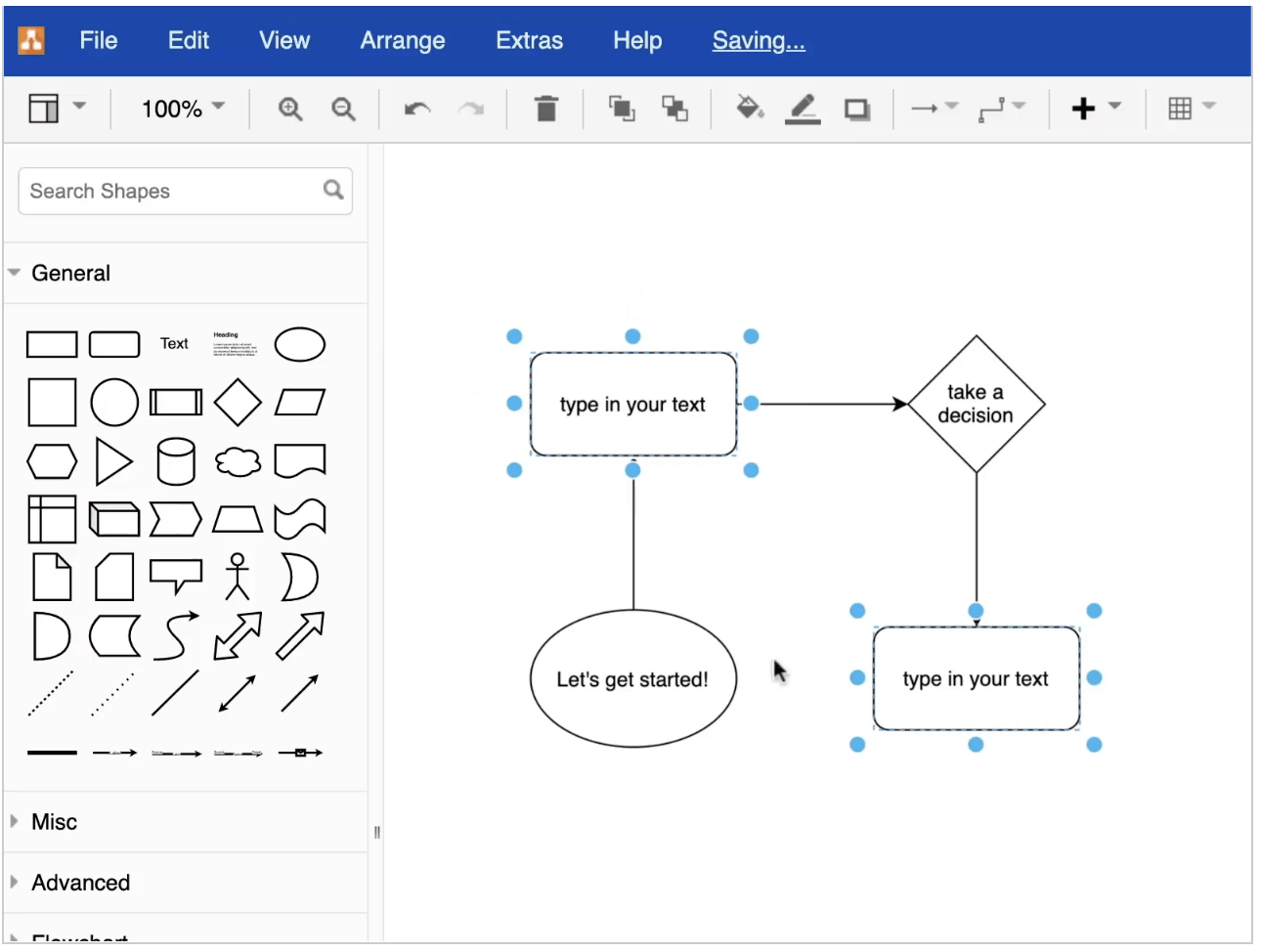
Fancy, advanced features and multifunctionality may be appealing. But sometimes, all you need is a simple tool that lets you draw right away—Diagrams.net (draw.io) throws all complications out of the window.
Forget about logging in, creating passwords, and handling subscriptions. Just go to the website, press Start now and begin working on your flowchart—it’s that easy!
The available shapes are located on the left of the screen, while customization options are on the right. Once you’re done, choose the export format and save the diagram at a location of your choice.
Mac users can even download the Diagrams app to create flowcharts offline! This platform has a stripped-down diagramming interface, meaning it doesn’t have extensive collaboration or documentation tools like ClickUp or Miro.
Diagrams.net best features
- Minimalistic interface that uses simple flowchart objects
- No login or setup requirement
- Solid selection of shapes
- Ability to import shapes
- Easy to create simple process flowcharts and organizational charts from scratch
Diagrams.net limitations
- Lacks advanced features compared to some professional diagrams and data flowchart apps
- Limited number of shapes and symbols
Diagrams.net pricing
- Free
Diagrams.net ratings and reviews
- G2: 4.4/5 (350+ reviews)
- Capterra: 4.6/5 (700+ reviews)
Summarize this article for me pleaseStill Can Decide on the Best Flowchart Makers?
Choosing the best flowchart software for Mac is like shopping for a slick new car—you want those features but also have style and aesthetics in the back of your mind. Many of the listed programs here offer a free trial or a free version, so take a test drive if you’re still on the fence! 🚗


Everything you need to stay organized and get work done.

Recent Articles
10 Best ChatGPT Alternatives We Tested for Work in 2026 
10 Best ChatGPT Alternatives We Tested for Work in 2026

