
Sorry, there were no results found for “”
Sorry, there were no results found for “”
Sorry, there were no results found for “”
A customer journey map may reveal confusing steps or gaps in support. But you’ll still need to validate those findings against real customer behavior, decide what to fix, and track whether the experience improves.
Progress on customer experience remains uneven. Forrester’s 2026 CX Index found that 26% of U.S. and Canadian brands saw statistically significant improvements in their customer experience scores, while 68% saw no statistically significant change.
Customer journey mapping software helps with different parts of the improvement process. Some tools help you build and maintain detailed maps, while others show how customers move through your digital channels or turn journey insights into work your team can act on.
In this guide, we’ll compare 10 customer journey mapping tools, including their features, pricing, ratings, and limitations, to help you find one that fits your needs.
TL;DR: Pick Smaply, UXPressia, or Custellence if you regularly build and update customer journey maps. TheyDo suits organizations managing multiple journeys across teams.
Choose Contentsquare or Fullstory to study customer behavior on websites and apps, Miro or FigJam for collaborative mapping workshops, and Lucidchart for service blueprints and swimlane diagrams.
| Tool | Best for | Standout feature | Starting price* | Where it taps out |
| Smaply | Persona-led journey management in CX teams | Journey Hierarchy, Research Hub, portfolio cards, service blueprints, and delivery tracking | Free; paid from $59/editor/month, billed monthly | Research Hub requires the Governance plan, the highest listed tier |
| UXPressia | Client-ready maps for consultants and agencies | AI journey generation, image-to-map importing, persona simulation, CX Chunks, and Design View | Free; paid from $36/user/month, billed monthly | Jira, analytics, and other delivery integrations require the Business plan |
| TheyDo | Enterprise journey portfolios | Journey frameworks, Mining agent, Opportunity Reveal, research evidence, and warehouse connections | 30-day free trial; custom pricing | Paid pricing isn’t public, which makes budgeting harder for smaller teams |
| ClickUp | Turning journey pain points into owned work | Whiteboards, sticky-to-task conversion, Brain², Forms, Dashboards, and Super Agents | Free Forever; custom plans available for enterprises | Teams needing dedicated persona management and research synthesis may prefer a specialist CX platform alongside ClickUp |
| Miro | Live journey-mapping workshops | Facilitation controls, AI clustering, collaborative whiteboards, two-way integrations, and Engage activities | Free; paid from $8/member/month, billed annually | Large or heavily used boards can lag, depending on their content, activity, and users’ devices |
| FigJam | Design teams already working in Figma | AI Sort and Summarize, open sessions, diagramming, Figma Design collaboration, and Slides integration | Free; paid Collab seats from $3/seat/month, billed annually | It doesn’t offer dedicated journey portfolio management or cross-map progress tracking |
| Lucidchart | Service blueprints and swimlane journeys | Swimlane diagrams, data linking (Enterprise), Lucid AI, conditional formatting, and Visio compatibility | Free; paid from $9/month, billed annually | Detailed diagramming tools can feel excessive for occasional workshop contributors |
| Contentsquare | Measuring real web and app journeys | Journey Analysis, heatmaps, AI session summaries, impact quantification, and cross-session tracking | Free; Growth from $39/month, billed annually | Session analytics cover web and app behavior; conversation analysis requires an add-on, and offline interactions need a separate data source |
| Fullstory | Diagnosing friction inside product journeys | Automatic interaction capture, session replay, frustration signals, user segments, and StoryAI | Free; paid plans have custom pricing | Journeys and session summaries require Advanced or Enterprise; mobile tracking and StoryAI Premium are separate paid options |
| Custellence | Small CX teams on a flat budget | Sub-lanes, map hierarchies, presentation mode, collaborative mapping, and PDF/PNG/CSV exports | Free; paid from $199/month, billed monthly | AI-generated templates are available on Free, but automatic map population requires a paid plan |
Our editorial team follows a transparent, research-backed, and vendor-neutral process, so you can trust that our recommendations are based on real product value.
Here’s a detailed rundown of how we review software at ClickUp.
Your customer journey map findings are useless if they don’t lead to meaningful changes in the product/ service. If the issues never become work someone owns, they will keep showing up in customer feedback.
Forrester’s Martin Gill made a similar point: “Insight only creates value when leaders use it to change what the business does next.” For a journey map, that means deciding which issues to address, assigning ownership, and checking whether the changes improve the experience.
This also explains why customer journey mapping software tends to serve three purposes:
| Purpose | What it helps you understand | Tools to consider |
|---|---|---|
| Map the journey | What steps do customers take, how do they feel, and where do they struggle? | Smaply, UXPressia, Custellence, Miro, FigJam, Lucidchart |
| Measure the experience | What do customers actually do on your website or app, and where do they drop off? | Contentsquare, Fullstory |
| Act on the findings | Which issues need attention, who’s responsible, and how is the work progressing? | TheyDo, Smaply, ClickUp |
Some tools cover more than one of these areas, and you may use several together. The key is to carry what you’ve learned from one stage into the next.
For example, your onboarding map might show that customers struggle with account verification. Analytics can tell you where they drop off, while support tickets help explain why. With that evidence, you can prioritize a fix, assign it to the right person, and track the work through to release.
Once the change goes live, check whether fewer customers abandon that step. Then update the journey map with what you’ve learned, keeping it in line with the experience customers have today.
Score each tool against the job you need most, then check these seven points before you commit:
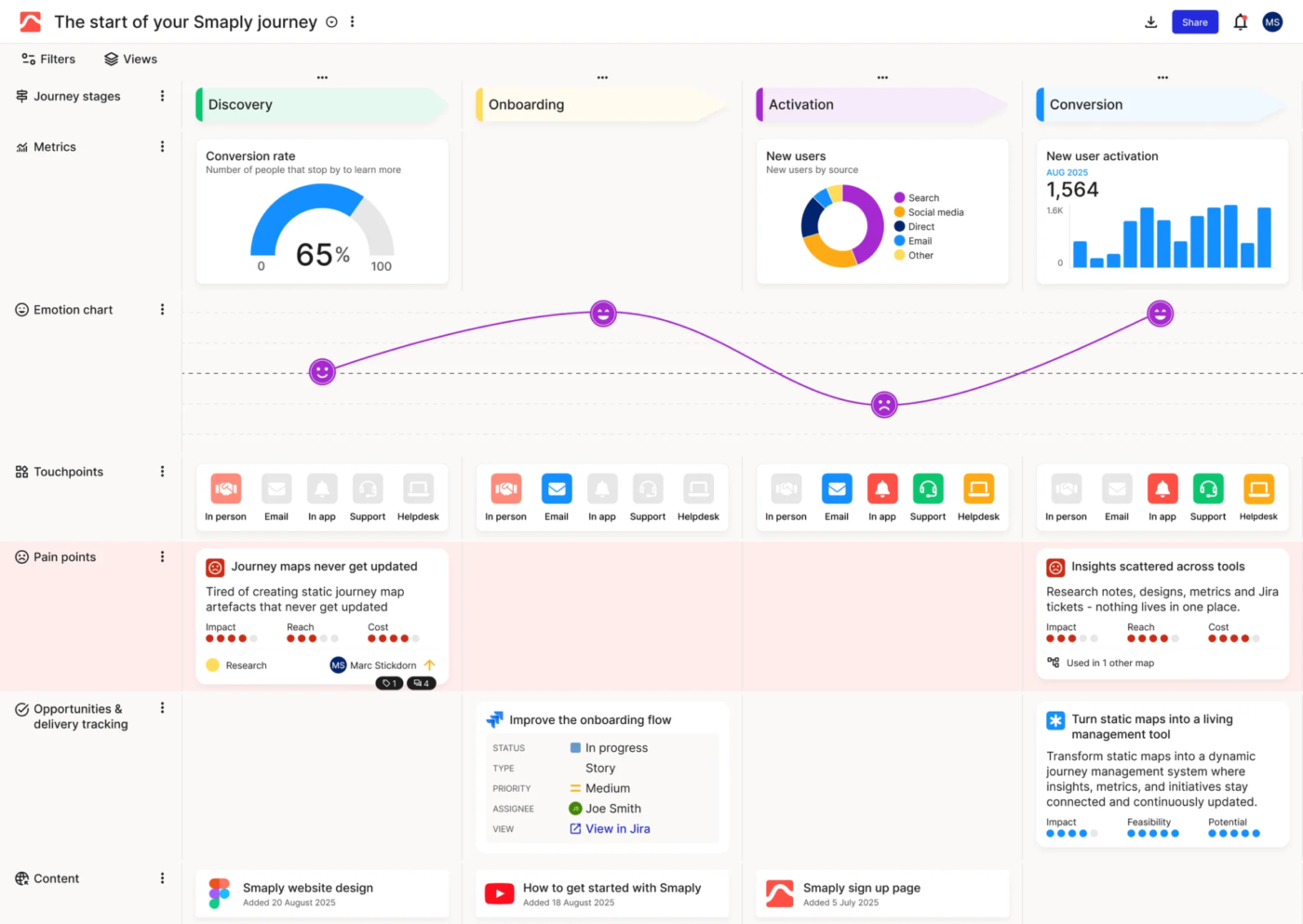
Smaply turns a customer journey map into a structured repository. Stages, steps, and lanes hold persona-tagged cards, while pain points, opportunities, and solutions feed into a shared portfolio. It also supports service blueprints, which help you map the internal processes behind each customer touchpoint.
For example, a CX lead mapping an insurance claims journey could flag the wait for an adjuster as a pain point. They could then link it to a Jira ticket and follow its progress from the map. This keeps the original customer issue connected to the work being done to fix it.
Smaply AI can help draft a starting map from a prompt. For research-heavy projects, its Research Hub brings interview transcripts, customer quotes, and supporting evidence into the same environment. Use those findings to refine the journey as you learn more about the experience.
Where it taps out: Research Hub is available on Governance. Teams that need interview synthesis alongside journey mapping should budget for the highest listed tier.
Best for: Persona-led journey management in CX teams
Skip it if: You need built-in interview synthesis at an entry-level price
A user review says:
It’s a tool that you can easily learn, it’s intuitive and meets your needs, especially if these are your first maps you’re building. It has all the functionalities you would expect a journey mapping tool to have.
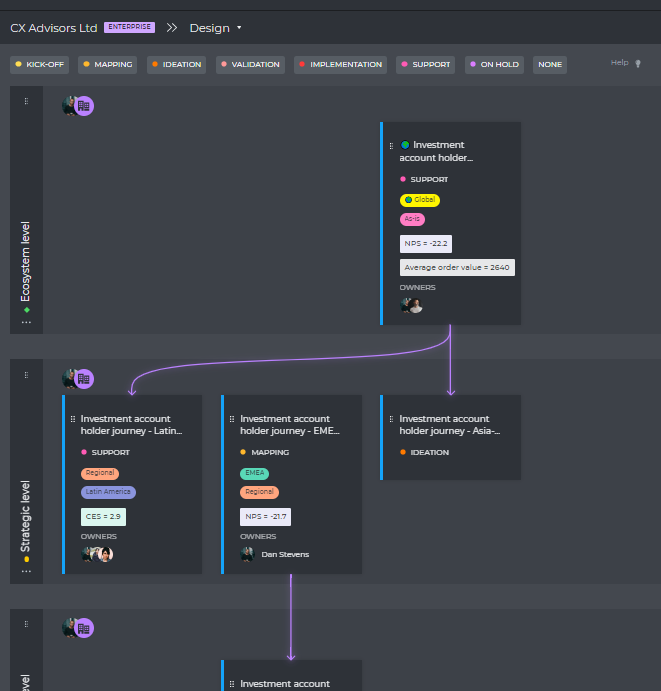
UXPressia brings customer journey maps, personas, and impact maps into one workspace. You can create them from scratch, start with a template, or use AI to prepare a first draft. It’s a good fit for consultants and agencies that regularly present customer research to clients.
Say you’re working with a client who already has a journey map from an earlier workshop. You could import a photo of that map, turn it into an editable document, and link it to the relevant personas. A password-protected link lets the client review the work without creating an account.
UXPressia also has an AI persona simulator that lets you ask questions from a persona’s perspective. As you refine the map, organize the ideas and opportunities you’ve identified into CX Chunks, assign statuses, and follow their progress.
Where it taps out: Delivery and data integrations, including Jira, Azure DevOps, Google Analytics, Mixpanel, and Slack, sit on the Business tier. Pro teams keep maps and backlogs in sync by hand.
Best for: Client-ready maps from consultants and agencies
Skip it if: You need ticket status on the map but can only budget for the Pro tier
A user review says:
I love that you can actually make user flows that show interactions between personas. The functionality is easy to use and doesn’t overcomplicate things. I have used basically every mapping software out there (I was actually hired to review these tools for a UX team) and I always come back to UXpressia as it does what I need from customer journeys right through to Service Blueprinting.
Also Read: User Persona Templates
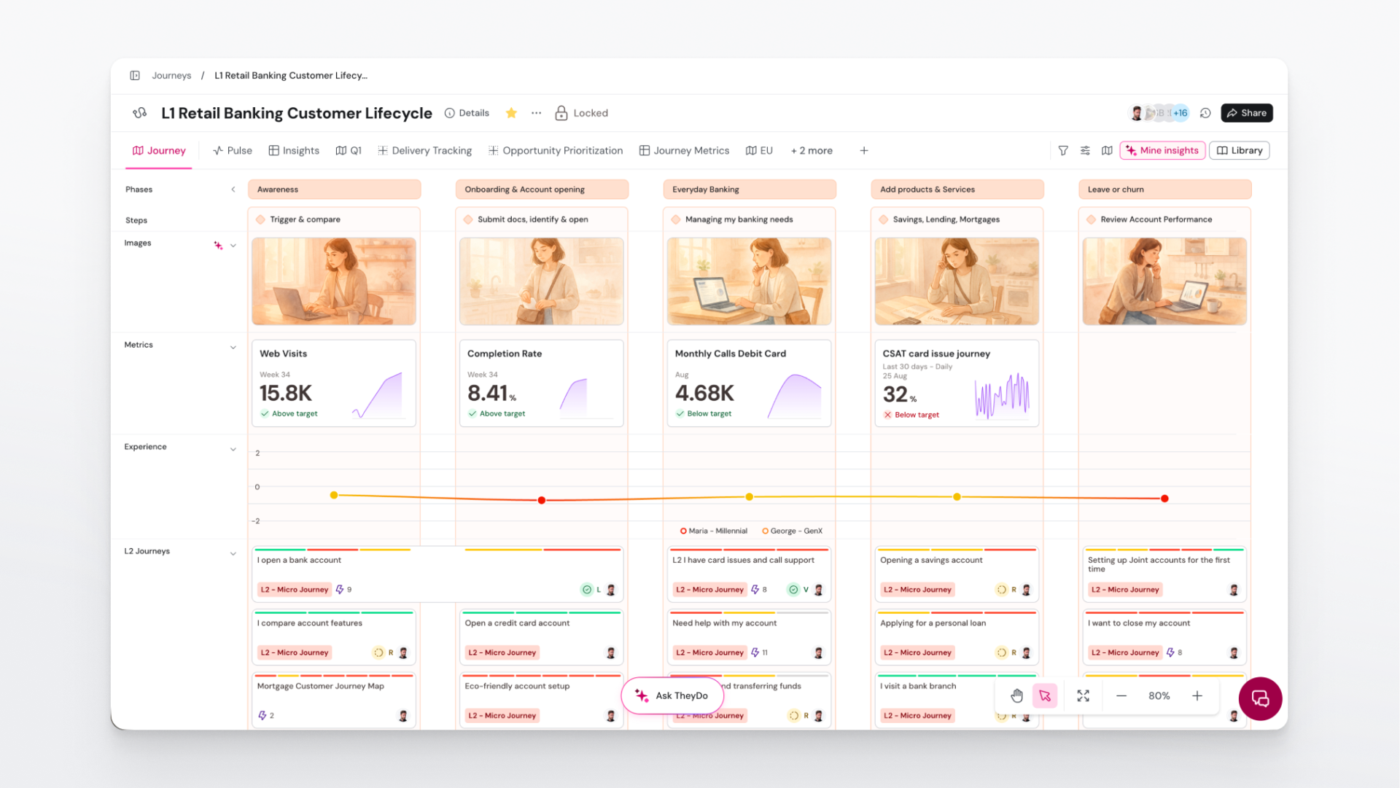
TheyDo treats journeys as a managed portfolio. You build a shared framework, attach research evidence to each step, and link improvement opportunities to business goals. This helps organizations understand how different journeys relate to one another.
For instance, a billing issue may affect onboarding, support, and retention. With TheyDo, those journeys can share the same opportunity, giving stakeholders a broader view of the problem and the work planned to address it.
TheyDo also brings AI into journey management. Its Mining and Analyst agents help teams work with research and ask questions about their journeys, while Opportunity Reveal helps identify improvement opportunities across the portfolio. That gives CX leaders a way to review findings across departments and decide which changes deserve attention.
Where it taps out: TheyDo doesn’t publish prices for its paid plans. Once the 30-day trial ends, you’ll need to contact sales for a quote, which can be a hurdle for smaller teams comparing options on a set budget.
Best for: Enterprise journey portfolios
Skip it if: You need a handful of maps for one team this quarter
A user review says:
Easy to use. Great for communicating journey’s and opportunities!
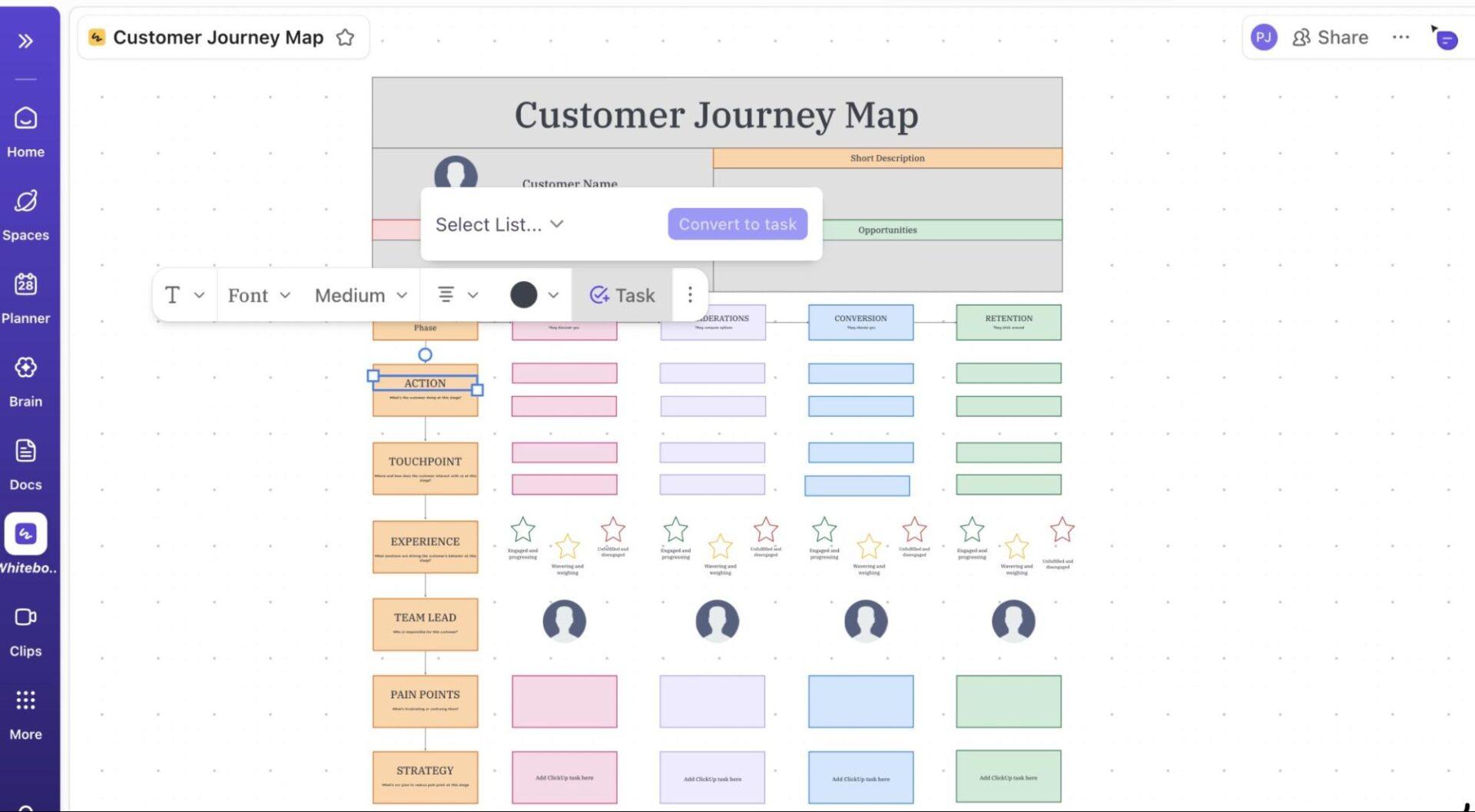
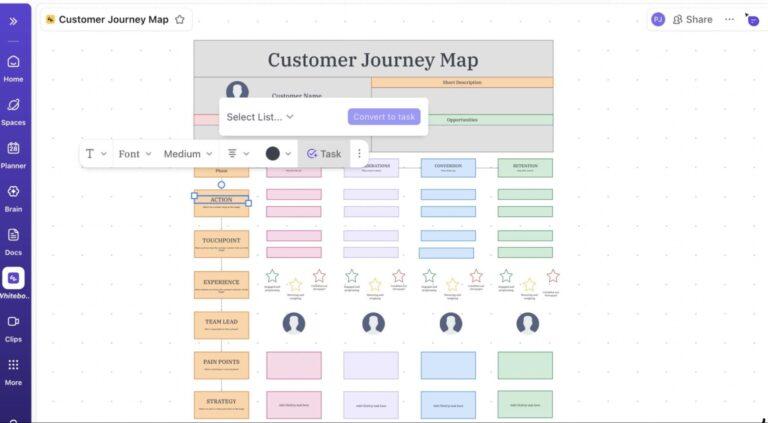
ClickUp connects customer journey mapping with the work that follows. Map a journey on a ClickUp Whiteboard, mark the steps where customers struggle, and turn those findings into tasks with owners and deadlines. The tasks stay connected to the board, so you can track progress without losing the original context.
For example, after an onboarding workshop, you might have several pain points to address. Convert them into ClickUp Tasks, organize them in a CX backlog, and use Custom Fields to group them by journey stage. Product and support can then work through the fixes while the map remains available for reference.
AI also helps keep visual documentation up to date. Brain² can generate editable flowcharts from your existing Docs and project information, while ClickUp Super Agents can help update process maps as workflows change.
To start, ClickUp’s customer journey map builder includes rows for Actions, Emotions, Touchpoints, Pain Points, and Opportunities. You can fill them in in your browser and export the map as a CSV.
Where it taps out: ClickUp suits collaborative mapping and follow-up delivery. Teams that need dedicated persona management and research synthesis can pair it with a specialist CX platform and manage the resulting work in ClickUp.
Best for: Turning journey pain points into tracked, owned work
Skip it if: Research synthesis and persona management are the core of your CX practice
A user review says:
I love ClickUp’s flexibility. There’s no other software that lets me implement my ideas the way ClickUp does (believe me, I tried!).
Our primary CRM lives in ClickUp, and we use automations for onboarding, offboarding, and subscription renewals, which makes it easy for the whole team to stay on top of the customer journey. The integrations with the software we use most (through Connected Search) also keep ClickUp top of mind throughout my day whenever I’m trying to find something.
The walkthrough below shows the whiteboard-to-task flow on a process map, the same mechanics a journey map uses:
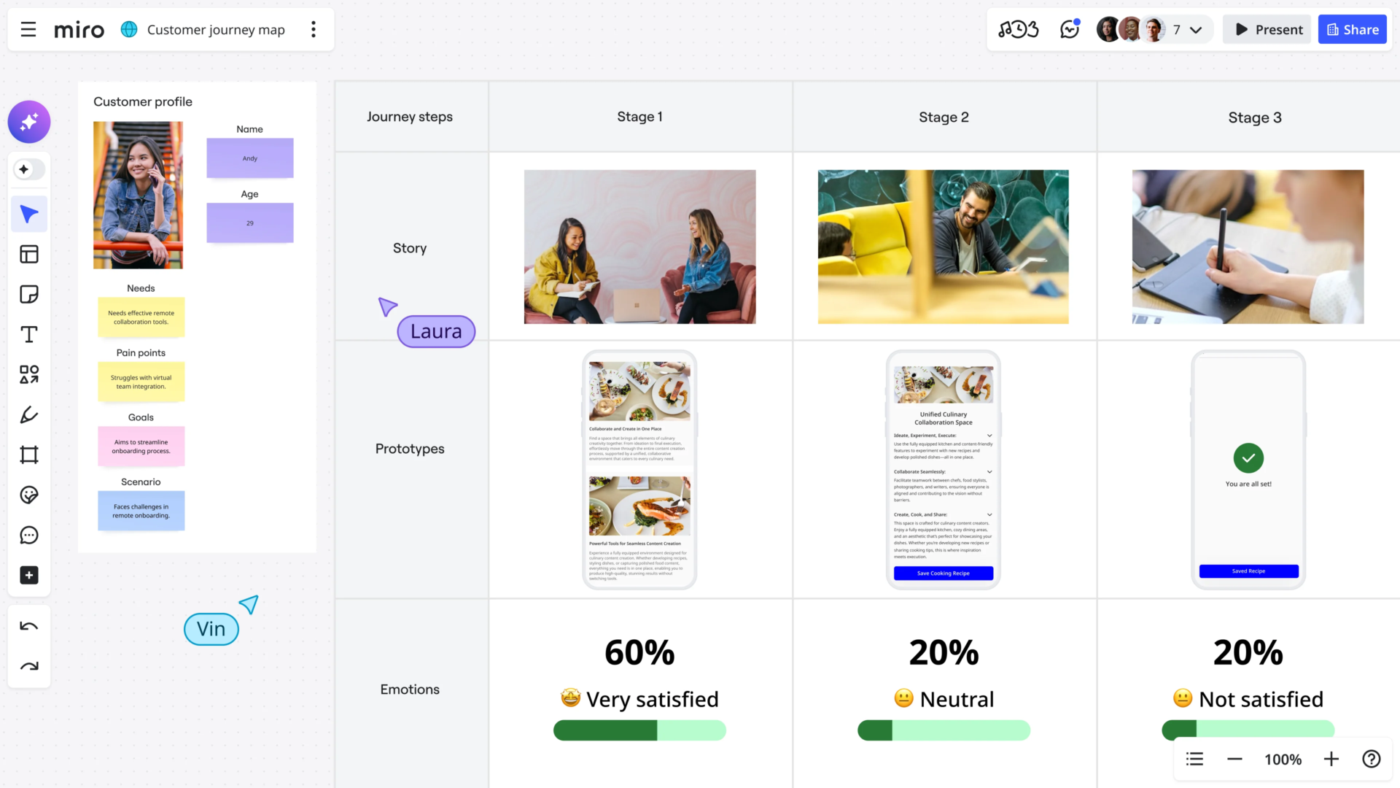
Miro works well for customer journey mapping workshops, where several people need to build and review a map together. Its large whiteboard template library includes customer journey maps. Plus, the shared canvas gives participants room to add touchpoints, emotions, and pain points as the discussion unfolds.
During a remote workshop, participants can add their observations privately before reviewing them as a group. Once the ideas are on the board, Miro AI can cluster sticky notes by theme or sentiment and generate a summary. This helps the facilitator organize the discussion and identify areas to explore further.
Miro also supports work beyond the workshop. Data tables help organize findings, while two-way integrations connect board items to delivery tools. You can bring together research, decisions, and follow-up work on the same canvas.
Where it taps out: Large or heavily used boards can slow down, depending on their content, activity, and users’ devices. Test a representative journey map before running a live workshop.
Best for: Live journey-mapping workshops
Skip it if: Your journey maps are long-lived repositories that grow to hundreds of screenshots
A user review says:
Easy, flexible collaborative canvas
The infinite canvas makes it easy to run collaborative workshops, map journeys and align stakeholders in one shared space.
AI is really useful and make valuable contribution to work
Read More: Best Miro Alternatives & Competitors
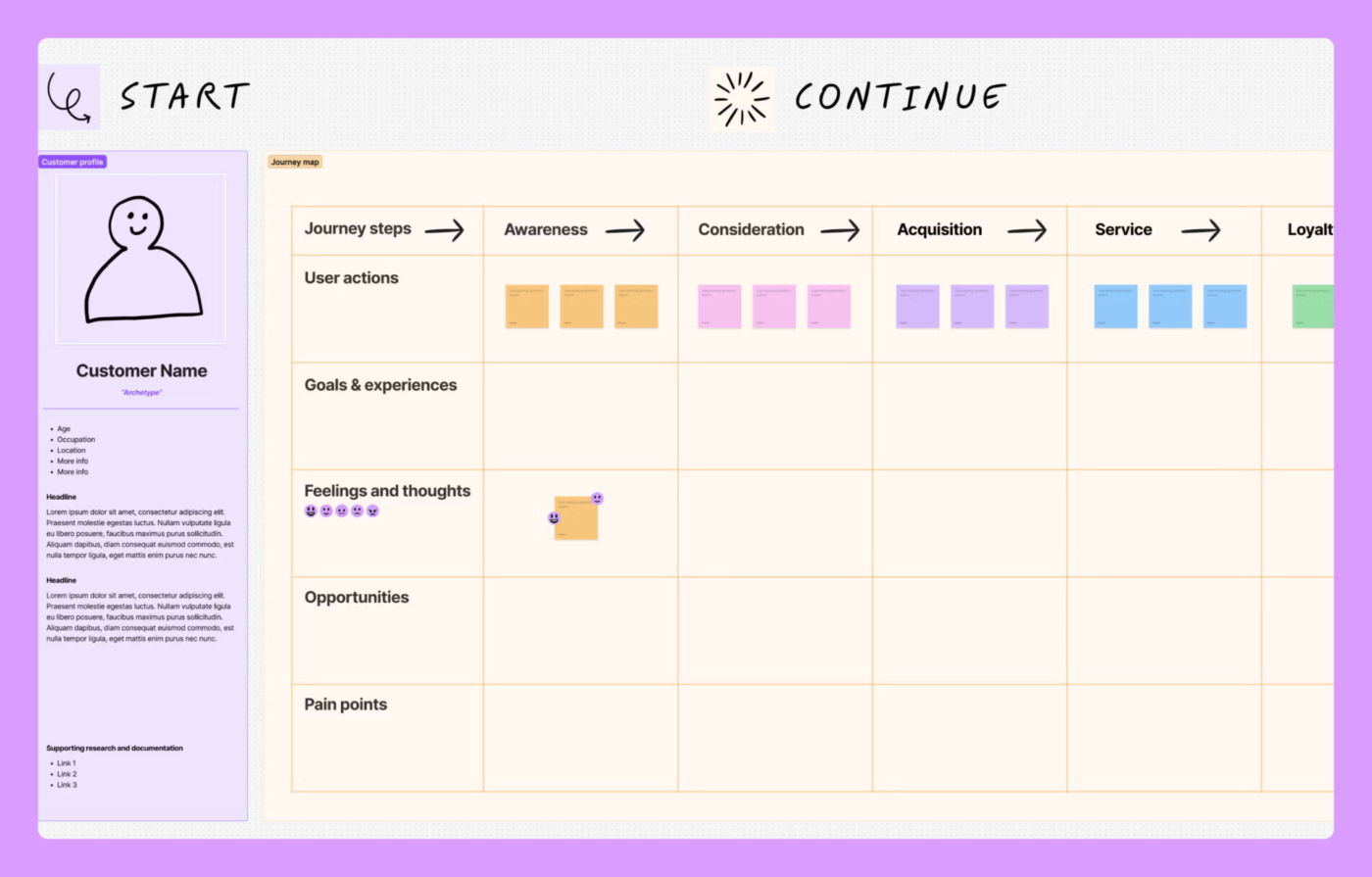
FigJam is Figma’s collaborative whiteboard, and its biggest advantage for journey mapping is how closely it connects to the design process. You can map customer experiences, collect feedback, and discuss possible improvements in the same environment where your designers work on prototypes.
For instance, a UX team mapping a checkout journey might identify a confusing step in the payment flow. Researchers can add findings to the board, while designers sketch possible changes and use those insights to update the prototype in Figma Design.
FigJam also works well when research, product, and design need to review the same journey. Everyone can contribute to the map and return to the discussion as new designs take shape.
Note: All paid prices are per seat, billed annually. Prices listed come from Figma, as FigJam is part of it.
Where it taps out: FigJam doesn’t offer a dedicated journey management system. Tracking pain points, owners, and progress across multiple maps requires another tool.
Best for: Design teams already working in Figma
Skip it if: Your team needs to report on pain points across many journeys
A user review says:
Collaborating with team members is seamless, allowing us to turn thoughtful ideas into reality. This tool supports our UX research activities, such as mapping user journeys, brainstorming sessions, and conducting design critiques.
Read More: Best FigJam Alternatives & Competitors
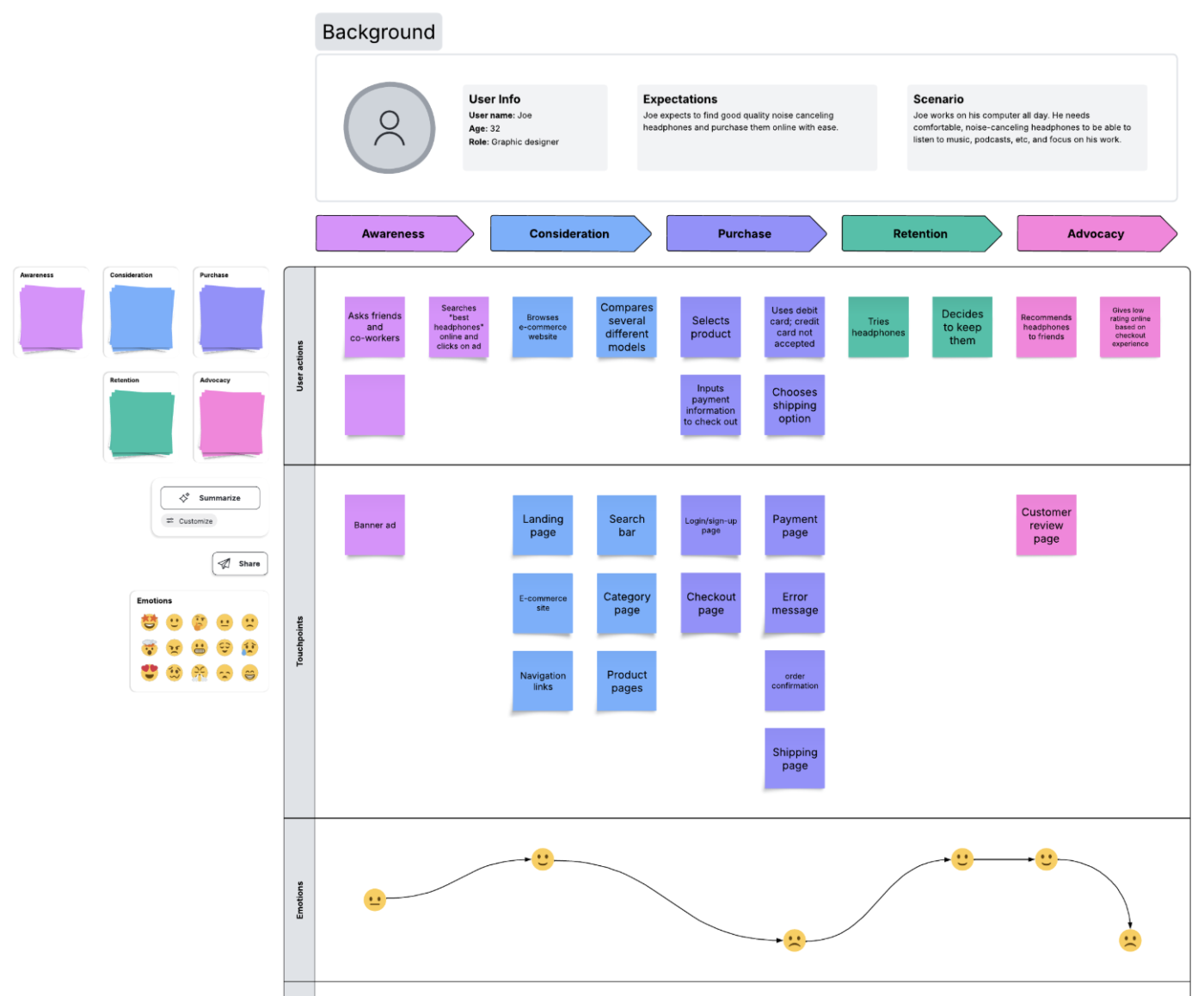
Lucidchart adds structure to customer journey mapping with diagrams, swimlanes, and data linking. It’s a good fit when you need to understand what customers experience and how the internal processes behind each touchpoint work.
Take an implementation team that could map client onboarding across three lanes: the client, the account manager, and the provisioning team. Each lane shows who’s responsible for each step, and the connecting arrows help you spot where handoffs break down.
On the Enterprise plan, you can also link spreadsheet data to diagram shapes, which helps when the map needs to reflect operational metrics or information from other systems. This works especially well for service blueprints that involve several departments.
Where it taps out: Lucidchart’s detailed diagramming tools can feel excessive for occasional contributors who only need to add notes or feedback during a workshop.
Best for: Service blueprints and swimlane journeys
Skip it if: Your contributors mainly need a simple canvas for collaborative mapping
A user review says:
The Lucid Visual Collaboration Suite is a user-friendly platform that made it easy for a new user like me to navigate, explore, and start using it successfully. The collaboration tools and visual layout also make it simple to organize ideas, map out processes, and work with others in real time
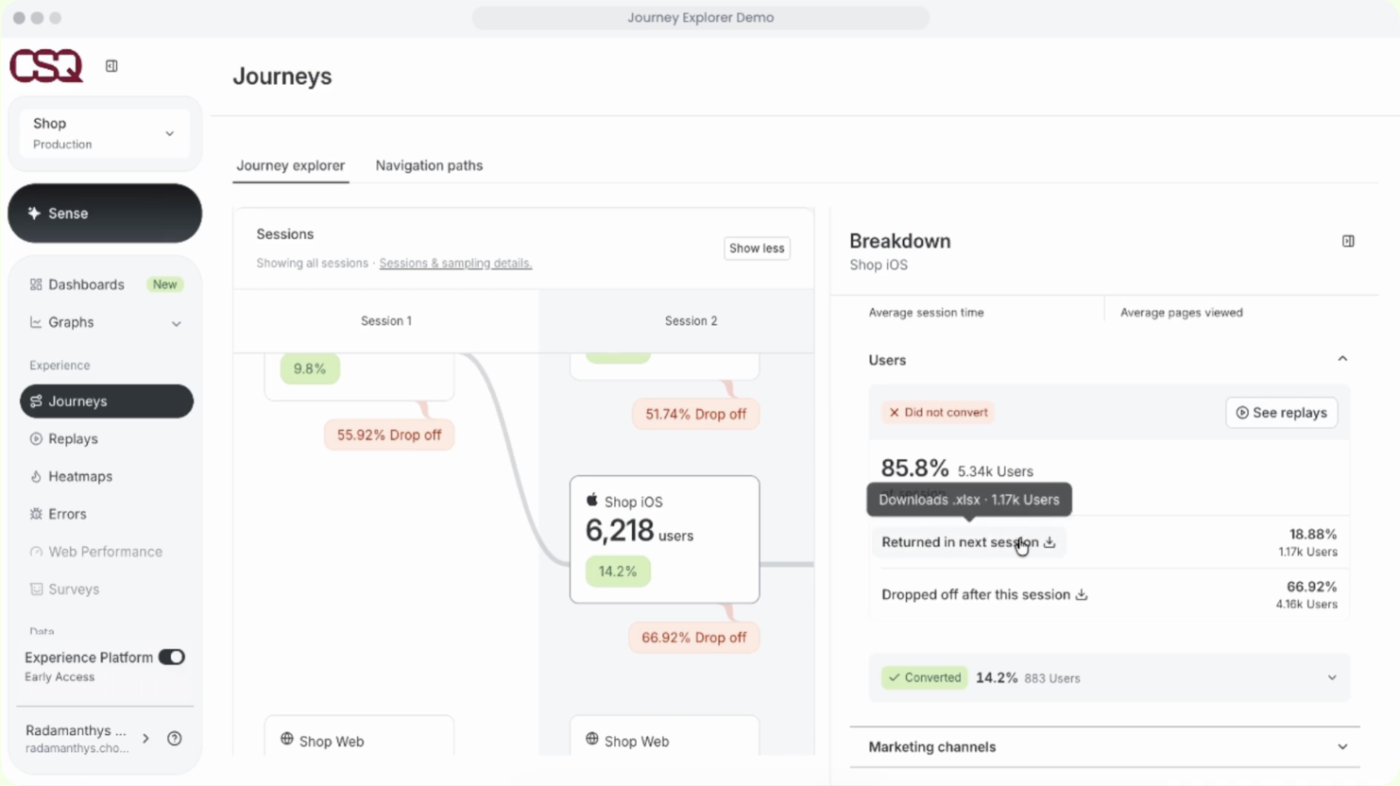
Contentsquare shows how customers actually move through your website or app. Its Journey Analysis feature maps visitors’ paths, including where they move between pages, return to earlier steps, or leave altogether.
Say you’re investigating why shoppers abandon their carts. You can examine the paths visitors follow after adding an item, check how often they return from delivery options to the cart, and review individual sessions to understand what happened.
Contentsquare also brings behavioral data and customer feedback into the analysis. This helps you investigate problems from different angles before deciding which parts of the experience need attention.
Where it taps out: Contentsquare’s session analytics capture web and app behavior. Conversation Intelligence is a Pro/Enterprise add-on for analyzing calls, chats, and email. Store interactions require connected data, not standard session capture.
Best for: Measuring real web and app journeys
Skip it if: You need a manually maintained journey map that combines digital, phone, and in-person experiences
A user review says:
I like Contentsquare’s journey analysis because it gives me a clear picture of what users did after completing a key action.
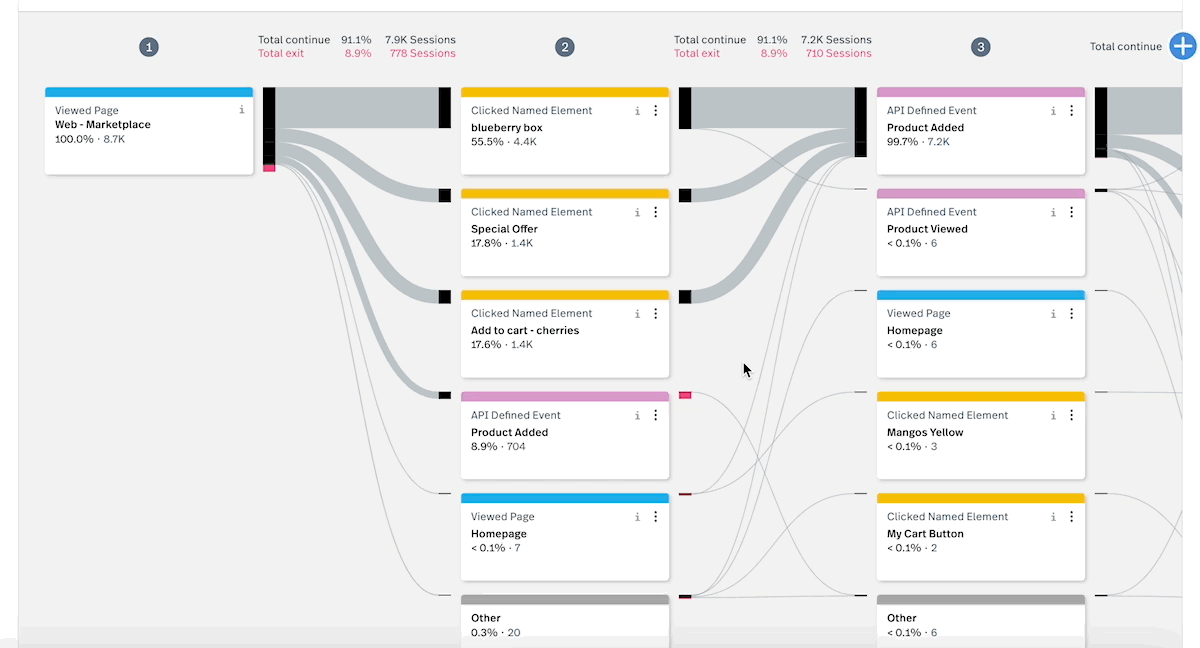
Fullstory automatically captures digital interactions such as clicks, scrolling, and form activity. That means you can investigate a customer journey using events already recorded, even if you didn’t plan to track that path.
Consider a product manager who notices that fewer customers complete sign-up after a release. On Fullstory’s Advanced or Enterprise plan, they can use Journeys to review the path from account creation to verification, once the relevant pages or events are configured. Session replays then show what happened during those visits, helping the product team understand which part of the experience needs attention.
Fullstory also connects behavioral analysis with product troubleshooting. You can investigate patterns across user groups, compare experiences, and use the findings to inform product changes.
Where it taps out: Journeys and StoryAI session summaries require Advanced or Enterprise. Native mobile app tracking and StoryAI Premium are separate paid options with unpublished pricing.
Best for: Diagnosing friction inside product journeys
Skip it if: No one on your team can own behavioral analysis week to week
A user review says:
The power of the tool, the ability to really understand our customer journey, identify issues and easily share with relevant team members for further investigation.
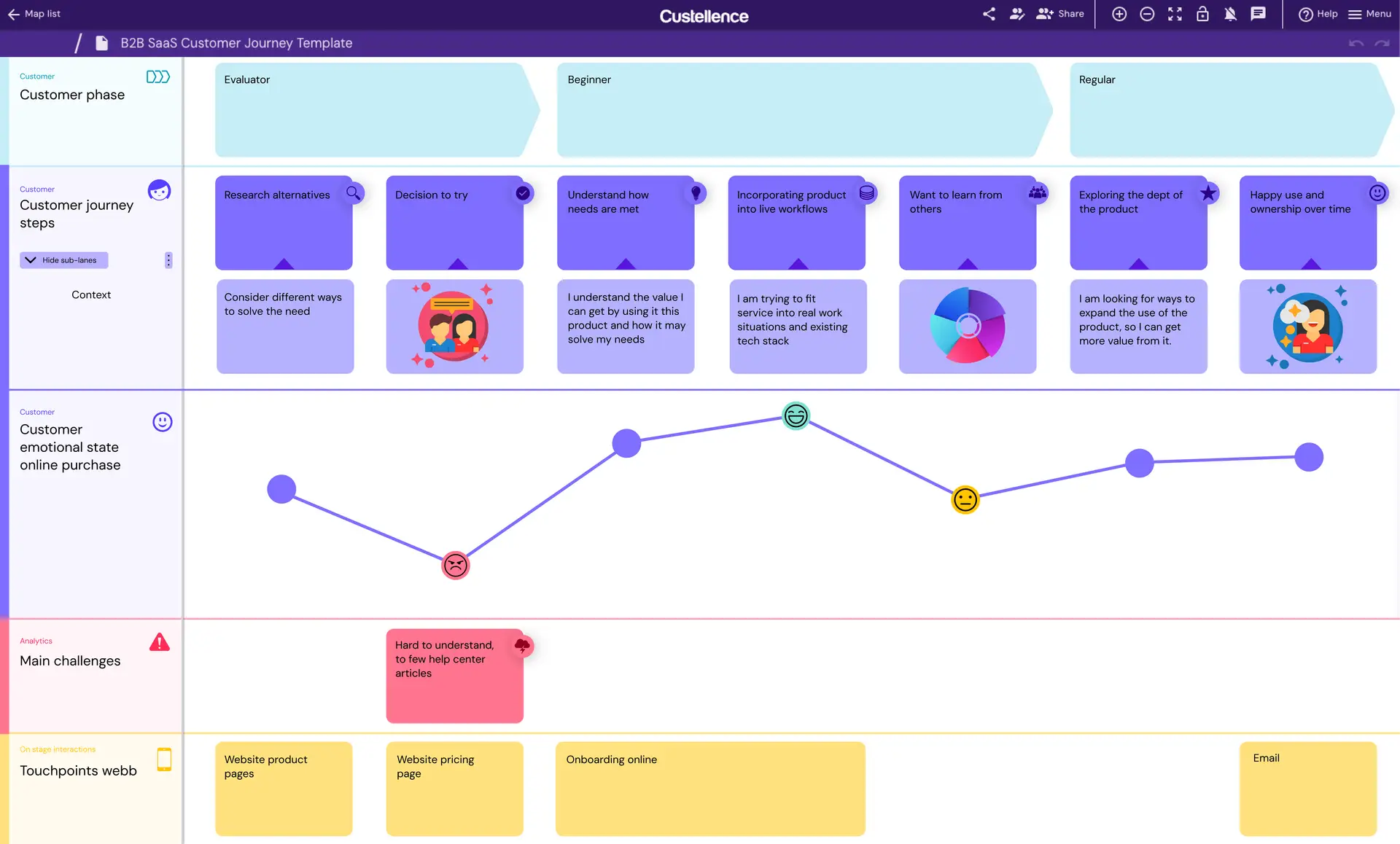
Custellence is a dedicated customer journey mapping tool designed to help teams build, review, and maintain their maps. Its interface lets you organize a journey into stages and lanes, with room to document what customers experience at each step.
For example, a CX team mapping an insurance claims journey could invite claims handlers to comment on the steps they manage. The team can discuss where customers face delays, update the map as the process changes, and keep those observations available for future reviews.
Custellence also supports different levels of journey detail. Start with a broad view of the customer experience, then create more detailed maps for individual stages or processes. This helps stakeholders understand both the overall journey and the steps that need closer attention.
Where it taps out: Custellence’s free plan provides AI-generated templates, but you’ll need a paid plan to auto-populate the map. Free users fill in the generated template themselves.
Best for: Small CX teams on a flat budget
Skip it if: You need AI to populate your maps and plan to stay on the free tier for the time being
A user review says:
I like the simplicity of the functions and swimlanes. The tool itself, making the journey maps is easy to use and easy to share. It is not a difficult item to integrate and is easily viewed if you have a computer.
Mural (Free; Team+ starts at $9.99/member/month, billed annually): Mural supports collaborative workshops with timers, voting, private mode, and participant controls across all plans. The Free plan includes unlimited murals, with three editable at a time. Team+ costs $12/member/month, billed monthly. Mural is an alternative to Miro and FigJam for journey-mapping workshops. Also see how two of these tools compare in our FigJam vs. Mural guide.
Google Analytics 4 (Free for standard GA4; Analytics 360 is paid): GA4’s Path Exploration shows the routes customers take through your website or app. Start from a page or event to see what happens next, or work backward from a conversion to understand how customers got there. GA4 is worth considering if you already use Google Analytics and want to study event sequences. But you’ll need other tools for session replays, qualitative research, and creating journey maps. Thus, it didn’t make the list.
JourneyTrack (30-day Free Basic trial, then $99/month): JourneyTrack brings customer journey maps, personas, and AI-assisted research into a shared platform. Its Journey Management plan adds journey health tracking and voice-of-customer integrations. The higher-tier Decision Intelligence offering includes AI agents and advanced governance. JourneyTrack is an option for organizations comparing enterprise platforms alongside TheyDo. Its pricing may be a significant commitment for smaller CX teams.
Start with the work you need to do. Some tools focus on building journey maps, others on analyzing customer behavior or managing improvements. Use these distinctions to narrow your shortlist:
Before you commit, test your shortlisted tools with a map similar in size to one your team uses. Ask stakeholders to find the evidence behind a pain point, leave feedback, and follow its progress.
For canvas-based tools, add screenshots, comments, and research notes to see how the map handles detail. Then try moving between stages or finding a specific touchpoint. This will help you judge how easy the map is to navigate as it grows.
If you’re switching platforms, save your existing maps and list the research, comments, and open issues connected to them. Smaply and UXPressia can recreate editable maps from images on paid plans. Check what each import preserves, then review the results and reconnect any missing evidence, assignments, or delivery links.
Customer journeys change as your business grows. A new feature might simplify onboarding, while a policy update could introduce friction somewhere else. That’s why you should revisit the maps whenever you make changes that affect the customer experience.
And remember that different customers may experience the same journey differently. A first-time buyer might struggle with a step that a returning customer barely notices. Looking at these differences can help your team decide which problems deserve attention first.
Once you’ve identified those priorities, the next step is to carry them through to completion. With ClickUp, you can bring customer journey improvements into your team’s daily work and keep everyone focused on what’s next.
Generally, yes, if different customer groups follow different paths or face different problems. For example, a first-time buyer and a returning customer may have different expectations during checkout. Start with one persona and one goal per map. Then compare the maps to see where their experiences overlap or differ.
A user flow shows the screens, actions, and decisions involved in completing a task, such as signing up for an account. A customer journey map covers the broader experience, including emotions, expectations, and interactions across channels. Use a user flow to examine how a process works, and a journey map to understand what customers experience along the way.
A customer journey map shows the customer’s actions, thoughts, and emotions. A service blueprint adds the people, systems, and backstage work that deliver that experience. Use a journey map to find customer friction, then a blueprint to trace the internal handoffs behind it.
Start with the current journey if you’re improving an existing product or service. This helps you understand what customers experience today and where they’re struggling. Once you’ve identified those problems, create a future-state map to plan improvements. If you’re building something entirely new, a future-state map can help your team define the experience you want to create.
A CRM and a journey map answer different questions. A CRM stores customer records and activities; a journey map connects touchpoints, customer needs, and pain points across an experience. Keep account records in Salesforce or HubSpot, then test whether your mapping workflow links findings to those records. Buy another tool only when it closes a documented gap in your current setup.

Manasi Nair
Max 23min read
Manasi Nair
Max 27min read
Manasi Nair
Max 30min read
© 2026 ClickUp