


Your marketing campaign is underway, but things aren’t running smoothly.
Deadlines are approaching fast, tasks are stacking up, and team morale is dipping. Meetings are turning into crisis management sessions, and you’re worried about keeping everyone aligned with your strategic goals.
What started as a straightforward project rapidly became a chaotic mess of missed deadlines and uncoordinated efforts. The fallout? Stressed teams, unhappy clients, and a hit to your reputation.
The problem is often a lack of visibility into your project’s status. This is where RAG (Red, Amber, Green) status steps in. 🚦
Breaking down project health into red, amber, and green categories provides a straightforward way to identify risks, prioritize actions, and keep everything on track.
Curious about utilizing RAG status to set your project straight? This guide discusses just that.
How to Implement RAG Status in Project Management

 Summarize this article for me please
What Is RAG Status?
RAG status is a project management software that tracks and communicates the overall project status.
The concept is straightforward: each color—red, amber, and green—represents a different level of the project’s health.
- Green signifies everything’s on track
- Amber (or yellow) signals potential but manageable issues
- Red warns of significant problems requiring immediate attention
This is much like traffic lights, where the green light signals you to proceed, the yellow light warns you to slow down, and the red light brings you to a stop until the issue is fixed.
This color-coded system offers a quick, clear way for project managers and stakeholders to effectively track project progress and make informed decisions—especially under tight deadlines.
For example, on a software development project for a new app, RAG status might look like this:
- Green: Core features are 80% complete, on track, and within budget
- Amber: UI/UX design is behind schedule due to feedback delays; actions are in place to address it
- Red: Critical bug causing performance issues; immediate fix required, impacting release date
Summarize this article for me pleaseHow to Implement RAG Status?
RAG status is your go-to tool for clear, actionable insights into your project performance. Here’s how to set it up and keep things moving:
1. Define what each color represents
Clearly define what each color represents for your project. This should be based on specific metrics such as timelines, budgets, or performance indicators.
🔴 Red
Assign red status when critical problems threaten the project’s success and demand immediate action. This could include:
- Major delays: A milestone or deliverable overdue by over a week, signaling the project is behind schedule and risking future deadlines
- Budget overruns: Exceeding the budget by over 20% indicates financial mismanagement or unforeseen costs that risk the project’s financial stability
- Critical risks: Major technical failures, key personnel leaving, or significant changes in project scope that aren’t adequately addressed
Red status requires urgent action from project leaders to resolve critical issues, reassess the project plan, and implement corrective action. It also highlights the severity of the problems and prioritizes them for swift resolution to prevent further complications.
🟡 Amber (or Yellow)
Amber status flags potential issues that could escalate if not addressed. Examples include:
- Vendor delays: A supplier’s delivery is a few days late, which could affect project timelines if not managed with contingency plans
- Software bugs: Minor bugs found in the software release that need fixing but don’t yet threaten the project’s overall functionality
- Scope changes: Small changes in project scope that could impact timelines or costs if not carefully managed and communicated
Amber projects can be managed without drastic measures. However, they need careful monitoring and strategic handling to prevent them from becoming serious problems.
🟢 Green
Mark the project with green status when everything is proceeding according to plan. It usually includes:
- On-time deliverables: Milestones and deliverables are on track with the project schedule
- Stakeholder satisfaction: Feedback from clients or stakeholders is positive, indicating satisfaction with progress and deliverables
- Positive trends: Performance indicators, such as sales figures or user engagement metrics, are tracking positively against goals, with no significant deviations
- Budget adherence: Expenses are within the allocated project budget, with no overspending or unexpected costs
Green status confirms the project is in excellent shape with no immediate issues needing attention.
2. Set thresholds
Next, set limits for red, amber, and green colors to keep everyone aligned and simplify project assessments.
This approach ensures consistency and objectivity when applying the RAG status. It also eliminates guesswork, allowing project teams to quickly identify and address issues before they escalate. Plus, projects stay on course as everyone knows when and how to act based on the current status.
Here’s an example of how to set clear, measurable RAG thresholds for different aspects of the project lifecycle:
| Aspect | Red status 🔴 | Amber status 🟡 | Green status 🟢 |
| Budget management | More than 20% over budget | 10-20% over budget | Within 10% of the budget or under |
| Resource allocation | Critical resources unavailable for >3 days | Resources unavailable for 1-3 days | Resources available as planned or <1-day delay |
| Schedule | More than 15% behind schedule | 5-15% behind schedule | Less than 5% behind schedule or on time |
| Client satisfaction | Satisfaction scores drop below 70% | Satisfaction scores between 70-80% | Satisfaction scores above 80% |
| Compliance | Non-compliance with >10% of regulations/standards | Non-compliance with 5-10% of regulations/standards | Full compliance or non-compliance with <5% of standards |
To set thresholds effectively:
- Adjust thresholds based on the project’s complexity: For high-risk projects, mark tasks red if they’re over 10% behind schedule; for simpler projects, allow up to 20% slippage
- Periodically revisit and adjust thresholds: If a project’s scope expands, revise the thresholds accordingly. For example, if tasks were initially red when two weeks behind, adjust the threshold to 1 week to reflect the increased complexity and urgency
However, manually tracking RAG status via Excel can quickly result in a mess. This is where a dedicated project management tool like ClickUp steps in. It provides tailored views for cross-functional projects and streamlines project management with project progress tracker templates and features, keeping your team synced with real-time insights.
Summarize this article for me pleaseUsing ClickUp for RAG Status
ClickUp Project Management Software provides comprehensive solutions for straightforward and effective RAG status tracking. It is an all-in-one knowledge and work management platform where you can plan and prioritize tasks with ease.
With ClickUp’s 15+ Custom Views, increased visibility across projects, and enhanced collaboration, it is easy to keep teams aligned and tackle potential issues head-on, driving a proactive approach to strategic project management.
ClickUp’s Custom Task Status feature allows you to go beyond the default options like ‘To Do,’ ‘In Progress,’ or ‘Done.’ This flexibility is essential for RAG status tracking, allowing you to label tasks and projects as red (at risk), amber (warning), or green (on track) with precision.
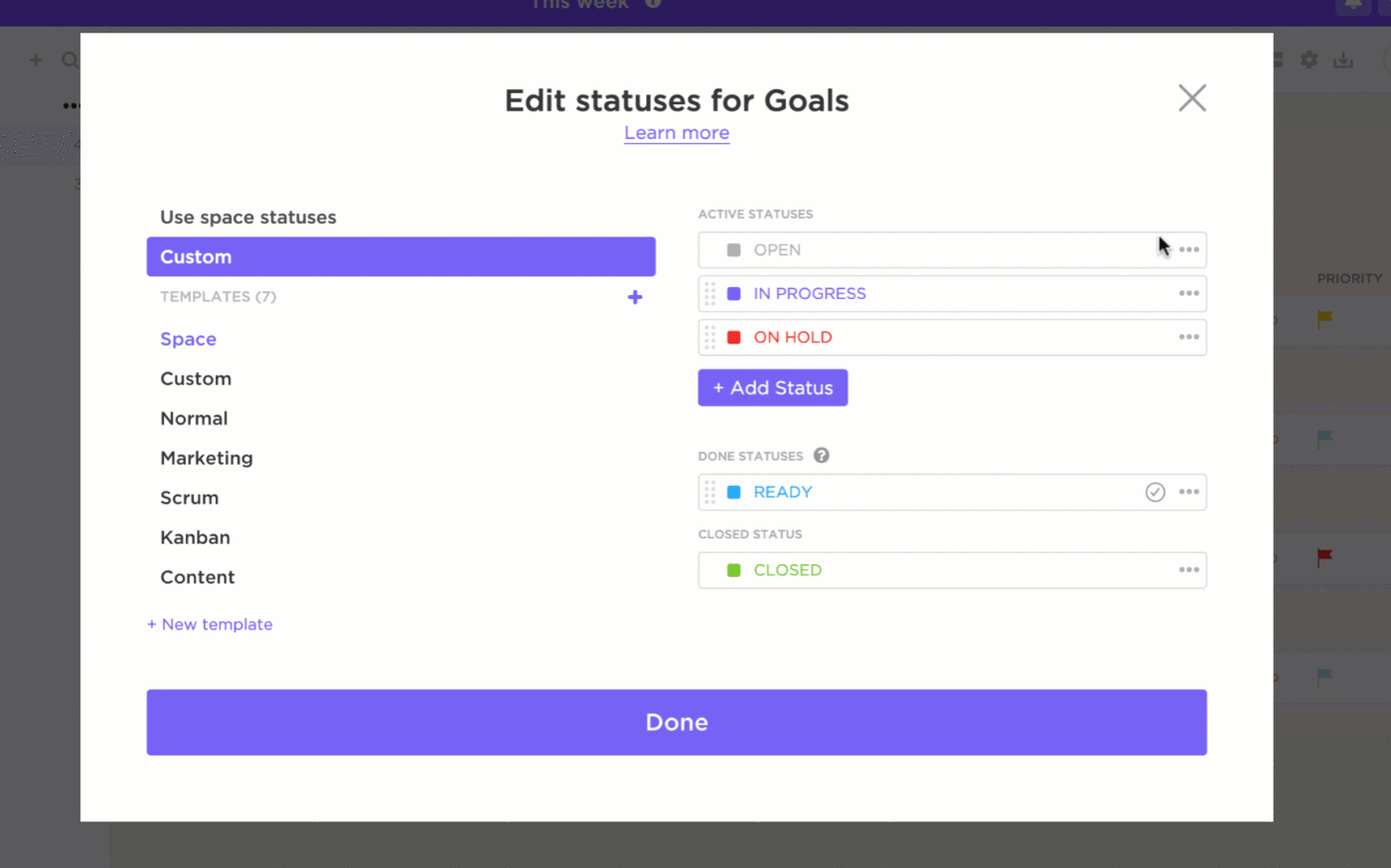
The best part? You can assign these statuses at the task level, project level, or both. This gives the project team members a crystal-clear view of the project’s status. Plus, they can swiftly grasp a task’s priority and urgency through RAG status.
Create widgets on ClickUp’s Dashboard to monitor RAG status for various projects or tasks. This is perfect for project managers and stakeholders tracking multiple projects simultaneously.
For example, a pie chart widget can visually display the proportion of tasks in each RAG category. This lets you quickly spot issues and prioritize actions effectively.

In addition, ClickUp lets you import its pre-built templates into your workspace, making it easy to track RAG status right away.
The ClickUp RAG Reporting Template simplifies real-time reporting on project progress. It lets you quickly organize tasks by risk level, visualize progress with clear color coding, and track performance metrics for informed decisions.

You can also use custom fields to capture key project details, including:
- Report details: Store essential information about the project’s status and progress
- Report file: Attach important documents or files related to the project
- Project team: Identify and assign the team members involved in the project
- RAG level: Quickly indicate the project’s status as red, amber, or green
- Category: Categorize tasks or projects to keep everything organized and easy to find
The RAG Reporting Template provides a brief graphic representation of a project’s current status so you can assess what needs more attention or resources and recalibrate your next action steps accordingly.
💡Pro Tip: Share your project’s RAG status report with team members, clients, or executives using ClickUp’s Email Project Management. Set up automated email notifications to alert them about significant changes or milestones, like completed tasks or upcoming deadlines.
The ClickUp Project Status Report Template is another beginner-friendly tool designed to improve communication and accountability among team members, reduce stress, enhance productivity, and minimize project completion time.
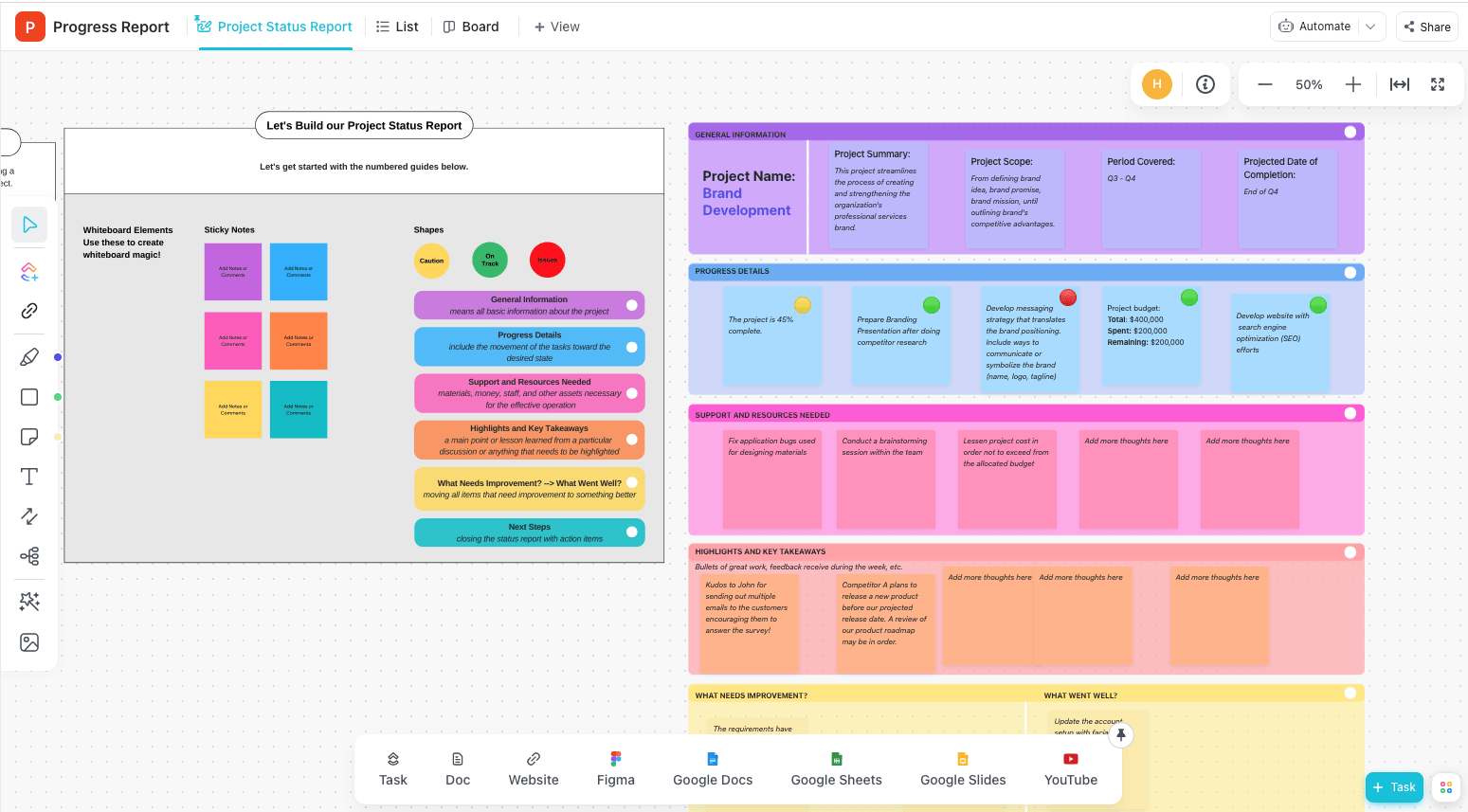
With this template, you can:
- Organize projects with custom labels and filters
- Report progress with automated charts and live updates
- Display your tasks on a timeline with the Gantt Chart View to spot overlaps, dependencies, and deadlines at a glance
- Track deadlines and milestones with Calendar View to stay on schedule and hit your targets
Summarize this article for me pleaseBest Practices for Incorporating RAG Status in Project Reports
Making RAG status truly effective goes beyond adding colors—leveraging it strategically to drive clear, actionable insights.
Here’s how to refine it:
1. Get everyone on the same page
Make sure every team member understands the meanings of red, amber, and green.
Integrate RAG status training into onboarding and hold regular workshops to keep everyone aligned, especially new hires.
You can also create a database or repository for the project manager, team members, and stakeholders. This outlines what each color signifies, how statuses are determined, and what actions are expected.
This minimizes misinterpretation and ensures that each status accurately reflects the project’s health.
Use ClickUp Docs to create accessible, up-to-date documents that evolve with your project. With features like version control and real-time collaboration, team members stay aligned and informed with the latest project details.
You can also manage document permissions for secure access and insert elements like tables, images, and checklists to enhance functionality and clarity.

2. Use visuals and color coding
Incorporate color-coded visuals such as color bars, pie charts, or traffic light icons into your project reports. These let team members grasp the project status instantly—without having to read through detailed text.
For example, a color bar next to each key metric (budget, timeline, resource allocation) gives a quick overview of the project’s current state.
Also, keep the color scheme consistent throughout the report or documentation to avoid confusion and make it more intuitive and user-friendly.
3. Align with stakeholder expectations
During RAG status reporting, customize the information to fit each stakeholder’s needs and expectations. Here’s how:
- Executives: Provide a high-level RAG status report on overall project health, major milestones, and critical issues. Use concise summaries and clear visuals for a quick snapshot
- Project managers: Share a detailed report for each project phase or task, including specific risks and action plans. Incorporate in-depth data, charts, and progress metrics to support detailed project management
- Team members: Offer granular updates for individual tasks, specific challenges, and next steps. Include detailed notes and actionable items to guide their daily work
This approach keeps your reports relevant and effective while providing each group with the information needed for smart decisions and effective management.
4. Provide context and explanations
Whenever you assign a red or amber status, include a brief explanation detailing why you selected it.
This should highlight the potential impact of each status on overall goals and outline specific risks or issues causing them. Also, specify the actions being taken or planned to address the issues associated with red or amber statuses.
This helps assure stakeholders of the project’s current status and the proactive steps taken to ensure continuity.
Summarize this article for me pleaseAdvantages of RAG Status in Project Management
Now, let’s dive into how RAG status makes managing projects more intuitive and effective than ever.
1. Simplifies complex data
RAG status simplifies reporting by consolidating budget, schedule, resources, and other data points into a straightforward color-coded system. It visually highlights key issues and shows stakeholders if a project is on track, facing issues, or in trouble.
2. Enhances decision-making
RAG status immediately signals the need for attention and corrective action when a project is flagged as amber or red. This prompt visual cue facilitates quicker responses and proactive problem-solving.
Summarize this article for me pleaseAddressing Common Pitfalls
Making RAG status effective requires vigilance against challenges that can undermine its reliability and clarity. Here’s what to watch for:
1. Misinterpretation of status
A project marked as amber might be seen as more critical than it actually is, causing unnecessary panic or overreaction. Or, confusing amber for green may result in ignoring emerging risks that could intensify.
To avoid this:
✅ Define green, amber, and red statuses clearly so everyone gets it right and each color truly shows the project’s state
✅ Hold workshops, share guidelines, and use real examples to make sure everyone interprets RAG status correctly and consistently
✅ Review and adjust RAG criteria as project conditions change to keep them relevant and accurate
2. Inconsistent criteria application
Team members or departments often use varying standards to determine what qualifies as red, amber, or green.
For example, if one department flags a 5% budget overrun as ‘Red’ and another flags only over 10%, it leads to confusion and miscommunication about the project’s financial status.
To maintain consistency:
✅ Agree on specific thresholds for each RAG status, like a project delay of more than ten days for ‘Red’
✅ Create detailed guidelines that specify these limits and distribute them to all relevant teams
✅ Conduct training sessions and regular review meetings to ensure all departments apply the same criteria consistently
Summarize this article for me pleaseFrom Chaos to Clarity with ClickUp
Project management doesn’t have to be a struggle. With RAG status, you can reduce confusion and bring clarity to your projects.
It acts like a GPS for your project—red signals roadblocks, amber warns of delays, and green means you’re moving smoothly.
ClickUp takes this a step further by integrating RAG status into its suite of tools. It offers real-time insights for instant updates, customizable dashboards for tailored views, and easy-to-manage templates for streamlined tracking.
This means no more sifting through endless spreadsheets or juggling between status updates. ClickUp guarantees your team stays aligned and proactively manages and responds to potential risks. Ready to simplify your project management? Start using ClickUp today.


Everything you need to stay organized and get work done.

Recent Articles
Jira Project Management: What It Does Well and Where It Taps Out 
Jira Project Management: What It Does Well and Where It Taps Out
8 Communication Strategies That Actually Fix Team Chaos
8 Communication Strategies That Actually Fix Team Chaos
