
Sorry, there were no results found for “”
Sorry, there were no results found for “”
Sorry, there were no results found for “”
Your home office feels like a busy train station. Kids playing tag in the background, construction noise next door, and your neighbor’s enthusiastic karaoke session—all while you’re trying to nail that important client presentation.
You’re not alone if you’ve been frustrated by background noises interrupting your virtual meetings or calls.
Remote work has made noise-canceling software like Krisp essential for many professionals. It allows us to focus on the conversation without interruptions from barking dogs or bustling cafés.
But while Krisp is excellent, it’s not the only option.
Through testing various noise-canceling tools, I’ve found many Krisp alternatives that could be just as effective—some even offer unique features that Krisp doesn’t. I’ll share my picks to help you choose.
🧠 Fun Fact: The world’s quietest room is at Orfield Laboratories in Minnesota. It’s so quiet that people can hear their own heartbeat.
Here’s my list of recommended Krisp alternatives for clearer audio quality for all your meetings:
When selecting a noise-canceling tool, it’s essential to focus on factors that will genuinely impact your experience, productivity, and the quality of your calls.
Here’s what I consider crucial:
💡Pro Tip: Before committing to any Krisp alternative, take advantage of free trials or free versions offered by many noise-canceling tools. This lets you test the software in your own environment and see how effectively it handles distracting noises.
Also Read: How to Make Your Voice Sound Better At Work
We’ve curated a list of ten top-tier Krisp alternatives, each offering powerful features to help you stay focused by effectively blocking unwanted sounds.

Noise Blocker is the ultimate solution for professionals and gamers seeking a focused environment. Its low-latency performance makes it suitable for live broadcasts or real-time communication.
Ideal for shared or open office settings, Noise Blocker enhances your productivity and communication by seamlessly adapting to your needs. Whether you’re on a video call, gaming session, or live stream, it ensures clarity and calm by intelligently blocking unwanted sounds.
Also Read: Meeting Agenda Examples & Free Templates

This Krisp alternative is ideal for those with NVIDIA graphics cards, as RTX Voice is a plugin that uses GPU power to deliver outstanding audio quality. It removes background noise with minimal impact on system performance.

Otter.ai goes beyond noise cancellation, offering real-time AI transcription that accurately captures meeting content. This tool is ideal for professionals who need unlimited noise cancellation, noise control, and detailed meeting notes, especially in client or team calls.
One unique feature of Otter.ai is its Live Collaborative Transcription, which allows multiple participants in a meeting to view, highlight, and comment on the transcription in real time.
This feature enhances engagement and ensures that key points are captured and clarified collaboratively during the discussion—something rarely found in other transcription apps.

Purpose-built for call centers, SoliCall offers advanced noise reduction and echo cancellation tailored for high-volume customer service or sales environments.
Its standout feature is server-side audio processing, which enhances audio quality across teams without requiring individual device installations. Optimized for VoIP systems, SoliCall is an ideal solution for businesses aiming to deliver exceptional call experiences at scale.

WavePad isn’t just for noise reduction but offers professional-grade audio editing features. Ideal for podcasters and content creators, it allows for detailed control over recorded audio, making it easy to fine-tune background audio elements and noise post-recording.

Designed for professionals who navigate diverse work environments, Utterly’s distinct feature is context-aware noise profiling.
This feature automatically adjusts settings based on detected ambient noise patterns, with noise suppression settings, ensuring seamless transitions between environments.

Descript is an audio and video editing tool with noise cancellation as a feature within its larger suite of tools. It’s especially beneficial for content creators who need tools for editing audio tracks and effortlessly removing background noise, filler words, or stutters.

LALAL.AI specializes in AI-driven audio isolation, letting you separate vocals from instruments or ambient sounds. This is ideal for musicians or anyone needing clear audio tracks free from unnecessary background noise.
Individuals:
Businesses:

An advanced audio editing tool that leverages AI, Cleanvoice’s focus on eliminating filler sounds and noise in recorded audio makes it a fantastic option for podcasters, interviewers, and anyone who values cleaner audio quality for post-production.
Pay as you go
Subscription: $1.10/hour per month
Neutralizer is an Android-exclusive app that delivers personalized audio equalization and noise control tailored to your unique hearing profile.
Ideal for individuals with hearing sensitivities or anyone seeking optimized sound quality, Neutralizer adapts audio input seamlessly to different environments for an enhanced listening experience.
Also Read: Best Daily Standup Software Tools
You may not always need specialized noise-blocking software or advanced video/audio editing tools to support your communication and content creation needs.
In fact, robust project management platforms like ClickUp can offer innovative features that indirectly enhance your meeting and video communication workflows.
📮ClickUp Insight: Nearly 40% of professionals feel compelled to follow up on action items immediately after every meeting.
According to research by ClickUp, despite most people’s intent to action meetings, they’re unable to do so. The reason? Action items are often scattered and lack visibility due to current communication channels split between email (42%) and instant messaging (41%).
ClickUp makes the transition from discussion to action smoother as the everything app for work. It brings your meetings, notes, and tasks into one unified platform for higher meeting productivity!
While ClickUp isn’t a direct substitute for dedicated noise-canceling apps like Krisp, it stands out as a powerful productivity tool for remote teams. Krisp excels at ensuring crystal-clear audio during calls by removing background noise, but ClickUp enhances the overall efficiency and effectiveness of those meetings, offering features that elevate remote work communication and collaboration.
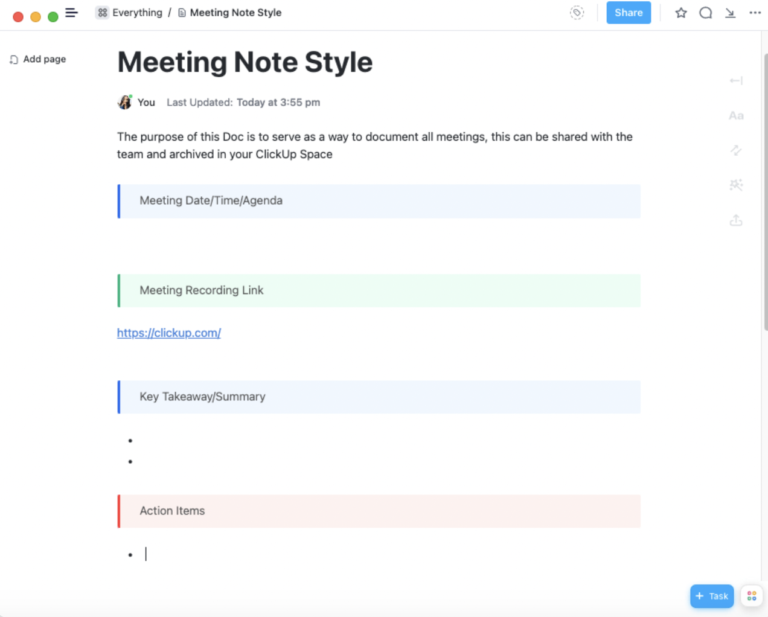
With ClickUp Meetings, you can prepare detailed meeting agendas, start and attend Zoom meetings directly from ClickUp, get your meeting notes and transcript within your workspace, and assign tasks directly to those responsible.
Attendees know exactly what to focus on, minimizing the need for lengthy, repetitive discussions often caused by poor communication. Post-meeting, action items are clearly tracked, ensuring seamless follow-through.
In one workspace, you can track project progress, organize discussions, and ensure everyone is aligned on priorities.

Additionally, if you want to avoid unnecessary meetings, ClickUp Clips allow you to quickly capture video recordings of your screen, along with camera and audio input if needed. You can easily share visual walkthroughs, provide feedback, or offer updates without requiring a full-length meeting.
It’s a valuable tool for asynchronous communication, helping teams stay connected and aligned across time zones, or for individuals who prefer visual explanations over text.
Finally, ClickUp Brain, ClickUp’s built-in AI assistant, can help enhance productivity by eliminating the need to switch between multiple tools for note-taking, brainstorming, or managing project insights.
Integrated directly within ClickUp, this is one of the few artificial intelligence tools that instantly understands the context of your projects and tasks. It links your notes, ideas, and resources to relevant workflows and objectives without needing constant manual updates or organization. It can also transcribe and summarize audio and video messages to help you highlight key takeaways and action items instantly.
This seamless connection to your workspace lets you easily capture insights during meetings, add actionable points directly to tasks, and recall project-specific information in real time.
Ultimately, while Krisp and its alternatives enhance the auditory quality of meetings, ClickUp ensures those meetings—and the work stemming from them—are productive, well-organized, and aligned with your goals. Together, they’re a powerful combination for any remote team.
After exploring the top noise-canceling Krisp alternatives, it’s clear that achieving seamless communication and focus goes beyond blocking out unwanted noise—it’s about ensuring efficiency across every workflow.
With its versatile meeting tools, centralized calendar, Clips feature, and Whiteboards for collaborative brainstorming, ClickUp supports everything from clear agendas to post-meeting follow-ups.
For me, ClickUp is indispensable. It enhances communication and facilitates project management in a way that truly supports focus, productivity, and seamless collaboration across teams.
Try ClickUp today!

Manasi Nair
Max 26min read
Manasi Nair
Max 26min read
Manasi Nair
Max 20min read

© 2026 ClickUp