You started your business with a vision, but the daily grind—admin, emails, and scheduling—likely drains your creative battery. It’s the classic small business paradox: you’re so busy running the business that you don’t have time to grow it.
In fact, research from Thryv shows that small business owners using AI are reclaiming over 20 hours per month. That is five full work weeks a year handed back to you.
It’s time to take those hours back.
In this blog post, we’ll walk you through how to automate the repetitive “grind” so you can finally focus on the work that matters.
Summarize this article with AI
ClickUp Brain not only saves you precious time by instantly summarizing articles, it also leverages AI to connect your tasks, docs, people, and more, streamlining your workflow like never before.
Summarize this article for me please
What Is AI for Small Business?
AI for small business refers to the use of artificial intelligence tools and technologies by small and medium-sized enterprises (SMEs) to automate tasks, improve decision-making, and enhance customer experiences—often without needing a large IT team or budget. This matters most to founders, ops managers, and lean teams juggling too many tools and not enough time.
Most small businesses already drown in disconnected apps and manual busywork. AI only fixes issues when integrated into existing workflows, not as a standalone tool.
Moving on, you’ll run into three flavors of AI as a small business owner. ✨
Generative AI: creates text, images, and summaries from a prompt
Predictive AI: forecasts outcomes like sales trends or lead scores based on past data
Task automation: follows “if X happens, do Y” rules without anyone telling it each time
🛠️ The real trap to watch out for is AI sprawl—buying five separate AI tools that don’t talk to each other. This creates a new version of the fragmentation problem AI was supposed to solve in the first place. When you allow an unplanned proliferation of tools, models, and platforms without a central strategy, you end up with wasted spend, duplicated effort, and compounding security risks.
Summarize this article with AI
ClickUp Brain not only saves you precious time by instantly summarizing articles, it also leverages AI to connect your tasks, docs, people, and more, streamlining your workflow like never before.
Summarize this article for me please
Why AI Matters for Small Businesses
Small teams can’t outspend larger competitors. But they can out-automate them.
Here’s what changes when AI is part of your workflow:
Faster execution: Status updates, meeting summaries, and first drafts that used to take hours collapse to minutes
Better decisions: AI surfaces patterns in project data and team workload that a five-person team would never have time to spot manually
Consistency without headcount: Automated workflows keep processes running the same way every time, even when someone’s out
Competing above your weight class: A small team with smart AI can deliver the responsiveness of a much larger operation
And it all boils down to how AI closes the resource gap by handling the repetitive, time-draining work that eats into your most limited asset—your time.
Without it, you’re stuck toggling between apps, copy-pasting data, and losing context. That’s work sprawl, and it’s the opposite of productivity. It causes fragmentation of work activities across multiple, disconnected tools and platforms that don’t talk to each other—costing your team time, focus, and momentum every single day.
👀 Did You Know? 29% of SMEs using AI say it helps them compete with larger firms. The competitive gap is closing—and AI is the equalizer smaller businesses have been waiting for.
See how path8 Productions, a small video production agency, went about adopting AI!
Summarize this article with AI
ClickUp Brain not only saves you precious time by instantly summarizing articles, it also leverages AI to connect your tasks, docs, people, and more, streamlining your workflow like never before.
Summarize this article for me please
How Small Businesses Can Use AI
The best way to think about AI adoption is by business function. These four areas deliver the fastest results for small teams 👇
Automate repetitive tasks and workflows
Small teams lose hours each week on recurring tasks. Think about assigning work after a form submission, updating statuses, and sending follow-up reminders. These aren’t complex decisions that can’t already be automated.
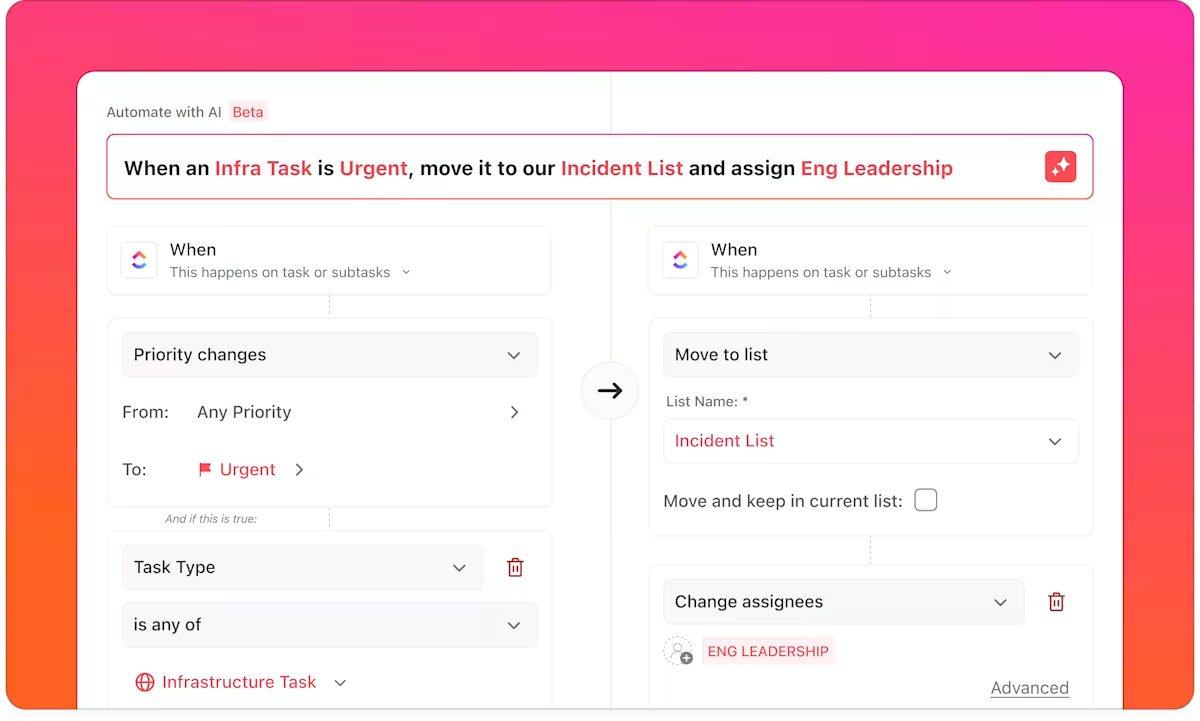
This is where you would need ClickUp Automations. Each automation has three parts:
A trigger (what starts it)
An optional condition (a filter to narrow when it fires)
An action (what happens next)
Automate repetitive workflow steps with ClickUp Automations
📌 For example, say a client request lands through ClickUp Forms. An automation instantly creates the task, assigns it based on team workload, and sets the due date. Nobody has to lift a finger.
📮 ClickUp Insight: 21% of people say more than 80% of their workday is spent on repetitive tasks. And another 20% say repetitive tasks consume at least 40% of their day.
That’s nearly half of the workweek (41%) devoted to tasks that don’t require much strategic thinking or creativity (like follow-up emails 👀).
ClickUp Super Agents help eliminate this grind. Think task creation, reminders, updates, meeting notes, drafting emails, and even creating end-to-end workflows! All of that (and more) can be automated in a jiffy with ClickUp
Small businesses rarely have a full content team, so marketing falls on whoever has a spare hour.
AI changes that. Blog posts, social captions, email campaigns, product descriptions—quality AI-generated content no longer takes half a day.
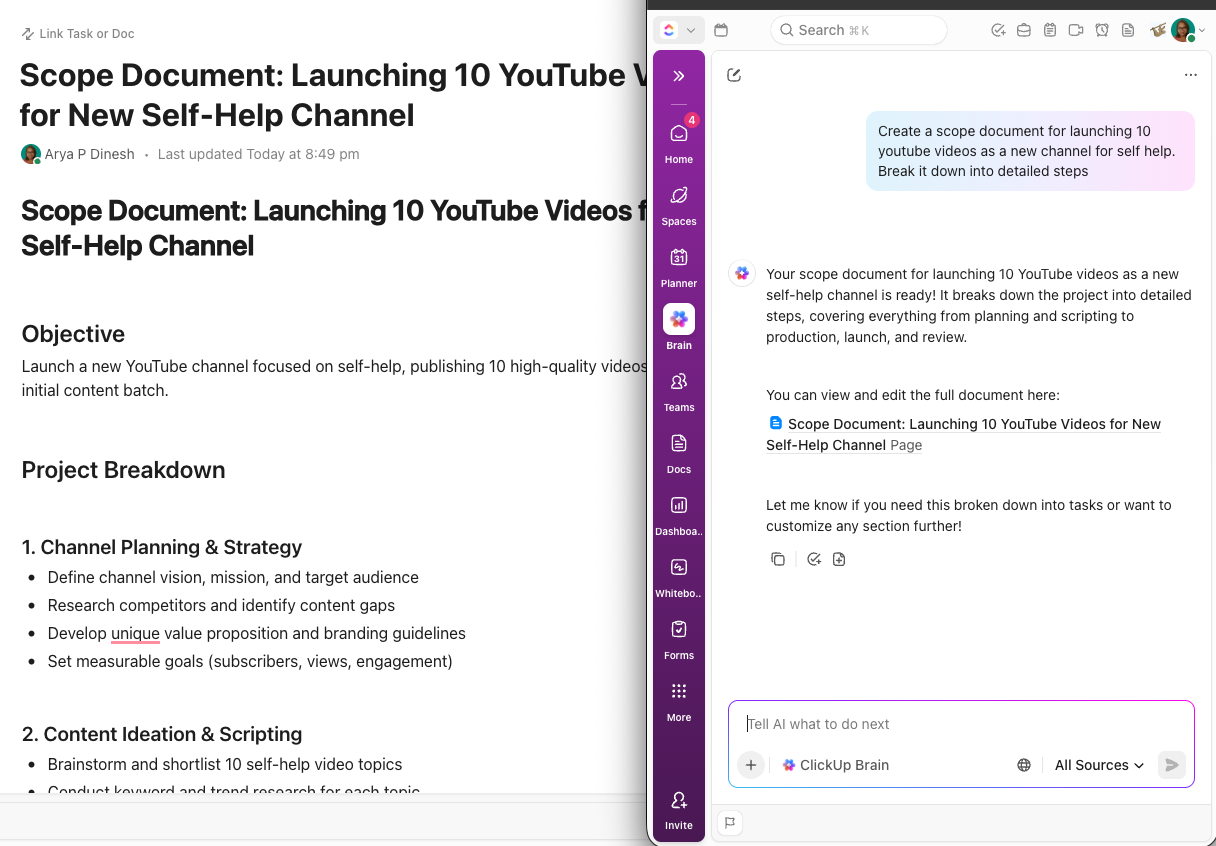
For instance, ClickUp Brain lives inside ClickUp Docs and handles all things content for you. Draft absolutely anything from scratch, rewrite a section, shift the tone, or pull a summary. It’s all in one place, right next to the brief, the feedback, and the deadline.
Produce customized content in a jiffy with ClickUp Brain
Brain can go further too. Need a campaign brief, a batch of images, or a full blog post? It can generate it all, with your project’s context already baked in.
Generate powerful images using natural-language prompts in ClickUp Brain
You don’t need to staff a massive team to deliver the fast responses your customers expect. Using AI-powered customer service tools lets you handle common questions, route complex issues to the right person, and keep response times low—even outside business hours.
With ClickUp, you can take this a step further by connecting your support workflows directly to your internal knowledge base.
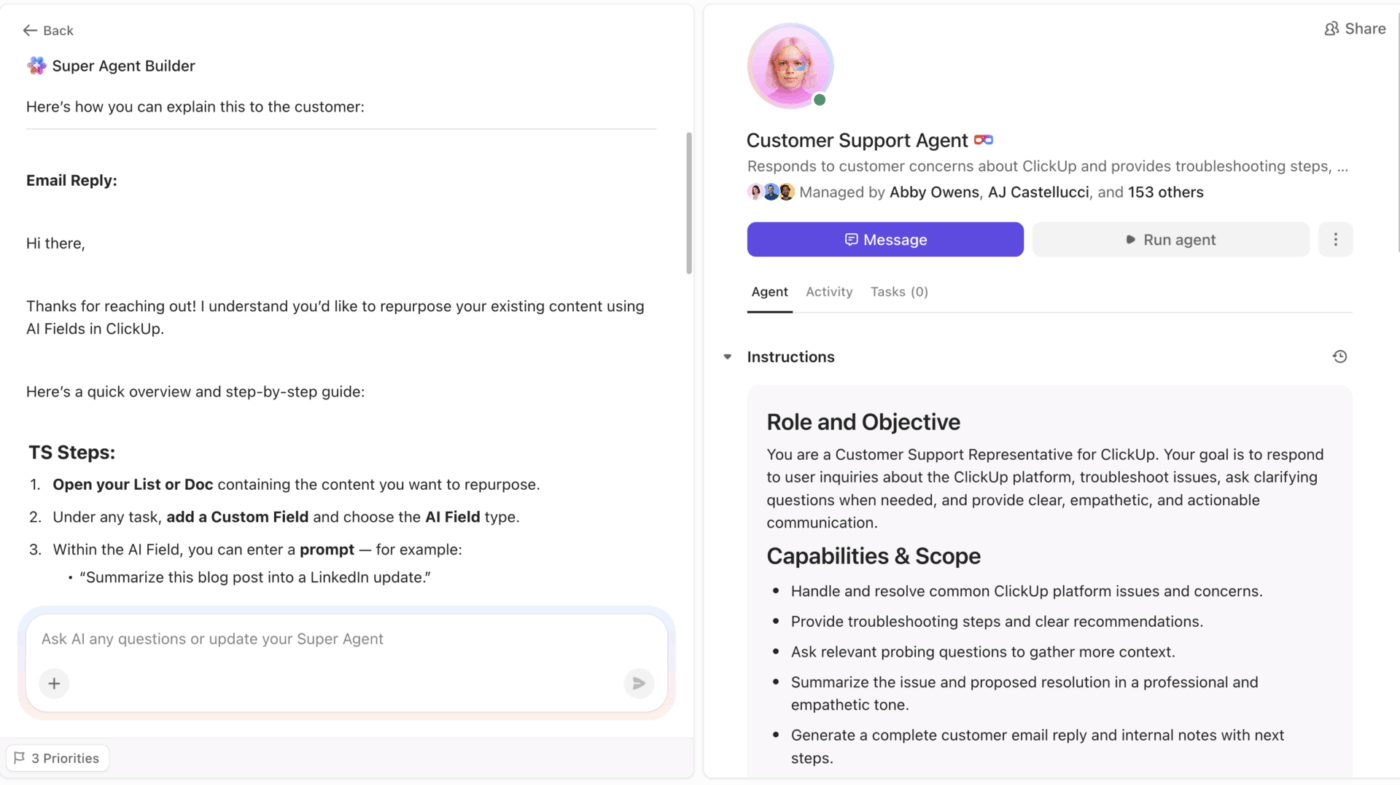
Instead of toggling between a chatbot and your project docs, you can use a Super Agent to instantly generate accurate, context-aware first-drafts for your customers based on your knowledge base. This ensures your support stays consistent and fast, while your team stays focused on the high-level tasks that actually need a human touch.
Get tailored support emails via this customer support Super Agent
💭 Wondering how you can build a properly organized knowledge base for Super Agents? Watch this video:
👀 Did You Know? Before modern AI, there was ELIZA. Created at MIT, it mimicked a therapist. Even though its creator (Joseph Weizenbaum) insisted it was just a simple script, users began pouring their hearts out to it, a phenomenon now called the “ELIZA Effect.”
Analyze data for smarter decisions
Small businesses sit on more data than they realize—project timelines, sales pipelines, team workload, customer feedback—but rarely have time to analyze data for predictive insights.
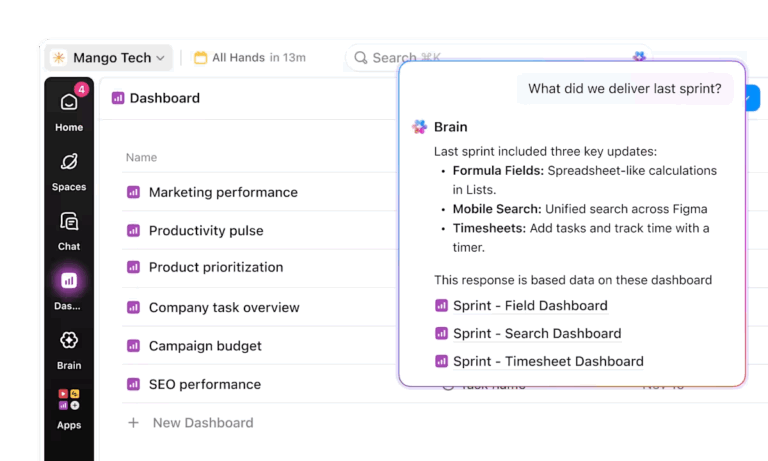
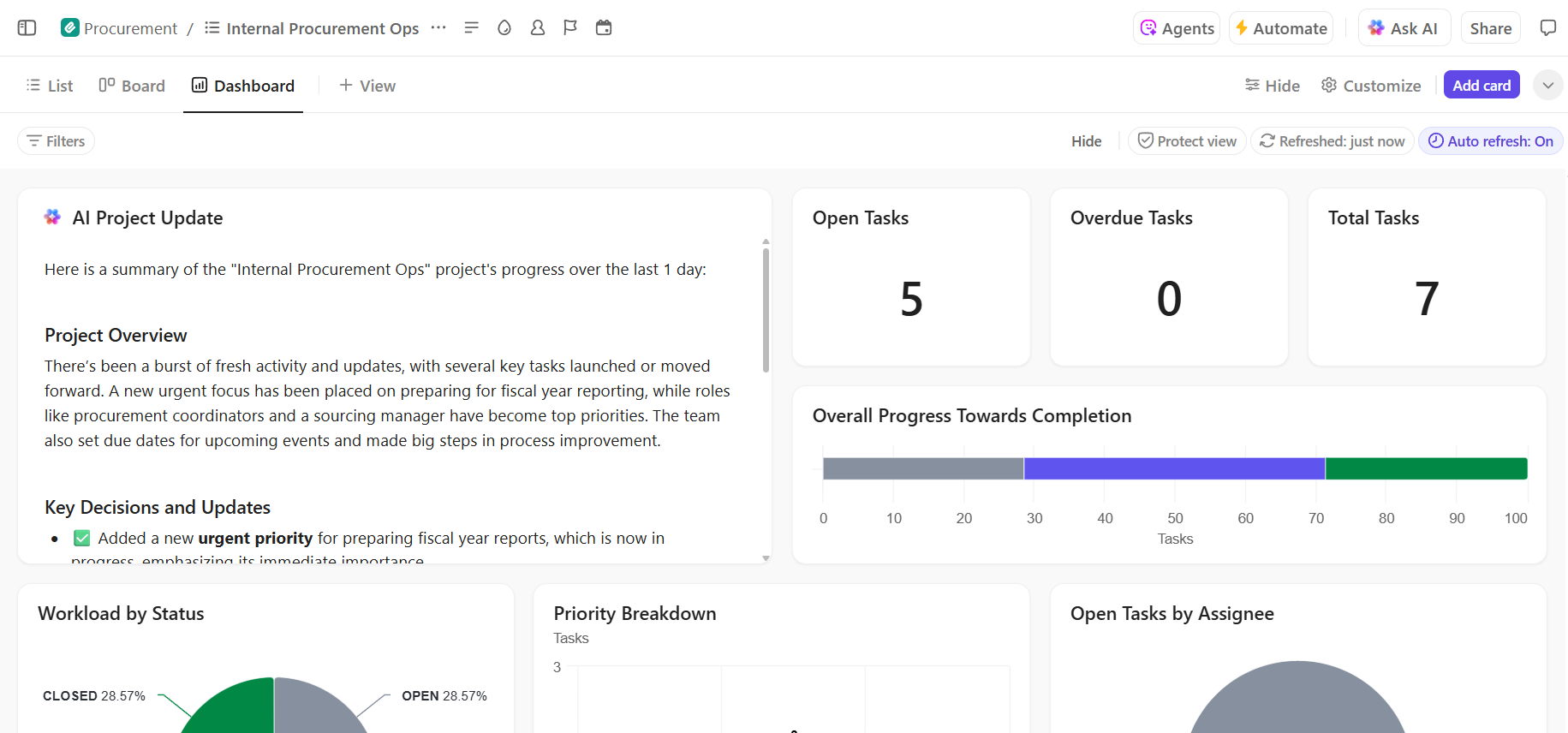
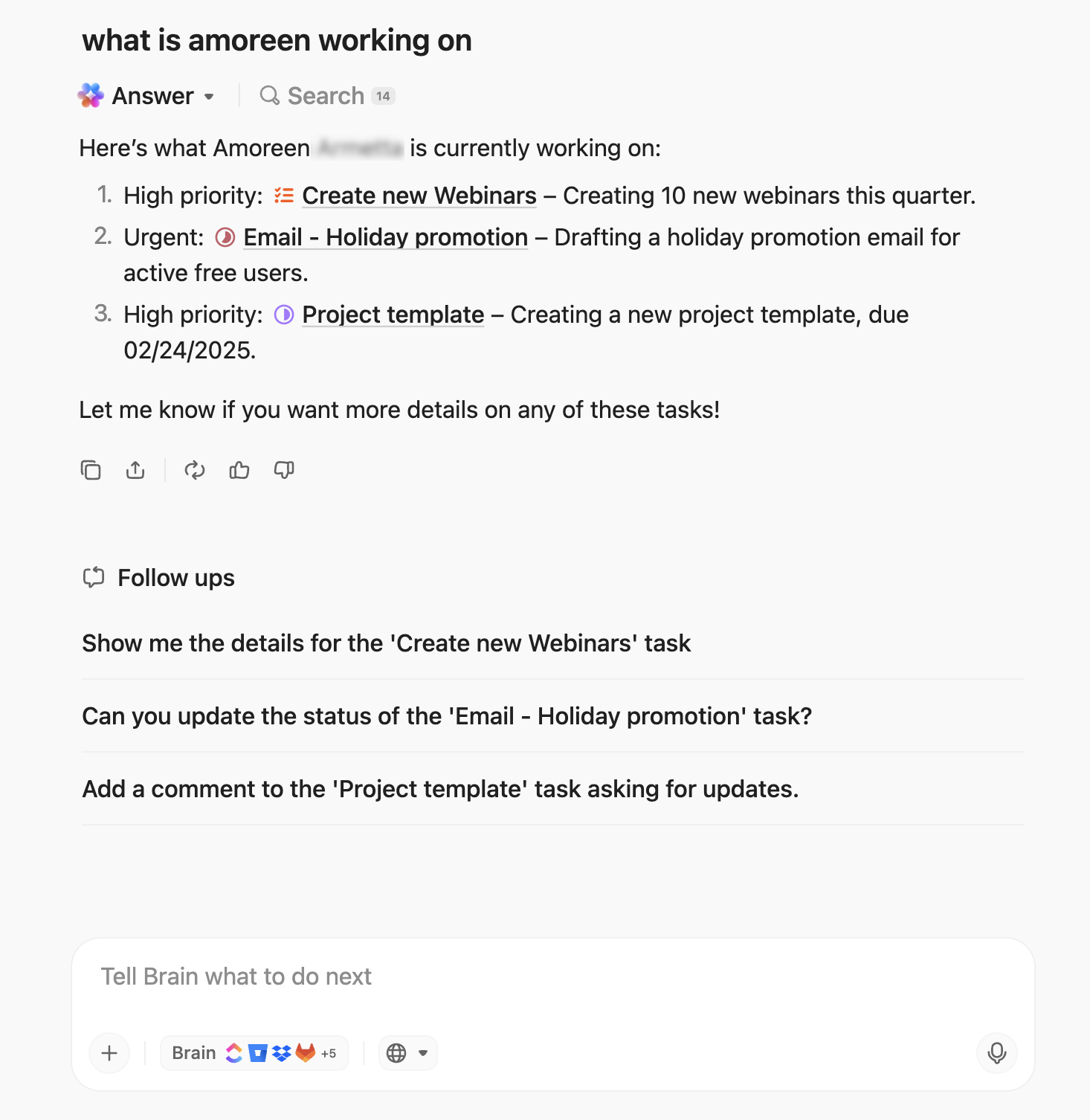
ClickUp Dashboards provide a high-level visual of your workspace data, with customizable cards for charts, calculations, and workload tracking. While that happens, ClickUp Brain answers natural-language questions about data (e.g., “Which projects are at risk?” or “What’s our average task completion time?”), providing a full picture without pulling reports from multiple tools.
Monitor project health and team capacity with ClickUp Dashboards and ClickUp Brain
🤖 The hard truth about AI? It’s only as smart as the data it has access to.
You can buy all the standalone AI subscriptions you want, but if your business data is scattered across a standalone CRM, a separate time-tracker, and an isolated chat app, your AI is operating blind. It can’t analyze what it can’t see, so you’re still stuck doing manual analysis yourself.
Instead of bolting a generic chatbot onto a siloed app, the suite gives you a truly integrated AI partner:
Context-aware analysis: Because your projects, docs, chat, and time tracking live under one roof, ClickUp Brain actually knows your business. It can connect the dots between a delayed task, a client chat, and your team’s workload instantly
Premium LLMs included: No need to juggle separate $20/month AI subscriptions. You get instant access to the latest Claude, Gemini, and ChatGPT models working directly alongside your workspace data
AI Super Agents working 24/7: Instead of paying for expensive business intelligence tools or a data analyst, you can rely on always-on AI to monitor project health, automate task assignment, and trigger progress updates
This unified, AI-first approach is exactly why 97% of small businesses using ClickUp report improved efficiency.
Summarize this article with AI
ClickUp Brain not only saves you precious time by instantly summarizing articles, it also leverages AI to connect your tasks, docs, people, and more, streamlining your workflow like never before.
Summarize this article for me please
Best AI Tools for Small Businesses
Below, we have a very focused list of the best AI tools you can have as a small business:
ClickUp AI, Super Agents, Autopilot Agents, AI Codegen, Enterprise Search, Chat, Docs, Dashboards, Views, Notetaker, Time Tracker, Tasks, and Whiteboards
Free Forever; Paid plans available for enterprises
QuickBooks
AI-driven accounting
Automated expense tracking, AI receipt scanning, and smart cash flow forecasting
Starts at $19 per month
HubSpot
Sales and CRM
AI “Breeze” Intelligence, automated lead scoring, and predictive sales analytics
Starts at $20 per month per seat
Jasper
Marketing copy
AI Brand Voice, 50+ templates, and marketing campaign generation
Starts at $69 per month
Intercom
Customer messaging
Fin AI chatbot for instant resolutions and automated ticket routing
Starts at $39 per seat per month
Zapier
Workflow automation
AI-powered “Zap” builder and 8,000+ automated app integrations
Starts at $29.99 per month
Canva
Graphic design
Magic Studio for AI image/video generation and background removal
Starts at $15 per month
Grammarly
Writing assistance
Generative AI drafting, tone detection, and one-click sentence rewrites
Starts at $30 per month
*Please check the tool website for the latest pricing
🕰️ How many minutes did you lose today just jumping between different AI models and browser tabs to find one single answer?
ClickUp Brain MAX fixes that for you. It acts as a high-speed desktop companion for your Mac or Windows. Even more, it brings your entire workspace to your fingertips so you can stop hunting for info and start working.
Try ClickUp Brain MAX for deeper research and context across your workspace and beyond
In a nutshell:
Find anything instantly: Pull answers from everywhere in seconds. Whether a file lives in ClickUp, Google Drive, or the web, Brain MAX finds it in seconds without you ever needing to open a browser
The best models in one place: Why pay for three different subscriptions? You get direct access to the world’s leading AI models like GPT-5, Claude 3.5, and Gemini 3 Pro. Just pick the best “brain” for the job and keep moving
Talk-to-Text (3x faster than typing): For those days when you’re tired of the keyboard, just speak your thoughts. It works in any text box on your computer and even lets you choose how to “clean up” your notes
Summarize this article with AI
ClickUp Brain not only saves you precious time by instantly summarizing articles, it also leverages AI to connect your tasks, docs, people, and more, streamlining your workflow like never before.
Summarize this article for me please
How to Get Started with AI in Your Small Business
Knowing what AI can do is the easy part. Actually adopting it without wasting time or budget is where most small businesses stall.
Here’s a three-step framework:
Step 1: Identify your biggest time sinks
Before picking any tool, measure productivity to audit where your team’s hours go. Have each team member log tasks that are repetitive, manual, or low-judgment for one week. Some common culprits:
Status update meetings
Data entry
Report generation
Chasing approvals
Your ultimate goal should be to identify where AI can automate most of your team’s time. ⚡️
Step 2: Pick one tool and run a 30-day test
Resist the urge to adopt five AI tools at once. Pick the highest-impact, lowest-risk workflow from Step 1 and choose a single tool to test for 30 days.
And you need to define the success criteria upfront as well, such as:
Hours saved
Error reduction
Team satisfaction
Well, anything measurable.
💡 Start with one automation, one AI-assisted process, one team. Learn, then expand.
After 30 days, compare results against your criteria. If the pilot worked, expand it:
Add more automations
Roll it out to another team
Layer in additional AI features
If it didn’t, diagnose the issue—wrong workflow, wrong tool, or insufficient onboarding?
Each cycle should be: identify → test → measure → expand.
💡 Pro Tip: Scaling a broken process just makes it more expensive. Before you go all-in on a new workflow, you need to know whether it holds up under pressure. ClickUp’s Operational Efficiency Agent acts like a specialized auditor during your pilot phase, sniffing out bottlenecks and tracking real workflow patterns.
Identify workflow bottlenecks early with ClickUp’s Operational Efficiency Agent
Summarize this article with AI
ClickUp Brain not only saves you precious time by instantly summarizing articles, it also leverages AI to connect your tasks, docs, people, and more, streamlining your workflow like never before.
Summarize this article for me please
AI Mistakes Small Businesses Should Avoid
Before you click ‘integrate,’ know these very commonly occurring mistakes:
Automating the wrong things first: Start with simple, repetitive tasks—not complex, high-stakes processes. If AI makes a mistake on a draft social post, that’s an easy fix. On payroll? That’s a crisis
Buying too many point solutions: Each new AI tool adds a login, a learning curve, and a data silo. Consolidate SaaS apps where possible
Skipping the human review step: AI is fast, not infallible. Every AI output needs a human check before it goes live
Expecting magic without clean inputs: AI is only as good as the data and context it has. Vague prompts and messy project data produce vague outputs
Ignoring team adoption: If your team doesn’t understand why or how to use the AI, it won’t get used. Budget time for onboarding
Waiting for the “perfect” tool: There’s no perfect moment to start. The cost of waiting is measured in hours your team keeps spending on work that AI could handle today
Summarize this article with AI
ClickUp Brain not only saves you precious time by instantly summarizing articles, it also leverages AI to connect your tasks, docs, people, and more, streamlining your workflow like never before.
Summarize this article for me please
How to Choose the Right AI Tools for Your Business
With thousands of platforms vying for your attention, the selection process must be driven by your business goals, not market hype. So let’s take a look:
Context awareness: Does the AI understand your full workflow, or just a single slice? Tools with cross-platform context make smarter suggestions than siloed ones
Fit with existing workflows: Will this tool replace a current app or add another one? Fewer tools means less context sprawl—the costly pattern of teams wasting hours switching between apps, hunting down files, and repeating the same updates across multiple platforms just to piece together what they need
Ease of adoption: Can a non-technical team member set it up within a day? If it requires a developer, it’s not built for a small business
Scalability: Will this still work when your team doubles in size? Pick tools you won’t outgrow in six months
Security and data privacy: Where does your data go? Small businesses handle sensitive customer and financial data—privacy-conscious AI tools need to respect that
Multi-LLM flexibility: Some platforms give you access to multiple AI models, so you’re not locked into one provider’s strengths and weaknesses
Summarize this article with AI
ClickUp Brain not only saves you precious time by instantly summarizing articles, it also leverages AI to connect your tasks, docs, people, and more, streamlining your workflow like never before.
Summarize this article for me please
Replace Your Entire Stack with One Intelligent Hub
At the end of the day, the best AI tool for your business is the one that lets you delete three others.
You don’t need to chase every shiny new bot. Just find one workflow that’s eating your time, automate it, and see if it sticks.
If you’re ready to see what it looks like when your work and AI live in the same place, talk to an expert today. Let’s stop the tool sprawl before it starts. 🙌
Summarize this article with AI
ClickUp Brain not only saves you precious time by instantly summarizing articles, it also leverages AI to connect your tasks, docs, people, and more, streamlining your workflow like never before.
Summarize this article for me please
Frequently Asked Questions
Do I need technical skills or IT staff to use AI tools for my small business?
No. Most modern AI tools for small businesses are designed for non-technical users—you set them up through visual interfaces, natural language prompts, or simple toggles (with low or no code).
What’s the difference between standalone AI tools and AI built into a work platform?
Standalone AI tools handle one function (like writing or chat) in isolation. AI built into a work platform—like ClickUp Brain inside ClickUp—has context across your tasks, docs, and conversations, so it produces more relevant results without extra setup.
How do I incorporate AI into my business without adding more apps to manage?
Choose a platform that already covers multiple workflows (project management, docs, communication) and includes native AI that works across all your work contexts. It’s much better than bolting on separate AI apps for each function.
Is AI worth the investment for a business with fewer than 10 employees?
Yes—small teams often benefit the most because AI handles the busywork that would otherwise require hiring. Even a team of two or three can reclaim significant hours each week by automating repetitive tasks.
Everything you need to stay organized and get work done.