









Still downloading templates?
There’s an easier way. Try a free AI Agent in ClickUp that actually does the work for you—set up in minutes, save hours every week.
Sorry, there were no results found for “”
Sorry, there were no results found for “”
Sorry, there were no results found for “”
Most teams can hand work to AI in seconds. But getting useful output still depends on what happens before the handoff: the context you include, the constraints you define, and the quality bar you set.
What makes AI delegation messy?
If you give too little direction, you get generic output and rework. If you over-explain every task from scratch, delegation becomes another time sink. So how do you delegate faster without losing control?
That is where templates help. They give repeat work a repeatable structure.
In this post, we share AI delegation templates to try, what each template helps you delegate, and how to choose the right one for the work you assign most often.
AI delegation is the practice of handing off specific, well-scoped parts of your work to an AI system (chatbot, copilot, agent, automation) so it can produce a first draft, run an analysis, generate options, or execute a repeatable step—while you stay accountable for the outcome.
📌 Common tasks people delegate to AI: Turning rough notes into a structured first draft (emails, briefs, SOPs, blog sections)Converting meetings into action items, owners, and next stepsCreating variants (headlines, intros, CTAs) that match a specific toneExtracting key info from long text (requirements, risks, decisions)Checking work for gaps (missing steps, unclear logic, inconsistent messaging)
Categorize tasks by type to make delegation decisions easier. A simple mental model can guide your decisions: repetitive, rule-based, or data-heavy tasks are strong candidates for AI. Tasks that require empathy, complex judgment, or creative strategy should always stay with humans.
Here are some clear examples of tasks to delegate to AI:
Conversely, these tasks should remain firmly in human hands:
The goal isn’t to replace your team but to free them from repetitive tasks so they can tackle strategic projects and complex decisions.
👀 Did you know? McKinsey’s report says 62% of organizations are at least experimenting with AI agents.
To see how AI task generators work in practice and streamline your delegation workflows, watch this quick demonstration of automated task creation in action:
AI delegation templates are pre-built frameworks that help you decide which tasks to hand off to AI and who remains accountable for the output.
These templates range from classic accountability frameworks adapted for AI to modern AI-specific playbooks. The key is to use them to treat AI as a ‘team member’ with clearly defined responsibilities, eliminating the guesswork that causes so much friction.
And what better way to accomplish that than with ClickUp? It’s a Converged AI Workspace pulling your tasks, docs, knowledge, meetings, workload—you name it—in one consolidated workspace.
And the best part? Its endless library of templates.
Let’s take a look:
AI delegation only works when people know the rules. Who owns the call, who gets consulted, and who just needs an FYI.
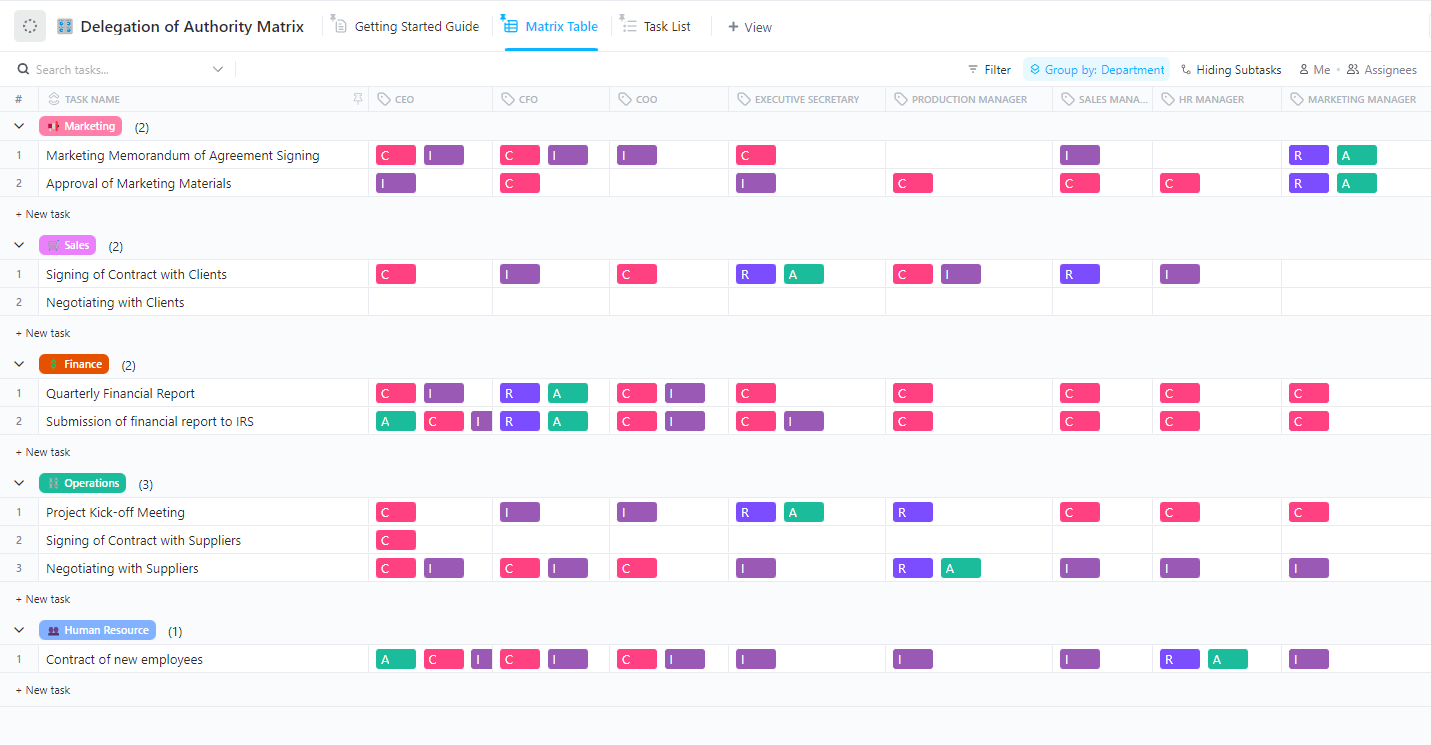
The ClickUp Delegation of Authority Matrix Template gives you a single matrix to map decision rights across roles and departments using clear RACI-style labels. Add rows for the exact actions you want to delegate, like approving campaign copy, signing contracts, or submitting reports, then assign who is Responsible, Accountable, Consulted, and Informed for each. Once the matrix is set, it becomes the reference point your team can follow before pushing work to automation or AI.
✅ Ideal for: Operations managers setting delegation rules and approval paths for AI-assisted workflows across multiple departments.
When you start delegating work to AI (and to people using AI), the real risk is never really speed. It is ‘ambiguity.’
The ClickUp RACI Planning Template fixes that at the source by mapping every project activity to RACI roles, then letting you turn each row into ClickUp Tasks. That way, even if the first draft is AI-generated, the accountability chain stays human, visible, and enforceable.
✅ Ideal for: Project managers running cross-functional delivery projects where approvals keep bouncing between design, product, engineering, and QA.
📮 ClickUp Insight: 62% of respondents say AI agents don’t live up to the hype yet, describing them as early-stage or even creating more work than they remove.
That frustration often shows up in the handoff. An agent summarizes a meeting, suggests next steps, or flags an issue, and then stops. You still have to create tasks from the action items, assign owners, update statuses, and follow up manually.
Super Agents are designed to take care of all those steps. They can use chain actions to turn meeting notes into tasks, update project statuses, route work to the right owners, and keep workflows moving inside the same system where execution happens.
When an AI agent can take work from “here’s what should happen” to “it’s already in motion,” the value becomes real.
Making a decision with AI in the room is alright until you need to know who signed off on it. The ClickUp DACI Model Template is built for that.
Each decision gets its own row, a clear Driver to push it forward, an Approver to close the loop, and space for Contributors, Informed, plus the thinking behind it like Context, Things to consider, Alternatives, and the final Decision. It also groups decisions by priority (Urgent, High, Normal, Low) and tracks the status of each one, which makes it easier to keep AI-generated options organized and reviewable.
✅ Ideal for: Product managers running high-volume decisions across AI drafts.
⭐ Bonus: How to be more decisive at work?
The ClickUp Responsibility Assignment Matrix Template makes ownership visual by mapping people down the left, processes across the top, and assigning each intersection a clear role.
Because it’s built in ClickUp Whiteboards, the matrix is easy to scan and even easier to adjust when responsibilities evolve. The legend maintains consistency in roles across teams, ensuring clarity about who is responsible for the work, who approves it, who requires consultation, and who only needs to be informed.
✅ Ideal for: Ops leads defining AI-assisted responsibilities across repeatable business processes.
💡 Pro Tip: Treat ClickUp Super Agents like your always-on ‘delegation layer’ inside ClickUp.
Set an agent up to monitor a space (or a specific workflow), then have it turn requests and updates into next-step work: create ClickUp Tasks, draft a status recap in Docs, and surface what needs a decision vs. what can be executed automatically.
If you are introducing AI into project execution, role clarity needs to be documented upfront. The ClickUp Project Management Roles and Responsibilities Template gives you a clean, client-ready document format to define the project overview, objectives, goals, and team responsibilities in one place.
Unlike matrix-first templates, this one works well when you need a more formal responsibilities reference that stakeholders can review asynchronously. It is especially useful for client-facing projects where teams need a shared written source for who owns decisions, who executes, and how accountability is structured before AI-assisted work starts scaling.
✅ Ideal for: Client-facing project managers running multi-stakeholder delivery projects with clearly defined ownership and approvals.
👀 Did you know? Gartner predicts up to 40% of enterprise applications will include task-specific AI agents this year, up from less than 5% in 2025.
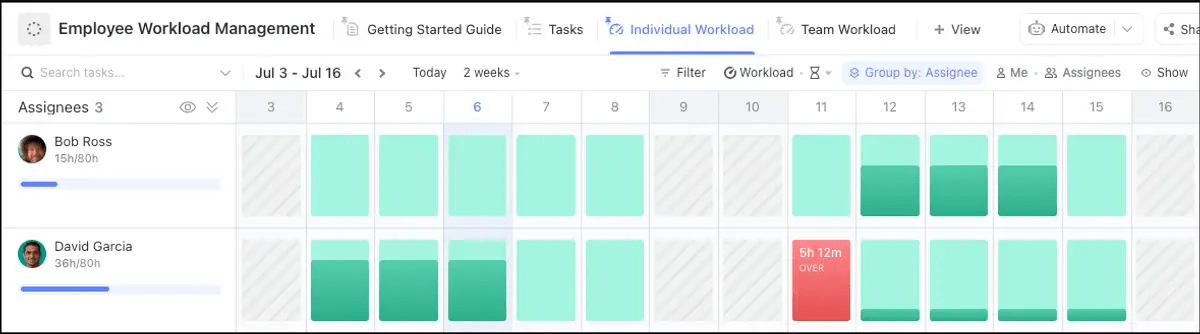
When AI speeds up task creation, delegation can fail when people get overloaded without anyone noticing in time. The ClickUp Employee Workload Template helps you monitor capacity visually across assignees, so you can distribute work more realistically before bottlenecks turn into delays.
The template is especially great for AI delegation workflows where tasks are generated fast but still need human review, approvals, and execution. With its workload-focused layout, you can scan who has room, rebalance assignments, and plan without speculating.
✅ Ideal for: Resource managers and team leads balancing AI-assisted task inflow across individual contributors with limited weekly capacity.
📚 Read More: Employee overload solutions
ClickUp ChatGPT Prompts for Project Management Template gives project teams a ready-to-use prompt library they can use to offload repetitive planning, documentation, and analysis work to AI faster.
Instead of drafting every prompt from scratch, you get a structured prompt bank organized for project management use cases. This makes it easier to delegate first-pass work like planning support, summaries, stakeholder communication drafts, and methodology-specific thinking tasks.
✅ Ideal for: PMO leads standardizing AI usage across project managers.
💡 Pro Tip: If your team is already using a prompt library, pair it with ClickUp Brain MAX to make the ‘ask’ frictionless. 
Draft updates and turn notes into action items from anywhere with ClickUp Brain MAX
Because it’s a desktop AI companion, you can draft a quick status update, turn meeting notes into action items, or rewrite a stakeholder email from anywhere, then sync the output straight to the ClickUp Task or Doc you’re working in (without breaking focus to jump between tabs).
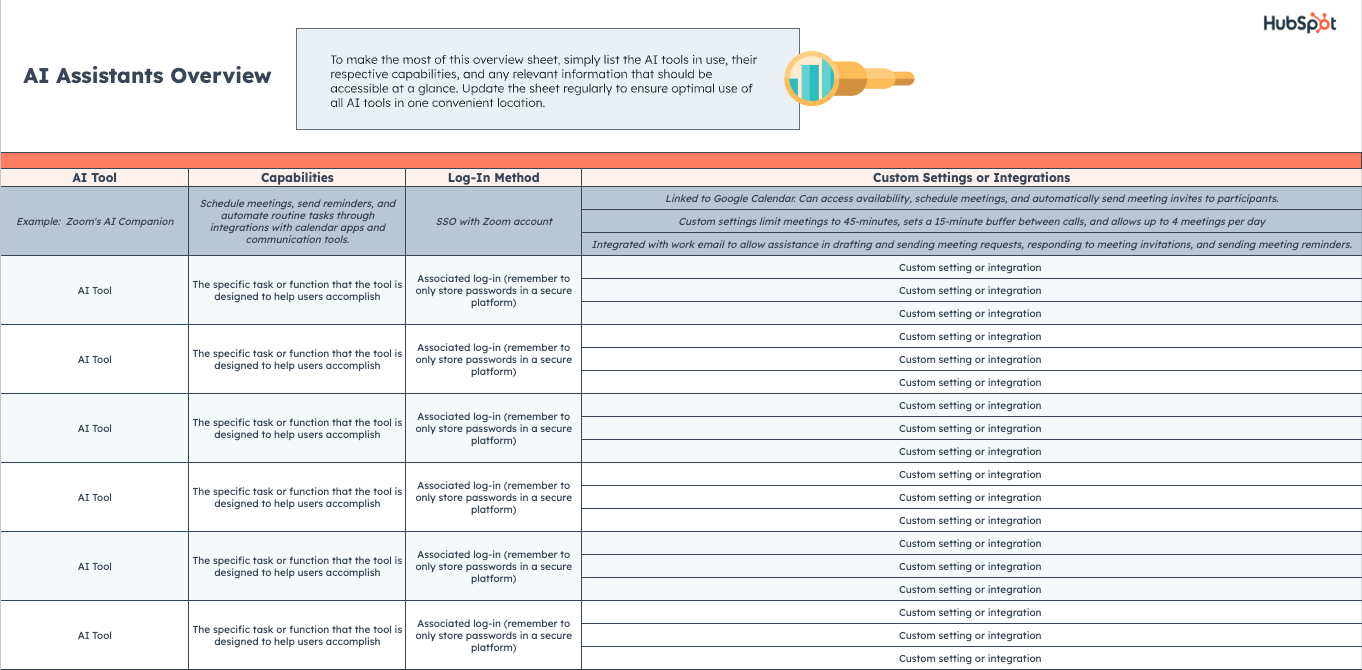
HubSpot’s AI Task Delegation Playbook is a high-level strategic guide. It provides a step-by-step process for identifying which tasks are good candidates for delegation, how to structure your AI-powered workflows, and what metrics to track to measure success.
✅ Ideal for: Leadership and management teams who are in the early stages of developing an organization-wide AI strategy.
A template alone won’t work unless your team follows a few simple rules, as AI adoption challenges often stem from process, not just tools.
Many teams stumble here, leading to a major AI mistake that erodes trust and sends everyone back to their old, manual ways of working. Avoid that by building these best practices into your process:
AI delegation works best when it is not reinvented every time.
The real advantage is not just faster handoffs. It is building a repeatable way to assign work with the right context, constraints, and review criteria already in place.
ClickUp helps you do that in one workspace. You can store and refine delegation templates, turn them into repeatable workflows, and keep the actual work, feedback, and follow-through connected. With AI built into the flow, teams can move faster on first drafts while keeping quality and accountability clear.
Get started for free with ClickUp and transform how your team works with AI.
Traditional delegation assigns tasks to people, who bring their own judgment to the work. AI delegation assigns tasks to tools that follow instructions precisely, which means a human must always remain in the loop to provide judgment and accountability.
Yes, all good templates are built with customization in mind. You can easily adapt role labels, task categories, and approval workflows in ClickUp to fit the specific needs of your marketing, sales, or operations teams.
RACI, DACI, and RAM all clarify who does what, but they focus on different levels of decision and execution:
Measure AI delegation the same way you would measure any delegation system: by checking whether it improves outcomes without creating hidden cleanup work.
Track a small set of metrics:

© 2026 ClickUp

There’s an easier way. Try a free AI Agent in ClickUp that actually does the work for you—set up in minutes, save hours every week.