
ClickUp Boards
Kanban boards that move work forward
ClickUp connects boards to docs, chats, calendars, and AI in one place. Less context-switching, more shipping.
No credit card. Free forever.
No credit card. Free forever.
 25,000+ reviews from
Trusted by the best
Your work is already in motion, give it a board that keeps up
All the context, control, and connection to keep work moving.
ONE CONNECTED WORKSPACE
A board that's part of something bigger
ClickUp's Board view is one lens on your project. Switch to List, Calendar, or Gantt and the same tasks are right there, no import, no rebuild. Everything you add on the board stays with the work, wherever you view it.

NEVER LOSE CONTEXT
Do the work right from the card
Assign owners, drop in comments, and attach files without leaving the board. When a task needs a doc, it's already linked. One surface for every action.

STAY IN CONTROL
Set limits on each stage
Set a cap on each column and ClickUp flags when you hit it. Your team sees when to pause new work and focus on finishing what's already in flight. Less piling up. More shipping.


Your work is already in motion, make sure it keeps moving
Free forever. No credit card required.




CLICKUP BRAIN + SUPER AGENTS
AI that reads your board and moves your work
ClickUp Brain answers questions about your board. Super Agents act when work stalls.
CLICKUP BRAIN
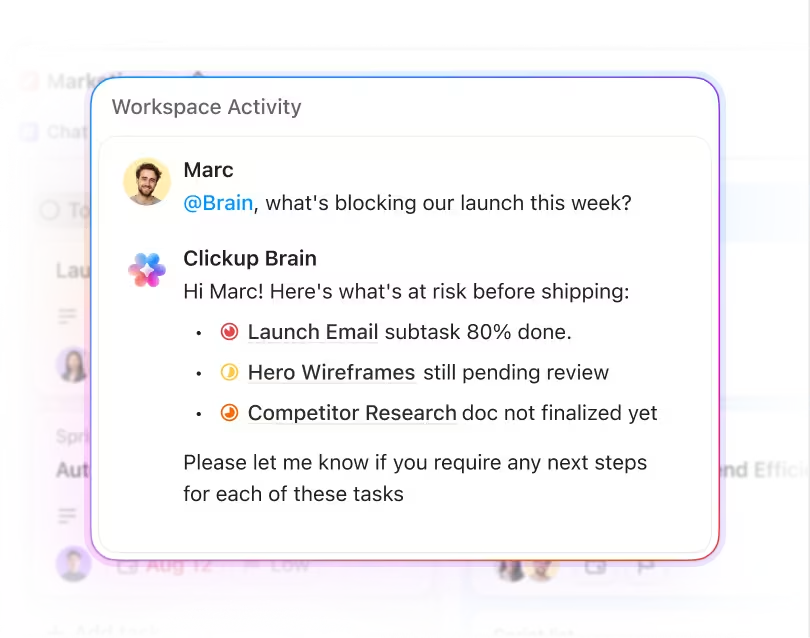
Ask what's stuck and get an answer instantly
"What's been sitting in In Progress for more than a week?" Ask Brain and it pulls the answer from your board in seconds, no status meeting required. Ask about deadlines, workloads, or blockers and get a real response.
SUPER AGENTS
Stalled work doesn't stay stalled
Super Agents can be configured to watch for cards that haven't moved and columns nearing capacity. Set one up and it pings the right person when something stalls, before the delay lands in your inbox.

Every Kanban feature, built in from day one
Custom fields on cards
Add priority scores, time estimates, client names, or any data your workflow needs right on the card. Your board reflects exactly how your team works.
Nested subtasks
Break any card into subtasks visible on the board surface. Track progress at a glance without opening the task.
Multi-card drag
Select multiple cards and bulk move them to a new column. Update a sprint's worth of tasks at once instead of card by card.
Board filters
Filter by assignee, priority, tag, or any custom field to zero in on what matters right now. Fewer distractions, faster decisions.
Mobile board view
Drag-and-drop Kanban on iOS and Android. Move cards, update statuses, and manage your board from anywhere.
Shared board views
Share a filtered board view with clients or stakeholders without giving them access to your full Workspace. The right view, for the right person.
PART OF THE CLICKUP PLATFORM
Board view is just the beginning
Board view is your visual entry point into the ClickUp platform. Tasks, Docs, Chat, Calendar, Dashboards, and more in a single, converged app. Explore everything you unlock when your work lives in one place.


Security
Everywhere
24/7 support
SOC 2 TYPE IIISO 27001GDPRHIPAA
FAQs
Frequently asked questions about ClickUp Chat
Your board should work hard as your team does
No credit card required.
No credit card required.


SOC 2
CERTIFIED

ISO 27001
CERTIFIED

GDPR
COMPLIANT

HIPAA
COMPLIANT