


Are you wondering where the day went when you finally log out in the evening? Whether you’re trying to tame the clock or become a productivity powerhouse, time tracking software helps you take control of your day and assign every billable minute.
Tracking time doesn’t have to be an invasive or cumbersome process. Today’s time tracking software for Mac makes it easy to see where your time went and focus your efforts on where you need them the most.
Let’s explore the cream of the crop in time tracking apps and find the one best suited to help you track your time without infringing on your day. Some of these options even make time tracking fun!
10 Best Time Tracking Software for Mac Users in 2024

 Summarize this article for me please
What Should You Look for in Time Tracking Software for Mac?
As you search for the best time tracking app, there are a few essential things to remember. These factors will make using your time tracking software less of a slog and turn it into a seamless part of the workday.
- Simplicity: Look for intuitive and easy-to-navigate user interfaces that make billable hours tracking effortless. You’re more likely to do it (and do it consistently) if it’s a simple addition to your daily routine
- Flexibility: Choose software with the ability to switch between multiple devices. For example, you might want to start tracking a project on your MacBook but need to stop the timer on your iPad or iPhone. An essential feature for remote workers to track hours from anywhere!
- Integrations: Find software that integrates with the rest of your tech stack. Consider the daily apps you use, such as team management and or employee monitoring tools, and find a time tracking app that plugs into them
- Insights: Insightful reporting makes your time tracking data even more useful. Look for software that analyzes your time data and offers insights into becoming more productive
- Customization: Your time tracking software needs to work for you and adapt to how you work. Look for options to customize timers, reminders, and settings to integrate more seamlessly into your workflow
Summarize this article for me pleaseThe 10 Best Time Tracking Apps for Mac
1. ClickUp
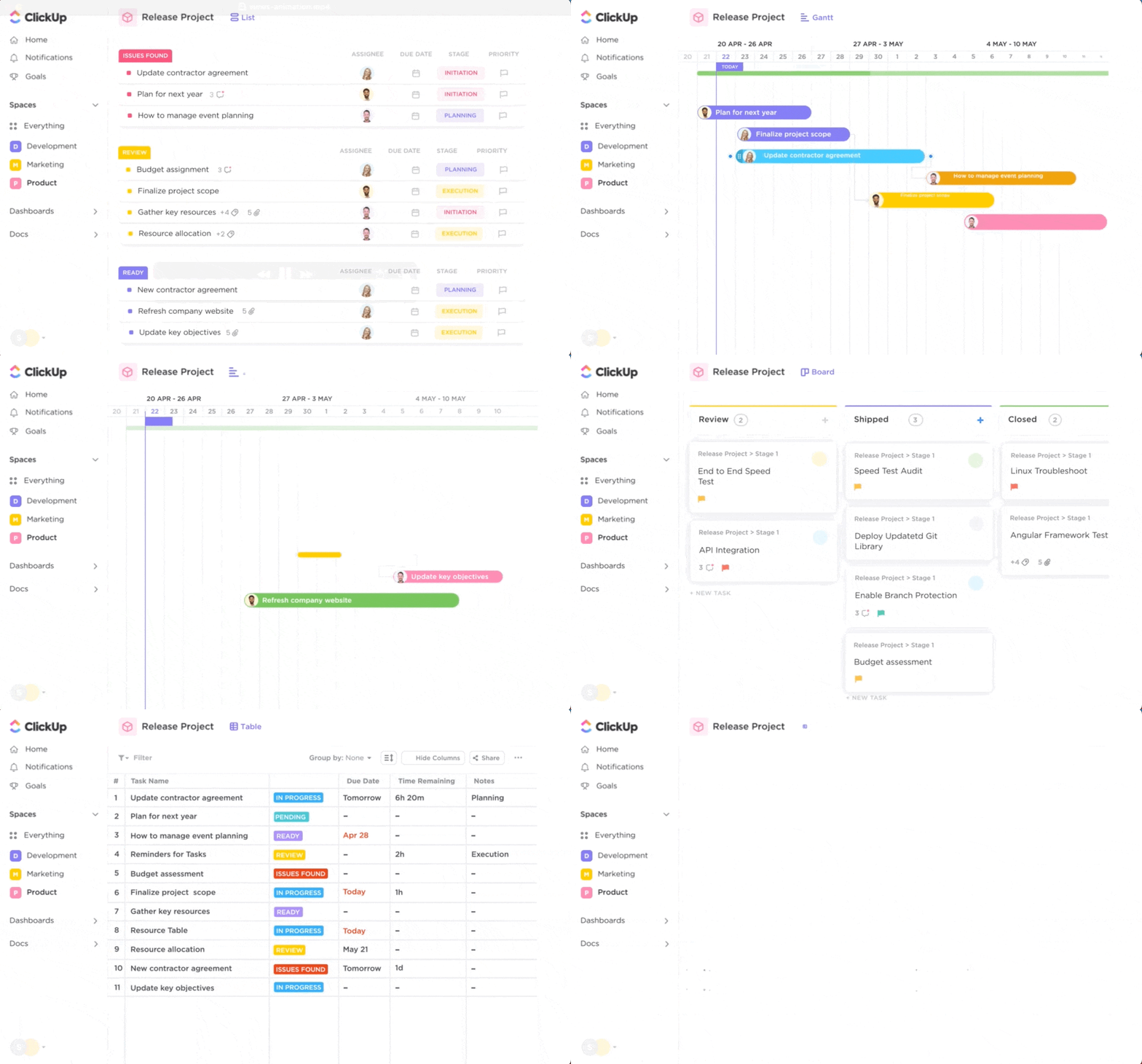
ClickUp is an all-in-one productivity platform that seamlessly integrates into your Mac ecosystem. And with its built-in free time tracker, you can easily switch between your desktop and devices to start and stop the global timer!
With an intuitive interface that simplifies tracking your projects, ClickUp’s Project Time Tracking helps you identify and prevent potential bottlenecks in your day or see where more help is necessary to complete a task. It’s also incredibly adaptable, working for solopreneurs as well as large enterprises.
Take advantage of the platform’s Workload view to get a high-level peek at what each team member has scheduled for the next week or month. You can reallocate resources as necessary and help everyone stay on track while avoiding the dreading burnout.
The reporting features of ClickUp are especially useful. You can customize timesheets, get feedback on how long specific tasks take, or analyze non-billable entries.
Use the ClickUp Time Allocation Template to hit the ground running with your time-tracking efforts. The time tracking template makes it easy to see where you spend your work hours, allocating time to priority tasks and streamlining your admin time.
ClickUp best features
- Works on all your devices, from desktop to mobile
- Integrates with the rest of your tech stack
- Helps you see who has availability and who needs some extra help
- Time management templates to help your work faster
- Has lots of reporting features to help optimize team time through analytics
ClickUp limitations
- Some views aren’t available on mobile yet
- There could be a steep learning curve if you want to take a deep dive into the platform’s features
ClickUp pricing
- Free Forever
- Unlimited: $7/month per user
- Business: $12/month per user
- Enterprise: Contact for pricing
ClickUp ratings and reviews
- G2: 4.7/5 (8,300+ reviews)
- Capterra: 4.7/5 (3,700+ reviews)
2. RescueTime

RescueTime is a powerful productivity booster, as alerts prompt you to refocus on a task if something starts to distract you.
RescueTime blocks distracting sites (hello, social media) to help you get more productivity out of your focus hours. The app runs discretely in the background of your device to record time spent in different apps and websites and then gives you a breakdown of your day.
With that insight, you can better plan your day and eliminate distractions to supercharge your time-management skills.
RescueTime best features
- Focus sessions help you stay on track by blocking notifications and distracting websites
- Alerts let you know when you’ve gotten off task and help you redirect
- The easy-to-read dashboard tells you where you spend your time and gives tips on building focus
- Idle time detector
RescueTime limitations
- No project time tracking, so if that’s something you need, you’ll have to pair it with another app
RescueTime pricing
- Classic version monthly: $12
- Classic version annually: $78
- Updated version of Rescue Time: Contact for pricing
RescueTime ratings and reviews
- G2: 4.1/5 (85+ reviews)
- Capterra: 4.6/5 (130+ reviews)
Bonus: Task management apps for Mac
3. Tyme
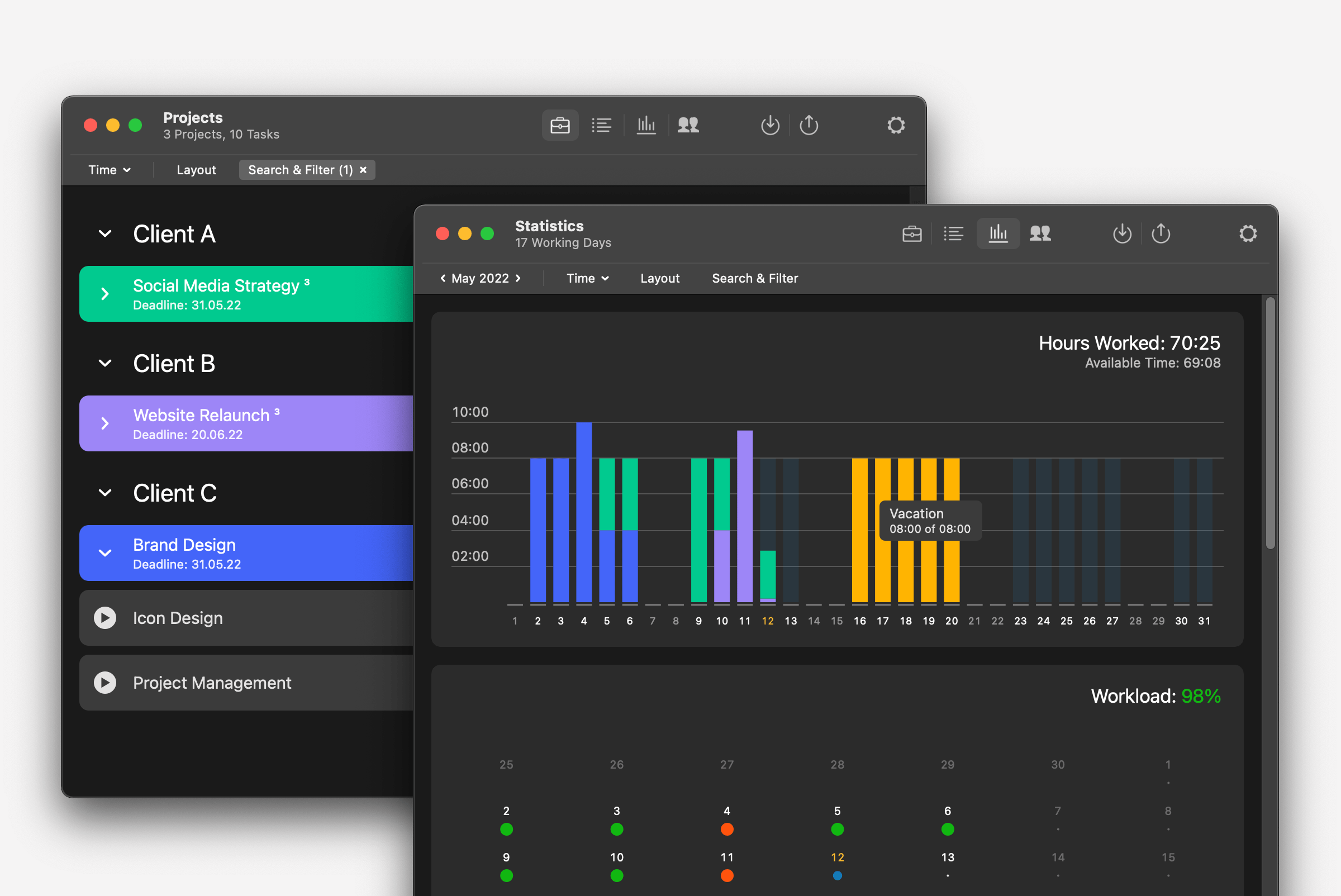
For a time-tracking software developed specifically for the Mac ecosystem, Tyme is a fantastic option. It even works with your Apple Watch to track time on the go.
The app is very user-friendly, with a sleek user interface to help you track multiple projects.
Plus, the platform scales with your needs, so you can track your entrepreneur or consulting hours or get insight into what your team is up to.
Excellent data visualization gives you an overview of the workload, booked hours, and revenue, so you can easily see where your time is going and how to optimize it.
Tyme best features
- Built specifically for the Mac ecosystem, including Apple Watch
- Ability to start and stop time tracking without opening the app
- Nice data visualizations to give insight into productivity and workload
Tyme limitations
- You’ll need to create tasks for everything you want to track, which may be time consuming for some users
Tyme pricing
- 14-day free trial
- $2.99 per user per month, billed annually
- $3.99 per user per month, billed month-to-month
Tyme ratings and reviews
- App Store: 4.8/5 (37 reviews)
4. Clockify
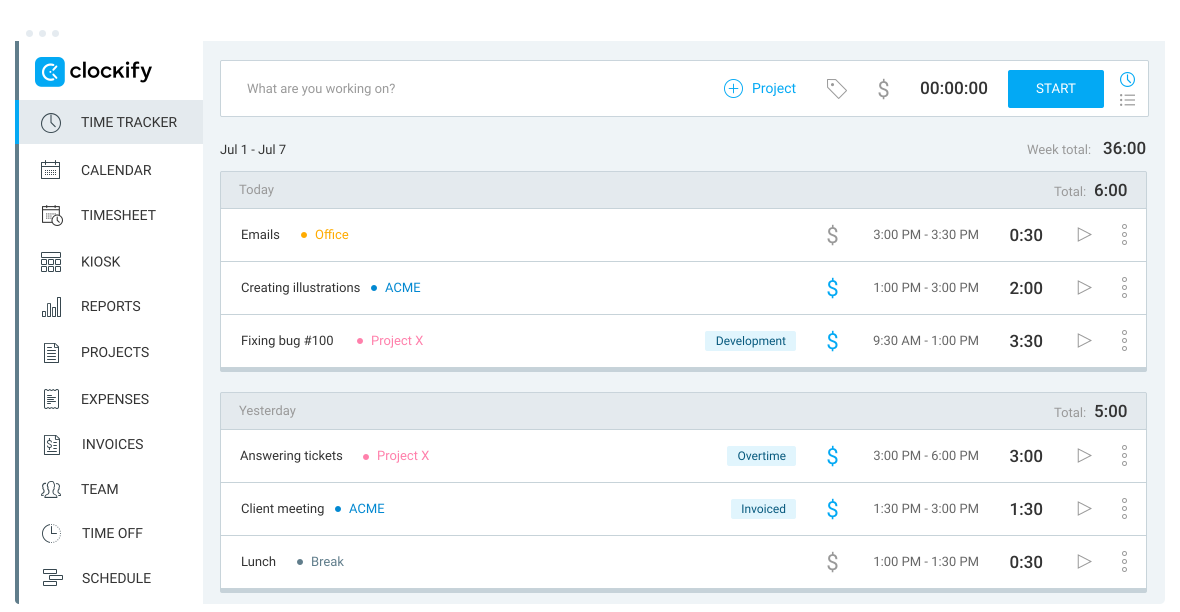
Clockify is a popular time-tracking software for Mac that big brands, such as Amazon, Hewlett Packard, and Google, use. The platform offers excellent adaptability, connecting across devices and synchronizing data in a web-based dashboard.
Take advantage of Clockify’s multiple timekeeping features, such as a calendar, timesheet, and auto tracker that logs time spent on various websites and apps. Managers will love the reporting features, which allow you to see who is working on what and even estimate project budgets. It’s a well-rounded platform with solid features for any clock watcher.
Clockify best features
- Time tracker allows you to start and stop a timer or log hours manually
- Templates allow you to load repeated activity to cut down on admin
- Kiosk mode allows multiple people to clock in on the same device using a PIN
- Free time tracking app
Clockify limitations
- Advanced features aren’t available in the free plan, which may force some users to upgrade or look elsewhere
Clockify pricing
- Free Forever
- Basic: $3.99/per user, per month, billed annually
- Standard: $5.49/per user, per month, billed annually
- Pro: $7.99/per user, per month, billed annually
- Enterprise: $11.99/per user, per month, billed annually
Clockify ratings and reviews
- G2: 4.5/5 (150+ reviews)
- Capterra: 4.7/5 (4,600+ reviews)
5. Timemator
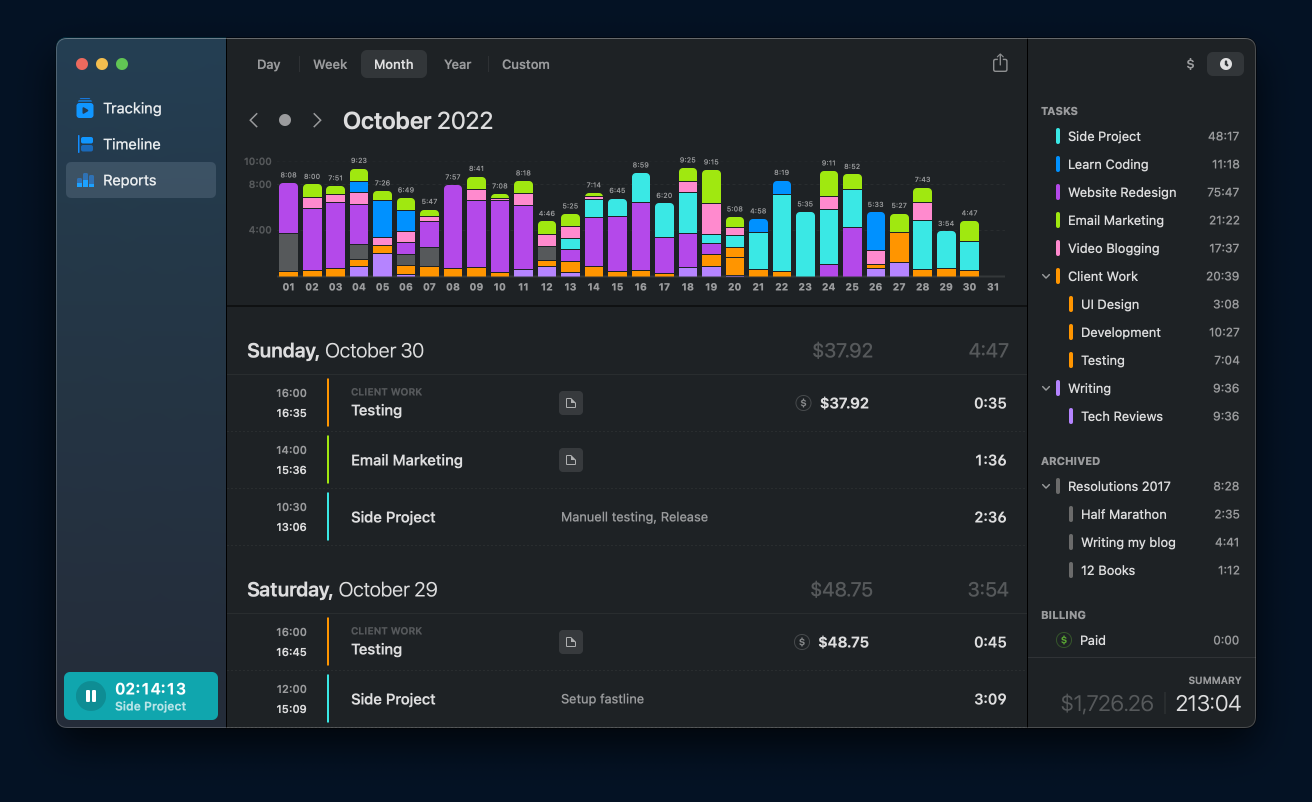
The Timemator platform operates behind the scenes and automatically captures the time spent on your Mac.
At the end of the day, you review the log and assign time to projects in a few clicks. The platform also allows you to create rules to trigger timers, such as opening specific files or launching certain applications, so there’s no need to remember to start a timer.
Timemator best features
- Traditional time-tracking options, along with auto tracking
- Group time tracking by task, project, client, or a combination
- Set hourly rates for certain tasks and automatically calculate projected revenue
Timemator limitations
- This native-Mac app won’t work on Windows, so if you have a team using mixed platforms, you’ll need another option
Timemator pricing
- $7.99 one-time payment for iOS
- $39 one-time payment for Mac (valid for up to two devices)
Timemator ratings and reviews
- App Store: 4.6/5 (15+ reviews)
6. Hubstaff

Our next tracking app for Mac is Hubstaff. It automatically adds employee time to an invoice, so employees don’t have to remember to do it later. Track time by task, project, work order, client, or even location, and then generate time reports to review time-spend.
Data from Hubstaff helps guide future project decisions and streamline workflow. Best of all, the platform works across all your devices and integrates with your other favorite apps in just a few clicks.
Hubstaff best features
- One-click start and stop timers for easy time tracking
- Automated timesheets to give detailed breakdowns of how you’ve spent your time
- The GPS time clock, which you can geofence for automatically clocking in and out
Hubstaff limitations
- Not a lot of customization options compared to other time tracking apps on this list
Hubstaff pricing
- Desk Free: Free for one user
- Desk Starter: $5.83 per user per month, 2-user minimum
- Desk Pro: $8.83 per user per month, 2-user minimum
- Enterprise: Call for a customized quote
Hubstaff ratings and reviews
- G2: 4.3/5 (420+ reviews)
- Capterra: 4.6/5 (1,400+ reviews)
7. Time Doctor
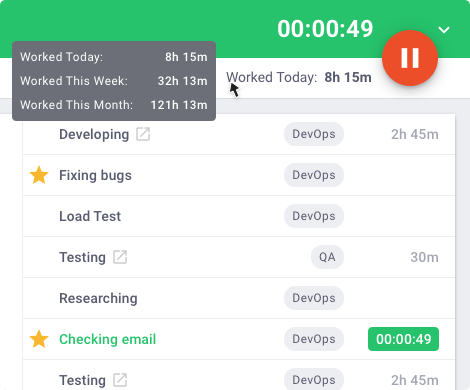
Time Doctor offers automatic time tracking that runs in the background of your Mac system, eliminating manual tracking efforts. The app takes desktop screenshots regularly while monitoring productivity and watching for time wasters.
Reviewing the app’s data uncovers roadblocks and distractions that might keep you or your team from reaching productivity goals. You also get robust reporting features, chat monitoring, and offline time-tracking options to ensure you never miss a minute.
Time Doctor best features
- Automatic time tracking monitors productivity and break time and generates daily reports for management review
- Integrates with payroll to make time reporting and payments easier
- Allows employees to check their time use stats and address any distractions pulling them away from work
Time Doctor limitations
- The app works on-screen instead of in the background, which can some users may find distracting
Time Doctor pricing
- Basic: $5.90 per user per month
- Standard: $8.40 per user per month
- Premium: $16.70 per user per month
Time Doctor ratings and reviews
- G2: 4.4/5 (350+ reviews)
- Capterra: 4.5/5 (500+ reviews)
8. Time Sink
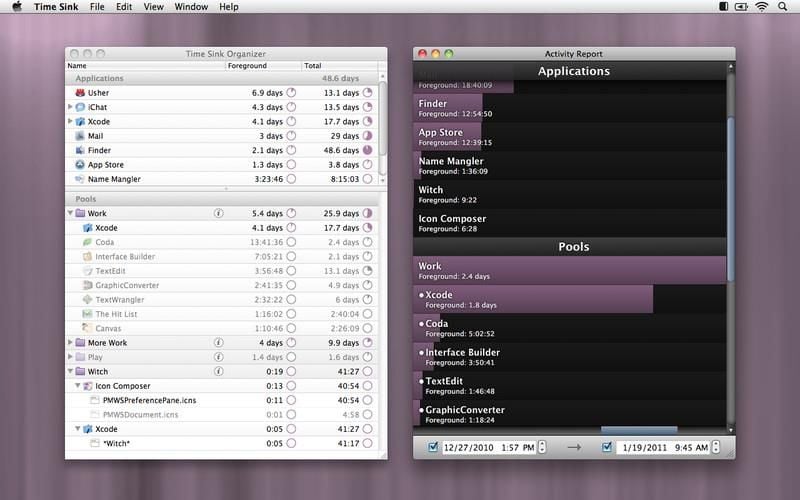
Another Mac-native app, Time Sink runs in the background as you go through your work day. At the end of the day, you can review Time Sink’s data to see where you spent your time and what you worked on.
The app captures information on what apps you used and when and how long you used them, so you don’t have to start and stop a timer every time you begin or end a task. Manual timers track time spent on activities offline, such as taking a phone call or attending an in-person meeting. Time Sink covers all the bases.
Time Sink best features
- Automatic time tracking so you don’t have to remember to start and stop timers with every task
- Pool creation to quickly categorize your activities and see how you spent each minute of your day
- Report exportation to determine patterns in your worktime over weeks or months
Time Sink limitations
- Fairly limited features for project management
Time Sink pricing
- $5 for a forever-valid license plus at least one year of free updates
Time Sink ratings and reviews
- App Store: 4.3/5 (10+ ratings)
9. Screen Time
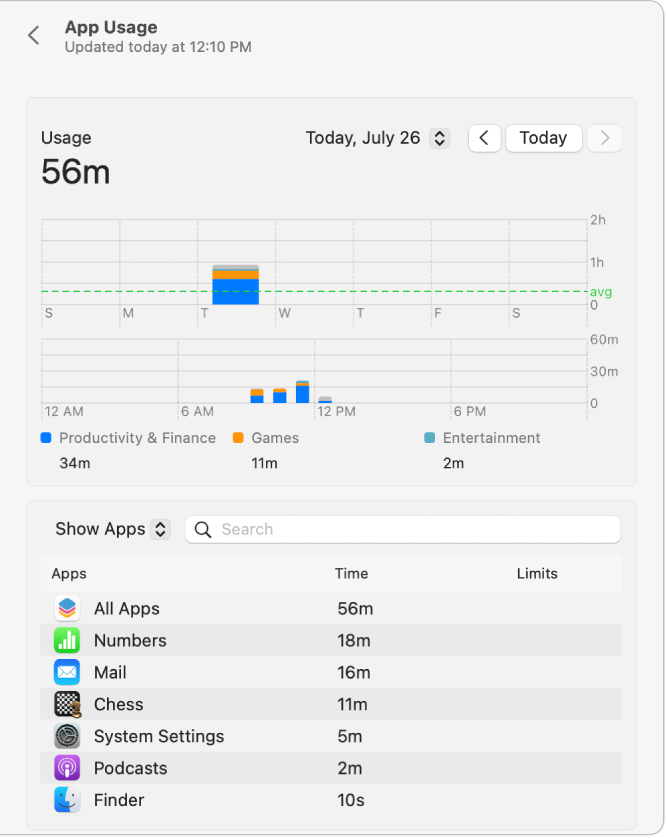
If you need a bare-bones time tracker, there’s a Mac desktop app called Screen Time. Use Screen Time by logging into your Mac user account, going to system settings, and clicking Screen Time in the sidebar.
The app tracks different devices and gives stats on various apps and categories. Set limits to reduce distractions and keep yourself (or your kids) on track.
Screen Time best features
- Helpful for tracking your screen time in apps
- Handy for eliminating distractions such as unnecessary notifications
- Great for monitoring screen time on all your Mac devices
Screen Time limitations
- Very limited features, so no project or task tracking and no integration with other productivity apps
- Data may be inaccurate as there’s some confusion about how it tracks the time
Screen Time pricing
- Free with iOS
Screen Time ratings and reviews
- N/A
10. Timely

Timely is another automated task tracker that works behind the scenes on your device. It tracks how much time you spend on apps or websites and then delivers a precise daily log of your activity. Then you can assign your time to different projects and see where and how you spent your day.
It has a very user-friendly drag-and-drop interface, so using it takes seconds of your day. In return, you get valuable productivity and usage feedback for yourself or your entire team.
Timely best features
- Easy to integrate with other apps in your tech stack
- Automatic creation of timesheets and schedules
- Provides accurate data on budget and project rates
Timely limitations
- Limited customer service options
Timely pricing
- Build: Starts at $20 per month
- Elevate: Starts at $30 per month
- Innovate: Starts at $35 per month
Timely ratings and reviews
- G2: 4.8/5 (300+ reviews)
- Capterra: 4.7/5 (650+ reviews)
Summarize this article for me pleaseKeep on Track Every Time With ClickUp
Whether you’re a small team or a massive corporation, managing time tracking for every project can feel cumbersome. But it doesn’t have to be. With ClickUp, you’ve got powerful time-tracking tools at your fingertips. Try it today for free!


Everything you need to stay organized and get work done.

Recent Articles
Confluence vs. Google Docs: Which Should Your Team Use in 2026? 
Confluence vs. Google Docs: Which Should Your Team Use in 2026?
Linear vs. Jira: Is Linear Just Jira Before the Mess? 
Linear vs. Jira: Is Linear Just Jira Before the Mess?
