Sorry, there were no results found for “”
Sorry, there were no results found for “”
Sorry, there were no results found for “”
Every guide tells you to break a big project into workstreams. Yet, almost none of them tell you what to do about the spaces in between. But those gaps decide whether the projects will succeed or fail.
It is easy to think of workstreams in project management as a basic division problem. You split the work into tracks, assign each an owner, and let them run. But splitting the work is only the first step. A track can run perfectly, and still cause issues if no one watches the handoff to the next team.
This guide focuses on managing what happens between tracks. For example, the handoffs, the dependencies, and the shared deadlines.
TL;DR: Workstreams break a complex project into parallel tracks, each with a single owner. That part is easy, and almost everyone gets it right. What sinks projects is the handoffs, dependencies, and shared dates that connect those tracks. Too often, no one is assigned to protect those gaps.
The teams that deliver don’t just run better tracks. They treat every connection point as something to watch daily. They use clear owners, simple yes-or-no checkpoints, and explicit rules for when to escalate a problem. If you only remember one thing: manage the seams, not just the streams.
A workstream is a distinct, separate track of related tasks. It runs in parallel with other tracks to reach the same main project goal. Each track has its own project deliverables, timeline, and a single owner: the workstream lead.
The keyword here is structure. A loose group of tasks has no boundaries and no clear owner. In contrast, a workstream has a defined scope, clear handoff points, and one person accountable for progress. This structure keeps parallel work from colliding.
Workstreams are what make a complex project legible. You can see each track’s status without untangling the whole thing. Without it, large projects collapse. Everything looks equally urgent, teams miss dependencies, and a single delay ruins the whole project timeline.
You will also hear workstreams called tracks, project streams, or delivery streams. They are the same structural unit under different labels.
A workstream is a broad domain of work. A workflow is the specific process that moves a task through it. People often mix up these terms. However, confusing them leads to unclear ownership.
A workstream is an entire area of related tasks, teams, and deliverables within a project. A workflow is the exact sequence of steps a single task follows from start to finish. For example: Draft, Review, Approve, Publish.
Here are the key differences side by side:
| Dimension | Workstream | Workflow |
| Scope | Broad domain of related work | Single repeatable process |
| Ownership | Workstream lead manages a team | Process owner defines the steps |
| Duration | Lasts as long as the project | Repeats every time a task starts |
| Project Role | A major parallel track | A process running inside a track |
| Example | Marketing for a product launch | Content approval within that launch |
The core rule: The relationship is containment. Every workstream holds multiple workflows.
Think of the workstream as the container and the workflows as the repeatable machinery inside it. For instance, a marketing workstream for a product launch might run three separate workflows: a content creation workflow, an ad approval workflow, and a launch-day checklist workflow.
Workstreams give you six concrete advantages: contained delays, clear ownership, visible workloads, isolated risk, easier reporting, and faster onboarding. They don’t just organize a project; they change how it behaves under pressure. Here’s what you get.
Projects don’t fail inside the workstreams. They fail at the seams. Here’s why:
Dividing a project into workstreams is the easy part. Anyone can draw the boxes. What kills projects is what happens between those boxes. It is the handoffs, the dependencies, and the moments when one stream misses a deadline that another stream relies on.
Decisions, status changes, and shifted deadlines die at the seams. The more streams you create, the more handoffs you have to watch.
This is just the math from The Mythical Man-Month applied to structure instead of people. The author showed that communication paths grow quadratically based on this formula:
n(n-1)/2: add people and the coordination cost climbs quadratically, while output only climbs linearly.
If you swap ‘people’ for ‘workstreams,’ the lesson holds true. Three streams have three interfaces to manage. Six streams have fifteen. Every stream you add doesn’t just add work. It multiplies the number of places where work can fall through.
That reframes the whole job. A lead’s work isn’t just running their track. It is defending its boundaries. They must know exactly what they owe other streams and what those streams owe them.
Likewise, a project manager’s work isn’t just managing tasks. It is about managing the interfaces between streams. They must monitor handoffs, watch dependencies, and catch cross-stream risks early.
There is a trap here, too. A famous rule called Conway’s Law warns that organizations naturally build systems that mimic their own internal communication lines. In other words, you will likely group your workstreams by your existing org chart without meaning to.
Then, you will be surprised when the tasks that span two different teams are the ones that slip. Reduce your streams by the type of work, not by who already sits together. The rest of this guide isn’t about drawing the boxes. It is about designing the seams between them.
There are four main types of workstreams: functional (by department), cross-functional (by outcome), geographic (by region), and technology/system (by technical layer). Where you draw the lines decides which handoffs you’ll spend the project defending.
| Type | Strength | Weak spot | Best for |
| Functional | Obvious boundaries everyone understands | Cross-team tasks fall through the cracks | Teams whose work is mostly self-contained |
| Cross-functional | Seams sit inside the stream, easy to watch | Hard to staff; people split across streams | Outcomes that need tight collaboration |
| Geographic | Matches real local differences | Duplicated effort across regions | Global rollouts with genuine local scope |
| Technology/system | Seams map to real system interfaces | All integration risk lands at the end | Software and IT with distinct layers |
Functional workstreams work by department or discipline, such as engineering, marketing, or legal. This is the default choice for a few teams because these boundaries already exist on the org chart. Nobody argues about where one stream ends and the next begins.
What works well:
Limitations:
Skip it if: Your most important goals consistently require three or more departments to work in lockstep. The seams will quickly outnumber the streams.
Best for: Projects where each team’s work is relatively self-contained with a few clean, well-defined handoff points.
Cross-functional workstreams are structured around a specific deliverable or outcome. They pull people from multiple departments into one stream. For example, a ‘user onboarding’ track can include a designer, an engineer, and a support agent. It pulls the seams into the stream where the lead sees them daily.
What works well:
Limitations:
Skip it if: You cannot get a genuine commitment from department heads to dedicate their people. Half-staffed cross-functional streams are worse than functional ones.
Best for: Deliverables that demand tight collaboration across skills, where you would rather manage friction up close than across team boundaries.
Geographic workstreams work by region or location, such as a North America Launch versus an EMEA Launch. This structure is common in global rollouts where local laws, languages, or market conditions create different tasks.
What works well:
Limitations:
Skip it if: Your regions differ only by time zone. You are adding high coordination costs for differences that don’t exist. You would be better off using a functional setup.
Best for: Global rollouts where local conditions create truly different tasks, backed by a clearly owned shared core underneath.
Technology/system workstreams group work by technical layers, such as Front-End, Back-End, Database, or Infrastructure. This setup is common in software and IT. Each layer has different owners and risk profiles. This is the most literal version of ‘projects fail at the seams’ because the seams here are the system interfaces.
What works well:
Limitations:
Skip it if: Your project is small enough that one team owns the whole technical stack. Layer-based streams add extra interfaces you don’t need.
Best for: Software and IT projects where each system layer has distinct owners, unique risk profiles, and a clear code interface between them.
Mixing these styles is usually correct, but it is also where org-chart traps bite hardest. A global launch might run geographic streams at the top level, with functional sub-streams like marketing, logistics, or compliance nested inside each region.
Just remember the math from earlier: every level of nesting multiplies the seams. Only nest your tracks as deep as you can clearly see the handoffs.
Every workstream needs ten things: a single named owner, a clear scope, documented inputs and outputs, handoff milestones, independent status tracking, an escalation rule, a dedicated channel, a standard update format, buffer time at the seams, and one source of truth. No matter how you divide a project, a workstream only holds up with these in place.
Creating a workstream takes five steps: define scope, break the project into deliverables, assign one owner per track, map dependencies and milestones, and then set up communication and tracking.
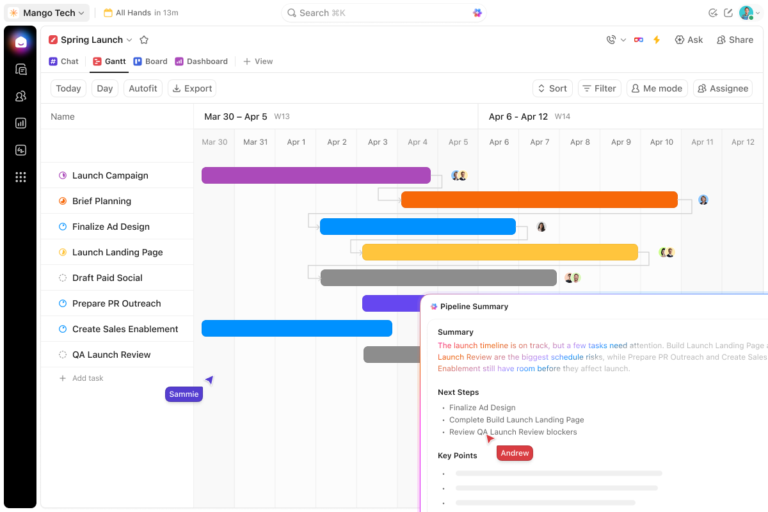
Whether you plan in a spreadsheet, a PM platform, or on a whiteboard, the whole job is drawing boundaries that hold up once work starts moving across them.
Before you draw a single stream, write down what the project delivers and what it doesn’t. Workstream boundaries must come from the scope, not the other way around. If you set up streams before you understand the work, you will miss critical tasks or create duplicate work.
Document three things before moving on:
Keep it brief. This step should produce a simple, one-page scope document.
Pro Tip: Write a single sentence describing the project’s goal. If that sentence uses the word ‘and’ more than once, you likely have multiple workstreams hiding inside it.
Identify the main assets the project must produce. Group related items into tracks that each have one distinct output.
Avoid over-engineering here. Every stream you add creates more seams. A project split into ten tracks can waste more time on meetings than on ongoing work.
Use the Independence Test on your groups:
Give every stream exactly one named lead. This person is responsible for the timeline, the deliverables, and the handoffs. Don’t assign ownership to a committee or to the team. Focus on a single name.
Map out the roles around that single owner:
Pro Tip: Give your leads real day-to-day authority. If a lead cannot unblock their own team without asking the main project manager first, the structure is fake.
Document how streams depend on each other using clear, visible links. Don’t rely on assumptions. If a dependency lives only in someone’s head, it cannot trigger an alert when a timeline slips.
Capture the exact points where tracks touch:
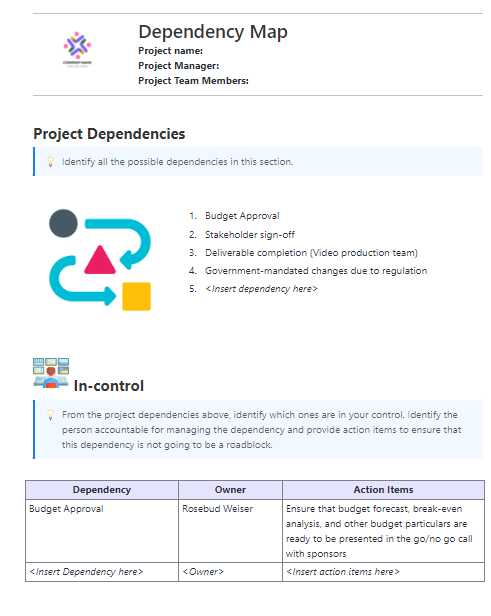
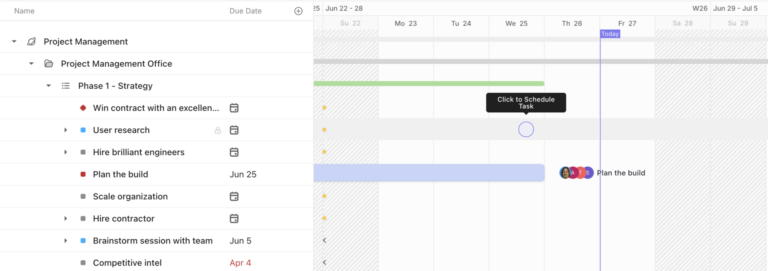
Pro Tip: In a spreadsheet, use a ‘depends on’ column. In a PM tool, use a visual timeline view to see the critical path across every stream at once. Even better, a structured layout like the ClickUp Dependency Mapping Template gives you a ready place to capture dependencies instead of tracking them in your head.
Give each stream its own specific space for updates, decisions, and files. Keep this separate from the main project chat. This stops one stream’s daily chat from burying another stream’s urgent alerts.
Lock down three items to build a lightweight communication plan per stream:
Pro Tip: Standardize your status templates before kickoff. If every lead invents their own format, the project manager wastes time translating updates instead of managing project risk.
Managing workstreams well comes down to six habits: audit the seams weekly, run working sessions, track people across streams, keep a cross-stream risk register, review boundaries at milestones, and close finished streams. Setting them up is a snapshot. Running them is a movie.
The structure you design at kickoff starts to change the day work begins. A lead leaves, a dependency shifts, or a minor stream suddenly swallows half the team. This is why so many setups break by week two.
These six practices keep your streams intact when reality shifts:
Workstreams appear across diverse projects such as marketing campaigns, software builds, and construction projects, with the same structure each time but varying levels of dependency strictness. Here’s what they look like in practice across three common projects.
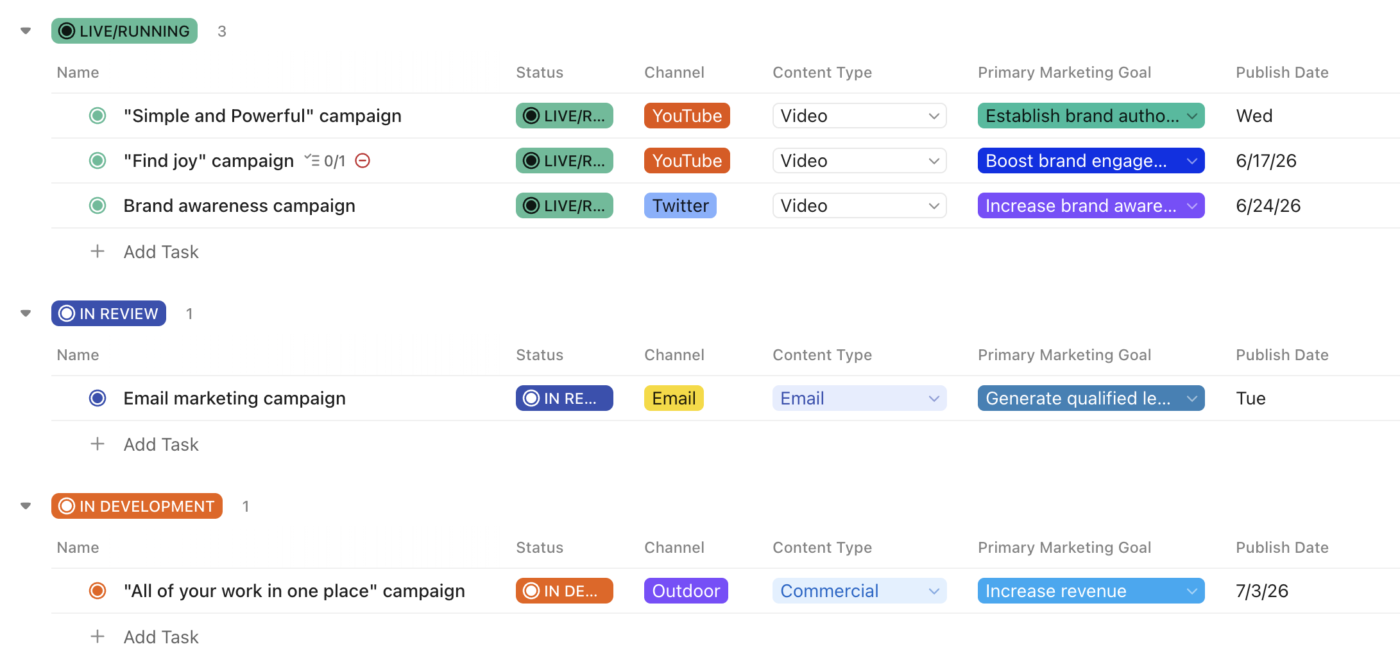
Say a company is launching a product across several channels. A campaign manager runs it. Four streams work in parallel, and all focus on one launch date. Here is how they break down:
The critical seam: Paid Media cannot finalize ad creative until content delivers approved messaging and brand assets.
What makes this one different: The dependencies are soft. Most streams can move on their own for stretches. So the risk isn’t a rigid chain. It is the one or two messaging handoffs that block everything downstream. Watch the seams, not the calendar.
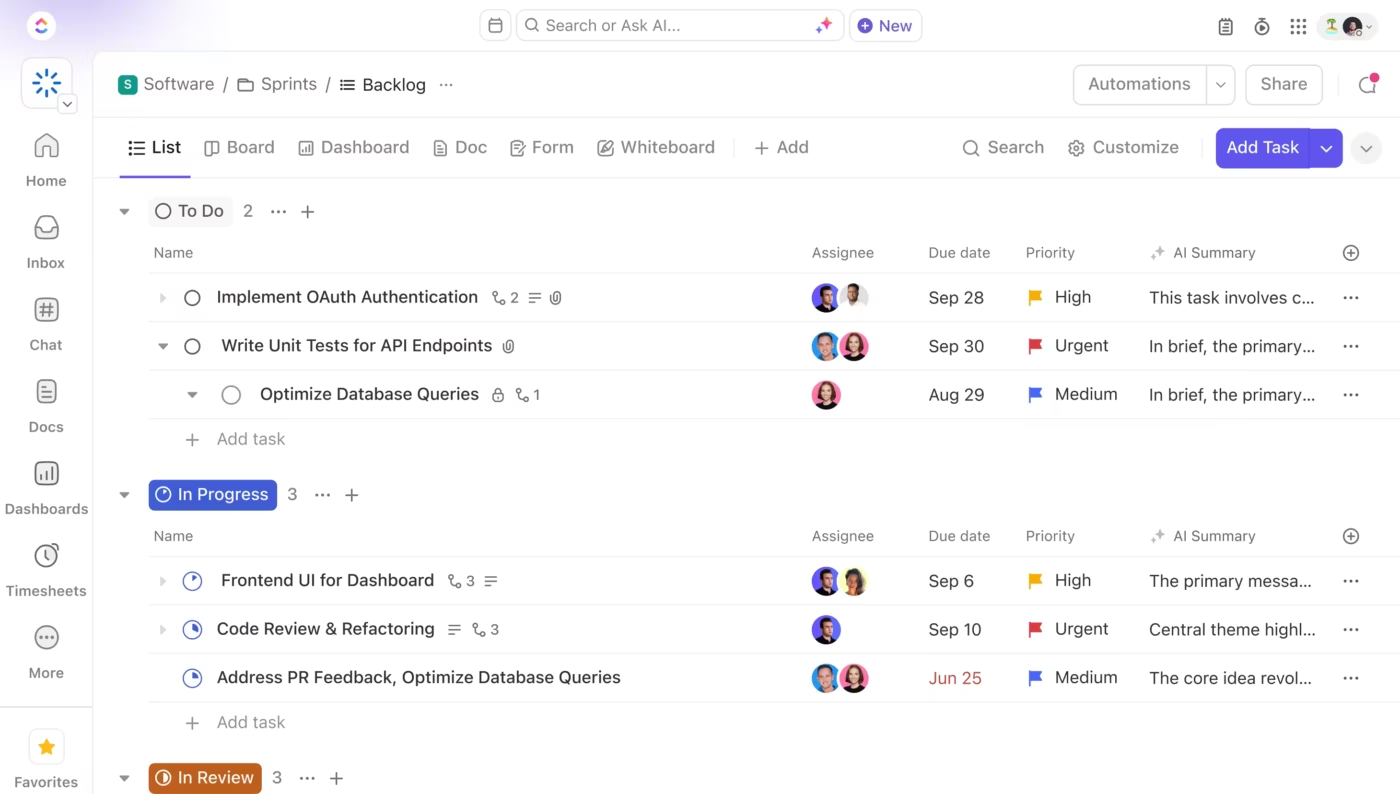
Now, picture a team building a new customer-facing app. An engineering lead runs it across squads, and each squad owns a layer. The dependency chain runs through every stream, so a slip anywhere pushes the release date. The work is split like this:
The critical seam: QA needs visibility into both Front-End and Back-End progress to plan test cycles.
What makes this one different: In Agile setups, these streams map to squads. Each runs its own sprint planning schedule and syncs only at shared milestones, like the feature freeze. The integration risk piles up at the end. So the seams to watch are the code contracts between layers.

Finally, take a commercial building project. A general contractor runs it, coordinating trades whose order cannot be rearranged. This is the most rigid dependency structure of any industry. This makes the handoffs unforgiving. The streams have to hit milestones in a fixed order:
The critical seam: Structural must hit defined checkpoints before electrical and plumbing rough-in can begin.
What makes this one different: You cannot reorder the work. There is no ‘just move it in parallel’ escape hatch that the other two have. So dependency mapping isn’t a nice-to-have here. It is the whole job from day one. A missed handoff halts the site.
ClickUp organizes work into Spaces, Folders, and Lists. Each workstream gets its own List with unique statuses, tasks, and docs. Every view shares the same data. Move a task or change a date in one place, and it updates everywhere.
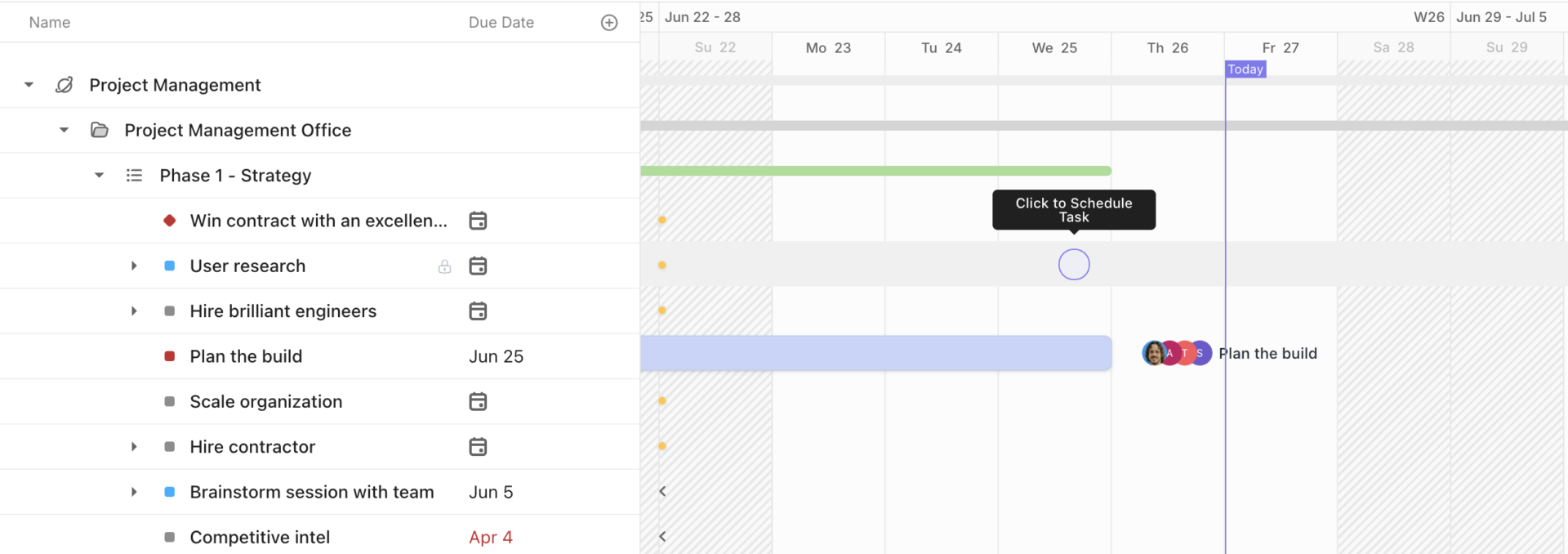
What works well for workstreams specifically:
Limitations:
Skip it if: Your project is one team, few handoffs, and no real dependencies between tracks.
Best for: Multi-team projects where parallel workstreams have real dependencies, and a slip in one track needs to visibly cascade to others.
You can already spot the obvious mistakes. These include having no named owner, drawing tracks around your org chart, or stretching one person across three tracks.
But some errors don’t look like mistakes while you’re making them. They look like everything’s going fine. Here are four problems that hide in plain sight:
The all-green project that is secretly on fire. Every lead marks their stream as ‘on track.’ Your dashboard is a wall of green, yet the launch date slips anyway. This happens because you measure status inside each track, but the handoff itself has no status of its own.
The fix: Give each handoff its own status. Mark it as on track, at risk, or blocked. Then, make the receiving team own that status.
The handshake nobody wrote down. Someone says, ‘Marketing always gets us the files on time, so we don’t need a formal rule.’ That is the problem right there. The links people skip writing down are the easy, reliable ones. Because they are unwritten, they have no automatic alert when they slip.
The fix: Write down the easy handoffs first. Do this precisely because nobody is worried about them. A link that lives only on good intentions doesn’t exist for planning.
Death by meetings. In the rush to protect your handoffs, you set up a recurring meeting for every single connection point. Now, your leads spend more time talking about work than doing it. This costs just as much time as the other mistakes.
The fix: Match your meeting schedule to the risk. Tight chains, where one slip stops everything, must sync daily. Soft links, which can drift for a while, should sync only at major milestones.
Fake parallel work. Two tracks sit side by side on your project chart. They look independent. However, both are waiting on the same person to make a call. Or the same boss to approve a budget. On paper, the work runs simultaneously. In reality, the tracks run one after the other.
The fix: You can catch this early by checking your resources. Look at shared people and approvers, not just tasks. If pulling one person out of the room stalls two tracks, those tracks were never truly running in parallel.
What separates projects that deliver from projects that drag is whether anyone designed the connections between those tracks. Or just assumed they would figure themselves out.
The pattern is predictable. Week one looks great. You have clean tracks, clear owners, and everyone moving fast. By week four, a decision made in one track ruined work in another. Nobody flagged it because nobody was watching the gap where the teams meet.
Teams that ship on time don’t have better plans. They have better visibility into what each track owes the others. They treat that visibility as a daily habit, because the structure only holds if the PM maintains it.
If your projects regularly involve multiple teams building toward the same deadline, ClickUp lets you run each track in its own List. You can link dependencies across them and monitor everything from a single Dashboard. You can even use AI to pull cross-track status without chasing people down. All of this happens in one platform, so you don’t have to stitch different tools together.
Get started for free with ClickUp.
A phase is sequential, while a workstream is parallel. Phases are stages that a project moves through in order, such as planning, execution, and closure. In contrast, workstreams run in parallel throughout the project’s life. A single workstream, such as engineering, remains active throughout every phase. Think of phases as telling you when work happens. While workstreams tell you who owns which track throughout the timeline.
The difference comes down to size and how they fit together. A program is a collection of related projects. A project is a single initiative with a clear deadline. A workstream is one parallel track inside that project. A workstream never stands alone. It exists only as a piece of a larger project goal. It shares its end date and main objective with its parent project. On the other hand, a separate project has its own independent charter.
No major project management standard formally defines ‘workstream’. None of the PMI’s PMBOK Guide, the APM Body of Knowledge, or the PRINCE2 manual mentions it. It is a practical term that grew from real-world project delivery. There is no governing body standardizing it, so usage varies across companies.
A work package is much smaller and lives inside a work breakdown structure. In formal terms, a work package is the lowest-level task you can estimate and assign. A workstream is much broader. It is an ongoing track that can contain many work packages and multiple workflows. Put simply, work packages are units of output. Workstreams are units of ownership that group those outputs together.
They can, but it is the fastest way to create a hidden bottleneck. The whole point of a single named lead is clear responsibility for one track’s handoffs. If you stack someone across three streams, the bottleneck moves to their calendar. Every track then waits on one person who is constantly switching tasks. If you must double up, do so only for small, low-risk tracks. Also, watch for timelines that peak in the same week.
A good workstream lead has enough authority to unblock their own team without asking the main project manager for every decision. The role owns the track’s timeline, deliverables, and handoffs. The best leads protect their boundaries. They monitor their handoffs closely and report issues early when a dependency slips. A lead who must ask for permission on routine decisions is a lead in name only.

Sudarshan Somanathan
Max 22min read

Praburam Srinivasan
Max 23min read
Praburam Srinivasan
Max 21min read

© 2026 ClickUp