10 Employee File Management Software in 2025

Sorry, there were no results found for “”
Digging through random folders, misnamed files, and mystery spreadsheets just to find one onboarding doc.
Not fun, is it? Moreover, you risk losing important employee files and finding yourself in a full-on fiasco. If you are an HR professional, chances are you have been there.
And you are not alone! According to a ClickUp report, the average professional spends more than 30 minutes a day searching for work-related information. That’s over 120 hours a year lost; time you could have spent handling your actual assignments.
That’s why it’s time to upgrade to an HR employee file management software that makes your life easier.
Whether you are running a fast-growing startup or just trying to bring some order to the chaos, here are 10 employee file management software tools that are seriously worth checking out.
| Tool | Best for | Key features | Pricing* |
| ClickUp | Centralized document management and task tracking; Team size: Startups, SMBs, Enterprises | Docs for employee profiles, Connected Search, Automations, Access control, HR templates | Free Forever, Customizations for enterprises |
| Bamboo HR | Self-service option for employees; Team size: SMBs | PTO tracking, onboarding tools, e-signatures, pre-built HR reports | Custom pricing |
| Rippling | Automating HR workflows; Team size: SMBs, Enterprises | Unified HR, IT, and Finance, automated compliance, payroll, and device management | Custom pricing |
| Zoho People | Mobile-friendly documentation; Team size: SMBs, Enterprises | Case management, customizable workflows, pulse surveys, built-in LMS | Custom pricing |
| Gusto | Payroll document management; Team size: Small teams, SMBs | Payroll tax registration, onboarding, benefits sync, and custom reports | Plans start at $49/month |
| Namely | Employee and managers who need a self-service platform; Team size: Small teams, SMBs | Self-enrollment in benefits, customizable news feeds, and goal tracking | Plans start at $9/month per user |
| Paycor | Health and manufacturing companies Team size: Enterprises of over 1000 people | AI-driven recruitment, shift optimization, and labor expense tracking | Custom pricing |
| ADP Workforce Now | HR outsourcing; Team size: Enterprises | Document expiration alerts, tailored reports, e-signatures, and access permissions | Custom pricing |
| SAP SuccessFactors | Managing employee career growth; Team size: Enterprises | Growth Portfolio, natural language queries, automated onboarding, compliance monitoring | $75.60/month per user |
| DocuWare | Maintaining HR data compliance; Team size: Enterprises | Secure digital signing, audit trails, intelligent search filters, and compliance with HIPAA/GDPR | Custom pricing |
Our editorial team follows a transparent, research-backed, and vendor-neutral process, so you can trust that our recommendations are based on real product value.
Here’s a detailed rundown of how we review software at ClickUp.
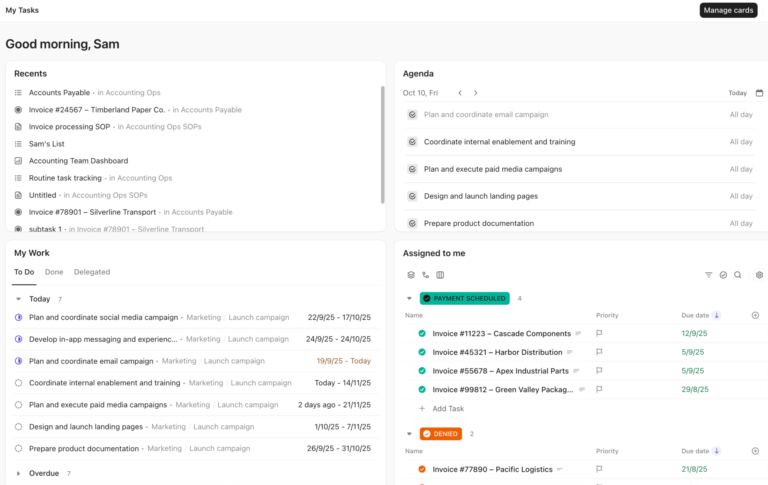
Not every employee document management system you stumble upon will be right for you. Here’s a checklist for choosing a tool that turns document dread into HR zen:
👀 Did You Know: A Nitro survey revealed that only 3% of knowledge workers are satisfied with their company’s document handling process. So the majority of organizations have broken document workflows.Â
Now that you know what ideal HR document management software looks like, here are the top ten options.

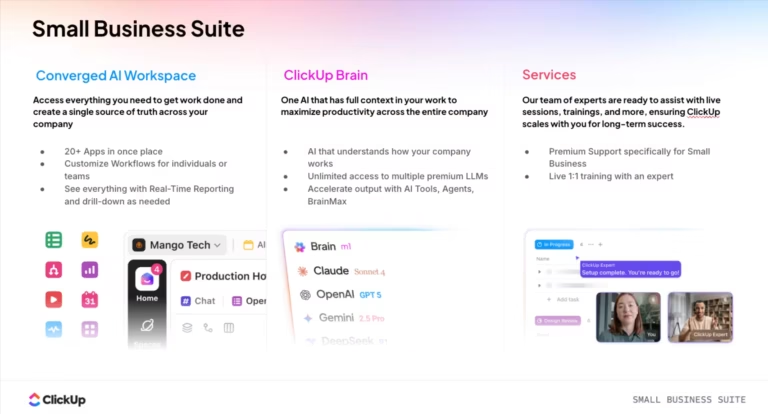
ClickUp is the world’s first converged AI Workspace and the perfect one-stop solution for managing employee files.
Whether it’s work contracts, onboarding docs, or performance reviews, ClickUp keeps everything organized and easy to find in one place. It’s like your digital filing cabinet, but without those nasty papercuts and the chaos of lost documents.
Bring all your employee file management needs into one, powerful, AI-powered Workspace with Brain MAX in ClickUp. Here’s how:
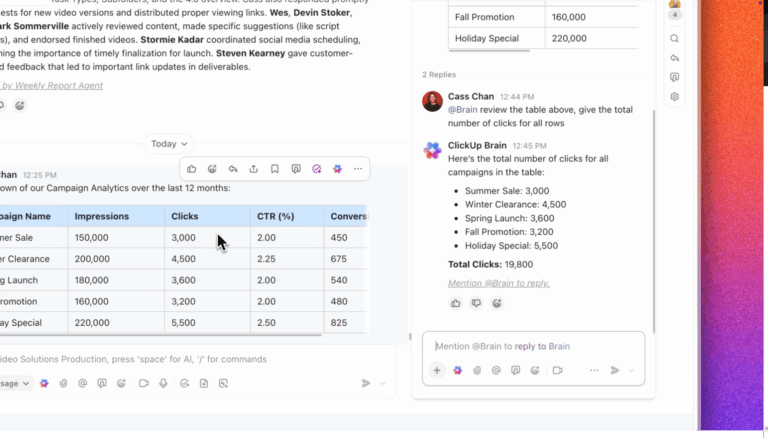
Further, you can ask ClickUp Brain to retrieve files and documents from your workspace or, even better, create them with you and watch it do it for you in seconds.

Brain empowers HR professionals to quickly generate job descriptions, policy documents, and employee communications with just a prompt. It ensures content is clear, consistent, and tailored to the audience, saving valuable time on drafting and editing.
With Brain, HRs can focus more on people and strategy while AI handles the heavy lifting of content creation.

Not only that! Our nifty employee file management also offers ClickUp Chat, where you and your team can discuss important HR policies, employee performance, and everything in between and beyond.
Now that you have your employee profile and other employee information drafts ready, keep everything neatly organized with ClickUp Project Hierarchy.

Start by creating a space for your HR team. Within that space, you can set up ClickUp Folders for each department, like marketing, engineering, and customer support. Within each employee folder, add other relevant documents like nested pages or sub-sections:
You can also add checklists to each subfolder. When you scale your team, the number of folders and subfolders will naturally go up. Still, finding documents shouldn’t feel like you are going on a treasure hunt, and our employee document management software solves this problem, too.
With ClickUp Enterprise Search, you can find any file, document, or task within your integrated tech stack with just a few clicks.Â

Searching for an employee contract? Or maybe you need to find a specific employee review? Just search by keyword, owner, or other relevant attributes, and BAM! The doc you wanted is right there.
All you need to do is integrate your existing HR tools with ClickUp, and the connected search feature will pull up any information you want. So, no more sifting through endless folders and praying you don’t miss anything.
After all this planning, one missed HR task can derail all your efforts. But with ClickUp Project Management for HR Teams, you keep every task on track.

It lets you turn onboarding plans and other HR strategies into ClickUp Tasks. You can assign each to the right team member, set up due dates, and track progress in one place.
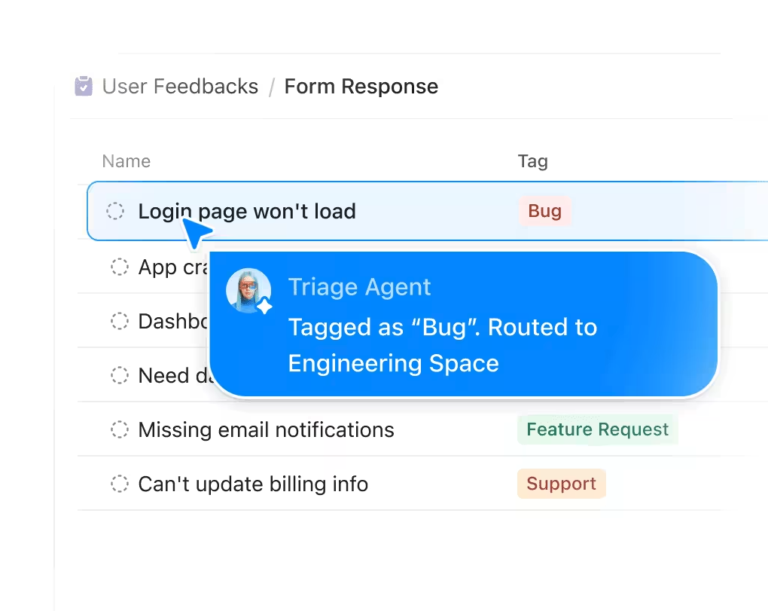
That’s not all. ClickUp Agents to respond to certain triggers and perform actions in a specific location.Â

Use Case: For example, the HR team’s Channel is flooding with new people ops people asking for documents and files. The people partner lead wants to use AI to dig up some of these files and free up their team’s time
They create a Custom Autopilot Agent in the Channel and instruct it to share the file in the knowledge base that it can access. They specify that the Autopilot Agent should only respond when the user’s message contains a clear and direct example. They even give the Autopilot Agent examples of questions.
With ClickUp Docs, you can create, store, and organize all your employee records and jot down their relevant details. Easily draft employee contracts, HR policies, forms, and onboarding steps with your team.

Remember that your stakeholders can edit the doc simultaneously and leave comments for specific team members with ClickUp’s Assign Comments feature.
Anne Thomas, Office HR Manager at Snowville Creamery LLC, says:
ClickUp allows us to post all communications between all areas of our company in one central place. It makes it easy and convenient to get notifications and maintain schedules, routes, and deliveries for our company.
💡 Pro Tip: Use ClickUp Relationships to link tasks, docs, or even entire lists together! For example, you can connect an employee’s onboarding task to their performance review, HR checklist, and training docs, so everything stays contextually connected and easy to navigate without jumping tabs!

Keeping track of employee info, onboarding steps, and time-off requests doesn’t have to be a full-time job in itself. Employee data management solutions like BambooHR can save your sanity.
It keeps all your people operations, from onboarding to time-off tracking and performance management, organized and running smoothly in one place. Plus, the pre-built HR reports will make employee record tracking easy for HR process improvements.
📮 ClickUp Insight: The average professional spends 30+ minutes a day searching for work-related information—that’s over 120 hours a year lost to digging through emails, Slack threads, and scattered files. An intelligent AI assistant embedded in your workspace can change that.
Enter ClickUp Brain. It delivers instant insights and answers by surfacing the right documents, conversations, and task details in seconds—so you can stop searching and start working.
💫 Real Results: Teams like QubicaAMF reclaimed 5+ hours weekly using ClickUp—that’s over 250 hours annually per person—by eliminating outdated knowledge management processes. Imagine what your team could create with an extra week of productivity every quarter!

Rippling is a workforce management platform that unifies HR, IT, and Finance operations into a single, cohesive system. Beyond keeping employee data organized, this document automation software automates HR compliance tasks, billable hours tracking, payroll, and onboarding steps, allowing your team to focus on strategies.
A G2 review reads:
What I like best about Rippling is how it brings together multiple systems — payroll, benefits, onboarding, device management — all under one roof. The seamless integration saves a ton of time and reduces manual errors, which is a game-changer for scaling teams. It feels like the platform was actually built with the end user in mind.
🧠Fun Fact: The concept of flex time was pioneered by the German aerospace company Messerschmitt-Bölkow-Blohm. They introduced “Gleitzeit”, meaning sliding time, giving employees the freedom to start and finish work at flexible hours.

Remember, we said that having a mobile app for your employee document management software is important for on-the-go record-keeping? Zoho People is an ideal platform for that.
The HR system is highly customizable to fit your dynamic needs. Since it’s cloud-based, you don’t have to worry about losing important employee data ever again.
You can also use it for automated hiring and onboarding workflows. Moreover, Zoho People offers an HR helpdesk that your employees can use to raise tickets and resolve issues.

Forget Paychecks, paperwork, and panic because Gusto helps you skip all three. This HR platform combines payroll, onboarding, benefits, and team management in one user-friendly space.
Have remote teams working from different US states? Easily register for payroll taxes in all 50 states directly on Gusto for streamlined payroll management. Moreover, it integrates with popular performance management software, allowing you to track and measure employee performance and engagement in one place.
A G2 reviewer says,
I’ve been using Gusto for a few years now. It’s very easy to use, easy to set up, and runs smoothly without me having to do anything monthly. I also love that they stay up to date with tax changes and regulations- they update me, let me know what I need to do, and take care of it if I wish.

Namely offers a self-service portal for employees and managers that puts everything, from pay stubs to benefits and time-off requests, in one place so they’re not stuck chasing down info across a dozen platforms. And trust us, it matters.
According to Harvard Business Review, 27% of employees say they feel overloaded by information, to the point where they don’t even bother trying to keep up.
This employee database software cuts through the clutter and gives your team a clean, centralized place to stay in the loop. You can use it to deliver state & federal W-4s, get them signed, and streamline tax compliance and filing.
It also has a newsfeed integrated into your Slack channel where you can share important announcements, celebrate achievements, work anniversaries, birthdays, and more.
👀 Did You Know: Just one employee can use 10,000 sheets of paper yearly, which costs about $80. When you do the math for your entire workforce, doesn’t shifting to a document management system look like the wisest choice?

Paycor offers an integrated employee document management system for the healthcare, manufacturing, and service industries. In addition to the document management system, it offers an AI-powered recruitment tool for sourcing suitable candidates from an extensive talent pool.
You can automate your outreach campaigns, access candidate scorecards, and simplify onboarding workflows. This tool also makes billable hours tracking and work scheduling easy, so all your employees get a fair workload and timely payments.
A Capterra review reads:
My experience has been positive. I have worked with Paycor for 10 years and enjoyed all they bring to the table.
📖 Also Read: A Digital Decluttering Guide for Creating a Productive Workspace
Is your small HR team struggling to manage employee onboarding and management tasks? Use ADP Workforce Now. This document management software keeps all your employee information organized and offers expert HR professionals to help you with your human resources backlog.
If you have over 1000 employees, ADP Workforce Now will even offer you an integrated HCM and payroll solution customized for your enterprise.
🎥 Watch: How to use AI for Documentation:
63% of people leave their jobs because of insufficient or low-quality feedback. Why? Because it keeps them in the dark about their progress and stops them from making actionable improvements.
Prevent that with SAP SuccessFactors, an HR document management software with a Growth Portfolio feature. Beyond keeping your employee information secure and organized, it also lets your workforce analyze their performance and implement guided suggestions.
A G2 review reads:
What I like best about SAP SuccessFactors is that it brings all HR tasks together in one easy-to-use system. It’s great for businesses of any size, helps make sense of employee data with powerful reports, and works well across different countries and languages. i can scheduled interview ,release offer , manage onboarding and many more. its one tool for all.
🧠Fun Fact: Westinghouse Electric & Manufacturing Company created the first corporate training film, teaching employees the right safety procedures and work techniques. Guess they knew the importance of showing employees how to work safely before PowerPoint even existed!

Navigating HR compliance, especially with a global team, is highly challenging. One slip-up and you will land yourself in murky legal issues.
With enterprise-grade security and compliance flagging features, DocuWare is your ideal companion for collecting and storing employee information securely. It securely archives all file types in a centralized system, keeping your HR practices compliant with HIPAA, GDPR, and other regulations.
With super-specific user rights, rock-solid workflows, and entries that can’t be tampered with, you are protected from data loss, mix-ups, and shady edits.
From secure storage and powerful search features to automated workflows and mobile access, the tools we covered bring serious organization to your HR processes. Whether you are running a lean startup or scaling a fast-growing company, there’s something in here for every kind of team.
Want all of it in one platform? Choose ClickUp. Use it as your digital filing cabinet and document hub. Get real-time updates so you never miss out on an HR task again.
Moreover, the connected search feature will ensure that you don’t get lost trying to locate an employee document.
So, what are you waiting for? Sign up for ClickUp today to make employee document management less of a headache and more of an automated process.
© 2025 ClickUp