

As a project manager, you understand that creating a perfect project plan is just the beginning. The real impact lies in the planning process—mapping tasks, navigating dependencies and staying adaptable in the face of change.
That’s where the Critical Path Method (CPM) becomes crucial. It helps you identify and prioritize the key steps that keep projects running smoothly.
To simplify this further, we’re thrilled to share some free critical path Excel templates to enhance your planning efficiency. Whether managing complex project timelines, handling dependencies, or ensuring deadlines are met, these templates support your workflow, keeping you in control and on track.🚀
Let’s explore how CPM can elevate your project management lifecycles!
Free Critical Path Excel Templates for Project Managers

 Summarize this article for me please
What Makes a Good Critical Path Excel Template?
A great critical path template can be a crucial solution to help avoid common project management mistakes. The template can help organize task details, durations, dependencies, and critical path analysis to help project managers track and prioritize activities efficiently. Essential elements include:
- Clarity and ease of use: The template should organize tasks, dependencies, and durations clearly, allowing for straightforward tracking and faster project planning
- Flexibility: It should be customizable and reusable for various complex projects, adaptable to unique timelines and task dependencies
- Visuals for analysis: Visual tools like Gantt charts or network diagrams help effectively map task sequences and identify critical paths
- Collaboration options: The best templates enable teamwork, supporting updates, resource management, and task monitoring across all stakeholders
Summarize this article for me pleaseCritical Path Excel Templates
Below, we’ve gathered some top-notch critical path templates to help you streamline your project management process:
1. Critical Path Template by ProjectManager
The Critical Path Template by ProjectManager helps project managers and teams outline all project tasks, dependencies, and task durations in an organized, easy-to-follow format.
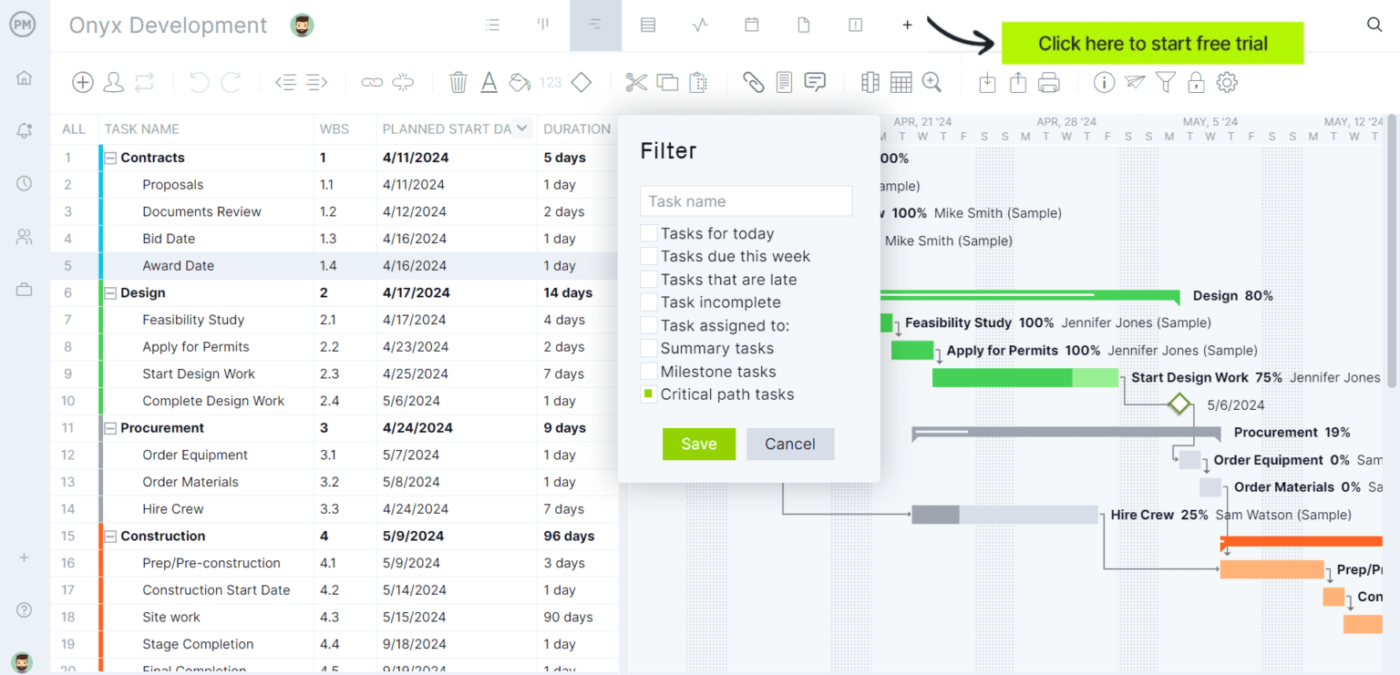
Features such as Gantt charts and task dependencies enable precise tracking of critical sequences in complex projects, ensuring that every task is accounted for and managed effectively.
With this tool, you can visualize the project’s critical path, optimize resource allocation, and manage the entire project timeline efficiently. It’s a versatile template for refining project planning and ensuring the timely completion of all critical paths.
✨Ideal for: Project managers and teams who need a straightforward, organized tool for visualizing project tasks, dependencies, and durations.
2. Critical Path Method Template by Vertex24
The Critical Path Method Template by Vertex24, a critical path software provider, is an Excel-based tool for helping project managers visualize dependencies and identify the critical path in their project timelines.
This critical path Excel template includes fields for task names, dates, durations, and predecessor relationships, allowing effective prioritization.
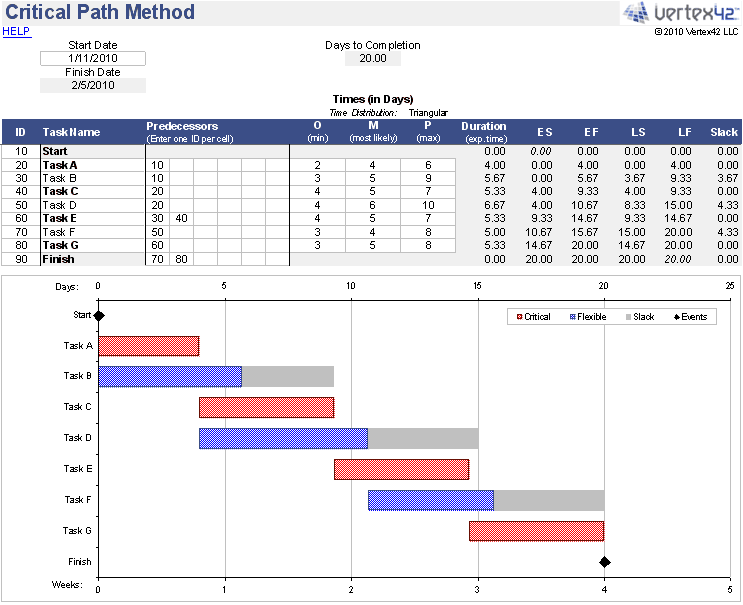
Inputting the project data automatically calculates the critical path, highlighting tasks directly impacting the project’s completion time. Additionally, the template features a Gantt chart for enhanced task visualization, facilitating effective scheduling and resource allocation.
✨Ideal for: Project managers who want an automated tool for calculating the critical path, enabling effective scheduling, task management, and resource allocation for project timelines.
3. Dissertation Timeline Gantt Chart Template by Template.net
The Dissertation Timeline Gantt Chart Template by Template.net provides a structured, visual timeline for organizing dissertation tasks. It is ideal for academic projects, allowing users to track task dependencies, deadlines, and overall progress.
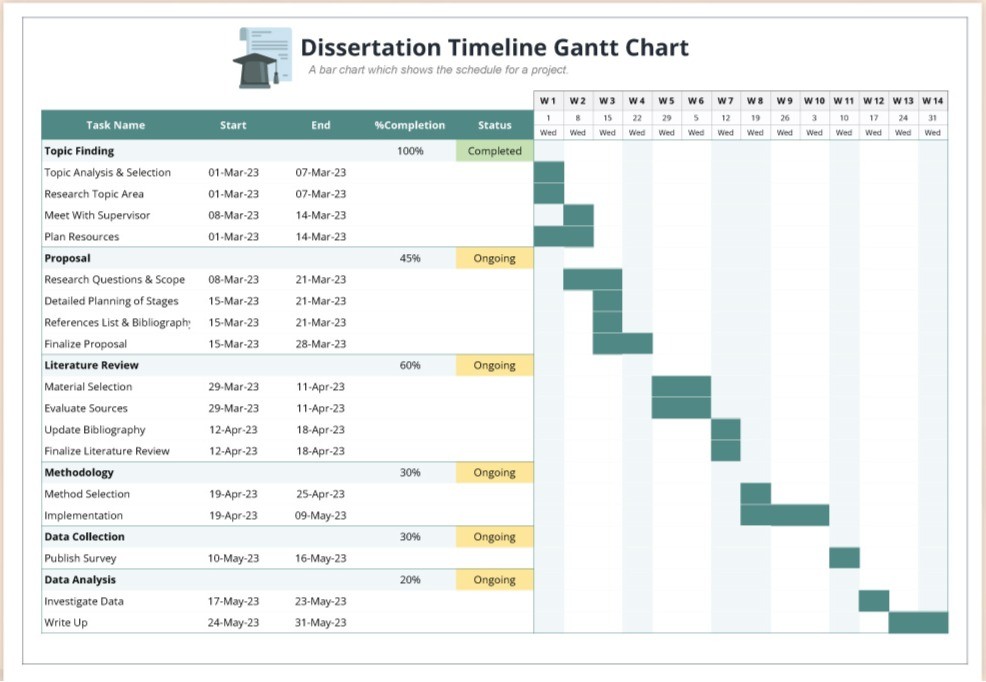
This template offers customizable fields for task names, timelines, and progress indicators, helping users maintain a clear and organized view of their projects.
✨Ideal for: Students and academic professionals who need a structured Gantt chart to organize their dissertation tasks.
4. Game Development Gantt Chart Template by Template.net
The Game Development Gantt Chart Template by Template.net offers a breakdown of game development stages, from design to testing. It’s great for tracking progress and managing dependencies across complex development processes.
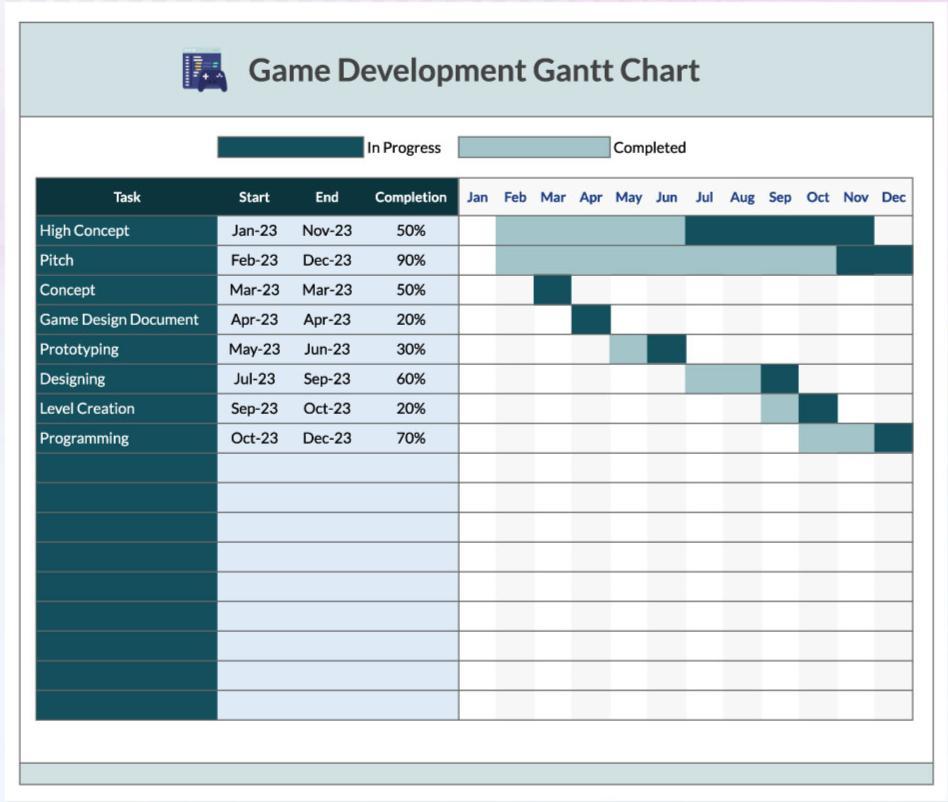
It offers a clear breakdown of each development phase, including pre-production, design, programming, and testing, allowing teams to monitor progress, set deadlines, and view task dependencies at a glance.
✨Ideal for: Game development teams who need a clear overview of all stages of development, from pre-production to testing.
5. Project Timeline with Milestones Template by Microsoft
The Microsoft Project Timeline with Milestones Template is an Excel-based template for mapping key project milestones. It helps project managers generate professional timelines to monitor progress efficiently.
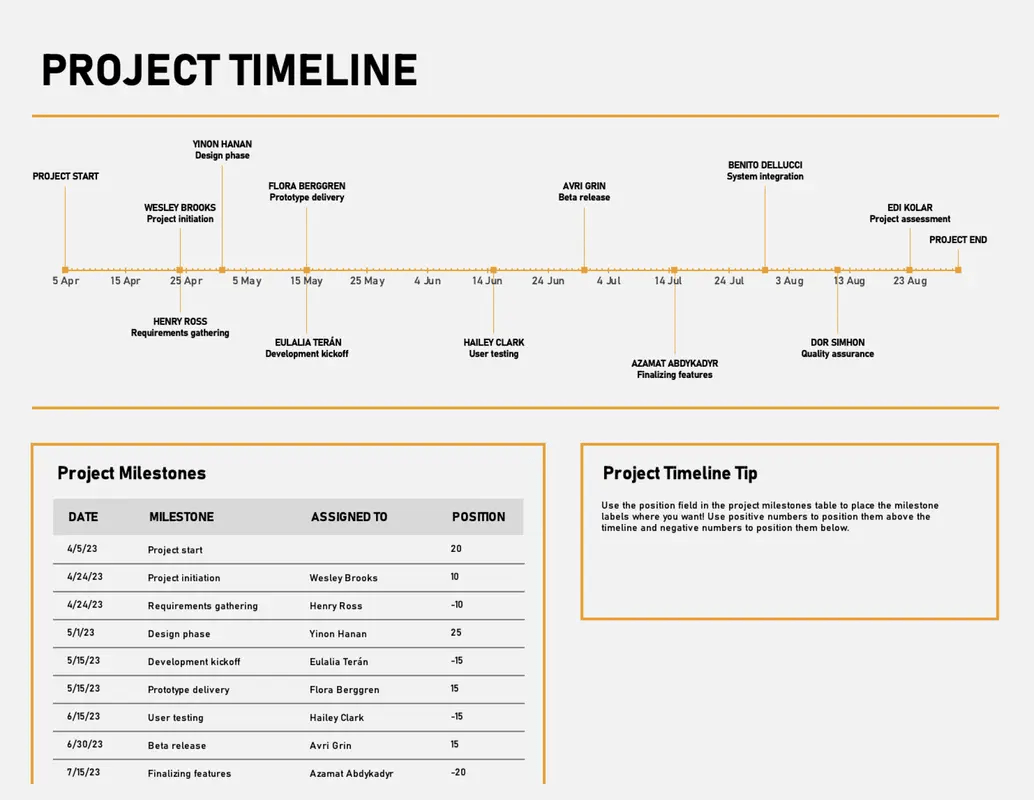
This fully customizable template allows users to adjust text, images, and other elements to suit specific project needs. By inputting milestone details, users can generate refined timelines that provide a clear overview of key project events and deadlines.
✨Ideal for: Generating professional timelines that provide a clear overview of key events and deadlines, allowing for efficient progress monitoring and project management.
Summarize this article for me pleaseLimitations of Using Excel for Critical Path Analysis
While Excel is helpful for critical path analysis in many projects, it has some limitations compared to specialized project management tools:
⚠️Difficulty with complex projects: Excel can handle basic tasks, but managing complex projects with intricate dependencies often requires significant manual setup, which can be time-consuming
⚠️Limited real-time collaboration: Unlike project management software, Excel doesn’t offer real-time collaboration, making it challenging for teams to update and track changes in the project timeline together
⚠️Basic visualization options: Excel’s Gantt charts are less dynamic and require manual updates for changes in the critical path
⚠️No built-in critical path analysis: Identifying critical path tasks requires custom formulas or templates, which can be limiting without advanced Excel skills
⚠️Resource tracking and allocation limits: Resource allocation isn’t built in, so tracking resources alongside the critical path requires additional setup
Summarize this article for me pleaseAlternative Critical Path Excel Templates
Excel templates are useful, but ClickUp offers a scalable and modern solution for more complex needs. ClickUp’s robust project management features include Gantt charts, timelines, and workload views, enabling project managers to visualize dependencies, monitor schedules, and adjust timelines in real time.
Additionally, ClickUp integrates with numerous tools and provides flexible import options. Through Zapier integrations, you can connect ClickUp to thousands of other applications, enhancing workflow customization and efficiency.
Suppose you’re seeking a scalable, all-in-one project management solution. In that case, ClickUp offers an extensive template library and a wide array of features to support you across your project management lifecycle.
Here are some ClickUp critical path templates that elevate critical path analysis beyond what Excel can offer.
1. The ClickUp Critical Pathway Analysis List Template
The ClickUp Critical Pathway Analysis (CPA) Template helps teams manage and track essential tasks. It offers features like time tracking, dependency warnings, and Gantt views, enabling precise scheduling and risk identification.
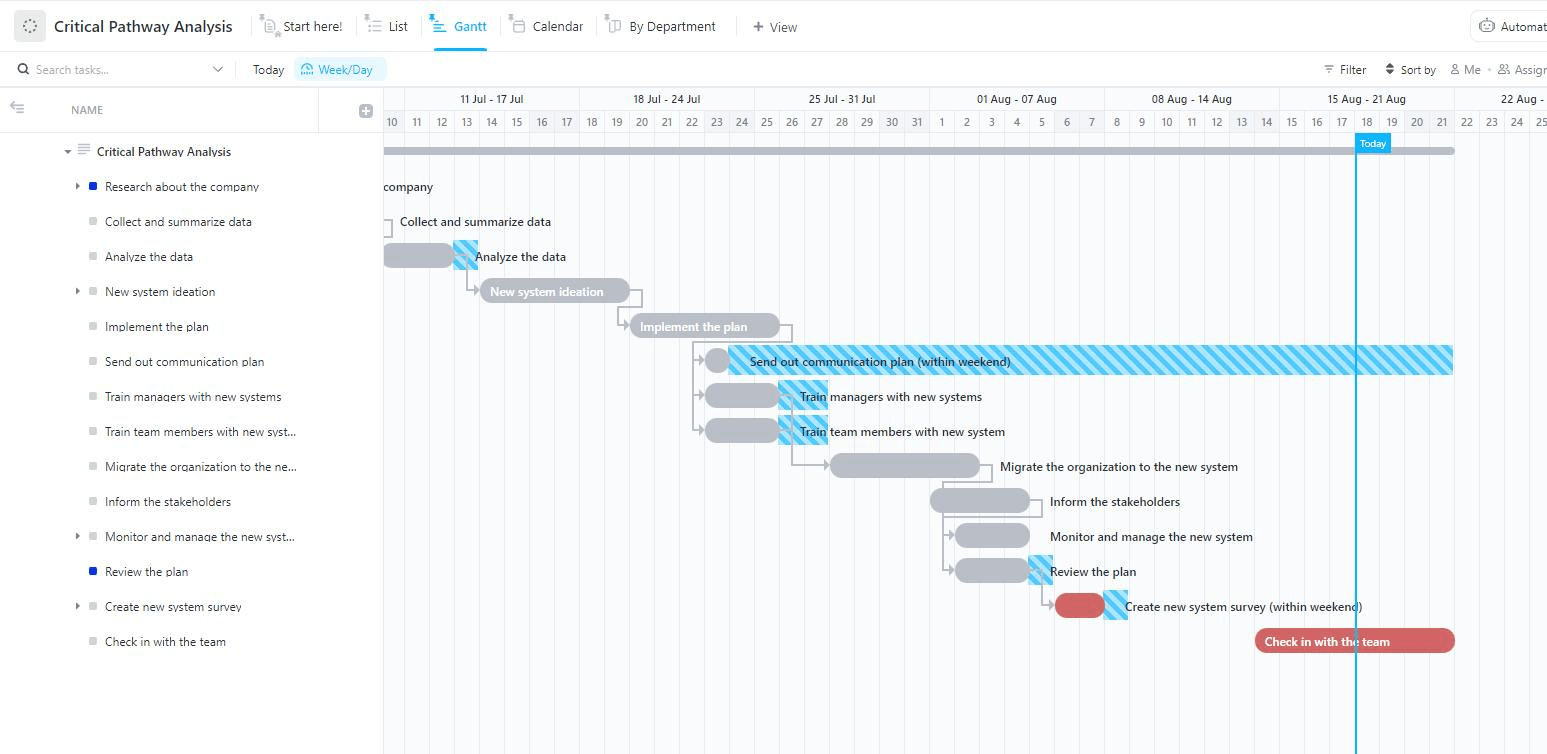
The template offers several key benefits that enhance project management effectiveness. By visualizing task dependencies and critical paths, teams can proactively address potential project risks early in the process.
This template also helps establish the appropriate order of tasks, ensuring that the entire project timeline remains on schedule. It supports aligning project timelines with deadlines, ultimately achieving project completion without delays.
Through this template, you can:
- Track project status with custom labels like “Complete,” “In Progress,” and “To Do” to maintain a clear project schedule
- Use custom fields such as Task Information, Duration, Delivering Team, and Progress to capture critical data
- Access multiple custom views, including List, Gantt, Calendar, and Department, for comprehensive insight into project paths
- Optimize project management with time tracking, tags, and dependency warnings to ensure you never miss a critical task
✨Ideal for: Teams that need a comprehensive solution to manage and track essential tasks, visualize dependencies, and ensure precise scheduling and risk management.
2. The ClickUp Critical Pathway Analysis Task Template
The ClickUp Critical Path Analysis Template provides detailed insights into task dependencies, progress tracking, and efficient management of the entire project timeline.
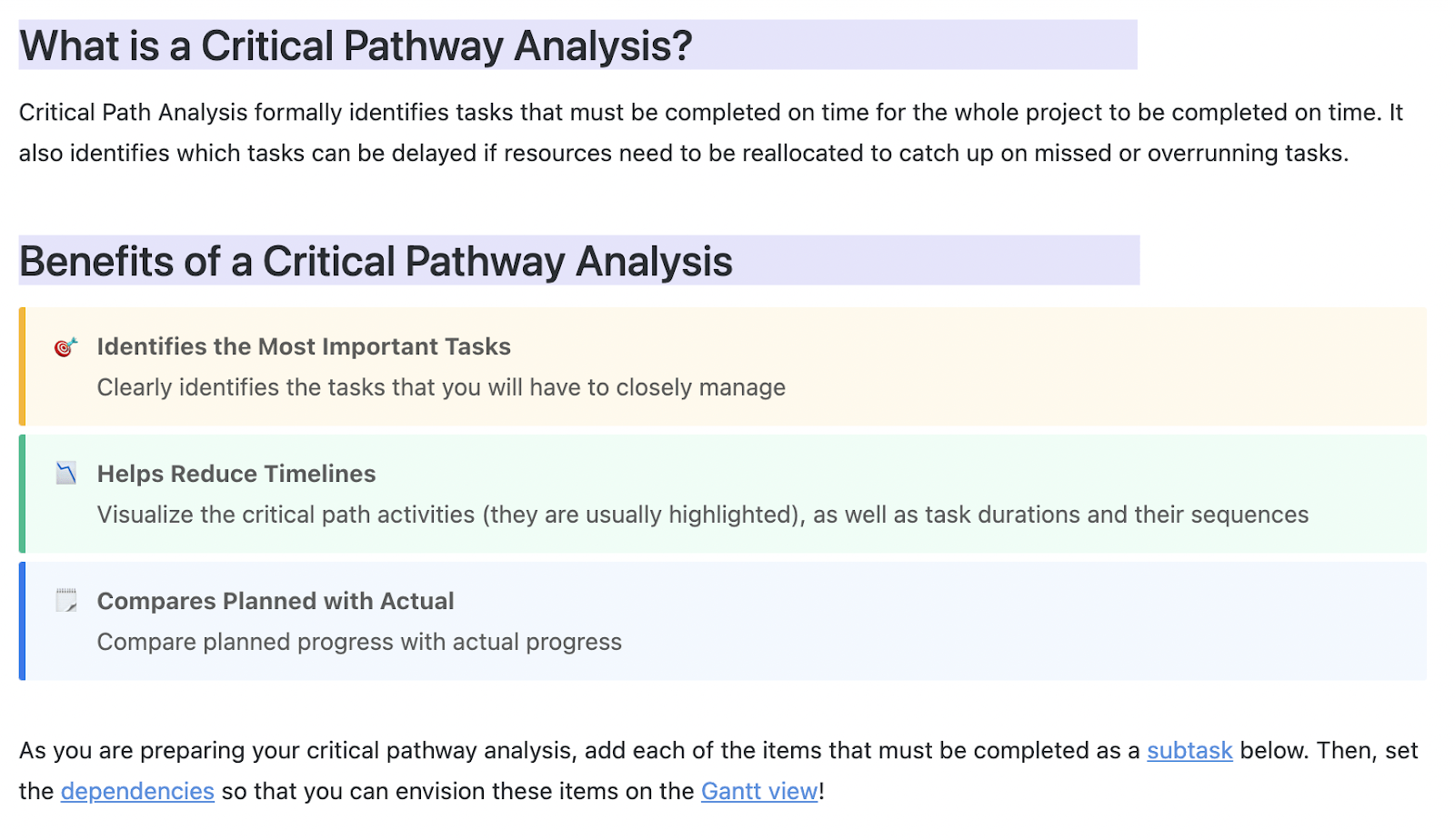
This template includes custom fields like Progress, Duration, Task Information, and Delivering Team, allowing teams to effectively monitor and manage tasks. It also features checklists and task descriptions, simplifying the creation of a precise Critical Path Method (CPM) analysis and enabling teams to prioritize essential tasks effectively.
Additionally, the Gantt view visualizes critical path activities, compares planned versus actual progress, and helps manage complex dependencies, offering the transparency needed to meet deadlines confidently.
With this Task template, you can:
- Identify the most important tasks
- Visualize the critical path activities (they are usually highlighted), as well as task durations and their sequences
- Compare planned progress with actual progress
✨Ideal for: Project managers requiring detailed insights into task dependencies, risk identification, and efficient timeline management for complex projects.
3. The ClickUp Project Timeline Whiteboard Critical Path Template
The ClickUp Project Timeline Whiteboard Critical Path Template offers an intuitive visual format for mapping critical tasks and milestones, supporting efficient team collaboration and on-time delivery.
With it, you can get a high-level view of the project with all tasks and milestones. You can also easily share timelines with stakeholders for transparency. The template also allows you to quickly adjust to task progress and address bottlenecks.
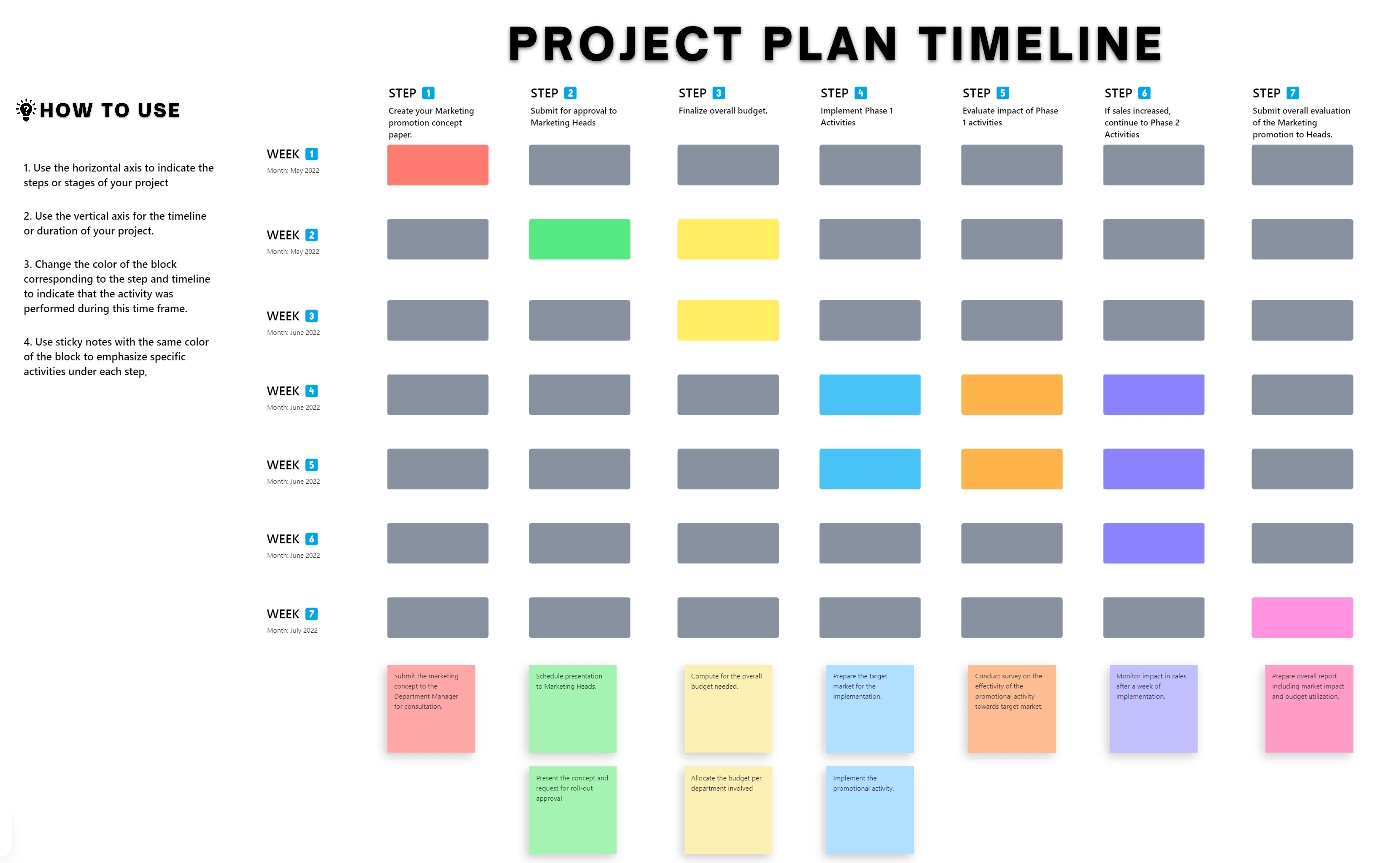
Some ways this template can make your life simpler include:
- Create task-specific custom statuses such as “Open” and “Complete” to monitor progress at every stage
- Organize tasks by adding custom fields like task duration, priority, and team assignments, simplifying the visualization of each project phase
- Access a consolidated Project Plan Timeline to track the project’s overall progress at a glance
✨Ideal for: Teams that prefer an interactive visual format for mapping critical tasks, collaborating efficiently, and keeping everyone aligned on project milestones.
4. The ClickUp Simple Gantt Critical Path Template
The ClickUp Simple Gantt Critical Path Template is designed for simplified project tracking, with features like SMART Goals, dependency visualization, and clear task sequencing, making it ideal for projects where timing is everything.
The beginner-level template has several time-saving features like Gantt Chart visualization to track project milestones, dependencies, and timelines. It is easy to organize tasks using the template, using structured tasks and subtasks to support each deliverable.
You can even monitor overall project health with real-time updates thanks to its automatic progress tracking.
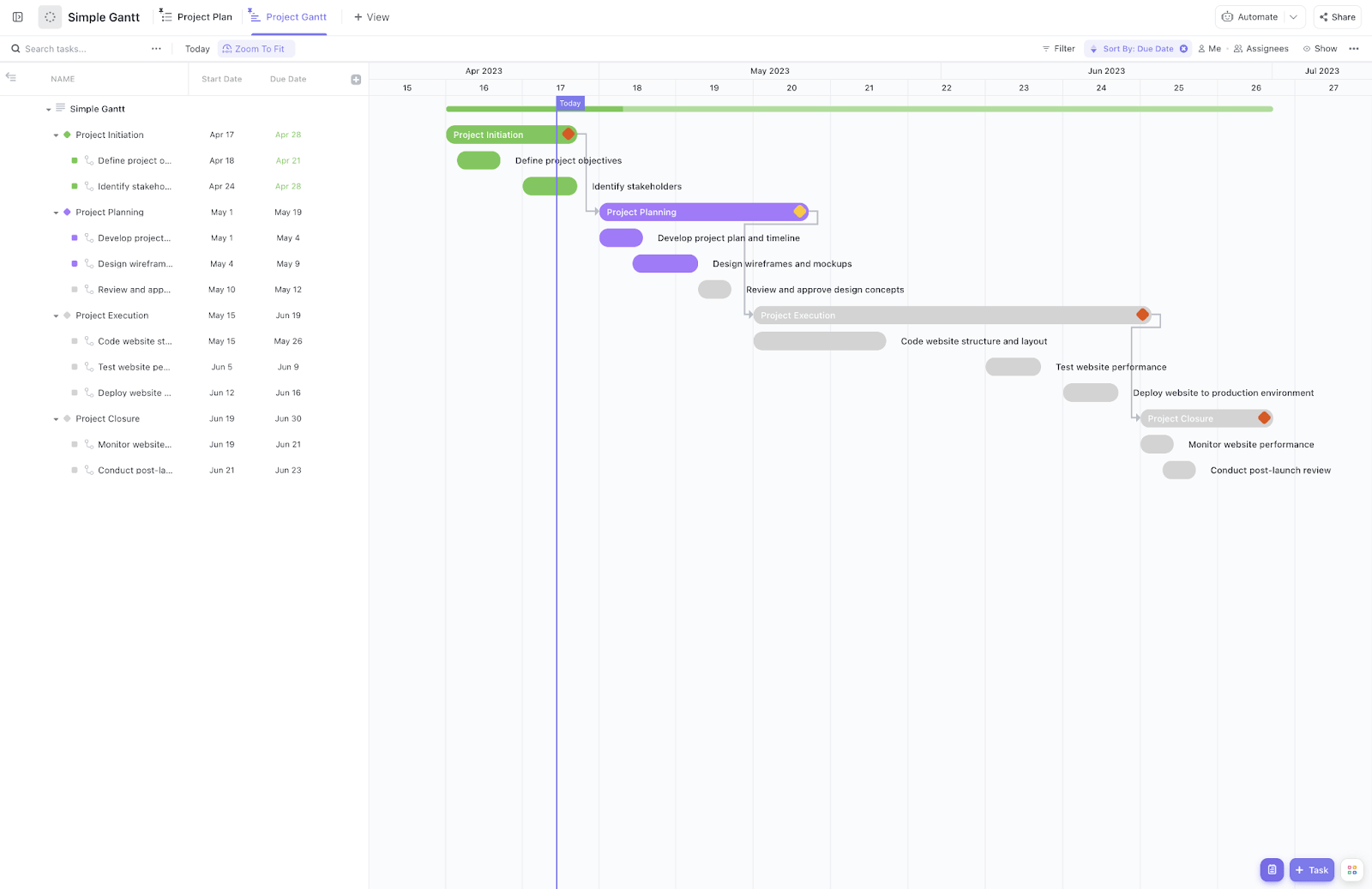
Here are some features that make this template super-easy to use and helpful:
- The List View allows for quick organization and tracking of SMART goals and action items by initiative, centralizing project information for easy access
- The Project Gantt View provides a visual timeline with task dependencies, illustrating how each task connects within the project for optimal scheduling
- You can create custom fields to track the progress of your project’s subtasks:
- Project Progress: Tracks the completion of subtasks as a percentage, offering real-time insights into task and project progress
- Project Phase: A dropdown field to categorize tasks by project phase, enhancing workflow prioritization and visual clarity
✨Ideal for: Project managers looking for a straightforward Gantt solution to effectively track milestones, dependencies, and overall project progress
5. The ClickUp Project Network Diagram Critical Path Template
The ClickUp Project Network Diagram Critical Path Template provides a visual map of task dependencies, making it easy to proactively refine project schedules and mitigate risk. You can visualize how tasks interconnect to manage resources proactively, spot potential bottlenecks early, and plan solutions. By mapping tasks clearly, it is also simple to ensure team alignment.
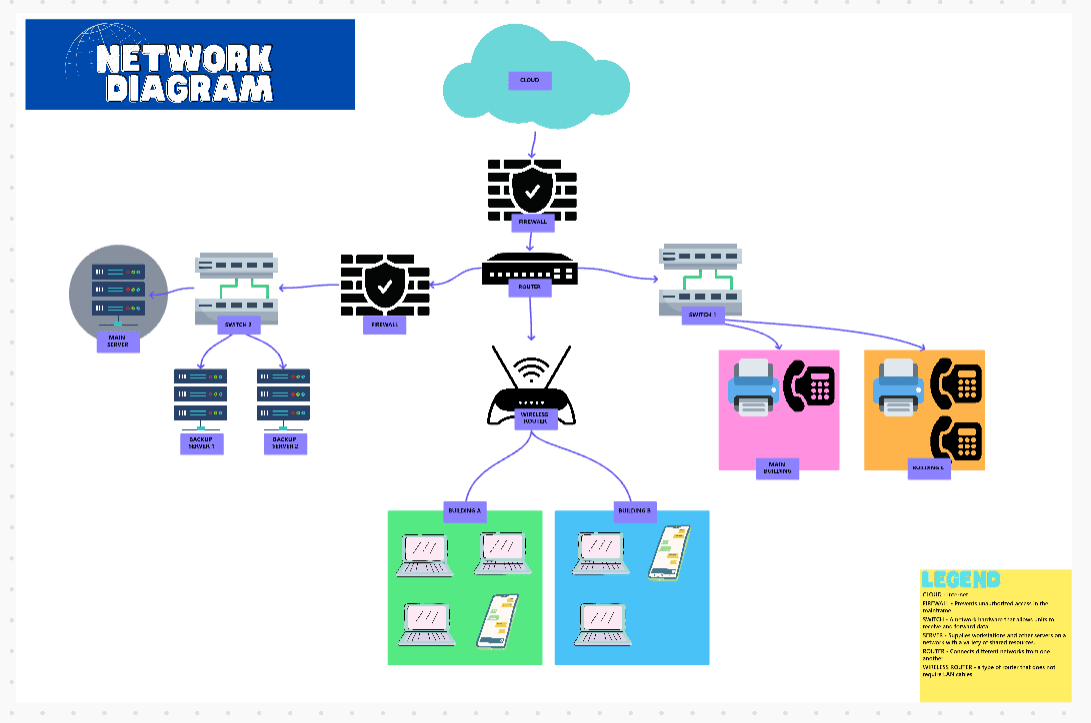
Here’s how this template helps:
- By breaking down projects into sequential tasks, milestones, and deliverables, this template enables you to connect tasks visually, making it easy to identify dependencies between each task
- It assists in determining essential tasks that directly impact project completion timelines through critical path analysis.
- You can even organize tasks using the Custom List View or switch to the Diagram View for an interactive, visual workflow
This comprehensive approach allows for more efficient and organized project management using this template.
✨Ideal for: Teams that need a visual representation of task dependencies to proactively manage schedules, identify bottlenecks, and mitigate risks.
6. ClickUp Gantt Project Timeline Critical Path Template
The ClickUp Gantt Project Timeline Critical Path Template helps project managers track timelines and dependencies visually, which is ideal for coordinating tasks across different departments.
This template offers several key benefits, such as comprehensive tracking and monitoring of tasks, milestones, and timelines at a glance. You can also break down large projects into manageable tasks for better oversight.
Share timelines and track dependencies to ensure resources are effectively allocated and make project management smoother for you with the ClickUp Gantt Project Timeline Critical Path Template.
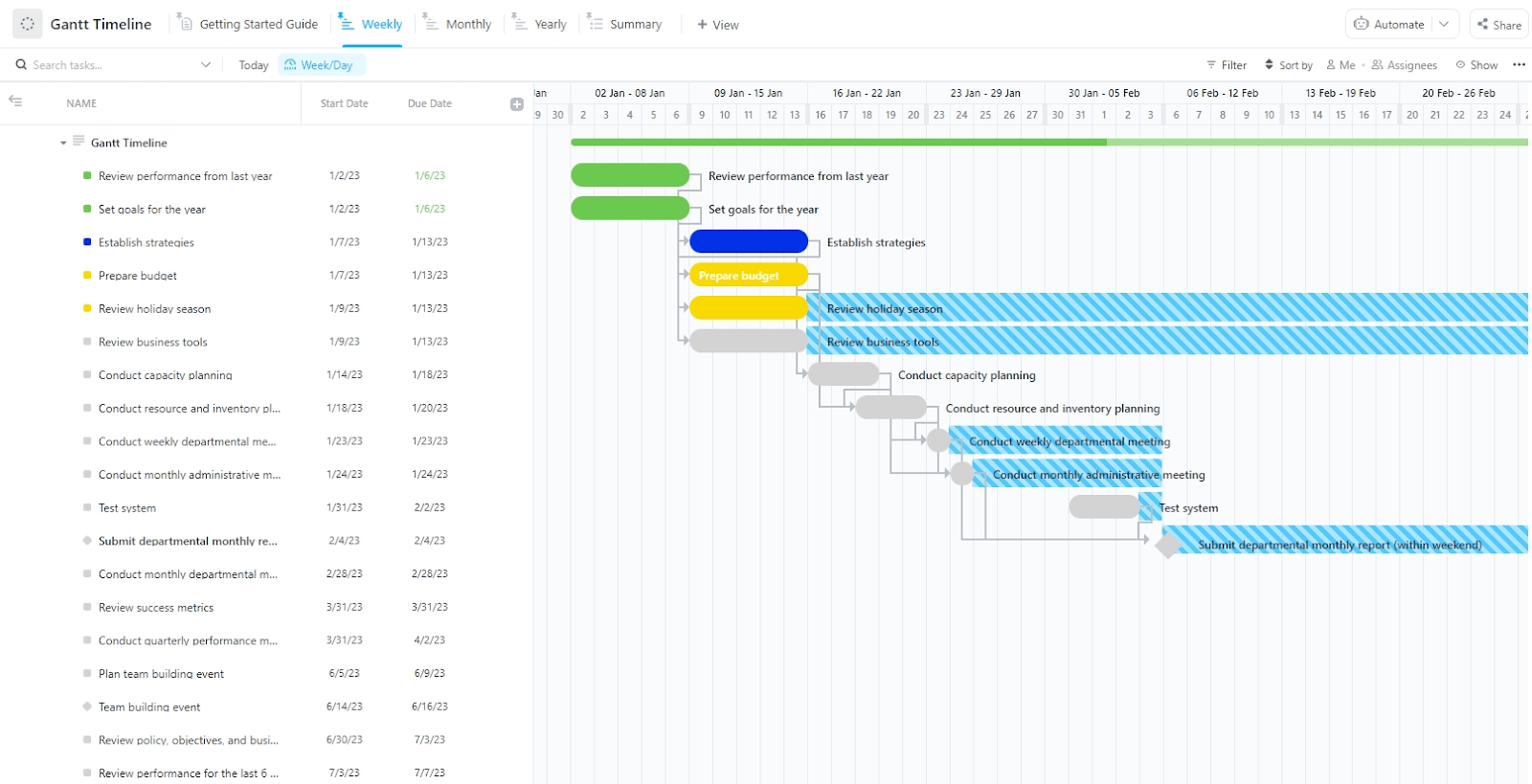
With this template, you can:
- Monitor project execution with statuses like To Do, In Progress, Complete, and Blocked, keeping teams aligned and identifying potential roadblocks early
- Utilize fields such as Completion, Duration, and Phases to visualize your project roadmap, making it easier to manage and update tasks
- Switch between views like Weekly, Monthly, Yearly, and Summary to access project information in the format that suits your needs
- Leverage ClickUp’s time tracking, tags, dependency warnings, and other advanced features to ensure your team stays on track and nothing is missed
✨Ideal for: Project managers overseeing large projects that require detailed task breakdowns, timeline visualization, and effective coordination across different departments.
7. The ClickUp Deadlines Critical Path Template
The ClickUp Deadlines Critical Path Template helps teams stay on top of deadlines with timely progress tracking, ensuring no critical task is missed. With this template, you can get a real-time overview of upcoming and overdue deadlines and organize tasks by start and due dates to avoid bottlenecks.
Further, for efficient collaboration, you can also keep all team members aligned and enhance communication to meet deadlines.

Six simple steps are all it takes to use the ClickUp Deadlines Critical Path Template to keep track of all your deadlines:
- First step? Set up your deadline! Use a preferred tool like ClickUp’s Gantt Chart, and be sure you’ve covered all your key dates
- Up next—estimations. Take a guess how long each task in your project will take. Don’t be afraid to break up larger/bigger tasks into smaller components to make the estimations easier
- Prioritize, prioritize, prioritize! A good way to prioritize is to first focus on tasks that are due soon and then work your way down the list
- Too many deadlines coming up? Be sure to set a reminder so that you don’t miss any of them! You can do this manually or use an automation tool like ClickUp’s Automations
- Keep monitoring your progress. Real-time tracking of your deadlines will help you identify any tasks where you are behind schedule and adjust accordingly
- Finally, don’t be afraid to tweak things as you go along. As task objectives change and deadlines move around, be sure those updates are reflected in your timeline to ensure you stay up-to-date!
✨Ideal for: Teams managing multiple deadlines who need a clear, real-time overview to track tasks and ensure timely project completion efficiently.
Summarize this article for me pleaseGet Access to the Best Critical Path Templates
Effective project management depends on prioritizing critical tasks. Using the right critical path template can significantly enhance your planning and execution. To supercharge your project management, consider integrating ClickUp’s powerful tools for managing tasks, tracking progress, and seamless team collaboration within a single platform.
ClickUp offers functionalities beyond traditional templates, allowing you to manage tasks, track progress, and collaborate seamlessly with your team. From Gantt charts to project whiteboards, ClickUp’s features enable precise and efficient management of your critical paths.
Sign up for ClickUp today and experience the difference firsthand!


Everything you need to stay organized and get work done.

Recent Articles
10 Free Project Status Report Templates (Daily, Weekly, Monthly) 
10 Free Project Status Report Templates (Daily, Weekly, Monthly)
Free Career Path Templates in Excel to Plan Professional Growth 
Free Career Path Templates in Excel to Plan Professional Growth
