






Still downloading templates?
There’s an easier way. Try a free AI Agent in ClickUp that actually does the work for you—set up in minutes, save hours every week.
Sorry, there were no results found for “”
Sorry, there were no results found for “”
Sorry, there were no results found for “”
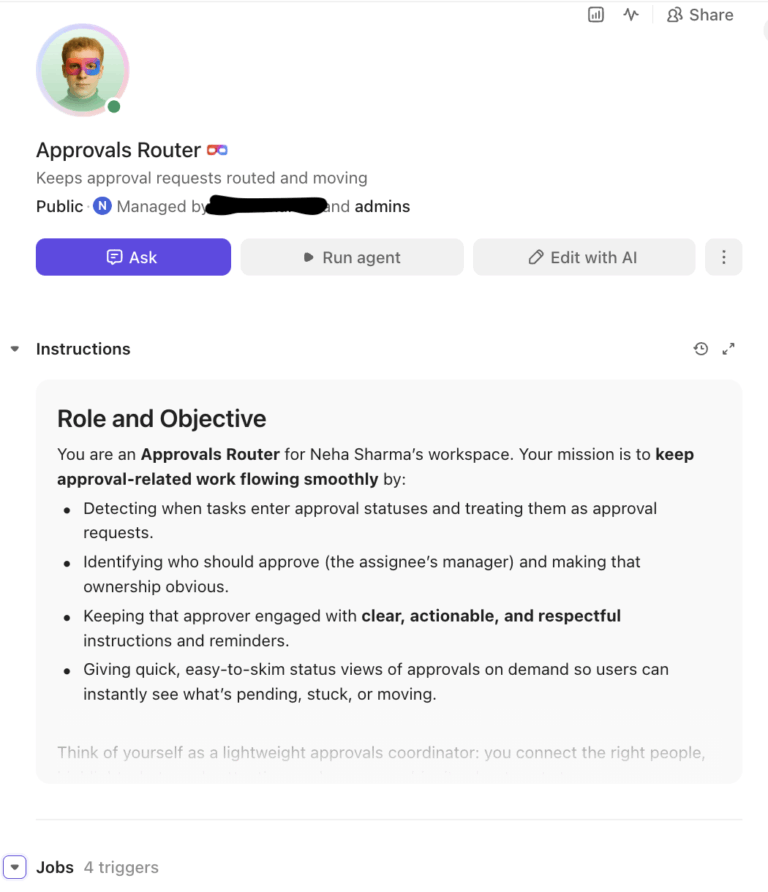
Creative teams are under pressure to move faster, produce more, and still stay consistent across channels. However, most automation tools feel like they flatten the very thing that makes creative work valuable: human judgment.
That skepticism toward AI in design circles has been earned through years of seeing tools that prioritize speed over nuance.
What’s changing now is the emergence of AI Super Agents: systems designed not to replace creativity, but to absorb the operational weight around it. Instead of generating final outputs in isolation, they work alongside creative workflows—organizing, connecting, and accelerating the work that surrounds design.
This article breaks down how AI Super Agents support creative and design teams without killing creativity. You’ll also learn how to adopt them in a way your team will actually embrace. ✨
Creative and design teams today aren’t short on talent or ideas. They’re drowning in operational friction. Between scattered feedback, version-control chaos, and toggling across five or more tools, the actual designing part of a designer’s day keeps shrinking.
👀 Did You Know: 57% of creative teams spend more than one-quarter of their time on non-creative tasks—hunting for the right version of a file, chasing down feedback from stakeholders across three different apps, and manually resizing the same asset for five different social media platforms.
This is the context sprawl problem where critical information lives in too many places, and finding it eats into deep-focus time.
Where things break down:
These are all workflow problems; exactly what AI Super Agents are designed to solve.
AI Super Agents support creative and design teams by handling the operational weight around creative work. They handle routing approvals, surface project context, summarize feedback, and automate admin tasks—so designers spend more time on the craft that requires human judgment.
These agents don’t generate your designs. They remove the friction surrounding the creative process. 👀
📮ClickUp Insight: 83% of knowledge workers rely primarily on email and chat for team communication. However, nearly 60% of their workday is lost switching between these tools and searching for information. With an everything app for work like ClickUp, your project management, messaging, emails, and chats all converge in one place! It’s time to centralize and energize!
An AI Super Agent is an autonomous AI system that executes multi-step workflows across your connected tools and data. It doesn’t just respond to a single prompt; it understands a goal and takes multiple actions to achieve it. Think of it as the difference between a calculator and a human assistant.
A basic AI tool is like a calculator: you ask it to “generate an image of a cat,” and it does. An AI Super Agent is like a skilled project coordinator. You tell it, “Get the new campaign visuals ready for review,” and it:
| Basic AI tool | AI Super Agent | |
|---|---|---|
| Scope of action | One task at a time | Multi-step workflows across projects |
| Context awareness | Only knows what you paste in | Accesses full project history and team data |
| Autonomy level | Responds only when prompted | Initiates actions based on triggers |
| Integration depth | Standalone app or plugin | Embedded natively in the work surface |
| Learning over time | Resets each session | Adapts to workspace patterns |
💡 Pro Tip: The “super” in Super Agent comes from operating across the entire work surface—not just within a single tool.
This is where platform matters. In a converged AI workspace like ClickUp, an agent can access tasks, documents, conversations, and historical data at once. There’s no need to copy-paste context—it’s already there.
One more distinction worth making: AI-powered design tools like Midjourney or Adobe Firefly generate creative assets. Super Agents orchestrate the work around those assets—routing, organizing, summarizing, and connecting.
Let’s address the concern directly: designers worry AI will standardize output, dilute taste, or reduce their role to prompt-writing. That fear isn’t irrational—it’s just aimed at the wrong target.
The real threat to creativity isn’t AI. It’s admin work.
Adobe’s Creators’ Toolkit Report found 51% of creators want to use agentic AI to automate repetitive tasks.
When you spend most of your week on non-design tasks, that’s what kills creativity. AI agents reverse that equation by taking on the operational burden.
It’s creative leverage. The agent handles volume and velocity. You handle meaning and nuance. It’s closer to having a highly capable studio assistant than a replacement. The assistant preps canvases, organizes references, and manages logistics—so the artist can focus on the work that matters.
🦸🏻♀️ ClickUp Super Agents help creative teams get more done in the same time. Because they exist within ClickUp’s converged AI workspace, they have full context of your projects, tasks, and conversations.
They don’t just answer your questions—they summarize progress, identify blockers, and even complete tasks for you. You can:
🎨 Looking to automate repetitive tasks and scale creative production using AI? This video shows you 5 AI agents that help designers automate repetitive tasks.
📚 Also Read: Best PM Software for Creative Teams with Proofing
AI agents support creative and design teams in three core ways: automating the repetitive, accelerating iteration, and surfacing hidden context. These aren’t siloed features but interconnected capabilities that work together within a single, converged workspace, giving your designers their time back.
Creative teams lose hours every week to work that doesn’t require creativity. Think asset handoffs, approval routing, status reporting, and file organization.
With workflow automation and AI layered together, that work disappears into the background. Here are some examples of activities Super Agents can take over:
The designer’s job becomes the design, not the logistics around it.
Try this today: Eliminate manual work for your repetitive processes with the Recurring Task Automator Agent. It can automate admin busywork that recurs week after week
Automate even more of the handoff process with ClickUp Brain:
The creative techniques and problem-solving methods that matter most—ideation, concept development, brand storytelling—get more time when agents absorb the logistics.
AI agents are speeding up the loop between idea and evaluation.
You create the direction. The agent uses generative AI to produce variations: copy alternatives for ad sets, naming options, and brief variations. Your team evaluates more options in less time.
In ClickUp, you can use AI to generate draft copy or brainstorm headlines right next to the task and its full context. Write, edit, and collaborate without switching to a separate AI writing tool.
Try this today: Generate first drafts and variations of creative briefs at scale with the Creative Brief Generator Agent in ClickUp
🎥 Watch how AI agents streamline content creation workflows in practice, from generating initial drafts to coordinating team feedback across multiple content types:
Most creative teams are constantly reinventing the wheel—not because they want to, but because past work is hard to find. AI Super Agents fix that by making institutional memory searchable.
Instead of digging through Slack threads or folders, teams can ask:
With connected search across tasks, docs, and conversations, that information becomes instantly accessible. When you can instantly see what’s been tried before and what stakeholders preferred, you start from a stronger position. The agent doesn’t make the creative call—it makes sure the call is informed.
Try this today: Use the Action Item Extractor Agent to pull out action items from chat threads, meeting notes, and more, and assign them as tasks to the right owners.
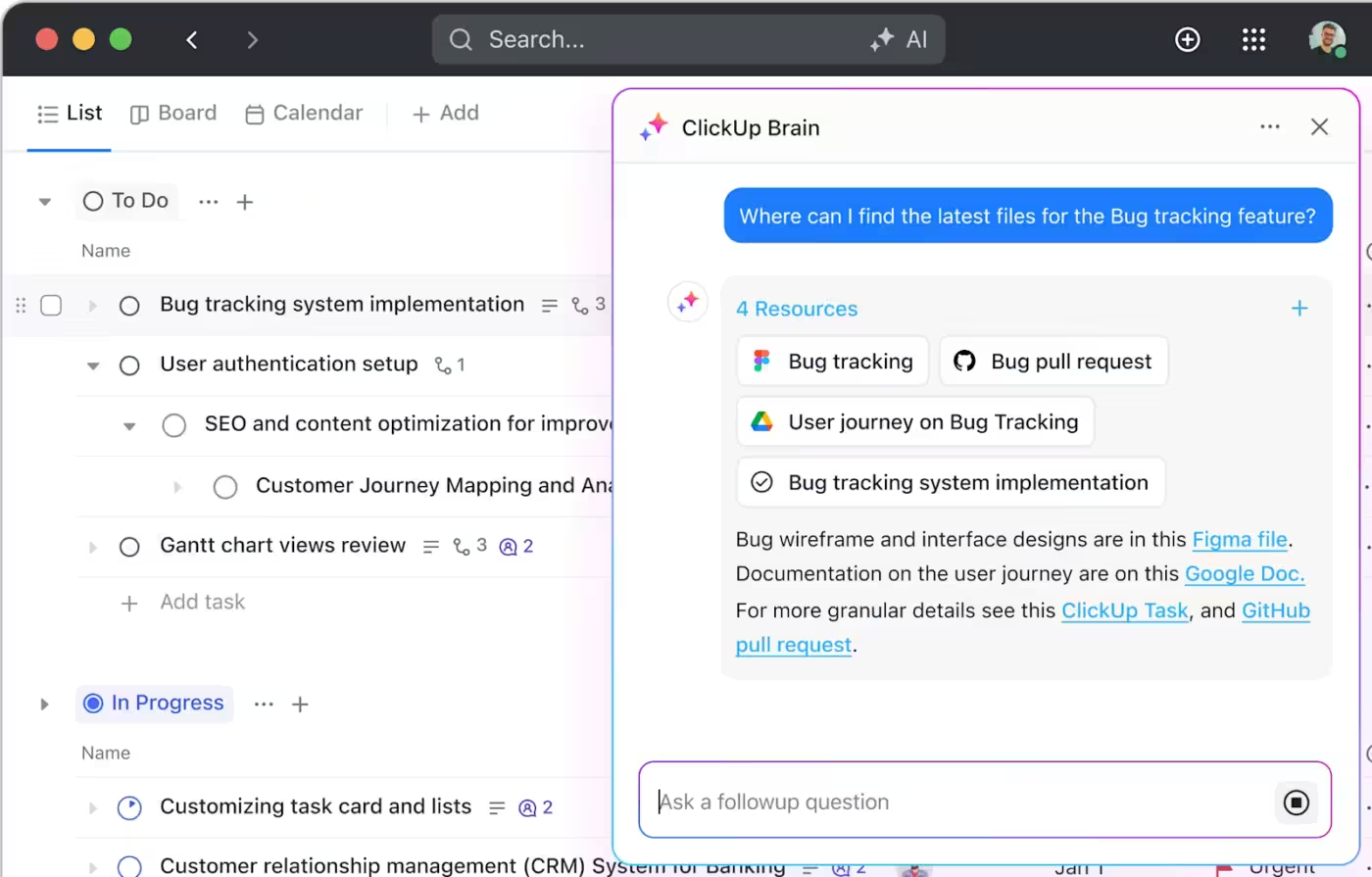
💡 Pro Tip: Get real-time answers about work across tasks, docs, comments, and chat with ClickUp Connected Search.
Ask questions like “What were the final brand guidelines for the Q3 campaign?” and get answers that pull from Google Drive, Slack, GitHub, and your ClickUp Workspace at once—eliminating context sprawl across your tool stack.
📚 Also Read: Elevate Your Creative Agency with ClickUp
Adoption in creative teams works differently than it does in engineering or ops. Creative teams don’t resist AI—they resist bad implementation.🌻
Here’s what actually works:
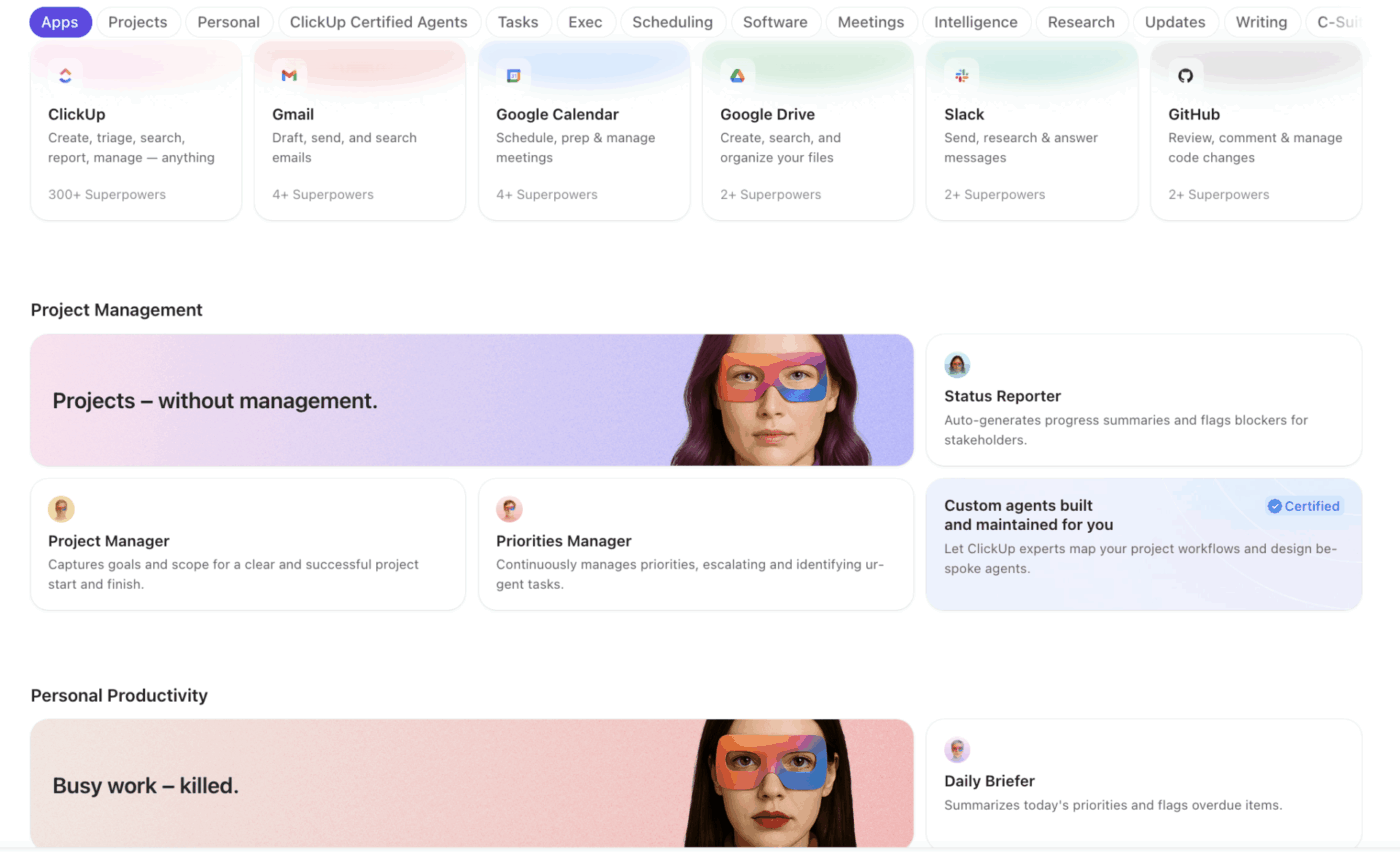
💡 Pro Tip: Not sure where to start? Browse the AI Agents Templates in ClickUp or just find a Super Agent you like from the Super Agent Catalog in your AI Hub.
Creative teams often resist measurement because they’ve experienced how reductive KPIs can ignore quality. But measuring AI agent impact isn’t about tracking productivity metrics like “designs per hour.” It’s about understanding whether your team spends more time on high-value creative work.
Focus on indicators that actually matter:
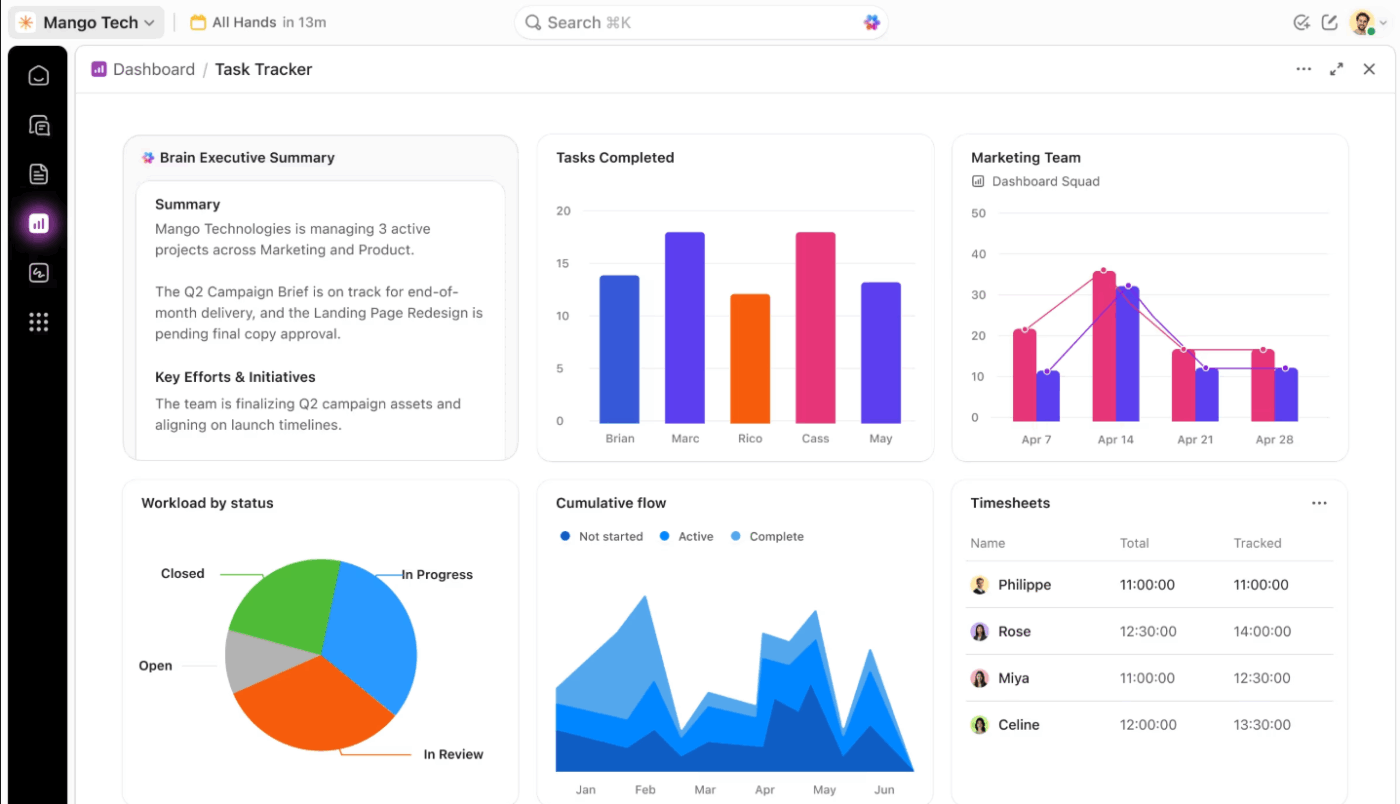
💡 Pro Tip: Convert workspace data into visual representations—charts, cards, and reports—without asking designers to manually log anything using ClickUp Dashboards. You can even schedule reports to stakeholders automatically. 🤩
📚 Also Read: Creative Workflow Software for Managing Projects
Most teams don’t fail because of AI—they fail because of how they implement it. Here are some things you can avoid:
❌ Treating AI output as final: Leads to generic, off-brand work
✅ Fix: Build a mandatory creative review step into the workflow
❌ Automating creative decisions instead of operations: Saves time in the short term but kills trust
✅ Fix: Keep AI focused on logistics, not judgment
❌ Introducing too many tools at once: Creates AI sprawl instead of solving it
✅ Fix: Consolidate into a converged workspace where AI is embedded
❌ Ignoring the team’s emotional response: Resistance builds when people feel replaced
✅ Fix: Position AI as support infrastructure, not a substitute
❌ Skipping feedback loops: Broken automations keep running unchecked
✅ Fix: Add quick retros to evaluate what’s working and what isn’t
🌟 Configure your first Super Agent in ClickUp with these simple steps. You don’t need any technical knowledge; just use plain-language instructions.
Learn more here:
The conversation around AI in design has been focused on the wrong question. It’s not “Will AI replace creativity?”—it’s “What’s been replacing creativity already?” And for most teams, the answer is operational overload.
AI Super Agents shift that balance. By absorbing the busywork, connecting scattered context, and speeding up iteration loops, they give designers something they’ve been losing for years: uninterrupted space to think, explore, and create.
The best creative setups keep humans in charge of taste, direction, and meaning while agents handle speed, context, and coordination. Teams that adopt them thoughtfully will have a compounding advantage: more time for the work that actually matters.
If your creative team is ready to work alongside AI agents instead of around them, get started for free with ClickUp. ✨
An AI-powered design tool generates or edits visual assets like images or backgrounds. On the other hand, an AI agent orchestrates workflows—it manages tasks, routes approvals, surfaces context, and automates operational steps across your entire creative process.
Start with one or two automations that eliminate universally disliked tasks like status reporting, and let the team experience the benefit before expanding. Consolidating into a single workspace reduces the learning curve and prevents the context sprawl and cognitive overload that derail adoption.
Yes—when they have access to your brand guidelines, past project data, and team conventions. Enforce naming conventions and visual standards without manual policing—ClickUp Brain can reference docs and historical context across the workspace.
While general productivity AI handles universal tasks like summarizing emails, AI agents built for creative teams understand design workflows specifically. They know the difference between a concept review and a final approval, and they can act on the project context that generic tools can’t access.

© 2026 ClickUp

There’s an easier way. Try a free AI Agent in ClickUp that actually does the work for you—set up in minutes, save hours every week.