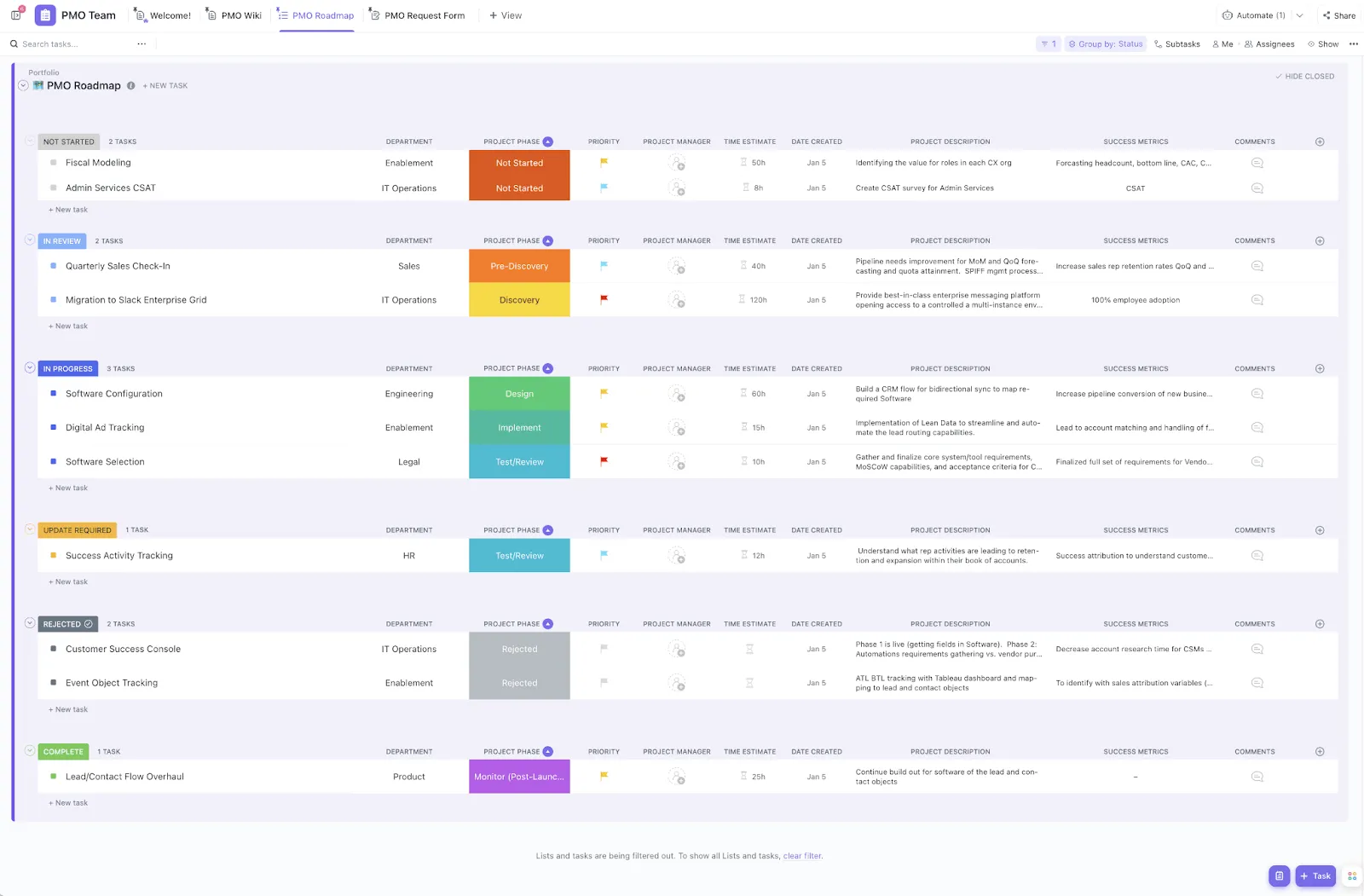

At the start of every new project, teams often spend more time hunting down data, setting up sheets, and perfecting workflows than actually getting work done. That’s Work Sprawl in action, and it costs you countless hours in lost productivity. Smartsheet templates can change that to an extent. Imagine opening a project plan that’s already organized—timelines in place, task lists ready to go, and dashboards built for easy tracking.
For project managers, operations teams, and business leaders, these templates provide a simple way to standardize processes, improve visibility, and save hours of setup time.
In this article, we’ll walk you through the top Smartsheet templates to streamline your processes and improve visibility across teams.
Smartsheet Templates at a Glance
Here’s a quick look at the top Smartsheet templates And if you’re looking for something more flexible and want to save time, we’ve also included the best ClickUp templates that might suit your workflow even better.
| Template Name | Download Template | Ideal For | Best Features | Visual Format |
| Work Breakdown Structure (WBS) Template | Download this template | Project managers, cross-functional teams | Task owners, deadlines, dependencies, visual indicators | Smartsheet Table, Hierarchy |
| Roadmap with Waterline Template | Download this template | Ops, product teams | Waterline prioritization, color-coded bars, drag-and-drop | Smartsheet Roadmap, Gantt |
| Email Campaign Project Plan Template | Download this template | Marketing teams | Task assignments, dependencies, reminders | Smartsheet Table, Calendar |
| Integrated Digital Marketing Plan Template | Download this template | Marketing leads, digital teams | Channel mapping, KPIs, budget tracking | Smartsheet Table, Dashboard |
| Social Media Plan Template | Download this template | Social media managers, content teams | Calendar, campaign goals, category tags | Smartsheet Calendar, Table |
| Marketing Campaign Plan Template | Download this template | Marketing teams | Campaign phases, deliverables, feedback loops | Smartsheet Table, Calendar |
| Marketing Budget Template | Download this template | Marketing managers | Planned vs. actual spend, variance formulas, summaries | Smartsheet Table, Chart |
| Weekly Task List Template | Download this template | Team leads, professionals | Daily breakdown, priorities, checkboxes | Smartsheet Table, Checklist |
| Weekly Schedule, Sun‑Sat 30‑min Interval Template | Download this template | Professionals, coaches | 30-min intervals, color-coding, full-week view | Smartsheet Calendar, Table |
| Team Project Task Board Template | Download this template | Teams, project managers | Kanban board, status columns, blockers | Smartsheet Board, Table |
| Event Launch & Budget with Gantt Timeline Template | Download this template | Event managers | Gantt view, budget tracking, drag-and-drop | Smartsheet Gantt, Table |
| Sprint Planning Board Template | Download this template | Agile, dev teams | Swimlanes, story points, retrospectives | Smartsheet Board, Table |
| ClickUp Project Management Template | Get free template | Project teams, managers | List/Board/Gantt views, time tracking, dependencies | ClickUp List, Board, Gantt |
| ClickUp Simple Gantt Template | Get free template | Teams, project managers | Gantt chart, dependencies, color-coded fields | ClickUp Gantt, List |
| ClickUp Project Tracker Template | Get free template | Project managers, team leads | Multi-project tracking, RAG status, workload | ClickUp List, Board, Gantt |
| ClickUp Resource Management People Template | Get free template | HR, people ops, PMs | Workload, onboarding, review tracking | ClickUp List, Board, Timeline |
| ClickUp Daily To-Do List Template | Get free template | Professionals, creators, teams | Prioritization, custom fields, multiple views | ClickUp List, Board, Table |
| ClickUp Agile Project Management Template | Get free template | Agile teams | Sprints, backlog, standups, reviews | ClickUp Board, List, Calendar, Gantt |
| ClickUp Project Timeline Whiteboard Template | Get free template | Team leads, PMs | Visual swimlanes, milestones, dependencies | ClickUp Whiteboard, Timeline |
| ClickUp Marketing Plan Template | Get free template | Marketing teams | Multi-channel planning, custom fields, real-time status | ClickUp List, Board, Calendar |
| ClickUp Content Calendar Template | Get free template | Content, social media teams | Drag-and-drop, custom fields, attachments | ClickUp Calendar, List, Board |
| ClickUp CRM Template | Get free template | Sales, client-facing teams | Pipeline, automation, sales playbook | ClickUp Board, List, Calendar, Docs |
| ClickUp Personal Budget Template | Get free template | Project managers, professionals | Income/expense tracking, dashboards, goals | ClickUp List, Dashboard |
| ClickUp OKR Framework Template | Get free template | Team leaders, PMs, execs | OKR tracking, dashboards, filters | ClickUp List, Board, Timeline |
What Makes a Good Smartsheet Template?
The best Smartsheet templates don’t just organize data—they actively help you make decisions. Here’s what separates a useful template from one that collects dust:
- Solves a specific problem and takes work off your plate, like helping you track progress, manage timelines, or automate recurring tasks
- Can be customized for your team’s workflow, so you can tweak columns, add automation, or adjust views without starting from scratch
- Includes built-in formulas or automations for basic math, status updates, reminders, etc.
- Scales well beyond a single project and grows with your projects, teams, and reporting needs over time
- Offers visibility across tasks, owners, and deadlines to make team accountability clear at a glance
👀 Did You Know? Project management is one of the fastest-growing professions globally. The World Economic Forum ranks it as the 12th fastest-growing role, with demand set to rise by 16 million new project professionals in the next decade.
Meanwhile, nearly 40 million people already hold project-focused roles across 170+ job titles, from Agile coaches and product owners to portfolio managers.
📚 Read More: How to Export From Smartsheet
Smartsheet Templates
Handpicked for their practicality, automation, and real-world use cases, these Smartsheet templates gallery is designed to streamline workflows and improve project efficiency.
1. Work Breakdown Structure (WBS) Template
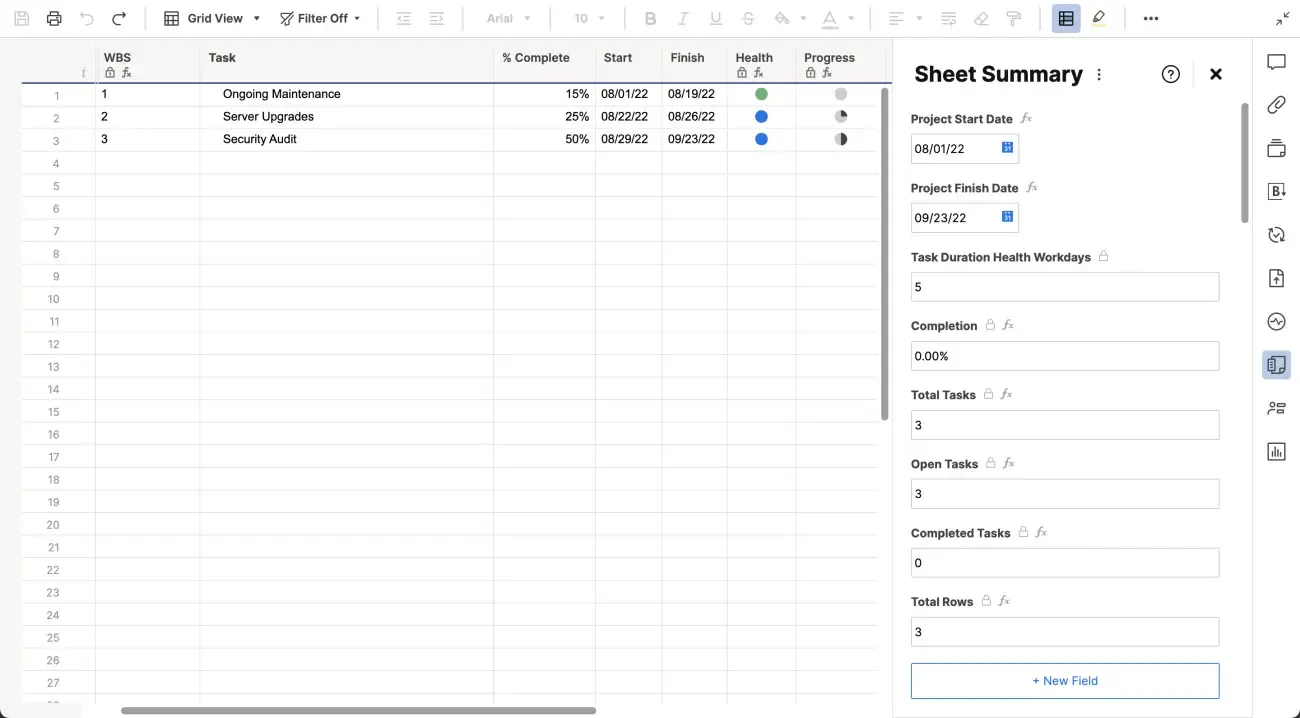
When you’re managing a large project, the last thing you need is a messy task list that hides more than it helps. That’s where you can use WBS, a method of visually breaking down work into multiple components. This WBS template gives you a crystal-clear view of your entire project hierarchy from high-level deliverables down to individual action items. It lets you plan work in digestible chunks and map out who’s doing what, and by when.
Why you’ll love this template:
- Assign task owners, deadlines, and status right from the start
- Spot slowdowns early with built-in visual indicators
- Connect tasks with dependencies to stay aligned across phases
✅ Ideal for: Project managers handling multi-phase or cross-functional projects who need clarity at every level
2. Roadmap with Waterline Template
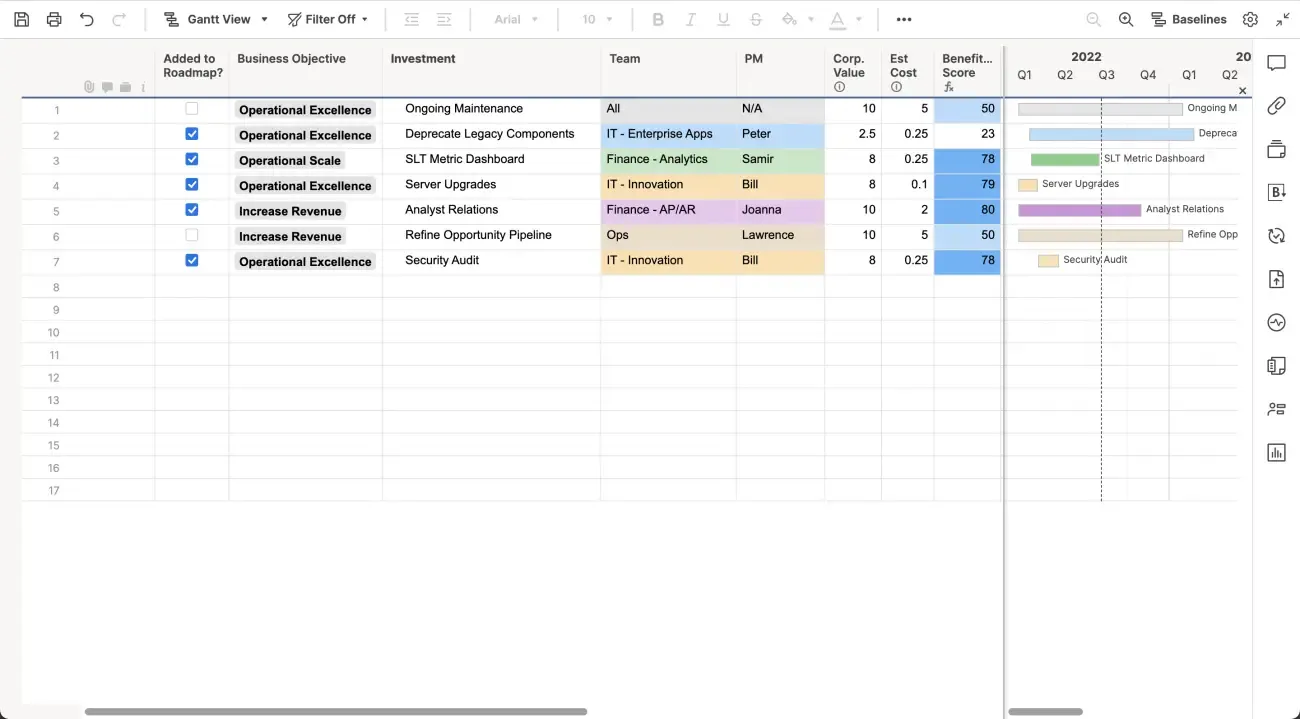
Trying to balance stakeholder expectations with limited resources? The ‘waterline’ feature in the Smartsheet Roadmap with Waterline Template lets you draw a clear line between what’s currently prioritized and what’s on hold. This helps you communicate trade-offs visually.
It’s especially useful during planning sessions when everything feels like a ‘must-have’, keeping things grounded.
Why you’ll love this template:
- Align stakeholders by making tough calls transparent and data-backed
- Update timelines and deliverables quickly with drag-and-drop simplicity
- Use color-coded bars to categorize work by team, function, or impact
✅ Ideal for: Ops and product teams planning roadmaps under tight timelines and shifting priorities
🔍 Did You Know? Developed by software expert Dai Clegg in 1994 while working at Oracle, the MoSCoW method (Must, Should, Could, Won’t) was created to help teams simplify priorities during Rapid Application Development (RAD) by categorizing what truly must be done versus what can wait.
3. Email Campaign Project Plan Template
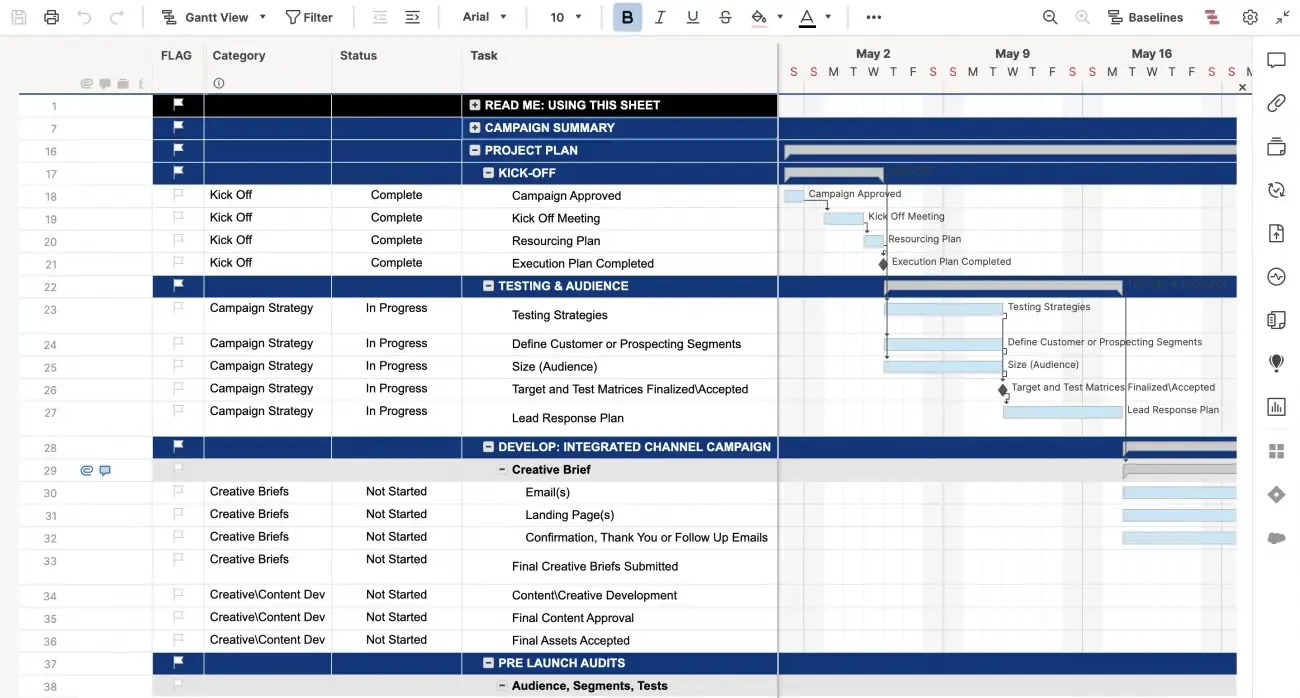
Launching email campaigns is a series of tasks, deadlines, dependencies, and approvals. This template helps you organize every moving part of your campaign, from content creation and audience segmentation to testing and final deployment. It includes sections for each stage of your email campaign, ensuring you won’t forget anything important (like that all-critical A/B test or approval step!)
Why you’ll love this template:
- Assign responsibilities to writers, designers, and approvers in one place
- Track timelines, dependencies, and status updates without switching tools
- Keep every task on track with automatic due dates and timely reminders
✅ Ideal for: Marketing teams running recurring email campaigns that involve multiple team members or stakeholders
📮 ClickUp Insight: A typical knowledge worker has to connect with 6 people on average to get work done.
This means reaching out to 6 core connections on a daily basis to gather essential context, align on priorities, and move projects forward.
The struggle is real—constant follow-ups, version confusion, and visibility black holes erode team productivity. A centralized platform like ClickUp, with Enterprise Search and A I Knowledge Manager, tackles this by making context instantly available at your fingertips.
4. Integrated Digital Marketing Plan Template
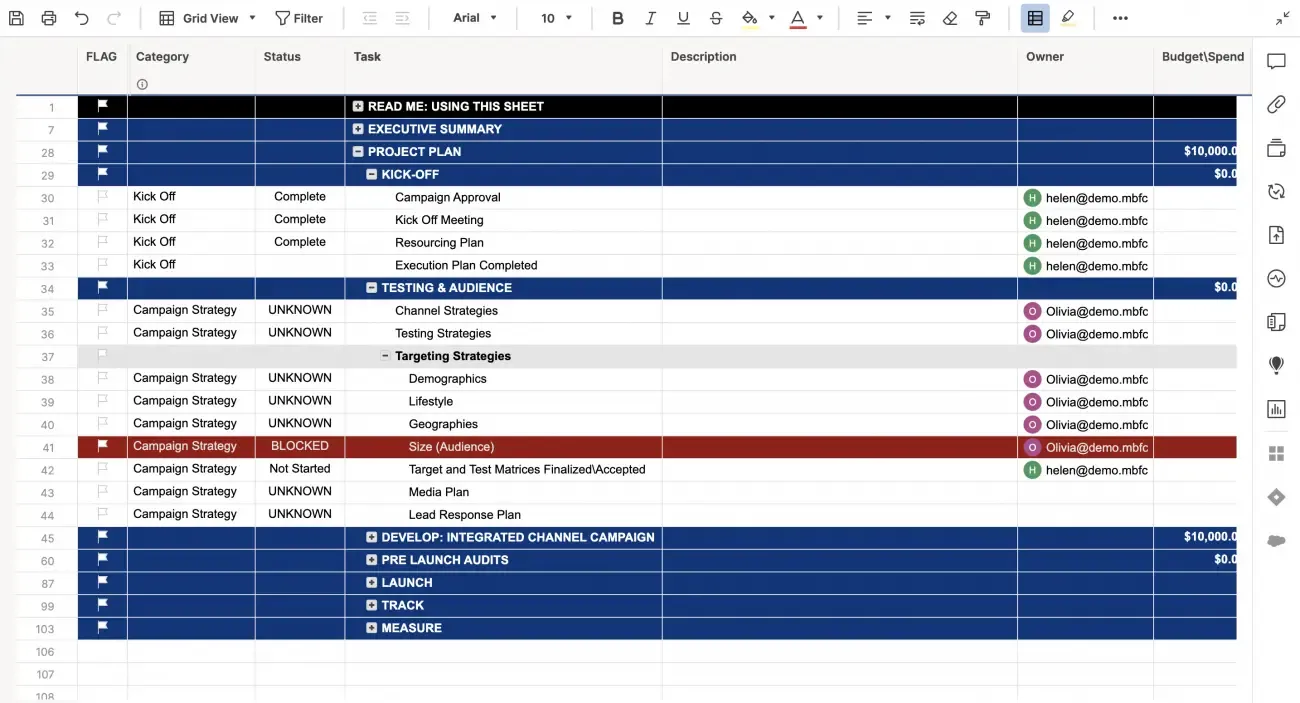
Digital marketing can get complicated fast with ads, SEO, content, email, and social, all running on different timelines. Smartsheet’s Integrated Digital Marketing Plan Template helps you bring everything under one roof with a centralized plan.
You can map goals across channels, track campaign statuses, manage budgets, and stay ahead of deadlines without the usual chaos.
Why you’ll love this template:
- Align campaigns with strategic goals across paid, earned, and owned media
- Monitor progress across teams with clear KPIs and status fields
- Manage timelines and spend without jumping between docs or sheets
✅ Ideal for: Marketing leads managing multiple digital campaigns across platforms and teams
⭐ Bonus: Streamline your project planning with ClickUp Brain:
ClickUp Brain is a complete AI work assistant that understands your projects, priorities, and tools. Instead of switching between disconnected AI tools, which further leads to Tool Sprawl, ClickUp Brain centralizes your work context (tasks, docs, calendars, chats, and even connected apps) into one smart system that works within your workflow, with your data, and delivers what you need right when you need it.
Here’s how it helps you work smarter:
- Eliminates manual busywork like writing standups, assigning tasks, or creating reports
- Fills communication gaps by providing instant summaries, updates, and context for tasks
- Reduces tool overload by unifying AI, search, and automation across every work app you use
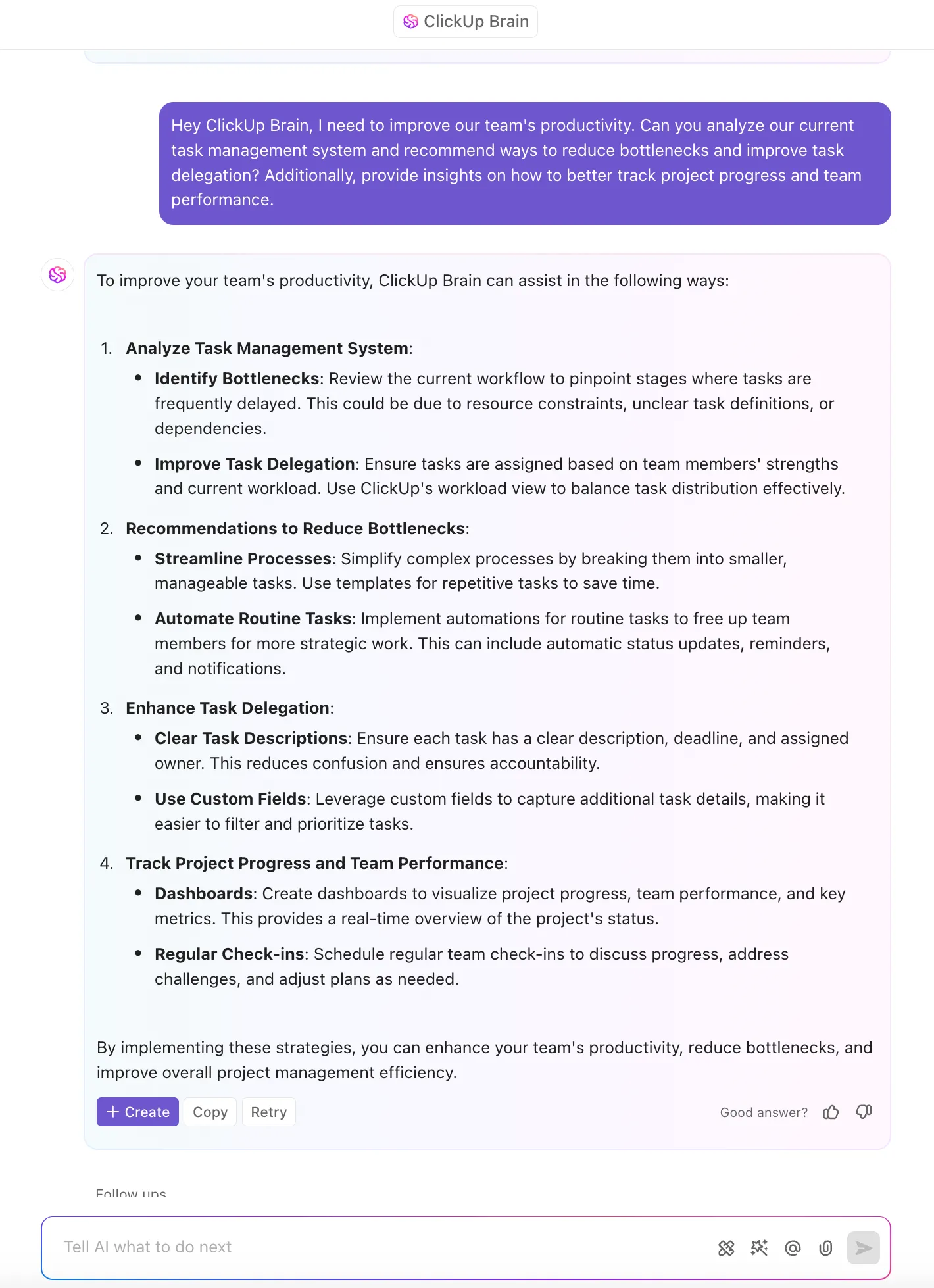
Normally, you’d spend an hour digging through tasks, writing a status update, and double-checking deadlines across different tools. But with ClickUp Brain, you get instant updates from across your workspace.
5. Social Media Plan Template
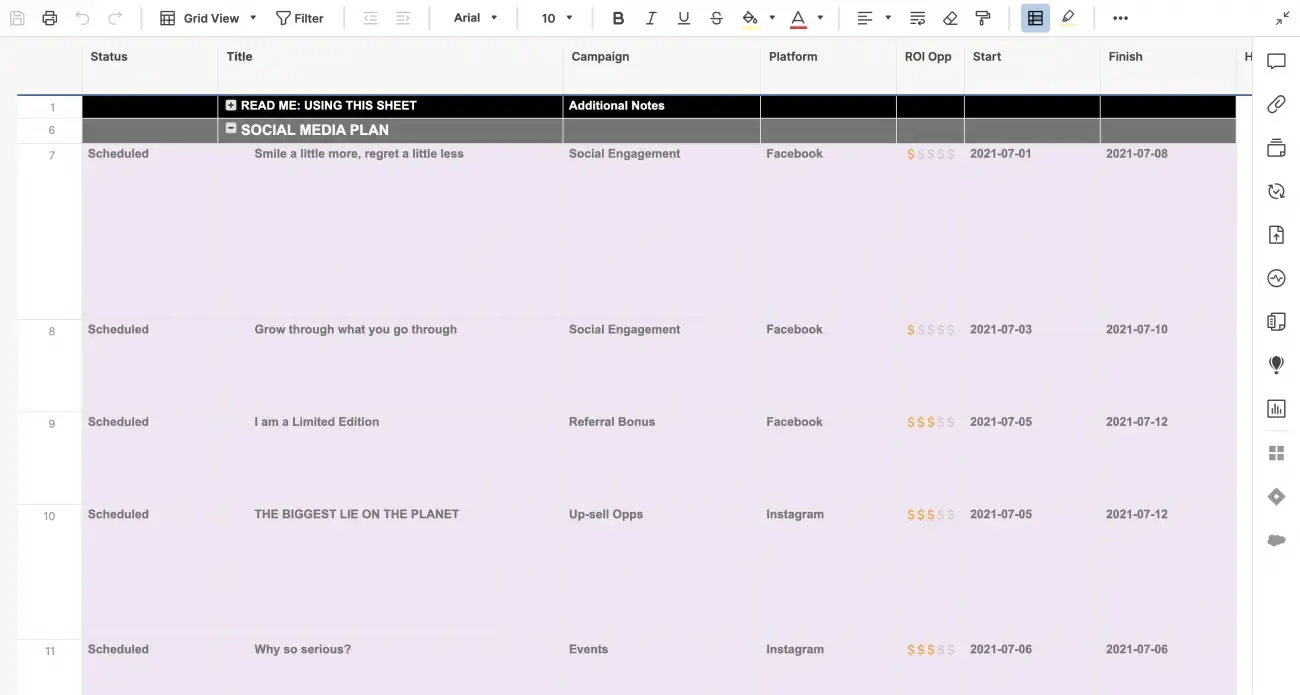
If your social media planning still lives in scattered docs and last-minute Slack threads, this Social Media Plan template is a serious upgrade. It gives you a structured calendar to plan posts, assign ownership, track campaign goals, and keep content consistent across platforms with a clean, weekly/monthly layout.
Why you’ll love this template:
- Assign tasks to writers, designers, and approvers with clear deadlines
- Track campaign goals, engagement metrics, and platform performance
- Stay consistent across channels with category tagging and color-coded themes
✅ Ideal for: Social media managers and content teams managing multi-platform calendars and client approvals
🎥 Friendly Hack: If you think you know AI project management, think again. Learn the secrets no one’s telling you—from smart scheduling to automated reporting. 🎯 In this video, we uncover insider strategies and overlooked hacks to supercharge your workflow.
6. Marketing Campaign Plan Template
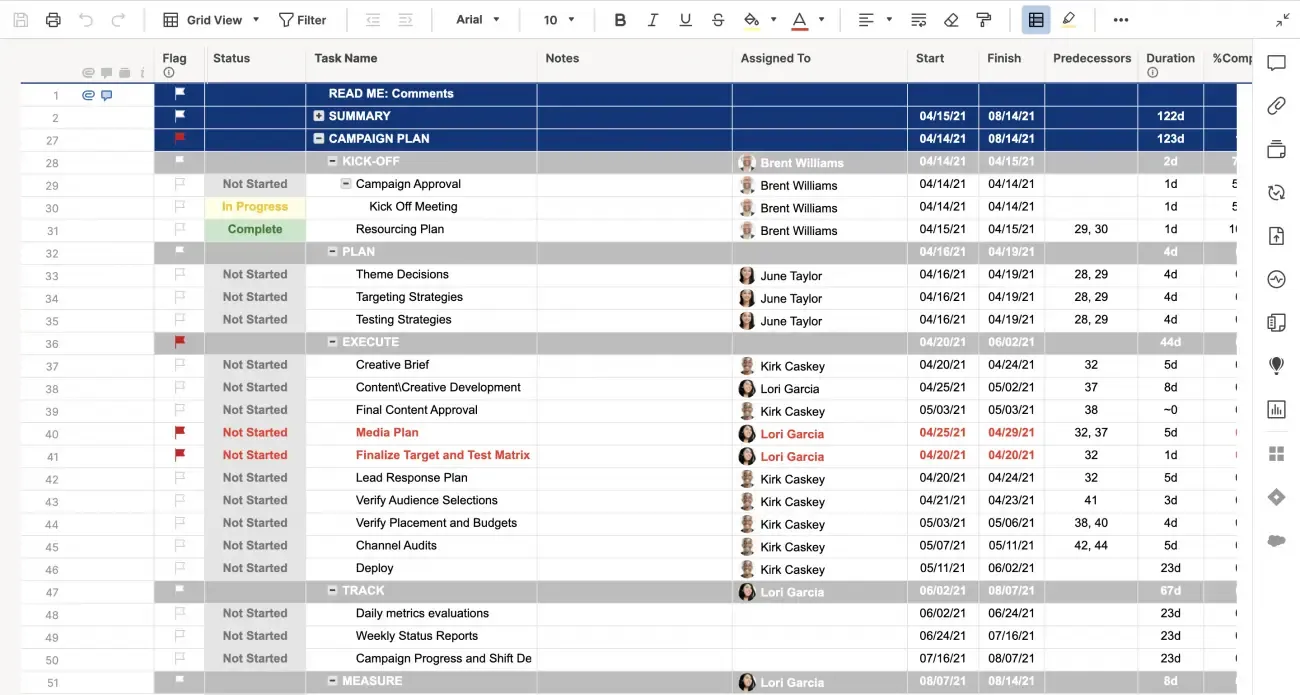
The Marketing Campaign Plan Template by Smartsheet breaks your campaign into key phases, like planning, execution, and post-campaign analysis, and tracks all the tasks within each.
With dedicated space for timelines, deliverables, and responsibilities, the template also ensures that from initial brainstorming to final results, every aspect of the campaign is accounted for.
Why you’ll love this template:
- Define the campaign’s “why” and align your team around shared outcomes
- Centralize creative files, briefs, and feedback loops to avoid back-and-forth
- Visualize the full campaign lifecycle to spot gaps or overlaps early
✅ Ideal for: Marketing teams running high-stakes campaigns where timing, clarity, and collaboration make or break results
7. Marketing Budget Template
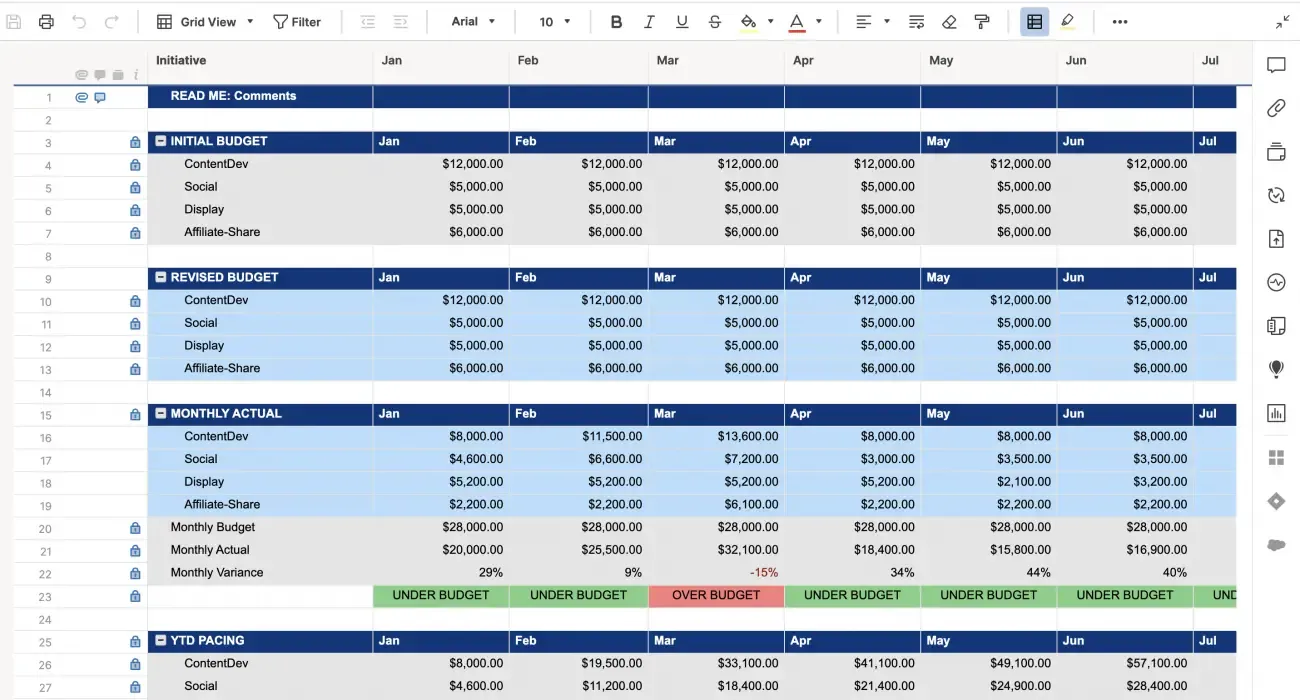
You can’t scale marketing without knowing where your money’s going. This budget template is built for marketers who need to track spend across campaigns, channels, and vendors.
With categories for different expense types (like advertising, content creation, events, etc. ), you’ll get a clear picture of how your marketing budget is being used and where you need to pivot.
Why you’ll love this template:
- Track planned vs. actual spend across categories and channels
- Organize recurring, one-time, and vendor-specific costs for better control
- Spot overspending early with built-in variance formulas
- Make decisions faster with budget summaries and quarterly breakdowns
✅ Ideal for: Marketing managers who want real-time visibility into campaign spend and financial performance
8. Weekly Task List Template
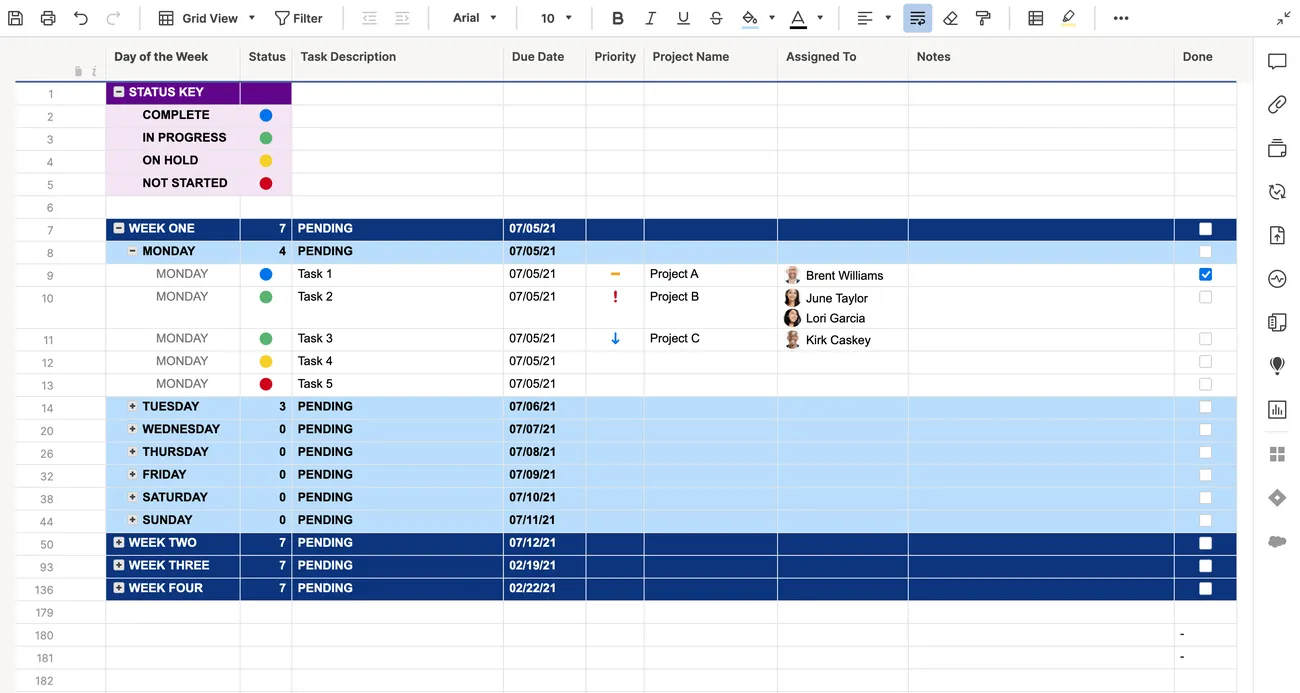
When your week’s a blur of meetings, tasks, and shifting priorities, this template helps you slow down and get clear. It’s a straightforward task tracker that helps you plan out what needs to be done each day. It’s great for capturing tasks, deadlines, and priorities with checkboxes, notes, and due dates, giving you an overview of your week’s workload.
Why you’ll love this template:
- Plan your week with a clear daily breakdown from Monday to Friday
- Prioritize key tasks while keeping an eye on secondary to-dos
- Assign tasks to teammates and track their progress in one place
✅ Ideal for: Team leads and professionals who just want a clear, stress-free look at their week
📊 Fact Check: Over two-thirds of employees (68%) report spending significant portions of their work time on low-value tasks like emails, admin, or repetitive activities.
Reviewing your tasks weekly helps you identify recurring inefficiencies, so you can cut them out. Take 10–15 minutes each week to audit what’s filling your schedule, and steer your productivity back to what truly matters.
9. Weekly Schedule, Sun‑Sat 30‑min Interval Template
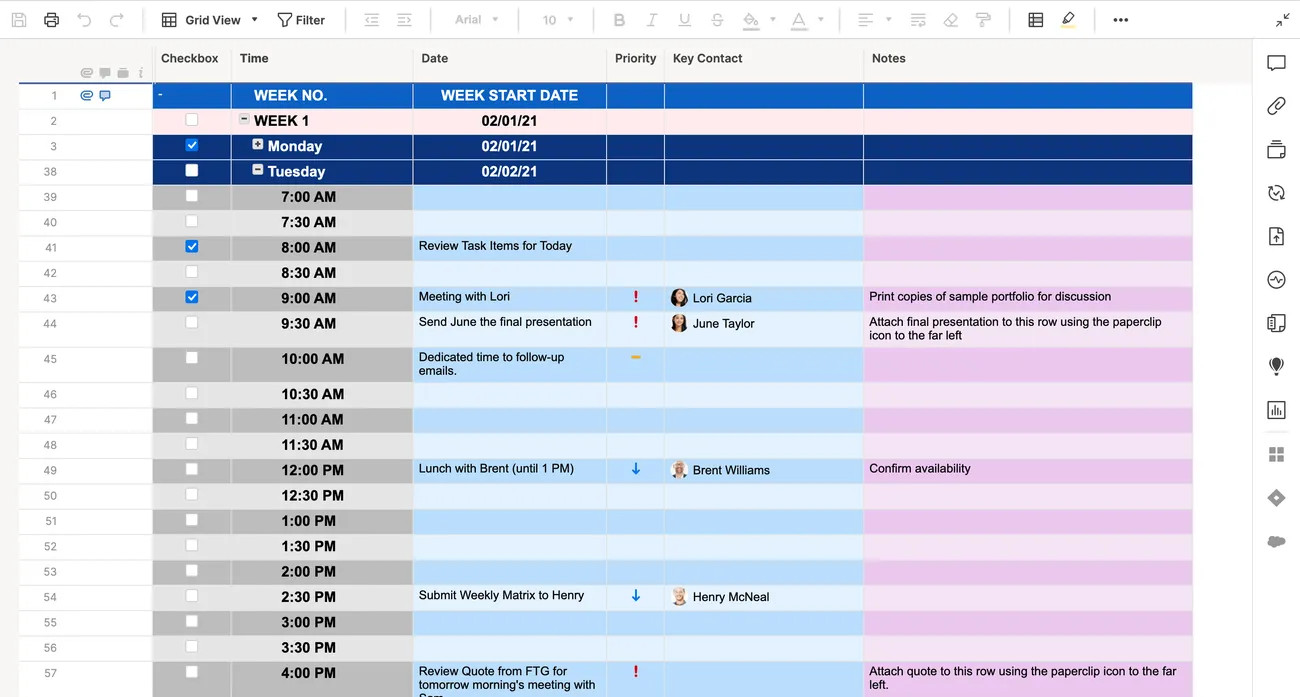
For those who live by their calendars, the Weekly Schedule (Sun–Sat, 30-minute Interval) template gives you a weekly calendar spread in Smartsheet format, broken down into 30-minute increments for each day. This is perfect for time-blocking, managing energy, and building structure into hectic days.
Why you’ll love this template:
- Plan your week across all seven days with full-day visibility
- Color-code activities by type to instantly spot overlaps or free time
- Reduce overwhelm by mapping your schedule before the week begins
✅ Ideal for: Professionals managing packed calendars, coaching sessions, or client appointments with tight timeframes
10. Team Project Task Board Template
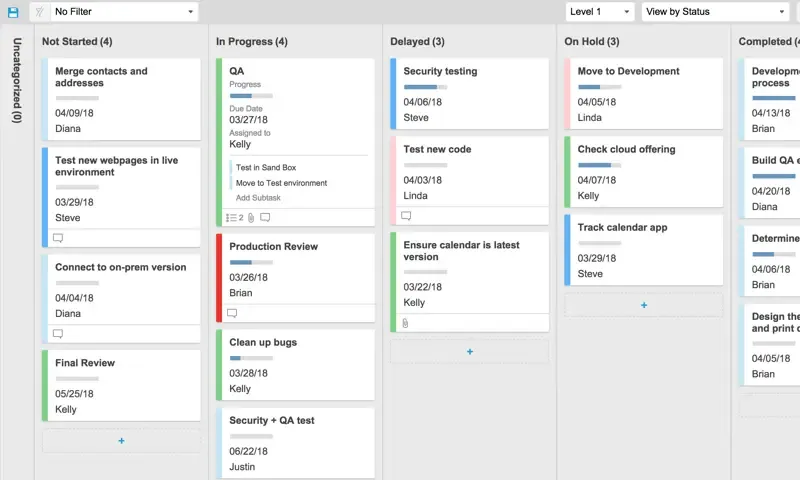
When multiple people are working on the same project, visibility becomes crucial. This task board template gives your team a shared space to track what’s in progress, what’s blocked, and what’s done, all without the constant ‘what’s the status?’ pings.
It’s a clean, kanban-style layout that helps teams stay in sync without micromanagement.
Why you’ll love this template:
- Organize tasks by status in a visual board layout for better clarity
- Identify blockers early by surfacing stalled tasks in one click
- Adapt the board for any workflow, like Agile, waterfall, or hybrid
✅ Ideal for: Teams managing collaborative projects where transparency and task flow matter more than long reports
👀 Did You Know? The way your team’s task board works is a real-world example of stigmergy. It is a concept introduced in 1959 by biologist Pierre-Paul Grassé, where indirect signals keep groups in sync. Every task move, comment, or status change acts as a cue, helping teammates coordinate seamlessly without constant check-ins.
11. Event Launch & Budget with Gantt Timeline Template
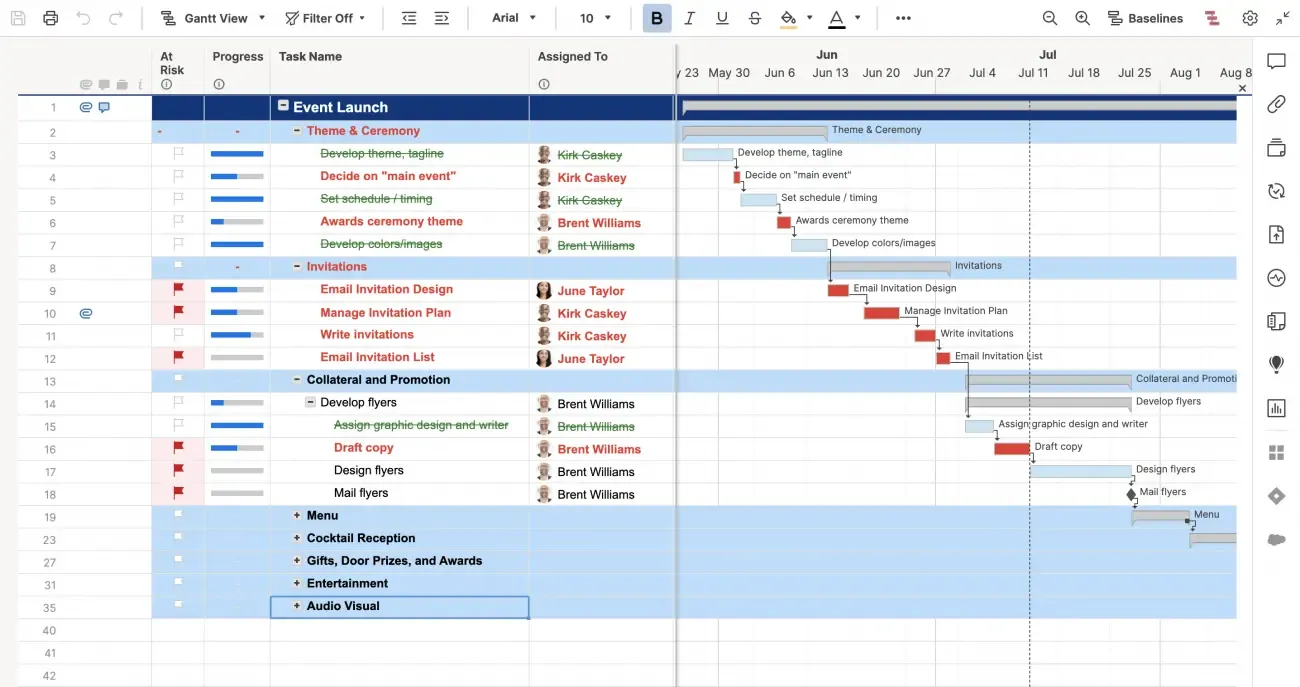
Pulling off an event or a big launch involves both precise timing and careful budgeting, and the Event Launch & Budget with Gantt Timeline template helps you handle both. With a built-in Gantt view, you can track every detail from pre-launch prep to post-event wrap-ups, while keeping your budget aligned.
Why you’ll love this template:
- Track budget items alongside key deliverables in one sheet
- Assign tasks and deadlines to internal teams and external vendors
- Stay flexible with easy drag-and-drop adjustments when things shift
✅ Ideal for: Event managers coordinating multiple vendors, deadlines, and teams under tight timelines
12. Sprint Planning Board Template
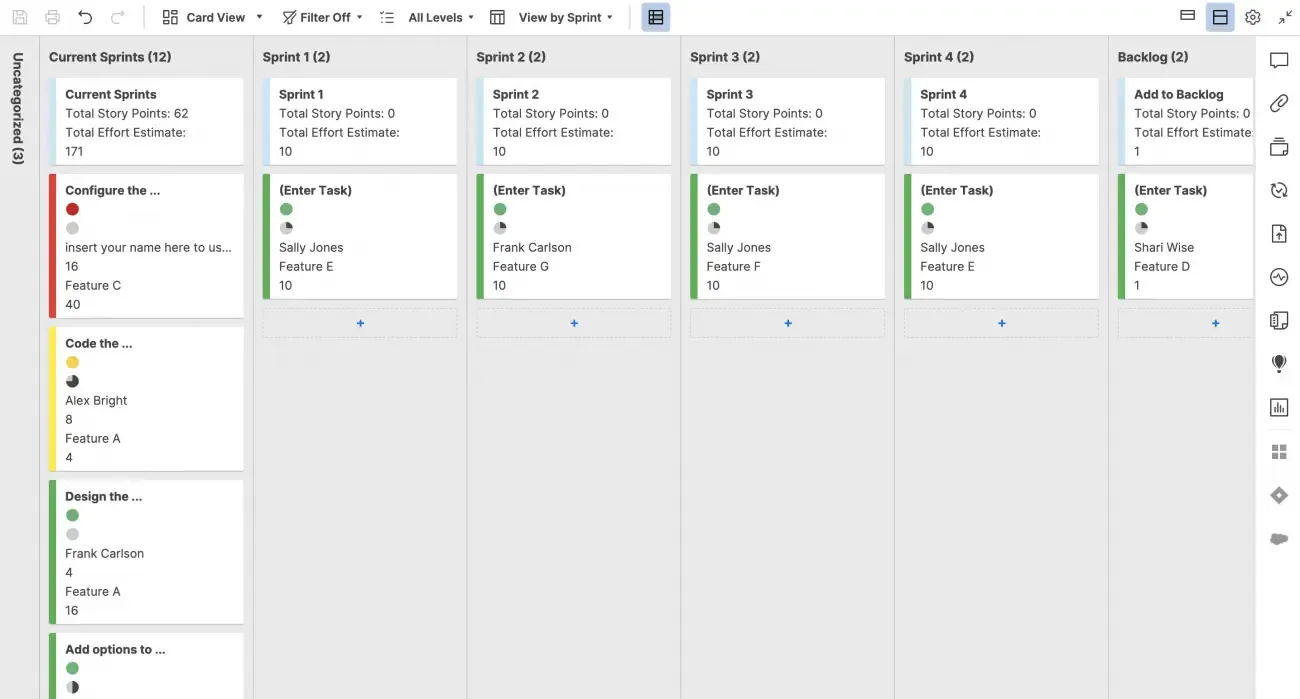
Anyone who’s run sprints knows it’s not just about moving tasks across columns; it’s about creating focus, momentum, and team alignment every week. This template does more than just track work-in-progress.
It helps you break down features, bugs, and backlog items into manageable, visible chunks your whole team can act on. It’s perfect for keeping product, engineering, and QA on the same page without slipping into chaos by day three.
Why you’ll love this template:
- Plan sprints with customizable swimlanes for tasks, bugs, or features
- Track progress with drag-and-drop cards and status columns
- Assign team members, story points, and due dates without friction
- Reflect post-sprint with built-in space for notes and retrospective inputs
✅ Ideal for: Agile or software development teams managing two-week sprints and fast-moving development cycles
💡 Pro Tip: Organize every sprint task in a single, structured view with ClickUp Lists. Assign owners, set due dates, attach files, and group tasks into sprint-specific folders for quick reference.
Easily sort or filter by priority, status, or assignee, and drag-and-drop tasks as progress changes. Real-time updates ensure your sprint board always reflects the latest plan, keeping your team aligned and moving forward.
Smartsheet Limitations
If you’re just getting started to use Smartsheet for project management, here are some limitations you need to know. This is based on what real users have noticed when pushing Smartsheet beyond light projects:
- Feels overwhelming for new users since the interface, including navigation and advanced features, comes with a steep learning curve
- Lacks essential options, such as advanced formatting and strong calendar views
- Slows down at scale, with large sheets or sheets loaded with heavy formulas becoming sluggish
- Lacks flexibility since automations fire in top-down order only, with no minute-level scheduling or prioritization
- Does not offer visibility with full-screen task views, making it hard to see long discussion threads or updates at a glance
Alternative Smartsheet Templates
As workflows become more complex and tools multiply, even the best templates can only go so far. Teams need more than structure—they need connection. So if Smartsheet feels limiting or a bit too rigid, it’s time to look for Smartsheet alternatives.
That’s where ClickUp redefines how work gets done. ClickUp is the world’s first Converged AI Workspace, bringing together all work apps, data, and workflows in one place.
With features that go far beyond static templates, ClickUp highly customizable platform that helps teams of any size plan, track, and manage their work without bouncing between apps or building complex workarounds.
Thus, ClickUp eliminates all forms of Work Sprawl to provide 100% context and a single place for humans and AI agents to work together.
To make things easier, ClickUp also offers a wide range of pre-built templates tailored to real workflows. Let’s take a look at the ones that can truly streamline your process.
1. ClickUp Project Management Template
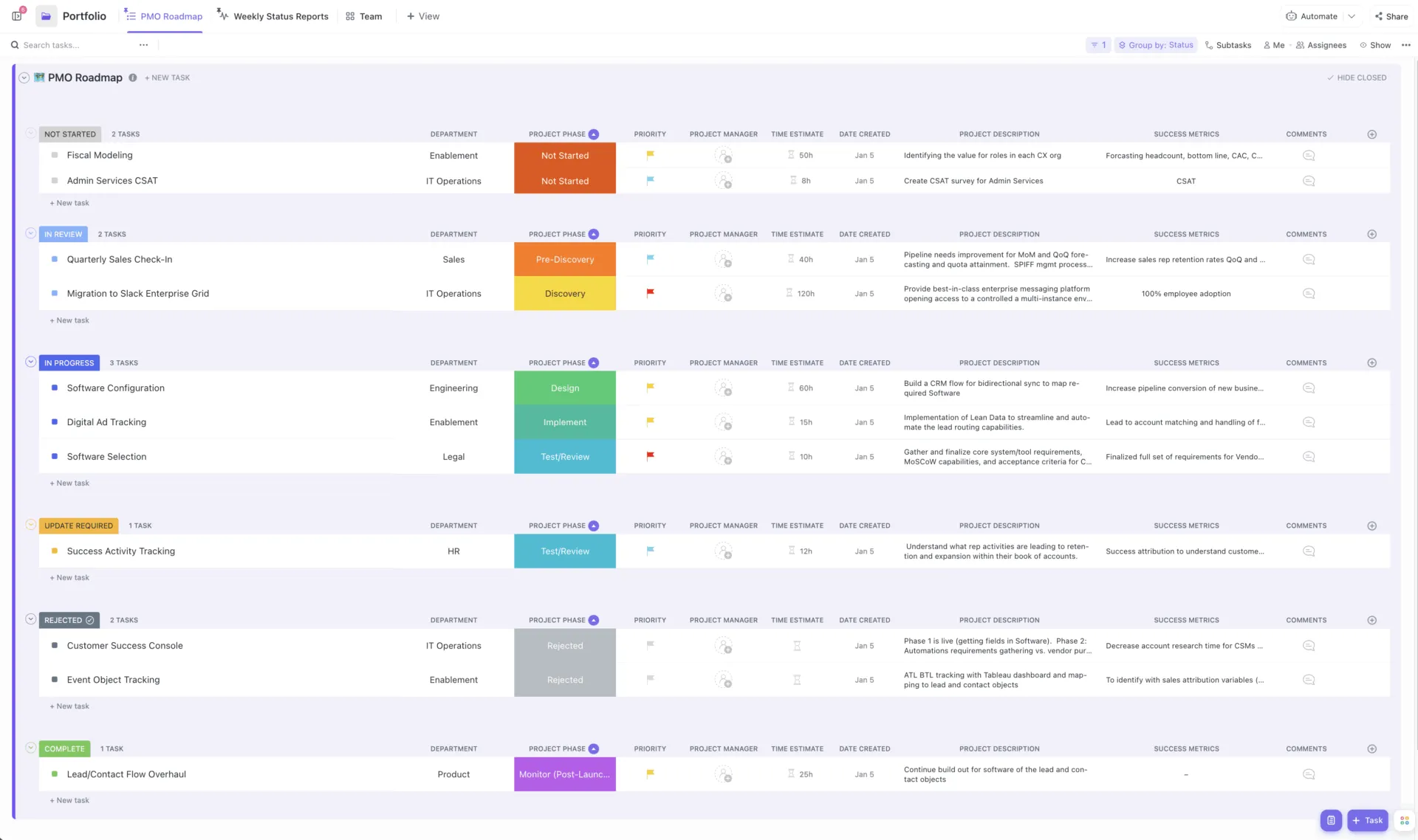
The ClickUp Project Management Template acts as your project cockpit. It lays out phases, tasks, dependencies, and roles at your fingertips. From lists to Boards to Gantt views, you and your team can toggle between the view that makes the most sense.
And the best thing is you’ve got task owners, due dates, dependencies, time tracking, and email integration baked right into the workflow without extra setup or expensive upgrades.
Why you’ll love this template:
- Switch seamlessly between List, Board, or Gantt views, whatever helps you think best
- Track time, apply Custom Statuses, and manage multiple assignees without leaving the task screen
- Sync via tags, priorities, ClickApps, and email, so nothing gets overlooked
✅ Ideal for: Teams who want a project system that’s structured yet flexible, perfect for complex initiatives where you need clarity, alignment, and tools that play nicely together
💡 Pro Tip: Managing projects today means juggling countless files, conversations, and tools—often leading to lost context and wasted time. That’s where Brain MAX steps in, transforming project management with AI-powered simplicity and speed:
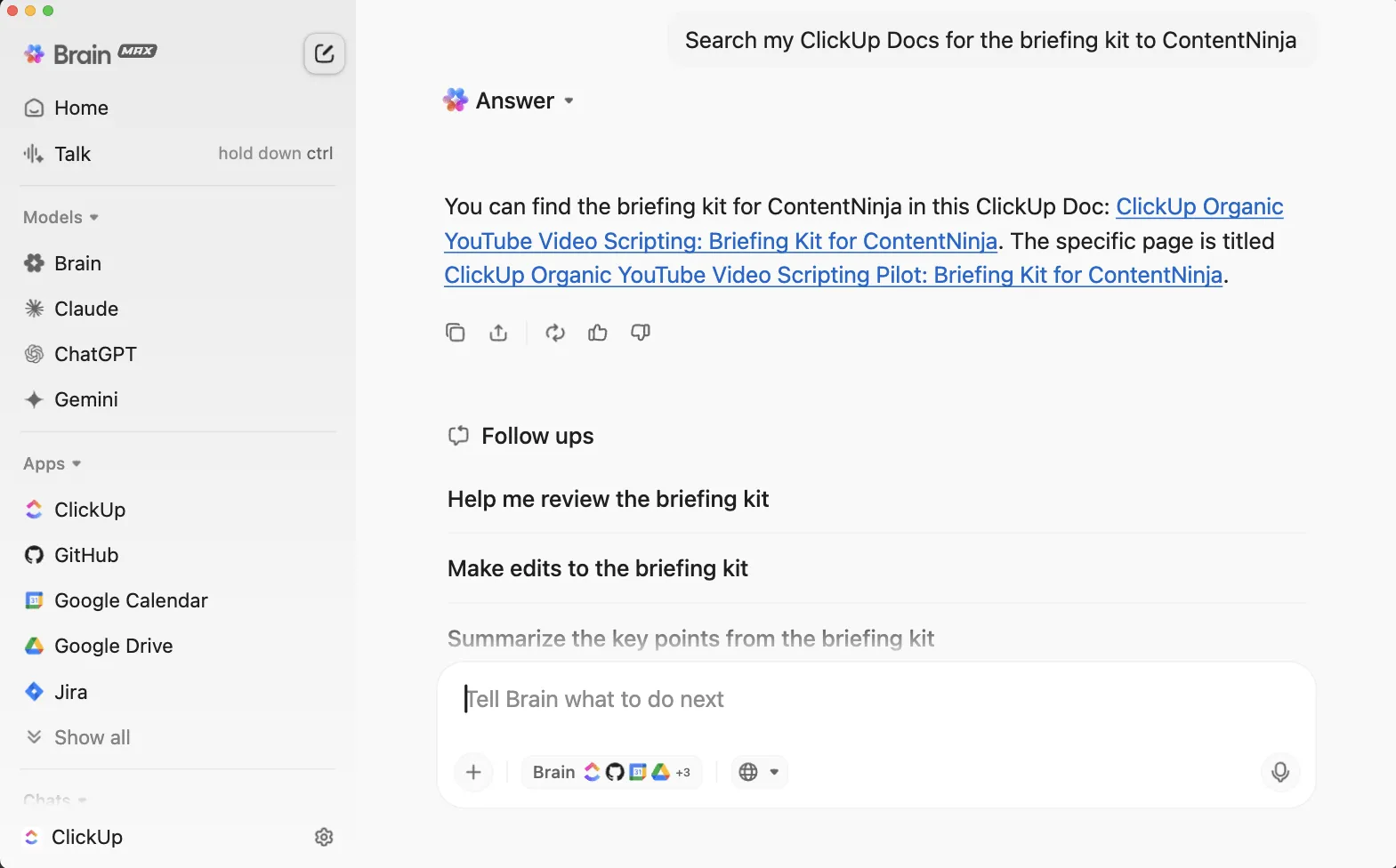
- Instantly search ClickUp, Google Drive, GitHub, OneDrive, SharePoint, and ALL your connected apps, plus the we,b to locate files, documents, and attachments
- Use Talk to Text to ask questions, dictate updates, or command your work by voice—anywhere, anytime. This feature is perfect for busy project managers who want to capture ideas, assign tasks, or check project status without stopping to type
- Leverage premium external AI models like ChatGPT, Claude, and Gemini, Brain MAX offers a single, contextual, enterprise-ready solution
Try ClickUp Brain MAX —the AI Super App that truly understands you, because it knows your work. Ditch the AI tool sprawl and get relevant answers, smart suggestions, and seamless automation, all in one place.
2. ClickUp Simple Gantt Template
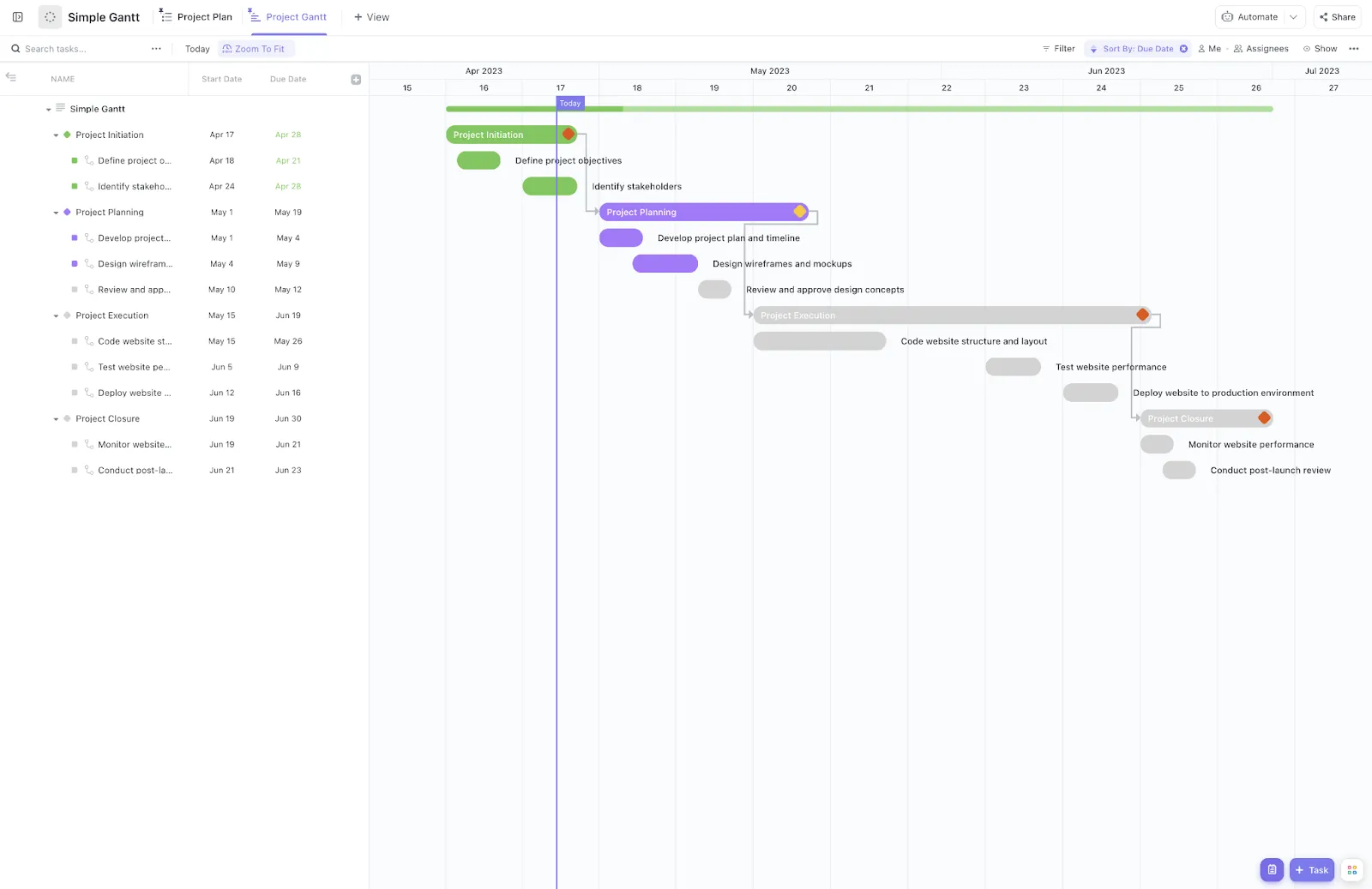
If timelines feel scattered and you’re constantly backtracking to see who’s holding what, the ClickUp Simple Gantt Template has you covered.
From syncing dependencies to dragging tasks around without breaking timelines, this template helps you avoid deadline chaos before it starts. You’ll also love how quickly it pulls tasks from your lists and lets you visualize progress using color-coded bars for open, in-progress, or completed work.
Why you’ll love this template:
- View the full project timeline and update tasks with a single click
- Link dependent tasks to visualize workflows and avoid delays
- Color-code Custom Fields to quickly spot what’s on track (and what’s not)
- Adjust durations, owners, and start dates by dragging tasks right on the chart
✅ Ideal for: Teams managing long-term projects, launch plans, content calendars, or anyone who needs a clean, flexible Gantt chart without the clutter
👀 Did You Know: Over a three-year period, organizations using ClickUp achieved an estimated 384% return on investment (ROI), according to Forrester Research. These organizations generated about US $3. 9 million in incremental revenue through projects enabled or improved by ClickUp.
3. ClickUp Project Tracker Template
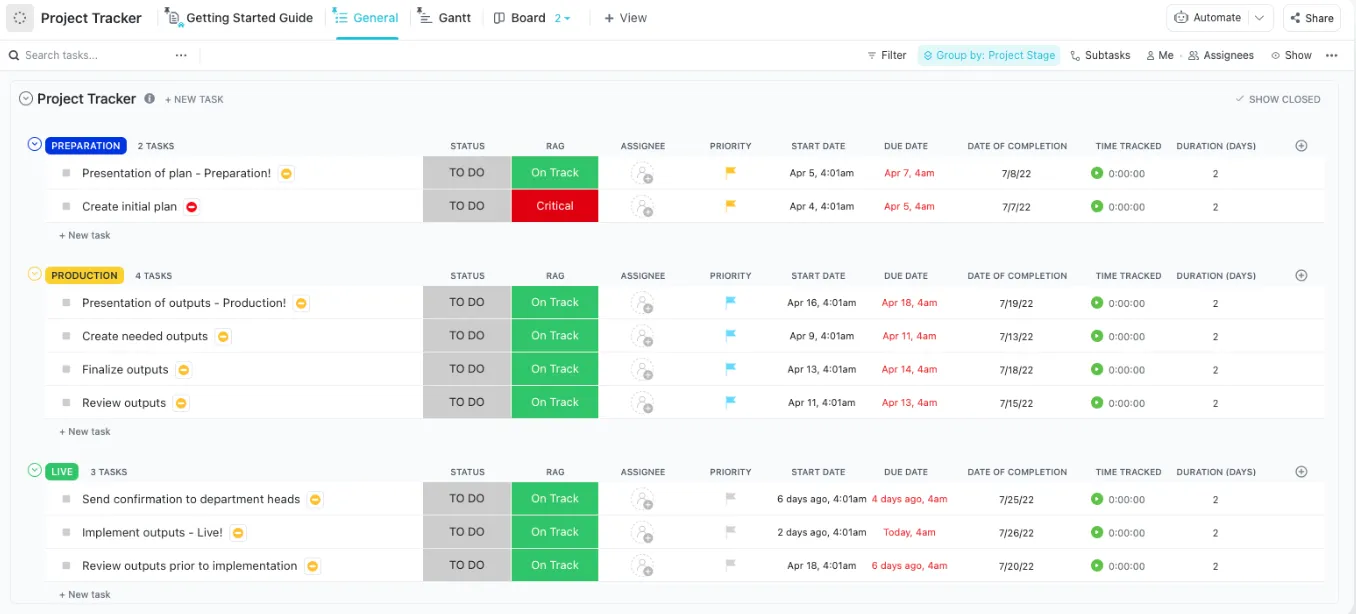
If your team’s work is scattered across spreadsheets, email threads, and too many meetings, the ClickUp Project Tracker Template brings it all into one place. It helps you monitor multiple projects from kickoff to close with full control over timelines, resources, and task status. It’s ideal for managers who need quick answers to ‘what’s done,’ ‘what’s at risk’, and ‘who’s behind it’.
You can toggle between List, Board, and Gantt views to match how your team works. Add RAG (Red, Amber, Green) status indicators, view workload distribution by assignee, and customize it down to the smallest detail.
Why you’ll love this template:
- Track multiple projects and stages in one place without messy duplications
- Use visual cues like RAG indicators and custom tags for quick risk spotting
- Assign owners, deadlines, and dependencies across projects from one dashboard
✅ Ideal for: Project managers, team leads, or department heads managing multiple concurrent projects who need crystal-clear visibility at all times
⚡ Template Archive: The best project tracker templates don’t just help you log tasks, they help you manage momentum. By using features like status updates, deadlines, task owners, and color-coded progress indicators, you can catch delays before they create big problems.
4. ClickUp Resource Management People Template
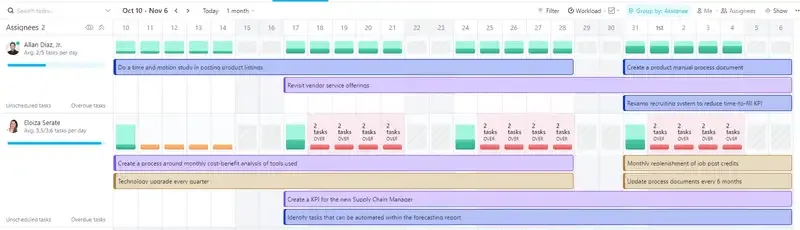
Executing a complex marketing plan means coordinating the people behind it, and ClickUp Resource Management (People) Template focuses on exactly that. It gives you multiple built-in views to track who’s doing what, who’s overloaded, and where resources are getting stretched too thin, without needing a separate HR tool.
It’s especially handy when scaling up projects or onboarding new teammates. From the timeline view to role-based overviews and live project tracking, this template keeps everyone aligned, visible, and supported.
Why you’ll love this template:
- Visualize team workloads in real time to prevent burnout and bottlenecks
- Track review stages, onboarding status, and role assignments across teams
- Organize resources in one place with dedicated fields for personnel and tools
- Monitor task flow with live updates, progress labels, and review tracking
✅ Ideal for: People ops teams, HR leads, or project managers responsible for allocating human resources across multiple workstreams
5. ClickUp Daily To-Do List Template
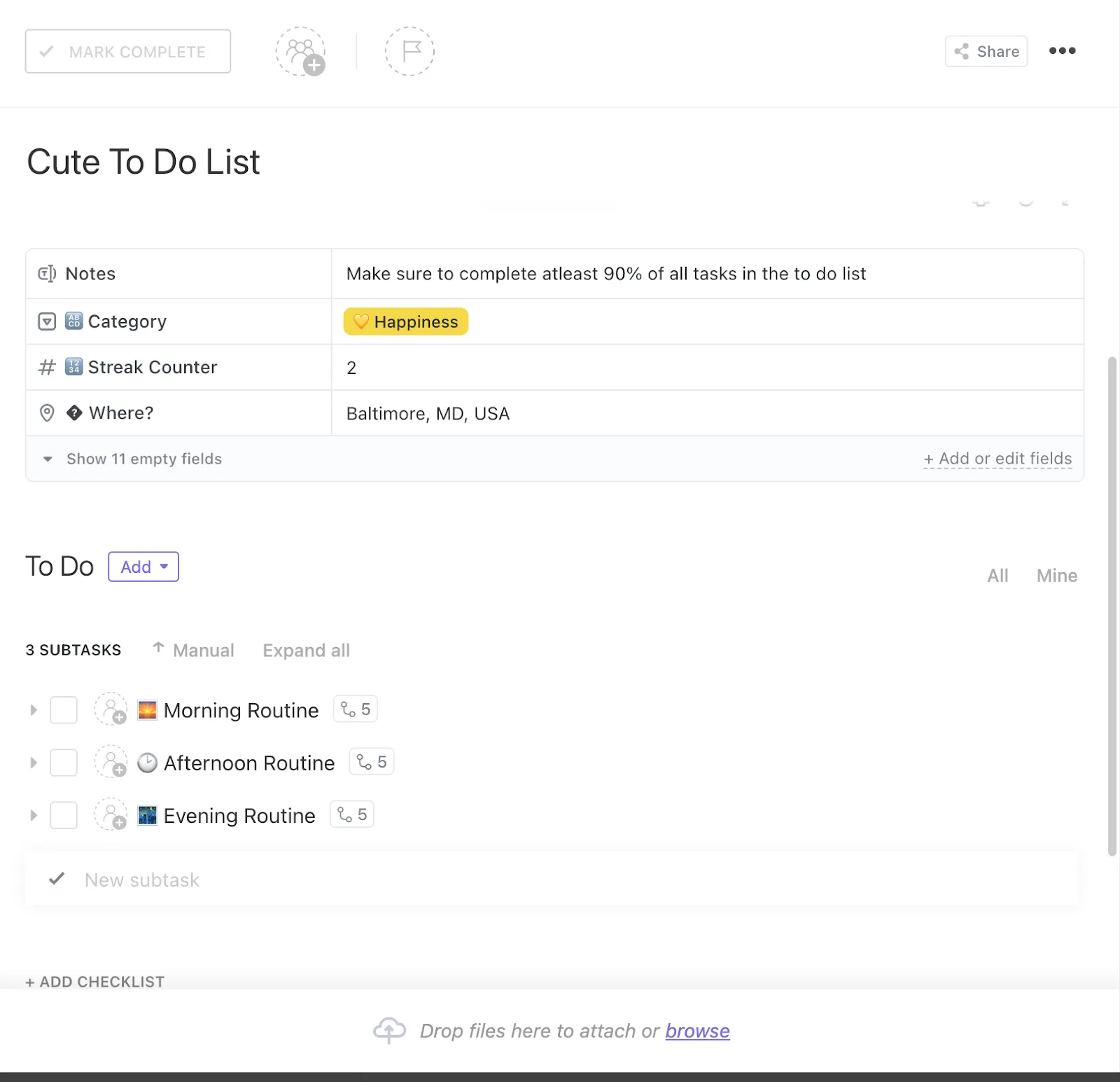
If your day slips by and your tasks are scattered across sticky notes, the ClickUp Daily To-Do List Template might be your new best friend. It helps you break your day into morning, afternoon, and evening routines, assign time blocks, and actually stick to a schedule.
It’s not just a checklist but a lightweight system that helps you build consistency. And yes, it’s fully customizable. Want to add a happiness tracker? A streak counter? A category for ‘low-effort wins’? You can do all of that, so your list reflects the way you work best.
Why you’ll love this template:
- Prioritize and manage your personal tasks by urgency, importance, or even habit streaks
- Customize with fields like location, category, notes, or personal KPIs
- Switch between List, Kanban, or Table views to suit your style
✅ Ideal for: Busy professionals, creators, or teams who want more control over their day without the stress of a complex productivity system
🎁 Bonus: To-do lists are powerful decision-making tools when used right.
By studying thoughtful to-do list examples, you’ll notice:
- The best lists filter impact over quantity; they help you say “no” to what doesn’t matter
- Great lists group tasks by energy level, priority, or focus zone; not just categories
- Smart formats surface patterns, like recurring unfinished tasks that signal deeper problems
So don’t just look at to-do list examples for structure, look at how they help you think better. That’s where the real value lies.
6. ClickUp Agile Project Management Template
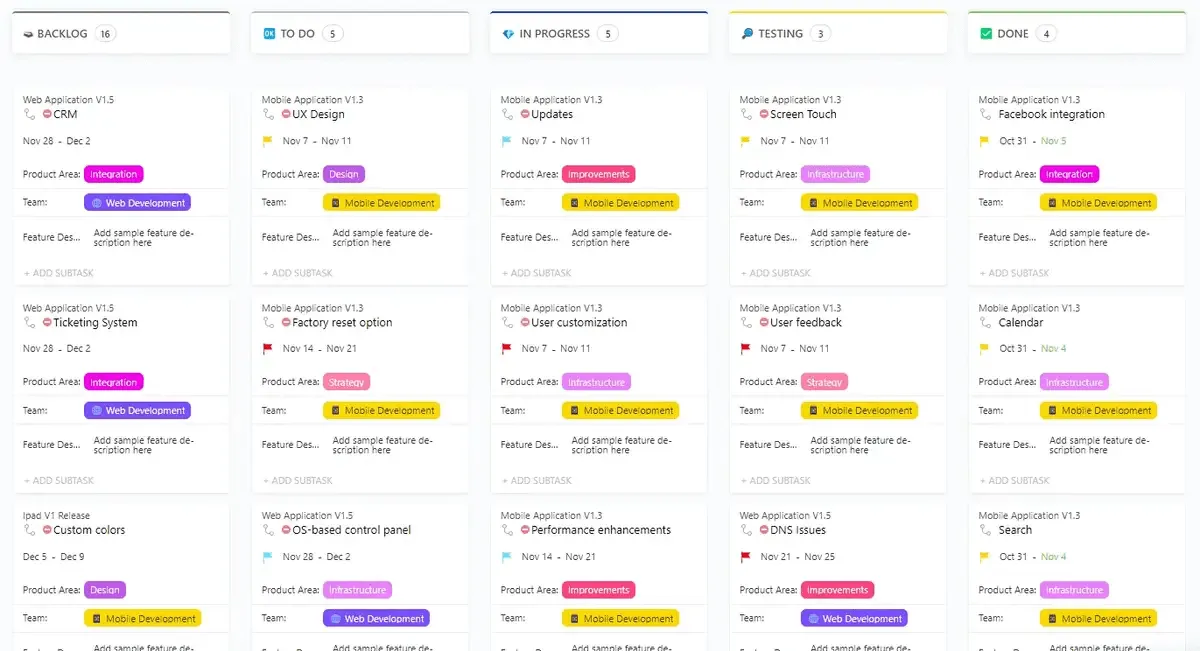
The ClickUp Agile Project Management Template gives you everything in one place, including boards, sprints, standups, backlogs, and reviews without the setup headache.
What’s great is you don’t have to waste hours building a system from scratch. The template comes with pre-built folders like Scrum Management, Epics, Roadmaps, and Backlog, so you can just drop in your tasks and start sprinting.
Why you’ll love this template:
- Manage your backlog, sprint board, and reviews using ClickUp Forms and Custom Fields
- Run meetings (standups, demos, retros) right inside the workspace
- Visualize progress with real-time views across List, Board, Calendar, and Gantt
✅ Ideal for: Agile teams who want a ready-to-run system that handles sprints, planning, and iterative delivery without needing to build the structure themselves
📚 Read More: How to Create an Agile Project Plan
7. ClickUp Project Timeline Whiteboard Template
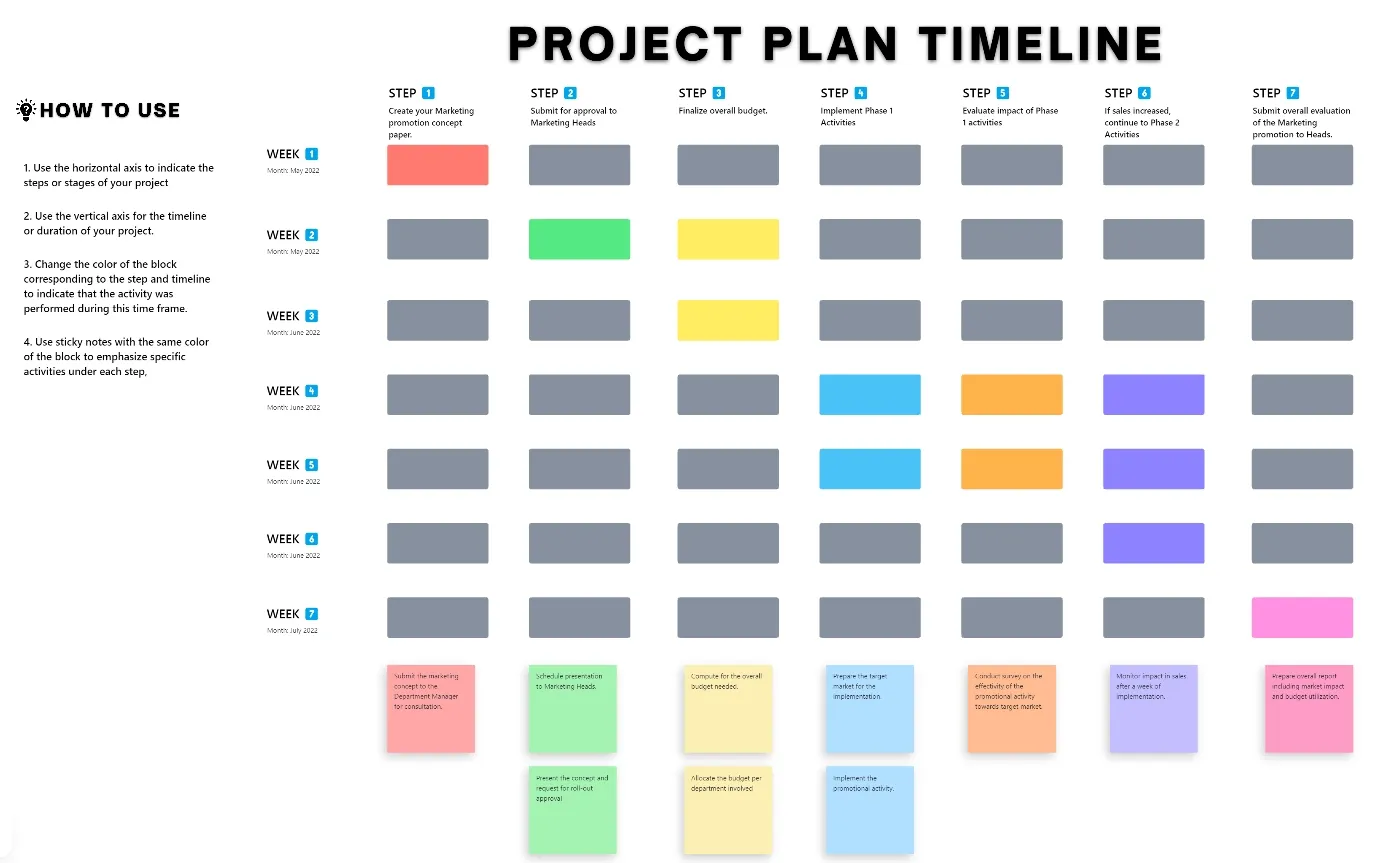
If your project plan is still trapped in boring Gantt charts or random sticky notes, this one’s your way out. The ClickUp Project Timeline Whiteboard Template gives you a clean, visual layout for planning sprints, marketing campaigns, or cross-functional launches.
This project timeline template gives your team a shared visual space to map milestones, assign owners, track dependencies, and monitor deadlines in real time.
Why you’ll love this template:
- Visualize every phase of your project with color-coded swimlanes
- Simplify stakeholder check-ins with a high-level view that’s easy for anyone to understand
- Unify team efforts across departments by bringing everyone onto the same visual roadmap
✅ Ideal for: Team leads and project managers handling multiple timelines who want to keep visual plans that are collaborative and always up to date
Pro Tip: Beyond tracking timelines, ClickUp Whiteboards are your all-in-one space for brainstorming, strategy mapping, and live collaboration. You can link existing tasks, create new ones directly from the board, and draw connections to show dependencies visually. This makes them perfect for pre-project planning, client workshops, and sprint retrospectives.
Here’s what you can do in ClickUp Whiteboards:
8. ClickUp Marketing Plan Template
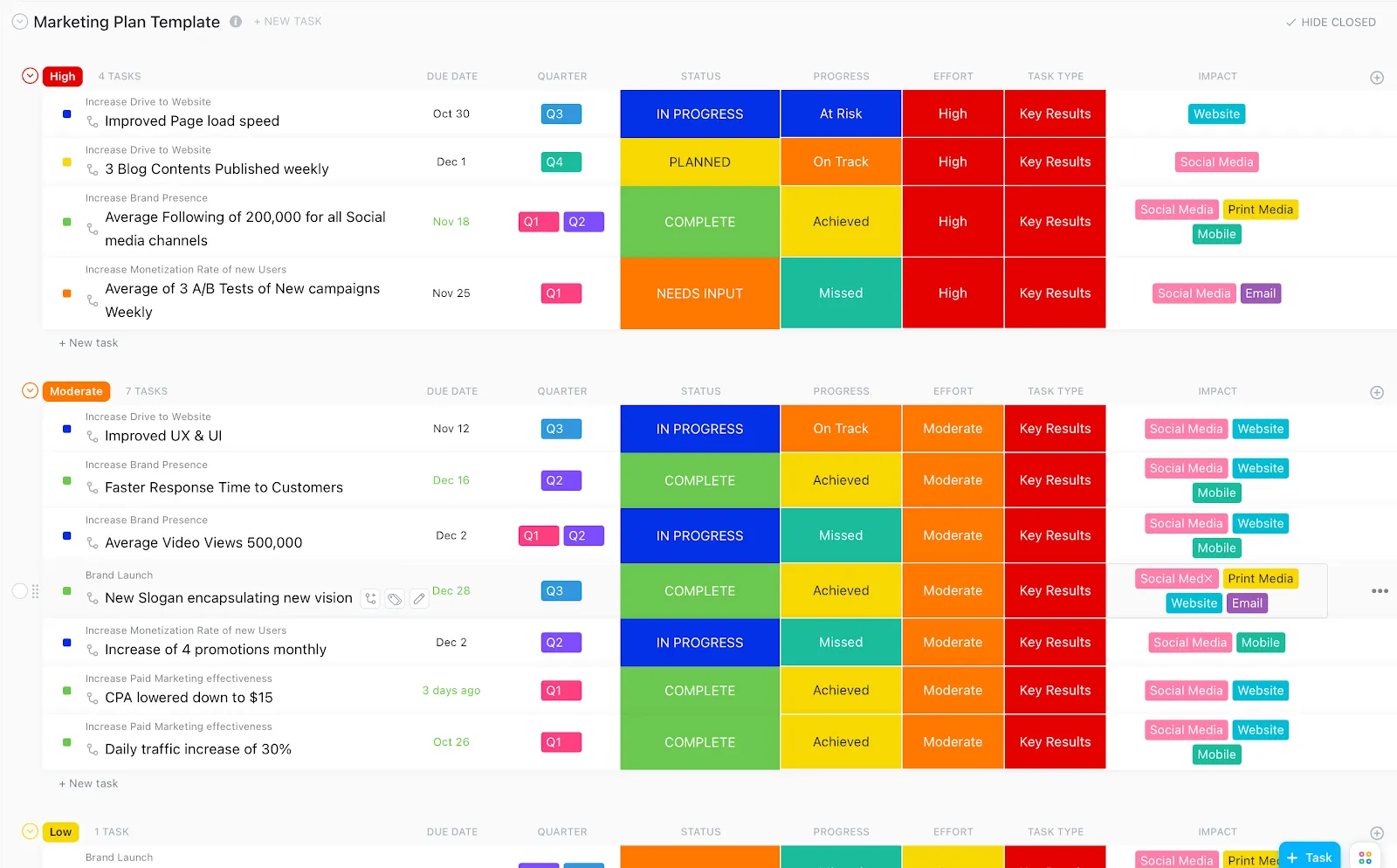
The ClickUp Marketing Plan Template is a structured system that helps you plan big-picture campaigns while keeping track of the tiny moving parts. You can group marketing efforts by objective, audience, or channel, and break them into actionable timelines with owners, briefs, and deadlines.
From brainstorming ideas to monitoring results, this template supports every stage of execution so your team can move faster, collaborate better, and hit real goals.
Why you’ll love this template:
- Map out multi-channel campaigns with tasks grouped by goal, team, or timeline
- Assign owners, attach briefs, and set priorities for every single marketing task
- Track status in real-time with clear Custom Fields, tags, and visual views
- Centralize campaign planning, content, and performance in one workspace
✅ Ideal for: Marketing teams who want a one-stop hub to organize campaigns, content, events, and results without the chaos
📚 Read More: How to Create a Content Marketing Management Plan
9. ClickUp Content Calendar Template
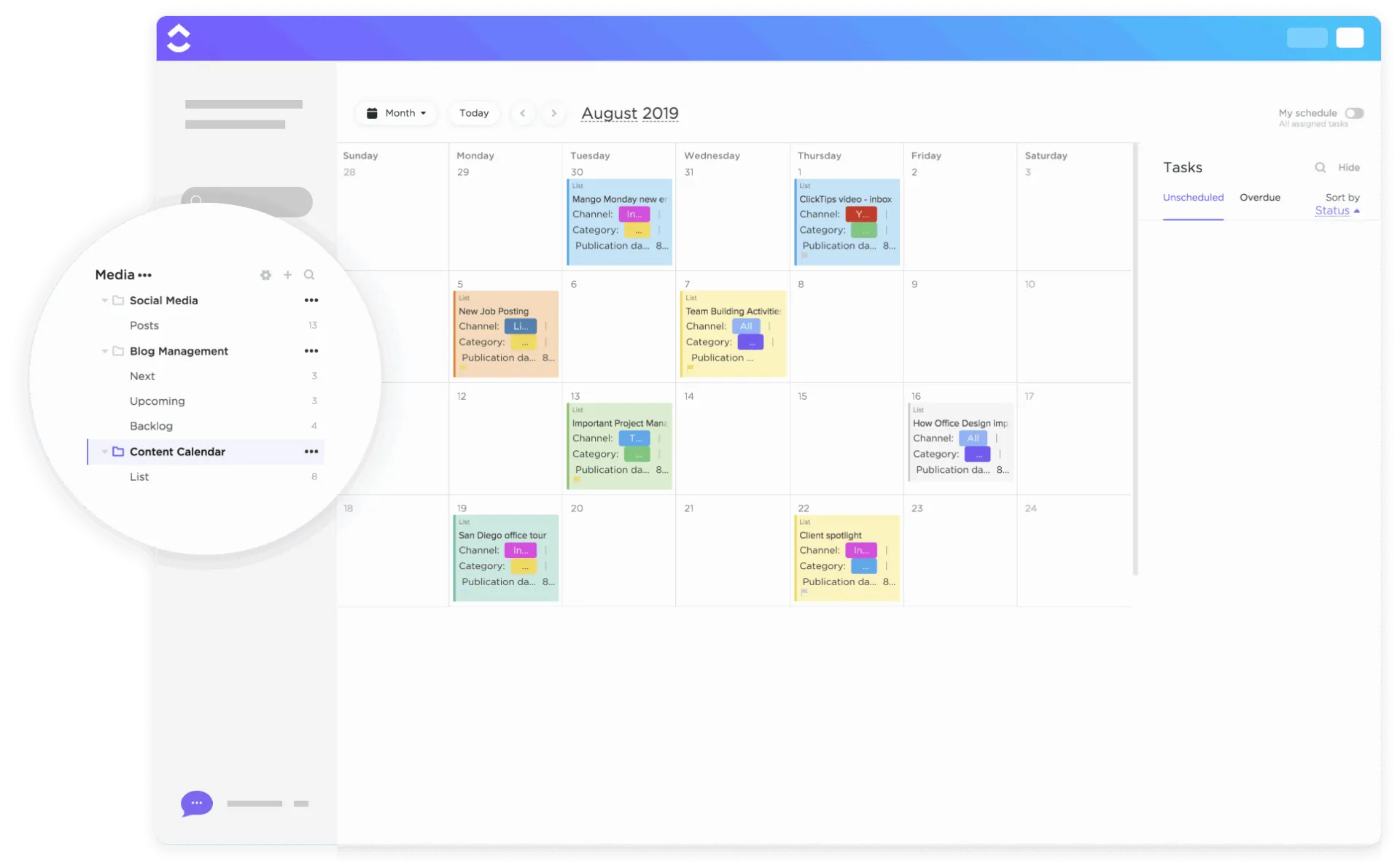
The ClickUp Content Calendar Template is a fantastic tool that helps you schedule blogs, videos, social media posts, or any content on a calendar so you can see your publication pipeline.
You can plan out weeks (or months) of content, assign each piece a publish date, manage the creation process, ensure you never miss a posting deadline, and maintain a consistent content rhythm.
Why you’ll love this template:
- Drag and drop tasks into your calendar to plan content across platforms
- Set up custom fields for post types, channels, and content owners
- Visualize deadlines, progress, and workloads with color-coded views
- Attach briefs, images, links, and feedback right inside the task
✅ Ideal for: Content and social media teams who need an organized system for planning and tracking content output, making sure everything in the queue goes out on schedule
🎁 Bonus: Want to learn how you can use AI in content marketing? You can brainstorm blog ideas, create outlines, repurpose content into different formats, draft ad copy, and analyze performance data. It speeds up the process so you can focus more on creative strategy and brand voice.
10. ClickUp CRM Template
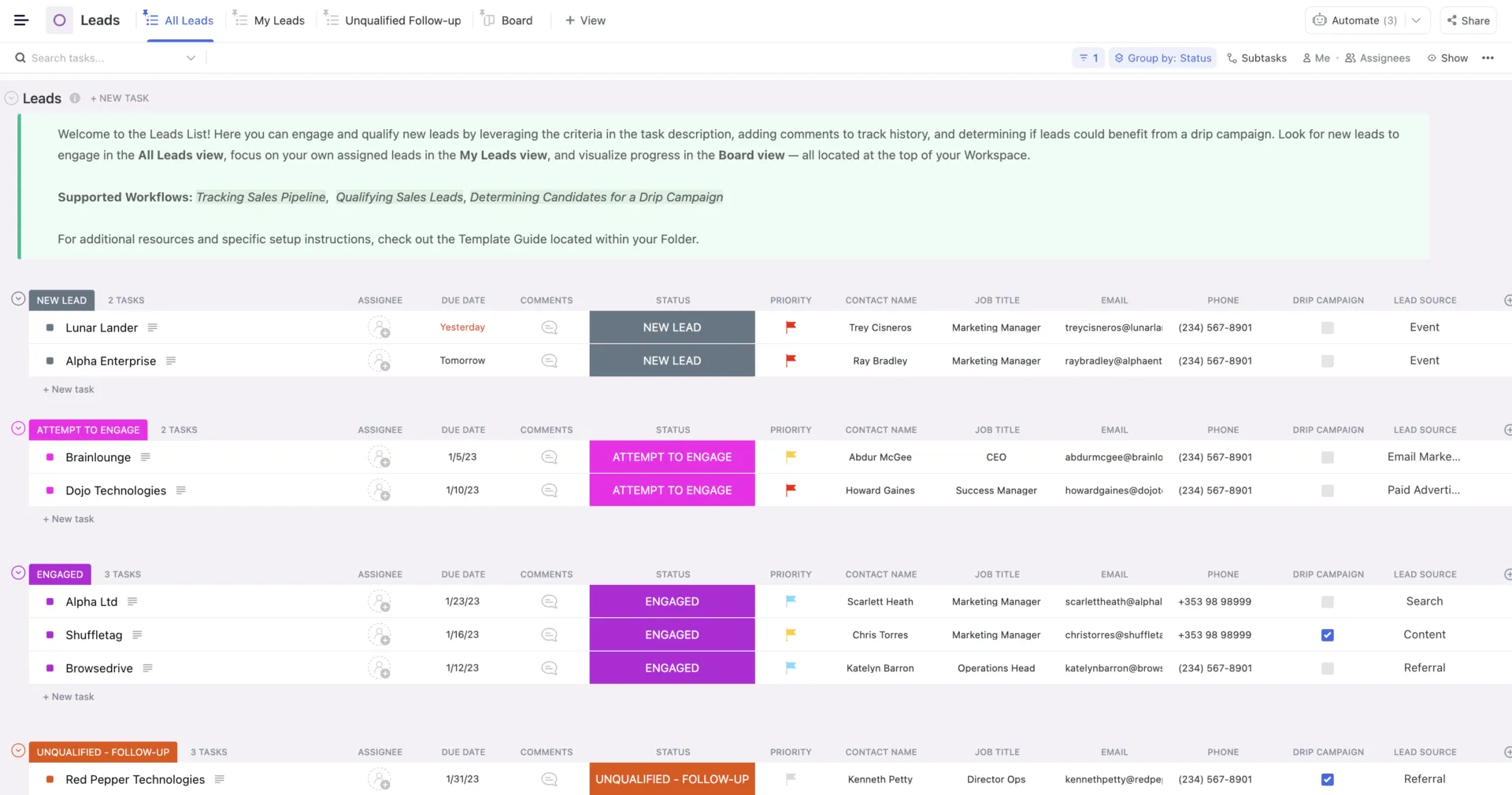
ClickUp CRM Template turns your scattered lead data into a clear, visual pipeline you can actually act on. From cold lead to closed deal, every stage is mapped out visually with smart statuses like ‘Attempt to Engage’ and ‘Unqualified – Follow-Up. ’
You’ll know exactly where each lead stands with multiple views (Board, List, Calendar, Docs). There’s even a built-in Sales Playbook Doc to keep your goals, outreach plan, and follow-up cadence locked and loaded.
Why you’ll love this template:
- Organize all your leads, contacts, and deals in one central space
- Track engagement stages clearly to never lose sight of follow-ups
- Automate repetitive CRM tasks so you can focus on closing deals
✅ Ideal for: Sales teams, business owners, and client-facing teams who want a smarter, cleaner, more visual way to manage customer relationships
11. ClickUp Personal Budget Template
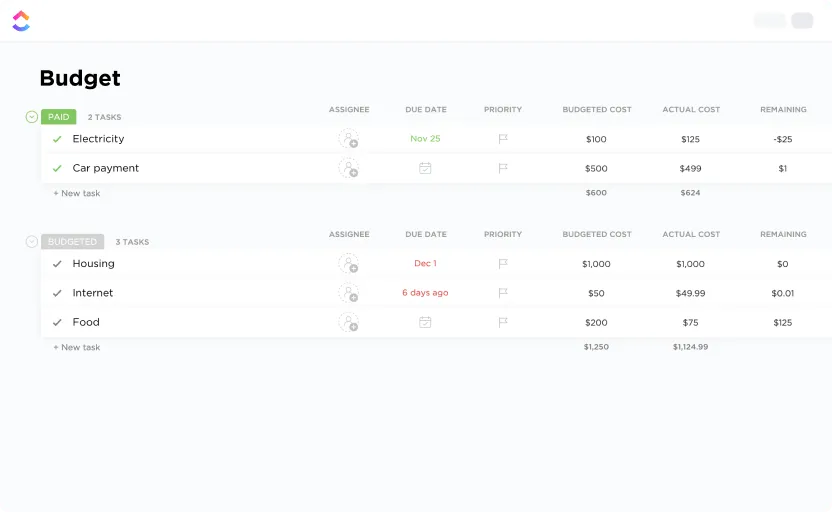
The ClickUp Personal Budget Template acts like a financial buddy that keeps you accountable, shows you exactly where your cash is going, and makes tracking your goals less of a headache and more of a habit.
The best part is that it comes with pre-built dashboards and views to track everything from monthly subscriptions to savings progress to income sources. You can tag and categorize transactions, review your balance at a glance, and even reflect on your spending behavior. It’s simple, super customizable, and makes money management kind of fun.
Why you’ll love this template:
- Track income, expenses, savings, and debt across multiple categories
- Customize budget categories based on your personal goals or lifestyle
- Visualize your spending patterns with pre-set ClickUp Dashboards and charts
- Set monthly goals and stay accountable with clear, color-coded views
✅ Ideal for: Project managers and business professionals who want to take control of their personal finances in a structured yet flexible way
🎉 Fun Fact: Americans spend nearly four hours a day thinking about money, with Gen Z and Millennials leading at 4. 8 and 4. 7 hours, respectively.
12. ClickUp OKR Framework Template
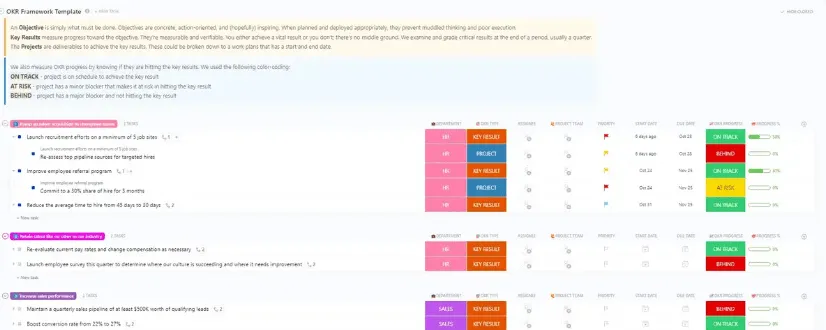
ClickUp’s OKR Framework Template is your go-to system to align big-picture goals with daily work. It’s built around the popular OKR method (Objectives & Key Results), so you can confidently set ambitious targets and learn how to implement OKRs in a way that drives measurable results.
And because everything’s visual, from dashboard overviews to custom fields and filters, you get instant insight into what’s on track, what’s falling behind, and what needs attention today.
Why you’ll love this template:
- Break down high-level objectives into trackable, measurable key results
- Monitor goal progress with color-coded views, filters, and timelines
- Centralize all goal-related tasks and updates in one dynamic dashboard
- Group goals by team, quarter, or progress with filtered views and automated sorting
✅ Ideal for: Team leaders, product managers, executives, or anyone implementing OKRs to set and track goals for their team or company
Hit Your Goals Faster with ClickUp
Missed deadlines, scattered tools, unclear priorities, and too much manual tracking can slow down even the best teams.
With powerful project management features and easy-to-use templates, ClickUp helps you plan, organize, and track everything from one place. You get customizable views, smart automation, and built-in docs designed for real workflows.
So if you’re ready to simplify your workday and focus on productivity, ClickUp is a great place to start.
Sign up on ClickUp today!