
Sorry, there were no results found for “”
Sorry, there were no results found for “”
Sorry, there were no results found for “”
Choosing the right planner can be overwhelming. Should you go for a physical planner or a digital one? Will a simple calendar work, or do you need a full system to track goals and habits?
But it doesn’t have to be this complicated.
Notability, a digital note-taking app, offers a variety of planner templates—weekly, monthly, daily, study, meal, and travel—that make planning fun and effective. You can save and download the Notability planner templates in PDF format on your iPad or edit them online using the Notability app.
In this blog post, we’ve rounded up some of the best Notability templates, plus a few alternatives for comfortable planning. Let’s get started!
The ideal Notability template varies based on your needs. Professionals need a template that helps track meetings, projects, and personal commitments in one place. A weekly study planner that helps manage school assignments, deadlines, and exams in one organized space works better for students.
Regardless of your goals, the best templates have a few things in common:
📌 Customizability: Look for aesthetic Notability templates with adaptive layouts, tabs, and sections to suit your unique workflow and planning needs
📌 Clarity: The template should offer a clean, intuitive structure for tasks, appointments, and notes
📌 Aesthetic appeal: Select templates with sleek layouts and options for adding stickers, color codes, and decorative elements to make planning visually engaging
📌 Attachments: Explore free or paid templates that allow you to integrate audio notes, media files, and documents to add context to tasks and enhance productivity
📌 Trackability: The template should allow users to monitor progress across daily tasks, weekly goals, and long-term plans using visual progress bars and status updates
From daily task organizers to long-term goal trackers, these Notability templates are practical and visually appealing.

The Notability Assignment Planner Template offers a clear, organized format for project planning. The dedicated sections like ‘Details,’ ‘Resources,’ ‘Tasks,’ and ‘Free Space’ help you capture all the relevant details to deliver a project successfully.
Within the ‘Free Space’ section, you can add visual aids like mind maps or write ideas for brainstorming. This personalized approach helps you tackle tasks efficiently and achieve success, making it an essential tool for anyone looking to stay organized and productive.
🌟 Ideal for: Students, educators, professionals, and freelancers who want to manage assignments and track deadlines.

Notability’s Weekly Planner Template offers a simple yet detailed layout for weekly planning. You can track tasks in the ‘To-Do’ section and prioritize academic or work responsibilities in the ‘Assignments/To Study’ space. This template helps you balance productivity with personal growth throughout your week.
It also serves as a great tool to start journaling, allowing you to reflect on your progress and identify areas for improvement.
🌟 Ideal for: Project managers and busy individuals who need to organize their week, prioritize tasks, and track progress at a glance.

This Study Session Planner Template helps students approach their study sessions with precision and structure. With dedicated spaces for ‘Time Goals,’ ‘Study Goals,’ and ‘Topics/Chapters,’ this student digital planner lets you clearly outline your objectives and focus areas before diving into your study routine.
In the ‘Before Starting’ section, you can list all the study resources and materials, ensuring you’re fully prepared for the session. ‘Time blocking’ enables you to allocate specific time slots for each topic or activity. This promotes focused, efficient study periods while minimizing distractions.
🌟 Ideal for: Students and learners who want to stay organized, set focused goals, and optimize their study sessions.

The Notability Daily Planner Template transforms daily planning into a productivity system. You can list your top five goals for the day and tick the boxes once you achieve the goals. The ‘Important Events’ section keeps track of key meetings or deadlines, and the to-do list offers a straightforward way to manage everyday tasks.
Customize the unique picture space to encourage creativity or inspiration, giving a visual boost to your daily planning.
🌟 Ideal for: Individuals looking for a daily plan tool to track meetings and task deadlines.

The 2025 Digital Portrait Planner Template from Notability combines functionality with a user-friendly design. It features dedicated pages for monthly dashboards, goal setting, routines, habits, important dates, notes, meal planning, and shopping lists.
Whether you’re planning a fitness journey with the habit tracker, setting quarterly professional goals, or organizing weekly family meals, this planner provides tools for both micro and macro-level planning.
Its portrait orientation ensures seamless navigation, while its structured design helps you track priorities and organize ideas seamlessly. This planner transforms daily and long-term planning into an intuitive process.
🌟 Ideal for: Goal-focused individuals seeking an annual digital planner to organize routines, track habits, and create meal plans.
📮 ClickUp Insight: 37% of workers send follow-up notes or meeting minutes to track action items and sort out their priorities, but 36% still rely on other, fragmented methods.
Without a unified system for capturing decisions, key insights and tasks get buried in chats, emails, or disconnected planners. With ClickUp, you can instantly turn conversations into actionable tasks across all your chats, docs, whiteboards and more—ensuring nothing falls through the cracks.
While Notability offers reliable digital planners, it has certain drawbacks:
❗️Collaboration: Notability is primarily designed for individual use, which can pose challenges in collaborative environments. For instance, teams attempting to share and edit planners in real time may encounter synchronization issues, leading to version conflicts and workflow disruptions
❗️Calendar integration: Integrating Notability with external calendar applications is not always seamless. Users have reported difficulties in synchronizing events and reminders, resulting in missed appointments or scheduling conflicts
❗️Storage: As your planners accumulate over time, file sizes can grow large, potentially affecting your device’s storage and performance, especially on devices with limited space
❗️Limited free version: The free version of Notability restricts the number of edits and features available, which can hinder extensive note-taking and planning activities
❗️User experience issues: Updates, such as Notability 14, have reportedly made basic features more difficult to access, leading to a less pleasant user experience
❗️Template limitations: While Notability offers built-in planners, they may not meet everyone’s needs due to their basic design, prompting users to seek more custom options
📖 Read More: Best Free Digital Planner Apps
If you want a tool for efficient goal planning, real-time collaboration, goal tracking, and Calendar integration, try ClickUp.
ClickUp is the everything app for work that combines project management, knowledge management, and chat—all powered by AI that helps you work faster and smarter.
Unlike Notability templates, which focus on basic note-taking, ClickUp offers fully customizable templates for every workflow, be it a weekly planner, daily log, or project timeline.
Using ClickUp has helped us plan better, deliver faster, and efficiently structure our teams, and our production team has doubled in size since I joined the company! That would not have been possible if we had not had a solid structure for resource allocation and project management in place.
Its advanced features, like automated reminders, progress tracking, and Google Calendar integration, ease your planning process while keeping everything synced.
With daily standups powered by ClickUp Brain, you can effortlessly track project progress in real time, receive automated updates on task completion, and gain insights into which tasks require immediate attention. This helps you stay organized, make data-driven decisions, and address critical tasks.
Now let’s see some ClickUp planner templates:
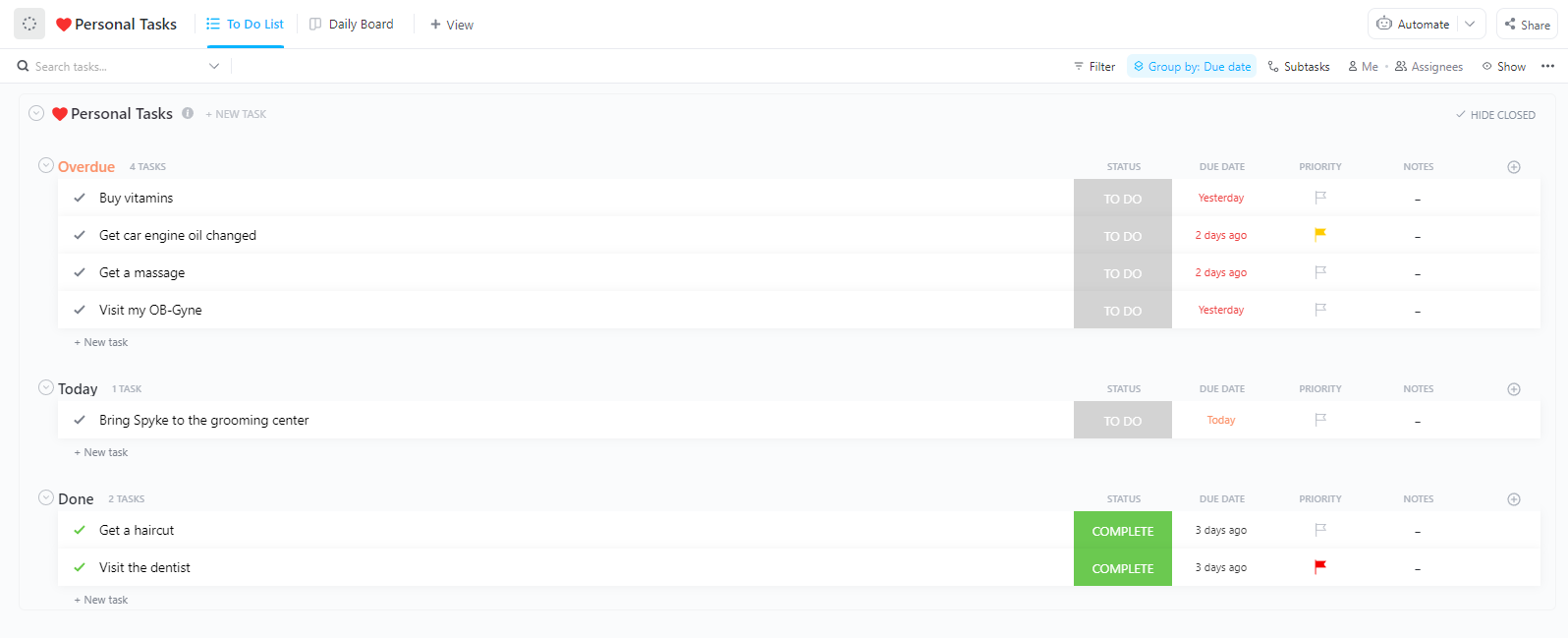
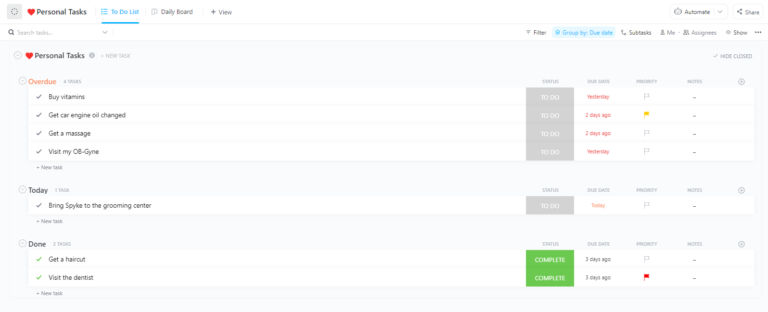
The ClickUp Daily Planner Template helps you organize, prioritize, and track personal, professional, and goal-oriented tasks. The template intelligently divides your tasks into ‘Habit Tracker’ and ‘Personal Tasks,’ providing a clear framework for tackling routine and one-off activities.
🌻 Why you’ll love it:
🌟 Ideal for: Individuals who want to organize and manage their personal and professional tasks in one place.
📖 Read More: How to Make a Google Sheets Calendar
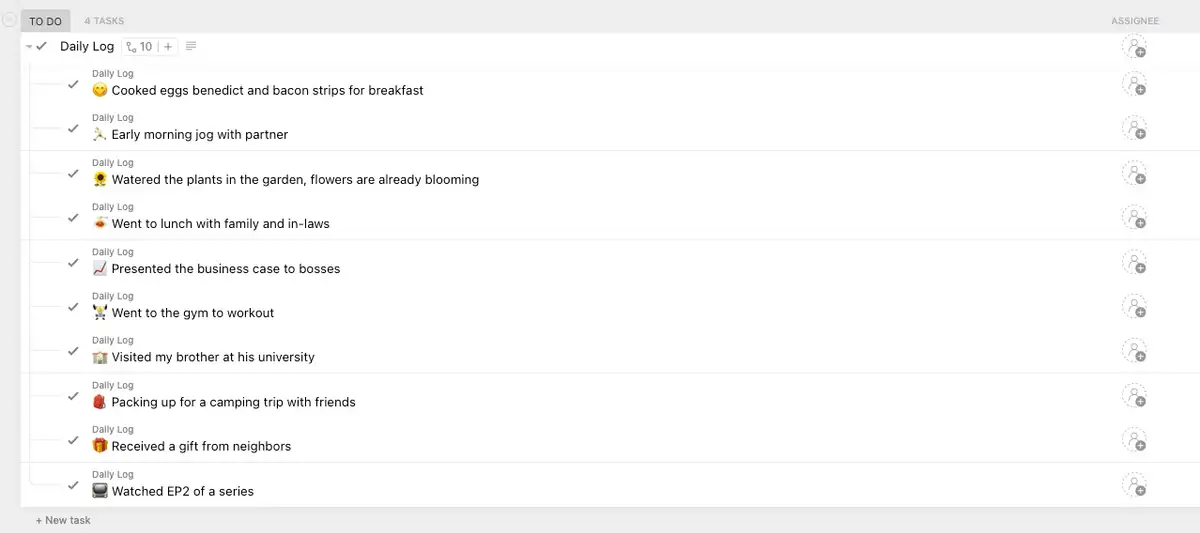
Have you ever wondered which tasks consume most of your time and energy? Enter the ClickUp Daily Log Template, a must-have for professionals who manage a variety of tasks in a day. This template goes beyond simple logging—it’s a strategic tool for improving accountability.
🌻 Why you’ll love it:
🌟 Ideal for: Project managers to track team progress and promote accountability.
💡Pro Tip: Apply color-coded tags to tasks based on urgency or category for a quick visual overview of your day’s priorities. For example, you could use green for tasks related to ‘buy groceries’ and red for ‘urgent deadlines.’
If a simple task list isn’t cutting it, the ClickUp Daily Hour Schedule Template offers a dynamic way to organize your day—hour by hour. This template helps you break down tasks into manageable chunks and plan how much time you need to dedicate to each task.
🌻 Why you’ll love it:
🌟 Ideal for: Project or team managers who want to do efficient resource scheduling and track time spent on each task.
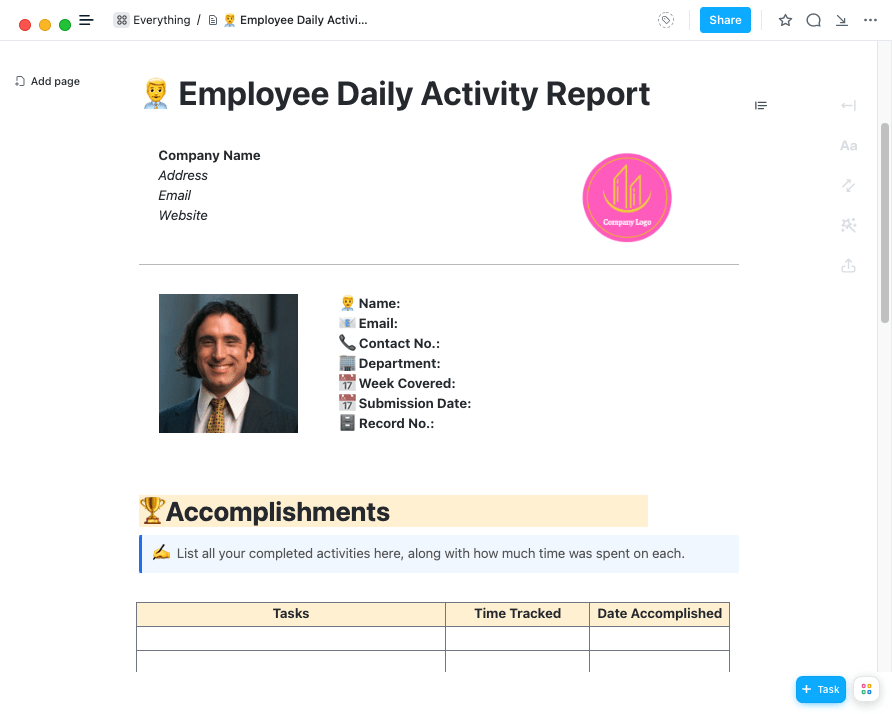
If you’re a manager or team leader, keeping tabs on your team’s daily activities can be time-consuming. The ClickUp Employee Daily Activity Report Template allows you to monitor team progress, assess productivity, and stay aligned without daily one-on-one meetings.
🌻 Why you’ll love it:
🌟 Ideal for: Managers who need to track employee productivity and performance.
Want to plan projects efficiently? Learn how to prioritize tasks and improve your workflow.👇
With the ClickUp Project Planner Template, you can break down the entire project into manageable tasks, assign them to the right team members, and track progress using visual Kanban Boards. Be it a marketing campaign with tight deadlines or a client-facing project requiring multiple touchpoints, the template helps you stay organized.
🌻 Why you’ll love it:
🌟 Ideal for: Project managers and teams who need a comprehensive framework for seamless project planning, tracking, and management.
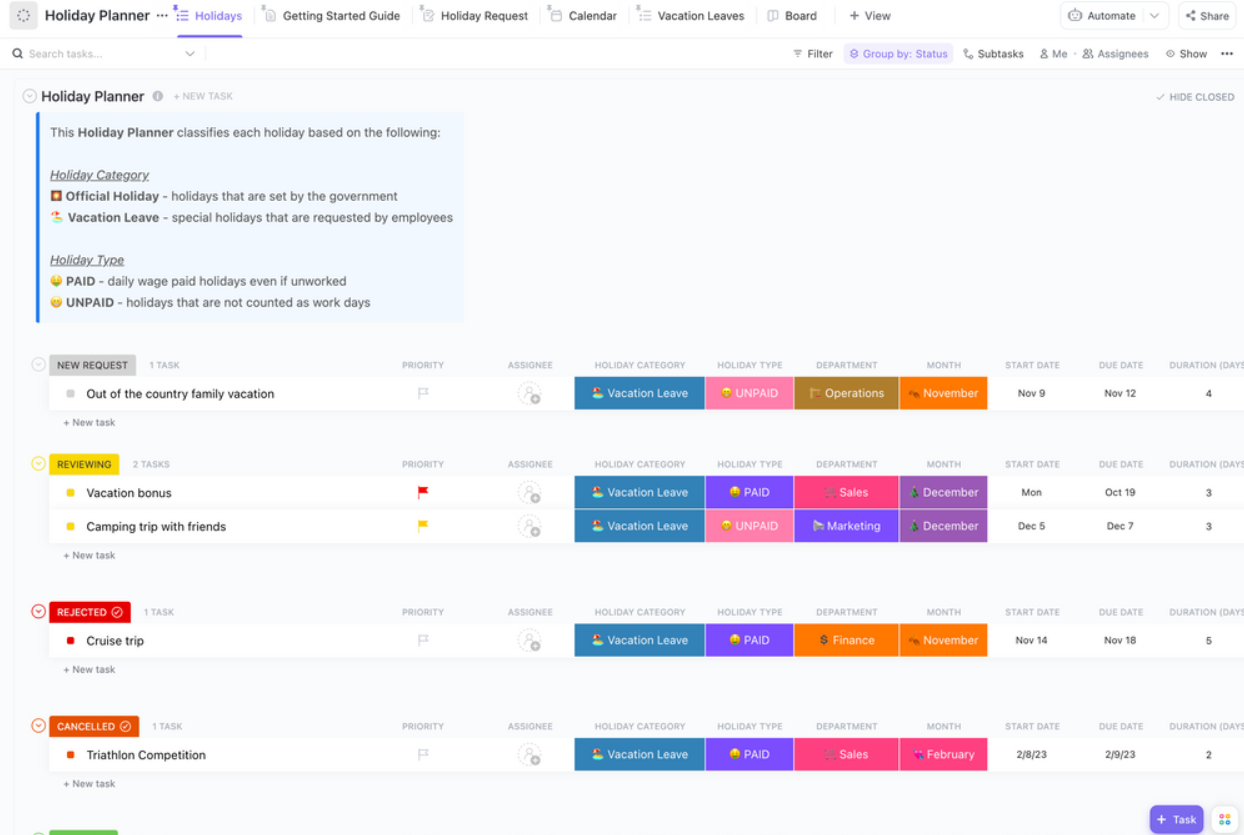
Managing employee holidays and team schedules doesn’t have to be a juggling act. The ClickUp Holiday Planner Template simplifies the process, ensuring smooth coordination and zero last-minute chaos.
🌻 Why you’ll love it:
🌟 Ideal for: HR teams, managers, or administrators responsible for coordinating employee time off.
The ClickUp Calendar To-Do List Template helps you effortlessly plan your week, bi-week, or month with a clear overview of your upcoming commitments. It allows you to spot and eliminate scheduling conflicts early on.
The template also simplifies meeting requests with the built-in meeting request form. You can easily review and schedule meetings, all within a single, centralized platform.
🌻 Why you’ll love it:
🌟 Ideal for: Busy professionals who want a simple yet effective way to manage their to-do list within a calendar view.
🧠 Did you know? 23% of employees schedule everything in their calendar.
The ClickUp Annual Calendar Template provides a central hub for mapping yearly business objectives and ensuring alignment across all departments.
For instance, if your company’s big goal is to launch a new product by year-end, you can break it down into smaller tasks like market research, product design, and marketing campaigns. This way, everyone knows exactly what needs to be done and when!
Assign tasks to the right team members, and you’ll easily track progress with automatic updates on progress bars—keeping everyone in sync and on track all year long.
🌻 Why you’ll love it:
🌟 Ideal for: Teams or businesses looking to map out yearly goals, milestones, and projects.
The ClickUp Weekly Calendar Template helps you visualize your entire week at a glance. You can effortlessly identify potential scheduling conflicts and proactively adjust your plans. Use emojis to rate your productivity levels and transform task completion into a fun and engaging experience.
🌻 Why you’ll love it:
🌟 Ideal for: Professionals who need to manage weekly tasks, meetings, and deadlines in a clear, visual format.
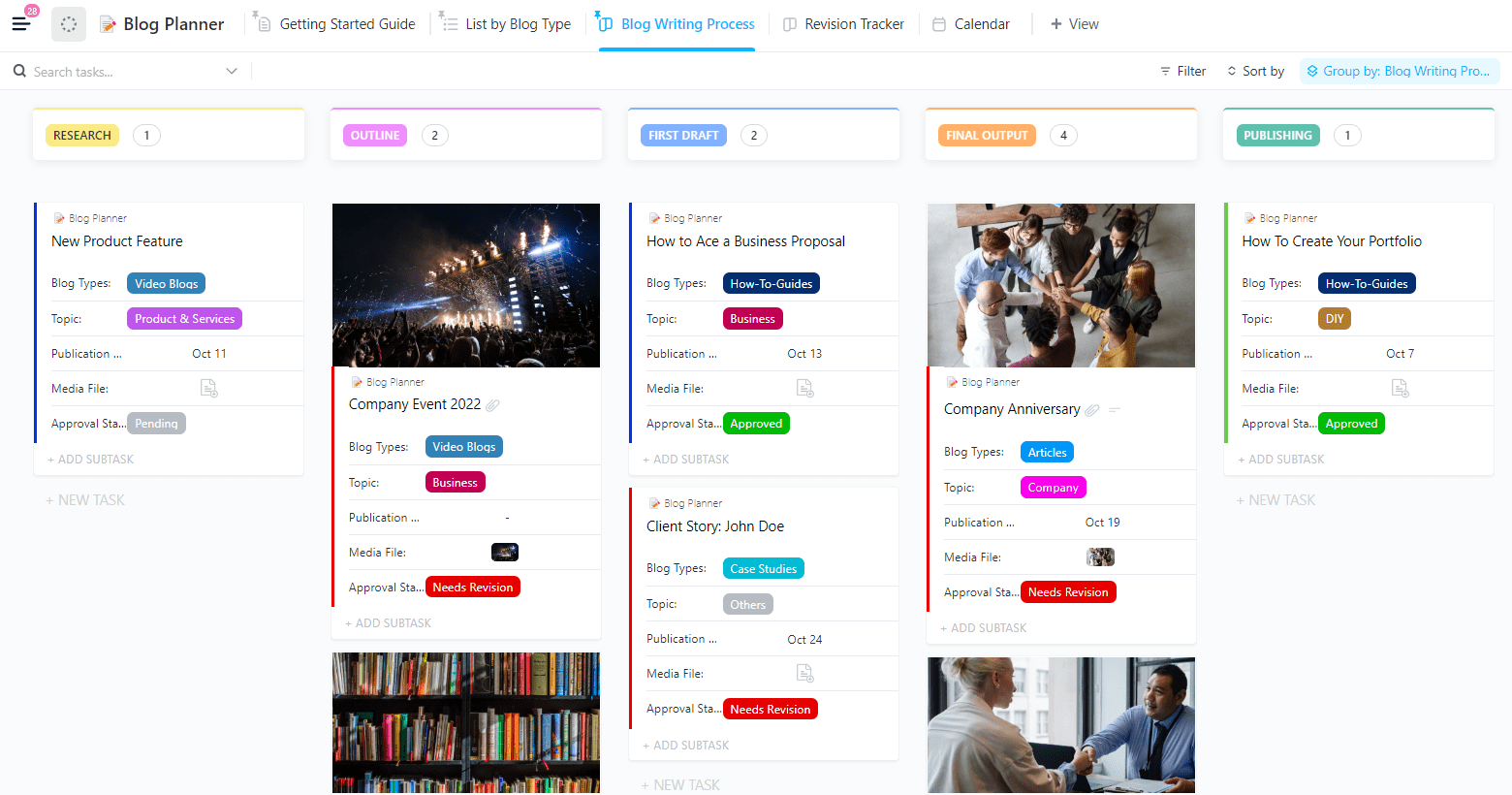
The ClickUp Blog Planner Template simplifies the entire content creation process. With this template, you can manage blog post ideas in one place, organize blog posts into categories, topics, and formats, and track blog performance. This helps you plan and execute your content strategy effectively.
🌻 Why you’ll love it:
🌟 Ideal for: Content creators, marketing teams, or bloggers who need to organize and track blog post ideas, drafts, and publication schedules.
While Notability is great for note-taking and personal organization, it often fails to handle complex planning or team collaboration.
ClickUp offers a powerful, all-in-one solution for project management, scheduling, and collaboration. Whether you’re coordinating a product rollout, overseeing a social media strategy, or monitoring project milestones, ClickUp will keep every aspect running smoothly.
It offers advanced features like Task Statuses to categorize work, Automation to reduce manual tasks, and real-time updates to keep everyone in sync.
So, why limit yourself to static planners and templates when ClickUp can simplify your process and enhance productivity? Sign up on ClickUp for free and experience a more efficient way to tackle your goals.

Praburam Srinivasan
Max 27min read

PMO Team
Max 9min read
Praburam Srinivasan
Max 16min read

© 2026 ClickUp