






Still downloading templates?
There’s an easier way. Try a free AI Agent in ClickUp that actually does the work for you—set up in minutes, save hours every week.
Sorry, there were no results found for “”
Sorry, there were no results found for “”
Sorry, there were no results found for “”
With U.S. creator ad spend projected to reach $37 billion, brands are investing more in creator content than ever. But many creators still lose deals because they do not have a clean, professional portfolio that shows brands exactly what they can do.
This guide walks you through how to build a UGC creator portfolio, what to include in it, where to host it, and how to keep it updated as you grow. We also cover how ClickUp can help you organize your content, pitches, and portfolio assets in one place. 📚
A UGC creator portfolio is a curated collection of content you have created for brands or as spec work to show the kind of content you can produce. It can include product demos, testimonial-style videos, lifestyle photos, and ad-ready clips. More than a gallery, it is a sales tool that helps brands quickly assess your content quality, niche fit, style, and professionalism.
You also do not need paid brand collaborations to build one. If you are just starting out, strong spec work can still show brands what you are capable of.
Your Instagram grid is not your portfolio. Neither is your TikTok page. A portfolio is a curated, intentional document that shows brands exactly what they need to see to say yes.
| Aspect | Social media profile | UGC creator portfolio |
|---|---|---|
| Purpose | Build an audience | Win brand deals |
| Content | Everything you post | Your best, most relevant work |
| Format | Platform-dependent | Flexible and shareable |
| Audience | Followers | Brand managers and marketers |
| Control | Limited | Fully in your hands |
You do not need to throw everything at a brand. You just need the right things, laid out clearly. A cluttered portfolio does more harm than good. Brands are busy, and if they have to work hard to find what matters, they will move on. Here is what every solid UGC portfolio should have.
Keep it to two or three lines: who you are, what kind of content you make, and who you make it for. Brands should know within seconds if you are the right fit.
Think of it as your elevator pitch in written form, clear, specific, and free of fluff.
Pick three to six pieces that represent your strongest work. Prioritize variety in format, video, photo, unboxing, testimonial, but keep it relevant to the niche you are pitching.
If you are going after a skincare brand, lead with skincare content, not your travel reel from six months ago.
If you have worked with brands before, show it. Even small collaborations count. Add their logos or mention them by name to build credibility fast.
Views, engagement rate, click-throughs, watch time, saves, or conversions can all help strengthen your portfolio. Not every creator will have access to full performance data, especially for unpaid or early-stage work, so share the strongest numbers you do have. Metrics make your pitch feel more credible and give brands something concrete to evaluate.
A simple breakdown of your services and starting rates saves time and positions you as a professional. You can list deliverables like one short-form video, three product photos, or a monthly content package.
You do not have to include full pricing for everything. Even a starting rate or a note that rates are available on request is enough to start the conversation.
End with exactly what you want them to do next. Email you, book a call, fill out a form. Make it one step, not five. The easier you make it to reach you, the more likely they actually will.
📮 ClickUp Insight: Only 39% of our survey respondents say their files, notes, and documents are fully organized.
For everyone else, information is often stored in a mix of places: a chat app, email, a drive, and data management tools. The mental effort of remembering where something lives can be just as draining as the task itself.
Enterprise Search in ClickUp gives you a single search bar that allows you to access tasks, documents, and conversations from a single entry point.
Need specific insights? Ask ClickUp Brain, and it will quickly pull together the most relevant details. Instead of reconstructing context from memory, people can re-enter the work with clarity and momentum intact.
Being selective is what separates a portfolio that converts from one that just looks busy. The goal is to show range without losing relevance. Here is how to choose the right samples for your UGC creator portfolio:
Picking the right platform to host your portfolio matters more than most creators think. The best portfolio in the world does not help if it is buried in a cluttered Google Drive folder or takes three clicks to open.
You want something clean, easy to share, and even easier to update. Here is a quick breakdown of your options.
| Platform | Best for | Pros | Cons |
|---|---|---|---|
| ClickUp | Beginners and organized creators | Clean layout, easy to update, shareable link, free to start, professional-looking | Slight learning curve if you are new to it |
| Personal website | Established creators | Full control, highly customizable | Takes more time and money to set up |
| Quick pitches | Easy to send, works offline | Hard to update, no interactivity | |
| Google Sites | Beginners | Free, simple, no coding needed | Looks basic, limited design control |
For creators who want something easy to build, update, and share, ClickUp is a strong option. It gives you a shareable link you can drop into a pitch email, a clean layout that does not require design skills, and a simple way to update your portfolio whenever your work evolves.
You have built the portfolio. Now you need to get it in front of the right people in a way that feels clear and professional. How you present it matters just as much as what is inside it. A strong pitch is short, specific, and makes it easy for the brand to understand why you are a fit.
Do not open your pitch email with ‘Hi, I am a UGC creator looking for collaborations.’ Everyone says that. Instead, mention something specific about the brand, a product you have used, a campaign you noticed, a value they stand for.
Two sentences of genuine context goes a long way before you even share the link.
Brand managers receive dozens of pitches a week. Your email does not need to explain everything, that is what the portfolio is for.
Introduce yourself, share one or two relevant stats or samples, drop your portfolio link, and tell them what you want them to do next. That is it.
Do not bury your portfolio link at the bottom of a long paragraph. Put it front and center, with a clear label like ‘Here is my portfolio’ or ‘Take a look at my recent work.’
The fewer clicks it takes to get there, the better.
If you do not hear back in five to seven days, send one follow up. Keep it short, friendly, and to the point. Reference your original email, ask if they had a chance to look at your work, and leave the door open.
After that, move on. Chasing a brand more than twice rarely leads anywhere good.
🚀 ClickUp Advantage: Never miss a follow-up with ClickUp Automations. Create a task for every brand you pitch and set the due date seven days out. Then use the automation builder to trigger a status change or inbox notification when that due date arrives, essentially a built-in nudge to send your follow-up.
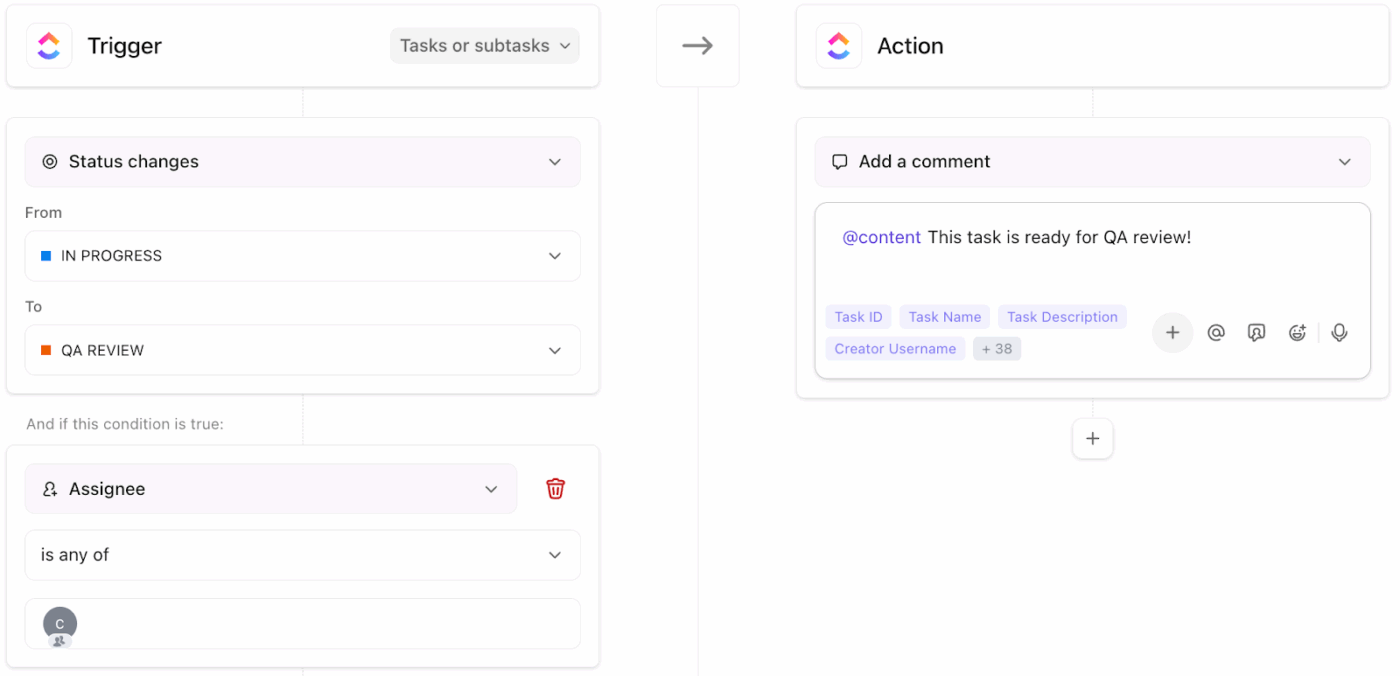
This step gets overlooked often, but it makes a big difference. Keeping track of your outreach helps you avoid pitching the same brand twice, missing follow-ups, or losing momentum in conversations that were going somewhere. Over time, it also helps you spot patterns, like which niches respond more often or which portfolio versions lead to better results.
A portfolio is not something you build once and forget about. The creators who land deals consistently treat their portfolio like a living document, one that grows and improves as they do. Letting it go stale is one of the easiest ways to lose a deal you were almost certain to win.
Review your portfolio every one to two months to make sure it still reflects your best work and current direction. If you have created something stronger than what is already in it, swap it in. If a sample no longer matches the niche you want to be known for, remove it. You should also update your portfolio any time you:
🚀 ClickUp Advantage: Keeping your content assets organized in ClickUp Docs means you always know what you have available and can make updates in minutes without digging through folders or old drives.
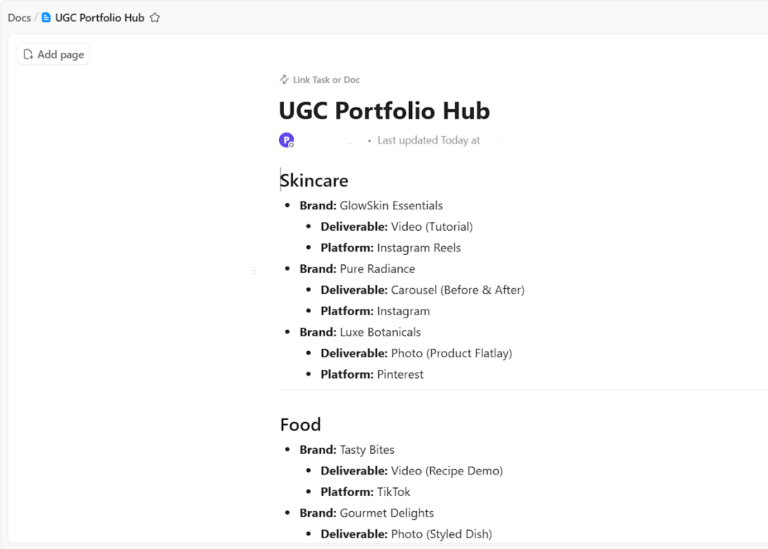
Set up a single Doc as your UGC Portfolio Hub with sections broken out by content type, such as skincare, food, lifestyle, or unboxing.
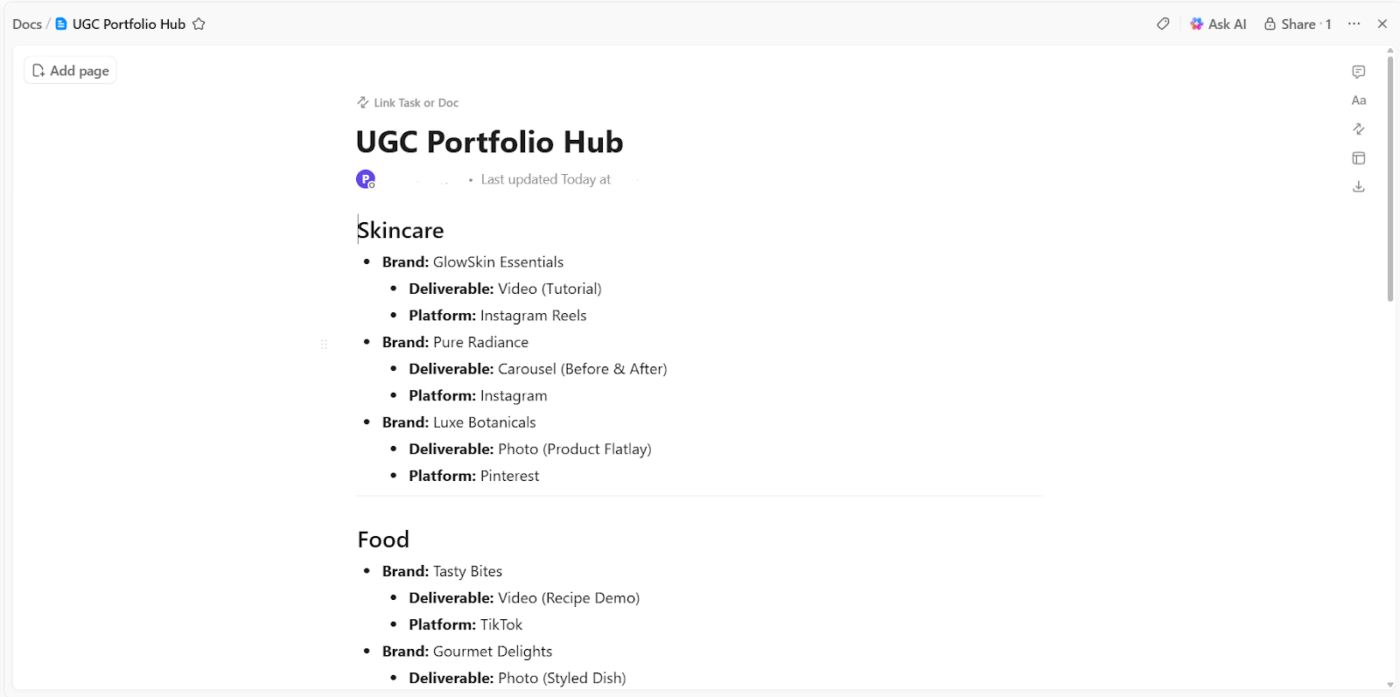
Within each section, list your samples with a short note on the brand, the deliverable type (video, photo, carousel), and the platform it was made for. This way, when a brand asks for relevant examples, you can pull exactly what fits their brief in seconds.
Your portfolio should reflect your growth as a creator. As you land more deals, improve your quality, and refine your niche, that progress should show clearly in the work you choose to feature.
Swap out your earliest work, update your bio when your niche evolves, and adjust your rates to reflect your current value. A portfolio that shows intentional growth tells brands you are not just a one-off creator, you are someone worth investing in for the long run.
Pay attention to which version of your portfolio gets responses and which does not. If you are pitching regularly, small tweaks like leading with a different sample or rewriting your bio can make a noticeable difference.
💡 Pro Tip: Use ClickUp Tasks with Custom Fields to track your pitches alongside your portfolio updates, so you can connect the dots between what changed and what started converting.
UGC creators handle multiple moving pieces at once.
Brand briefs arrive through email, feedback comes through DMs, edits live in cloud folders, and final assets sit scattered across platforms. This setup makes it difficult to track what’s approved, what needs revision, and what belongs in your portfolio.
ClickUp for Creative Teams solves this problem through a Converged AI Workspace where content planning, feedback, revisions, and final assets stay connected. This reduces SaaS Sprawl and cuts context switching because every asset, comment, and update stays tied to the same task.
So, here’s how to use ClickUp for UGC management.
UGC workflows often start with scattered ideas, rough briefs, and multiple deliverables. ClickUp Brain helps you turn raw inputs into structured content and actionable steps.
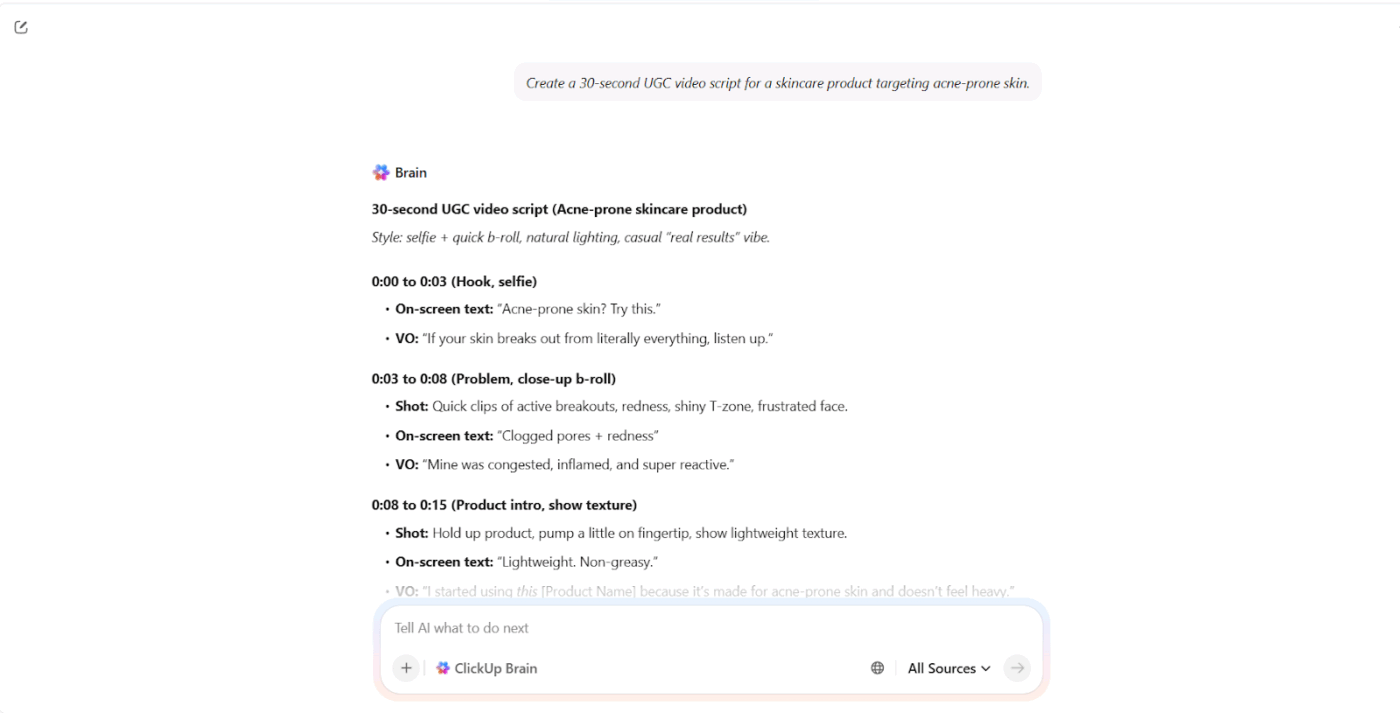
Suppose you receive a brand brief for a skincare product campaign. The brief includes key messaging, audience details, and deliverables but lacks a clear script. You ask ClickUp Brain: Create a 30-second UGC video script for a skincare product targeting acne-prone skin based on this brief.
The Contextual AI generates a structured script that includes a hook, product demonstration, and call to action. You can refine the script inside the same task and begin filming.
ClickUp Brain supports multiple stages of the UGC workflow:
If you want help structuring and presenting your work more effectively, this video explores how AI portfolio generators can help:
Once portfolio content takes shape, asset quality becomes the next focus. UGC portfolios rely heavily on images such as product shots, lifestyle content, and campaign creatives.
ClickUp Proofing allows you to review and refine those assets directly.
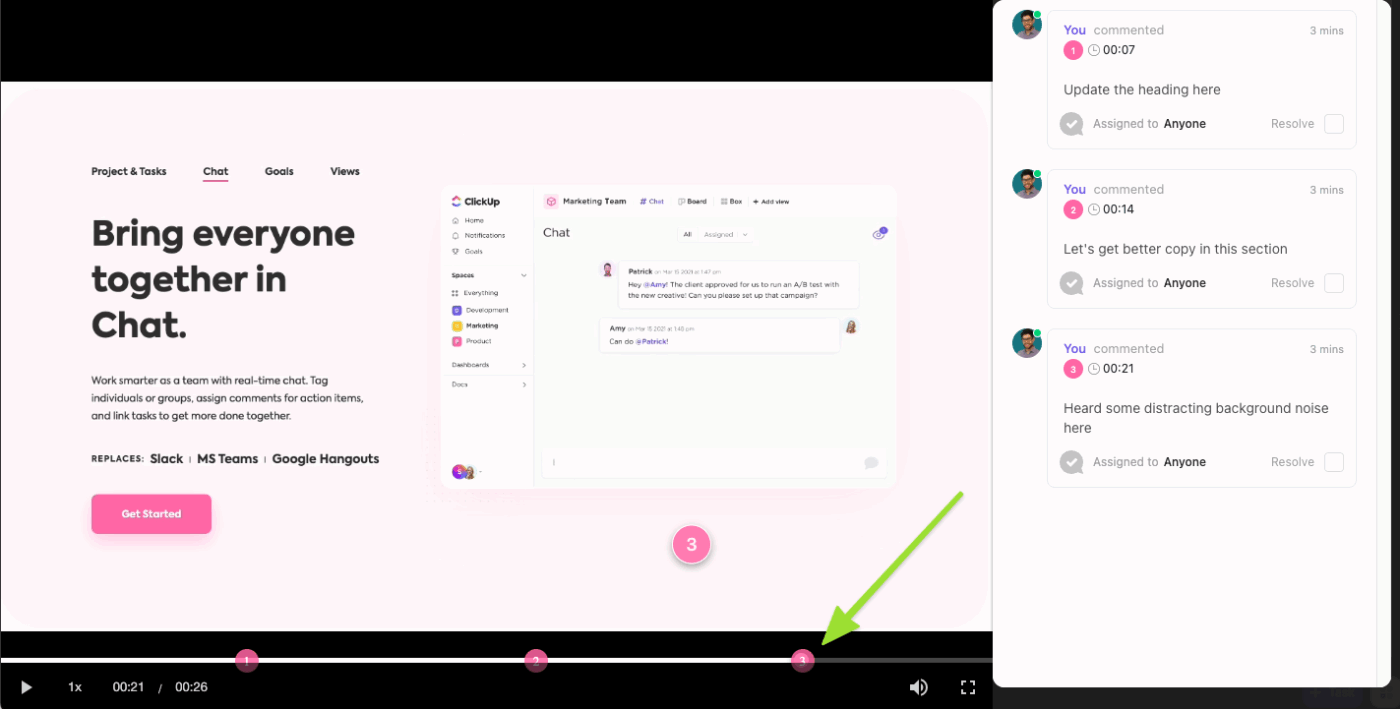
Suppose you’re preparing product photos for a fashion brand portfolio section, and upload image drafts into a ClickUp Task linked to that project.
You can review each image and leave precise feedback:
Each comment attaches directly to the image, so edits remain clear and actionable. Your team and collaborators also join the same workflow and add feedback in context. Image annotation and comments help reduce confusion during revisions.
ClickUp has been a great tool for keeping our team organized and aligned. It makes it easy to manage projects, assign tasks, and track progress all in one place. I especially appreciate the flexibility—you can customize workflows, create templates, and adapt the platform to fit different team processes.
It’s been very helpful for building repeatable systems for things like SOPs, performance reviews, and project tracking. Having tasks, docs, and communication connected helps reduce back-and-forth and keeps everyone on the same page.
Even creators with strong content lose deals because of avoidable portfolio mistakes. Most of these are easy to fix once you know what to look for.
More is not better. A portfolio with 20 samples does not make you look experienced; it makes you look like you do not know how to edit yourself. Brands want to see your best work, not all of your work.
Stick to three to six strong pieces and let those do the talking. If you have great content across multiple niches, consider having separate portfolio versions for each one rather than throwing everything into a single doc.
If your portfolio has beauty content, travel vlogs, food reviews, and tech unboxings all in one place, a skincare brand will not know what to do with you. The more specific your portfolio is, the easier it is for the right brand to say yes.
Clarity in your niche signals that you understand your audience, and brands pay for that kind of focus.
This one is surprisingly common. A brand loves your work, wants to reach out, and cannot find a single way to contact you. Always include:
Do not make interested brands do extra work to hire you.
A generic portfolio can still look polished and miss the mark. If you are pitching brands in different industries, tailor your sample order or featured work so the portfolio feels more relevant to each one. Even small adjustments can make your pitch feel more thoughtful and increase your chances of getting a reply.
A strong UGC portfolio does one thing really well: makes it easy for a brand to say yes. Clear positioning, relevant samples, and a simple structure help decision-makers quickly understand your value without digging through clutter.
But many creators still struggle to keep their portfolio organized, updated, and ready to send in a professional format. That gap often decides whether a deal moves forward or gets ignored.
That’s where ClickUp makes a real difference. You can build, manage, and update your portfolio in Docs, keep your content organized, track brand outreach in Tasks, and handle feedback without losing context with ClickUp Brain.
Everything stays connected, so you spend less time searching for assets and more time pitching, creating, and landing deals.
Your portfolio should work as hard as you do. Sign up for ClickUp and build a portfolio system that is easier to manage, update, and share.
Update your portfolio every time you complete a project that is stronger than your weakest current sample, or at a minimum once a month. A stale portfolio signals to brands that you’re inactive or not actively growing your skills.
Yes, you can easily create spec samples using products you already own around your house. Brands evaluate your execution quality and style, not whether a company actually paid you to make the video.
A UGC portfolio showcases your content samples and production ability, while a media kit focuses heavily on audience demographics, reach, and posting rates. Creators who do both types of work often need both, but a UGC-only creator can lead with just the portfolio.

© 2026 ClickUp

There’s an easier way. Try a free AI Agent in ClickUp that actually does the work for you—set up in minutes, save hours every week.