






Still downloading templates?
There’s an easier way. Try a free AI Agent in ClickUp that actually does the work for you—set up in minutes, save hours every week.
Sorry, there were no results found for “”
Sorry, there were no results found for “”
Sorry, there were no results found for “”
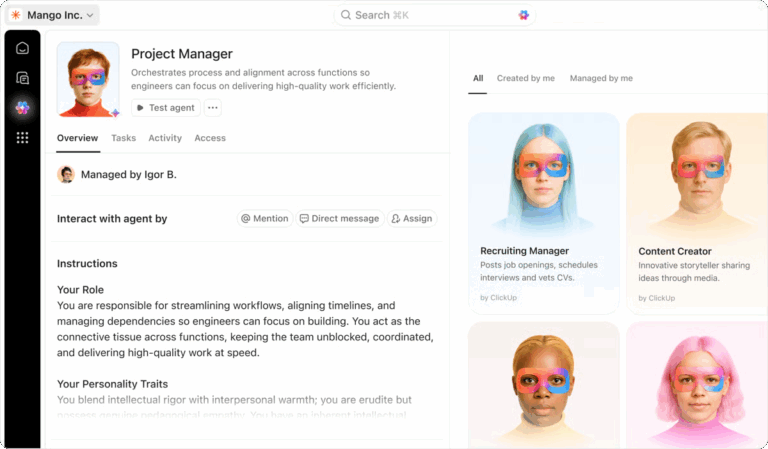
Building a sales AI agent can sound intimidating at first—especially for non-technical salespersons.
You might be thinking: “What if I need to write code, train machine learning models, or wire together complex systems?” 😣
In reality, it’s much simpler than that.
You need three things: a clear sales strategy, thoughtful agent planning, and a no-code AI platform like ClickUp to bring your agent to life.
Ready to learn how?
In this post, we show you how to build powerful AI agents for sales teams without any technical overhead. Boost team productivity and sales enablement success starting today. 💪🏼
AI agents for sales teams are intelligent systems that automate sales workflows end-to-end. This includes prospecting, qualifying leads, booking meetings, and following up, without constant human input.
Unlike basic AI tools that generate one-off emails or summaries, AI agents understand context, retain memory across interactions, learn from outcomes to improve their performance, and coordinate actions/decisions across multiple tools.
The result is an autonomous sales workflow, where planning, communication, execution, handoff, analytics, and decision-making are all done by AI.
With AI sales agents in the picture, your sales reps can focus on building relationships and scaling the customer base rather than on manual grunt work.
ClickUp consultant Anna Bullock (Co-founder of ABx2 Agency) built a ClickUp Super Agent for a construction client scenario where the service pipeline was quietly breaking down. Leads were going untouched, tasks were overdue, and customers weren’t being updated—even though all of the work existed inside ClickUp.
Instead of adding more manual tracking, Anna created a “Project Recovery Coach” Super Agent inside the client’s existing ClickUp workspace. The agent set to work, monitoring the Space:
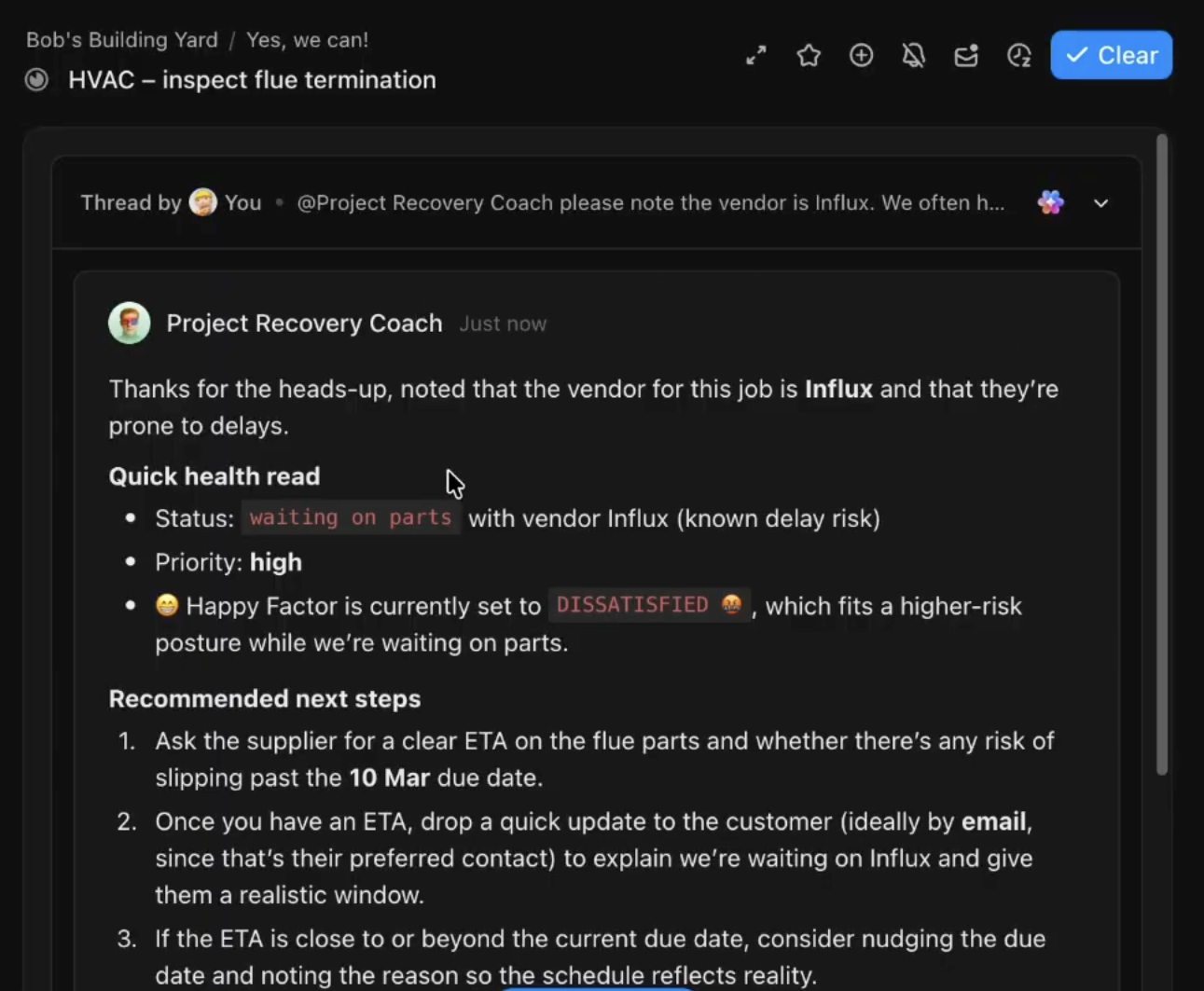
Each day, it generated a clear, prioritized outreach list, turning scattered pipeline data into actionable next steps.
🌟 The result: The pipeline was actively monitored without the client’s manual review. And it led to risks being surfaced early, with daily actions clearly defined to resolve them.
👉🏼 Need help building and deploying a custom AI agent that works the way your sales team does?
Your sales teams are no strangers to using automation tools. You’re probably already using them to manage repetitive tasks such as sending emails or pushing CRM updates. AI sales agents build on that idea, but offer much more:
| Aspect | AI sales agents | Traditional sales automation tools |
| How they work | Use large language models (LLMs), machine learning (ML), and natural language processing (NLP) to analyze data + context before performing tasks | Follow predefined rules and triggers set by the user |
| Role in sales workflows | Act as assistants who help sales teams analyze information, prepare outreach, and identify next steps in deals | Mainly automate repetitive operational tasks in the background |
| Context awareness | Remember past interactions across different tools | High context loss as each run starts fresh |
| Adaptability | Adjust responses, recommendations, or outputs depending on the situation | Perform the same action every time a trigger/condition is met |
| Multi-tool coordination | Pull info from multiple sources (CRM, email, meeting tools, etc.) | Usually connect two tools via simple trigger-action workflows |
| Learning | Improve over time through updated prompts, training data, and user feedback | Behavior only changes when you manually edit the rules |
| Scalability | Handle thousands of personalized conversations. | Lose personalization at scale |
| Output quality | Can generate summaries, insights, recommendations, and more | Perform basic actions like sending messages or updating CRM fields |
| Setup time | Minutes to hours; uses natural language and iteration | Can take weeks of coding and manual rule configuration |
📚 Read More: How to Use AI to Automate Tasks
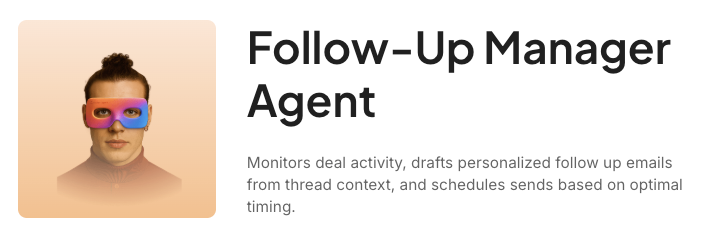
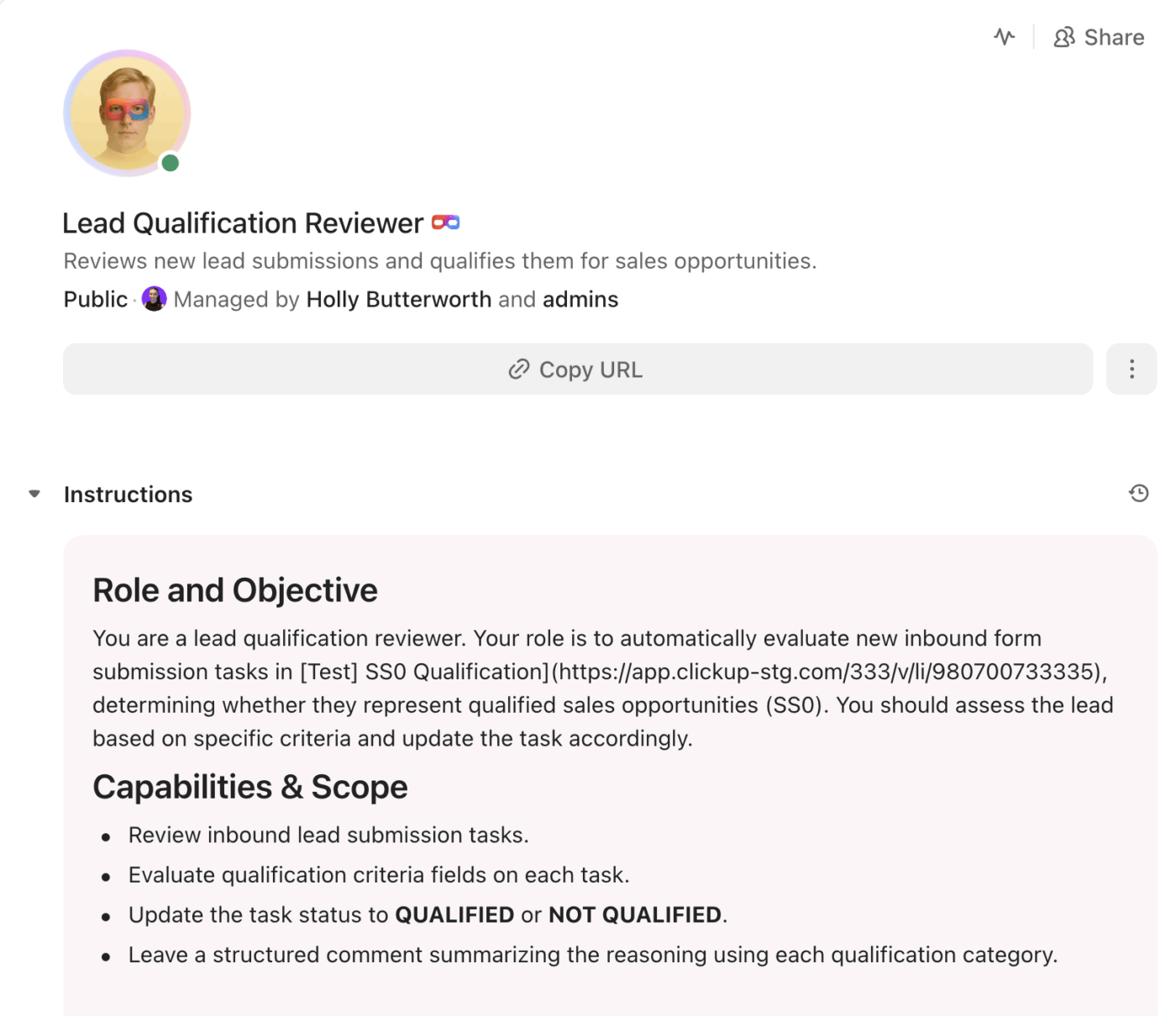
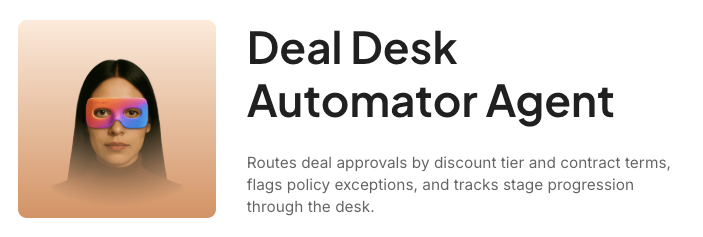
Below are some AI agent examples inside ClickUp that you can build or adopt to automate different sales functions:
🧠 Fun Fact: In 1966, ELIZA shocked the world as the first conversational AI. Created at MIT, it mimicked a therapist so convincingly that users shared their deepest secrets—proving decades ago that machines could hold human-like dialogue.
Sales reps lose entire days to activities that don’t close deals. Understanding these specific pain points shows exactly why AI agents are crucial:
AI agents not only automate repetitive sales tasks but execute them with full context. They can coordinate handoffs like humans, offer personalized recommendations, and run continuously in the background to keep your sales operations always on.
⭐ Bonus: ClickUp Super Agents act as AI-powered coworkers that live right inside your workspace. They don’t replace your sales reps—rather, take over the manual admin work so that your team can focus on strategy and selling.
You can interact with Super Agents just like you would with a teammate:
Powered by ambient AI, they run 24/7 in the background instead of waiting for you to ask a question. They use real skills like sending emails, updating CRM tasks, and summarizing calls—all while maintaining human-level memory.
🍒 The cherry on top: You don’t need to write code to build custom Super Agents. Just describe what the agent needs to do in plain English, and our Super Agent Studio will set it up in minutes!
🎥 To learn more about building Super Agents, watch this video:
Behind every effective sales AI agent is a framework that defines how it understands information, makes decisions, and performs tasks:
👀 Did You Know? The Rolodex, introduced in 1956, was the first real CRM. This rotating card helped sales reps manage hundreds of contacts and territories without dealing with the chaos of loose paper sheets.
Time for some action!
Below, we walk you through five steps of creating AI agents for sales teams without writing a single line of code.
⭐ Hang in there—we’ll also show how to use ClickUp in each step to make this process even easier.
You should be able to answer the question: Why are you building this agent?
Is it to qualify inbound leads, prep personalized demos, or chase stalled follow-ups? Nail down exactly what problem it should solve.
🔔 Remember: Highly strategic work, such as negotiating complex contracts, demands human nuance that AI can’t replicate yet. Instead, prioritize sales tasks that are repetitive, predictable, and time-consuming. Once you’ve identified those, set measurable goals (e.g., cutting qualification time from 30 minutes to 2 minutes per lead) so you know when the agent is pulling its weight.
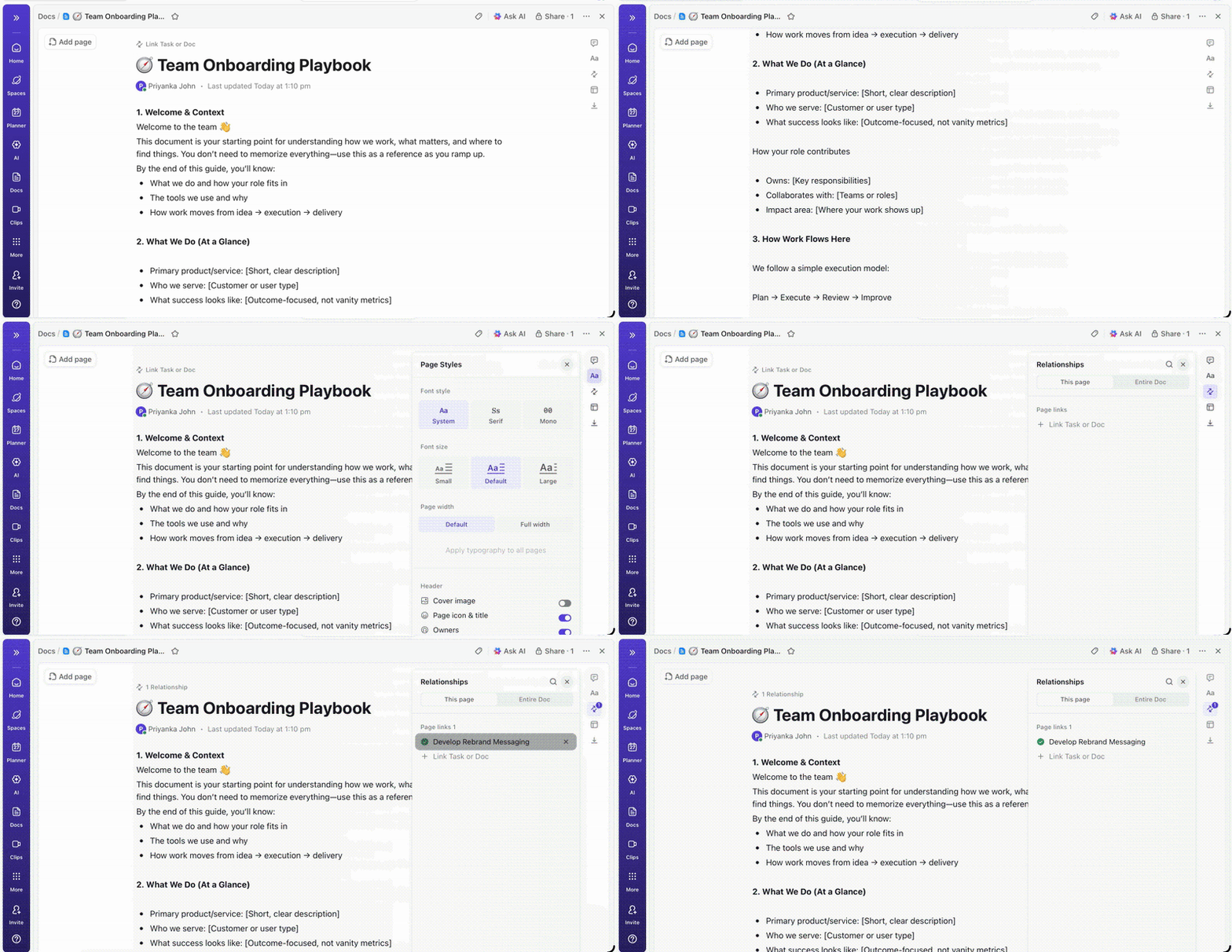
When you begin building multiple AI agents—say one for meeting summaries, another for prospect research, and a third for pipeline insights—it quickly becomes difficult to keep track of each agent’s scope.
ClickUp Docs allows you to capture these details clearly before any automation is created. Outline the agents you want to build, define the workflows they support, and prioritize which to develop first.
You can use rich formatting to make these plans skimmable, invite team members to suggest improvements in real time, and turn text directly into actionable tasks during execution.
⭐ Bonus: Here’s a beginner-friendly guide on how to use AI in sales.
With your goals locked in, it’s time to describe your AI sales agent and define its functions. Start with the agent’s core behavior:
📌 For example, if the agent handles meeting follow-ups, it needs to process call transcripts, identify key discussion points, and produce structured summaries for your CRM.
Next, define how much context and memory the agent should retain. Specify what tools it can access, along with the user permissions needed for each.
Think about how the agent will reason through tasks—will it follow a strict sequence (Task A > B > C) or adapt based on the data?
Finally, factor in multi-agent systems. If you deploy more than one, decide how they will coordinate with each other.
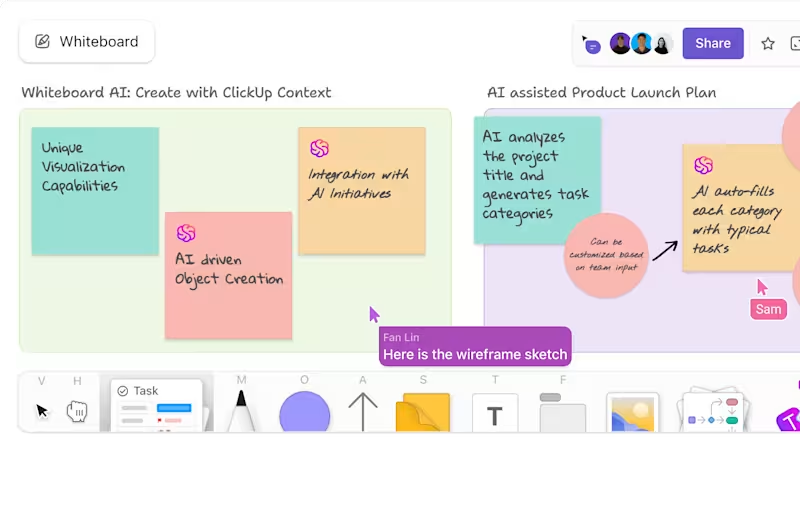
ClickUp Whiteboards provide an unlimited canvas to map out your agent’s logic before you start building.
You can:
Because Whiteboards support real-time collaboration, sales leaders, operations teams, and other contributors can review the architecture together and suggest improvements directly on the canvas.
This is where you develop the agent based on the plan you just chalked out in the previous step.
To start, choose a robust no-code AI agent builder. This tool should allow you to design, customize, test, and deploy agents through a user-friendly interface with zero technical overhead.
ClickUp is the world’s first Converged AI Workspace where you can create sales agents directly alongside your daily work. This saves plenty of time otherwise spent adding context, configuring agents, and moving data between tools.
Let’s see how this works out in practice:
ClickUp Super Agents remove the usual complexity of building AI systems. Instead of stitching together tools or training models, you can create agents using simple, familiar workflow components to automate real work much faster.
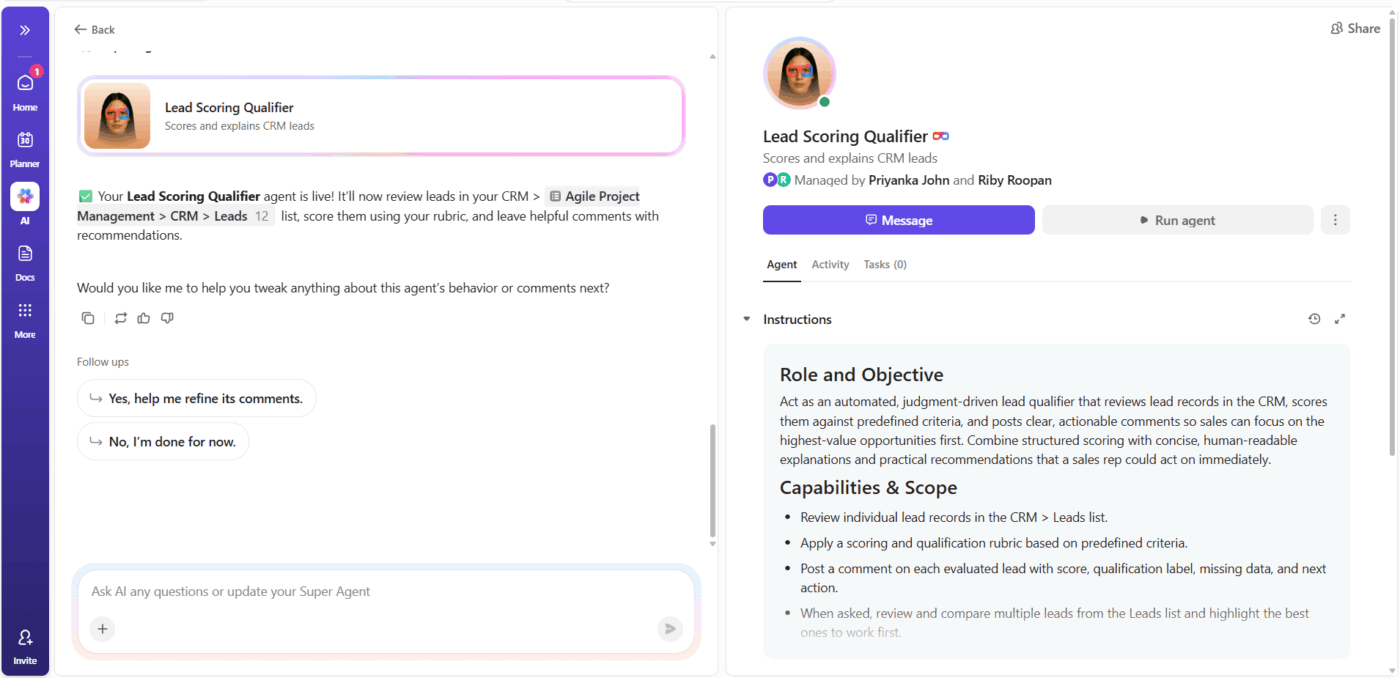
🤝 Customer story: Bell Direct proves that you don’t need a technical team to adopt AI Super Agents meaningfully.
Using ClickUp Super Agents, the team automated an entire intake and triage workflow—end to end—without writing code or adding new tools.
🌟 The results:
Anyone can start with AI Agents—you don’t need a development background. ClickUp has made it so easy to set up agents and introduce AI incrementally into our operating model.
The best part about ClickUp Super Agents?
You don’t have to manually feed information or context into your agents during development.
Instead, they inherit the context already present in your workspace—tasks, docs, chats, comments, projects, meeting notes, and calendars.
This contextual AI continuously updates its understanding in real time. So, when new information appears, such as a meeting summary added to a task or a deal stage updated in your pipeline, the AI immediately has access to that data.
This allows agents to produce outputs based on live information rather than outdated data.
🔑 Key Takeaway: Building AI agents doesn’t have to be complicated—but it does require a thoughtful approach.
Need designing customized and specialized agents for your workflows?
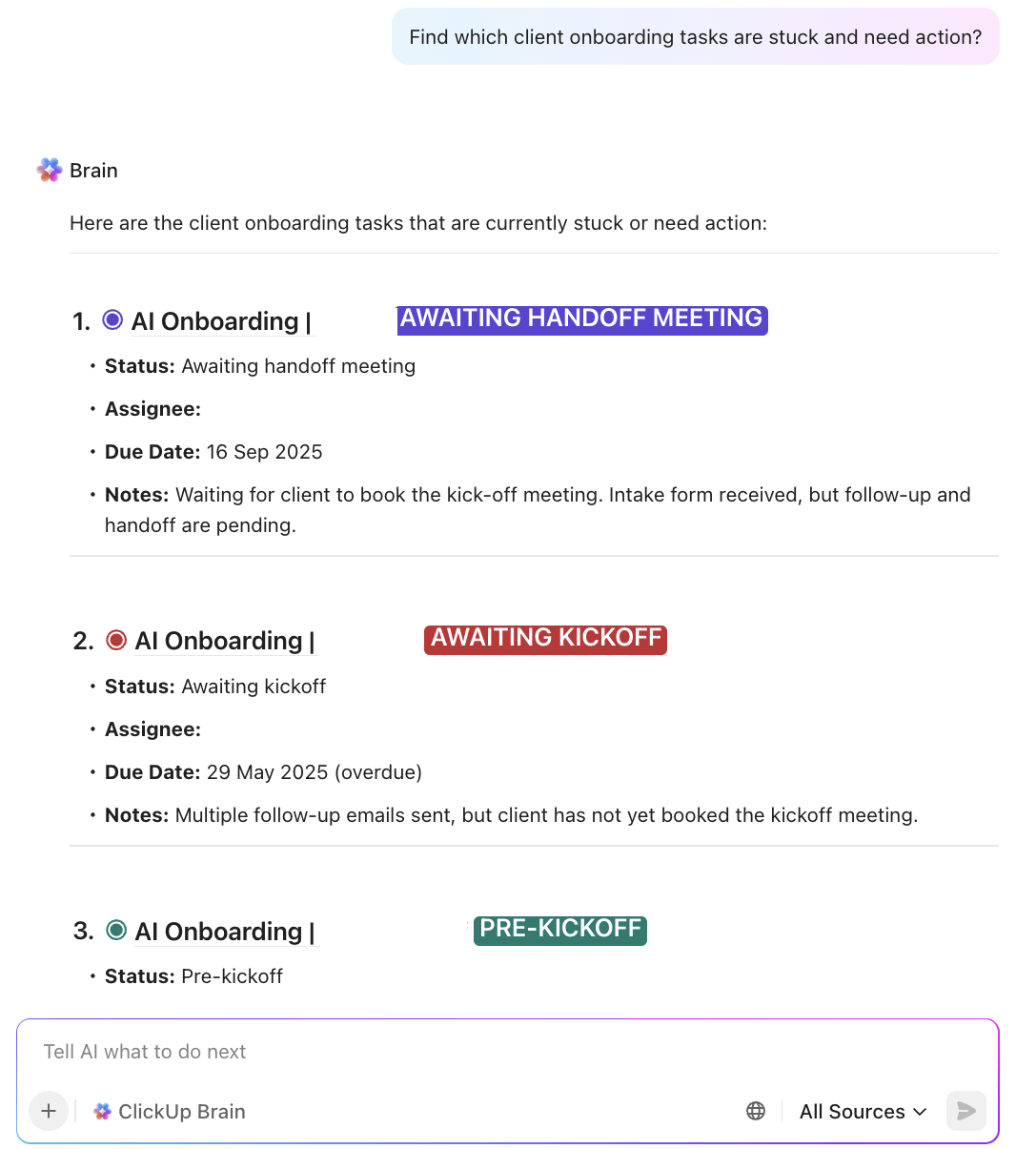
ClickUp Brain is the native AI layer baked into your workspace. It connects your tasks, docs, and knowledge, giving Super Agents the context and intelligence they need to operate effectively.
Super Agents build on top of this layer—using that context to understand what’s happening, make decisions, and take action across your workflows.
📌 Example: Your sales follow-up agent can review notes from a discovery call you finished a few minutes ago, combine them with prospect details from your integrated CRM tool, and draft a personalized follow-up message—all by itself.
ClickUp Brain helps your team understand what’s happening and what to do next. It doesn’t run chained workflows from start to finish on its own like Super Agents. Rather, it supports reps in the moment with the info they need to do their jobs.
🎥 Bonus: Here are some of the best AI agents for sales and CRM automation 👇
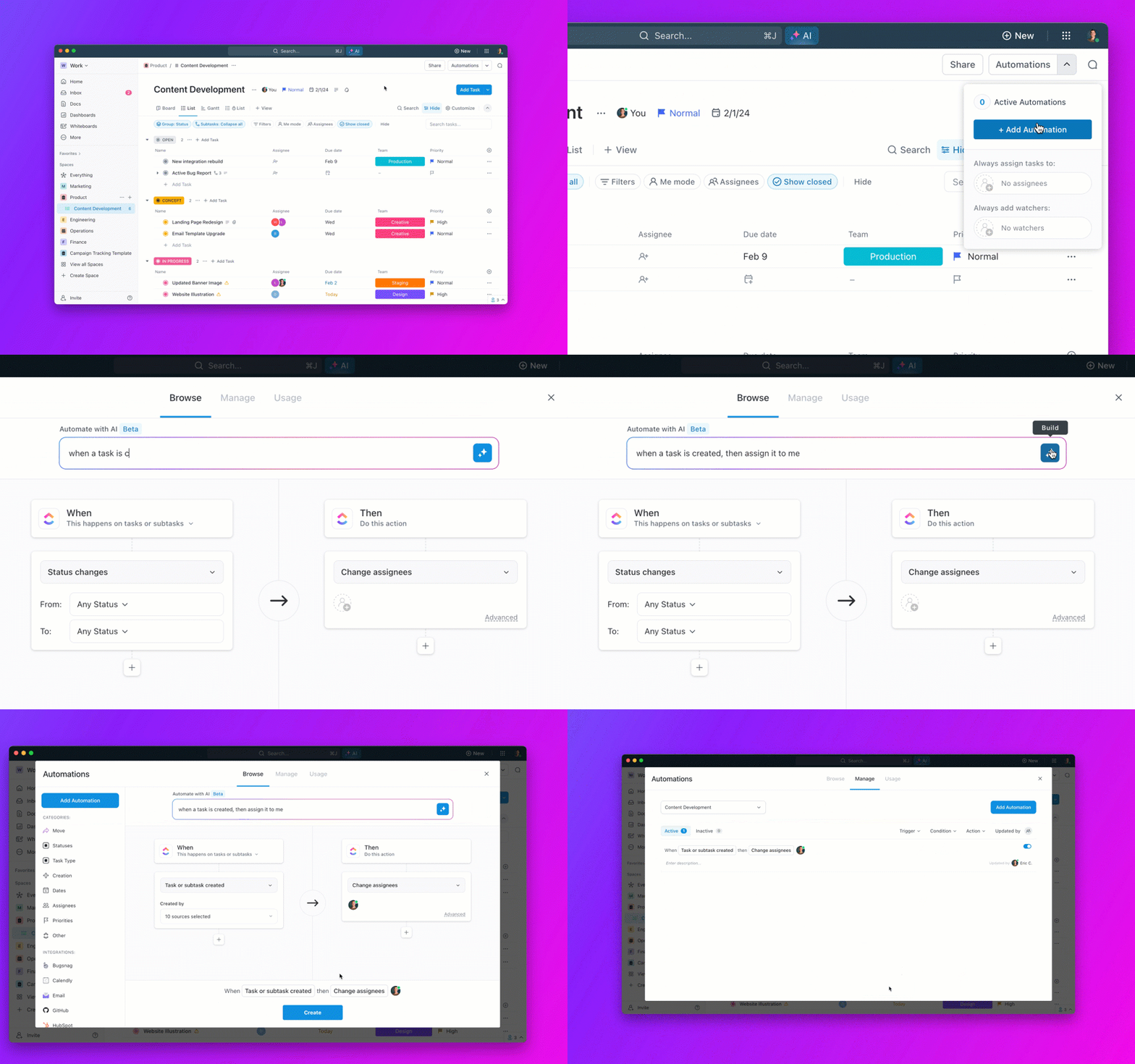
ClickUp Automations give you the flexibility to fall back on rule-based automations for simple, routine, and highly predictable tasks, such as changing task priority levels.
Choose from our pre-built list of triggers, conditions, and actions, or chat with Brain to design a custom automation. Either way, they help you put routine admin work on autopilot without having to set up a dedicated AI tool or agent for every small task, reducing AI Sprawl.
👀 Did You Know? ClickUp offers 1000+ native integrations to connect your sales AI agents with external apps. Just select the tools you use, toggle them on, and start accessing your data instantly.
It’s important to test AI agents before launching them at scale. This helps check AI accuracy, output consistency, and overall pipeline stability.
You can test your sales agent in different ways:
To thoroughly gauge performance, keep an eye on these agent and workflow metrics:
Finally, refine your AI agents as needed.
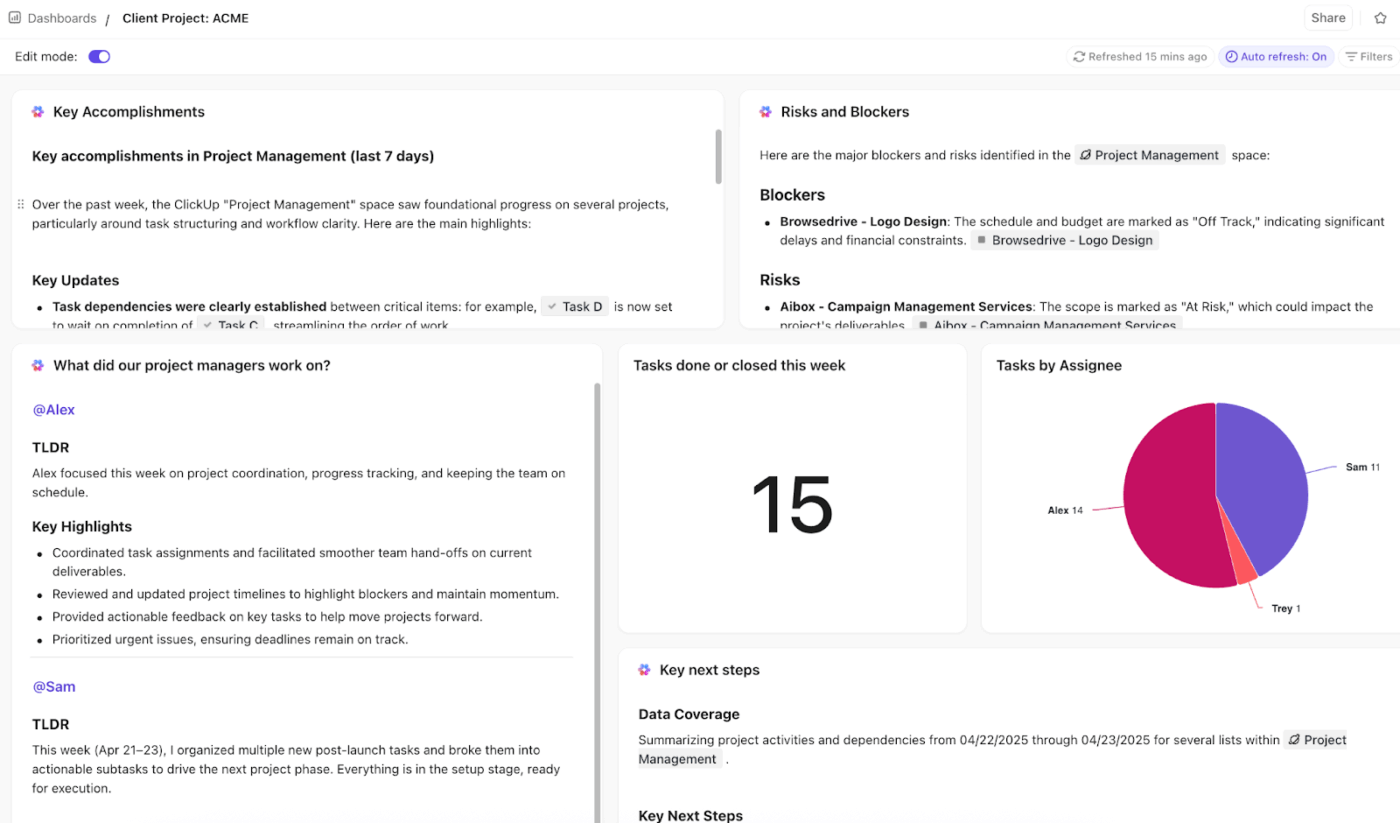
ClickUp Dashboards pull your agent and sales data into one live view, so you spot performance issues or wins as they happen, without digging through reports.
Use drag-and-drop cards—like pie charts, line graphs, and tables—to visualize your KPIs exactly how you want them.
Built-in filters make this even sharper. There’s no need to create separate dashboards for every role. Instead, just create a master dashboard and use filters to view the metrics that matter most to you.
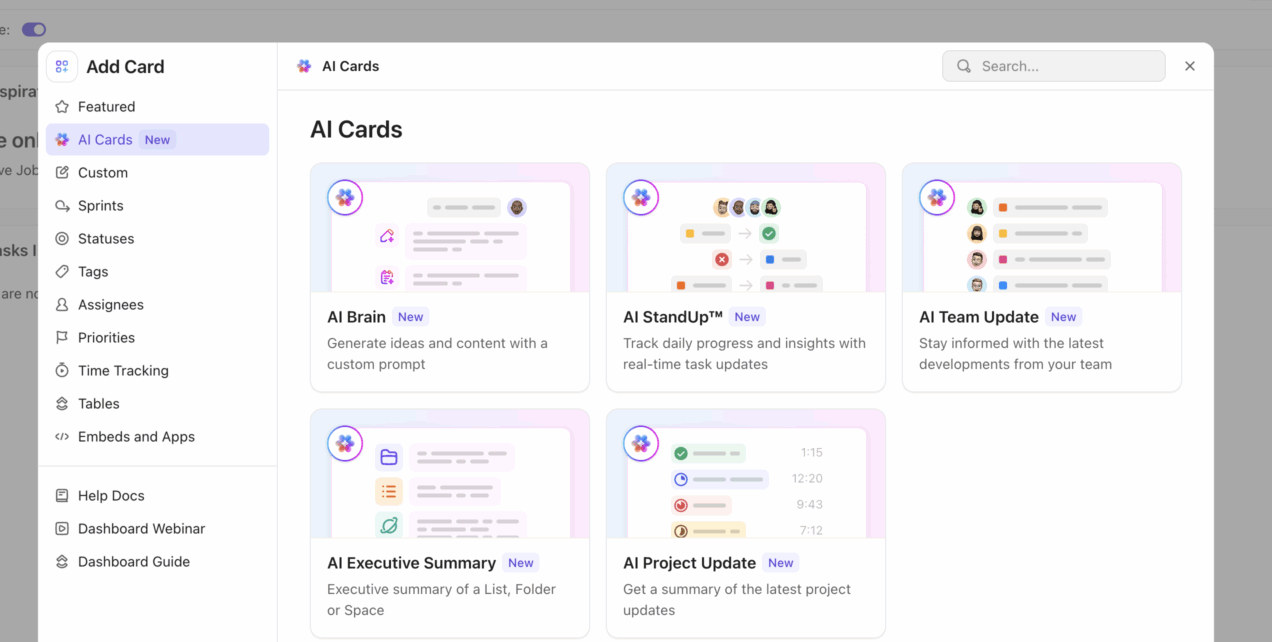
Take it a step further with AI Cards powered by ClickUp Brain. These are dynamic widgets that analyze your dashboard data on the fly.
For example, you can use an AI Brain card to automatically read your dashboard data (like agent response times) and suggest three ways to improve it.
📮 ClickUp Insight: 30% of people say their biggest frustration with AI agents is that they sound confident but get things wrong.
That usually happens because most agents work in isolation. They respond to a single prompt without knowing how you like to do things, how you work, or your preferred processes.
Super Agents work differently. They operate with 100% context pulled directly from your tasks, docs, chats, meetings, and updates in real time. And they retain recent, preference-based, and even episodic memory over time.
And that’s what turns an agent from a confident guesser into a proactive coworker who can keep up as work evolves.
Finally, roll out the sales agent to take over the everyday repetitive work.
Pay attention to how sales reps interact with it. Early adoption often reveals small gaps that didn’t show up during testing.
Gather this feedback during the first phase of deployment to refine the agent before expanding it across the organization.
Providing adequate sales training is just as important. Sales reps should know what the agent is responsible for, what kind of inputs it needs, and when they should rely on it versus handling a task themselves.
Clear guidance prevents unrealistic expectations and ensures a smooth handoff between AI and humans.
🧠 Fun Fact: Tupperware parties took off in the 1940s when Brownie Wise started hosting kitchen demos for housewives. By selling plastic containers peer-to-peer, she created a direct sales model that empowered women entrepreneurs long before corporate careers were common.
Modern sales teams deal with an overwhelming amount of information.
Rather than acting as a standalone AI tool, ClickUp Brain manages this complexity by bringing artificial intelligence directly into your workspace.
It integrates across tasks, docs, chats, dashboards, and connected apps to help you find information, draft communications, summarize conversations, and generate insights from your data.
Let’s see how:
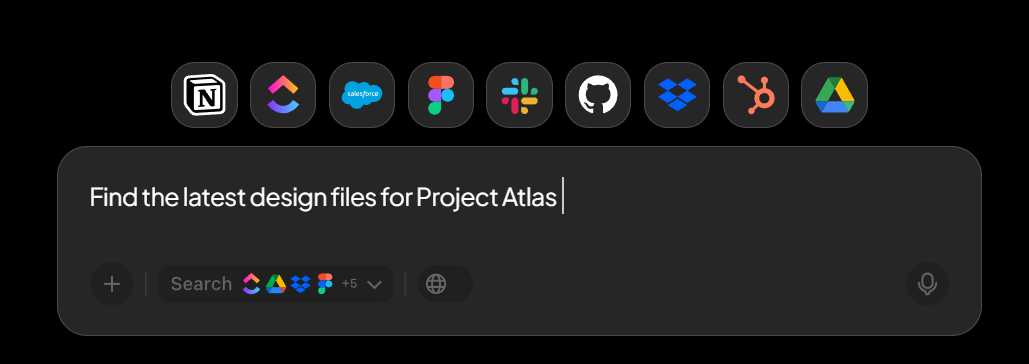
A sales rep’s ability to locate the right context in seconds can make a huge difference when engaging prospects and improving everyday productivity.
ClickUp AI Enterprise Search lets you retrieve information from across your workspace simply by describing what you want.
No need to rummage through folders or waste time recalling where you saved a file. Just type your query in the search bar. For example, “Find notes from the last call with Acme Corp” or “Show me documents related to the enterprise pricing proposal.”
AI scans your entire workspace and connected apps to surface the most relevant results instantly.
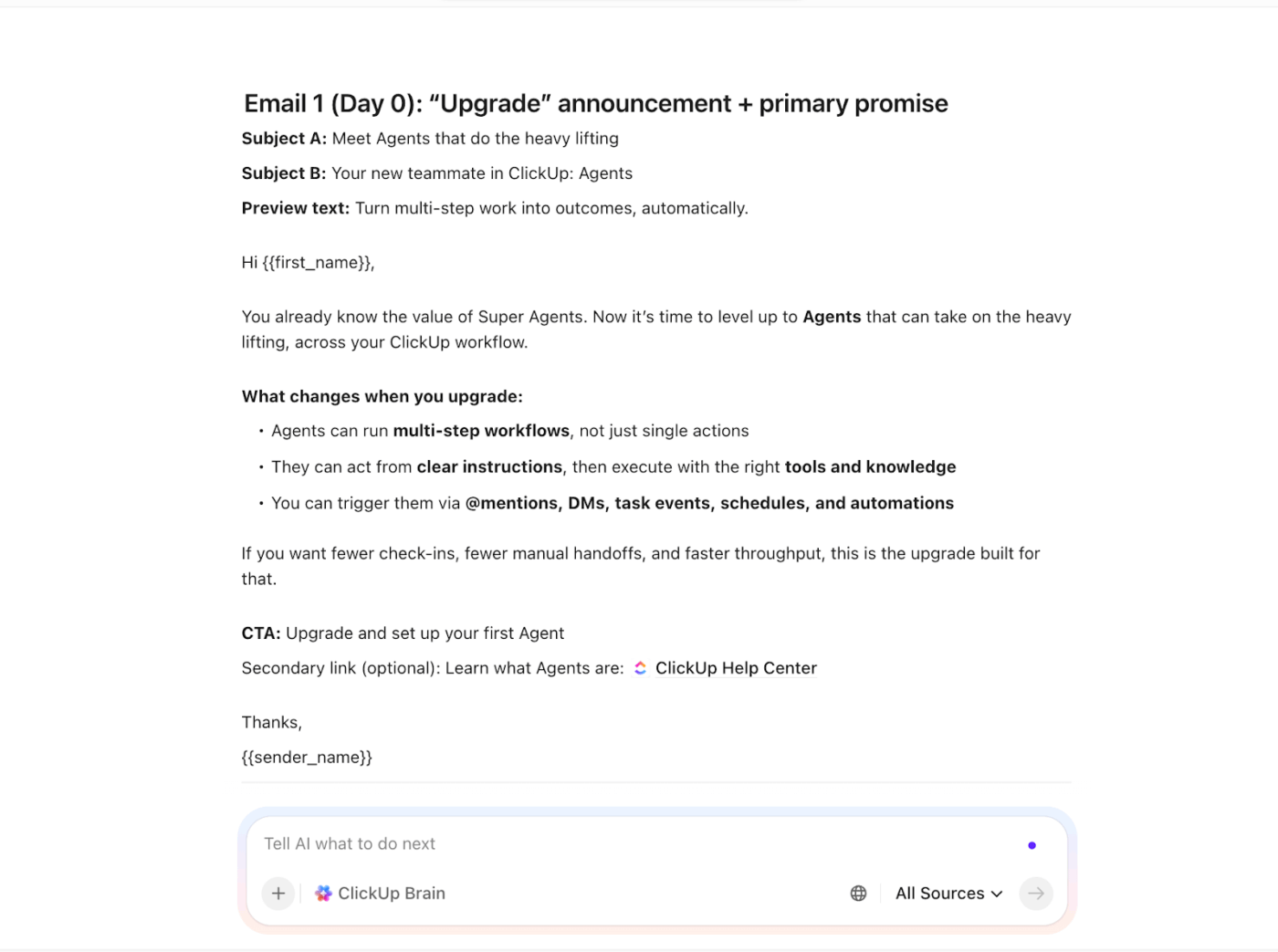
Use ClickUp Brain to help your sales team create content in three main places: Docs, Tasks, and Chat, plus standardize it with saved prompts and templates.
For example, use Brain directly inside a Doc to draft emails, summarize content, and turn notes into action items. Brain can engage with the entire Doc context, so it can keep style and positioning consistent across sections.
It is particularly helpful for creating sales brochures and email sequences.
If your team has messy notes, transcripts, or bullets, Brain is great at converting them into structured sales outputs.
👉🏼 Prompts to use:
This maps well to how Brain can summarize and generate action items from existing content.
Additionally, your team does not need to live in Docs. Brain writing tools work anywhere. ClickUp accepts text (task description, comments, Chat, etc.).
🎯 Great sales uses:
📚 Read More: How to Use AI in Content Marketing

ClickUp’s AI Notetaker joins your Zoom, Google Meet, or Teams calls automatically to record, transcribe, and summarize discussions. Once the call ends, it generates an instant summary highlighting risks, key decisions, and next steps.
It even extracts action items and turns them into tasks assigned to the right person—without you lifting a finger.
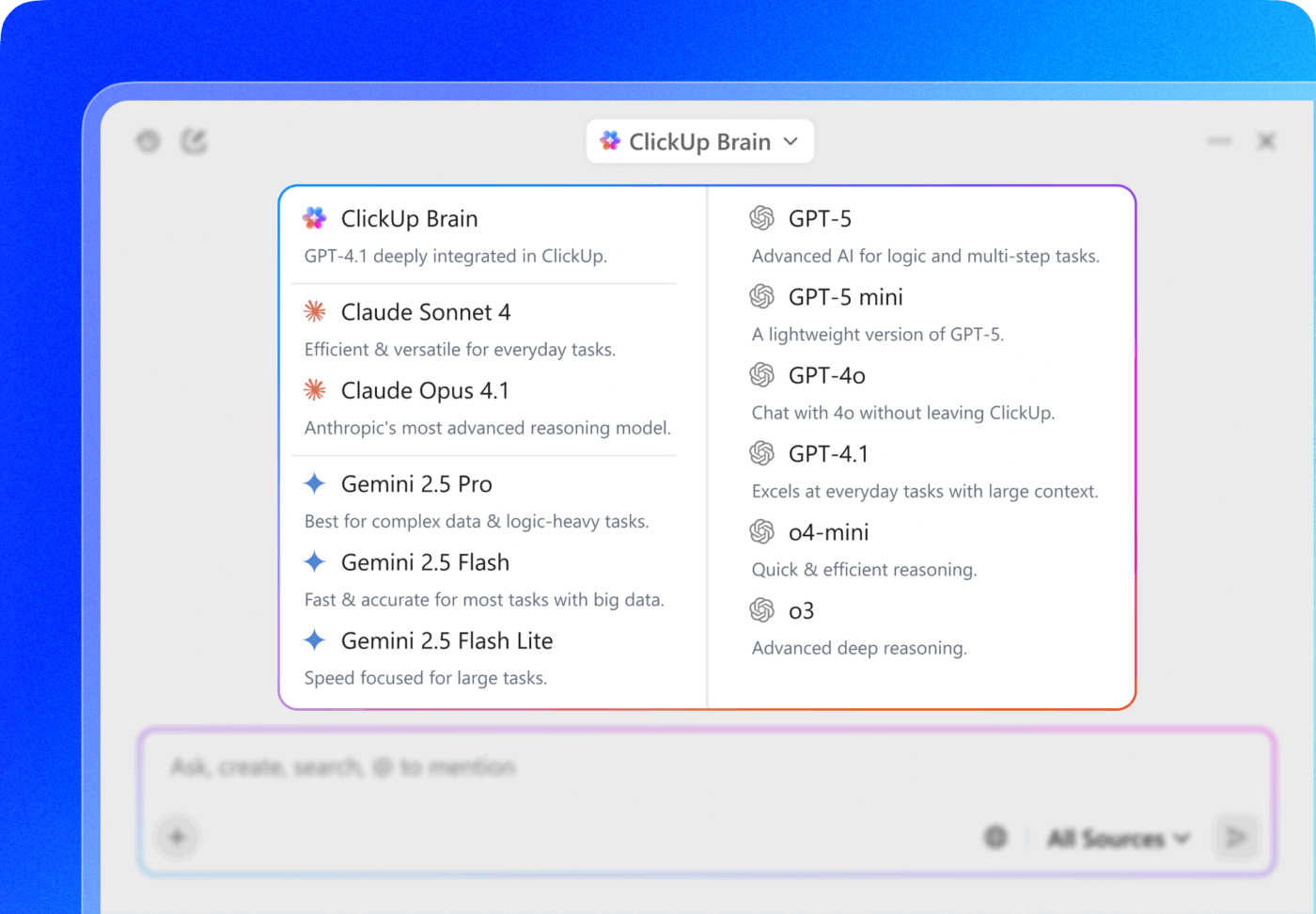
ClickUp Brain MAX is your desktop AI Super App that consolidates top AI models—ChatGPT, Claude, Gemini, plus ClickUp’s own contextual Brain—into one frictionless space.
This allows sales teams to choose the best model for the job: use Claude for market analysis, Gemini for personalizing emails, and ChatGPT for brainstorming sales coaching guides. There’s no need to manage multiple logins or subscriptions; everything runs under your ClickUp account.
For sales professionals who spend much of their day in meetings or commuting, Brain MAX’s Talk-to-Text works crazy well. Instead of typing out notes or emails, you just speak out loud, and the AI turns your voice into polished text.
Reps can dictate outreach sequences during a walk, log updates hands-free, or run verbal search prompts like “Find stalled Q1 opportunities,” saving hours every week.
🧠 Fun Fact: Ancient Babylonians around 1750 BC carved the world’s first sales contracts on clay tablets. Buyers pledged repayment for goods like barley or livestock, with witnesses binding the contract using their seals.
Here’s how ClickUp AI Agents stacks up against typical third-party AI agent tools:
| Feature | ClickUp Brain | Third-party AI agent platforms |
| Native workspace integration | Built directly into the workspace so that AI agents can access real-time sales data | Usually connect to your workspace through custom APIs and manual syncing |
| Context awareness | Can read and reference tasks, documents, comments, and workspace activity to generate responses with real business context | Relies on manual uploads; context often limited to what you explicitly import; misses nuanced workspace history |
| No-code building | AI agents and workflows can be created directly inside the workspace using natural language prompts, not coding | Visual builders available, but often need coding for advanced logic or custom sales integrations |
| Built-in project management tools | Comes with tasks, dashboards, whiteboards, and reporting tailored for sales pipelines, all AI-enhanced in one app | Focused on agents only; you still need separate PM software, creating tool sprawl and context switches |
| Pricing model | Included in ClickUp plans with usage credits; scales with your workspace without per-agent fees | Often subscription per agent or task volume, plus setup costs that add up for sales teams running multiple workflows |
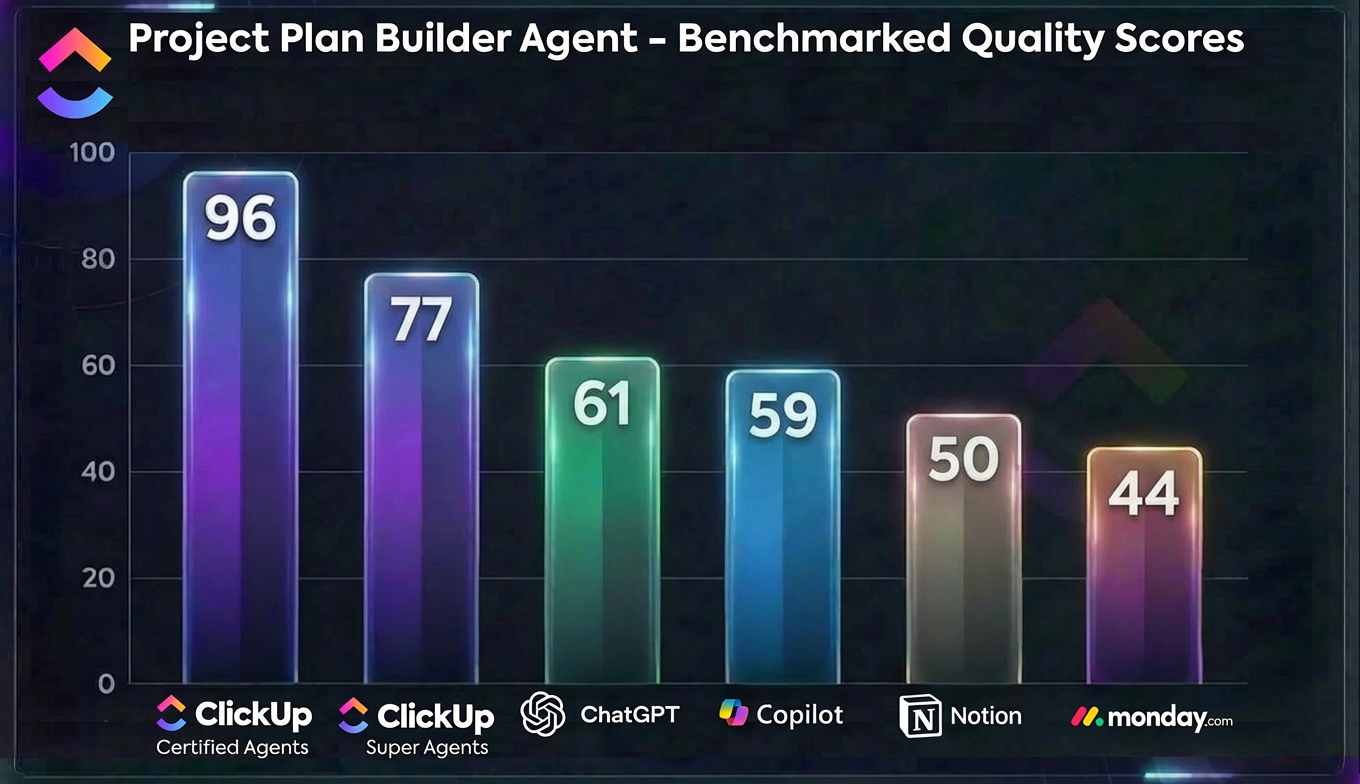
🌟 ClickUp’s Certified Agent scored 96 out of 100 in a direct benchmark of execution‑ready project plans.
The closest competitor reached 61, with most others stuck in the 40s and 50s.
ClickUp Certified Agents are built, rigorously tested, and maintained for you by ClickUp AI experts. You can choose them via either package:
🧠 Fun Fact: Sellers who effectively use AI for prospecting are 3.7 times more likely to meet their sales quotas
Here’s how sales teams benefit from AI-powered agents:
📚 Read More: Best AI Productivity Tools to Try
Before we wrap up, let’s quickly go through some common mistakes sales teams often make when building AI agents (+ how to fix them):
| Common mistake | Solution |
| Trying to automate strategic sales decisions | Focus AI agents on operational tasks rather than strategic ones. Activities like pricing negotiations, complex deal strategy, or relationship management should remain human-driven |
| Overcomplicating the first agent | Start with a simple workflow and expand gradually. Building a smaller, focused agent first makes it easier to test, refine, and scale later |
| Skipping the testing phase | Run the agent through multiple scenarios and real sales situations before deploying it widely. Testing helps identify gaps in instructions, context, or outputs early |
| Treating the agent as a one-time setup | Continue refining the agent based on feedback and performance data. Updating prompts, workflows, and integrations helps the agent stay aligned with evolving sales processes |
As powerful as AI sales agents are, they’re incredibly easy to build with the right platform.
ClickUp uses deep workspace integration and contextual AI to make agent development a breeze, without developing custom code solutions.
You can simply chat with the natural language Super Agent builder in ClickUp and refer to your workspace data to describe how you want the agent to behave. The builder will handle the entire technical part for you.
Ready to scale your sales? Sign up for ClickUp today and start building your first AI sales agent.
Need more information?
AI agents automate the entire sales cycle, from prospecting and lead qualification to booking meetings and summarizing calls. They act as autonomous assistants that handle repetitive admin work, allowing reps to focus exclusively on closing high-value deals.
AI processes and agents deployed using traditional sales automation tools are often rigid, limited in scope, and need manual connections to external databases or tools.
ClickUp Brain, on the other hand, is highly contextual. It understands your workspace data, remembers past interactions, and uses reasoning to make dynamic decisions, adapting to changing sales workflow in real time.
Not at all. With ClickUp, you can build custom agents using plain English. Simply describe the tasks, persona, and goals you want the agent to handle, and the platform manages the technical setup for you.
ClickUp Brain provides a single interface for tapping into leading models like ChatGPT, Claude, and Gemini. Additionally, 1,000+ native integrations allow you to connect your agents directly to CRMs like HubSpot, Salesforce, and communication tools like Slack.
AI agents monitor deal activity 24/7, triggering personalized follow-ups the moment a prospect engages. They also analyze pipeline health to alert reps about stalled deals, ensuring you don’t lose even a single opportunity due to poor timing.

© 2026 ClickUp

There’s an easier way. Try a free AI Agent in ClickUp that actually does the work for you—set up in minutes, save hours every week.