Google Antigravity Use Cases: How Dev Teams Automate Bugs, UIs & Security
Sorry, there were no results found for “”
Sorry, there were no results found for “”
Sorry, there were no results found for “”
Time spent manually tracing a bug or updating documentation is time taken away from shipping new features. High-performing teams are already using AI to reclaim this time, seeing a 26% increase in task completion in randomized field experiments.
You can join that growing number as well by implementing Google Antigravity use cases like automated bug fixing, rapid UI prototyping, and security auditing. This guide shows you how to use Antigravity by Google and explains how to orchestrate these workflows across your existing tools.
TL;DR: Antigravity is the strongest option available for work you can define, hand off, and walk away from. It is the weakest option for work you need to feel your way through.
Five use cases earn their keep: agentic task automation, UI prototyping with browser-in-the-loop feedback, codebase analysis, security auditing, and cross-tool orchestration. Your surface choice changes the outcome. Antigravity 2.0 for parallel orchestration, CLI for headless work, IDE for coding beside an agent, and SDK for custom agents.
The adoption decision isn’t really about Antigravity. It’s about whether your team has somewhere for agent output to land, someone accountable for reading it, and a way to notice when approvals get sloppy. Teams that build that first get compounding returns. Teams that skip it get a faster route to a codebase nobody understands.
Google Antigravity is Google’s agent-first development platform. It deploys autonomous AI agents that plan and execute multi-step tasks across your editor, terminal, and browser. Describe what you need, and the agents do the work, so you’re no longer switching between a code editor, a terminal, and your docs to finish a single piece of work.
It launched in public preview alongside Gemini 3, paving the way for the new update, Antigravity 2.0. That release turned a single IDE into four surfaces. What you pick changes how the use cases below play out:
The agent itself runs on Gemini 3.6 and 3.5 Flash, Gemini 3.1 Pro, Claude Sonnet 4.6, and Claude Opus 4.6, with GPT-OSS-120b also selectable. (Model availability changes frequently; check official Antigravity docs for the current list.)
Dev teams get the most out of Antigravity in five areas: agentic task automation, UI prototyping, codebase analysis, security auditing, and cross-tool workflow automation. Each one hands off a different kind of repetitive work, from a single developer’s boilerplate to team-wide handoffs.
Antigravity takes over the execution loops that pull developers out of deep work: writing boilerplate, running test suites, and deploying to staging. Those loops are slow on their own and lead to context switching, which drags productivity down every time attention breaks.
Delegating that multi-step execution to the agent helps developers focus on architecture and problem-solving. A few examples:
Fun Fact: The first computer bug was a literal moth, found trapped in a relay of the Harvard Mark II computer in 1947 and taped into the logbook as proof.
Frontend work moves faster here because the agent can see what it has built. The Antigravity IDE uses a browser-in-the-loop capability. Instead of you tweaking a pixel, refreshing, and repeating, the agent reads the rendered UI and adjusts the code against visual feedback.
That closes the mockup-to-browser gap in three ways:
An Antigravity agent is a persistent guide to your repository. This is important when it comes to legacy files, where even senior engineers lose the thread. Lack of clarity slows new features and increases your technical debt.
Watch how engineering teams track, prioritize, and pay down technical debt using AI-assisted refactoring and backlog grooming:
Security stops being a release blocker when agents scan code before it’s committed. Antigravity flags vulnerabilities and proposes fixes during the writing phase. This turns the manual review that used to stall your cycle into a continuous background process.
Agents can:
Antigravity acts as a bridge across your stack. It lets agents handle tasks, removing the tax of jumping between terminals, browsers, and project management tools. Example workflows for AI orchestration:
Our survey suggests nearly 54% of teams work across scattered systems, while 49% rarely share context between tools. Here’s what it looks like when silos actually connect:
Four features work in your favor: agent manager, visual feedback, autonomous planning, and artifact generation. Together, they explain how Antigravity runs multi-step work on its own while you keep the final say.
Antigravity’s agents handle the implementation. Your developer’s job is to review the agent’s plan before they write a single line of code. That’s a different skill from code review, controlling how fast work ships.
The two feel similar but aren’t. Code review asks, ‘Does this code do what it’s supposed to?’ The intent was already decided before anyone opened the editor.
Plan review asks, ‘Is the intent itself correct?’ and you’re making that call without any code to check your thinking against. Most engineers haven’t practiced this because career ladders don’t reward it. Plus, it’s harder to teach than fixing bugs.
Antigravity’s design accounts for this. Plan approval and the three-list permission engine (Deny beats Ask beats Allow) are core product surfaces, not optional settings. Google built the platform assuming that a human’s job is to authorize.
The catch is that your team’s sense of how well they’re authorizing can’t be trusted. A causal study of Cursor adoption across open-source projects found that velocity rose immediately after developers started using AI. But code complexity and static-analysis warnings climbed right alongside it.
Developers felt faster, but the codebase got worse. Nobody noticed until the data said so.
This is why speed is the wrong metric to track. Agents increase it instantly, but that tells you nothing about whether the approved work was good. The permission rules, artifact reviews, and human checkpoints in the rest of this guide exist to protect the quality of your approvals. That number decides whether agentic development pays off.
There are four serious contenders in agentic development: Google Antigravity (a dedicated agent surface), Cursor (inside your editor), Claude Code (in your terminal), and GitHub Copilot (inside your pull requests). Where the agent lives decides whose queue its output lands in, and that’s the part your team lives with daily.
| Tool | Strength | Limitation | Best for | Pricing* |
|---|---|---|---|---|
| Google Antigravity | Agents check their own rendered UI | Output sits where nobody already looks | Teams running parallel background work | Individual – Free; AI Pro ~$20/mo, Ultra $100–$250/mo |
| Cursor | Shortest gap between intent and edit | Two identical seats can cost very different amounts | Developers who work inside the editor | $20/mo Pro |
| Claude Code | Holds coherent logic across dozens of files | No visual surface for frontend work | Senior engineers running big migrations | Usage-based via Anthropic plans |
| GitHub Copilot | Land work inside the gates you already built | Advantage disappears outside GitHub | Orgs whose review runs entirely on GitHub | $10/mo Individual, $19+ Business |
Antigravity gives each agent the most room to work. You approve a plan, and it moves across files, terminal, and browser while you do something else. The other three keep a human closer by design, which helps right up until you want twelve things happening at once.
What works well:
Limitations:
Skip it if: You want to feel the agent respond as you type. This one is built for handing off batches and walking away.
Best for: Teams running long, parallel background work, especially frontend iteration, where an agent checks its own render and saves review cycles.
Cursor keeps the agent closest to your hands. It reads your cursor position and opens buffers. So the gap between intent and execution is the shortest of the four, and a VS Code team can switch in an afternoon.
It also runs work off your machine through Cloud Agents, so the old ‘editor-bound’ criticism no longer holds. What stays true is that the product is shaped around a developer sitting in a session. Delegating a fleet is possible; it just isn’t the thing the interface is built for.
What works well:
Limitations:
Skip it if: Your bottleneck is running many agents across many repos, not making a single developer faster in a single file.
Best for: Developers who want an agent inside their editing loop, particularly teams already standardized on VS Code.
Claude Code is the one you point at a migration nobody wants to start. Rename a function used in sixty places, and it tracks the call chain, updates the tests, and catches the two spots where the signature changed. All this happens without a rendered view of anything.
It starts in the terminal and reaches into IDEs, Slack, the web, and GitHub. This means it fits your team’s existing surfaces without replacing them. Hence, it’s the easiest of the four to slot in and the hardest to hand to someone who doesn’t live in a shell.
What works well:
Limitations:
Skip it if: Your heaviest work is visual iteration, or the people who need the agent most would rather not open a terminal.
Best for: Senior engineers doing complex refactors and migrations where reasoning quality decides the outcome.
GitHub Copilot competes on placement rather than raw capability. Its agent works inside your pull requests, issues, and actions. Output arrives in the queue that your team already opens each morning.
That placement also solves a governance problem the other three leave open. Agent work passes through branch protections, required reviews, and CODEOWNERS. This means the gates you spent years configuring keep working without a single new policy.
What works well:
Limitations:
Skip it if: You want an agent with broad local control over your terminal, browser, and filesystem.
Best for: Teams whose review process already runs entirely on GitHub and want AI integrated into that flow rather than alongside it.
Setting up takes six steps: pick your surface, install and sync, connect your workspace, set your agent model, enable the Browser Agent, and assign a low-risk first task. The Individual plan is free and includes all features, so you can run real agents before anyone signs a purchase order. Here’s the sequence.
Reliable results depend on five practices for successful AI adoption: clear prompts, pre-configured permissions, artifact review before merge, low-risk starting tasks, and iteration tracking. Skip any one, and the agent output degrades without a notification. Here’s your playbook.
Pro Tip: Set your permission lists before the run, not during it. Permissions approved mid-task get approved reflexively, because once an agent pauses on its fourth prompt, you’ll click Allow just to keep it moving. The same logic applies to plans: read them for wrong assumptions rather than bugs, since a wrong premise produces code that works perfectly and solves the wrong problem, and the diff will look internally consistent.
Antigravity has five constraints worth planning around: confident-but-wrong output, weekly quota ceilings, async-only latency, uneven feature parity across surfaces, and unresolved compliance questions for sensitive code. Knowing these upfront keeps expectations honest and prevents mid-project surprises.
Antigravity’s permission engine gates what an agent can do during a run. It does not manage what happens to the output afterward: who reviews it, how long approval takes, or whether anyone catches a wrong assumption before it ships. That’s a team coordination problem, and agent platforms don’t solve team coordination.
ClickUp works for both ends of the run. Codegen pulls the full context around a task (description, acceptance criteria, linked specs, comment history) and feeds it to the agent before execution starts. That’s a different input than a prompt typed into a terminal. Output comes back as a linked PR with status, assignee, and due date already applied.
For plans produced outside ClickUp, paste one into a task description, and ClickUp Brain reads it against live sprint data: what it conflicts with this week, which agent patches got reverted this month and what they share, and where the review subtasks should go.
Brain also runs Claude, GPT, and Gemini through one subscription. You pick the right model for the job.
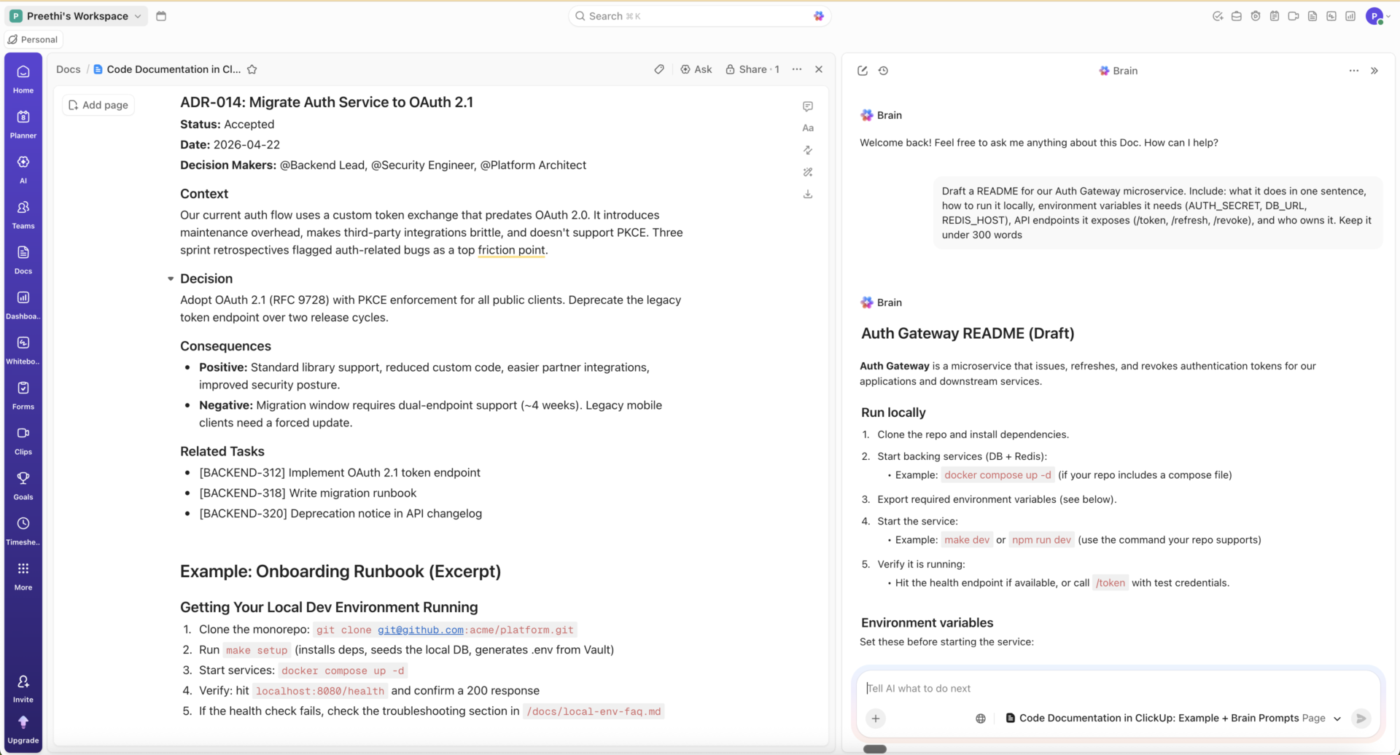
Overnight is the harder gap. Antigravity’s Scheduled Tasks ship patches whether or not your queue is clear. Super Agents in ClickUp read each incoming plan against the sprint scope, rank by risk, and assign high-risk items to your most experienced reviewer. Anything unreviewed after 24 hours gets escalated. You open a prioritized queue in the morning with reasoning attached.
Mariah Wilcox, Chief of Staff to the CBO & CMO at Seismic, talks about agents in ClickUp:
Our marketing intake used to be endless back-and-forth between submitter and producer, stalled whenever someone was out of office. Now an agent in ClickUp reviews each request, gathers requirements, and confirms capacity before handoff. Our creative team starts work immediately, focused on building, not chasing intake forms. Agents don’t take PTO!
What works well for managing agent output specifically:
The honest limitation: ClickUp runs the coordination layer around agent output. For Antigravity runs specifically, the connection point is the GitHub integration, so teams whose agents open PRs get this automatically; anyone else creates the task or wires a webhook.
Who it fits: Teams running several agents in parallel, where the question has moved from ‘can agents do this work’ to ‘can we keep up with verifying it.’ One developer running two agents on side projects doesn’t need this. Antigravity’s agent manager is enough.
See how an agent workflow moves from trigger to reviewed output inside ClickUp:
Google Antigravity use cases offer you a clear path to reducing manual overhead through automated bug fixing and rapid prototyping. However, your success hinges on more than just the tech. You need clear prompts, strong guardrails, and consistent human oversight to keep your codebase stable.
You likely lose far too much time to context-switching. And while agentic platforms offer a solution, they only work when paired with solid workflow management. It’s important to learn how to make AI agents ship faster and finally free yourself for creative work.
If you are ready to bring your AI development and project management into one place, start using ClickUp for free. See for yourself how a converged workspace eliminates tool sprawl and keeps your roadmap moving.
Antigravity 2.0 added a redesigned desktop app, a command-line interface, and an SDK for custom agent workflows. The desktop app lets you orchestrate multiple agents at once, design custom subagent workflows, and schedule tasks to run in the background, with integrations for Google AI Studio, Android, and Firebase. It marks a shift from a single IDE toward a broader agent-orchestration platform.
Google documents non-developer workflows explicitly, including competitive and web research, documentation, and scientific work. Its agents have fluency in over 20 major scientific databases, including AlphaFold Database, UniProt, PubChem, and ChEMBL, plus frontier models like AlphaGenome. Google’s own CLI codelab splits its exercises into developer and non-developer tasks.
Antigravity enforces both a baseline quota and weekly rate limits. Baseline quota refreshes every five hours on Google AI Pro and Ultra; hitting a weekly ceiling locks the model until the window resets. Pro and Ultra subscribers can buy AI credits for overage, priced at $25 for 2,500 credits. Google does not publish how much agent work one credit buys, so per-developer forecasting is still an estimate.
Yes, teams and enterprises can use Google Antigravity. It is available to Google Cloud customers through the Gemini Enterprise Agent Platform, separate from the individual Google AI subscription tiers. Individual accounts run under Google’s consumer terms of service; team deployments run under Google Cloud terms. Evaluate it against your own security and data-privacy requirements before pointing agents at proprietary repositories.
Antigravity CLI replaced Gemini CLI. Google launched the Antigravity CLI, a Go-based terminal surface sharing the Antigravity agent harness, and retired the Gemini CLI for consumer users. The practical difference: Gemini CLI was a lighter-weight, session-oriented terminal agent, while Antigravity CLI runs autonomous agents, executes shell commands, and manages background subagents under the same permission engine as the desktop app.

Praburam Srinivasan
Max 22min read
Praburam Srinivasan
Max 10min read

Manasi Nair
Max 22min read

© 2026 ClickUp