10 Best Alchemer Alternatives for Surveys & Data Collection

Sorry, there were no results found for “”
Accurate data drives smart decisions—but only if your survey and customer feedback platform can actually deliver it without a fight.
If you’re looking for the best Alchemer alternatives, chances are your current setup isn’t quite cutting it—maybe it’s too clunky, too limited, or just not giving you the insights you need.
From gathering customer feedback to running employee pulse checks, today’s businesses need tools that are intuitive, customizable, and ready to scale.
The right platform should help you create surveys with ease, collect individual responses that lead to valuable insights, and offer reporting capabilities that make your next step crystal clear.
So, let’s explore the options that do just that, without dragging you through a maze of confusing features and pricing pages.
Alchemer (formerly SurveyGizmo) has several limitations that might make data collection cumbersome. Here are some reasons you might want to explore alternatives for employee surveys, feedback, reporting, and data collection:
Given these limitations, it’s no surprise that many users seek more efficient and user-friendly alternatives that offer great reporting, customer support, and overall functionality.
👀 Did You Know? 79% of agents believe AI as a co-pilot boosts their abilities, helping them deliver superior customer service.
Here’s a brief rundown of the use cases and best features of each Alchemer alternative on our list:
| Tool | Best for | Key features | Pricing |
| ClickUp | All-in-one workflow and data management for teams of all sizes | Advanced form builder with conditional logic, automation, AI-powered insights, customizable templates, and integrations with third-party apps | Free plan available; Custom pricing available for enterprises |
| Typeform | Interactive surveys and forms for mid-sized or large businesses | Customizable forms with dynamic follow-up questions, branded experience, and embedding options | Free plan available; Paid plans start at $29/month per user |
| Qualtrics | Customer experience management and market research for large enterprises | AI-driven analytics, automated recommendations, ready-made templates, and Google Analytics integration | Custom pricing |
| Google Forms | Simple form creation within the Google ecosystem for individuals and small businesses | Unlimited forms and responses, real-time data analysis, seamless integration with Google Workspace | Free |
| SurveyMonkey | AI-powered surveys and forms for mid-sized to large enterprises and agencies | Conditional branching, sentiment analysis, global panel access, and customizable templates | Free plan available; Paid plans start at $39/month per user |
| Jotform | Payment-integrated forms for small businesses and solopreneurs | Payment gateway support, multilingual forms, automation, and 10,000+ templates | Free plan available; Paid plans start at $39/month per user |
| Zoho Survey | Form creation within the Zoho ecosystem for Zoho users | SSL protection, customizable reports, Google Sheets integration, and pre-built templates | Free plan available; Paid plans start at $9/month |
| Microsoft Forms | Form creation within the Microsoft Office 365 ecosystem for Microsoft users and large enterprises | Multilingual support, real-time collaboration, automatic charts, and seamless Office 365 integration | Free |
| Formstack | Automated, HIPAA-compliant forms for large companies and agencies | No-code builder, dynamic fields, e-signatures, and GDPR/HIPAA compliance | Free plan available; Paid plans start at $99/month |
| Wufoo | Form reporting and analytics for small businesses and agencies | SSL encryption, auto-updating dashboards, response caps, and app integrations | Free plan available; Paid plans start at $22/month |
Now, let’s look at some of the best Alchemer alternatives that could effectively meet your business’s survey report and customer feedback needs.
Our editorial team follows a transparent, research-backed, and vendor-neutral process, so you can trust that our recommendations are based on real product value.
Here’s a detailed rundown of how we review software at ClickUp.
As the everything app for work and a powerful work management software, ClickUp simplifies data collection and streamlines workflows.
Its most effective feature? The ClickUp Form View. The built-in form generator lets you efficiently use surveys for any situation, whether you’re gathering employee feedback, conducting market surveys, or collecting customer insights.
From colors to fonts and form security, each detail can be customized to reflect your brand’s personality and align with the target audience.
Forms also support conditional logic, which means they can adapt question visibility based on individual responses. This adds a level of sophistication that makes form building effortless, even for more complex needs.
ClickUp Forms empowers marketers to capture leads, researchers to craft surveys, businesses to streamline intakes, and software teams to organize bug reports—all in one flexible tool.
It can even be used to automate workflows.

The 100+ pre-built automations in ClickUp Automations save you critical time. Each form submission can create tasks, assign owners, track feedback, and trigger follow-ups—saving time and reducing manual work.
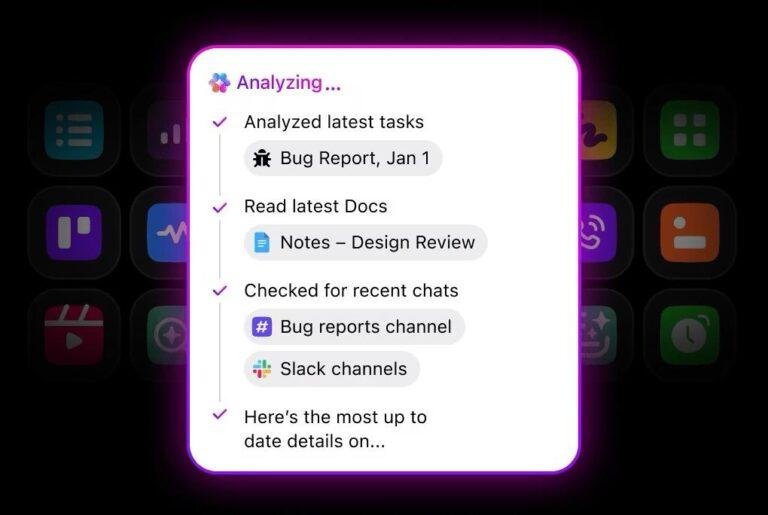
And to take it a step further, ClickUp Brain enhances these capabilities with AI-powered updates and analyses, ensuring efficient task management.
Brain’s AI-powered tools, enable users to generate tailored market research surveys and analyze responses to uncover key trends, patterns, and customer preferences.

You can use it to quickly generate relevant survey questions, collect data easily, and turn responses into actionable insights. Also, let these insights shape your product, guide your marketing, and support more intelligent business decisions.
Want to work with ChatGPT or Claude? Choose between large language models (LLMs) within ClickUp and reduce the time and attention lost through context switching.
📮 ClickUp Insight: Only 12% of our survey respondents use AI features embedded within productivity suites. This low adoption suggests current implementations may lack the seamless, contextual integration that would compel users to transition from their preferred standalone conversational platforms.
For example, can the AI execute an automation workflow based on a plain text prompt from the user? ClickUp Brain can! The AI is deeply integrated into every aspect of ClickUp, including but not limited to summarizing chat threads, drafting or polishing text, pulling up information from the workspace, generating images, and more!
✨ Join the 40% of ClickUp customers who have replaced 3+ apps with our everything app for work!
The platform comes with advanced analytics, customizable templates, and helpful AI agents to help you make the most of your online surveys. These can help with competitor analysis, spotting trends, leveraging user feedback to understand your audience, and visualizing survey data.
All in all, it makes market research faster, smarter, and way more effective—no matter your business size.

Plug survey information into ClickUp Dashboards for easy visualization, making it simple to track changes and forecast outcomes.
A TrustRadius review says:
Our teams have used forms and templates to standardize some workflows. We’ve also used the built-in automation to ease some workflows, especially where custom fields are capturing information that can help determine who should be assigned to a task. Finally, we’ve also used the email integration and API features to automatically generate tasks when some platforms are alerting or showing possible performance issues.

Looking for a more conversational approach to surveys? Typeform’s unique, user-friendly design turns traditional forms, surveys, and quizzes into interactive experiences.
Its focus on one question at a time makes surveys feel less like a chore and more like a chat, boosting response rates. With Typeform, you also get in-depth insights into customer behavior, buying decisions, and sentiment thanks to its AI-driven analytics.
Unlike Alchemer, which can be complex, Typeform shines with its simplicity, seamless integrations, and sleek templates.
A G2 review reads:
The best part of Typeform is how easy it is to create complex forms and still make it personal to the person filling the form out. It has vastly reduced spam submissions on my website and increased general enquiries. The results page is also useful for collecting customers’ stats super quick. I feel like I have only touched the surface with what Typeform can do.
💡 Pro Tip: Prioritize mobile when designing your forms by actually building for small screens first, not just tweaking later and hoping it works

If you’re a market researcher or working to improve customer experiences, Qualtrics can help you design the right surveys. It offers advanced predictive intelligence and analytics, powered by its proprietary iQ™ engine.
Qualtrics stands out among Alchemer alternatives with its automated recommendations, which direct feedback to the right teams, making it easier to act fast on customer input. You can take targeted steps based on feedback, which helps maximize the impact of your actions.
🧠 Fun Fact: People tend to give more thoughtful responses in surveys when they believe their answers will lead to change. It’s why many tools offer incentives or gamify the process!

If your team is already hooked on Gmail, Google Apps, or Google Drive, Google Forms is a no-brainer. It’s super easy to use and a great starting point for anyone looking to create surveys, questionnaires, or forms.
You can personalize your forms with your company’s colors, fonts, and images. Plus, it supports conditional logic, which lets you tailor the form based on responses.
A G2 review says:
The ease of use and the way everything you need to run a small business is in one space. I also enjoy that everything is covered under 1 small fee, which makes it very scalable.

SurveyMonkey offers a solid set of tools to help you ask better questions and collect responses that tell you something worthwhile. It works well across a range of use cases—whether you’re measuring customer satisfaction, collecting employee feedback, or exploring new market opportunities.
With over 2.4 million AI-driven predictions made daily, the platform offers smart recommendations to refine your surveys.
Unlike Alchemer, SurveyMonkey offers direct access to a built-in global panel of over 335 million people. This allows you to ask for feedback from targeted audiences without needing to source respondents yourself—starting at just $1 per completed response.
📖 Also Read: The best SurveyMonkey alternatives
🧠 Fun Fact: SurveyMonkey has popped up in an episode of “The Office,” where Jim Halpert uses it to run a “Dundie Awards” survey for his coworkers.

If you’re exploring Alchemer alternatives, Jotform is worth a look.
While Alchemer caters more to advanced users, Jotform makes building even complex forms feel straightforward, thanks to its intuitive drag-and-drop builder and 10,000+ ready-made templates. No expert skills required—that alone sets it apart from many other form tools.
You can automate workflows, add conditional logic, support multiple languages, and track individual responses through detailed analytics. Get both flexibility and insight without the usual hassle.
📖 Also Read: Best Jotform Alternatives to Try

Zoho Survey makes creating and managing surveys super simple, especially if you’re new to survey tools. The drag-and-drop feature lets you build questionnaires quickly, and its easy-to-use interface is perfect for smaller organizations or teams that lack technical expertise.
Customization is a big win here. You can tweak everything from your survey theme to your brand’s logo and even adjust the colors of the header and navigation buttons to match your brand.
Plus, the logic features let you personalize responses, so you can assign a different landing page based on how someone answers your questions.
A G2 review says:
Easy to use and to create your own surveys for corporate or even person use. The customer support is fantastic.

Clean, straightforward, and surprisingly capable, Microsoft Forms gets the job done without unnecessary clutter. It covers the essentials—form creation, templates, customization, and response tracking—all from a simple dashboard.
What gives it an edge is the built-in multilingual support, helping you connect with a broader, more diverse audience.
Educators especially benefit from features like quizzes and assignment tracking, with the added bonus of being able to export responses directly to Excel. Plus, smart AI suggestions help you build better surveys, whether you’re gathering employee feedback or managing team input.
📖 Also Read: Top AI Form Builders

Along with creating forms using AI-powered, no-code builders, Formstack is a productivity platform used in industries such as healthcare, finance, and law. Unlike some other Alchemer alternatives, it supports dynamic fields, conditional content, and e-signatures and complies with GDPR, HIPAA, and SOC 2 standards.
The platform claims to save 17 hours per week by connecting with CRMs, ERP systems, and other tools, thereby reducing manual tasks. It turns data into insights, generates AI-powered documents, enables e-signatures, and tracks form performance.
A G2 review says:
Formstack for Salesforce offers an incredibly seamless integration that makes document generation, and form submissions effortless. The native experience ensures that data flows directly from Salesforce, eliminating manual entry and reducing errors. The flexibility in automating workflows, combined with robust customization options, allows for a smooth and efficient process. Their support team is also responsive and helpful when needed.

Creating forms shouldn’t feel like a chore, and Wufoo proves it. With an easy drag-and-drop builder and a flexible Theme Designer, you can style every form to match your brand—logos, colors, fonts, the works.
For those who need more than just feedback, it also supports payment collection through integrations with major providers, making it a solid pick for online stores, event fees, or donations. It’s simple, customizable, and built to keep things moving quickly.
Your surveys are only as good as the data and insights they generate. If you’re looking for Alchemer alternatives that do more than just survey creation and help you take action on your feedback, ClickUp is the perfect solution.
It combines the power of survey creation with robust task management, so you can automatically convert survey responses into actionable tasks. Whether you’re automating workflows, organizing feedback, or tracking progress, ClickUp keeps everything in one place for maximum productivity.
No more jumping between platforms or losing track of important details—just streamlined processes and real-time insights.
Ready to see how it works for you? Sign up for ClickUp today and turn your survey results into meaningful action!
© 2025 ClickUp