Gantt Chart Software for Team Leaders
Transform Your Team’s Workflow with Powerful Gantt Charts
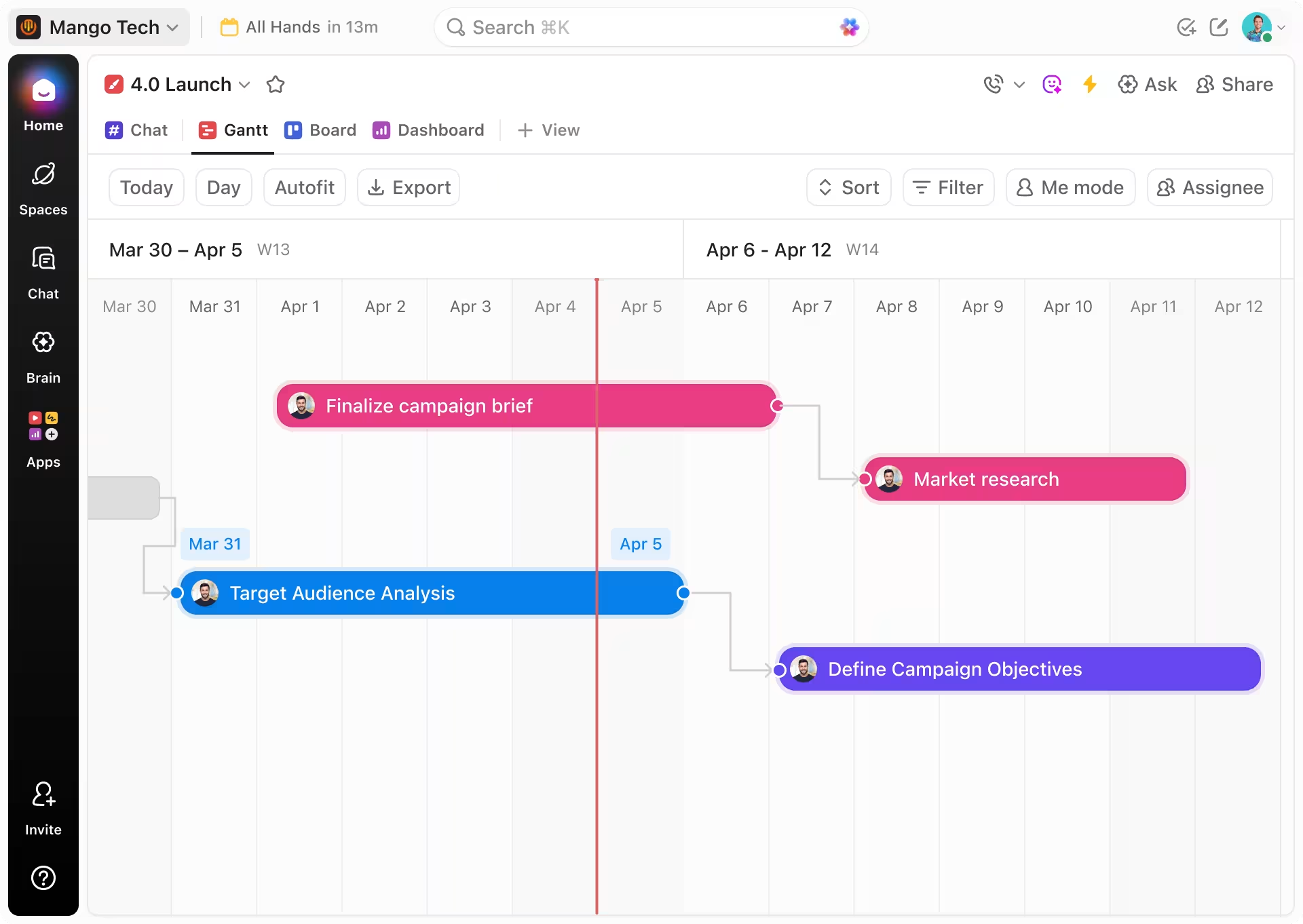
Visualize your project timelines, coordinate your team seamlessly, and keep every task on track—all in one intuitive platform designed for team leaders.
 25,000+ reviews from
Trusted by the best
Why Choose a Gantt Chart?
Why Team Leaders Rely on Gantt Chart Software
Managing a team without a clear timeline can feel like juggling blindfolded. Priorities blur, deadlines sneak up, and coordination becomes a daily challenge.
Here’s what typically goes wrong without a visual project plan:
- Tasks overlap or get forgotten — making it hard to track who’s doing what and when.
- Resources are misallocated — causing bottlenecks and burnout.
- Deadlines become moving targets — increasing stress and last-minute rushes.
- Communication breaks down — with updates scattered across channels.
- Progress feels invisible — making it tough to celebrate wins or course-correct.
- Dependencies get missed — leading to delays and rework.
- Team motivation dips — when clarity and accountability are lacking.
- Reporting becomes time-consuming — pulling together status updates from multiple sources.
Traditional vs ClickUp
Why Conventional Tools Fall Short for Team Leaders
Discover how ClickUp Gantt Charts bring clarity and control where spreadsheets and emails leave you overwhelmed.
Conventional Methods
- Tasks scattered across emails, spreadsheets, and apps
- No unified view of project timelines
- Manual tracking of dependencies
- Difficult to assign clear ownership
- Deadlines managed reactively
- Collaboration fragmented across platforms
Use Cases
How Gantt Chart Software Empowers Team Leaders
Explore how a clear timeline and task management transform team leadership and project success.
#UseCase1
Eliminate Project Blind Spots
ClickUp’s Gantt charts provide a comprehensive timeline that reveals bottlenecks and keeps everyone aligned on progress.
#UseCase2
Coordinate Cross-Functional Teams
Easily manage tasks across departments, ensuring dependencies and handoffs are seamless and transparent.
#UseCase3
Manage Shifting Priorities with Agility
Adjust timelines and task priorities on the fly while keeping the team informed and focused.
#UseCase4
Visualize Resource Allocation
Track team member workloads and resource availability to prevent burnout and optimize productivity.
#UseCase5
Streamline Stakeholder Reporting
Generate clear, visual reports that communicate progress and upcoming milestones effortlessly.
#UseCase6
Facilitate Remote Team Collaboration
Centralize project updates and communication so distributed teams stay connected and accountable.
#UseCase7
Track Milestones and Deliverables
Keep critical deadlines front and center to ensure timely project completion.
#UseCase8
Improve Risk Management
Identify task dependencies and potential delays early to mitigate risks proactively.
#UseCase9
Enhance Decision-Making with Data
Leverage real-time insights from your Gantt charts to guide strategic planning and resource allocation.





Ideal Users
Who Benefits Most from ClickUp’s Gantt Chart Software
Designed for team leaders who juggle complex projects, multiple stakeholders, and dynamic timelines.
Leading Cross-Department Projects
ClickUp keeps diverse teams aligned, tracking dependencies and milestones across functions and locations.

Managing Agile Development Teams
Visualize sprints, backlogs, and releases with dependencies and priorities clearly mapped.

Overseeing Marketing Campaigns
Coordinate timelines, content creation, and launch dates to ensure campaigns hit every target.

How ClickUp Supports Team Leaders
Step Into Efficient Team Leadership with ClickUp Gantt Charts
Drive your projects forward with clarity and control.
Centralize Tasks and Timelines
Keep all project elements—from tasks to documents—linked and visible on one interactive timeline.
Plan Projects in Clear Phases
Define stages, assign tasks, and visualize progress to maintain momentum and accountability.
Automate Workflow Dependencies
Use ClickUp’s automation to update timelines and notify team members when tasks shift.
Enhance Team Communication
Integrate comments, docs, and updates directly into tasks for seamless collaboration.
Track Progress with Visual Indicators
Monitor milestones and task statuses in real time to identify issues early.
Stay Ahead with Deadline Alerts
Receive automated reminders that keep your team focused and deliverables on schedule.