Gantt Chart for Animators
Visualize Every Frame with Animator-Focused Gantt Software
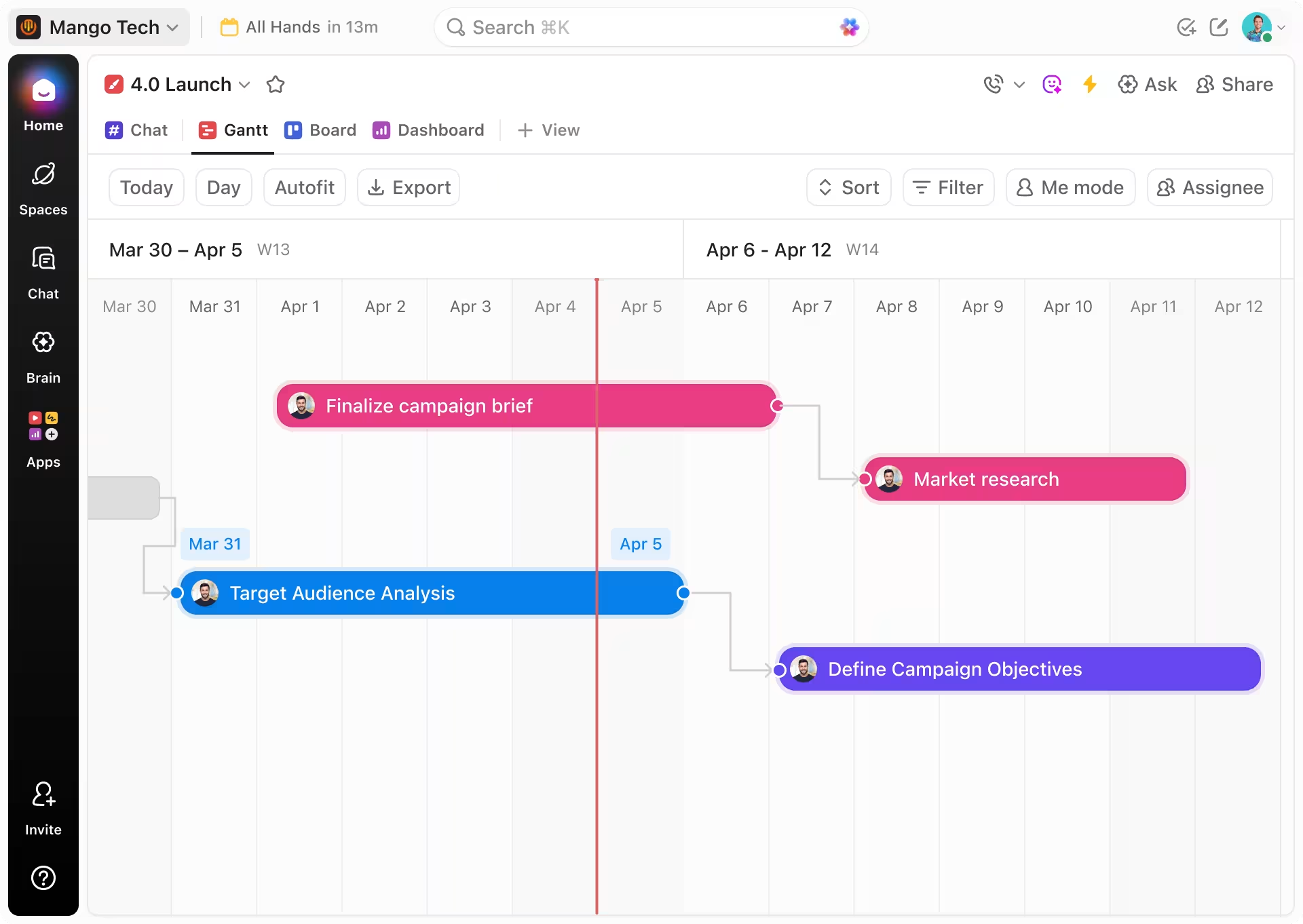
Plan your projects from storyboard to final render, track deadlines across scenes, coordinate with your team, and get a clear timeline that brings your animation process to life.
 25,000+ reviews from
Trusted by the best
Why Gantt Chart
Why Animators Need Specialized Gantt Chart Software
Managing animation projects without a clear timeline is like animating without keyframes — chaotic and unpredictable. Tasks pile up, deadlines blur, and creativity can stall.
Here’s where traditional approaches fall short for animators:
- Project phases overlap without clear sequencing — storyboards, design, animation, and post-production get tangled.
- Asset creation and revisions are hard to track — multiple versions and feedback cycles cause confusion.
- Dependencies between scenes and effects get missed — resulting in delays and rework.
- Collaboration across teams feels fragmented — communication scatters across emails and messages.
- Deadlines sneak up unexpectedly — client reviews, deliverables, and release dates get missed.
- Progress tracking is opaque — months of work feel stagnant without clear milestones.
- Resource scheduling is inefficient — software licenses, rendering time, and artist availability clash without a unified plan.
Traditional vs ClickUp
Why Conventional Methods Can’t Match ClickUp Gantt for Animators
Discover how ClickUp Gantt Charts give animation teams a transparent, interactive timeline unlike scattered tools or spreadsheets.
Traditional Tools
- Tasks scattered across notes, emails, and spreadsheets
- No centralized timeline → missed dependencies
- Manual tracking of asset versions → errors and confusion
- Collaboration bottlenecks with unclear roles
- Client feedback loops delayed
- Disorganized file storage across drives
ClickUp Gantt Charts
- Unified task and timeline view tailored for animation workflows
- Visualize dependencies, milestones, and deliverables
- Manage asset revisions and approvals in one place
- Assign clear responsibilities with deadlines
- Automate reminders and track task impact on schedules
- Attach files and comments directly to timeline tasks
Use Cases
How Gantt Chart Software Empowers Animators
Explore how visual timelines eliminate confusion and keep animation projects on schedule.
#UseCase1
Visualizing Complex Scene Timelines
ClickUp’s Gantt charts help you map every scene’s production timing—so bottlenecks disappear and progress is crystal clear.
#UseCase2
Tracking Asset Creation and Revision Cycles
Organize every asset’s development stages with deadlines and approvals so nothing gets lost in feedback loops.
#UseCase3
Coordinating Collaborative Animation Teams
Assign tasks, dependencies, and review cycles to keep artists, designers, and editors perfectly aligned.
#UseCase4
Managing Render Schedules and Hardware Resources
Plan your rendering timelines while balancing hardware availability to avoid costly delays.
#UseCase5
Sequencing Post-Production and Effects Integration
Use dependencies to ensure post-production tasks follow animation completion seamlessly.
#UseCase6
Meeting Client Review and Delivery Deadlines
Map all client feedback sessions and final delivery milestones to stay on track and exceed expectations.
#UseCase7
Avoiding Overlapping Task Assignments
ClickUp’s timeline view prevents overbooking of artists by visualizing workload and availability.
#UseCase8
Simplifying Revision Tracking Across Versions
Keep all asset versions organized and linked directly to tasks, making revisions transparent and easy to manage.
#UseCase9
Turning Team Meetings into Actionable Animation Plans
Convert brainstorming and feedback into sequenced tasks with deadlines and owners for smooth follow-through.





Key Beneficiaries
Who Benefits Most from ClickUp Gantt Chart Software
Designed for animators managing multiple sequences, collaborators, and tight deadlines.
For Animation Studios Working Across Departments
ClickUp unifies workflows across artists, editors, and producers, keeping everyone synchronized despite varying schedules and locations.

For Freelance Animators Handling Multiple Clients
Stay on top of diverse project timelines, revisions, and client feedback with a clear, visual schedule.

For Animation Students and Educators
Plan coursework, projects, and collaborative assignments with timelines that bring clarity to complex workflows.

How ClickUp Supports Animators
Discover How ClickUp Gantt Charts Elevate Animation Projects
Craft Your Animation Workflow with ClickUp’s Powerful Timeline Tools
Centralize All Animation Assets
Keep storyboards, models, rigs, drafts, and notes linked to tasks—all within a visual timeline.
Plan Production Phases Seamlessly
Map concept art, animation, rendering, and post-production for transparent end-to-end visibility.
Standardize Workflow and Revisions
Use dependencies, templates, and timed steps to ensure consistent quality and avoid errors.
Visualize Team Collaboration Clearly
Assign tasks with deadlines, track progress, and coordinate simultaneous workstreams effortlessly.
Convert Meetings into Actionable Timelines
Transform feedback sessions into sequenced tasks—ensuring no idea or change request is missed.
Never Miss a Delivery Date
Track client reviews, rendering schedules, and final launches with automated alerts and timeline oversight.