
AI Presentations for Teams
Most AI presentation tools are built for individuals. One person opens the tool, types a prompt, gets a deck, and shares a link. That model works until the deck needs input from three people, review from a manager, data from a project tracker, and an update next month.
Team presentation workflows have requirements that single-player tools handle poorly: shared source material, collaborative review, version control, brand consistency across contributors, and a connection to the work the deck describes.
Where Standalone Tools Break Down for Teams
Per-seat costs compound quickly
Scroll horizontally with the arrow keys to see more columns.| Tool | Per seat/month | 15-person team | 50-person team |
|---|---|---|---|
| Gamma Pro | ~$18-20 | ~$3,600/year | ~$12,000/year |
| Beautiful.ai Team | $40 | $7,200/year | $24,000/year |
| Plus AI Team | $30 | $5,400/year | $18,000/year |
| Pitch Business | $25 | $4,500/year | $15,000/year |
These costs sit on top of project management, documentation, and communication licensing. For most teams, presentations are not the primary work product, which makes a dedicated per-seat presentation tool a hard budget line to justify.
Context lives outside the tool
The deck needs project status, but the AI only knows the prompt. Whoever builds it becomes a manual data pipeline: find the numbers, verify them, type them in, and hope they are still current at presentation time. That person becomes a bottleneck and a single point of failure.
Review happens somewhere else
Feedback arrives in Slack, email, or a meeting. Reconciling it with the deck is manual, and the decisions made during review are not recorded anywhere durable. Three weeks later nobody remembers why a slide says what it says.
Version confusion
Three people have exported PDFs, two have edit links, and the deck presented last week may or may not match the deck in the tool. This is a genuine operational problem for teams that present the same material repeatedly.
Brand drift
Without enforcement, every contributor's slides look slightly different. Tools with brand governance (Beautiful.ai, Canva Enterprise, Pitch) solve this at a price. Tools without it produce inconsistency that becomes visible in customer-facing material.
ClickUp Brain: Team Presentations from Shared Context
The source material is already shared
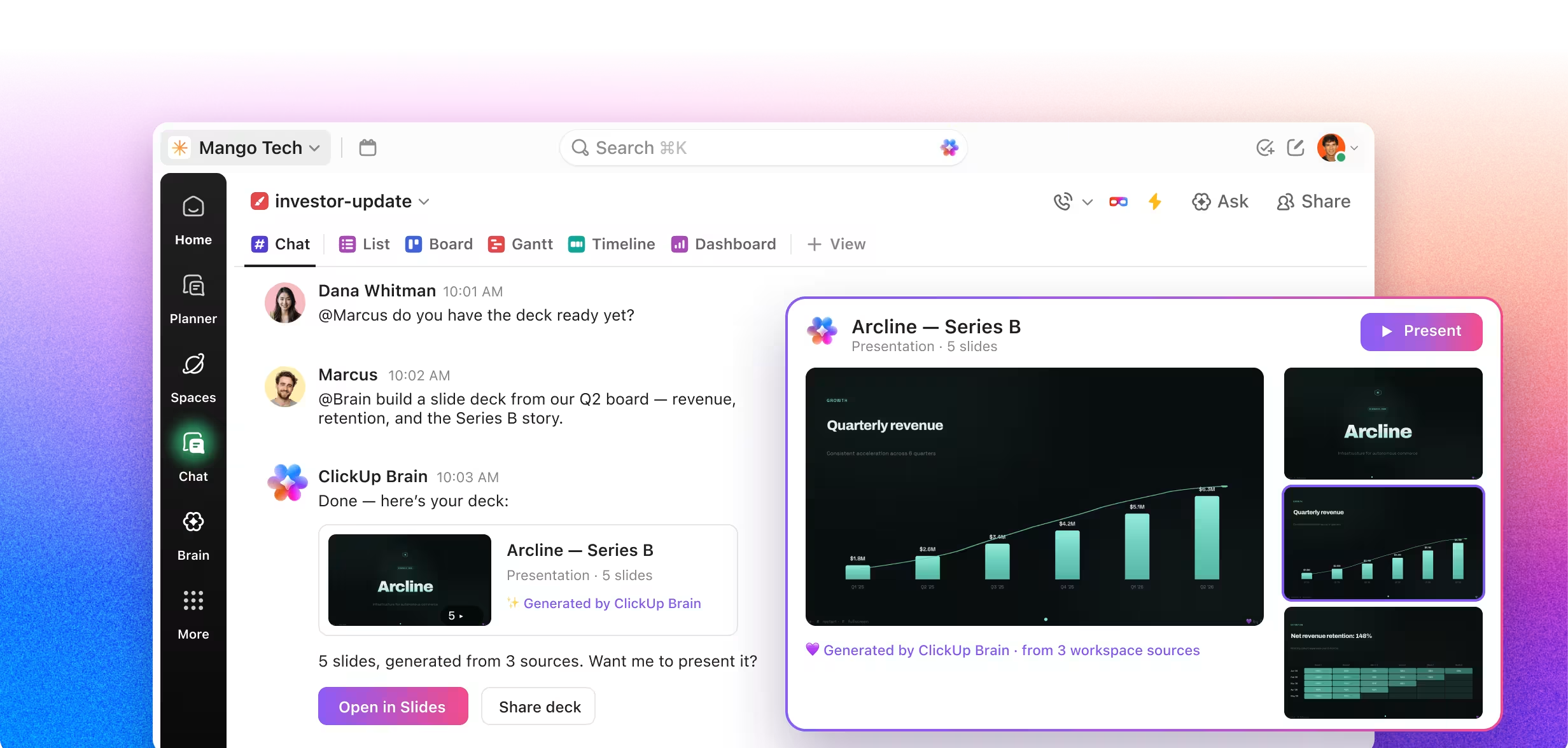
Tasks, Docs, project data, and decisions live in a workspace the whole team uses. When Brain generates a deck, it draws on the same source of truth everyone else is looking at. No single person owns the data pipeline, and anyone can regenerate.
Discussion stays attached to the work
Feedback on a deck's content is feedback on the underlying project. Comments on tasks, Docs, and Chat keep the conversation where the work is rather than in a separate tool's comment thread that nobody revisits.
Regeneration is cheap
When the project moves, the deck is stale. Regenerating from current data takes a sentence. Rebuilding a manually assembled deck takes an afternoon, which is why stale decks get presented.
No additional per-seat cost
Brain is included in ClickUp plans. Teams already using ClickUp for project management get AI slides without a second subscription, second vendor relationship, or second security review.
Use Cases That Benefit Most
Recurring team updates
Weekly sprint reviews, biweekly team syncs, monthly stakeholder briefings, quarterly business reviews. The format repeats while the data changes, so generation from source compounds in value with frequency.
Cross-functional project reporting
When a deck needs input from engineering, design, and marketing, having all three teams' work in one workspace means the deck can draw from all of it without three separate people submitting slides.
Manager roll-ups
A director presenting five teams' progress. Brain can read across multiple Lists and Spaces rather than requiring five people to prepare and submit their sections.
Onboarding and enablement
Training decks generated from the Docs and processes that actually govern the team, so they do not drift out of date the way standalone training materials do.
Client-facing project reports
For agencies and services teams, recurring client updates built from actual delivery data rather than an optimistic summary written from memory.
Limitations for Team Workflows
Being direct about the gaps:
No real-time deck co-editing. Multiple people cannot simultaneously edit a generated deck the way they can in Google Slides, Pitch, or Canva. Refinement happens conversationally through Brain, one person at a time.
No formal approval workflow on decks. Task-based approvals exist in ClickUp, but the deck artifact itself has no review or approve state.
No brand governance for decks. Designer-made templates only. You cannot upload a corporate slide master or lock brand elements the way Beautiful.ai Enterprise or Canva Business allow.
No PowerPoint export. If your team's delivery format is .pptx, this is a blocker.
No shared deck template library. Teams cannot build and share their own approved deck structures.
Point-in-time artifacts. A generated deck does not auto-update when the project changes; you regenerate it.
For teams where presentations are the primary deliverable and brand consistency is contractual, a dedicated tool with governance is the better fit. For teams where presentations report on work, the calculus favors generating from the work.
Choosing Based on Your Team's Situation
Choose a dedicated presentation tool if:
- Presentations are your primary work product
- Brand governance is contractual or highly visible
- You need real-time collaborative deck editing
- Your delivery format is PowerPoint
Choose workspace-native generation if:
- Your presentations report on work you already track
- The bottleneck is assembling data, not designing slides
- You want to reduce tool count and per-seat costs
- Your delivery format is a shared link or screen share
Why Teams Choose ClickUp
Scroll horizontally with the arrow keys to see more columns.| ClickUp | Standalone AI Slide Tools | |
|---|---|---|
| Shared project context | Native | Manual transfer |
| Per-seat slide cost | $0 (included) | $18-40/seat/month |
| Anyone can regenerate | Yes | Only whoever has the data |
| Task management | Native | Not available |
| Docs | Native | Not available |
| Chat | Native | Not available |
| Dashboards | Native | Not available |
| Real-time deck co-editing | No | Yes (most tools) |
| Deck approval workflow | No | Some (enterprise tiers) |
| Brand governance | Limited | Strong (Beautiful.ai, Canva) |
| Shared template library | No | Yes (Pitch, Beautiful.ai) |