Sorry, there were no results found for “”
Sorry, there were no results found for “”
Sorry, there were no results found for “”
An Eagle Hill Consulting workplace survey found that 68% of U.S. employees regularly spend significant time on low-value, inefficient tasks. The work isn’t unimportant; it’s just unranked. Without a system to decide what comes first, the loudest request wins the day.
A prioritization template fixes that. It forces a repeatable call on what to do first, what to wait on, and what to cut. The 15 templates below cover daily triage, feature scoring, portfolio go/no-go calls, release scoping, and workshop alignment across ClickUp, Notion, Smartsheet, Confluence, Miro, and more. We’ve called out where each one shines and where each one breaks.
Pick by where the friction lives. Use Notion or Confluence for documentation-led teams, Miro for distributed workshops, and Excel or Sheets when no one wants another login. Use ClickUp when prioritized items need owners, dates, and dependencies that survive the meeting they were scored in.
| Template | Download Link | Best For | Best Features | Format |
| Eisenhower Matrix Template by ClickUp | Get free template | ICs, team leads, and small teams triaging reactive daily work | Four color-coded quadrants, pre-built urgency/importance Custom Fields, List + Board views, one-click task creation from Delegate items | Whiteboard + List |
| Daily To-Do List Template by ClickUp | Get free template | Freelancers, solo contributors, and anyone wanting a ranked list over a framework | Urgent/High/Normal/Low priority flags, List + Board views, customizable Custom Fields, near-zero setup | List |
| Prioritization Matrix Template by ClickUp | Get free template | Cross-functional teams running live prioritization sessions | Drag-and-drop ClickUp Whiteboard, one-click sticky-to-task conversion, ClickUp Brain for criteria, flexible 2×2 or custom axes | Whiteboard |
| Effort Impact Matrix Template by ClickUp | Get free template | Product, marketing, and ops teams scoring backlogs | 1-4 Effort/Impact Custom Fields, auto-categorizing Quadrant field, Activity List + Status Board views, color-coded quadrant tags | List |
| Value Risk Matrix Template by ClickUp | Get free template | PMOs, ops leaders, and product teams making go/no-go calls | Value + Risk Custom Fields (1-10), five built-in views (List, High Value, Low Value, Board), four status automations | List |
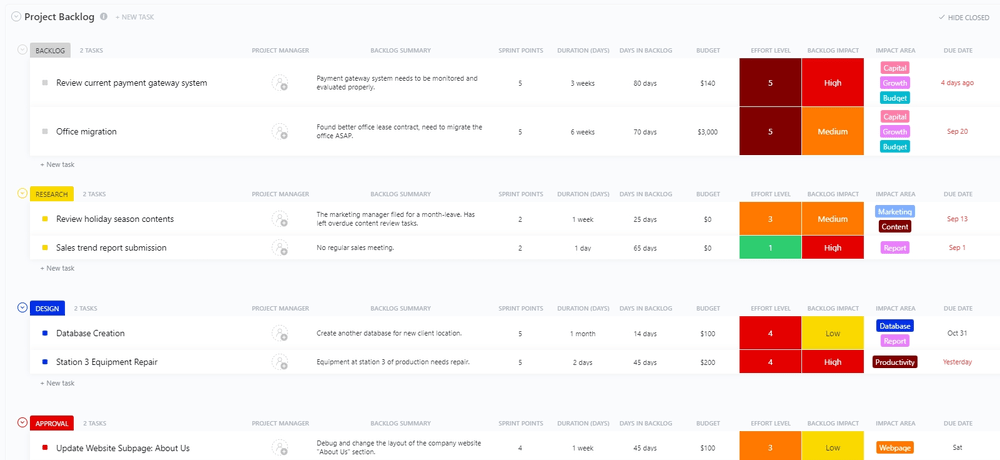
| Project Backlog Template by ClickUp | Get free template | Product, engineering, and ops teams on agile or scrum workflows | Six pre-built views including intake Form, five custom statuses, Gantt + timeline visibility, sprint-ready backlog grooming | List + Form |
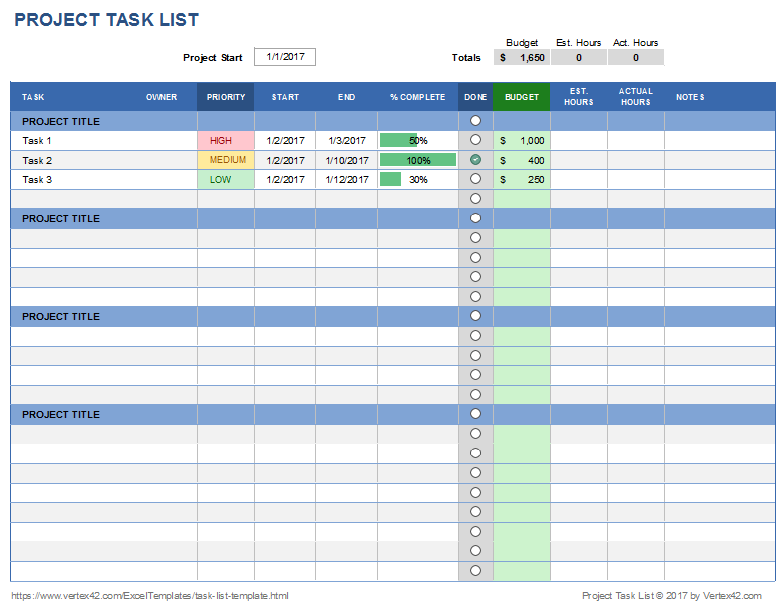
| Project Task List Template by Vertex42 | Get free template | Freelancers, consultants, and small teams who live in Excel or Google Sheets | Color-coded priority icons, in-cell % Complete progress bars, budget + hours columns, offline-friendly | Spreadsheet |
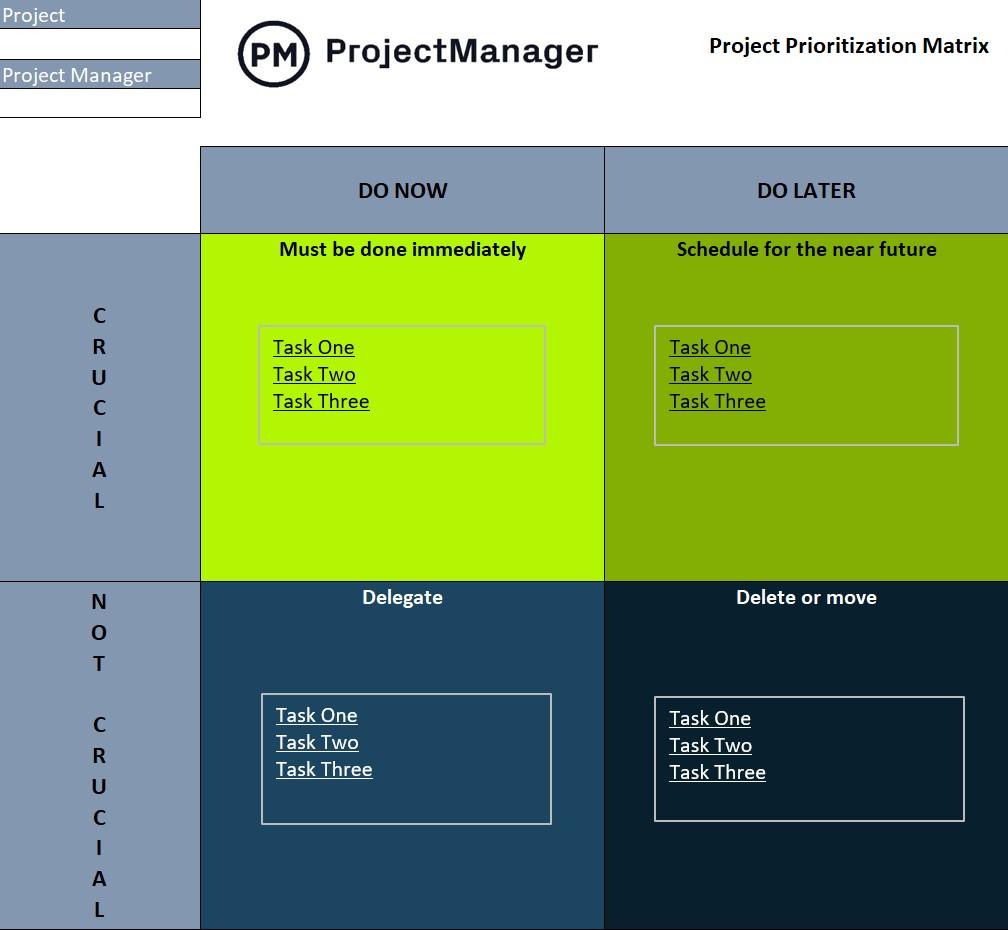
| Project Prioritization Matrix Template by ProjectManager | Get free template | PMOs and program managers choosing between competing project proposals | Eisenhower frame applied to projects, no-signup Excel/Sheets file, pairs with business case + estimate templates | Spreadsheet |
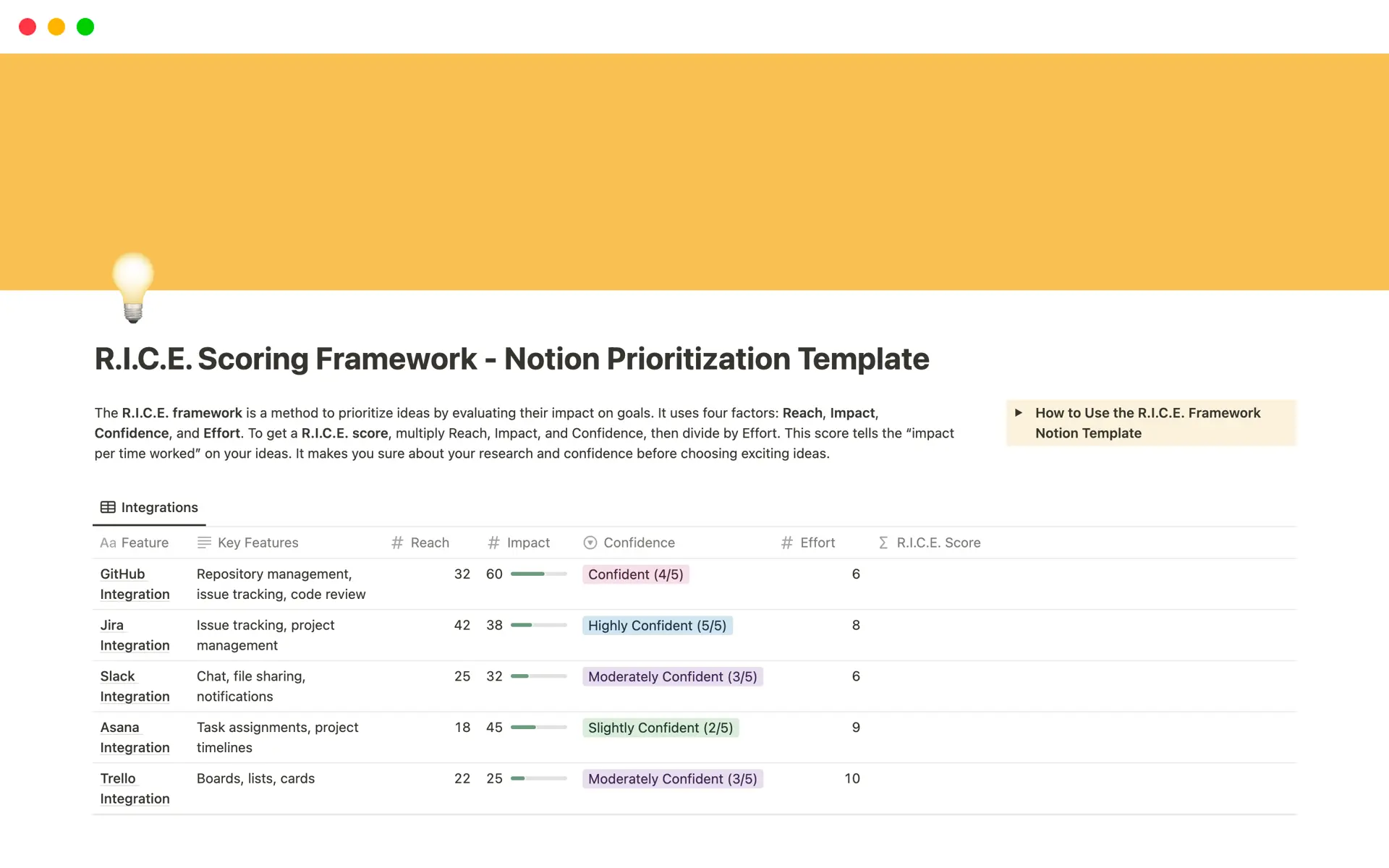
| RICE Scoring Framework Template by Notion | Get free template | Product and growth teams already using RICE inside Notion | Auto-calculated RICE formula, sortable database properties, lives next to PRDs and roadmaps, bias-reducing four-input scoring | Database |
| Prioritization Matrix Template by Confluence | Get free template | Engineering and product teams embedded in Jira + Confluence | Jira ticket integration, page-native structure, @-mention follow-ups, Must Do / Nice to Have / Won’t Do buckets | Page template |
| Startup Task Prioritization Matrix Template by Template.net | Get free template | Solo founders and 3-5 person startup teams | 1-5 Impact + Effort scoring, explicit Priority 1-4 labels, browser editor with no signup, evaluator and date fields | Editable document |
| Pugh Matrix Template by Miro | Get free template | Cross-functional teams choosing between multiple options across cost, feasibility, risk, and impact | Weighted criteria scoring, multi-option side-by-side comparison, real-time collaboration, exportable decision record | Whiteboard |
| Product Prioritization Board Template by Smartsheet | Get free template | Product managers running roadmap reviews who need specs, mockups, and customer feedback attached to the priority list | Single-row context (specs, mockups, threads), four-axis tagging (priority, category, stage, size), board and grid views, inline per-row discussion | Board + Grid |
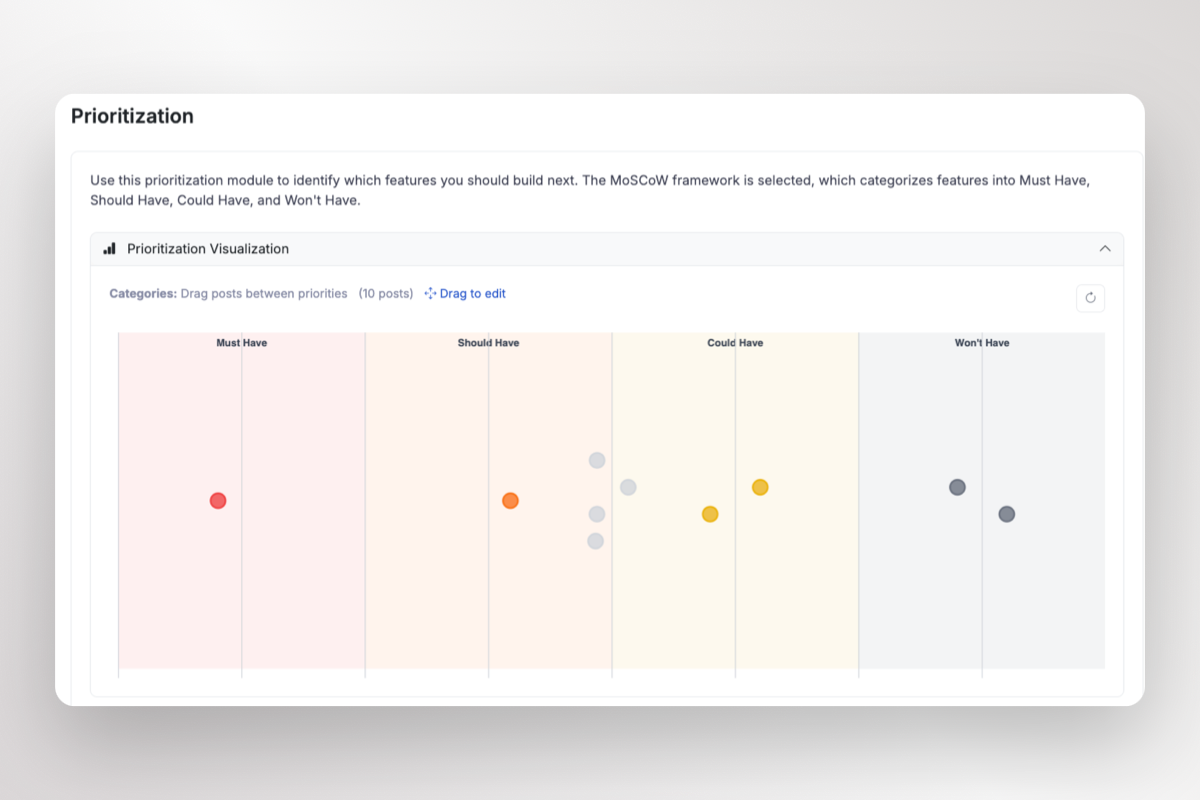
| MoSCoW Prioritization Template by ProductLift | Get free template | Product managers running MVP scoping and stakeholder workshops | Four-bucket categorization, live distribution tracking, customer-vote context, roadmap + changelog integration | Categorical board |
| Feature Prioritization Template by Product School | Get free template | PMs, founders, and leadership teams building executive review decks | Five framework variants (impact/effort, RICE, value/complexity), worked examples, framework comparison guide, presentation-ready slides | PowerPoint / Google Slides |
A ClickUp survey found that 76% of professionals use their own prioritization system for task management. Another piece of research, cited in the same data set, shows that 65% of workers drift toward easy wins over high-value tasks once their personal system isn’t enforced. Together those numbers explain why prioritization works in your head and breaks the moment a second person enters the picture.
Personal systems aren’t wrong. They’re just unshared. A template makes the criteria visible, so two people on the same team can score the same item and agree on what comes first.
Keep a prioritization template if it fits your team’s size, aligns with leadership’s success criteria, and is in a tool your team uses daily. Templates fail the moment any of those three slip out of alignment.
If your team optimizes for speed but leadership measures revenue impact, every “high priority” label will be wrong. A McKinsey survey of 617 executives found that only about half of companies align budgets with corporate strategy—a gap that starts with mismatched prioritization criteria.
Check whether the template’s default criteria—urgency/impact, effort/value, RICE, and MoSCoW—align with your business goals. A growth team might weight revenue impact at 40% and effort at 30%, while a support team weights customer severity highest.
The 15 templates below cover daily triage, feature scoring, portfolio go/no-go calls, release scoping, and live workshop alignment.
Six are built inside ClickUp. The rest span Notion, Smartsheet, Confluence, Miro, ProjectManager, Vertex42, ProductLift, Template.net, and Product School.
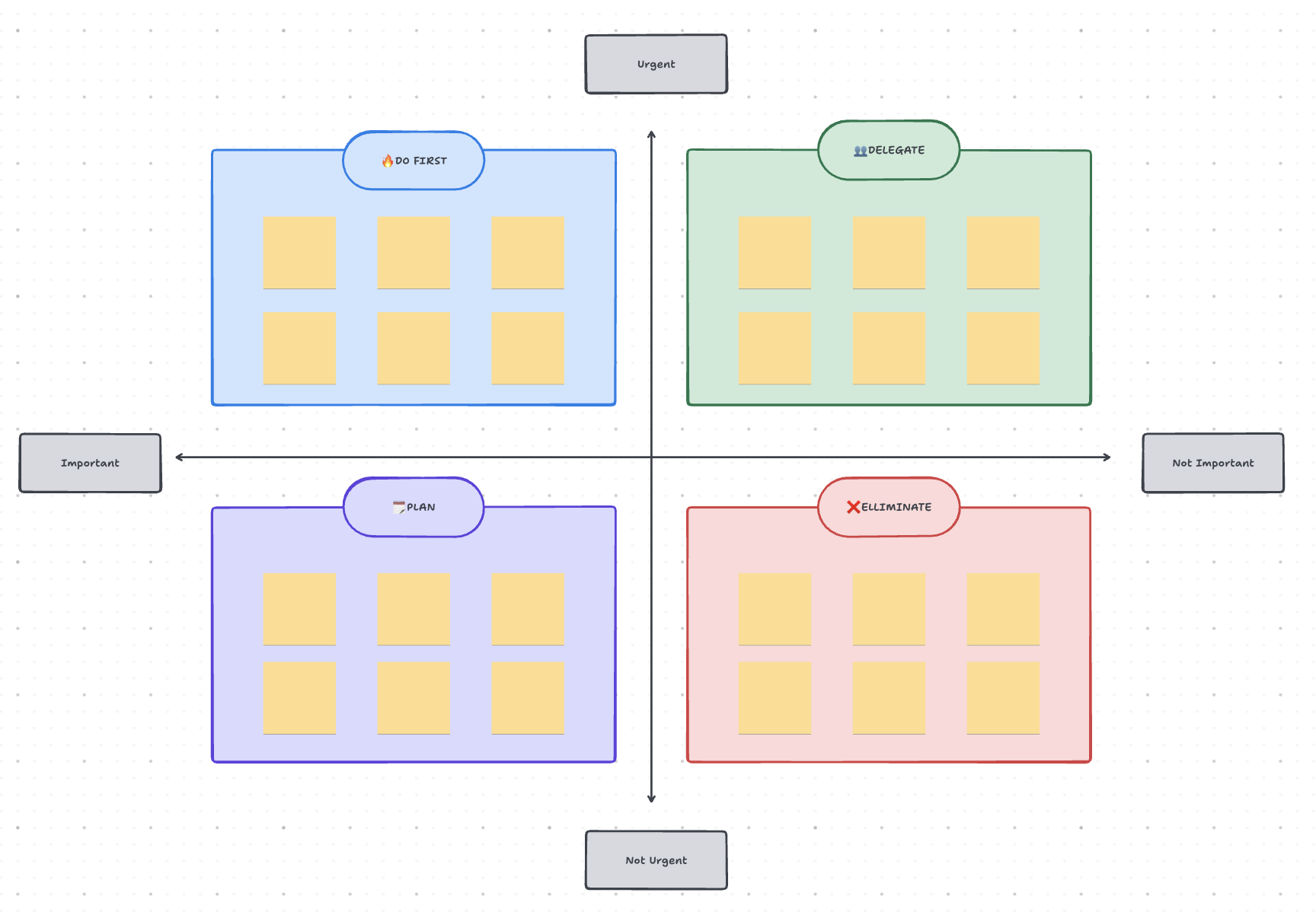
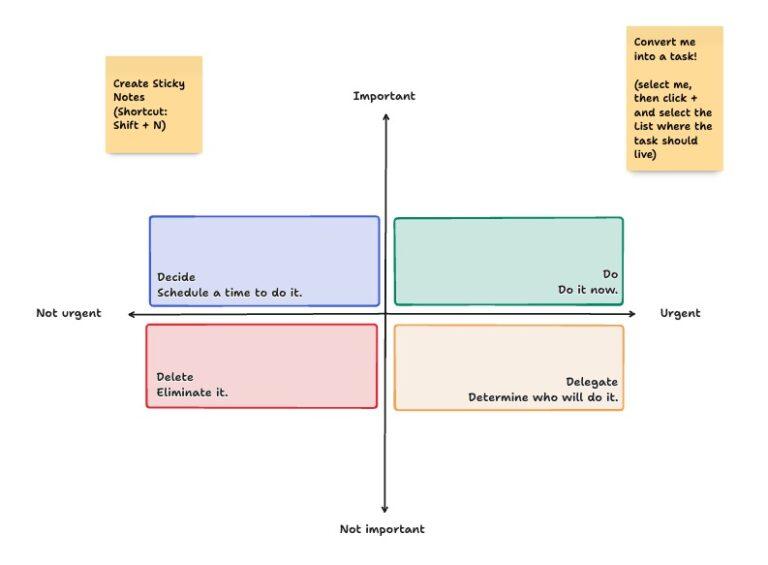
Use the Eisenhower Matrix Template by ClickUp when your day keeps getting hijacked by reactive work. It gives you a fast way to separate what actually deserves your attention from what only feels urgent. It helps individual contributors and small teams sort tasks into Do First, Schedule, Delegate, and Eliminate before the inbox wins again.
Use case: You are a team lead or IC ending most days busier than productive, with a to-do list that grows faster than it shrinks. Use it to triage daily and weekly tasks by urgency and importance so the loudest request doesn’t stop the most valuable one.
Best for: Individual contributors, team leads, or small teams drowning in reactive work who need a fast daily or weekly triage system
Skip it if: You’re scoring complex projects with budget or resourcing trade-offs. A 2×2 grid can’t hold weighted criteria like strategic fit, cost, or risk, you’ll want a scoring matrix (#4 or #6) instead
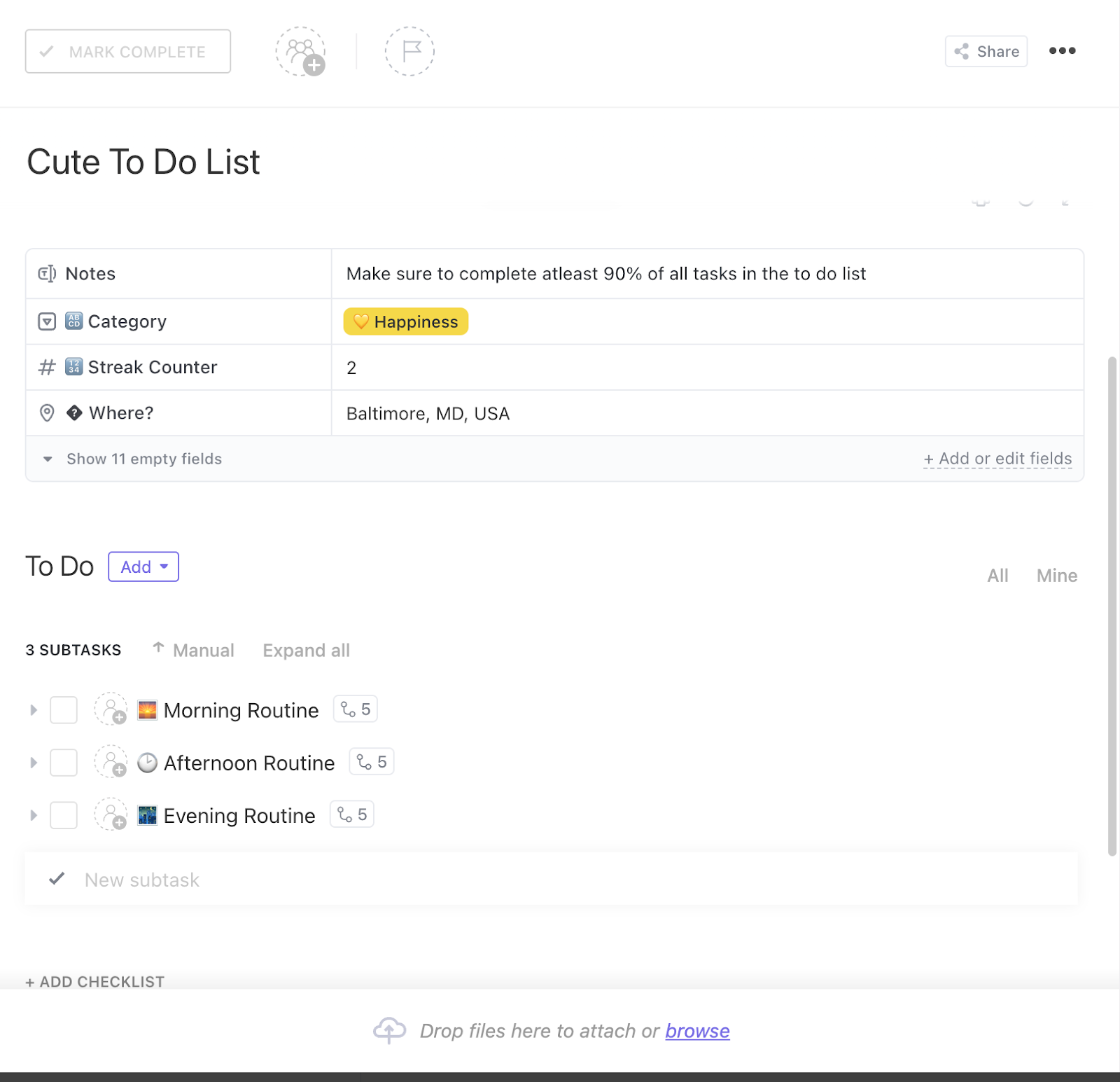
Use the Daily To-Do List Template by ClickUp when you don’t need a matrix. A clean, ranked list that tells you what to open next is all it takes. Tasks land in a single list, with ClickUp Priorities set to Urgent, High, Normal, or Low. You list tasks, assign a level, and work top-down.
Use case: You’re a freelancer juggling three clients, or an IC running your own backlog inside a bigger team. Add tasks as they come in, flag the priority, and filter to Urgent and High when your calendar tightens. No quadrants, scoring, or debate.
Best for: Solo contributors, freelancers, or anyone who wants a ranked list instead of a framework
Skip it if: You’re prioritizing across multiple people or weighing trade-offs like effort vs. impact, you’ll outgrow a flat list fast
Use the Prioritization Matrix Template by ClickUp when your team needs to plot ideas visually. The goal is to walk out of the session with actual tasks, not a screenshot of sticky notes. It’s a ready-to-use whiteboard where you map items by impact and effort, then convert the winners into tracked work with a click.
Use case: Your marketing team has 30 campaign ideas, design has a backlog of overdue requests, and PMs are trying to figure out what ships next quarter. Drop every idea onto the matrix as sticky notes, let the group cluster them into Quick Wins, Major Projects, Fill-Ins, and Thankless Tasks. Then, turn the Quick Wins and Major Projects into assigned tasks without leaving the canvas.
Best for: Cross-functional teams who run live prioritization sessions and want final decisions to become real-time work
Skip it if: You need weighted scoring across multiple criteria like cost, risk, and strategic fit. A visual quadrant won’t hold that math, reach for the Project Prioritization Matrix or PPM template instead
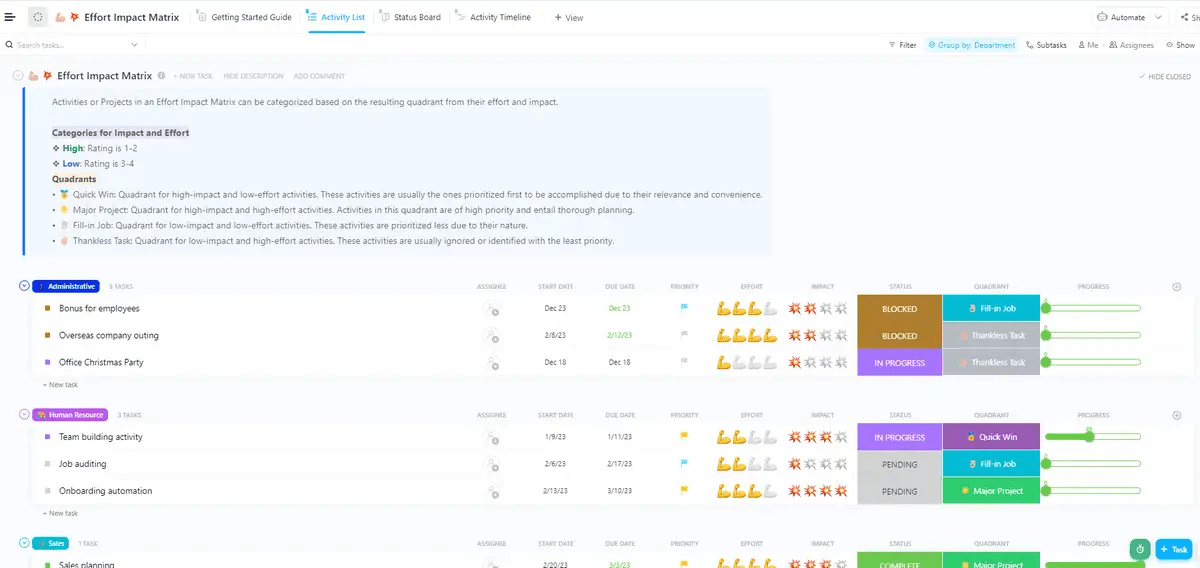
Use the Effort Impact Matrix Template by ClickUp when you have a long backlog to score. The matrix sorts itself: rate Effort and Impact on each item and the Quadrant field places it automatically. Score Effort and Impact from 1 to 4, and the Quadrant field automatically places every item into Quick Win, Major Project, Fill-in Job, or Thankless Task.
Use case: Product has 40 feature requests waiting on a decision, marketing has 25 campaign ideas, and HR is sitting on a stack of internal projects nobody has ranked. Drop each item in, rate Effort and Impact, and the Quick Wins float to the top. Group by department so each team sees its own priorities, then attach owners and due dates.
Best for: Product, marketing, and ops teams who want effort-vs-impact scoring tied directly to assigned tasks and timelines
Skip it if: You’re running a live brainstorm where the team needs to cluster sticky notes and talk through trade-offs in the room. A whiteboard-based matrix (#3) will better fit that workshop format
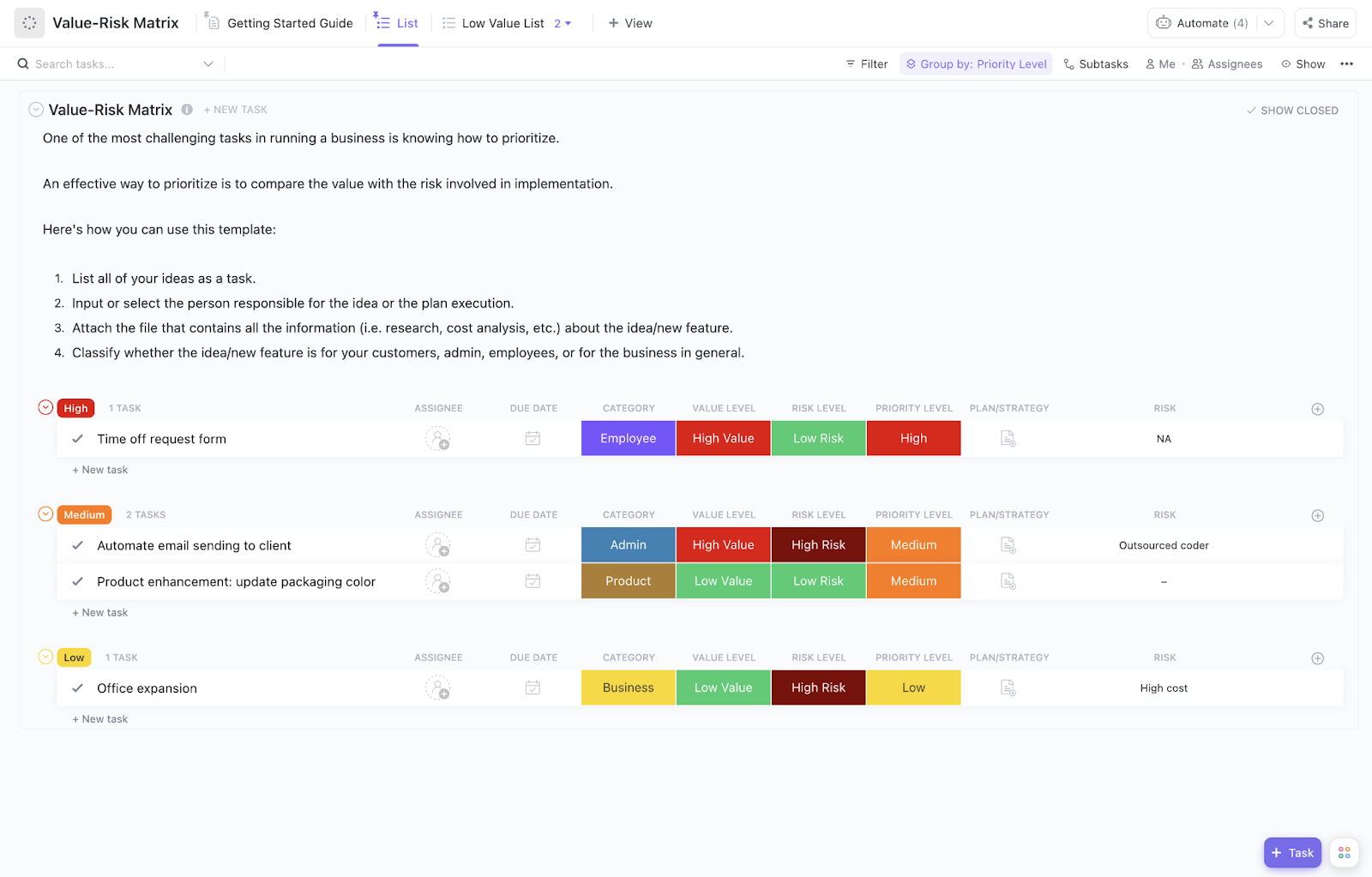
Use the Value Risk Matrix Template by ClickUp when “high impact” isn’t enough to greenlight the work. You need to weigh the downside next to the upside before committing. Each item gets a Value rating and a Risk rating from 1 to 10, with pre-built views that surface high-value, low-risk work first.
Use case: Your team has six initiatives competing for the next quarter. One promises huge revenue but depends on a fragile integration, another is safer but smaller, and a third is a regulatory bet with unclear ROI. Drop them in, score Value and Risk on each, and the High Value List view bubbles the right work to the top while the Low Value List shows what you should probably kill or defer.
Best for: PMOs, ops leaders, and product teams making go/no-go calls on initiatives where downside risk carries weight
Skip it if: You’re sorting daily tasks or scoring features by customer satisfaction. A simpler matrix will fit those decisions without the risk overhead
Use the Project Backlog Template by ClickUp when prioritization is an ongoing practice. A backlog needs constant grooming as new requests come in and existing ones change. This template captures every feature request, bug, and idea in a single list with priority, status, owner, and timeline built in.
Use case: Your product team has a steady stream of incoming work: customer requests, bug reports, and feature ideas. Use the intake form to consolidate everything into a single backlog. Groom it weekly across Approval, Backlog, Design, Execution, and Research statuses. Sprint planning then pulls from the top of the ranked list.
Best for: Product, engineering, and operations teams running agile or scrum workflows who need a single backlog that connects grooming, prioritization, and sprint execution
Skip it if: You’re prioritizing a one-time, fixed list of options. The backlog format is overhead you won’t use. Reach for #4 instead
Use the Project Task List Template by Vertex42 when you want a downloadable file with no account required. It opens in Excel or Google Sheets and works offline. Priority gets color-coded icons, % Complete renders as an in-cell progress bar, and a data-validation checkbox crosses off tasks as you finish them.
Use case: You’re a solo consultant or small-team lead who lives in spreadsheets and needs a ranked task list with budget and hours columns built in. Open in Excel or Sheets, enter tasks, set priority, and % Complete for a quick, no-account tracker.
Best for: Freelancers, consultants, and small-team leads who already live in Excel or Google Sheets and want a quick, offline-friendly tracker
Skip it if: Two or more people need to update the same list. Spreadsheets create version conflicts fast, and there’s no audit trail for who changed which priority. Reach for a real-time tool once collaboration matters
Use the Project Prioritization Matrix Template by ProjectManager when you’re deciding which projects to greenlight. It’s built for portfolio-level calls, not daily task triage. It’s a downloadable Excel file built on the classic Eisenhower frame: crucial vs. not crucial, do now vs. do later, applied at the portfolio level.
Use case: Your PMO is staring at 12 project proposals for next quarter, and leadership wants a defensible rationale for which three move forward. Gather the team, evaluate projects on the urgency-importance grid with data and stakeholder input. Once done, leave with one project in the “do now” quadrant and a list of what to defer or kill.
Best for: PMOs, program managers, and team leads choosing between competing project proposals at the start of a quarter or planning cycle
Skip it if: You’re triaging daily tasks for one person. Also, skip it if multiple stakeholders need to score simultaneously; an Excel file will fight you on that
Use the RICE Scoring Framework Template by Notion when you need a real numeric ranking. Each item is scored on Reach, Impact, Confidence, and Effort. A Notion formula does the math live: (Reach × Impact × Confidence) / Effort. Update any input, and the rankings re-sort instantly.
Use case: Your product team is debating which six features to ship next quarter, and “high impact” keeps masking very different bets. Score each feature on the four RICE inputs, and the database returns one ranked list. Strong fit for teams that already document specs and roadmaps in Notion.
Best for: Product and growth teams who use RICE as their scoring model and already work inside Notion
Skip it if: You need ranked items to convert into tracked tasks with assignees, due dates, and sprint planning. Notion’s database stops at the score, you’ll need a second tool for execution. RICE also assumes you have enough confidence data for four inputs, which is rarely true at early-stage startups
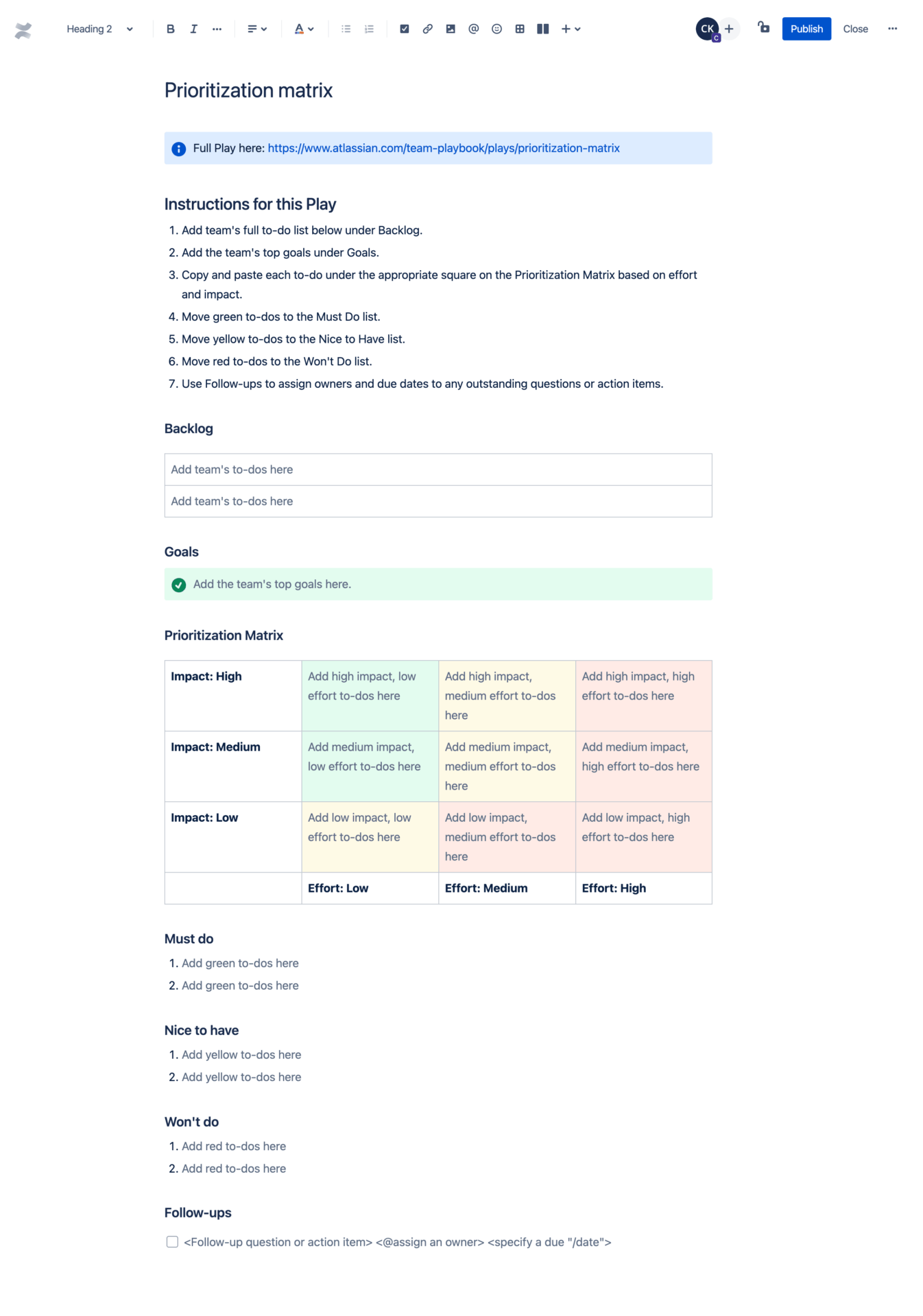
Use the Prioritization Matrix Template by Confluence when your team already lives and works in the Atlassian stack. It’s a Confluence page template where the team lists work, plots it by impact and urgency, then sorts items into Must Do, Nice to Have, and Won’t Do lists.
Use case: Your engineering team runs sprint planning in Jira and documents specs in Confluence. Open a new page, drop the team’s top goals at the top, list every backlog item, then assign each one to a Must Do, Nice to Have, or Won’t Do bucket inside the same doc. The output becomes a referenced page in your sprint planning meeting, and @-mentions notify owners directly.
Best for: Teams embedded in the Atlassian ecosystem (Jira + Confluence) who want prioritization documented alongside the rest of their project artifacts
Skip it if: You need scores to update automatically or items to re-rank as you edit. Confluence won’t recalculate or re-sort; it’s a static page. Also, skip if your team doesn’t already use Jira, the integration is the main reason to pick this one
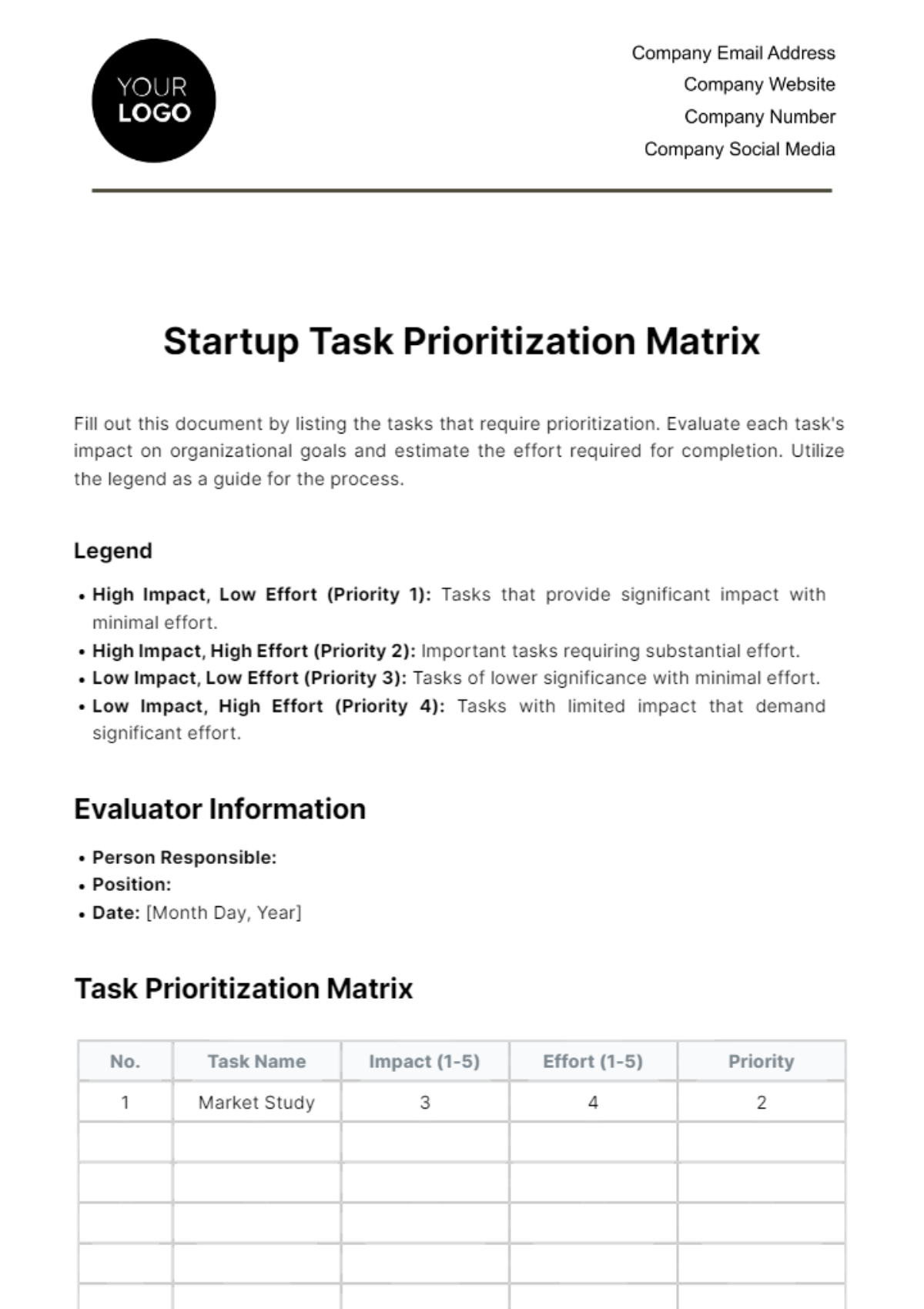
Use the Startup Task Prioritization Matrix Template by Template.net when you’re an early-stage founder ranking what to ship this week. Score each item on Impact and Effort and the template assigns a Priority 1-4 label.
Use case: You’re three people building toward a launch, and the backlog of “things we should do” has crept past 25 items. Drop each task into the matrix, rate Impact and Effort honestly, and the Priority labels tell you what to start tomorrow vs. what to defer. Print it, share the link, or edit it in the browser, no signup required.
Best for: Solo founders and three-to-five-person startup teams who need a ranked list without committing to a full task tracker
Skip it if: You need scores to update automatically, multiple people to collaborate live, or items to convert into assigned tasks
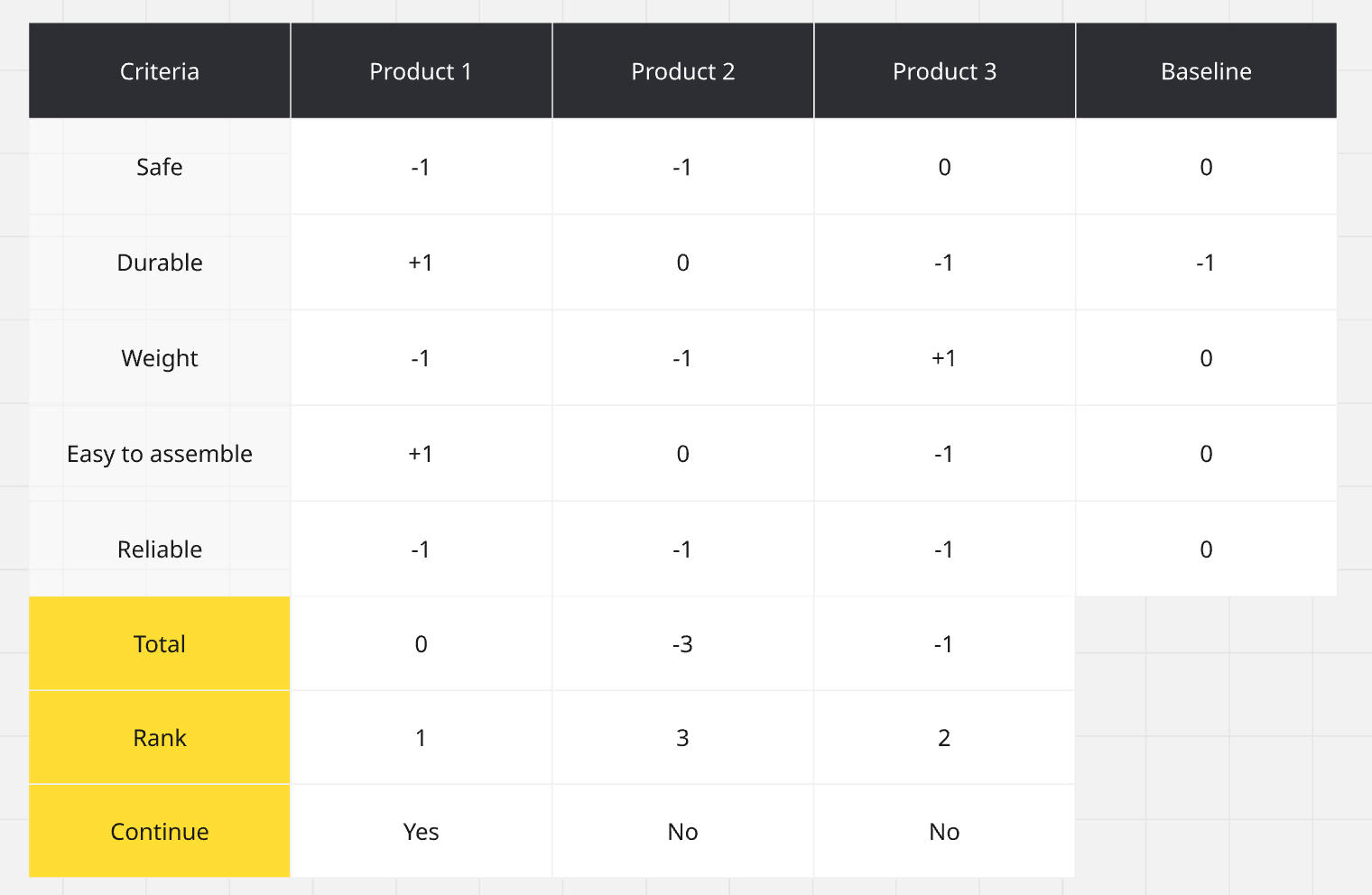
Use the Pugh Matrix Template by Miro when you’re choosing between several options and the trade-offs span more than two axes. The framework scores each option against a set of weighted criteria, then totals the scores to surface the most favorable choice. It’s useful when impact and effort alone can’t capture the full picture.
Use case: Your team is picking between four vendor proposals, three product directions, or five potential features. The call you make depends on cost, feasibility, customer impact, risk, and timeline all at once. Set the criteria, assign weights, score each option against every criterion, and the matrix returns one ranked list with the math visible to everyone in the room.
Best for: Cross-functional teams choosing between multiple alternatives where the trade-offs span cost, feasibility, customer impact, risk, and timeline at once
Skip it if: You’re triaging a flat list of tasks where everything competes for the same outcome. A 2×2 matrix (#3, #4) or scoring framework (#9) will move faster than setting up criteria and weights
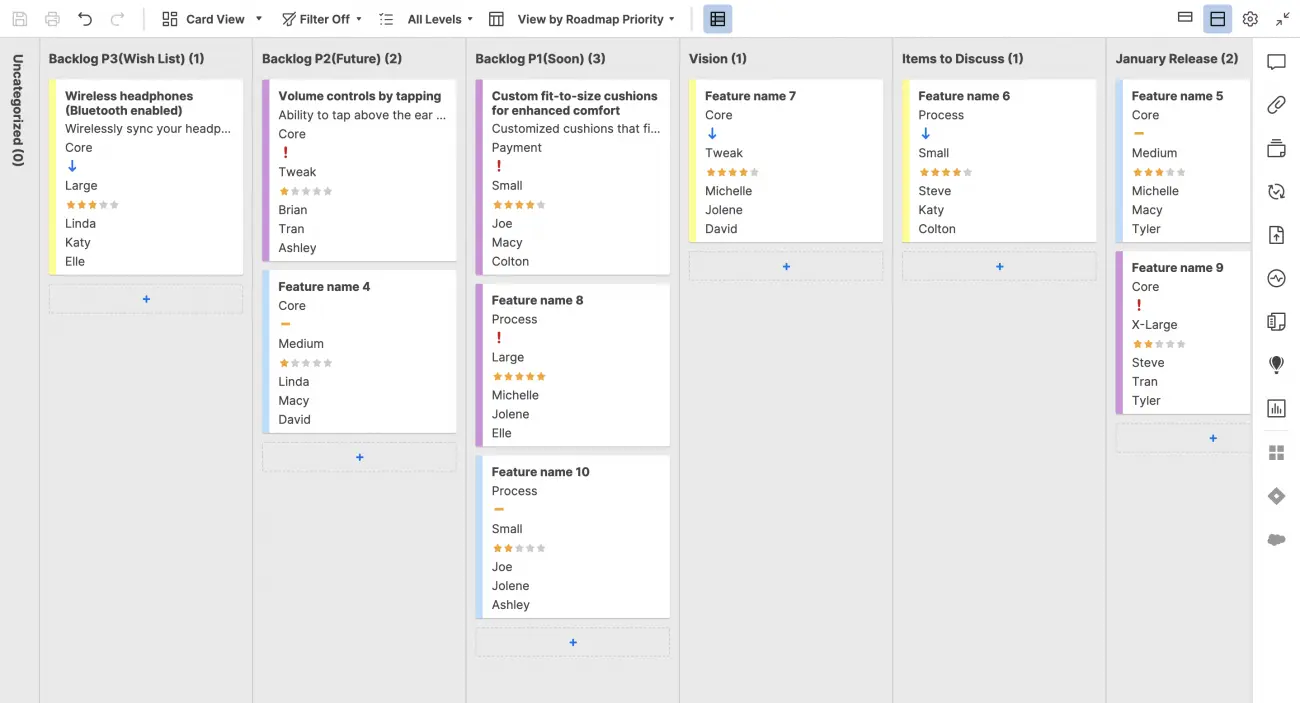
Use the Product Prioritization Board Template by Smartsheet when your roadmap needs a Kanban board for features. Each feature is a row tagged with priority, category, stage, and size, and the spec, mockup, and customer feedback attach directly to it.
Use case: Your PM team reviews the roadmap every two weeks. Half the meeting is spent finding the right Figma link or scrolling through Slack to find the customer quote behind a feature. Move the roadmap here. Each row carries its priority, owner, stage, and an attachment column for the spec and mockup. The next review opens with the context already in place.
Best for: Product managers running roadmap reviews who need feature context (specs, mockups, customer feedback) attached to the priority list itself
Skip it if: You need numerical scoring or a formula-driven ranking. The board is tag-based and qualitative. Reach for RICE in Notion (#9) when the call depends on quantified trade-offs
Use the MoSCoW Prioritization Template by ProductLift when you need stakeholder buy-in more than a numerical ranking. The framework sorts every feature into one of four buckets: Must Have, Should Have, Could Have, or Won’t Have. There’s no formula, just an explicit decision on what ships and what doesn’t.
Use case: Your product team is scoping an MVP release with marketing, sales, and engineering stakeholders, and “high priority” has lost all meaning. Run a 30-minute workshop using MoSCoW. Force every feature into one of the four buckets, capping Must Haves at 60% of available effort. The Won’t Have list does the heavy lifting because it documents what’s explicitly out of scope, killing future debates about why something didn’t make the release.
Best for: Product managers running MVP scoping, release planning, or stakeholder workshops where everyone needs to agree on what’s in and what’s out
Skip it if: You need numerical ranking within a category. MoSCoW won’t tell you which Must Have to build first. Pair it with RICE or use a scoring template when precision matters more than buy-in
Use the Feature Prioritization Template by Product School when you need a presentation-ready artifact. It’s a PowerPoint and Google Slides pack with 5 matrix variants (impact/effort, RICE, value/complexity, and others) plus framework guidance. It’s designed to help PMs walk leadership through a feature decision.
Use case: You’re a product manager pitching the next release scope to your VP and need an organized visual that shows the trade-off math. Drop your features into one of the 5 matrix slides, swap the framework if the audience prefers a different lens, and walk into the review.
Best for: Product managers, founders, and leadership teams who need a polished visual for executive reviews, board decks, or cross-functional stakeholder meetings
Skip it if: You need a working file that updates as scores change. Slides are static; you’ll have to rebuild the visuals every cycle. Use a live tool for ongoing prioritization and bring the slide version out for review
Use this as your second decision point. Match your need to the template that best fits it:
| If you need to… | Start with this template |
| Triage your own day fast, no framework debate | Eisenhower Matrix Template by ClickUp (#1) |
| Run a flat ranked list, no quadrants | Daily To-Do List Template by ClickUp (#2) |
| Run a live workshop and convert decisions into tasks | Prioritization Matrix Template by ClickUp (#3) |
| Score a team backlog with effort vs. impact | Effort Impact Matrix Template by ClickUp (#4) |
| Weigh upside against downside on big initiatives | Value Risk Matrix Template by ClickUp (#5) |
| Groom an ongoing backlog tied to sprints | Project Backlog Template by ClickUp (#6) |
| Work offline in Excel or Google Sheets | Project Task List Template by Vertex42 (#7) |
| Choose between competing project proposals | Project Prioritization Matrix Template by ProjectManager (#8) |
| Rank features using RICE inside Notion | RICE Scoring Framework Template by Notion (#9) |
| Prioritize inside the Atlassian stack | Prioritization Matrix Template by Confluence (#10) |
| Rank tasks as a founder with no signup | Startup Task Prioritization Matrix Template by Template.net (#11) |
| Compare multiple options across weighted criteria | Pugh Matrix Template by Miro (#12) |
| Run roadmap reviews with specs and feedback attached | Product Prioritization Board Template by Smartsheet (#13) |
| Scope an MVP using MoSCoW with stakeholders | MoSCoW Prioritization Template by ProductLift (#14) |
| Build a presentation-ready feature prioritization deck | Feature Prioritization Template by Product School (#15) |
Still stuck? Start with #4 (Effort Impact Matrix Template by ClickUp). The 1-4 scoring is structured enough to defend in a meeting and loose enough to score 30 items in 20 minutes. And the moment you rank an item, it carries an owner, a date, and a status.
A prioritization template works when it runs on a fixed cadence, uses written scoring criteria, and connects directly to the tasks your team opens every day. Without those three things, the scoring session is a meeting that produces a screenshot.
Most prioritization templates fail at the same six checkpoints. Skip any of these, and you’ll be re-scoring the same work by next week.
Watch this quick walkthrough on creating an effective priority list that you can apply to any of the templates above.
External templates and ClickUp templates solve different problems. External templates are better when you need a one-time decision documented fast. ClickUp templates are better when that decision needs to drive assigned work for the next six weeks.
The list above mixes ClickUp templates with options from Notion, Smartsheet, Confluence, Miro, ProjectManager, and more. They’re all free, but they don’t do the same job.
External templates work best when prioritization is the whole point. A RICE database in Notion, a downloadable Excel matrix, or a slide deck for a leadership review. You score items, share the artifact, and move on. The decision is documented but it doesn’t carry into next week’s standup.
ClickUp templates, however, work best when prioritization needs to become tracked work. Score Effort and Impact, then assign Quick Wins to a teammate with a real due date inside the same view. Drop sticky notes on a whiteboard, then convert them into tasks with one click. Groom the backlog, then pull from the top into the next sprint’s planning. The matrix and the execution live in one place.
You also get ClickUp Brain and access to multiple frontier LLMs (Claude, GPT, Gemini) inside the same workspace. Meaning you can draft scoring criteria, summarize stakeholder input, or pressure-test a prioritization call in one workspace.
Honest take: ClickUp is overkill if you only need to rank a one-off list once a quarter and never look at it again. For that, a Miro board or a Notion database is lighter and faster to spin up. The ClickUp advantage shows up when the same list needs to drive standups, sprint planning, and weekly grooming for the next six months.
Cody B., a student mentor coordinator, wrote:
I use ClickUp to organize, prioritize, and execute my chaotic work to-do list. It’s like everything I would imagine if I were to build my own software for managing complexity in my work. I really appreciate the customization options that let me tailor my workflow and make sense of my chaotic list, helping me prioritize and keep it organized. I think the organization is laid out perfectly for my use, is intuitive, and extremely powerful. I love the ability to customize the status workflow and create custom views. It’s awesome that you can manually control and prioritize items in the ‘Personal Priorities’ section, giving complete control over prioritization. I give it a 10/10 and recommend it highly to others.
Prioritization templates fail for one of four reasons: no one maintains them after the first session, the scoring criteria were never written down, the ranked list lives in a tool disconnected from execution, or every stakeholder successfully argues their work into the top tier. Four patterns show up over and over:
The fix is review cadence, a clear scoring rubric, and a direct link between the ranked list and the tasks people open every day.
When two pieces of work compete, which one ships first, and why? A good prioritization system helps you answer that.
But the template is the easy part. Pick the one that fits the call you’re making (say, daily triage, backlog grooming, or a go/no-go on competing initiatives). Run it for two sprints before deciding whether it earns a permanent spot.
The harder part, however, is maintaining honest rankings after the first session.
That’s where ClickUp earns its keep. The ranked list, the owners, the due dates, and the next sprint’s plan all live in one workspace, so the call you made on Monday is still the call your team is working off on Friday. Get started for free.
RICE (Reach, Impact, Confidence, Effort) is the most widely used scoring model for product teams because it reduces gut-feel bias by forcing four numeric inputs before any feature gets ranked. It works best when teams have enough user data to estimate Reach and Confidence. Teams without that data, typically early-stage or pre-launch products, tend to get better results from MoSCoW, which forces a categorical commit (Must Have vs. Won’t Have) without requiring numeric estimates. Eisenhower is better suited to individual task triage than feature-level decisions.
Start by separating urgency from importance. A task can be urgent (deadline today) without being important (moves no strategic metric). The Eisenhower Matrix sorts work into four quadrants by those two axes, and research on decision fatigue suggests that externalizing this judgment into a visual framework reduces the cognitive load of repeated prioritization. Once the high-importance, low-urgency work is visible, it’s easier to defend against the high-urgency, low-importance noise that typically consumes most sprint capacity.
MoSCoW and RICE answer different questions. MoSCoW asks “does this ship at all?” by forcing a Must Have, Should Have, Could Have, or Won’t Have categorization, which makes it useful for MVP scoping and stakeholder alignment. RICE asks “which of these ships first?” by calculating a numeric score using Reach, Impact, Confidence, and Effort, which makes it useful for ranking within a backlog. Most product teams use both: MoSCoW to define release scope, RICE to sequence what’s inside it.
A prioritization list goes stale when it lives in a static document disconnected from execution. Three practices prevent this: first, score new incoming requests against the same criteria before they enter the backlog, so they’re never unranked; second, assign a re-grooming date when you score (weekly for task lists, bi-weekly for feature backlogs, quarterly for portfolios); third, store the ranked list in the same tool your team creates tasks in, so a change in priority immediately affects the assignee’s view rather than sitting in a separate spreadsheet nobody opens.
Yes. The frameworks are tool-agnostic. Marketing teams use Effort/Impact matrices to rank campaigns. Operations teams use MoSCoW to scope quarterly process improvements. HR teams use RICE-style scoring to decide which internal initiatives get headcount. The logic is identical: you have more options than capacity, and the template forces a defensible call on what comes first. The main adaptation is redefining the scoring criteria to match your function. “Reach” for a product team means affected users; for a marketing team, it might mean estimated audience size for a campaign.
Two to four criteria is the practical ceiling for a matrix people will actually use. Past four inputs, scoring sessions slow down, disagreements multiply, and the math starts masking judgment rather than informing it. The Eisenhower Matrix uses two (urgency and importance). RICE uses four. Pugh matrices can use more, but those are designed for one-time vendor or option selections, not recurring backlog grooming. For ongoing prioritization, two to three criteria with a written rubric for each score level will outperform a six-criterion model that nobody fills in consistently.

Praburam Srinivasan
Max 19min read
Praburam Srinivasan
Max 20min read
Praburam Srinivasan
Max 27min read

© 2026 ClickUp