
Sorry, there were no results found for “”
Sorry, there were no results found for “”
Sorry, there were no results found for “”
You just wrapped up a meeting. Great ideas were shared, clear decisions made, and you told yourself, “I’ll type it all out right after this.”
But manual note-taking after a meeting eats into valuable time, and you can hardly remember who said what, when, and in which context.
That’s where voice dictation tools like Wispr Flow step in. This online dictation tool captures spoken words, turns voice memos into accurate transcriptions, and helps you organize them with AI commands.
The goal is to help you enhance productivity without spending hours typing things out manually. Still, Wispr Flow isn’t for everyone. Maybe the voice recognition misses the mark, or it doesn’t quite fit into your workflow. That’s why we’ve rounded up the best Wispr Flow alternatives for you.
From smart speech-to-text software to AI-powered tools that let you streamline note-taking and document editing, these options are designed to help you save time and work smarter.
Wispr Flow is a helpful voice dictation tool, but recent user feedback highlights several challenges that might push you to explore better options.
Here’s our list of the best alternatives to Wispr Flow you can try today to easily transcribe audio files!
| Tool | Key features | Best for | Pricing* |
| ClickUp | ClickUp Brain, AI Notetaker, Docs, task management, meeting templates | Individuals as well as mid-sized to large teams that need an all-in-one workspace for notes, tasks, and collaboration | Free plan available, customizations available for enterprises |
| Otter.ai | Live transcription, speaker ID, meeting summaries, Zoom, and Google Meet integration | Individuals, solopreneurs, and small teams needing real-time transcription and meeting summaries | Free plan available, paid plan starts at $16.99/month for premium features |
| Sonix.ai | 40+ language support, audio/video import, timestamps, custom vocabulary | Freelancers, content creators, and global teams needing fast, multilingual transcription with high accuracy | Free trial available, paid plan starts at $10/hour for transcription |
| Temi | Budget-friendly pricing, simple interface, quick turnaround | Individuals and occasional users (like students or journalists) needing fast, budget-friendly transcription software | Starts at $0.25/audio minute, pay-as-you-go model |
| Descript | Overdub, screen recording, multi-track editing, and podcast publishing | Solo creators, podcasters, and small media teams combining audio, video, and text editing | Free plan available, paid plans start at $24/month |
| MacWhisper | Whisper AI engine, no internet required, supports multiple languages | Offline voice-to-text for Mac users | Free plan available, one-time license for Pro version |
| Dictanote | Hybrid dictation + manual input, formatting tools, voice shortcuts | Writers, bloggers, and students who toggle between dictation and typing in a solo setup | Free plan available, paid plan starts at $8/month |
| Tactiq | Transcripts for Zoom, Google Meet, MS Teams, highlight tracking, and auto-summaries | Small to mid-sized teams capturing and organizing meeting transcripts from video calls | Free plan available, paid plan starts at $12/month |
| Rev | AI and human transcription, captioning, and global language support | Legal, media, and research teams (mid-size to enterprise) needing human-level transcription accuracy | Free plan available, paid plans start at $14.99/month |
| Superwhisper | Lightweight interface, supports multiple audio inputs, no account needed | Privacy-first professionals and enterprise users using Whisper AI locally on Mac and iOS | Free plan available, paid plans start at $8.49/month |
Now that you’ve seen the top picks at a glance, let’s break them down one by one to find what works best for you.
Most voice-to-text tools stop at transcription. ClickUp goes further by transforming your conversations into actionable plans.
Imagine you’re in a client call, brainstorming ideas, discussing next steps, and assigning responsibilities on the fly. The ClickUp AI Notetaker quietly joins the meeting (with your permission, of course), records the conversation, and delivers a clean, labelled transcript into your inbox paired with a smart summary of key takeaways and action items.
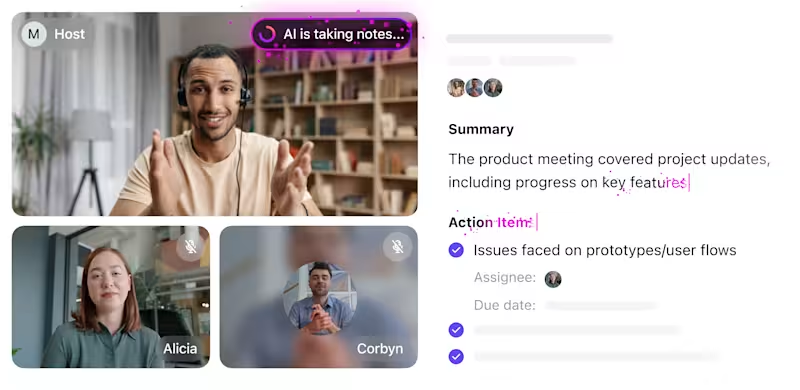
But that’s only the beginning.
ClickUp AI Notetaker already captures and summarizes meetings, but ClickUp Brain MAX takes it further with a voice-first desktop AI that knows your work context.
With Talk to Text, you can dictate notes, follow-ups, or tasks hands-free and have them instantly formatted into ClickUp Docs, tasks, or comments. It supports smart linking to @mentions, tasks, and Docs, so your spoken commands connect to real work without extra clicks.
Why Brain MAX upgrades note-taking:
Example:
“Max, create a task to finalize the onboarding guide by Thursday for Jordan.”
✅ Task created, due date set, team notified—no typing needed.Collaborate and organize notes with ClickUp Docs
Right after the meeting, those notes, created in ClickUp Docs, become part of your workspace. You can instantly turn highlights into ClickUp Tasks, assign them, set due dates, and keep the full project context centralized. This kind of task integration keeps your team aligned and eliminates the need to jump between tools. You can also use task list templates to get started faster.

Since everything happens in a shared space, collaboration feels natural. Your team can co-edit notes using Live Collaboration in ClickUp, leave comments, update task progress, and stay on the same page with shared notes, rather than losing track of the bigger picture.
📮ClickUp Insight: ClickUp found that 47% of meetings last an hour or more. But is all that time truly necessary? The reason for our skepticism? Only 12% of our respondents rate their meetings as highly effective.
Tracking metrics like action items generated, follow-through rates, and outcomes can reveal whether longer meetings truly deliver value.
ClickUp’s meeting management tools can help here! Easily capture action items during discussions with AI Notetaker, convert them into trackable tasks, and monitor completion rates—all in one unified workspace. See which meetings actually drive results and which ones are just stealing time from your team’s day!
A G2 reviewer shared how ClickUp has transformed their agency’s internal task management:
ClickUp has completely transformed the way we manage our internal tasks at the agency. It allows me to track the entire team’s workflow in one place, prioritize urgent matters, and keep communication centralized.
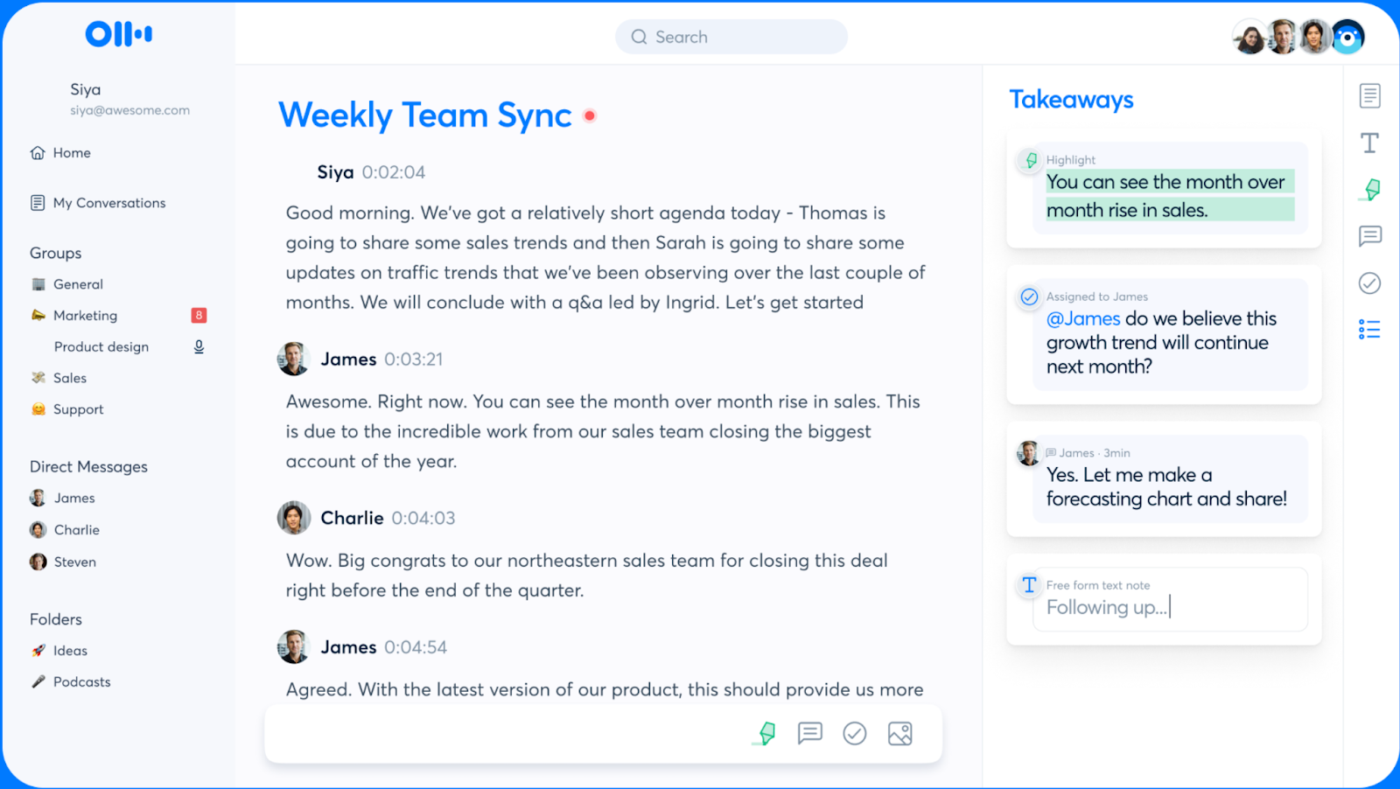
Otter.ai is a well-known voice-to-text tool built for professionals who spend a lot of time in meetings. It offers real-time transcription with speaker labels, and automatically generates summaries and searchable transcripts. Whether you’re in a Zoom call, lecture, or interview, Otter helps you stay focused without having to take notes manually.
Here’s what a G2 reviewer says about Otter.ai:
An Effective Notetaker with good summaries, action items and helpful integrations
📖 Also Read: Best Otter AI Alternatives and Competitors
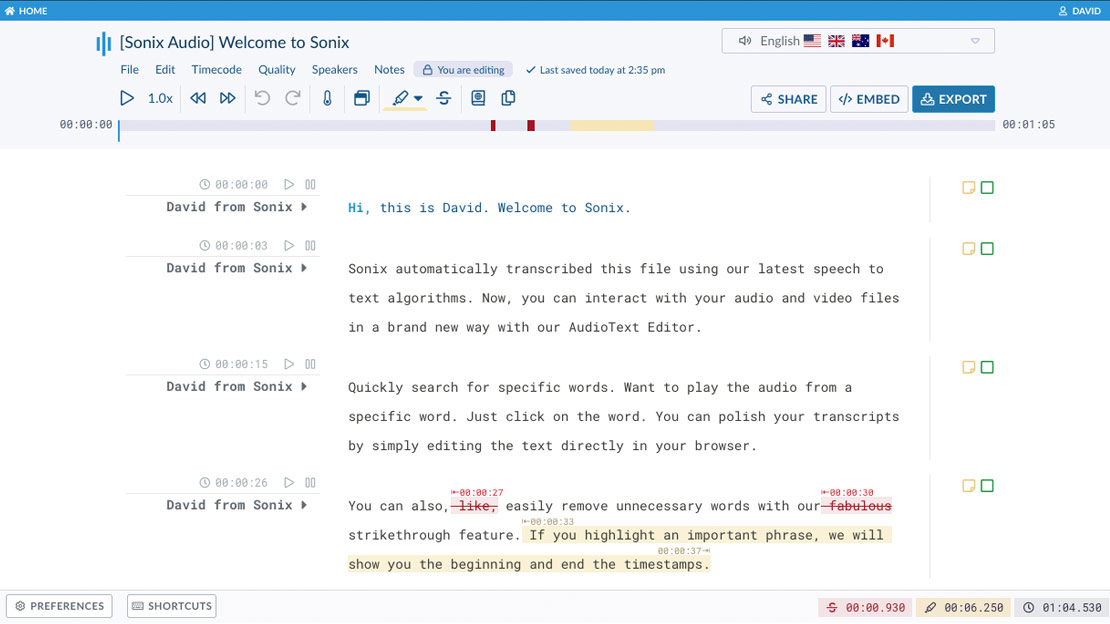
Sonix.ai is ideal for content creators and teams needing fast, high-accuracy transcription in 40+ languages. You can upload audio or video files, get quick transcripts with speaker labels and timestamps, and edit them directly in-browser. It supports multi-language input, allows users to speak freely, and includes smart features like summaries and export options.
Here’s what a G2 reviewer had to say:
Sonix.ai a fantastic tool for transcribing work voice messages on the go and keeping them organized.
📖 Also Read: Top speech-to-text software
Temi is built for speed and simplicity. It’s a lightweight transcription tool that delivers quick results at one of the lowest price points in the market. With its flat-rate pricing and easy-to-use editor, it’s a favorite among solo professionals like journalists, students, and content creators.
You can upload your audio, get a transcript back in minutes, and polish it using Temi’s built-in editor. It works best with clear audio and minimal background noise—perfect for one-on-one interviews, lectures, or podcast recordings.
While it lacks collaboration features or task workflows, Temi shines when affordability and speed are your top priorities.
This G2 review shares:
Temi accurately transcribes audio recordings. Once transcribed, the content can be edited.
💡 Pro Tip: If you’re transcribing webinars or video calls manually, use timestamps to anchor your notes. Pause the video and jot down the timestamp next to each key point (e.g., [03:42] How to build a project roadmap). This makes it easy to revisit complex parts without rewatching the whole thing.
Want more tips? Here’s a quick guide on how to take notes from a video efficiently.

Descript is a favorite among podcasters, marketers, and educators who want a faster way to transcribe, edit, and publish content without switching between tools. It automatically turns recordings into text, letting you edit videos or voiceovers by simply changing the transcript.
You can remove filler words, add captions, and prep content for publishing—all from one dashboard. With built-in screen recording, team collaboration, and publishing tools, Descript helps creative teams move from idea to finished content in less time.
Here’s what a G2 reviewer shares about their experience with Descript:
Great for easy video edits and transcripts, plus way more. Editing videos and audio is as easy as editing a document, so you don’t need to know how to use a complicated editing program to get things done.
📖 Also Read: Best free screen recorders with no watermark
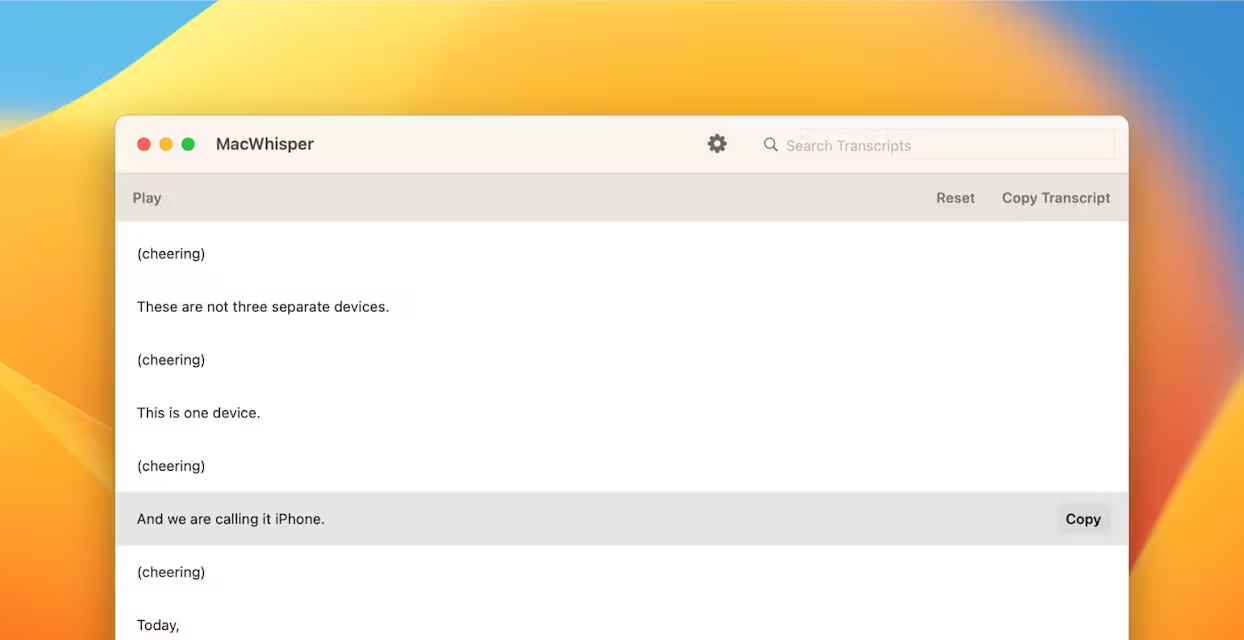
Privacy and simplicity are at the heart of MacWhisper. It’s designed exclusively for macOS and runs entirely on your device—no internet required, no cloud storage involved. Whether you’re transcribing interviews, meetings, or content drafts, your files stay local and secure.
MacWhisper uses OpenAI’s Whisper model to deliver accurate transcriptions in multiple languages. You can upload audio or video files, view the transcript in a clean interface, and edit it on the spot without worrying about connectivity or privacy concerns.
It’s a reliable pick for professionals who value control over their data and want a lightweight, offline transcription tool that just works.
Note: Actual pricing may vary slightly depending on current exchange rates.
Here’s what a Product Hunt reviewer shared about their experience with MacWhisper:
An incredibly useful app for on-device transcription. I use this for transcribing both voice notes to text and creating automatic transcripts from online videos for my notes.
👀 Did You Know? Our meeting effectiveness survey found that while 47% of meetings last an hour or more, 14% of respondents are able to wrap up their meetings within just 15 minutes. A small but notable percentage that proves quick, efficient meetings are possible.
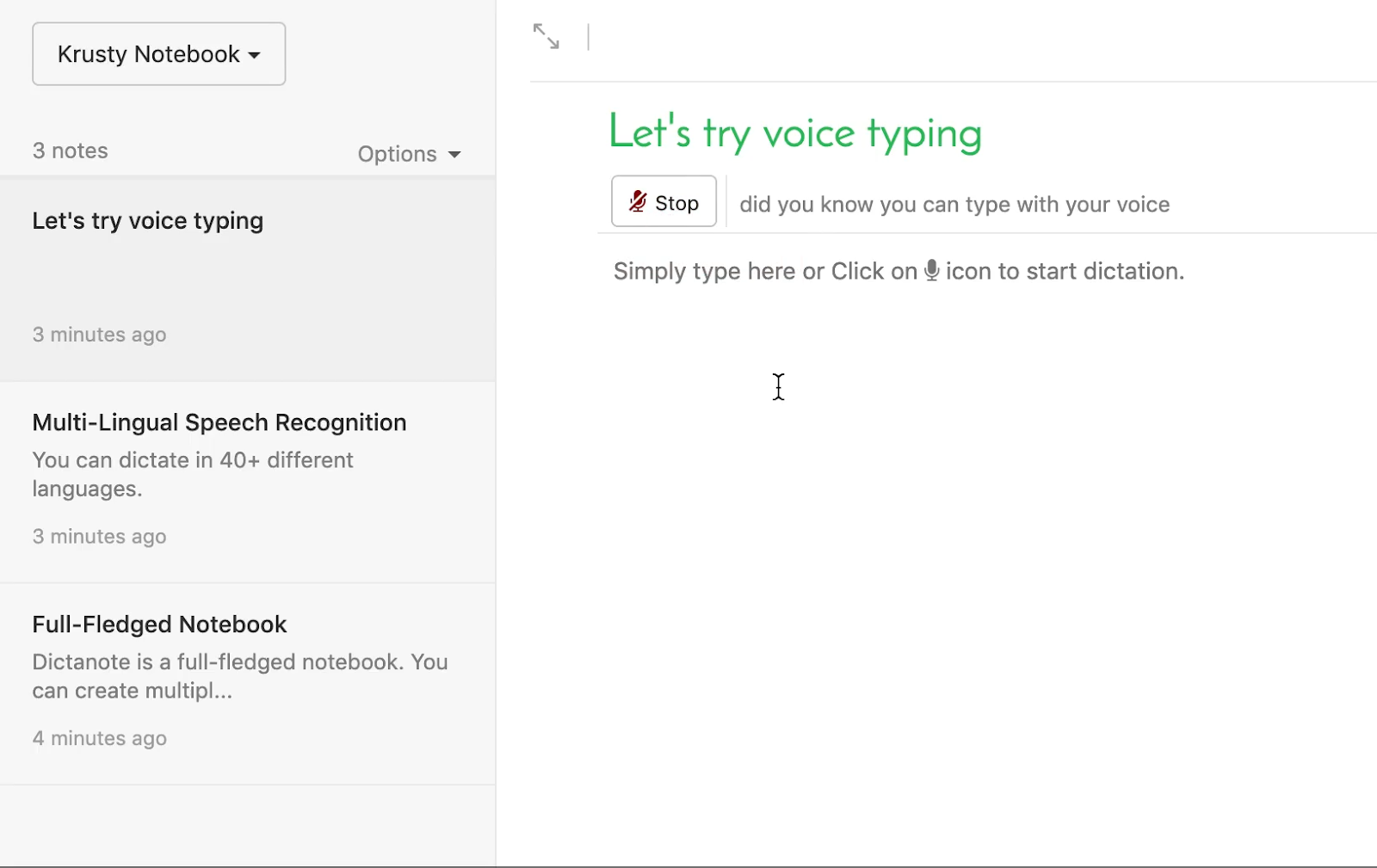
Dictanote is ideal for writers, students, and professionals who want to switch between typing and voice input without leaving their writing process. It runs in your browser with a clean, Docs-like interface and built-in voice recognition.
You can speak naturally or type mid-document, organize content with tags, and manage projects using separate “notebooks.” For anyone who mixes dictation and manual writing, Dictanote keeps everything streamlined in one place. Since it runs entirely in the browser without heavy integrations, it feels responsive even on slower or older devices.
Here’s what a reviewer on the Chrome Web Store shares about their experience with Dictanote:
It worked pretty good yesterday, giving about the promised 90% accuracy. However, it does not work at all this morning, at about 50% accuracy. Even with 90% accuracy, I could have typed the whole thing faster than it took to dictate and then do corrections.
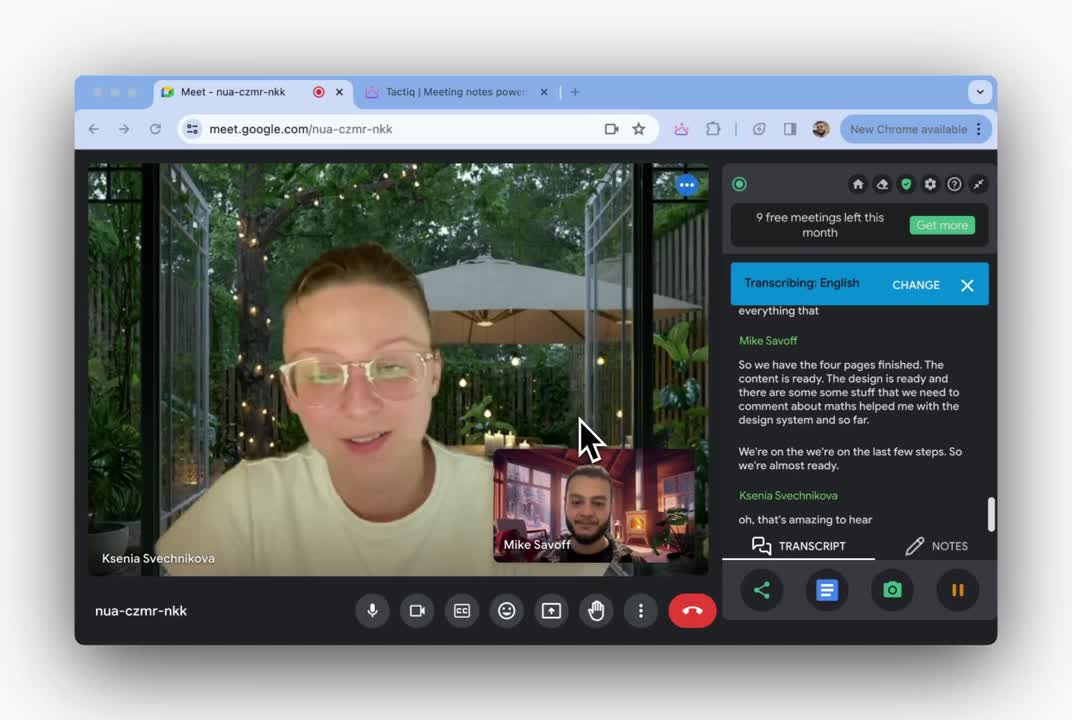
Have you ever wrapped up a Zoom call only to forget who promised to do what? Tactiq helps ensure that this never happens again.
This Chrome extension captures live transcripts from Google Meet, Zoom, and Microsoft Teams, and lets you highlight key moments and turn them into action items, all during the meeting. It sits neatly on the side of your screen, so you stay focused on the conversation without scrambling for notes.
You can tag important takeaways, assign follow-ups, and export everything to tools like Google Docs, Notion, or your CRM. Since it runs on your browser and doesn’t join meetings as a participant, it avoids the privacy concerns common with meeting bots.
Here’s what a G2 reviewer says:
Easiest Way to Transcribe Meetings. There are a few things, but probably my favorite feature is the AI-powered summaries.
📖 Also Read: How to write an effective meeting recap
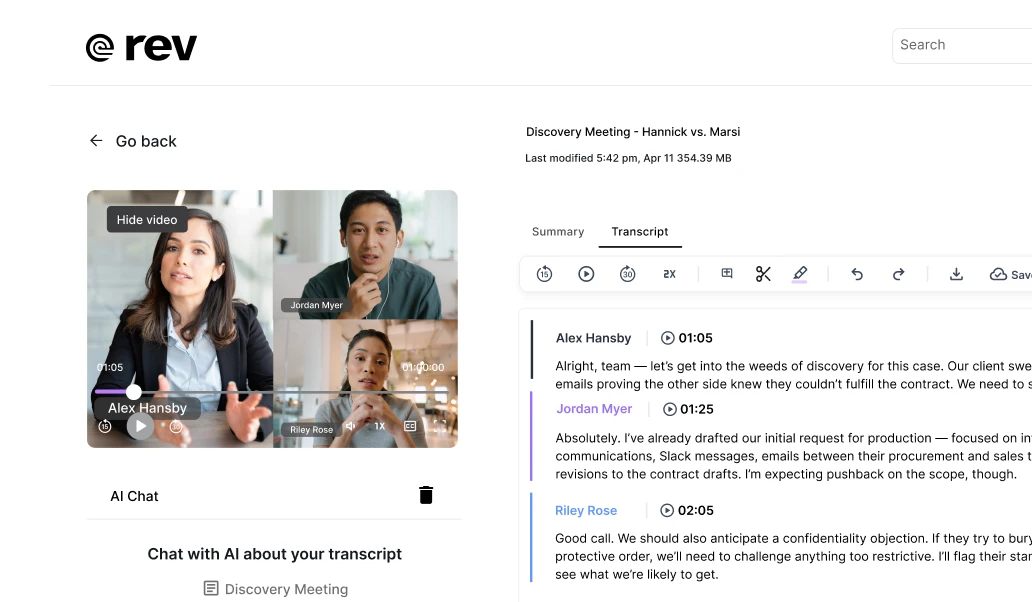
Not every voice-to-text tool balances speed and accuracy, but Rev does. With over a decade in the transcription space, it blends AI efficiency with human-level precision for industries where every word matters.
Whether you’re a journalist needing court-admissible transcripts, a legal team prepping cross-examinations, or a researcher sorting through hours of interviews, Rev gives you flexible options—from fast AI-powered transcriptions to highly accurate human-generated ones.
It also offers features like an AI assistant to surface quotes and themes, editable transcripts, and integrations with Zoom, Teams, and Google Meet.
Here’s what a G2 reviewer says about Rev:
Our agency uses rev almost daily to provide near instant AI rough drafts for depositions. Our clients love the shareable links which synchronize the transcript with a video. The summary AI summary and question bot are also great and look forward to their expansion.
👀 Did You Know? 49% of our meeting effectiveness survey respondents still take handwritten notes—a surprising trend in a digital-first era. This reliance on pen and paper may be a personal preference or a sign that digital note-taking tools aren’t fully integrated into workflows.
Superwhisper is a powerful offline transcription tool for macOS and iOS, designed for enterprise users. It uses the Whisper.cpp framework and runs entirely on-device, ensuring complete data privacy.
What sets it apart is its context-aware formatting and support for customizable AI workflows, allowing teams to define post-processing rules using natural language processing. It’s ideal for transcribing sensitive content like legal or medical notes without relying on cloud services.
Here’s what a user wrote on Product Hunt about Superwhisper:
Such useful software! I find myself writing more and better documentation and emails with it because it makes text entry so fast.
📖 Read More: How to use AI for meeting notes
Voice-to-text tools are no longer just about transcription. The real value comes from what you can do with those transcripts once the meeting ends.
With tools like ClickUp, you’re getting a full system to turn ideas into action.
Of course, other tools shine in different areas. Otter.ai and Sonix are great for fast, AI-powered transcription. Rev gives you high-accuracy, human-reviewed results. MacWhisper and Superwhisper are perfect for privacy-first users who need offline processing.
The right tool really depends on what your workflow looks like and how your team operates.
Start by exploring demos and free trials with flexible platforms like ClickUp. Get the clarity you need to choose the best solution for your team’s next phase of growth.

Manasi Nair
Max 23min read
Manasi Nair
Max 29min read
Manasi Nair
Max 14min read

© 2026 ClickUp