






Still downloading templates?
There’s an easier way. Try a free AI Agent in ClickUp that actually does the work for you—set up in minutes, save hours every week.
Sorry, there were no results found for “”
Sorry, there were no results found for “”
Sorry, there were no results found for “”
Teams using disconnected spreadsheets for invoice tracking can spend 3-5 extra hours per week piecing together payment histories. This is precious time that could be spent actually collecting.
To help you take back control, we’ve rounded up five free invoice aging tracker templates. Whether you want a tool that connects to your team’s daily tasks or a simple spreadsheet to get started, these options will help you clear the clutter and get paid on time.
| Template name | Download link | Ideal for | Best features | Visual format |
| Invoices Template by ClickUp | Get free template | Teams managing high invoice volume across multiple clients | Status-based tracking; Custom Fields for invoice data; multiple views (List, Board, Calendar); recurring workflow setup | Multi-view workspace with structured invoice pipeline |
| Accounts Payable Template by ClickUp | Get free template | Finance and ops teams managing vendor payments and approvals | Approval stage tracking; due date scheduling; Dashboard reporting; task dependencies for payment sequencing | List-based workflow with approval stages and reporting views |
| Payment History Template by ClickUp | Get free template | Freelancers and teams needing a reliable record for client payments and disputes | Centralized transaction log; Timeline View for trends; filtering by client/payment type; detailed Custom Fields | Structured list with timeline and filtered views |
| Invoice Tracking Template by Vertex42 | Download this template | Freelancers and small teams using spreadsheets for invoice tracking | Built-in aging formulas; client-level filtering; conditional formatting for overdue invoices; print-ready layout | Spreadsheet-based grid with aging summary |
| Aging Report Template by CFI | Download this template | Finance professionals preparing reports for audits or stakeholder reviews | Standard aging buckets; doubtful accounts calculation; clean financial reporting format; Excel compatibility | Structured financial report spreadsheet |
🔎 Did You Know? Federal Reserve data shows that 51% of U.S. employer firms struggle with uneven cash flow simply because it’s so hard to collect what they’re owed.
An invoice aging tracker is a specialized tool that organizes your unpaid invoices into time-based categories, called aging buckets. It shows you exactly how long each one has been outstanding. Think of it as a financial map that highlights which payments are safe and which require your immediate attention.
A solid invoice aging tracker template typically includes:
🧠Fun Fact: 56% of small businesses have outstanding invoices, with an average of $17,500 owed per firm. Chasing these payments reactively means your cash flow forecasts are a shot in the dark, and critical invoices inevitably take a backseat.
This disorganized approach leads to work sprawl, where you waste hours searching for information across different spreadsheets and email threads. In fact, Microsoft’s Work Trend Index found that 62% of employees struggle with the time spent hunting for data.
An aging tracker template brings structure to your accounts receivable, showing you exactly what’s overdue so you can prioritize your collections effectively.
📮 ClickUp Insight: The average professional spends 30+ minutes a day searching for work-related information—that’s over 120 hours a year lost to digging through emails, Slack threads, and scattered files. An intelligent AI assistant embedded in your workspace can change that. Enter ClickUp Brain. It delivers instant insights and answers by surfacing the right documents, conversations, and task details in seconds—so you can stop searching and start working.
💫 Real Results: Teams like QubicaAMF reclaimed 5+ hours weekly using ClickUp—that’s over 250 hours annually per person—by eliminating outdated knowledge management processes. Imagine what your team could create with an extra week of productivity every quarter!
🔎Did You Know? Overdue invoices affected an average of 43% of credit-based B2B sales for U.S. companies. This highlights a fragmented landscape where businesses struggle with liquidity simply because their collection systems can’t keep up with the volume.
The key is to find a template that fits your workflow, is easy for your team to use, and can be customized as you grow.
We’ve selected five of the best invoice aging tracker templates to help you decide. Three are built within ClickUp to create a connected workflow, while two are traditional spreadsheets for teams that prefer a simple, downloadable option.
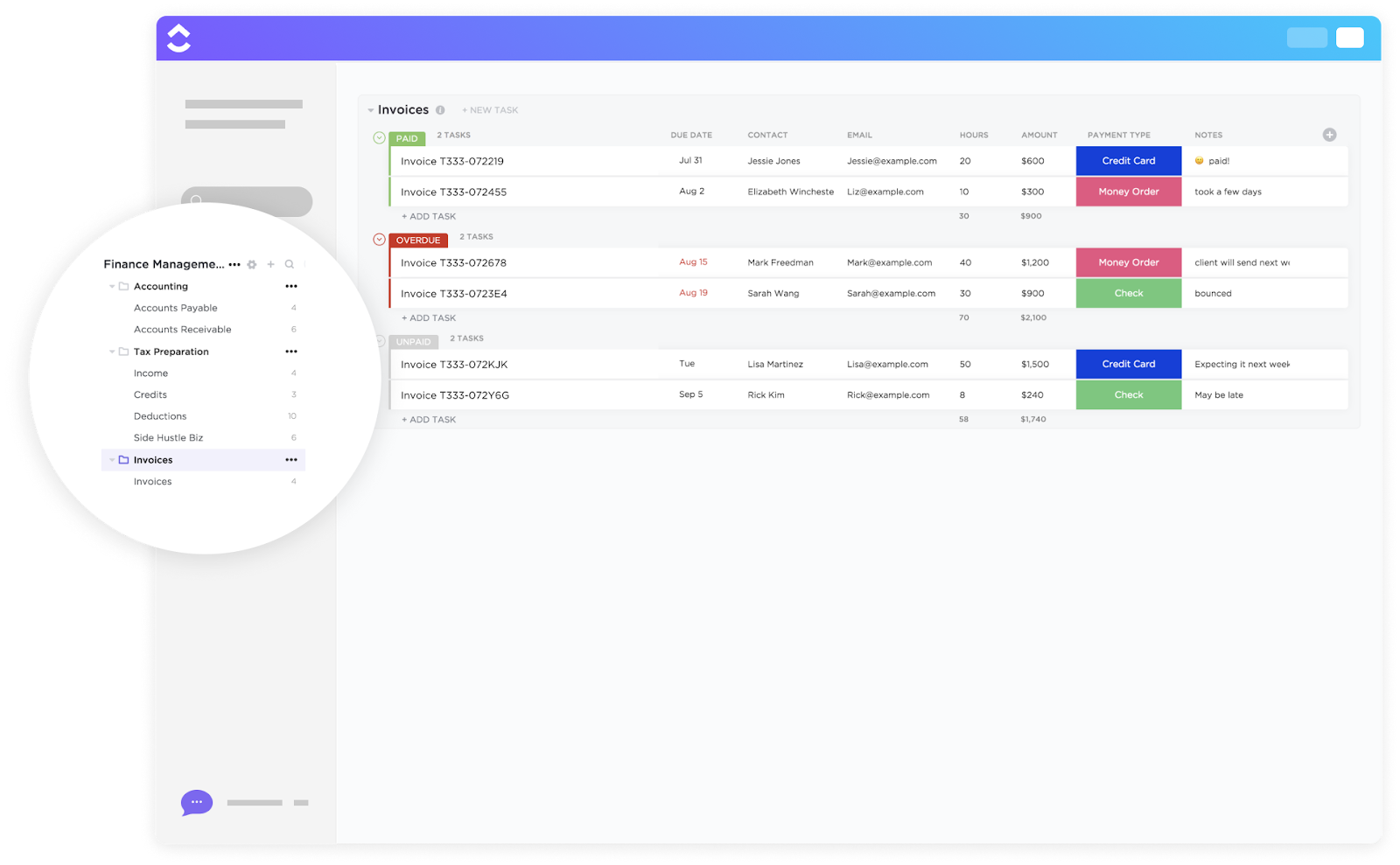
The ClickUp Invoices Template transforms invoices from static records into trackable units. Instead of manually checking every bill, you get a connected workflow with clear stages and visibility across all clients. You can break down payments by status, group them by client, and move them forward without building a new system from scratch every month.
💰Ideal for: Teams handling a growing volume of invoices across multiple clients and payment cycles.
🦸🏻♀️ Invoicing operations slowing your team down? Put the Invoice Processing Automator Agent on the job!

There are over 650 pre-built Super Agents in ClickUp that can help you scale work efficiently. You can also build your own. See how.
Outgoing payments are often handled in batches—reviewed at the end of the week or just before deadlines. That makes it easy to miss early payment discounts, double-pay invoices, or lose track of cash flow.
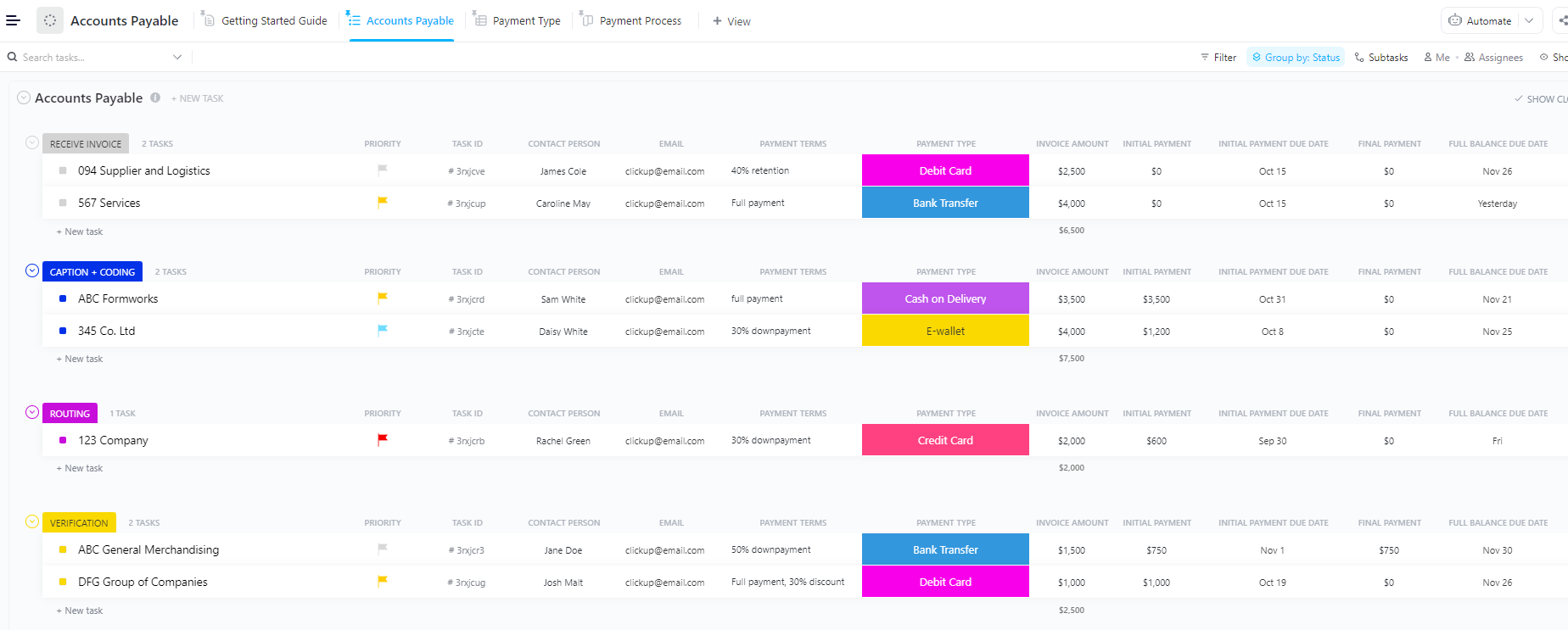
However, you can use the ClickUp Accounts Payable Template to organize payables in a step-by-step process. Each bill moves through verification, approval, and payment stages with clear checkpoints.
You can track where a payment is stuck, who needs to act, and what’s coming up next, without relying on manual follow-ups or scattered records.
💰Ideal for: Finance and ops teams that need a structured approval and payment workflow to manage vendor bills without delays or errors.
💡Pro Tip: Over time, payables data starts revealing patterns you can act on—vendors who consistently invoice late or months where payouts spike. The problem is that insight stays buried unless someone pulls and analyzes it regularly.
ClickUp Dashboards bring that data into a format you can review without digging. You can track how much you’ve paid each vendor over time and keep a running view of outstanding vs. cleared payments.
This gives you a clean record to refer to during negotiations or budget planning, without having to rebuild the analysis each time.
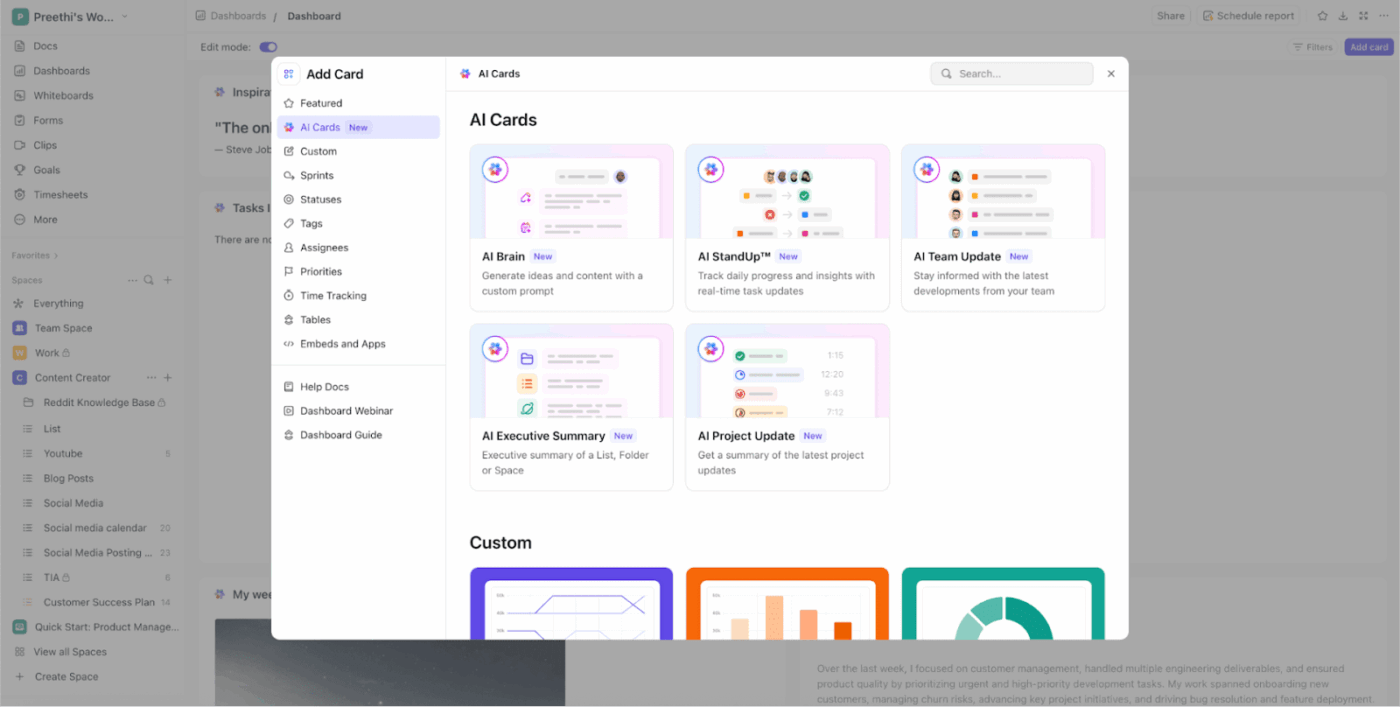
AI Cards help you get to answers faster. You can generate a summary of vendor performance before a review meeting, or ask direct questions such as ‘Which vendors have increased billing in the last quarter?’
The output is tied to your actual payment data, so you’re working with facts, not estimates.
This becomes useful during budget planning, vendor negotiations, and payment scheduling. You’re walking into those decisions with a clear view of what’s been happening rather than trying to reconstruct it under pressure.
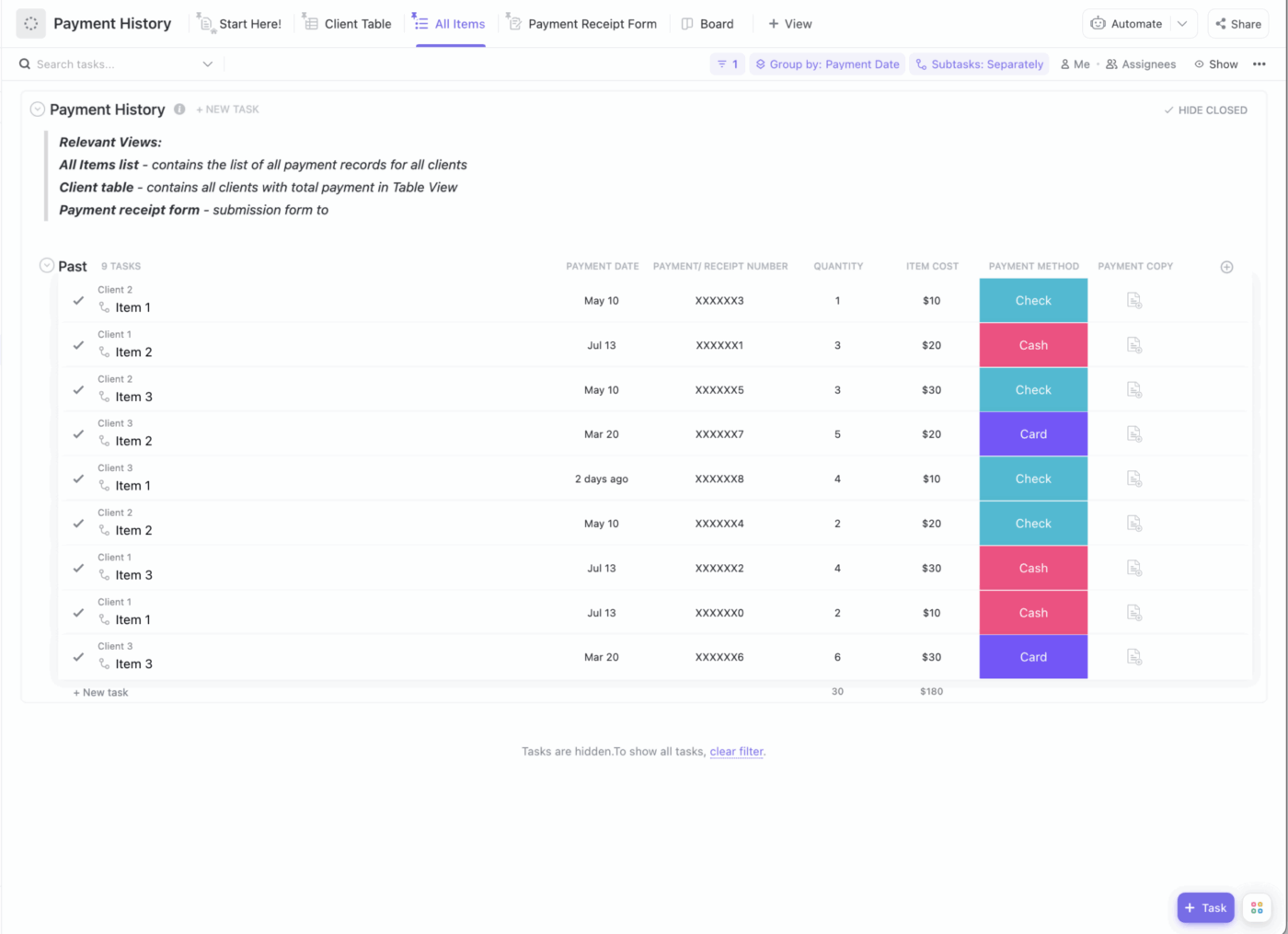
Without clear payment records, you may find yourself piecing together timelines from invoices, bank entries, and old messages. The ClickUp Payment History Template helps you maintain that clean record.
It keeps every payment tied to its invoice, date, and context in one place. You can quickly review how a client has paid over time, check for partial payments, and reference exact transactions when needed.
💰Ideal for: Freelancers and teams that need a reliable payment record to handle client conversations, disputes, and payment planning with confidence.
Arnold Rogers, a Customer Support Manager at Launch Control, handles finances with ClickUp:
“We have integrated with Intercom, Stripe, ChurnZero, Slack, Gmail, ProfitWell, etc. This enables us to track finances, retention, reporting, and customer details in one space, as we can pull information from all the tools we use and compile them in ClickUp for ease of use without getting all departments involved and taking time from their schedules.”
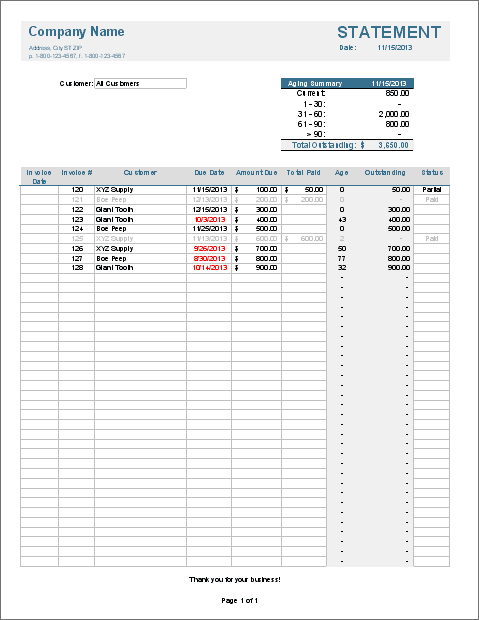
Not every team needs a full system to manage invoices. Sometimes, the priority is simple: get all invoices into one place, see what’s overdue, and avoid overcomplicating the process.
In that case, the Vertex42 Invoice Tracking Template for Excel can be an ideal solution. It gives you a structured way to log invoices, track due dates, and see aging at a glance without setting up workflows or learning new software. With built-in formulas and filtering, you can sort by client, highlight overdue payments, and generate quick summaries when needed.
⚠️However, it’s important to note the limitations. There are no features for real-time collaboration, all data must be entered manually, and you can’t use workflow automation for follow-ups. It’s a reliable option if you prefer a familiar spreadsheet workflow and don’t need connected, automated features.
💰Ideal for: Freelancers or small teams who prefer a simple, spreadsheet-based system without added complexity.
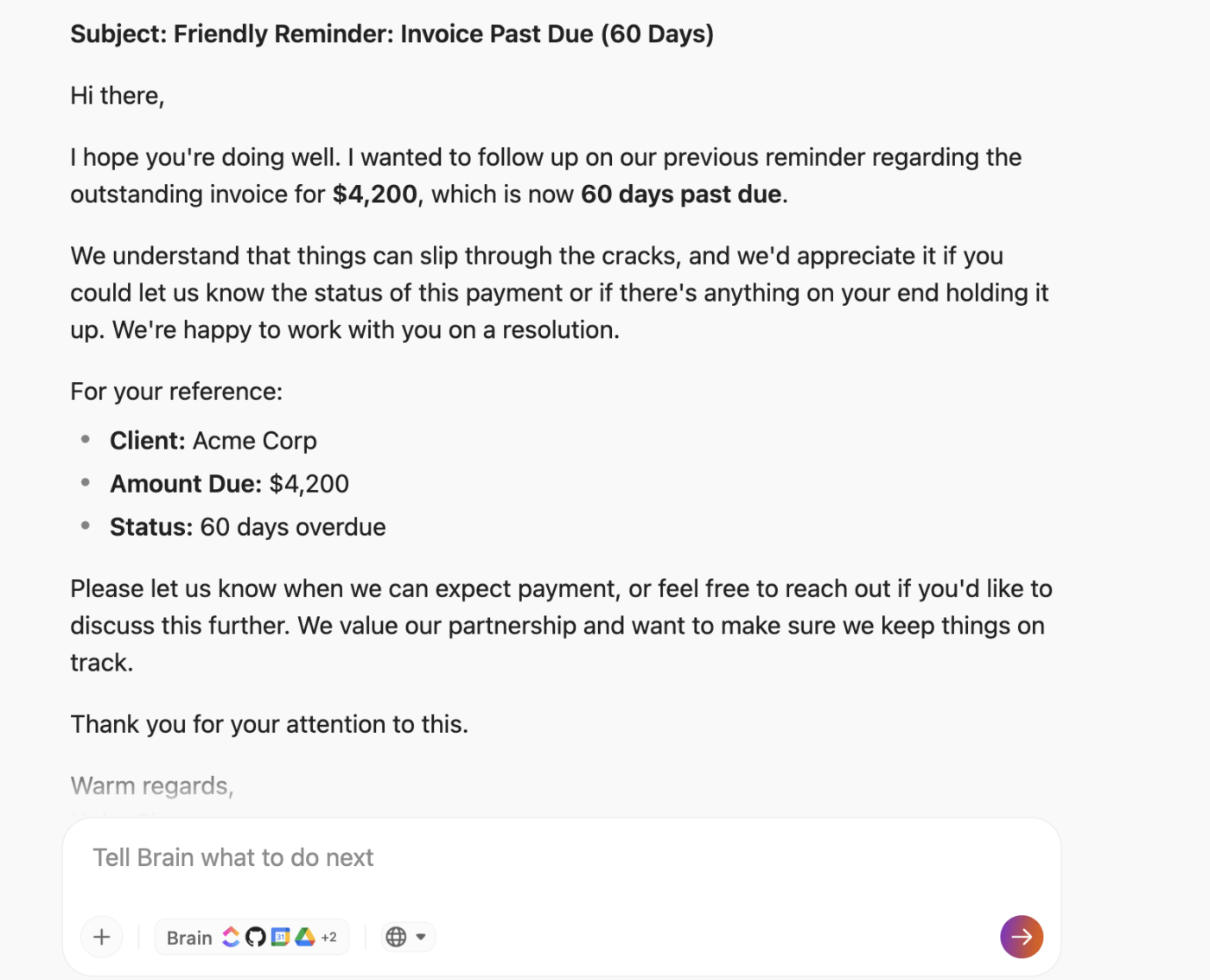
💡Use ClickUp Brain MAX to speed up your collections workflow. Ask it to draft a follow-up email for a specific invoice amount and aging bucket (30, 60, 90+ days). You can even use Talk to Text to dictate the context (“draft a second payment reminder for Acme Corp, $4,200, 60 days overdue”) and have a send-ready email in seconds.
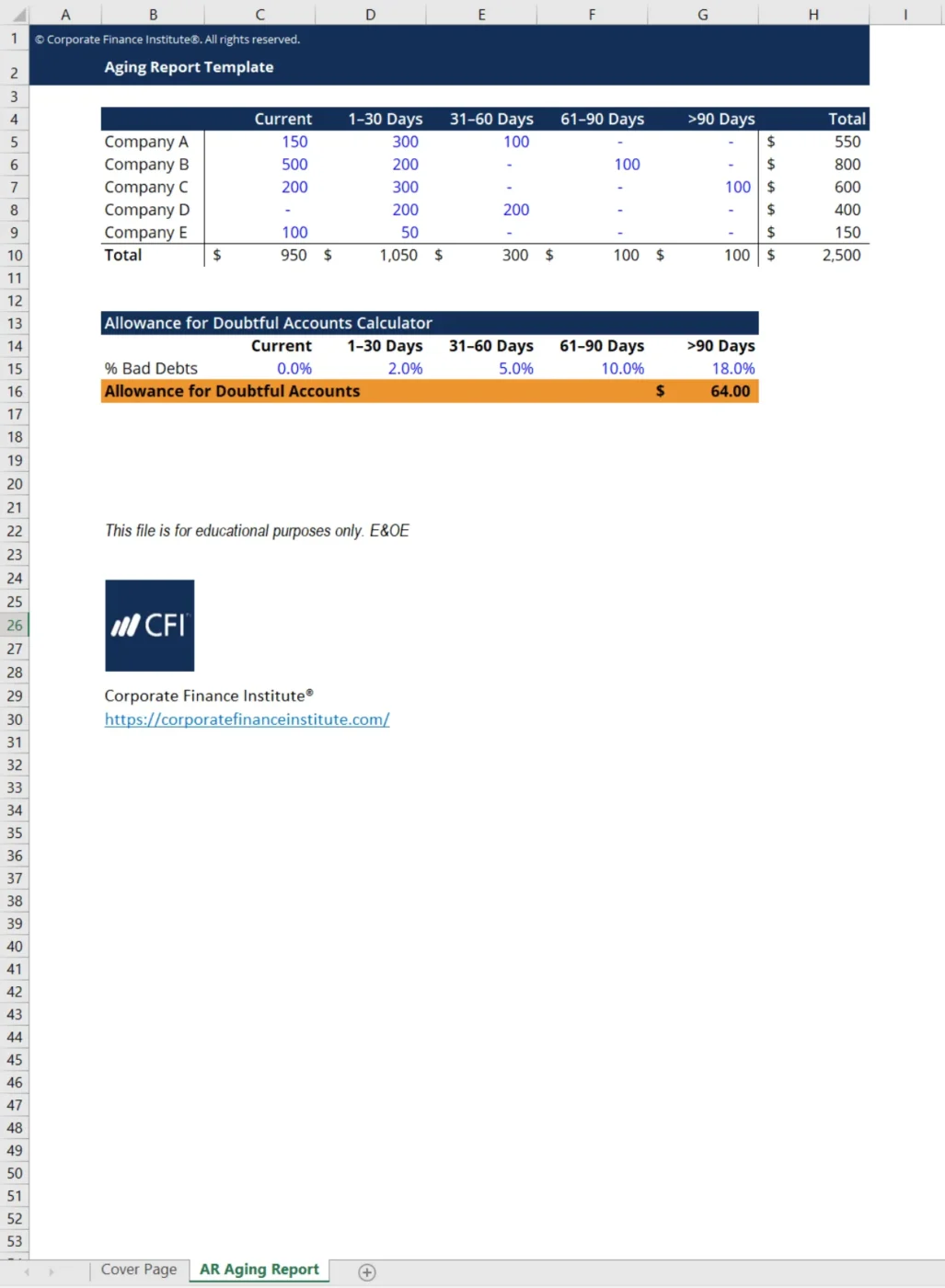
If you’re a finance professional who needs to present your accounts receivable data to stakeholders, the CFI’s Aging Report Template is for you.
It organizes receivables into standard aging buckets and aligns with common accounting formats, so you can present data in a way that’s easy to review and act on. It also supports calculations like doubtful accounts, helping you move from basic tracking to financial evaluation.
⚠️The tradeoffs here are similar to those of other spreadsheet-based solutions. It’s a static template that requires manual updates, lacks any workflow management, and doesn’t support real-time team collaboration. It’s a great choice when the presentation and adherence to accounting standards are your top priorities.
💰Ideal for: Finance teams and analysts who need structured aging reports for decision-making, audits, or stakeholder presentations.
Downloading a template is the easy part. The value comes from how consistently you use it to track, review, and act on overdue invoices. A few small setup decisions can turn it into a system your team relies on every week.
📌 ClickUp Advantage: Automate the follow-up workflow
Most teams stop at reminders. Someone still has to check the invoice, decide what to do next, and update the tracker. ClickUp Automations excel in this case.
You can set rules like: when an invoice moves into the 31–60 day bucket, assign it to the account owner, raise priority, and post a follow-up comment.
If it exceeds 60 days, escalate it or trigger an automatic email update. These reminders move the work forward without manual steps.
With prebuilt automation templates or the AI Automation Builder, you can set this up in minutes. Once it’s running, invoices don’t sit idle between reviews. They progress through follow-ups, ownership, and escalation based on actual conditions, without anyone having to track every step.
📚 Also Read: Master Invoice Follow-ups with ClickUp
The real problem with invoice tracking isn’t just the tracking itself—it’s the fragmentation of work across multiple disconnected tools. This fragmentation means you’re always working without full context.
This constant context switching slows down your collections process, leads to duplicate work, and makes it impossible to maintain a single source of truth. Your team ends up spending more time hunting for information than actually getting payments in the door.
ClickUp eliminates this sprawl with its converged AI workspace. It’s a single platform where projects, documents, conversations, and analytics live together with contextual AI that understands your work.
Instead of just a static list of overdue payments, you get a connected, automated workflow. See overdue invoices, view related tasks, review client communication history, and access the original contracts—all without leaving ClickUp. This is how you shift from reactive payment chasing to proactive cash flow management.
Start managing your cash flow with full context by getting started for free with ClickUp today.
Accounts receivable aging tracks the money customers owe your business, helping you manage cash inflows. Accounts payable aging tracks the money your business owes to vendors, which helps you manage cash outflow and avoid late fees.
Most finance teams review their aging report weekly to stay on top of overdue invoices before they become significant problems. However, businesses with high transaction volumes may find daily reviews more effective.
Yes, you can get invoice aging tracker templates with powerful features that spreadsheets lack from work management platforms like ClickUp. These include built-in automations for reminders, real-time collaboration for your team, and AI-powered insights to speed up your workflow.

© 2026 ClickUp

There’s an easier way. Try a free AI Agent in ClickUp that actually does the work for you—set up in minutes, save hours every week.