

Sorry, there were no results found for “”
Sorry, there were no results found for “”
Sorry, there were no results found for “”
If the time it takes you to clean up AI content is greater than the time to write that content yourself, then something is very wrong.
In a June 2026 Optimizely survey of more than 2,000 marketing leaders, 76% said they spend at least three hours each week editing, fact-checking, or correcting AI-generated output. Only 4% said AI saves them time at every stage of the process.
If Claude already knows how you want something written, you shouldn’t have to keep teaching it the same rules from scratch. That’s where Claude Skills for writing come in handy: they let you package the specific instructions behind repeatable writing jobs. Claude then pulls those instructions in whenever it recognizes the right kind of request.
TL;DR: The hardest part of building a Claude Skill for writing is getting Claude to open SKILL.md at all. Your style guide inside can be perfect and still never load. At startup, Claude sees only each Skill’s name and description. It reads the full instructions only after deciding the Skill applies to your request. That makes the description part instruction and part routing rule. This guide shows you how to write one that reliably fires, what belongs inside the Skill once it does, five writing Skills to build first, and when a Skill is the wrong tool.
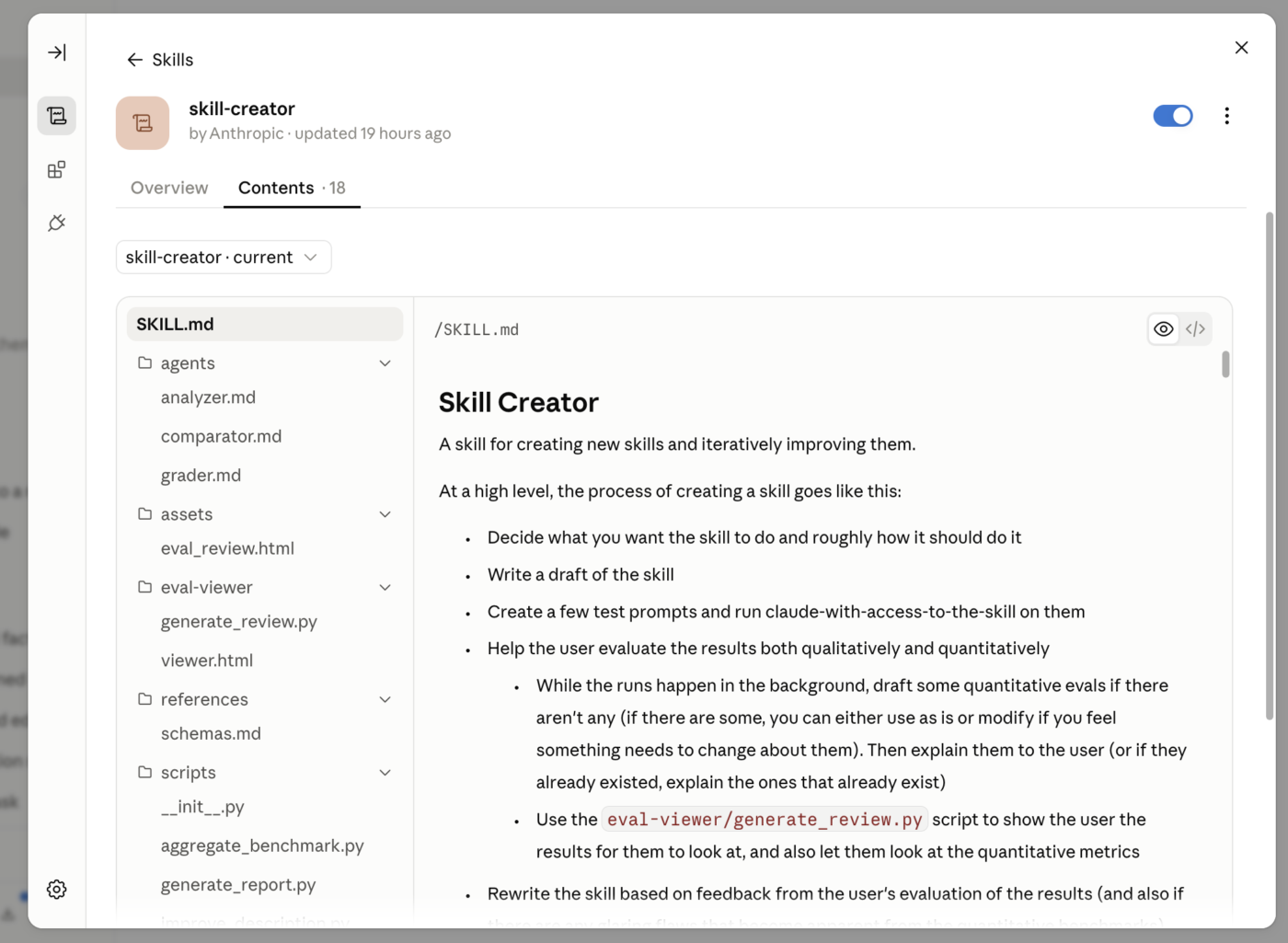
A Claude Skill is a folder that teaches Claude how to handle a repeatable task. It can contain instructions, reference files, templates, and optional scripts, but every Skill starts with one required file: SKILL.md.
That file opens with a small block of YAML frontmatter containing a name and description. The rest is plain Markdown telling Claude what to do once the Skill is active.
For writers, the key difference between a saved prompt and a new one lies in how those instructions enter the conversation. You paste a prompt yourself. Claude can discover and load a Skill when your request matches what the Skill says it’s for.
Anthropic calls this progressive disclosure. Claude loads the Skill in stages:
| Level | What loads | When | Token cost |
|---|---|---|---|
| Metadata | Name and description | Always available at startup | Small; metadata only |
| Instructions | The body of SKILL.md | When Claude triggers the Skill | Recommended under 5,000 tokens |
| Resources | Extra guides, examples, templates, or scripts | As Claude needs them | Reference files cost tokens when read; scripts can run without their source entering context |
A brand Skill might point to a long style guide, a library of approved examples, and a separate banned words file. Claude loads the core writing procedure first and opens the supporting files only when the task calls for them.
And this explains something that trips up many first-time Skill builders: Claude has to decide that your Skill is relevant based on its metadata before it reads the instructions in SKILL.md. We’ll come back to that when we build the trigger.
Skills work in Claude when code execution is on, in Claude Code, and in the Claude API’s code execution environment. Anthropic has also published the format as an open standard, so other AI tools can adopt it too.
Simon Willison, creator of Datasette and co-creator of Django, says:
Skills are Markdown with a tiny bit of YAML metadata and some optional scripts in whatever you can make executable in the environment. They feel a lot closer to the spirit of LLMs—throw in some text and let the model figure it out.
Also Read: Claude Skills for Design
A writing Skill can contain the best style guide you’ve ever written and still do nothing.
The usual problem sits one level higher: its description explains what’s inside the Skill, but gives Claude little reason to use it for the request in front of it. Call this the trigger gap.
Go back to the loading model above. Before a Skill fires, Claude has access to its name and description, not the detailed instructions you spent an hour polishing inside SKILL.md. Anthropic’s authoring guidance says that the description should explain both what the Skill does and when Claude should use it. The field can be up to 1,024 characters.
A first attempt often looks like this:
description: Our brand voice and editorial standards.
It’s accurate, but vague. Claude knows what the folder contains. It still has very little information about which requests should activate it.
Now compare it with this:
description: Writes and edits marketing copy in Acme’s house voice, including blog posts, landing pages, emails, and social captions. Use when drafting, rewriting, polishing, or editing customer-facing copy, or when the user mentions Acme’s brand voice, tone, or style guide.
The second version gives Claude much more to route on. It names the work: blog posts, landing pages, emails, and social copy. And it names the situations where the Skill belongs: drafting, rewriting, polishing, editing, and requests about brand voice.
Treat the description as a routing instruction—the thing that gets Claude through the door.
Writing Skills have another failure mode after they fire.
Suppose your SKILL.md says:
Claude can follow those rules while drafting and still return prose that drifts from them. Some constraints are easy to check with code. A script can flag banned words, sentence length, or readability. But “sounds natural” and “matches our voice” are judgment calls. A strong writing Skill therefore needs a review pass built into the workflow. Tell Claude to draft, check the result against a short editorial checklist, revise anything that fails, and only then return the copy.
Your Skill name is part of the metadata Claude sees before the full instructions load, so keep it concrete.
Use consistent, descriptive names and often use gerunds: actions ending in -ing. For writing Skills, this usually produces names that are easy to understand at a glance:
The name field accepts lowercase letters, numbers, and hyphens. Avoid names such as “writing-helper,” “content-tools,” or “brand-stuff.” They tell you very little about the job the Skill owns.
You don’t have to use a gerund every time. Names such as blog-editing or brand-voice-review can work too. What matters more is consistency and specificity across your Skill library.
The easiest way to choose between Claude’s customization options is to ask what you’re trying to preserve: a procedure, a body of context, a universal preference, or access to another system.
| Feature | What it holds | When it applies | Best writing use |
|---|---|---|---|
| Skill | A repeatable procedure, plus optional reference files and scripts | When Claude decides the Skill is relevant | The editing pass you want run across many drafts |
| Slash commands | A manually invoked Claude Code command; custom commands now use the same Skill mechanism | When you type /name | Running a writing workflow deliberately instead of waiting for auto-triggering |
| Project | Knowledge and instructions tied to one workspace | In chats inside that Project | One client, campaign, publication, or book |
| Custom/profile instructions | Preferences that should shape Claude broadly | Across your conversations | “Skip long preambles” or “use British English” |
| MCP | Access to external tools and live data | When Claude uses the connected tool | Pulling campaign data, reading a CMS, or filing a finished draft |
A Project is useful when the context belongs to one body of work. Put the campaign brief, source interviews, approved claims, and client background there.
Use a Skill when the same procedure should travel across projects. If you edit articles for five clients, each client can have its own Project, while one editing Skill handles the recurring pass (tighten the introduction, remove banned phrasing, check structure, and review the final draft against your style rules).
MCP handles access. It might let Claude pull a draft from your CMS or fetch live campaign data. The Skill then tells Claude what to do with that material. In other words, MCP provides tools and external connections, while Skills provide the procedural knowledge for using them.
If you already work in Claude Projects, you don’t need to replace them. Keep project-specific knowledge there and move any process you want to reuse elsewhere into a Skill.
Also Read: Claude vs. ChatGPT for Writing
A writing Skill should contain the decisions Claude needs to get the writing right, plus the steps it should follow to check itself. Leave out anything Claude already knows.
Anthropic recommends keeping the SKILL.md body under 500 lines and moving extra detail into separate files as the Skill grows.
For a writing Skill, keep these in SKILL.md:
Take the time to keep this main file as clear, detailed, and explicit as you can. Keep bulky reference material outside the main file. Your full brand book, archive of approved articles, research library, and long list of examples can live beside SKILL.md and load only when needed.
For example:
editing-blog-posts/
├── SKILL.md
├── style-guide.md
├── banned-phrases.md
└── examples/
    └── approved-intros.md
Then SKILL.md can say exactly when to open each file:
A quick test: remove a line and ask whether Claude could still make the right call without it. If yes, move it to a reference file. If no, keep it in SKILL.md.
To build a Claude Skill for writing, pick a repeatable editing job, run it manually once to capture the corrections Claude keeps missing, write a description that controls when the Skill fires (before you write the instructions), structure SKILL.md as a step-by-step workflow with firm rules, add a self-review checklist so Claude catches its own mistakes, then install and stress-test routing with direct, natural, and negative prompts. In detail:
Start with a task whose corrections you can almost predict.
“Help me write better” is too broad. “Run the final editorial pass on a blog draft” has a repeatable shape. So does turning an interview transcript into a customer story, rewriting product copy in your house voice, or checking an article against your editorial standards.
A useful first Skill has three things you can name:
For example:
- Input: A completed blog draft
- Transformation: Edit for house style, structure, clarity, and banned phrasing
- Output: A publication-ready draft that preserves the writer’s argument
If you can’t fill in those three lines cleanly, narrow the Skill before you build it.
Before writing SKILL.md, run the task with Claude the way you do today. Then look at what happened after the first answer.
Maybe you told Claude:
Those follow-up notes are often more useful than your formal style guide. They expose the decisions Claude can’t work out on its own. Turn the ones that keep coming back into rules, and toss the rest.
For example:
## Editing rules

- Preserve the writer's argument unless it is factually unsupported.
- Make the smallest edit that solves the problem.
- Don't add rhetorical questions.
- Keep evidence close to the claim it supports.
- After removing or moving text, check the surrounding transition and repair it if needed.
This gives you a Skill grounded in failures you watched happen.
Joe Karlsson, a developer marketing engineer, built exactly this kind of writing Skill for his team’s blog pipeline. He started by encoding his own editing process: brand voice checks, a banned-words list, structural requirements, and Vale linting that had to pass with zero errors before any draft could ship. Two approval gates (outline, then draft) kept quality high. But the real payoff came when he shared it with his marketing team. In his words:
What used to require me reviewing every piece of content now happens automatically. The skill enforces consistency I couldn’t maintain manually across a team.
The Skill ensured every piece of content went through Joe’s judgment. It replaced him as the bottleneck for it.
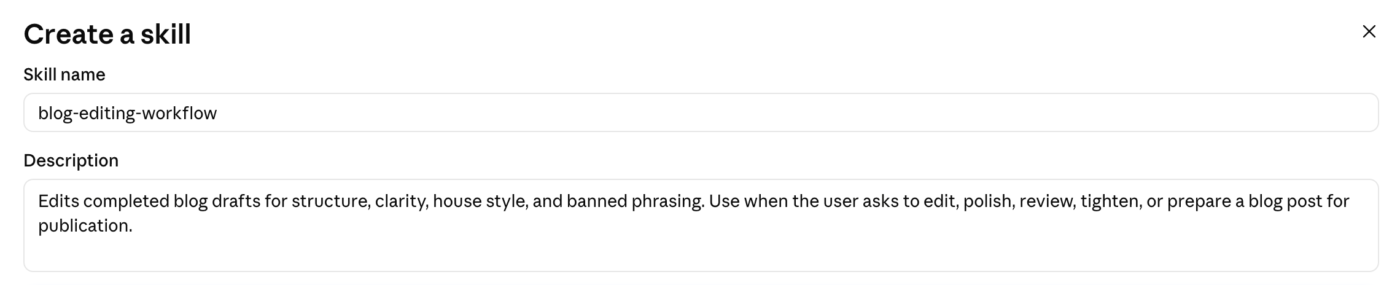
Now write the part that determines whether Claude finds the Skill. Start with the name and description:
—name: blog-editing-workflow
description: Edits completed blog drafts for structure, clarity, house style, and banned phrasing. Use when the user asks to edit, polish, review, tighten, or prepare a blog post for publication.
—
This is how it would look:
Anthropic limits Skill names to 64 characters and allows lowercase letters, numbers, and hyphens. The words “claude” and “anthropic” are restricted and can’t appear in the name. Descriptions can run up to 1,024 characters in Claude Code and the API, but Claude.ai caps them at 200, so write the tightest version first and expand for other surfaces. The description should explain both what the Skill does and when Claude should use it.
Notice what the example doesn’t say:
description: Contains our editorial style guide and writing standards.
That describes the folder. Claude still has to guess which requests belong to it.
Once you have a description, test it before writing another line. Remove the Skill name and ask: If someone saw only this description, could they tell which requests belong to this Skill?
Then try a few requests against it:
The first two should plausibly trigger your editing Skill, but the third shouldn’t. That negative test is vital. A Skill that fires on everything is also badly routed.
Once Claude has chosen the Skill, the body tells it how to do the job. Write it as a procedure: the steps Claude runs in order.
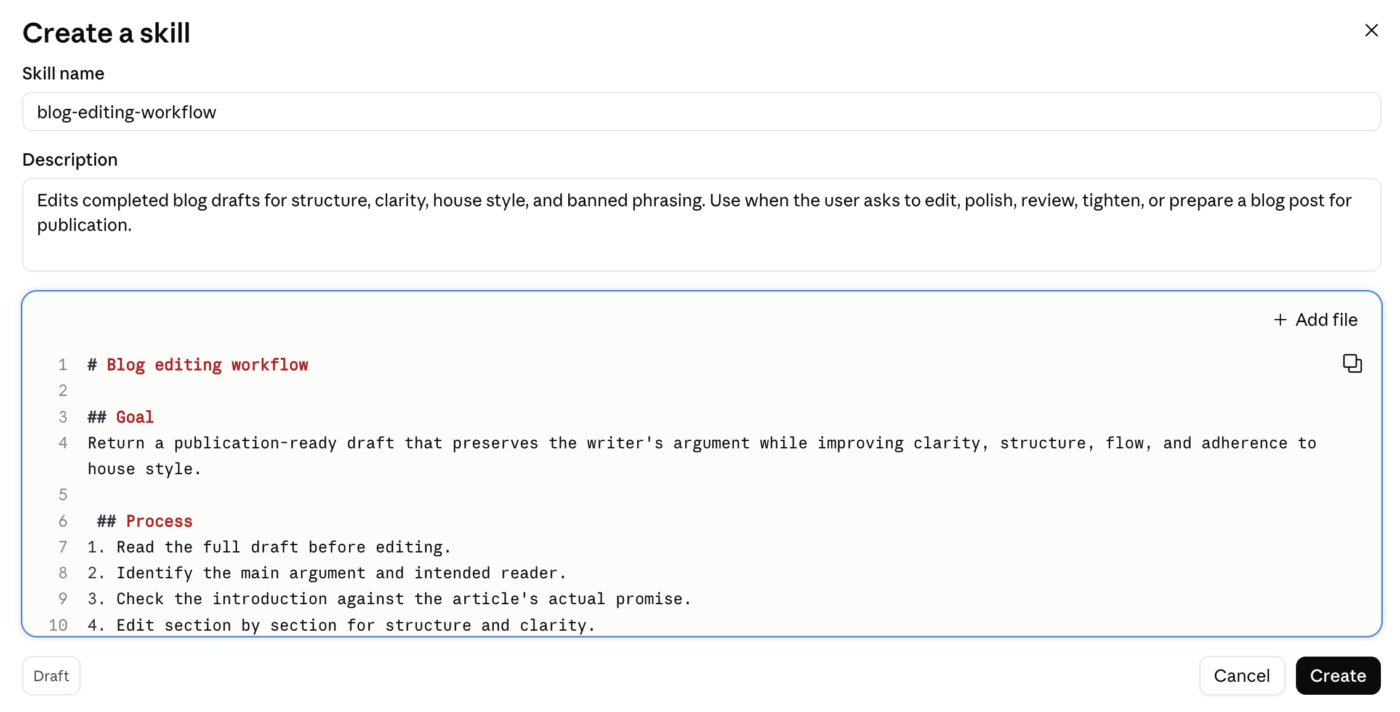
Here’s an example of a simple writing Skill:
# Blog editing workflow

## Goal

Return a publication-ready draft that preserves the writer's argument while improving clarity, structure, flow, and adherence to house style.

## Process

1. Read the full draft before editing.
2. Identify the main argument and intended reader.
3. Check the introduction against the article's actual promise.
4. Edit section by section for structure and clarity.
5. Apply the house-style rules below.
6. Run the final review checklist.
7. Return only the revised draft unless the user asks for commentary.

## House-style rules

- Use contractions where natural.
- Prefer concrete verbs.
- Do not use rhetorical questions.
- Avoid the phrases listed in `banned-phrases.md`.
- Preserve useful examples, evidence, and technical detail.
- Vary sentence length naturally.

## Supporting material

Read `banned-phrases.md` when editing prose.
Read `approved-examples.md` when voice or tone is unclear.
Be firm when the rule genuinely calls for it. If rhetorical questions are banned, say, “Do not use them.”
But leave judgment where judgment belongs. A rule like “every paragraph must have exactly three sentences” buys you consistency. It also buys you prose that sounds manufactured.
This is the failure mode you’ll encounter when using Skills for writing. Over-specify the creative parts of the workflow, specifically the voice, rhythm, and phrasing rules, and Claude starts producing a caricature of your style. It over-indexes on your most distinctive moves and flattens everything between them.
More so, a recent study measuring what the authors call the “Idiolect Erasure Rate” found that heavy AI rewriting reduced authorship attribution on personal blogs by 66.5 percentage points. After the rewrite, a model trained to identify writers could barely tell whose voice it was reading. The part that matters for Skill builders: even prompts that explicitly told the assistant to “preserve the author’s voice” failed to recover most of the signal. A Skill that tries to encode every dimension of your voice is doing the same thing those prompts did, just with more instructions.
The takeaway is to codify the rules Claude can check (banned words, structure, reading level) and leave the voice rules looser. A Skill that says “use contractions, second person, and no rhetorical questions” imposes three verifiable constraints on Claude. A Skill that adds fifty lines about rhythm, pacing, energy, and attitude gives Claude enough rope to produce something technically compliant and completely lifeless. Give Claude enough context to act on. Skip anything it already knows.
A Skill can load correctly and still produce a weak draft. To fix this, make review part of the procedure. Add a short checklist near the end of SKILL.md:
## Final review

Before returning the draft:

- Check that the opening makes a clear promise.
- Remove banned words and constructions.
- Check that evidence appears close to the claim it supports.
- Look for abrupt transitions created during editing.
- Remove unnecessary repetition.
- Check that sentence rhythm does not become repetitive.
- Confirm that useful examples and specifics survived the edit.

Fix every issue you find, then review the affected passages again before returning the draft.
Also, make sure the checklist is diagnostic. “Is the writing good?” gives Claude very little to inspect. “Did I remove a statistic from the claim it supports?” points to something observable. And separate rules that can be checked mechanically from rules that require editorial judgment. A script can catch a banned phrase. It can’t reliably tell you whether an introduction is interesting or whether a paragraph has lost the writer’s voice.
That’s also why editing AI content still needs a final human review even when the Skill does a strong first pass.
Don’t test a Skill by asking Claude to use it by name once. That only proves that Claude follows an explicit instruction. The real test is routing.
In Claude, package the Skill folder as a ZIP, then go to Customize → Skills and upload it. Code execution and file creation must be enabled. In Claude Code, personal Skills can live under ~/.claude/skills/, while project Skills can live under .claude/skills/.
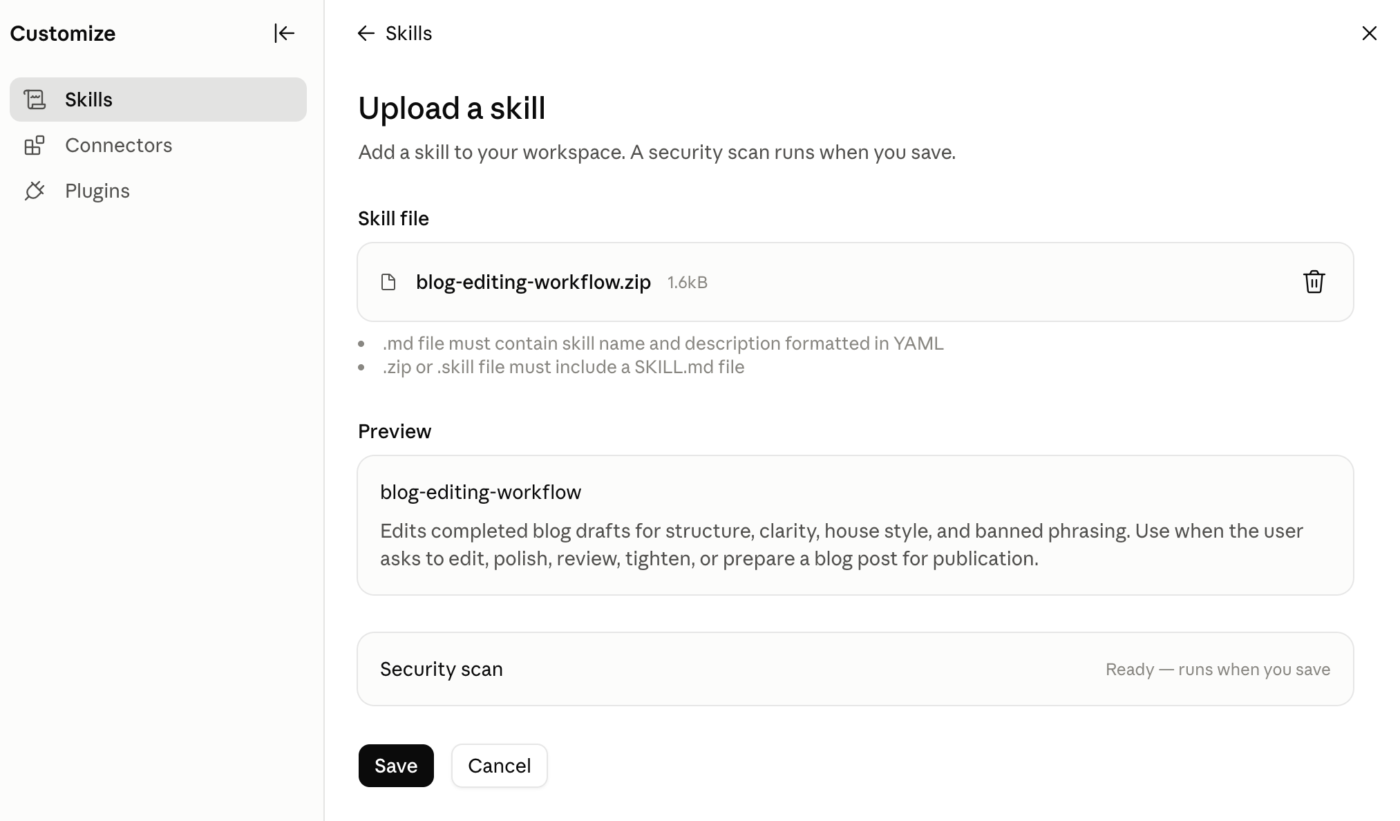
Then run three kinds of tests:
| Test | Example | What you’re checking |
|---|---|---|
| Direct trigger | “Edit this blog draft for publication.” | Does the Skill load when the request clearly matches? |
| Natural trigger | “This section is bloated. Tighten it but keep the examples.” | Can Claude recognize the job without the Skill being named? |
| Negative trigger | “Find recent research on AI writing tools.” | Does the Skill stay out of unrelated work? |
Test several prompts and inspect Claude’s visible activity to confirm that it loaded the Skill and any supporting files.
If it fails, diagnose the layer that failed:
That last test is the one worth repeating after real use. Your first version of a Skill is a hypothesis about how you work. The corrections you still make after five or ten runs tell you what belongs in version two.
If you need a refresher on the Claude AI prompts underneath all of this, this walkthrough covers the fundamentals:
Also Read: AI Content Creation Tools
Five Skills that cover the most common writing-team bottlenecks: a house voice editor, an interview-to-case-study writer, a content brief builder, a content repurposing editor, and a documentation consistency checker.
If you only build one, build the first. The house voice editor’s rules end up feeding every other Skill on this list.
Build this when: Claude gets the substance right but keeps drifting into phrases, rhythms, or structures your team would never publish.
A strong house voice Skill should do more than store a style guide. Give Claude an editing sequence: preserve the argument, check structure, apply your voice rules, remove banned patterns, then review the finished draft before returning it.
Bundle files such as:
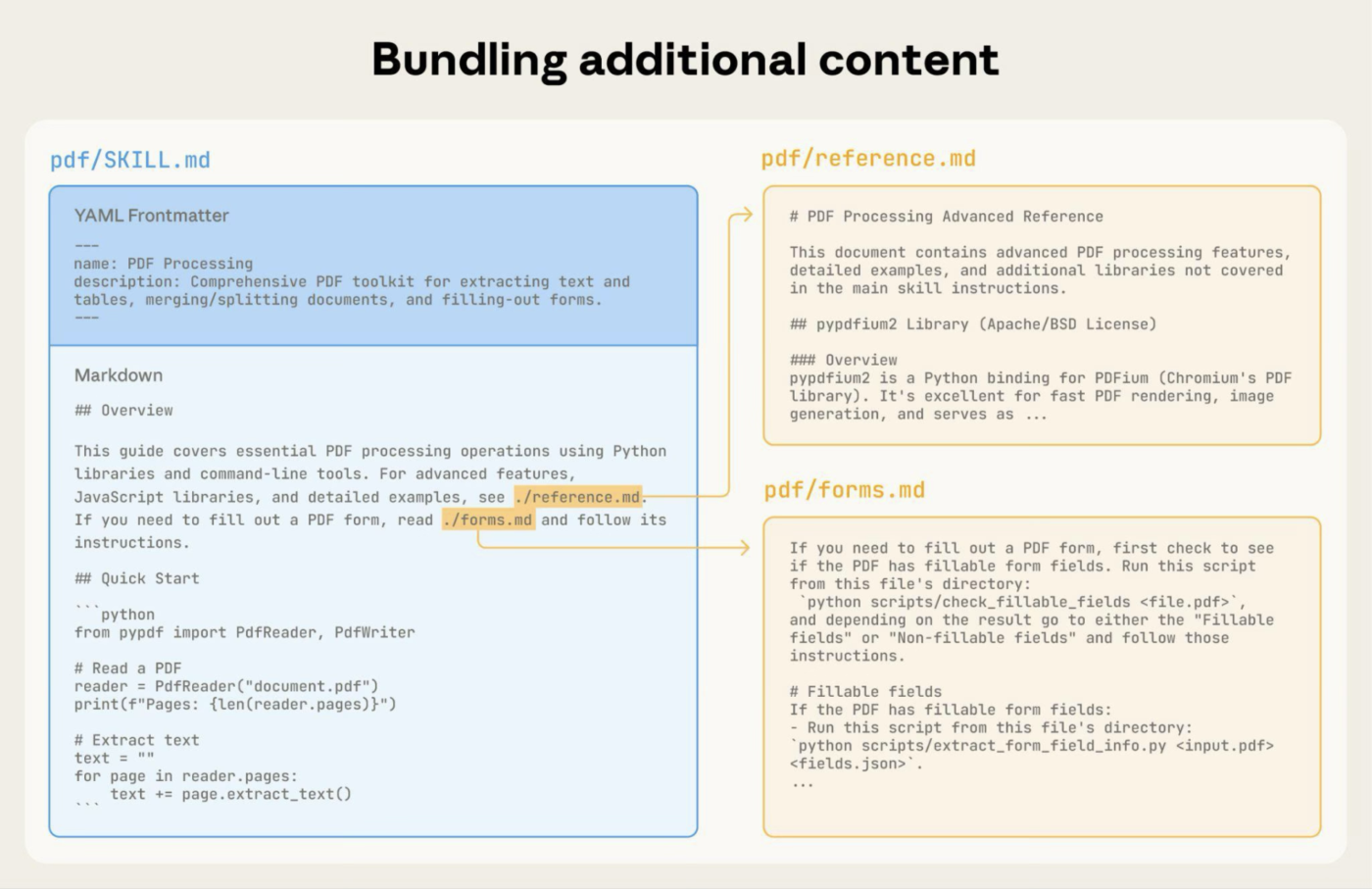
Then pressure-test it on copy you already trust. Take a few published passages, deliberately add the habits you want the Skill to catch, and run them through the editor.
Pay attention to what it leaves alone, too. If Claude keeps rewriting good sentences simply because the Skill fired, your instructions are too aggressive.
You’ll know it’s working when: It fixes recognizable voice problems without sanding down the parts that were already strong.
Build this when: Your customer stories follow a consistent structure, but every interview arrives as a different mix of anecdotes, half-answers, metrics, and tangents.
Have the Skill organize the evidence before it starts writing. It can extract the customer’s problem, previous approach, implementation, results, and usable quotes, then draft from that material.
Two or three approved case studies can show Claude how much space each part deserves and how your final stories tend to flow. But make sure to plan for made-up connective tissue. Transcripts often leave gaps between events, and Claude may fill them with things nobody said.
Give it an explicit rule to flag those gaps or leave them unresolved.
A compact setup might look like this:
writing-case-studies/
├── SKILL.md
├── case-study-structure.md
├── approved-examples.md
└── claims-checklist.md
Watch for: Sentences that sound completely reasonable but can’t be traced back to the transcript or another approved source.
Build this when: Briefs vary depending on who creates them, and writers keep having to ask the same questions before they can start.
The weak version of this Skill produces an SEO outline with a keyword at the top. A stronger one prepares the decisions a writer actually needs.
You might require it to identify:
Then give it a fixed brief template as the output structure.
This is also a good place to encode editorial judgment that tends to disappear between briefing and drafting. For example, you can tell Claude to skip a section even when every competing article has one, unless it can explain why that section earns its place in your version.
The payoff: Writers start with fewer open questions, and editors spend less time repairing problems that began in the brief.
Build this when: One source asset regularly needs to become several formats, and Claude keeps giving you the same summary at four different lengths.
Give each destination its own rules.
For example:
repurposing-content/
├── SKILL.md
└── formats/
 ├── linkedin.md
 ├── newsletter.md
 ├── internal-slack.md
 └── social-short.md
The main Skill can identify the requested destination and open only the relevant reference file. That fits the progressive disclosure model well because Claude doesn’t need your newsletter rules while writing an internal Slack update.
And make the transformation deeper than just shortening. A newsletter opening may need context. A LinkedIn post may lead with one sharp observation. An internal update may care mostly about the decision, the owner, and the next step.
Build this when: Your documentation has dozens of small rules that are easy to forget and expensive to clean up later.
Docs are a great fit because most of the rules can be written down as hard checks:
And this Skill can go beyond Markdown instructions. Skills can include executable scripts, which is perfect for checks that need one right answer.
A script could flag deprecated product names, invalid heading patterns, or banned terms. Claude can then handle the parts that need editorial judgment, such as whether a procedure is clear or whether two steps should be swapped in order.
Best sign that it’s earning its keep: Reviewers stop leaving the same mechanical comments and can spend their time on accuracy, clarity, and usability.
Before you build a sixth Skill, run the idea through three questions:
If all three answers are yes, a Skill is probably worth building. If every version of the task needs a completely different approach, a well-written prompt may still be the better fit.
Marketing and PM teams have their own versions of this pattern. We cover those separately in Claude Skills for marketing and Claude Skills for project management.
You don’t have to build every Skill yourself. Anthropic maintains an official anthropics/skills repository on GitHub with examples across document creation, communication, and development. Some are open source; the production document “Skills” is source-available for reference.
Claude also has a built-in Skills Directory with partner-built options from Notion, Figma, Canva, and others. Open Customize → Skills, click +, then Browse skills.
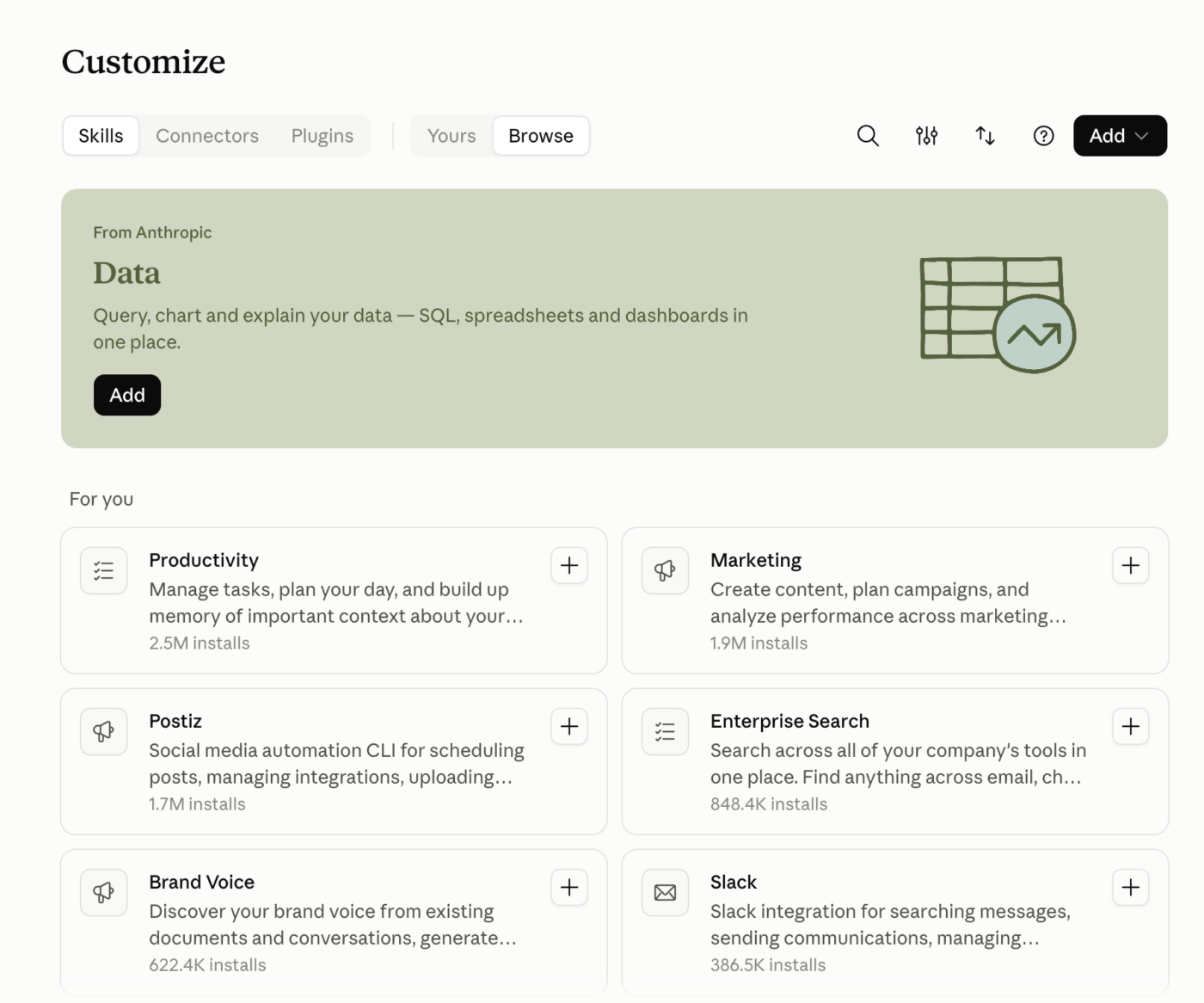
For writers, those two places are the safest starting points. Community collections lean heavily toward developer workflows, and Skills can contain executable scripts alongside Markdown.
Treat any third-party Skill like a small software package. Before installing, check:
SKILL.md tells Claude to doRemember, a malicious Skill can execute arbitrary code, access files, or transmit data outside your environment. Enterprise organizations can enable Skill and plugin security scanning for uploads in Claude and Cowork, though it doesn’t cover the API or Console and doesn’t replace a manual review.
Quick rule: Markdown-only Skill? Review the instructions. Executable code or network access? Review it like software.
Public Skills already cover most common writing jobs, from blog drafts to full manuscripts. The useful ones tend to be narrow. Each one encodes a single editorial job and does it well.
One caveat before installing anything from GitHub: a Skill can include scripts that run code. Read its SKILL.md and bundled files first. Anthropic gives the same advice for third-party Skills.
| Claude Skill | Best for | Skip it if |
|---|---|---|
content-and-copy | Blog posts, guides, website copy, and general editorial work | You already have a detailed house-style Skill and only need enforcement, not drafting guidance |
copywriting | Landing pages, pricing pages, headlines, CTAs, and conversion copy | Your work is mostly editorial or informational, with little conversion copy |
academic-writing | Research papers and technical academic prose where claims need to stay tied to evidence | You’re writing general marketing or business content |
curating-readme | READMEs, CONTRIBUTING guides, changelogs, and repo docs grounded in the actual codebase | Your docs already follow a mature internal style system that Claude needs to preserve |
line-and-copy-editor | Long-form nonfiction manuscripts that need sentence-level editing plus consistency checks | You’re editing short web copy or want a lightweight final pass |
research-paper-writing | Journal papers where you need tight claims, claim-evidence checks, and reviewer-mindset self-review | You want a general academic-writing assistant, since this one is tuned for ML/CV/NLP papers |
The four failure patterns that account for most abandoned Skills are: building one Skill that tries to do everything, dumping a full style guide into SKILL.md, not realizing a duplicate copy exists, and never comparing the output to what Claude produces without the Skill.
| Mistake | What happens | Fix |
|---|---|---|
| The Skill that does everything | One Skill named “content” covers blogs, email, social, and docs. Claude ignores it or applies blog rules to a subject line | One Skill per job. Descriptions that don’t overlap |
| The style guide dumped into SKILL.md | A 900-line body loads in full every time the Skill fires, crowding out the draft you want Claude to work on | Move reference material into bundled files. Keep the body of the procedure |
| The duplicate | You edit the Skill, the output doesn’t change, and you conclude Skills don’t work. Usually two copies exist (one personal, one project-level) and Claude is reading the other one | Check both locations before debugging the content |
| No baseline comparison | The output seems better, but you never checked what Claude produced without the Skill. You end up documenting requirements that never come up | Run representative tasks first. Document the specific failures. Write only enough instructions to fix those |
A Claude Skill can remember how you edit a launch article. It still needs you to bring it the launch article, the brief, the latest product decision, the client’s style rules, and whatever changed in review yesterday.
That’s the context problem ClickUp solves. Its native workspace AI, ClickUp Brain, already sits beside the work: Tasks, Docs, comments, Chat, activity, and connected apps. You don’t have to recreate that context before asking it to help.
You’re editing an article for a product launch. The draft lives in a ClickUp Doc. The associated task contains the due date and assignees. The PM clarified the positioning in a comment. The launch brief sits in another Doc, and the client’s approved terminology is already in the Workspace.
You can ask Brain:
“Tighten this introduction using the positioning from the launch brief. Keep the claims the product team approved in the task comments, and match the tone of our other Client A articles.”
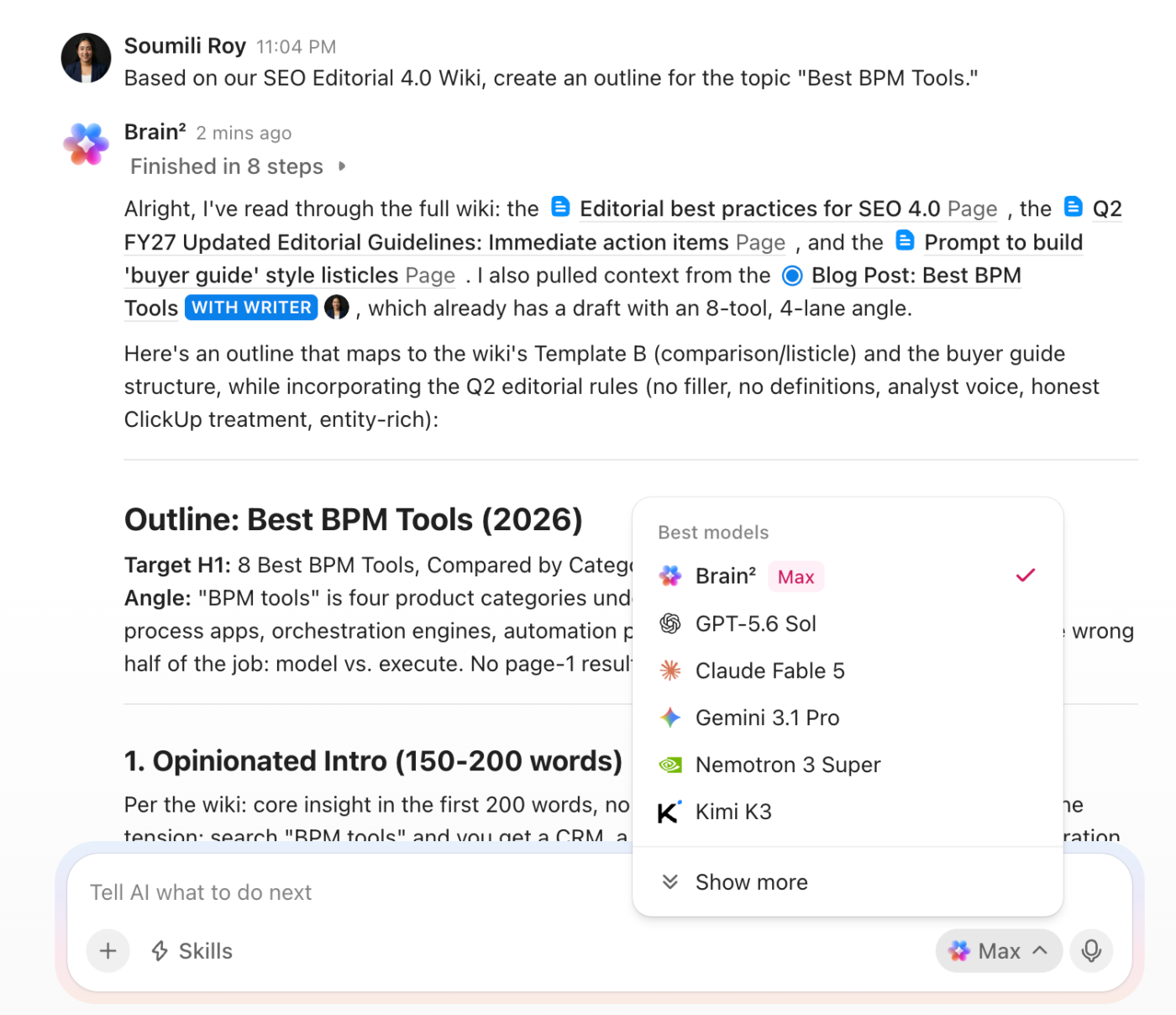
This is what the results look like. Brain can work off the surrounding project context while helping you draft, rewrite, summarize, or edit in ClickUp Docs.
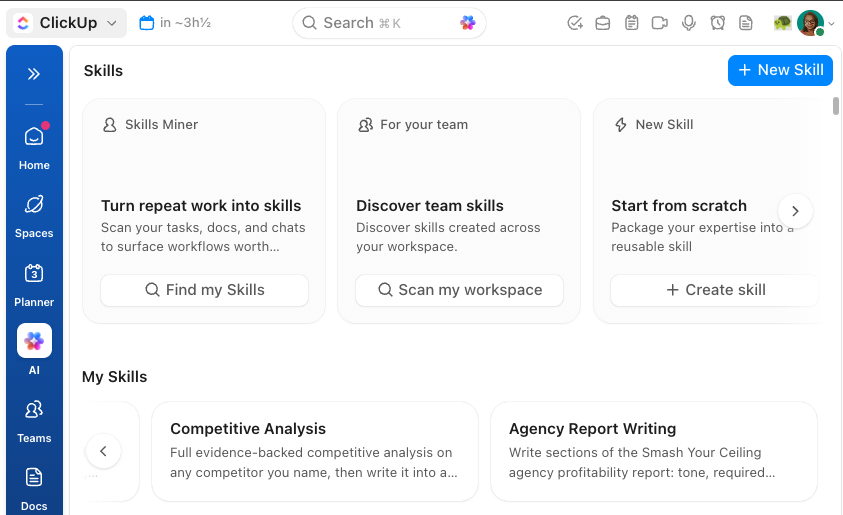
For all your routine, repeatable workflows, ClickUp has AI Skills, too. Teams can create reusable instructions in the Skills Hub, attach reference material, and share the same Skill across the Workspace without maintaining separate SKILL.md files for every writer.
You start by telling the system where to find the pattern. The Skills Hub in ClickUp gives you three ways in:
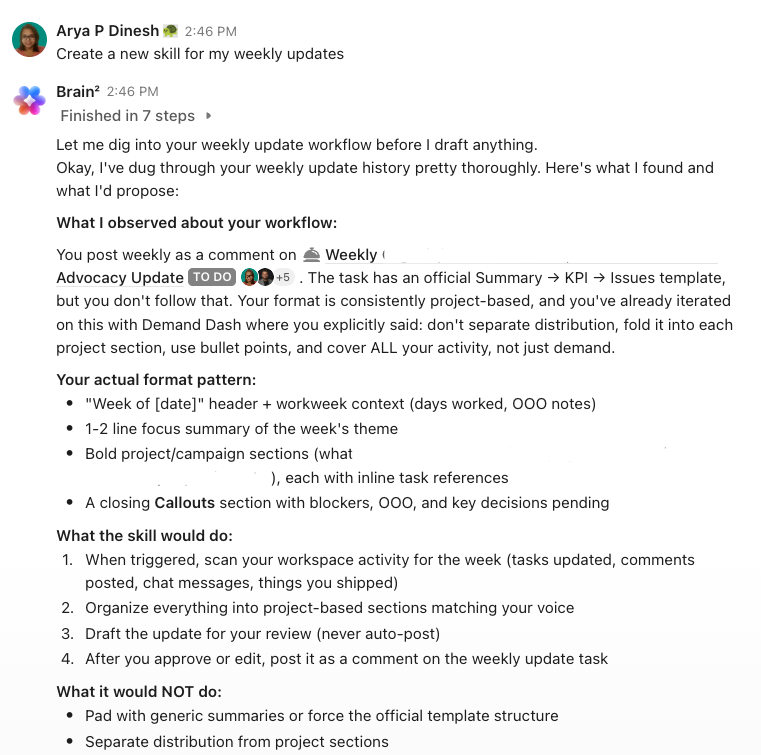
Let’s see the example of a weekly update skill, starting with a simple prompt:
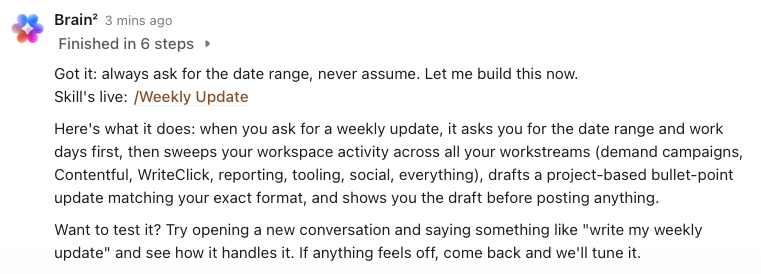
Once you confirm the proposed Skill details, Brain will build it for you.
ClickUp AI also hosts several top LLMs, including Claude, ChatGPT, and Gemini, with a single subscription. Pick the model per your needs, and you’re good to go. The bigger difference appears after the copy is written. Here’s what your AI-assisted blog writing workflow on ClickUp would look like:
Remember the Optimizely numbers from the top of this article: 48% of marketers lose time to hallucination review, 40% to moving information between disconnected tools, and 37% to compliance checking. A Claude Skill can’t help with any of those, but a connected work AI like ClickUp can.
ClickUp Brain can check a draft against the positioning your PM confirmed in a task comment, pull approved terminology from a Doc that lives in the same Workspace, and flag when a claim doesn’t trace back to anything in the project. The Skill handles the repeatable procedure and ClickUp provides 100% context against which the procedure runs.
The real limitation: This is the no-build path. If your writing workflow lives outside ClickUp, a portable Claude Skill with custom scripts gives you more control. ClickUp Brain works best when the work and the coordination happen in the same place.
Who it fits: Editorial teams and content operations managing real complexity: multiple writers, client-specific styles, shifting deadlines, stakeholders who need visibility without asking for it. For a solo writer drafting in a chat window, a plain Claude Skill is faster to build and faster to change.
Start with the trigger. Write the description in the language you use when you want the Skill to run, then build the instructions around one repeatable writing job.
From there, capture the corrections you keep making, turn them into explicit rules, and end with a review pass that Claude has to complete before it returns the draft. That gives you something more reliable than a saved prompt and much easier to maintain than a giant style guide pasted into every chat.
Then keep it current. If your editorial standards change, the Skill has to change with them. Otherwise, Claude can follow an outdated process perfectly.
And if the writing depends on live project context, client decisions, approvals, deadlines, and what changed this week, the better answer may be to keep the AI where that work already lives. Try ClickUp for free and bring the writing standard into the same workflow as the work around it.
Yes. Skills can bundle executable scripts, Markdown instructions, and reference files. That makes them useful for deterministic checks such as validating filenames or linting banned terms, but it also means third-party Skills should be treated like software and reviewed before installation.
Yes. Anthropic currently lists Skills for all users across Free, Pro, Max, Team, and Enterprise when code execution and file creation are enabled. Free users can also upload custom Skills through Customize → Skills. Team and Enterprise plans add organization-level provisioning and sharing controls.
Yes. A Skill must contain SKILL.md, but it can also include reference documents, examples, templates, and executable scripts. Claude uses progressive disclosure, which means it loads SKILL.md when the Skill triggers and opens supporting files only when the instructions call for them.
MCP connects Claude to external services and data; Skills teach Claude how to perform a task. They work together, and neither replaces the other. An MCP connection can give Claude access to your CMS, while a Skill defines how the post it publishes there should be written.
In Claude Code, put the Skill under the repository’s .claude/skills/ directory and commit it to Git so everyone working from that repo receives the same version. Personal Skills live under ~/.claude/skills/ and apply only to that user. For larger libraries, teams often keep Skills in a shared repository so changes can be reviewed and versioned.
Yes. You can describe the workflow you want to repeat and ask Claude to create the corresponding SKILL.md and supporting files. You should still review the description, trigger conditions, instructions, and any executable scripts before installing it. For writing Skills, testing the generated Skill against several real drafts is more important than accepting the first version.

Praburam Srinivasan
Max 10min read

Manasi Nair
Max 22min read
Manasi Nair
Max 27min read

© 2026 ClickUp




