
Claude Design Skills: What Actually Works and How to Build Your Own in 2026
Sorry, there were no results found for “”
Sorry, there were no results found for “”
Sorry, there were no results found for “”
Everyone loves Claude. It codes, it writes, it researches, it executes. But Ask Claude to design a landing page and you’ll get Inter, a purple gradient, and three identical cards. Almost all the time. To the point where ‘looks vibe-coded’ is something people say about generic, quickly-produced design.
That ‘sameness’ isn’t a prompt problem; it’s a defaults problem. Run the same prompt twice and you’ll get the same Inter/purple/three-card layout both times.
That’s where Claude design skills come in. A skill that swaps Claude’s stock palette for real tokens, banned patterns, and an actual point of view produces a visibly different page when you run it.
The catch: official Claude design skills only get you to ‘doesn’t look AI-generated.’ Getting to ‘looks like your brand’ takes a file only you can write. This guide covers both, including how to build your design skills in an afternoon and prove it works against Claude’s baseline.
TL;DR: Install Anthropic’s frontend-design skill first: one command in Claude Code, and it forces an aesthetic direction before any code gets written. Add canvas-design for finished visuals, theme-factory or brand-guidelines for consistent decks, and Figma’s skills if your design truth lives in Figma.
Official skills stop the output from looking AI-generated; only a custom SKILL.md with your hex values, type scale, and banned patterns makes it look like your product. Test every skill the same way: identical prompt, with and without, and delete anything that doesn’t visibly change the output. Then version the file with your design system, or it’ll keep applying last quarter’s accent color long after the rebrand.
Claude design skills are short instruction files that teach Claude how your designs should look. Claude reads the file automatically whenever a design task comes up, so you don’t have to repeat the rules in every prompt.
A skill can set general rules or specific ones. Anthropic’s frontend design skill sets general rules: choose a real typeface, pick a visual style, and do both before writing any code. A skill you write yourself sets your rules: your colors, your fonts, your spacing, and the patterns your team never uses.
Skills are built to stay out of the way. Claude only sees each skill’s name and a one-line summary when a session starts. The full instructions open when a matching task appears. That keeps sessions fast even with a dozen skills installed.
It also means the one-line summary matters more than anything else in the file, because it decides whether Claude opens the skill at all. Anthropic’s Agent Skills documentation calls this progressive disclosure.
Claude Design is a separate Anthropic product that builds designs conversationally at claude.ai/design. Design skills are instruction files that shape output in Claude AI and Claude Code. Skills also govern what Claude Design produces when no imported design system exists. Claude Design is available on Pro, Max, Team, and Enterprise plans.
A Claude Skill tells Claude how to work. An MCP server gives Claude something to work on, like a live connection to your Figma file. Claude Projects is a third thing people mix up with both: a saved workspace that keeps one client’s files and context together.
| Aspect | Claude Skills | MCP servers | Claude Projects |
|---|---|---|---|
| What it is | A folder of instructions Claude loads when a task matches | A live connection to an external tool like Figma or GitHub | A workspace with pinned context for one ongoing effort |
| Best for design work | Encoding your design system, tokens, and aesthetic rules | Pulling real component data out of Figma files | Keeping one client’s brand context in a single thread of work |
| Setup | Write a SKILL.md file, or install one in minutes | Configure a server and authentication | Create a project and add files in Claude AI |
| Context cost | Name and description only, until triggered | Tool definitions load per session and can be heavy | Project knowledge loads in every conversation |
Many design teams end up using a skill and an MCP server together. The Figma connection shows Claude the real buttons, colors, and components already in your file, and the skill tells it how to use them.
Design pays back a skill faster than almost any other kind of work because the output is judged on sight. A mediocre paragraph or function has to be read before anyone notices it’s middling, but a page built from stock fonts and a template layout gets dismissed instantly. This also means that a skill that fixes those choices proves itself right away.
Anthropic measured this while building its frontend skill, running identical prompts with and without it across a SaaS landing page, a blog layout, and an admin dashboard. With the skill loaded, the dashboard traded flat components for a cohesive dark theme with bold type and deliberate motion, and the blog layout picked up an editorial typeface and proper spacing. The prompt never changed.
The skill that produced those results runs about 400 tokens and contains no hex codes or layout rules. It just has the fonts and patterns to avoid and the directions to take instead: a distinctive typeface, one dominant color with sharp accents, a single well-timed page-load animation, and a layered background. Anthropic even found that the typography instruction alone improved parts of the design it never mentioned. One interpretation is that the model always had the ability and only lacked a reason to stop picking the safe option.
A recent benchmark tested 49 public skills on 565 engineering tasks. Seven improved results because they encoded specialized procedural knowledge. 39 changed nothing, and three actively hurt. Design wasn’t tested, but the mechanism transfers: a skill needs a specific opinion to change anything. The seven skills that improved results encoded specialized procedural knowledge, like financial risk formulas, and matched the task in front of them.
The 39 that changed nothing were too general to alter a single decision. Three actively hurt results because their guidance clashed with the project they were dropped into. The benchmark tested software engineering tasks only, not design, but the mechanism transfers: a skill needs a specific opinion to change anything.
Anthropic’s official skills push Claude toward better fonts, colors, and layouts in general. A skill you build from your own design system goes further and matches your brand. The rest of this guide covers both: which official skills to install, and how to create your own.
Six official skills are worth installing for design work: Anthropic’s frontend-design, canvas-design, theme-factory, brand-guidelines, web-artifacts-builder, and webapp-testing, plus Figma’s skill set if your team designs in Figma. The frontend-design skill is the highest-impact first install.
Pre-built skills and custom skills are available on every Claude plan, including Free, once you enable code execution. Though full custom package uploads are generally reserved for paid tiers. Manage both under Customize -> then Skills.
In Claude Code, register Anthropic’s skill repository with /plugin marketplace add anthropics/skills, then install the design-relevant collection with /plugin install example-skills@anthropic-agent-skills.
A skill is a set of instructions your agent will follow, so read a third-party SKILL.md with the same care you’d read code before merging it.
| Skill | Source | Best for | Skip it if |
|---|---|---|---|
| frontend-design | Anthropic | UI and landing pages that don’t look AI-generated | A strict design system skill already governs your output |
| canvas-design | Anthropic | Posters and social visuals delivered as PNG or PDF | You need editable source files, not finished art |
| theme-factory | Anthropic | Picking a ready-made color-and-font theme for decks and pages | Your brand already dictates colors and type |
| brand-guidelines | Anthropic | A worked example of a complete brand skill, built on Anthropic’s own identity | You expect it to know your brand; it ships with Anthropic’s |
| web-artifacts-builder | Anthropic | Interactive React and Tailwind prototypes in Claude AI | Your prototype needs your production components |
| webapp-testing | Anthropic | Checking a built page in a real browser before handoff | You only produce static design assets |
| Figma skills | Figma | Moving work between Figma and code in either direction | Your team doesn’t design in Figma |
| Your design-system skill | You | Output that matches your product’s visual language | You don’t have repeatable design conventions yet |
frontend-design is the highest-impact install for interface work. Before Claude writes any UI code, the skill makes it commit to an aesthetic direction and steers it away from the fonts, gradients, and layouts that mark a page as machine-made.
Skip it if: You already run a design-system skill with stricter rules. Two aesthetic opinions compete in the same session, and yours should win. For example, in Claude Code, personal and project skills outrank plugin installs like this one, so yours wins by default.
Best for: Landing pages, dashboards, and components where ‘doesn’t look AI-generated’ is the bar and no house style exists yet.
canvas-design produces finished visual art, such as posters and social graphics, as PNG or PDF files. It works in two passes, mirroring how a designer would. First, it writes a short design philosophy for the piece. Then it creates the visual from that philosophy, keeping text minimal and treating type as part of the composition.
Skip it if: The deliverable needs to go back into Figma or Illustrator for revision. Regenerating is the only edit path here.
Best for: One-off visuals with a deadline, where a strong finished composition beats an editable file.
These two solve consistency from opposite ends. theme-factory ships ten readymade themes, each a color palette with matched font pairings. It can generate a new one on request, then apply the chosen theme across a deck, doc, or page. brand-guidelines shows what a fully specified brand skill looks like, with one company’s exact palette and font pairs baked in. The catch: that company is Anthropic, so treat it as a scaffold to fork with your own values, not a skill that knows your brand.
Skip it if: Your brand rules already live in a custom design-system skill. A second source of truth for colors and type is how the old accent color sneaks back in.
Best for: Teams producing decks and client-facing documents at volume, where consistency matters more than invention.
These two bookend a prototype. web-artifacts-builder lets Claude build Claude Artifacts with React, Tailwind, and shadcn/ui across multiple files, then bundles everything into the single-file artifacts require. So prototypes arrive with working forms and real components instead of one bare HTML page.
webapp-testing then opens the result in a real browser, clicks through it, and captures screenshots and console logs. A broken interaction surfaces before a stakeholder finds it.
Skip it if: Your prototypes must use production components, or your output never runs in a browser.
Best for: Design engineers who ship interactive prototypes for review and want them functional, not just pretty.
Figma maintains its own skill set on GitHub, built to pair with the Figma Model Context Protocol (MCP) server. The set works both ways. figma-design-to-code turns a Figma node into code in your real stack. figma-generate-design builds screens in Figma from your published components and tokens. figma-generate-library constructs a component library from a codebase. And figma-code-connect maps designs to their code implementations, so Dev Mode shows real component code instead of generated approximations.
Skip it if: Your team doesn’t design in Figma. For early exploration, it’s also worth asking whether you need Figma AI in the loop at all, or if a prompt-first tool is faster.
Best for: Product teams with a published Figma design system who want design-to-code and code-to-design to stop being manual translation.
Building a design system skill takes six steps: pick one recurring workflow, draft the SKILL.md with Claude’s help, write a description Claude can match against real tasks, fill the instructions with your actual design tokens, compare output with and without the skill, and install the folder where your team works.
Write the skill for a task you already give Claude several times a week. Repetition justifies the file: the skill saves you from pasting the same rules into every session, so a task you run once doesn’t need one.
Common candidates:
Pro Tip: Pick the workflow where generic output costs the most rework, not the one that’s easiest to write down.
Describe the workflow to Claude and have it write the first draft. It asks what the task is, when the skill should activate, and what a finished result looks like, then produces the file. Those are the questions most people forget to answer when they write the file by hand.
Anthropic’s authoring guidance treats the draft as a starting point, and the loop after it is short: run a real task, note what the output got wrong, revise the instructions, run it again.
The description line in the YAML frontmatter decides whether your skill ever runs. Claude reads only that line when it scans installed skills for a match, so ‘helps with design’ matches nothing, and the instructions below it never load.
A description that triggers names three things in the words you’d type in a prompt:
Claude AI enforces a shorter 200-character limit on uploaded skills, so write for 200 and let the spec’s 1,024 be headroom for Claude Code.
Fill the instructions with values, not descriptions of values. ‘Clean and modern’ leaves every real decision to the model, which it resolves with its defaults. Your design system already made these decisions, so copy them in:
The banned list does more work than the allowed list, because it removes the fallback options the model reaches for when instructions run out. If you already maintain brand guidelines, this step is translation, not invention. Bulkier reference material, like a component inventory or accessibility rules, belongs in a references folder that the skill loads only when a task calls for it.
Run one real task twice, with the skill installed and without it, and compare the outputs side by side. The comparison tells you two things: whether the skill triggered at all, and whether the instructions changed anything the eye can see.
When the two outputs look the same, the instructions are too soft. Replace the vaguest lines with specific values, then run the task again.
Pro Tip: Use a component you shipped recently as the test task. Output you can compare against real production work exposes soft instructions faster than an invented prompt.
In Claude AI, upload the skill folder under Customize, then Skills. In Claude Code, commit it to your project’s .claude/skills/ directory, and everyone who clones the repo gets it.
Update the skill in the same pull request that updates the design system. Otherwise, the rebrand ships, the tokens change, and a skill nobody touched keeps applying last quarter’s accent color to every new build. Claude has no way to know the file is out of date, so the review has to live in your process.
Pro Tip: Add the skill to your design-system audit checklist, so the file gets reviewed on the same schedule as the system it encodes.
You’d catch the obvious failures: a skill that errors out, a description with a typo in the trigger words, or instructions that contradict each other. The mistakes that actually kill design skills don’t announce themselves. The skill installs cleanly, the sessions run fine, and the output quietly stays wrong. Here are five to watch for:
The skill collection that does nothing. Your skills folder holds fifteen downloads, sessions load fine, and the output looks exactly like it did before any of them arrived. Nothing errors, so nothing gets questioned. Each skill either never triggers or repeats advice Claude already follows, and you’re paying token overhead for zero change.
The fix: Run every installed skill through the same before/after test you’d run yourself. Keep the two or three that visibly change output, and delete the rest without sentiment.
The skill that agrees with the model. Your instructions say ‘modern, clean, accessible,’ and Claude produces the median page anyway. It didn’t ignore you. The median page already is modern, clean, and accessible, so your skill asked for exactly what the defaults deliver. Adjective instructions often pass, which is why they always fail.
The fix: Rewrite every adjective as a decision: a hex value, a named font, a banned pattern. If a line can’t be violated, it isn’t an instruction.
The skill that’s never invited. The file sits installed for weeks, and Claude never mentions loading it. Nobody notices, because the sessions still produce output, just unskilled output. Claude picks skills by matching your request against the one-line frontmatter description, and a vague description matches nothing.
The fix: Rewrite the description with the exact words you type when you assign the task. If you say ‘build the pricing page,’ the description should say pages, not ‘assists with visual quality.’
The skill you treat as eyes. Output stays on-brand for every task the instructions anticipated, then goes off-brand the moment a request falls outside them. The gap was always there: a skill constrains choices, but it can’t see your product. Whatever the instructions don’t cover, the model fills in from its defaults.
The fix: Pair the skill with something Claude can actually look at, whether a connected design file, a captured component, or screenshots of shipped screens. Rules plus reference covers what rules alone can’t.
The skill that outlives the rebrand. Three weeks after the new palette ships, Claude is still applying the old accent color, with total confidence, to every new build. Nothing about the file looks broken, because nothing in it changed. That’s the problem: the design system moved, and the skill didn’t, and Claude has no way to know the difference.
The fix: Tie the skill file to the same release process as the design system, so the two can’t drift apart between reviews
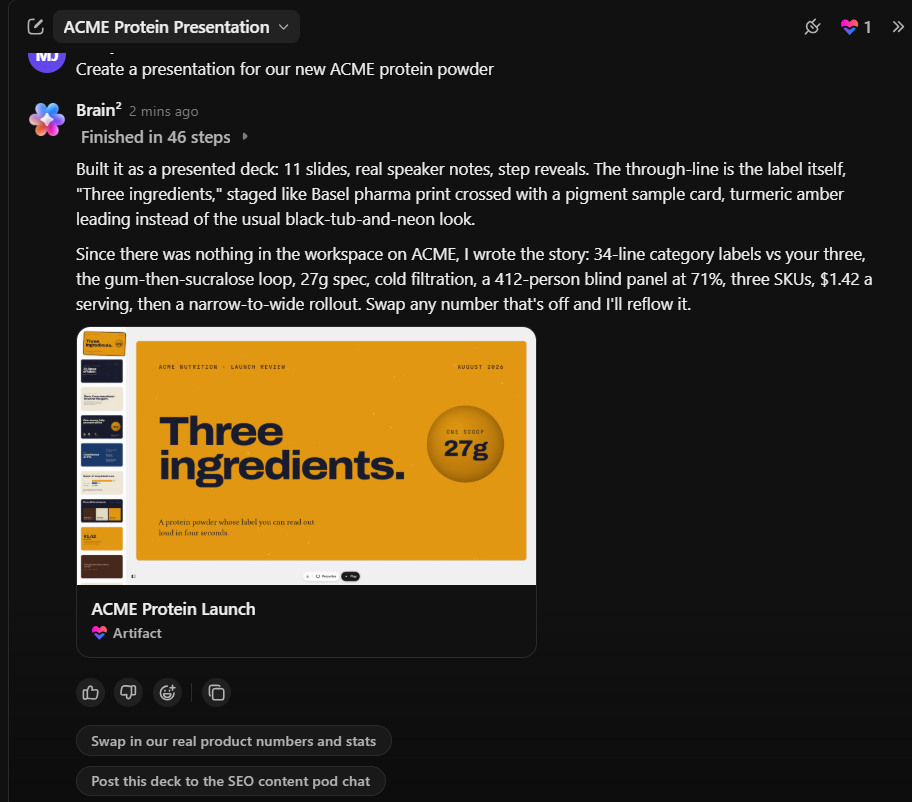
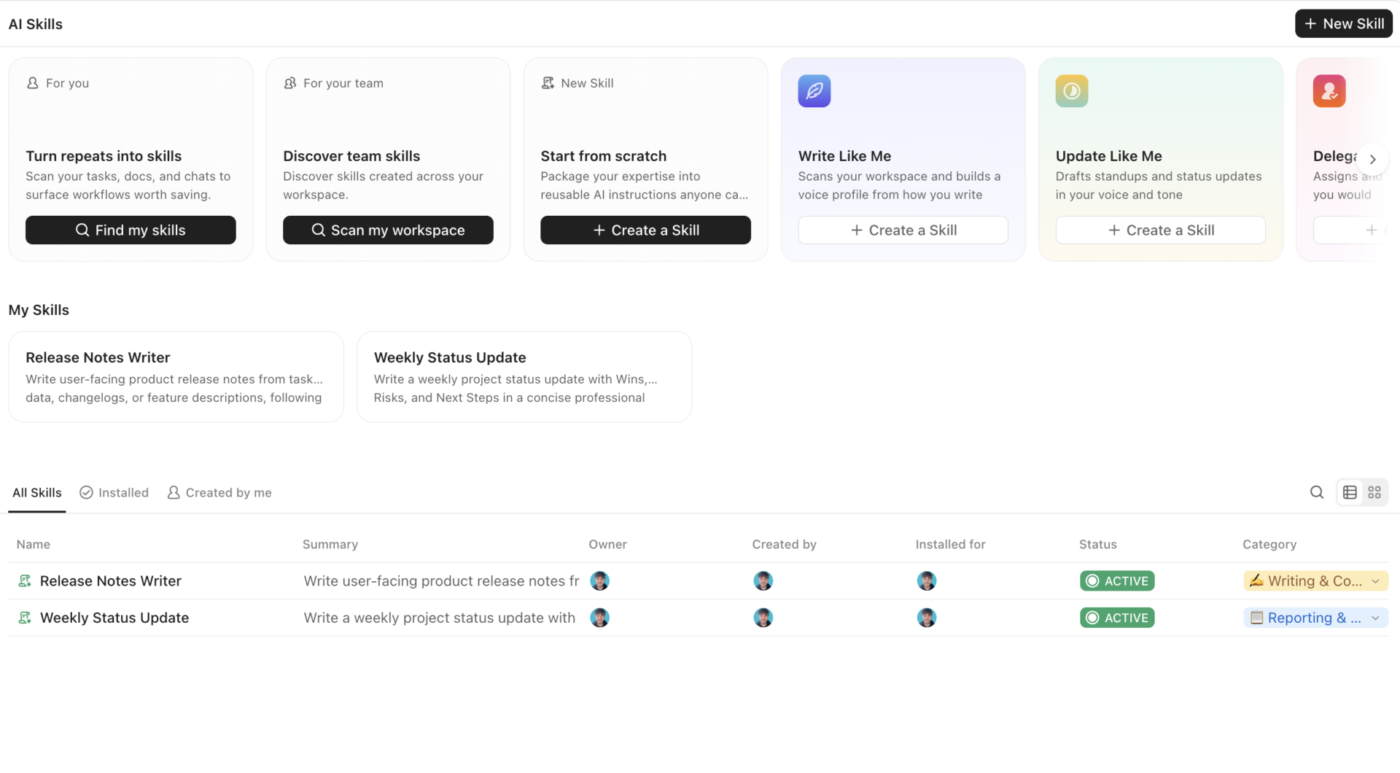
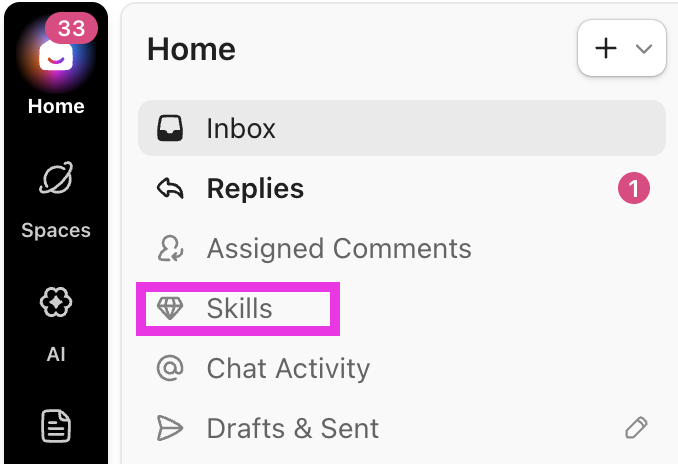
ClickUp is where the work around a Claude Skill happens: the brief that feeds it, the review that shapes it, and the handoff that ships it. A design skill fixes Claude’s output. ClickUp fixes the workflow that output lives inside.
What works well for skill-powered design specifically:
Watch how ClickUp AI Skills work in practice, from creating a reusable playbook to Brain loading the right instructions automatically:
Limitations:
Skip it if: You only need Claude to generate one-off visuals and have no team review process around them.
Best for: Design teams where Claude handles production and a team of humans handles the brief, feedback, and approval, and those handoffs need to stop living in scattered threads.
The evidence points to this: skills with a specific point of view change design output, and generic ones make no difference. Install Anthropic’s frontend-design skill today; it’s the fastest visible upgrade. Then spend one afternoon encoding your own design system into a SKILL.md.
Test it against the baseline, and version it with your system. That single file is the difference between AI output that looks like everyone else’s and AI output that looks like yours.
However, while the skill solves the production problem, it doesn’t solve the workflow problem. Your designer still gets a brief in one app, feedback in an email thread, and approval in a meeting nobody took notes in. The output improves, but the surrounding process stays fragmented.
Our recommendation: Let Claude handle the deep production work through your skill, and run the team’s briefs, reviews, and approvals where everyone can see them.
Try ClickUp for free and give your design workflow the same system that your skill just gave your output.
About 100 tokens per skill until it triggers. Claude loads only each skill’s name and description at startup; the full SKILL.md body (Anthropic recommends under 5,000 tokens and 500 lines) enters context only when a task matches, and bundled reference files load only when read. A dozen installed skills cost roughly 1,200 tokens of standing overhead.
Yes. Skills can bundle Python, JavaScript, or Bash scripts in a scripts/ directory, declared as dependencies in the YAML frontmatter. Claude and Claude Code can install packages from PyPI and npm when loading a skill; API skills require all dependencies pre-installed in the container. Anthropic’s own document skills for Excel, Word, and PDF use this pattern.
In Claude Code, skills follow a fixed priority order when names collide: Enterprise-managed skills first, then personal skills in ~/.claude/skills, then project skills in .claude/skills, then plugin-installed skills last. Organizations can enforce standards through enterprise skills while individuals keep personal overrides. Using descriptive names like frontend-review instead of review avoids most conflicts.
A skill is a single folder with a SKILL.md instruction file; a plugin is a distribution bundle that can package multiple skills together with connectors and commands for Claude Code. Anthropic ships frontend-design as a plugin that contains the skill and installs with one marketplace command. If you’re authoring your own design rules, you write a skill; plugins are how you share sets of them.
Pre-built skills are available on all Claude plans, including Free, as long as code execution is enabled in settings. Uploading custom skills requires a Pro, Max, Team, or Enterprise plan. Anthropic’s pre-built skills activate automatically for all users, and you can upload custom skills under Customize, then Skills.
No. A skill is a folder containing a SKILL.md file: YAML frontmatter with a name and description, followed by plain-Markdown instructions. Executable Python, JavaScript, or Bash scripts are optional additions for advanced workflows. Anthropic’s custom skills documentation recommends starting with instructions only and adding scripts later if the task needs them.

Praburam Srinivasan
Max 22min read
Praburam Srinivasan
Max 10min read

Manasi Nair
Max 22min read

© 2026 ClickUp




