
Claude Skills for Marketing: How to Turn Your Brand’s Playbook Into AI That Executes
Sorry, there were no results found for “”
Sorry, there were no results found for “”
Sorry, there were no results found for “”
Claude Skills turn your brand playbook into rules that the AI follows on every draft. This matters because AI writing tools have a documented sameness problem.
A review of more than 130 studies in Trends in Cognitive Sciences found that language model output converges toward the most common patterns in its training data. Since brands are using the same AI tools, they produce the same voice.
A Claude Skill prevents that. It loads your voice rules, positioning, and formats into the draft before the model writes a word. Because the voice and context belong to you, competitors can’t shortcut to the same output by using the same tool.
This guide shows you how to build Claude Skills for marketing and how AI that already knows your workspace can take the idea further.
TL;DR: A Claude Skill is a folder of instructions, reference files, and scripts that Claude loads on its own whenever a task matches its description, so it writes in your brand the same way every time. Build one the moment you’ve re-explained the same voice or format rules to an AI three times. Ad copy, campaign briefs, and newsletters are the obvious first candidates.
A solo marketer running one-off jobs gets by with a standalone Skill in claude.ai. A team drowning in disconnected tools gets more from consolidating the work where the AI can act on live campaigns. This guide covers both.
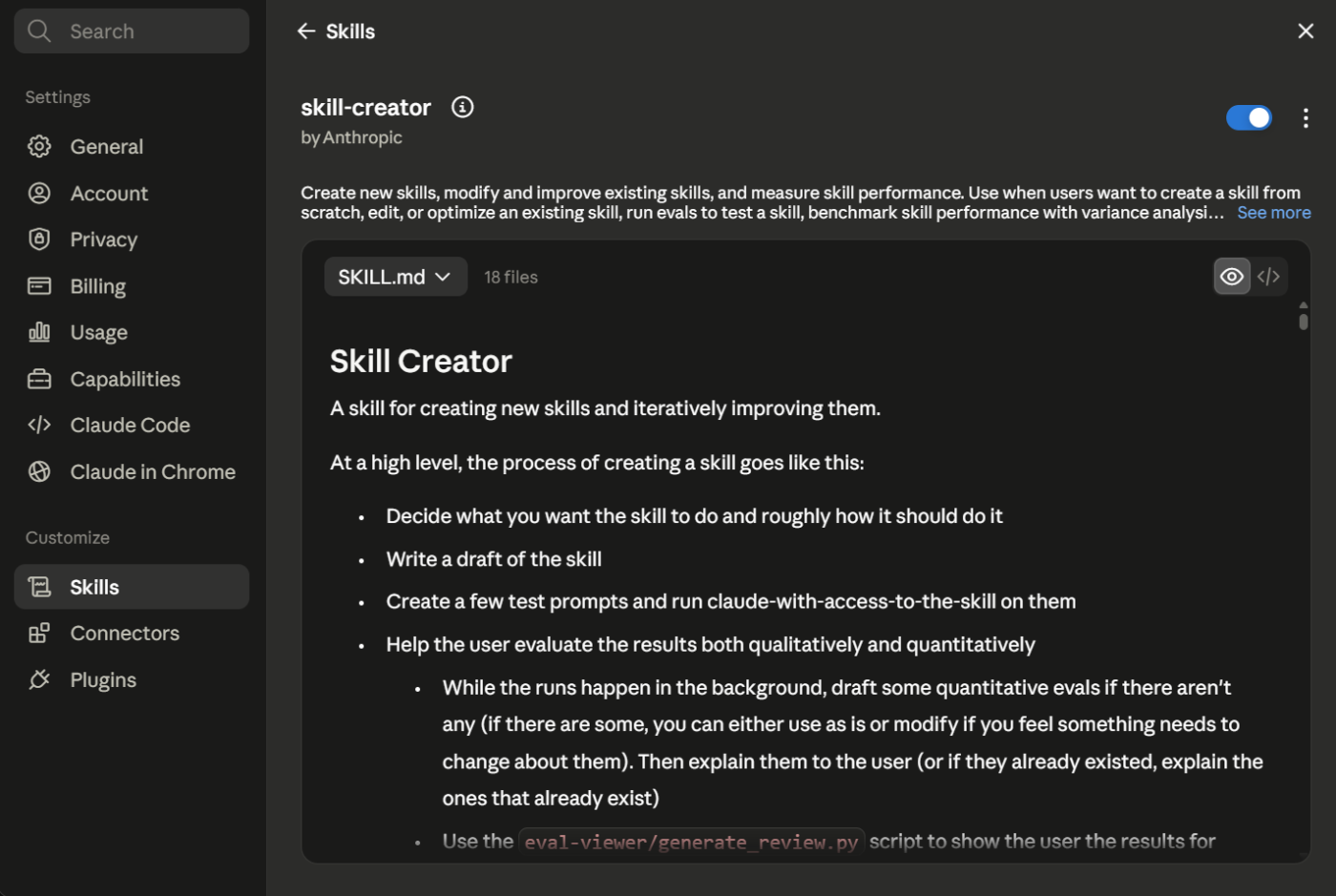
A Claude Skill is a folder of instructions that Claude loads on its own when a task matches. Every Skill needs one file: SKILL.md. The file starts with a short block called YAML frontmatter, which contains the Skill’s name, a description of when to use it, and the instructions. A Skill can also bundle reference files and scripts.
Anthropic built Skills so Claude can complete a task the same way every time. For a marketing team, that task is writing in your brand: the tone rules, the banned phrases, the value props, and the formats reviewers expect.
Anthropic launched Skills in October 2025. That December, they published the format as an open standard. Build one, and it runs across claude.ai, the Claude API, Cowork, and Claude Code.
Claude Skills work through progressive disclosure. Claude loads each layer of a Skill only when the task requires it:
The layering exists because brand knowledge is too extensive for a single prompt. Voice rules, messaging frameworks, product facts, legal-safe phrasing: together, they exceed what a prompt can carry. A Skill keeps SKILL.md short. The depth lives in referenced files that load only when needed.
The description carries more weight than any other line, because it decides whether the Skill activates at all. A description like ‘help with content’ will never work. One like ‘use when the user asks for ad copy, a landing page, or an email in our brand voice’ will generate customized marketing content.
Skills also work beyond chat. They run in Claude Code and in Claude Cowork, the desktop agent that reads your real files and runs multi-step tasks in the background. For example, Anthropic’s growth team built a Google Ads workflow in Claude Code. It draws on Skills for brand voice and product accuracy, then packages 15 headlines and 4 descriptions per ad into a CSV that the team reviews and uploads.
A Skill teaches Claude how to do a repeatable task, while a prompt is a one-time instruction. An AI agent is a system that runs multi-step work on its own. MCP, short for Model Context Protocol, connects Claude to outside tools such as Google Ads or HubSpot.
The four stack together instead of competing.
| Layer | What it is | When to reach for it |
|---|---|---|
| Prompt | A one-time instruction you type into the chat | You have a quick ask that you won’t repeat |
| Skill | A folder that teaches Claude a repeatable task in your brand voice | You produce the same work often: campaign briefs, ad variations, landing pages |
| Agent | A system that runs multi-step work on its own | You want a workflow to finish end to end without you checking each step |
| MCP server | A live connection between Claude and an external tool | Claude needs current data from Google Ads, GA4, HubSpot, or your CMS |
Skills and MCP get confused the most. An MCP server gives Claude access: it connects Claude to your Google Ads account, GA4 data, or CMS. Claude can then read and write real numbers instead of working from a pasted export.
A Skill tells Claude what to do with that access, in your voice, following pre-set rules.
So if you connect Claude to Google Ads through MCP, it can pull last month’s headline performance. It still does not know your brand voice or character-count conventions. That knowledge lives in the Skill.
Building a Skill delivers four advantages: you stand out in the crowd, review cycles are shorter, voice stays put when people leave, and the asset improves over time.
Escaping sameness is only half the job
Loading your voice into a Skill is a good instinct. It pulls you away from the industry average. But sounding different gets you noticed once. Sounding like yourself every time is what makes people remember you.
The work of the Ehrenberg-Bass Institute, the group behind How Brands Grow, shows a simple thing: people know a brand by the same few cues, shown again and again.
Professor Jenni Romaniuk flags a source of clutter most teams miss: a brand’s own mixed signals. Put simply, when you keep changing, you compete with yourself for attention.
For example, when Tropicana swapped its familiar packaging for a cleaner one, customers could no longer find the carton on shelves. Sales fell an estimated USD 26 million before the old look came back a month later.
Your voice is a brand asset with the same rule. Every time it drifts, you lose recognition. A voice guide can describe the target, but it can’t hold the line once ten people write to it at the same time. But a Skill does a good job of holding that line.
It does more than make you distinct from competitors; it keeps you identical to yourself across every draft, so the recognition compounds instead of leaking. That kind of consistency, at the speed AI now lets you publish, is the one thing a prompt can never give you.
Nine marketing workflows fit Claude Skills best: SEO and AI search optimization, paid ads, content operations, landing pages, email, marketing campaign planning, UGC and video scripts, analytics, and social. Each one repeats in a fixed shape, which is the test that matters.
If you have re-explained your brand voice or content brief format to an AI three times, that knowledge belongs in a Skill.
Here is what each cluster covers:
Start with the row that matches your most repeated task.
| Use case | Build this first | Pair it with |
|---|---|---|
| On-brand copy everywhere | Brand voice Skill | Existing output assets and a banned phrases list |
| Google/RSA ad copy at scale | Ad copy Skill | MCP connection to Google Ads and a CSV export script |
| AI search visibility | GEO/AEO Skill | MCP connection to Search Console and an FAQ schema Skill |
| Blog and content pipeline | Content ops Skill | A humanizing pass and your brief template |
| Landing pages and campaign visuals | Claude Design | Brand voice Skill and your design system |
| Turn an idea into campaign briefs | Campaign brief Skill | Marketing plan template and projects |
| Repurpose one asset into many | Content repurposing Skill | Brand voice Skill and per-channel format rules |
| Lifecycle and campaign email | Email Skill | MCP connection to your ESP and your segmentation rules |
| Diagnose a metric drop | Analytics/CRO Skill | MCP connection to GA4 and a CRO methodology file |
One category does not fit: Strategy and taste. A Skill won’t decide your positioning, and it can’t judge whether the output resonates with your audience.
Treat every Claude draft as a starting point and refine each result against what you know about your target audience. For quality outputs, feed the agent with your best assets. This way, the output replicates the expected standard rather than an average one.
Build a marketing Skill in six steps: pick a repeated task, write the SKILL.md, add brand rules, split long content into linked files, test on a live brief, and fix what drifts.
You don’t always have to start from a blank file. Three places worth checking first:
/draft-content, /campaign-plan, /brand-review, /seo-audit, and /email-sequence. Good for seeing the shape of a well-built SkillTo build your own, follow these steps:
The right first Skill comes from work you already repeat. Look through your recent AI chats and find the task where you keep pasting the same context. A task is ready to become a Skill if these three things match:
Ad copy, campaign briefs, and newsletters pass all three, since their formats and rules hold steady from one batch to the next. Positioning strategy fails the checklist test, because the strategy changes shape with every decision. Repetitive work moves into the Skill, and judgment stays with your team.
Create a folder and add one SKILL.md file. It holds three parts:
Spend most of your effort on the description, because it alone decides whether the Skill activates. Write it with the phrases your team types in real requests. If your teammates ask for ‘RSA refresh’ while you write ‘ad copy,’ the description needs both.
A downloaded Skill carries generic rules, and generic rules produce the average copy you built the Skill to escape. Replace them with material only your team has:
Paste from your real style guide rather than summarizing it from memory. The summary keeps the rules you remember and loses the specifics, but specifics are what make the voice yours.
Pro Tip: If you manage a single brand, bake the voice into the Skill. If you manage several, keep the Skill generic and load the brand context into a Claude Project instead, so one Skill serves every brand.
A Skill grows as you feed it corrections, and a SKILL.md past one screen slows everything down. When yours gets there, split it into linked parts:
Claude opens each referenced file only when the task needs that depth. Your ad copy request loads the character-count rules and skips the pricing sheet, so the Skill stays fast no matter how much knowledge it carries.
Run the Skill on a half-formed campaign request with the missing details and the deadline pressure left in. A clean sample hides the gaps, but a real brief exposes scope for improvement.
Watch for two separate failures:
Keep the two apart when you diagnose. Fixing instructions when the problem is the description wastes a round, and the reverse wastes two.
The Skill improves through use, and the loop is short. When the output goes off-brand, tell Claude what went wrong, fix the draft by hand, and then write that fix into the Skill or its examples.
Each round transfers one more piece of your judgment into the file. The next draft starts with refined logic, minimizing edits and workarounds even further.
Marketing teams share Claude Skills three ways: by sending zipped Skill folders directly, through built-in sharing on Claude’s Team and Enterprise plans, or through a shared GitHub repository.
Direct sending fits outside partners, built-in sharing fits in-house teams, and GitHub fits libraries that need review and version history. The deciding factor is who needs your brand library and how often it changes.
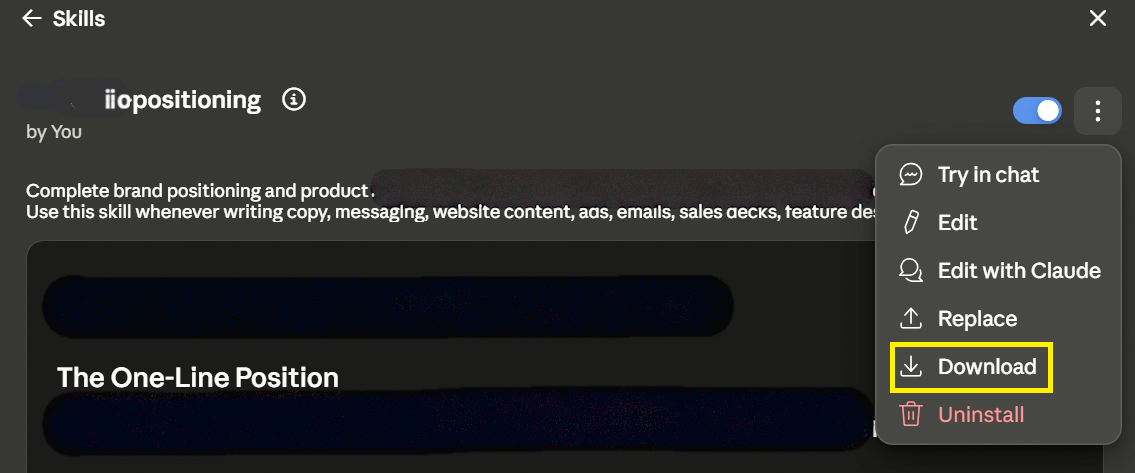
A Skill is a folder, so you can compress it and send it over email or Slack. The other person uploads it to their Claude settings, and this works on any plan.
To send a Skill:
To upload a received Skill:
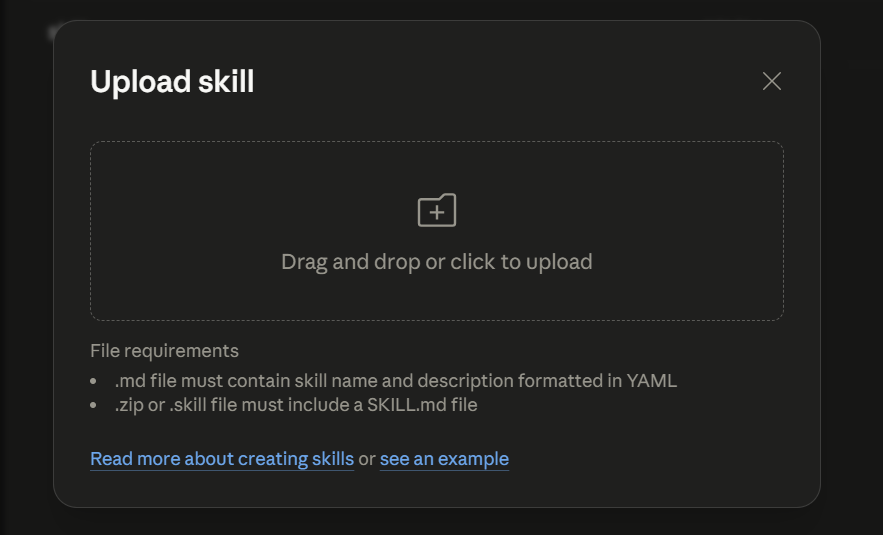
Use this path when you hand a brand voice Skill to a freelancer or an agency partner. Avoid it inside the team, because every voice guide update means a new zip, a new upload, and no record of who runs the current version. A marketing Skill changes more often than most, since campaigns, claims, and product facts shift monthly. The update problem hits this category harder than it hits others.
Claude has built-in sharing on Team and Enterprise plans. You can share a Skill with specific colleagues or your whole organization, and owners can push a Skill to everyone at once.
Before anyone can share, an organization owner must turn the feature on:
To share a Skill you created:
To push a Skill to the entire organization (owners only):
This is the right default for an in-house marketing team. The brand voice Skill is the one asset every marketer should run identically, and owner provisioning is the only path where nobody can skip the upload or fall behind a version.
Store each Skill as a folder in one GitHub repository, which is a shared project folder that tracks every change. Teammates download a synced copy and get the full brand library, and changes go through review before they reach anyone.
Marketing gives the review step a concrete job: when someone updates the value props in the brand-voice Skill, a second person approves the change before it ships to every marketer’s output. Two conventions keep the library in order:
# Version: 1.3) to the top of every SKILL.md and raise it on each change, so two teammates never unknowingly run different versions of the brand voiceUse this path if your team spans multiple tools, needs an approval trail for brand changes, or already works in Claude Code.
Which one should you pick?
Handing a Skill to an outside partner: zip it. Standardizing an in-house team on a Team or Enterprise plan: share inside Claude. Managing a growing brand library with review and history: use GitHub.
One capability applies across all three paths. Skills are composable, meaning Claude can load your brand voice Skill and your email format Skill together on the same task, so the library works as a system regardless of how you distribute it.
Four Claude Skills cover most of a marketing team’s repeated work: a brand voice Skill, an ad copy Skill, a campaign brief Skill, and a repurposing Skill.
Each comes from a workflow that teams already run every week. And each follows the same anatomy: a SKILL.md with a trigger description, plus the reference files that carry your brand’s depth.
Here is what each looks like in practice.
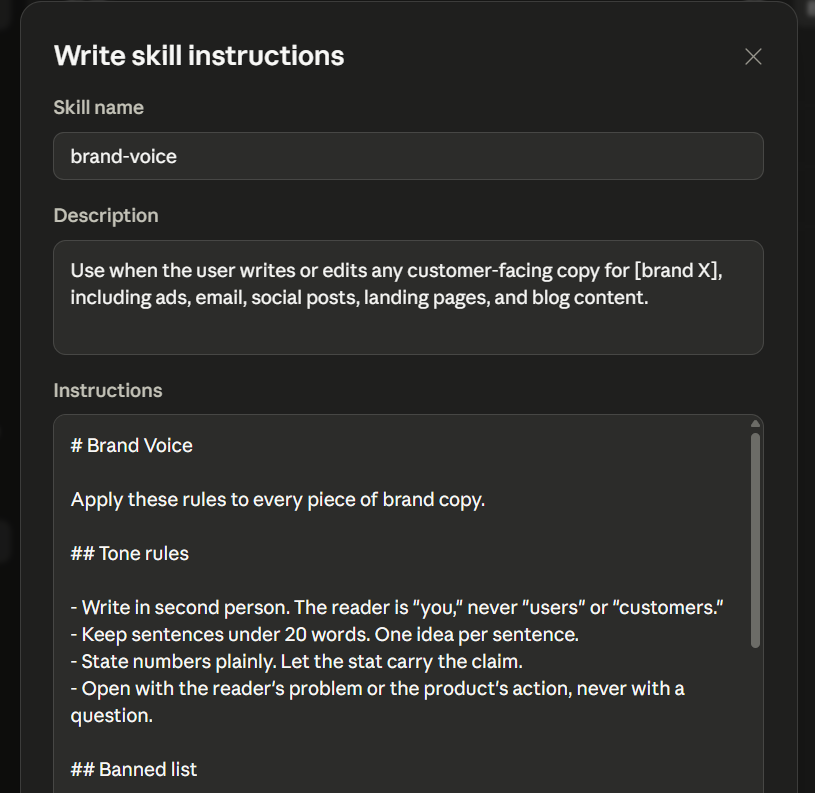
A team of six produces copy across ads, email, and social, and every piece needs the same voice. Any copy request triggers this Skill, and the SKILL.md carries four components that do the work:
What makes or breaks it: The reference copy. Claude matches examples more reliably than it follows described rules. A Skill with tone adjectives but no real samples gives you an approximation of your voice, not your voice.
The payoff: Every other Skill here loads it as a layer. Build it first, and each later Skill inherits the voice instead of restating it. It’s the foundation that the rest of your library stands on.
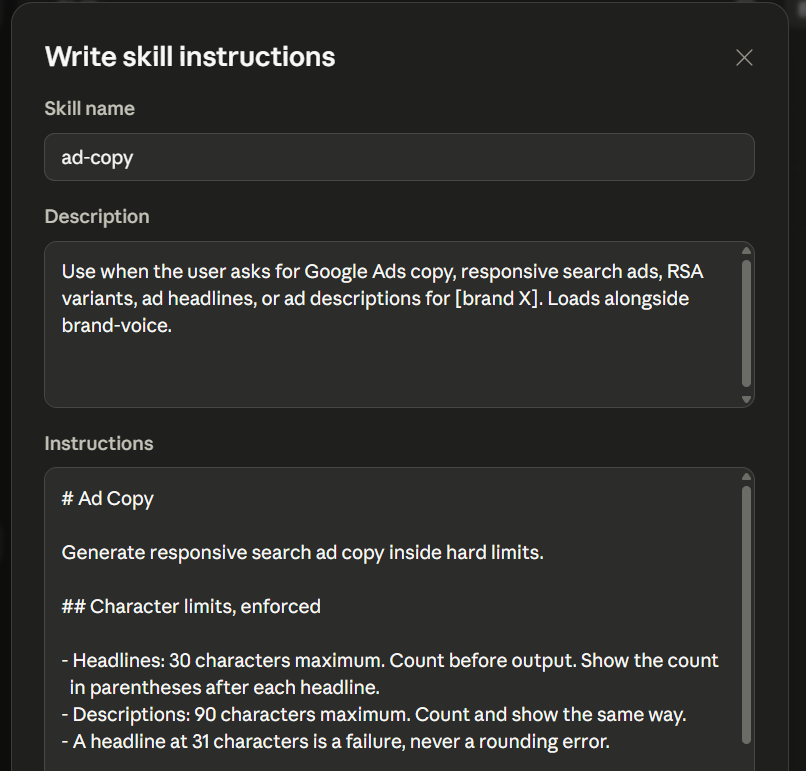
Now picture a performance marketer refreshing responsive search ads every few weeks. A request with campaign data and keywords triggers the Skill, and the components split the job:
What makes or breaks it: The character limits should be enforced. A Skill that treats 30 characters as guidance hands back headlines you trim by hand, which puts the manual work right back.
The payoff: It removes the slowest part of ad production. Once the limits and angles live in the Skill, you go from a blank page to a full set of review-ready lines in one pass. A person still approves every line before it gets published.
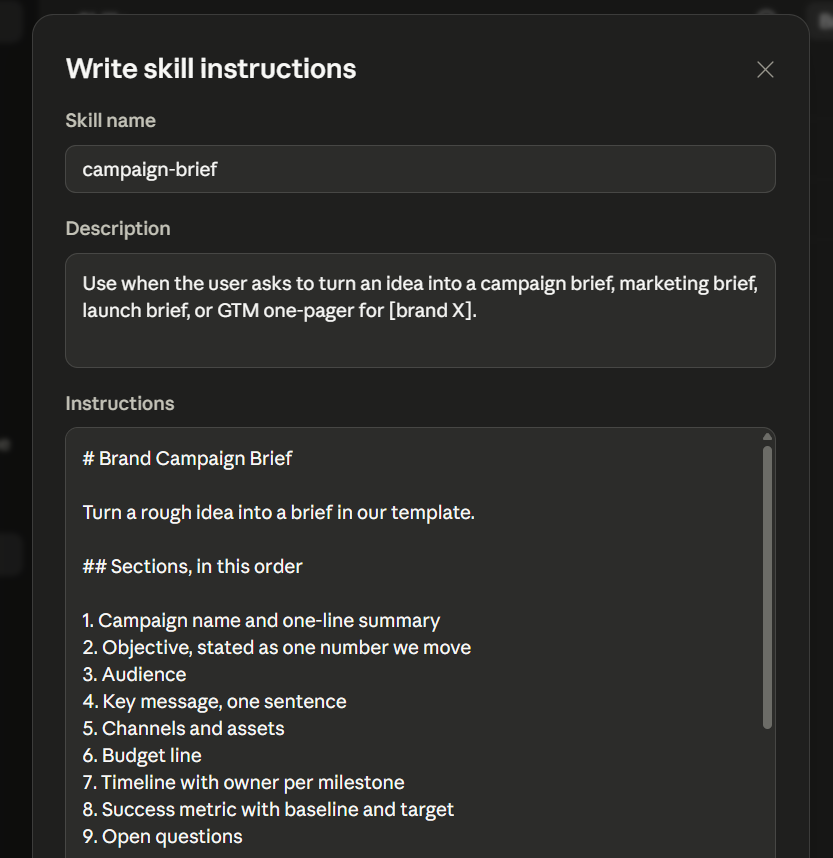
Next, take a marketing manager who turns rough ideas into stakeholder-ready briefs. A one-sentence idea triggers the Skill, and the structure does the rest:
What makes or breaks it: The placeholder rule. Without it, the Skill invents answers to fill empty fields. And a made-up budget number that looks real is worse than a blank someone knows to fill in.
The payoff: This one buys back the most time. A rough idea becomes a structured, stakeholder-ready brief in minutes. And the placeholder rule keeps it honest about what’s still unknown.
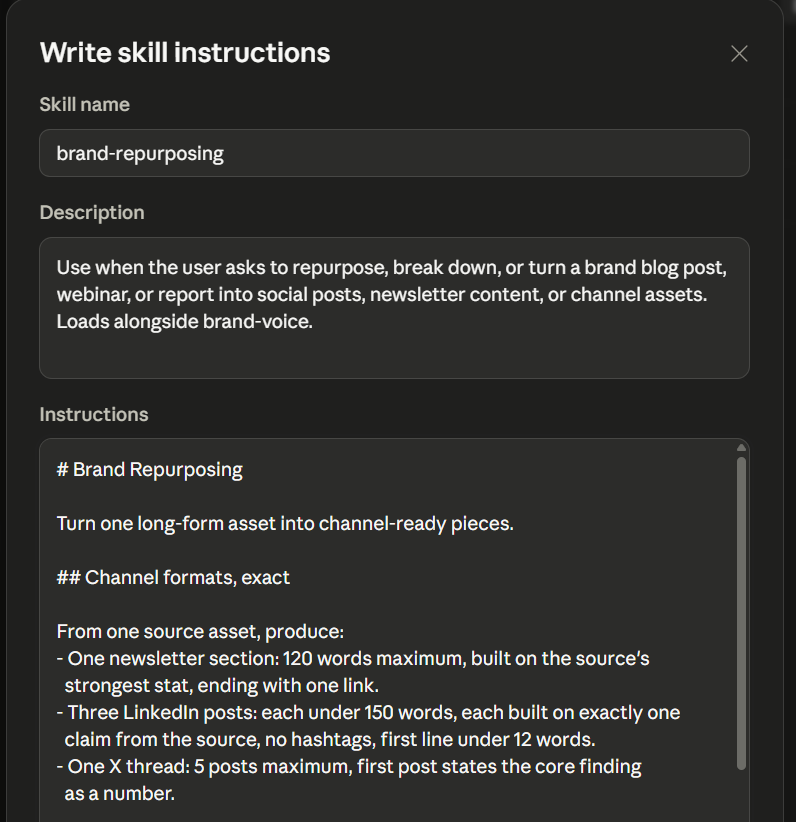
Finally, consider a content team that turns each long-form asset into a week of channel content. One blog post or webinar transcript triggers the Skill, and the components define every output:
What makes or breaks it: How precisely you spell out each channel format. A vague ask like, “Make some social posts,” gives you generic mush. Tell the Skill you want three LinkedIn posts, each under 150 words and each built on one claim from the source, and you get content you can schedule as-is.
The payoff: It multiplies the work you already finished, so there’s no new production to fund. It’s also where composition shows up in practice: one Skill holds the tone while another reshapes the structure.
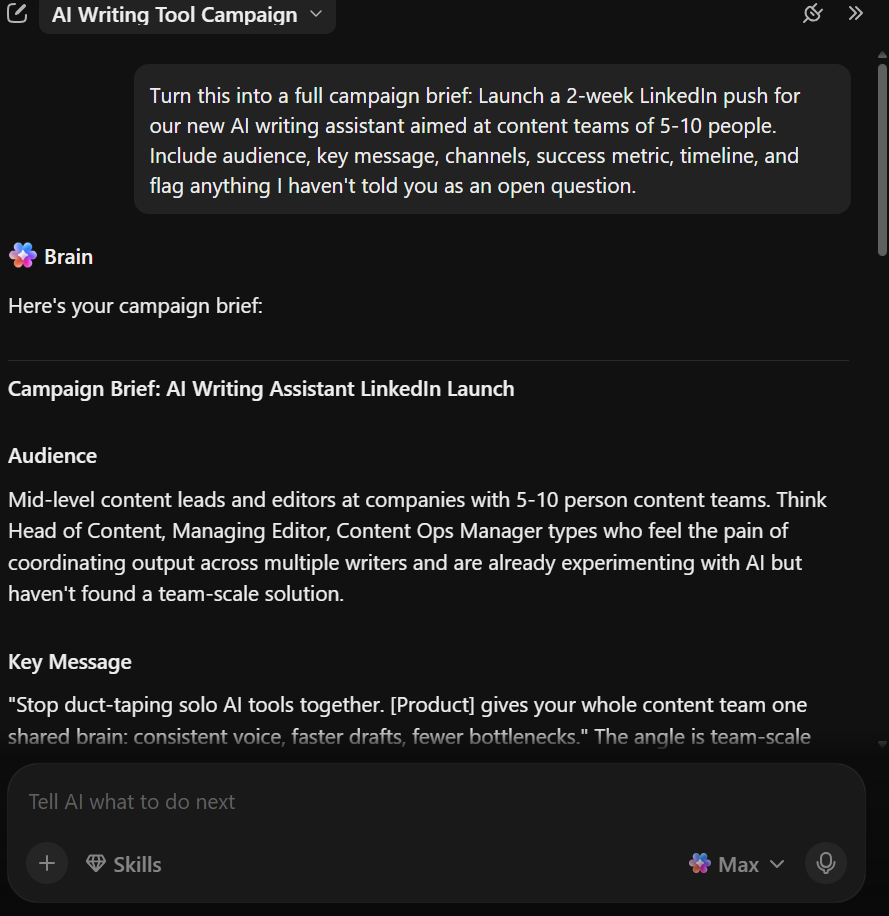
ClickUp gives you the same Skill behavior inside a workspace where your campaigns, briefs, and team already live. Instead of authoring a markdown file and distributing it as a zip file, you teach the AI your process once, and it holds that knowledge for everyone on the team.
Here is what works well for marketing Skills specifically:
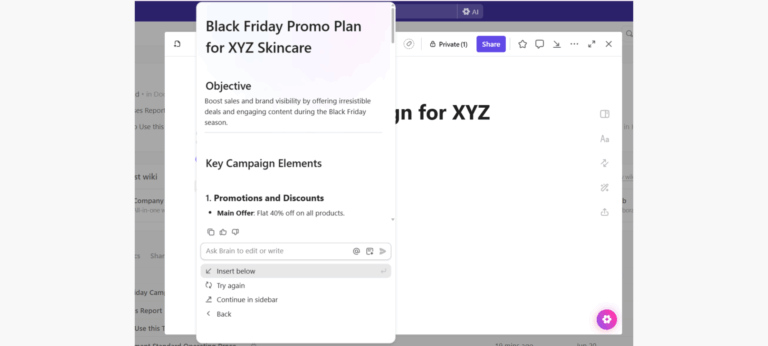
Use the dedicated Skills feature in ClickUp Brain. Describe a repeating workflow in plain language, such as ‘write ad copy in our brand voice following these rules and format.’ Brain stores that instruction.
The next time anyone on the team asks for that task, Brain runs it the same way. When someone corrects the output, Brain keeps that correction for future runs. This is the same iterative loop as Step 6, but you never author a SKILL.md file.
Also, unlike Claude, you don’t need to add linked reference files inside a Skill folder. Since your style guide, product facts, and campaign briefs live in ClickUp Docs, Brain references them directly when it generates content. This way, you can be sure that the AI always pulls from the current version. Nobody redistributes a folder when positioning changes or a claim expires.
Get campaign copy or briefs written by @mentioning a Super Agent. It is an AI teammate that takes instructions, triggers, and knowledge through a plain-language builder.
Point it at your style guide in ClickUp Docs, and it writes campaign copy or generates briefs using that guide as its source of truth. The output becomes a task with an owner, a status, and a due date inside your workflow. It doesn’t sit in a chat window waiting to be copied into a project tracker.
Watch this video to build your first Super Agent:
With ClickUp Brain, you get Claude, GPT, and Gemini in one workspace, without separate subscriptions. You can pick the model yourself or let Brain choose based on the task. This means you use the same Claude reasoning that powers standalone Skills, alongside other models, from the same place where your campaigns are managed.
Beyond AI, ClickUp for Marketing Teams handles the operational side of marketing in the same workspace.
Honest limitations. Brain is designed to work inside ClickUp’s workspace. If you need a portable Skill with custom scripts that runs across claude.ai, the API, and Claude Code simultaneously, you may prefer to build that outside of ClickUp and maintain it there.
Who it fits. ClickUp fits best when your marketing team already manages campaigns, content calendars, and coordination in one workspace. Or when you want to stop splitting context between a Skill in Claude and a project tracker somewhere else.
Here’s what that consolidation looks like in practice: a marketing manager running campaigns, briefs, and AI workflows from one workspace:
Six mistakes cause most marketing Skills to underperform: overlapping descriptions, examples that contradict the rules, not naming the brand everywhere, expired product facts, all-prohibition rule sets, and testing on one person’s phrasing.
Here’s how to spot and close each.
Two Skills claim the same request. You build a brand voice Skill, then an email copy Skill, and both descriptions mention email. Now Claude can’t tell which one owns the task, so the load order shifts day to day, and your quality flickers with it.
Fix: Give each Skill its own territory. Let the voice Skill own all customer-facing copy, and let the email Skill own email structure, sequencing, and subject lines. Add a note in its instructions that it runs alongside the voice Skill, not instead of it.
The rules and the examples disagree, and the examples win. Your SKILL.md bans exclamation points, but a real campaign you pasted in as an example uses two. Claude leans on what you show more than what you tell, so the banned habit keeps resurfacing.
Fix: Check every example against your rules before you bundle it. Each one should either follow the rules or carry a one-line note, like a flag that it predates your no-exclamation rule. This turns a contradiction into a teaching moment.
The Skill says ‘we,’ then breaks when a partner uses it. Phrases like our product and our tone work fine for one in-house team. Zip the Skill to an agency juggling three clients, and Claude has no way to tell which brand your ‘we’ means.
Fix: Name the brand everywhere, so it reads as its specific tone. It costs nothing internally and keeps the Skill clear when it crosses to a freelancer or agency.
Product facts get added and then expire. Someone hard-codes pricing and feature claims in March. The pricing changes in June, and the Skill keeps injecting the old numbers into every draft, in perfect brand voice. That’s worse than no facts, because the errors arrive pre-approved.
Fix: Keep facts separate from voice. Stable voice rules stay in the SKILL.md; volatile facts move to one product facts file with an owner and a review date at the top. This way, anyone can see at a glance whether it’s overdue.
Every rule is a ‘don’t,’ so Claude knows what to avoid but not what to do. A Skill built from 20 banned words and no positive direction just pushes Claude toward the generic middle. It leads into the exact sameness you’re trying to kill.
Fix: Pair each ban with its replacement. Don’t just cut ‘leverage,’ tell it to use ‘use.’ Don’t just ask it to avoid hype, tell it to state the number and let that carry the claim. Aim for more do’s than don’ts.
The Skill was tested on the builder’s words and no one else’s. The author asks for an ad copy refresh, and it triggers every time. A teammate asks to spin up some RSA variants, and nothing loads. The danger: Claude doesn’t err; it just answers generically, so the teammate gets a plausible draft with none of your rules applied.
Fix: Before rollout, pull a week’s worth of your team’s real request phrasings from chat and test the description against them all. Then add a tell to the instructions, like opening every draft with the asset type and channel on line one, so a missing tell instantly shows the Skill didn’t load.
Claude Skills change what the AI knows about your brand. Without one, every model writes from the same training data and produces the same average output. Once you start using it, the model writes from custom voice, rules, and proof points, every time.
The mistake most teams make is downloading a pack of generic Skills and expecting better results. That just replaces one pile of average with another. The value comes from encoding your own judgment: the tone an editor enforces, real case studies, and a proven content structure.
Start with the one asset you produce most often. Write your voice into a single Skill. Test it on a real brief. Fix what drifts, and keep fixing it. The Skill gets sharper each round because it compounds your corrections instead of resetting.
If you want the AI, the brand knowledge, and your campaigns in the same place from day one, get started with ClickUp for free.
To create a Claude Skill without coding, create a folder with one SKILL.md file and add YAML frontmatter with a name and a trigger-focused description. Then, write your instructions in plain language. Load it with your real brand voice and two or three example assets. Next, test it on a live brief and refine where the voice slips.
The community Claude marketing skills on GitHub are useful as reference patterns. But installing a pile of them tends to produce generic content because each encodes a stranger’s judgment rather than your brand’s. Public repositories like anthropics/skills show how a SKILL.md is structured. It is worth studying before you build. The better move is to copy the structure, not the content: build one Skill loaded with your own voice, ICP, and banned phrases.
Yes, you can keep proprietary brand data in a Skill private. A Skill is a set of files you control, so voice rules, positioning, and unreleased product facts stay in your own workspace or repository. On Team and Enterprise plans, owners manage who a Skill is shared with. Storing the library in a private GitHub repo keeps it internal and adds a review trail.
There’s no single best AI for marketing; the right fit depends on the work. Claude is widely used for it due to strong reasoning over campaign data and long context that can hold a full brand guide. Plus, its support for Agent Skills and MCP connections to tools like Google Ads and HubSpot help. The bigger differentiator is usually not the model but whether your brand knowledge and your work live in the same place.
Use the most capable model your plan offers for anything voice-sensitive (copy, briefs, long-form content), since it holds brand context and rhythm best across a long document. Lighter models are fine for quick, high-volume, low-stakes tasks like bulk subject line variants. Skills work the same across all of them, so the model choice affects quality and cost, not whether the Skill runs.
Both package reusable instructions. But a Claude Skill loads only under these scenarios: when a task matches its description, can bundle scripts and multiple reference files, and runs across claude.ai, the API, and Claude Code as an open standard. A custom GPT stays inside OpenAI’s ecosystem and is configured through a single instruction set. For marketing teams, the practical edge is portability and the ability to attach a full style guide as linked files.
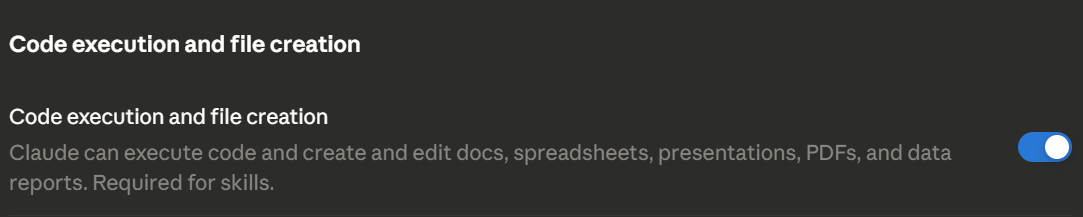
Skills run on Free, Pro, Max, Team, and Enterprise plans, as long as code execution and file creation are turned on. Built-in sharing, where an owner pushes one Skill to the whole organization, is limited to Team and Enterprise plans. On other plans, you share by zipping the folder and sending it.

Praburam Srinivasan
Max 10min read

Manasi Nair
Max 22min read
Manasi Nair
Max 24min read

© 2026 ClickUp




