






Still downloading templates?
There’s an easier way. Try a free AI Agent in ClickUp that actually does the work for you—set up in minutes, save hours every week.
Sorry, there were no results found for “”
Sorry, there were no results found for “”
Sorry, there were no results found for “”
Let’s be honest—budgeting sounds about as fun as organizing your sock drawer (which you’ve definitely been avoiding, too). But what if managing your money didn’t require a finance degree, 10 spreadsheets, and a minor existential crisis?
Enter: the magical 50/30/20 budget rule.
It’s as simple as pie: 50% for needs, 30% for wants, and 20% for savings. To make things even easier, we’ve got 50/30/20 budget templates that offer a structure to help you organize finances and build a long-term financial plan.
Whether living off a student loan, salary, or side hustle cash, this budgeting system can fit into your routine without flipping your life upside down. Keep reading for free templates, smart strategies, and tips to get your spending on track—starting next month.
Here’s a summary table for all the 50/30/20 budget templates listed below:
| Template Name | Template Link | Ideal For | Best Features | Visual Format |
| ClickUp Simple Budget Template | Get free template | People wanting a simple, visual budget | Custom Fields for categories, dynamic table views, status updates, and dashboards | Table, Board, Dashboard |
| ClickUp Personal Budget Template | Get free template | Individuals seeking customizable, all-in-one budgeting | Docs for goals, recurring tasks, Board/List/Calendar views, payment schedules | Board, List, Calendar, Docs |
| ClickUp Personal Budget Plan Template | Get free template | Users wanting a clean, guided layout | 50/30/20 Custom Fields, tagging, task statuses, multiple views | Table, List, Board |
| ClickUp Budget Report Template | Get free template | Budgeters needing actionable reports | Multi-month tracking, reusable templates, Custom Fields, goal vs. performance | Doc, Table, Task Views |
| ClickUp Finance Management Template | Get free template | Managing multiple financial streams | 28 statuses, automations, reminders, calendar/list views | List, Calendar, Board |
| ClickUp College Budget Template | Get free template | College students tracking varied expenses | Cost Board, payment status tags, Custom Fields, drag-and-drop | Board, Form, Table |
| Ally Monthly 50/30/20 Budget Worksheet | Download This Template | Printable, pen-and-paper budgeters | Income/expense breakdown, percentage targets, manual tracking | Printable PDF Worksheet |
| Simple 50/30/20 Budget Spreadsheet | Download this template | Spreadsheet users wanting clarity | Editable fields, preset categories, instant calculations, reminders | Spreadsheet (Excel/Google Sheets) |
| ProjectManager 50/30/20 Budget Template | Download this template | Excel users, shared/household budgets | Auto-calculations, actual vs. planned, duplicate tabs, preset categories | Spreadsheet (Excel) |
| Simple Weekly Budget Template | Download This Template | Weekly budgeters, short-term tracking | Planned vs. actual, live balance updates, weekly totals, portability | People want a simple, visual budget |
Morgan Housel writes in The Psychology of Money:
Doing well with money has little to do with how smart you are and much to do with your behavior.
A 50/30/20 budget template helps shape that behavior by offering a simple method to manage your income. It divides your net income into three parts:
Instead of tracking every penny, you categorize your monthly expenses based on priorities. These templates act as ready-to-use frameworks to organize finances, making it easier to start budgeting, monitor actual spending, and reach financial goals without overcomplicating the process.
A strong 50/30/20 budget template helps you track, adjust, and plan for real-life expenses and goals. The right template should break down monthly income clearly and guide your financial decisions month after month. Key features to look for:
📚 Also Read: Free Household Budget Templates for Google Sheets
Managing your monthly budget gets a lot easier when you have the right tools by your side.
Here are some top 50/30/20 budget templates that can help you allocate your income, track your expenses, and grow your savings goals precisely.
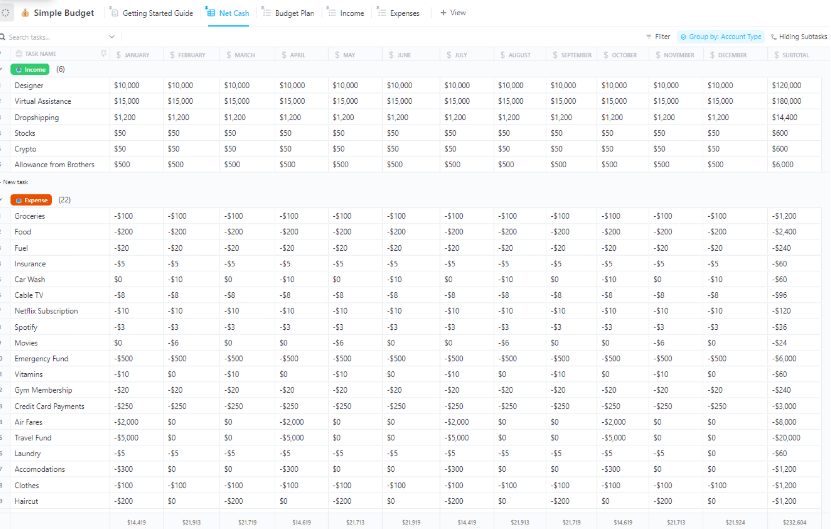
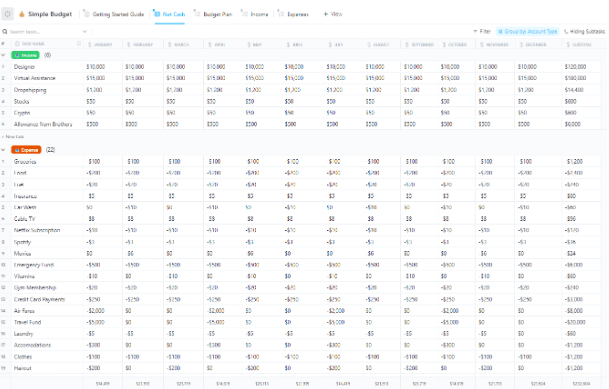
The ClickUp Simple Budget Template strips budgeting down to exactly what it should be—simple. Instead of endless tabs and hidden formulas, you get a visual-first system that neatly maps out your needs, wants, savings, and debt repayment areas.
You can easily enter new transactions, track net income, and plan monthly expenses without much manual work.
Plus, you can shift focus between budgeting views like Net Cash, Income Tracking, and Expenses Management whenever you want to sharpen your financial picture. You don’t have to figure it out alone—ClickUp guides you with a built-in Getting Started view.
🔑 Ideal for: People who want a structured, no-fuss way to organize their 50/30/20 budget and keep it updated with minimal effort.
📹 Watch how to streamline your budget in ClickUp:
➡️ Read more: Atomic Habits Book Summary: Key Takeaways & Review
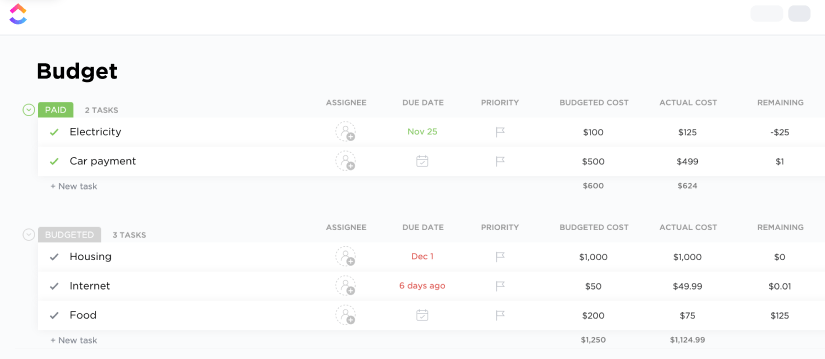
ClickUp’s Personal Budget Template is designed for people who want more control without the complexity of traditional budgeting apps. It focuses on building smart habits by helping you capture everything from your monthly income to discretionary spending in one easy-to-use workspace.
You’ll find Board, List, and Calendar views that lay out your income, fixed expenses, and goals. It’s more than just a tracker—it’s a full financial planning system where you can brainstorm savings strategies, plan debt repayment, and prioritize your money based on your life stage.
If you’re serious about mastering your 50/30/20 splits, this template keeps it structured but flexible.
🔑 Ideal for: Anyone looking for a personal and customizable approach to applying the 50/30/20 rule while keeping future financial priorities in sight.
💡Pro Tip: Use the 50/30/20 budget not just for monthly spending but to fund your one-year, five-year, and ten-year goals—aligning daily habits with bigger milestones makes hitting those long-term targets a lot easier.
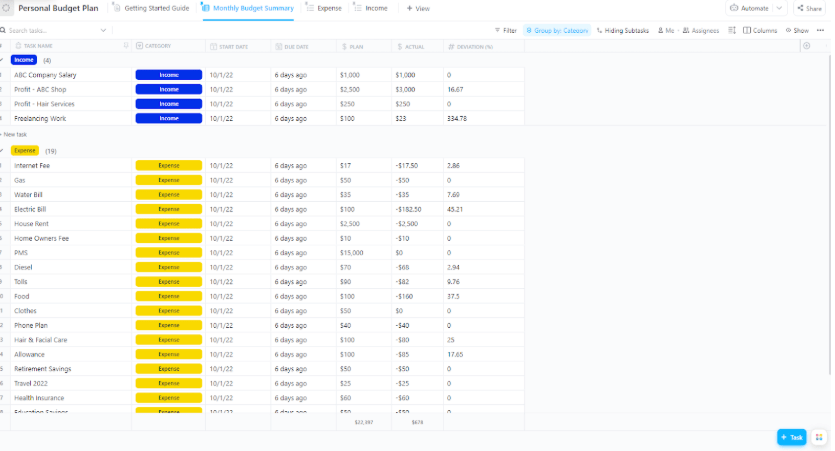
ClickUp’s Personal Budget Plan Template is built for people who want to see everything from income to monthly expenses in one clear view, minus the spreadsheet headaches.
This isn’t a bloated finance dashboard—it’s direct and minimal by design. You can move through the budgeting process quickly, using clear task statuses and six Custom Fields that let you sort by date, category, or budget type.
Whether planning time budgeting, monthly savings, budgeting for debt, or just trying to make smarter choices about your actual spending, this tool gives you the structure to get there.
🔑 Ideal for: Individuals who want a clean, guided layout to apply the 50/30/20 rule without distractions or complex configurations.
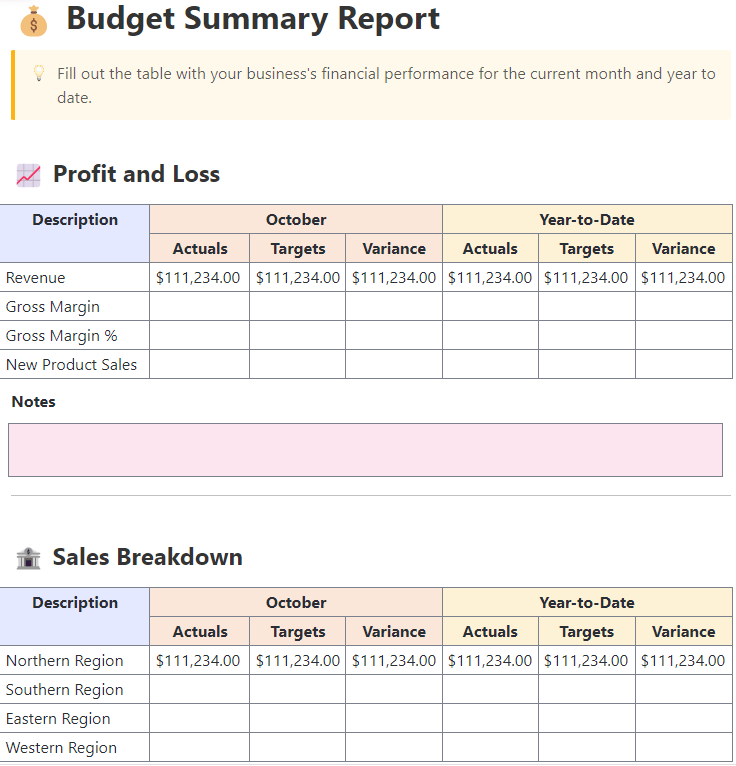
ClickUp’s Budget Report Template focuses on turning financial chaos into clarity. Unlike basic budget trackers, this one is built for deeper insight. It helps you explain discrepancies between your planned and actual spending and pinpoint where your 50/30/20 allocations fall short.
It’s structured as a Doc template, meaning you’re not locked into rows and cells. You can build out reports, insert breakdowns, and track changes over time in a format that feels more natural.
This tool is especially useful for anyone who needs to communicate a financial plan or justify debt repayment adjustments. It’s a reporting tool first, but a strategic planning tool underneath.
🔑 Ideal for: Budgeters who want to translate their 50/30/20 data into actionable reports for better tracking, smarter decisions, and long-term financial clarity.
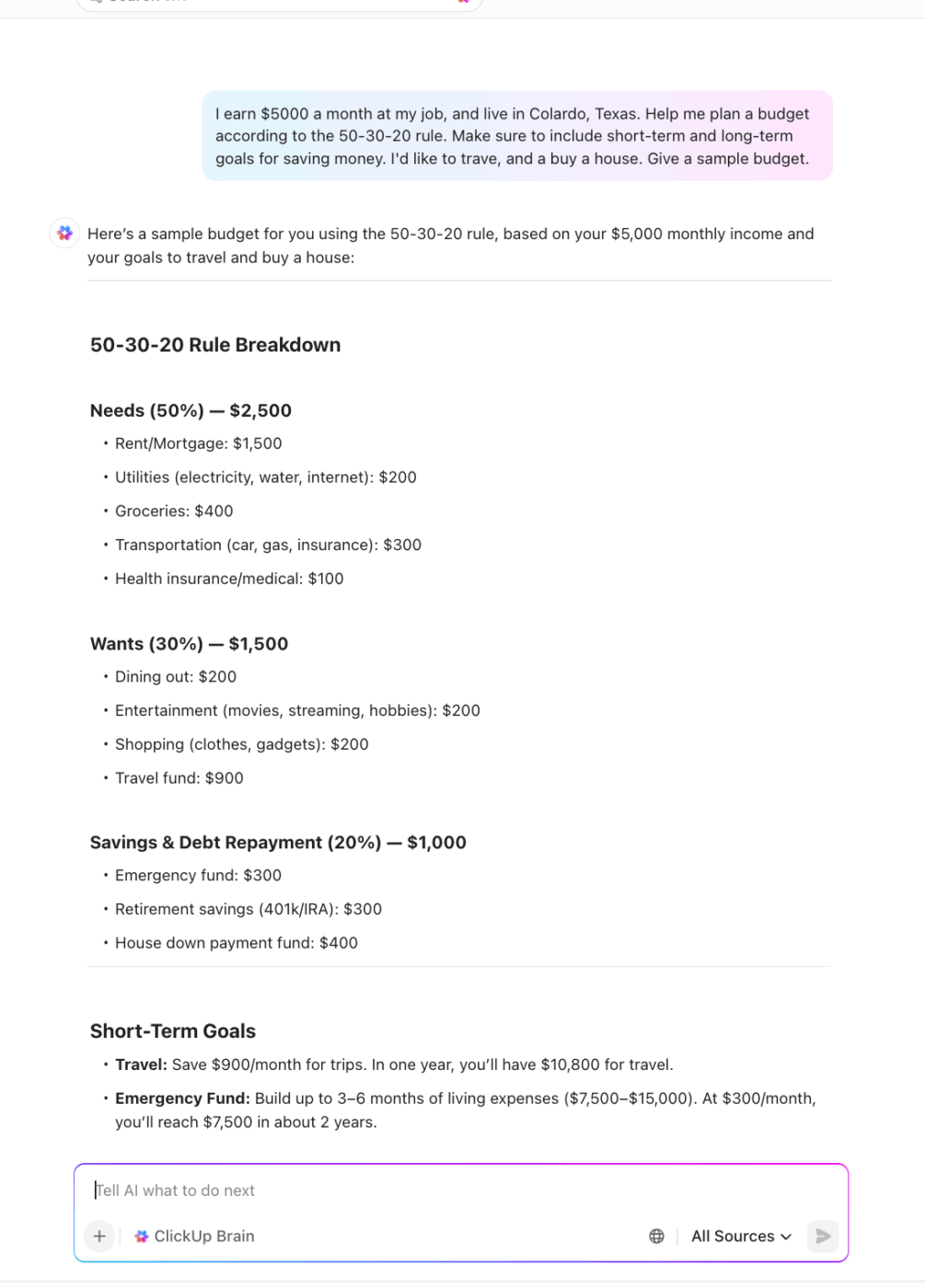
Pro Tip: ClickUp Brain can help you create a personalized budget using the 50-30-20 rule, tailored to your income and goals. It can also track your spending, set reminders for savings milestones, and suggest adjustments to keep you on target. Here’s how:
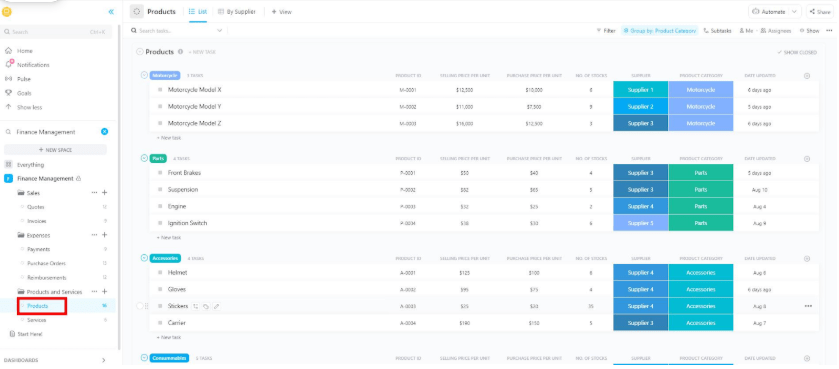
ClickUp’s Finance Management Template isn’t just about budgeting but building a system around your money. Unlike simpler tools, this one gives you full visibility across income, monthly budget, cash flow, and long-term financial goals.
Whether planning a large expense, organizing regular fixed expenses, or breaking down contributions toward a savings account, this workspace adapts to your setup.
With 28 customizable statuses and automation options, you can manage multiple financial priorities without jumping between apps.
🔑 Ideal for: Those managing multiple financial streams who need more than a tracker—a full system to keep all parts of their financial plan connected and in sync.
🔎 Did you know: Here are some stats on money goals, according to an Intuit survey:
The growing trend of open money discussions is making it easier to talk about finances with friends, family, and coworkers.
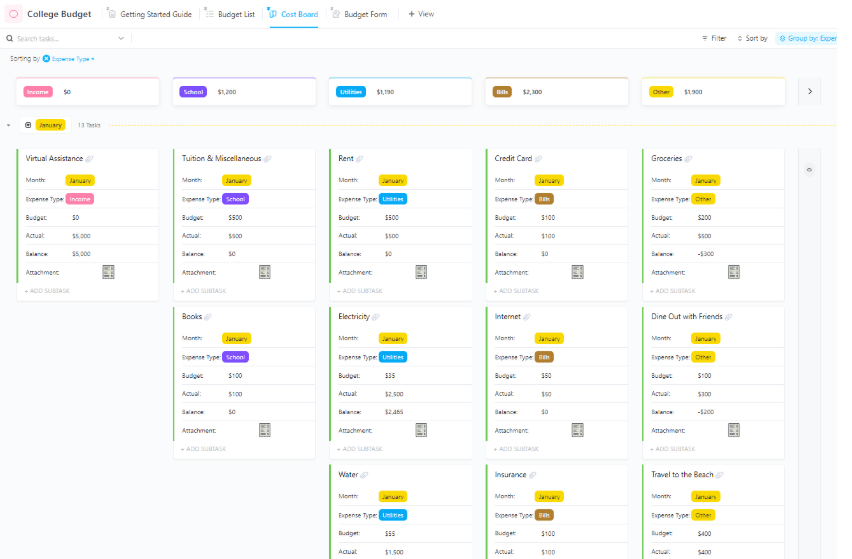
ClickUp’s College Budget Template makes budgeting as a student manageable. Designed with everyday student life in mind—think tuition, groceries, loans, and entertainment—this template gives you a solid grip on your monthly income and spending without requiring a finance degree.
You’ll find flexible views (including Cost Board and Budget Form) that help you sort through fixed payments and spontaneous expense management.
The template lets you mark transactions by payment status, so you’re always clear on what’s pending and what’s been covered. Whether allocating your student loan refund or part-time income using the 50/30/20 rule, this setup keeps you in control without burying you in admin work.
🔑 Ideal for: College students managing multiple categories of expenses who need a visual, organized system to stay within their 50/30/20 budget and avoid overspending.
➡️ Read More: Free Monthly Budget Templates to Manage Expenses
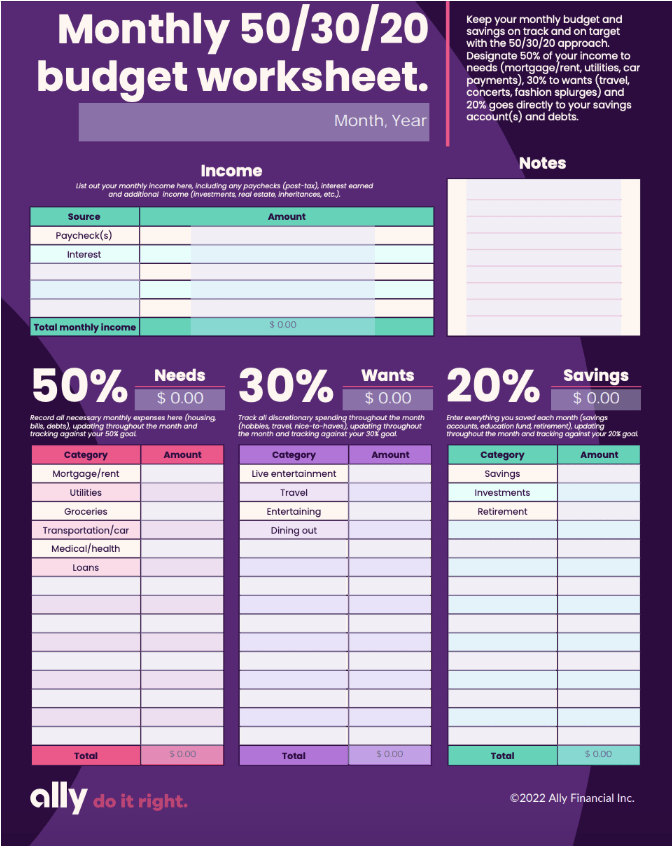
Ally’s Monthly 50/30/20 Budget Worksheet is a printable, no-login-needed tool that keeps budgeting refreshingly simple. It’s ideal if you prefer pen-and-paper tracking or want a clean digital worksheet alongside your online tools.
The template breaks your monthly income into needs, wants, savings, and debt repayment, giving you space to list individual items under each section.
It’s especially useful for staying disciplined month-over-month because it highlights percentage targets and keeps your totals in check. Whether you’re budgeting for rent, weekend concerts, or your savings account, this worksheet lets you track everything without the distractions of an app.
🔑 Ideal for: Budgeters who wish to have a physical or printable format to manually track and visualize their 50/30/20 splits and spending habits in one easy-to-reference sheet.
💡 Bonus: Level up your budget tracking by integrating AI accounting tools that automatically categorize expenses, flag unusual spending, and help you fine-tune your 50/30/20 plan with real-time insights.
This Simple 50/30/20 Budget spreadsheet is built for clarity. It takes a single number—your monthly income—and breaks it down into essential needs, flexible wants, and targeted savings and debt repayment categories.
Each section includes real-world allocations like housing, transportation, dining out, and an emergency fund, with percentages and dollar amounts already calculated for a $4,000/month example.
This template stands out because it is ready-to-use: you don’t have to build anything, plug in your numbers.
🔑 Ideal for: Anyone looking for a structured spreadsheet to kick off their budgeting journey and enforce the 50/30/20 rule with zero guesswork.
📮 ClickUp Insight: While 78% of our survey respondents are big on setting goals, only 34% take time to reflect when those goals don’t pan out. 🤔
That’s where growth often gets lost.
With ClickUp Docs and ClickUp Brain, a built-in AI assistant, reflection becomes part of the process, not an afterthought. Automatically generate weekly reviews, track wins and lessons, and make smarter, faster decisions moving forward.
💫 Real Results: ClickUp users report a 2x increase in productivity because building a feedback loop is easy when you have an AI assistant to brainstorm with.
📚 Also Read: How to Write a Goal Statement (with Examples)
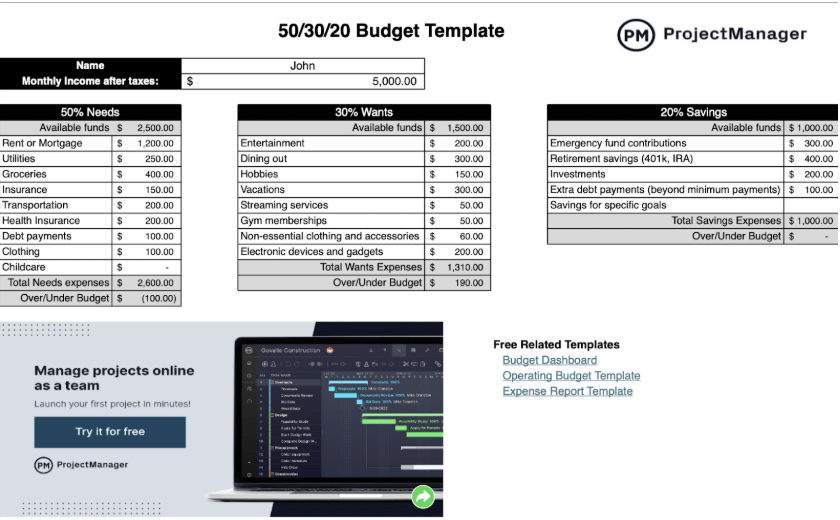
ProjectManager’s 50/30/20 Budget Template is a smart pick for Excel users who want built-in automation without switching platforms. It’s a downloadable spreadsheet that does the heavy lifting: once you input your monthly income, the sheet automatically calculates allocations for needs, wants, savings, and debt repayment.
It features clear cost breakdowns for each category—like rent, insurance, travel, or retirement—along with totals that instantly flag overspending.
What sets this apart is the structure: the tool isn’t just for budgeting but also for spotting trends and making course corrections early. It even supports duplication for multi-user tracking, making it useful for shared household budgets or group financial planning.
🔑 Ideal for: Users who want a downloadable, editable Excel tool that combines automation with a spreadsheet’s familiarity—great for individual and shared budget tracking.
➡️ Read More: Best OKR Software (Reviews & Pricing)
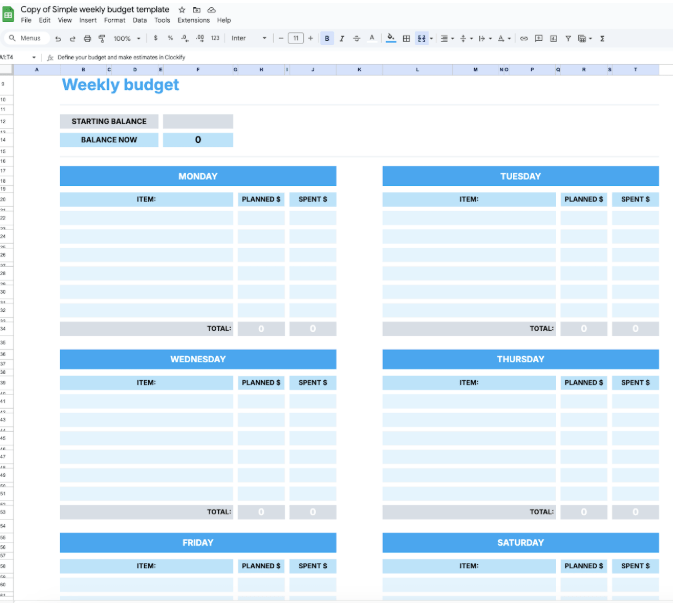
The Simple Weekly Budget Template is perfect for anyone who wants to keep a close eye on spending without the bulk of a full financial system. It’s a stripped-down, spreadsheet-based tool that helps you capture planned expenses or actual expenditures and automatically updates totals and balances as you go.
It works just as well for planning as it does for tracking in real-time, especially if you’re applying the 50/30/20 rule on a weekly scale. Whether you’re managing your groceries, a quick weekend trip, or daily coffee splurges, this sheet lets you monitor spending patterns before they spiral.
🔑 Ideal for: Budgeters who want a fast, flexible way to monitor weekly spending, especially when applying the 50/30/20 method to shorter budgeting cycles.
➡️ Read More: Rich Dad Poor Dad Summary: Key Takeaways & Review)
Mastering your finances doesn’t have to feel like a second job. With the right 50/30/20 budget template, you can simplify how you track spending, allocate income, and prioritize savings—whether for the next week or the next decade.
From printable sheets to dynamic dashboards, our templates give you various ways to stick to your budget and focus on your goals. Whether you’re managing a personal salary, student income, or shared household expenses, there’s a setup that works for your routine.
Ready to organize your money with less stress and more structure?
👉 Sign up for ClickUp to start budgeting smarter—free templates included.

© 2026 ClickUp

There’s an easier way. Try a free AI Agent in ClickUp that actually does the work for you—set up in minutes, save hours every week.