Sorry, there were no results found for “”
Sorry, there were no results found for “”
Sorry, there were no results found for “”
Tired of answering the same customer questions over and over again?
Or maybe your support team is drowning in tickets and emails? That’s where a knowledge base chatbot can help.
Imagine having an AI-powered tool that can instantly answer customer questions, provide personalized responses, and guide users to self-service resources—all without needing human intervention.
These aren’t your basic bots. We’re talking about advanced chatbots powered by artificial intelligence and generative AI, built to understand complex questions, deliver relevant answers, and adapt to different user needs.
Whether a customer asks something simple or dives into complex issues, a smart chatbot can scan your existing knowledge base, interpret your corporate policies, and pull out the most accurate information.
Let’s break down what you should be looking for in a chatbot that actually delivers value for both you and your team.
From supporting a custom knowledge base to augmenting your customer service software with AI, we’ve got all the options!
Choosing the right base chatbot is kind of like hiring a new support rep. Only this one works 24/7, never takes breaks, and keeps getting better the more it learns.
Here’s what you really need to pay attention to:
You want a chatbot that does more than just follow scripts. Look for strong artificial intelligence and generative AI features. This helps the bot truly understand complex problems, provide relevant answers, and keep the conversation going in a natural conversational format. A smart chatbot can even handle complex queries without needing human intervention.
Your chatbot should work with your existing knowledge base. Whether it’s an FAQ page or more in-depth support content, the chatbot should be able to scan it all to deliver accurate information quickly.
A great chatbot doesn’t feel robotic. With the right voice and persona, it can mirror your brand tone while offering personalized responses tailored to different customer needs. It should also adapt based on past conversations and use your training data to improve over time.
🧠 Did You Know? The ancient Egyptians created one of the first known systematic archives of knowledge in the Library of Alexandria around the 3rd century BCE. It wasn’t just a library—it was an early knowledge hub where scholars managed scrolls, curated information, and even classified data based on subject matter. In a way, they were practicing knowledge management thousands of years before the term was coined!
The goal is to guide users to the right self-service resources, not just bounce them around. A well-designed chatbot should help customers solve complex tasks on their own and reduce the need for live agents. This not only helps with saving time, but also improves satisfaction for both your customers and your support team.
A good chatbot doesn’t just answer questions—it shows you where your knowledge gaps are. Look for features like analytics or dashboards that highlight customer questions, track chatbot’s effectiveness, and suggest updates to your knowledge base as your product evolves. This is key to building a smarter knowledge management strategy.
Your needs today won’t be the same six months from now. Look for a solution that grows with you—whether that means handling more complex issues, serving more user types, or plugging into different AI platforms. Just make sure the pricing fits your business, and there are no hidden fees for scaling up.
The right chatbot will feel like an extension of your team—intuitive, helpful, and smart enough to understand even your trickiest customer questions. With a solid knowledge base and the right AI features, you’re not just offering support—you’re delivering a better experience, every time.
➡️ Read More: Free Knowledge Base Templates in Word & ClickUp
Our editorial team follows a transparent, research-backed, and vendor-neutral process, so you can trust that our recommendations are based on real product value.
Here’s a detailed rundown of how we review software at ClickUp.
Here’s a markdown table summarizing the 10 best knowledge base chatbots from your content, following your requested format:
| Tool name | Key features | Best for | Pricing |
| ClickUp Brain | AI-powered Connected Search, Contextual answers, Automated meeting summaries, Custom prompts, Task suggestions, Knowledge management integration, Seamless task creation, Permissions, Customer service support, Continuous learning | Scalable, AI-driven customer service for enterprises | Free Forever; Paid plans from $7/user/month |
| Intercom Fin AI | Fin AI Engine™, Multilingual, Custom training, Self-checking answers, Complex workflow automation, Image understanding | Scalable, AI-driven customer service, Enterprises | 14-day free trial; Paid plans from $0.99/resolution (min. 50/month) |
| Tidio | Live chat + AI chatbot, Visual workflow builder, Multi-channel inbox, Website visitor tracking, Pre-built templates | Small to medium businesses, Sales & support teams | Free; Paid plans from $29/month |
| Botpress | Visual flow builder, Autonomous nodes, Multi-platform deployment, 100+ languages, Enterprise security | Developers, Enterprises, Custom AI chatbots | Pay-as-you-go; Paid plans from $79/month |
| Ada | Reasoning Engine™, Multichannel (web, mobile, social, voice), Brand customization, Integrations (Salesforce, Zendesk), Real-time NLP | Large enterprises, Automated & scalable support | Custom pricing |
| Kommunicate | No-code builder, Multi-platform deployment, AI suggestions, Live chat integration, Performance analytics | SMBs, Affordable AI + live chat, Easy setup | Paid plans from $100/month |
| Zoho Desk | AI assistant (Zia), Sentiment analysis, Automation, Multi-channel, Zoho integrations, Remote support | Affordable, feature-rich help desk, SMBs | Free (3 agents); Paid plans from $20/agent/month |
| SAAS First | AI chatbot, Live chat, Knowledge base, CRM, Multilingual, Automated FAQ, Data privacy compliance | All-in-one help desk, Customer engagement | Free trial; Paid plans from $9/member/month |
| Guru | Workflow integration, Content verification, Slack/MS Teams/Salesforce integration, AI writing assistant, Centralized knowledge | Integrated knowledge management, Content verification | Free (3 users); Paid plans from $12/user/month |
| Zendesk | AI-powered responses, Automated routing, Agent assist, Multi-language, Workflow automation, Knowledge base | Comprehensive customer service, Large/complex teams | Paid plans from $69/month |
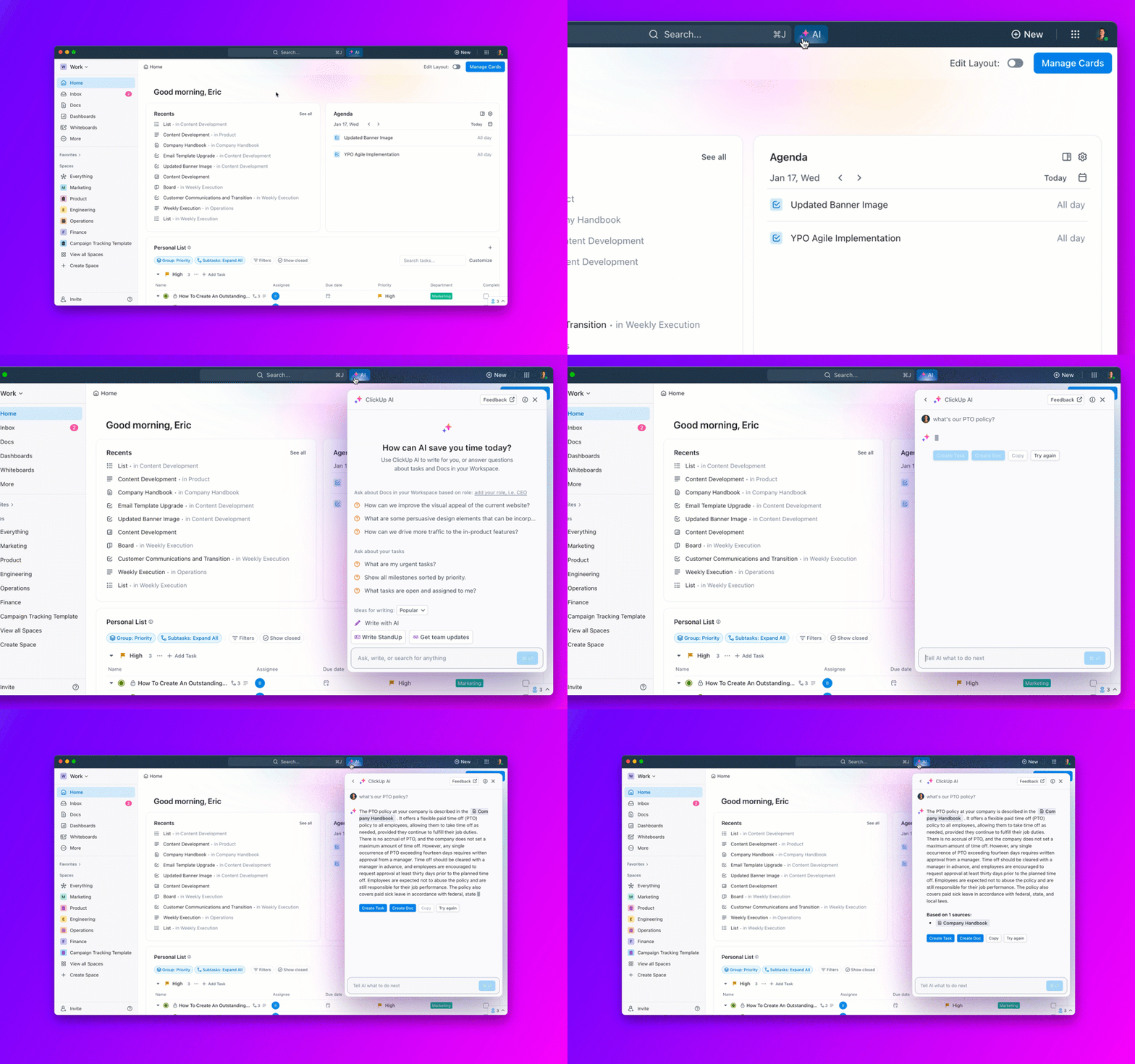
ClickUp Brain, the AI-powered assistant within ClickUp, is built to eliminate the most common pain points teams face: wasting time searching for information, knowledge silos, inconsistent support responses, and onboarding bottlenecks.
By integrating ClickUp Brain and Connected Search with Docs, tasks, and conversations, ClickUp lets you ask questions in natural language and get instant, contextual answers from your internal knowledge base—no more digging through endless docs or pinging teammates for help.
ClickUp Brain is especially valuable for internal team support and customer service teams, enabling anyone to surface policies, process docs, or product details in seconds. For example, a new hire can ask, “What’s our process for onboarding?” and get up-to-date, accurate steps without waiting on a manager.
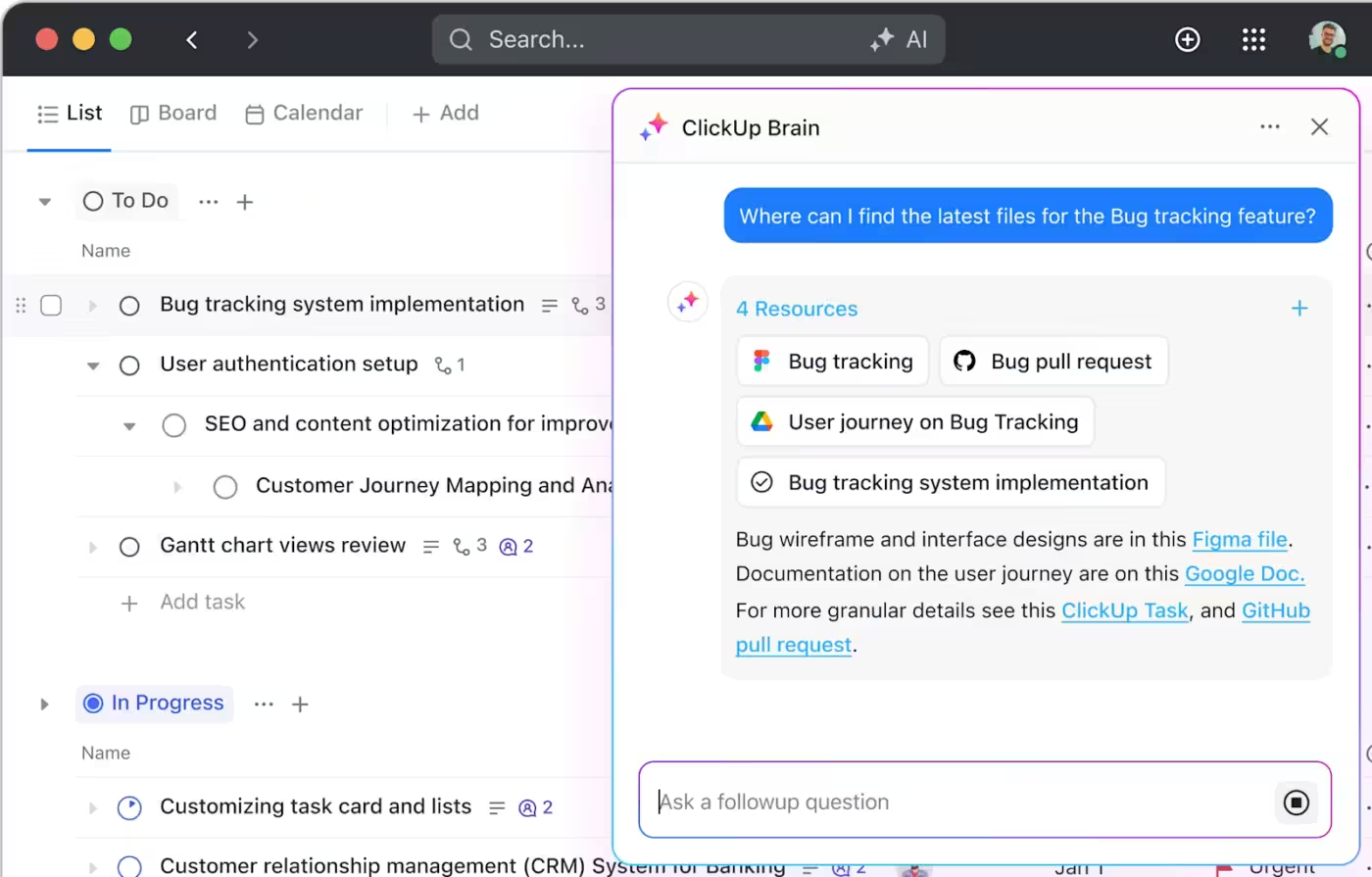
Support agents can use it to instantly retrieve troubleshooting guides or the latest product updates, ensuring consistent and on-brand responses to customers. After critical meetings, the combo of AI Notetaker + Brain can summarize transcripts, extract action items, and suggest tasks—so nothing falls through the cracks and follow-ups are never missed.
Leveraging custom prompts, you can even automate repetitive queries and standardize answers to FAQs, freeing up your team’s time for higher-value work. Brain also provides intelligent, task-related suggestions—like surfacing related Docs, recommending next steps, or linking knowledge articles directly to tasks—helping teams stay organized and proactive.
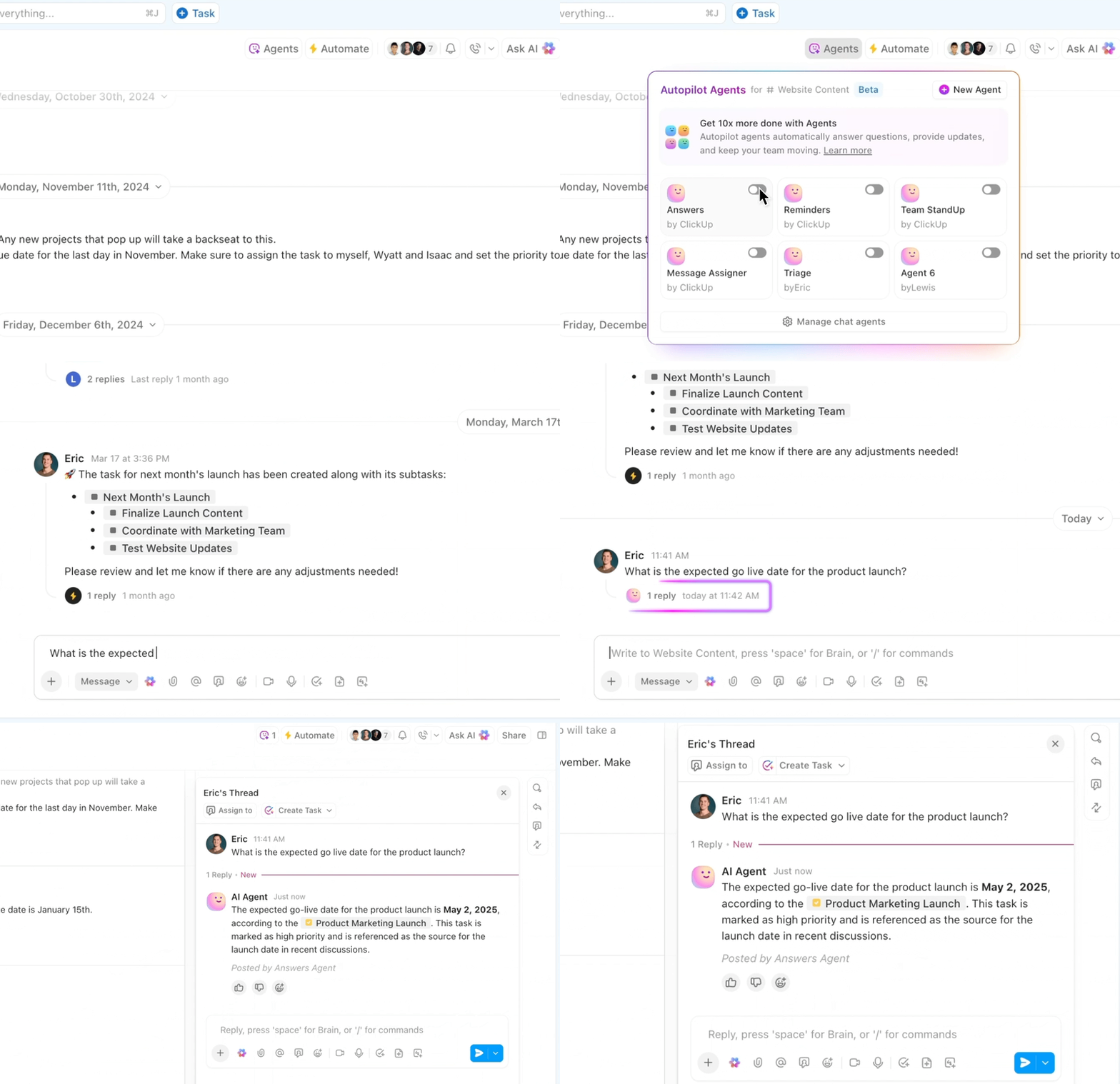
If you want to dial up it up a bit, Autopilot Agents within ClickUp can step in and provide highly contextual answers based on the information in your workspace. You can even configure them to perform specific functions.
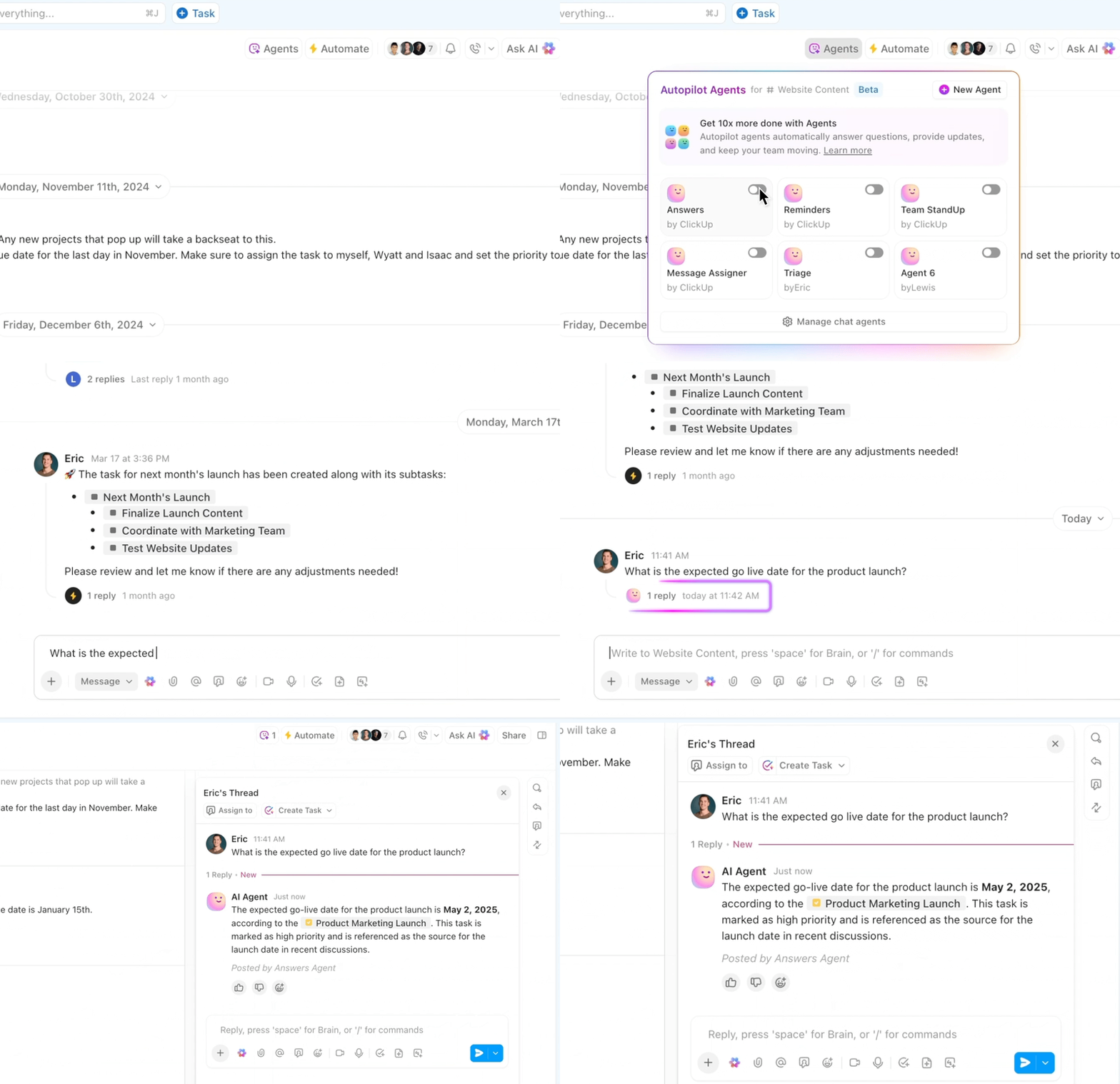
All of this is seamlessly integrated with ClickUp’s robust knowledge management and task features, so your company’s knowledge base is always accessible and actionable.
Alexander Haywood, CTO of Liquid Barcodes, says:
We’ve saved tens of thousands of Euros already, as our teams don’t waste time explaining what and where information is. It’s all in one platform with ClickUp. Teams see the Goals, Lists, and Dashboards. Everyone is in the know!

Meet Intercom Fin AI, an impressive AI agent for customer service that’s really changing the game. It’s built to instantly and accurately resolve a huge chunk of customer questions, taking the load off your human support team so they can focus on trickier stuff. Think of Fin as your super-efficient first line of defense in customer support.
What makes Intercom Fin stand out is its ability to really understand what customers are asking. It can take complex questions, make sense of them, and then deliver precise answers, thanks to its special Fin AI Engine™. Whether you’re already using Intercom’s customer service tools or a different helpdesk software like Zendesk or Salesforce, Fin slots right in, making it a flexible way to boost your current support setup with smart AI.
A G2 review says:
We are able to support so many more customers with the same high level of service they’ve come to expect. Fin gets better and better and adapts so well to the complex questions that are being asked. Our product is just that…complex. Most issues are unique in that clients ask similar questions but in very different ways or with very different use cases of each feature. Fin is able to use our resources to answer well.

Tidio is like a friendly, versatile assistant for your website, blending live chat and AI chatbots into one neat package. It’s especially popular with small and medium-sized businesses because it helps them boost customer support and sales without getting too complicated or expensive.
The tool acts as a central hub where you can chat with website visitors in real-time and let smart AI handle common questions, even when you’re not around.
Tidio really shines by offering a comprehensive solution that includes live chat, robust AI (their “Lyro” AI agent), and email and social media integrations, all from a single dashboard. It’s designed to be user-friendly, even for non-tech-savvy users, allowing them to quickly set up automated responses and engage with customers more effectively.
A Capterra review says:
It has been a fabulous tool to be able to resolve customer queries through live chat much faster, many times without the need to transfer to an advisor. Frequently asked questions that are easy to answer are done by the AI, which reduces the flow of conversations. It helps improve the productivity of operators by being able to focus on more special cases that require more attention.

Botpress is a powerful, open-source platform that really puts the reins in your hands when it comes to building AI chatbots and voice assistants. It’s designed to be versatile, appealing to both seasoned developers who love to dive deep into customization and those who appreciate a visual, drag-and-drop approach.
With Botpress, you’re not just creating a simple FAQ bot; you’re crafting sophisticated conversational experiences that can understand, learn, and improve over time.
It allows you to build complex conversation flows visually, almost like drawing a flowchart, while also offering the flexibility to integrate with virtually any system or channel you need. This makes it a go-to choice for businesses aiming to automate customer service, streamline internal operations, or enhance user engagement with intelligent AI agents across multiple platforms.
A G2 review says:
Botpress is both powerful and user friendly – there isn’t much you can’t do if you put your mind to it. It has the capability. I love that there is a large user base in the discord and the community openly helps each other.
📮ClickUp Insight: The average professional spends 30+ minutes a day searching for work-related information—that’s over 120 hours a year lost to digging through emails, Slack threads, and scattered files.
An intelligent AI assistant embedded in your workspace can change that. Enter ClickUp Brain. It delivers instant insights and answers by surfacing the right documents, conversations, and task details in seconds—so you can stop searching and start working.
💫 Real Results: Teams like QubicaAMF reclaimed 5+ hours weekly using ClickUp—that’s over 250 hours annually per person—by eliminating outdated knowledge management processes. Imagine what your team could create with an extra week of productivity every quarter!
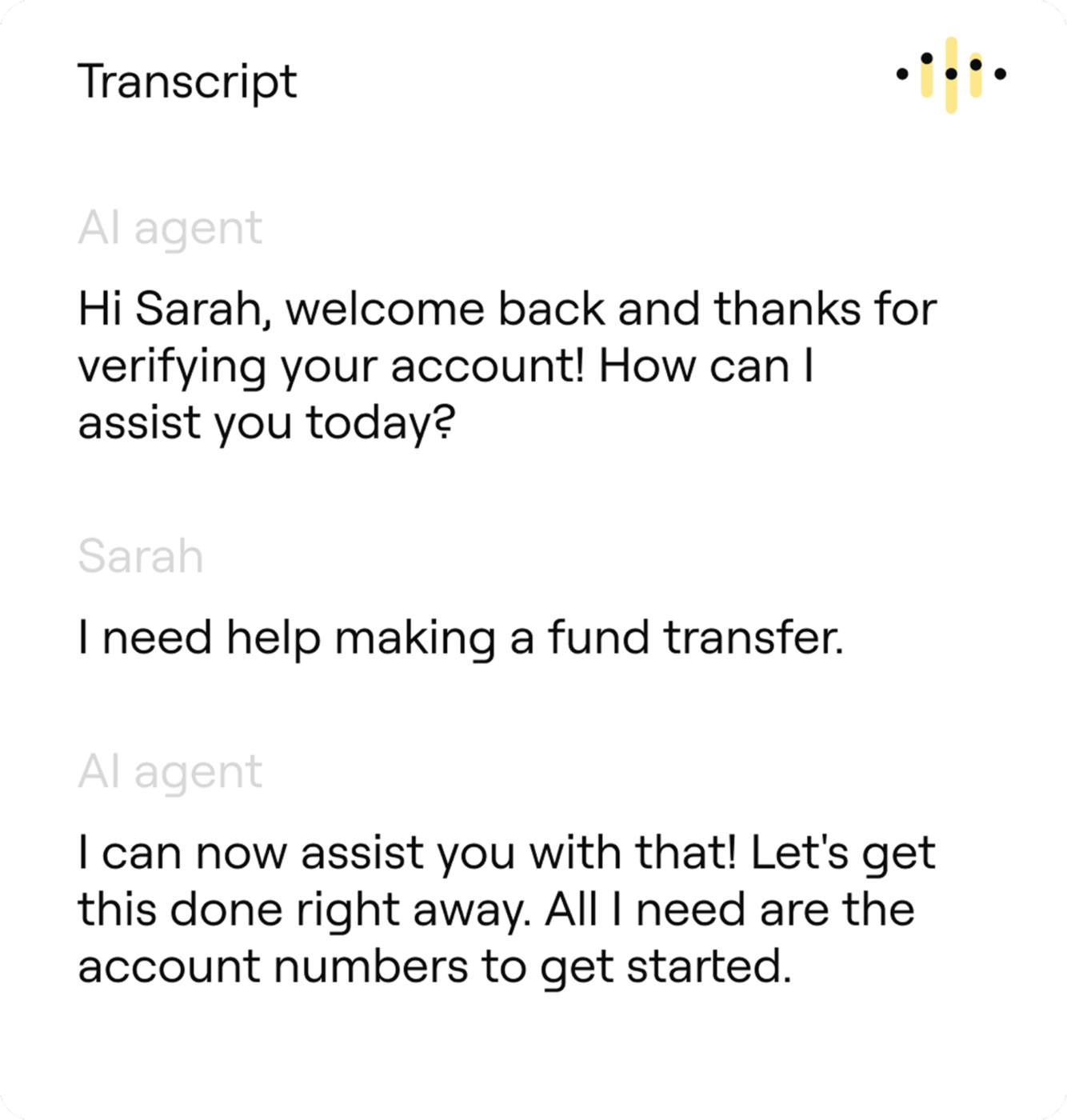
Ada is a leading AI-powered customer service automation platform, built to handle a huge volume of customer inquiries instantly and accurately.
It’s especially popular with large enterprises looking to significantly reduce the burden on their human support teams and empower customers with truly intelligent self-service.
At its core, Ada uses its proprietary “Reasoning Engine™” to understand customer intent, connect with various knowledge sources, and even take actions within business systems. This makes it a powerful solution for automating resolutions across a multitude of channels, including web chat, mobile apps, email, social media, and even voice, aiming to deliver exceptional customer support around the clock.
A Capterra review says:
I particularly like the fact that Ada is always super fast when it comes to integrating the latest innovations into the software solution. The solution is also very intuitive and meets all my personal requirements for a good conversational AI. The support from the employees is also very good.
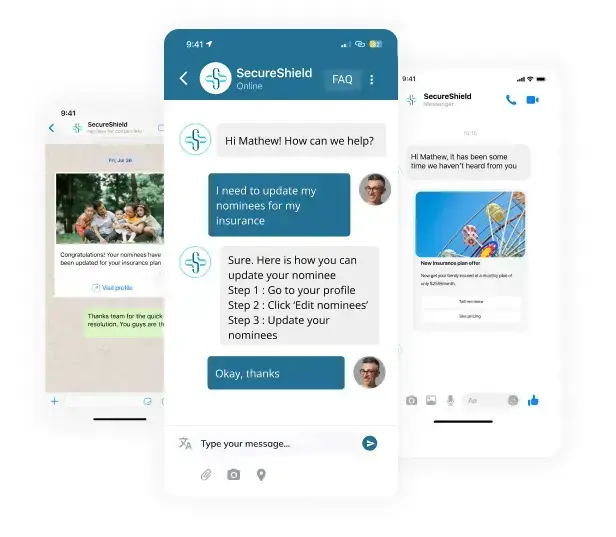
Kommunicate positions itself as a comprehensive customer messaging platform, perfect for businesses that want to blend AI chatbots with seamless human live chat support. It’s especially appealing to small to medium-sized businesses due to its user-friendly interface and competitive pricing. Imagine a tool that not only answers common customer questions instantly but also knows exactly when to hand off a more complex query to your human team, making the overall operations more efficient.
A G2 review says:
As a coding newbie, I was thrilled with how easy Kommunicate’s AI chatbot was to set up. It was intuitive and straightforward, letting me launch a website chatbot without breaking a sweat.
➡️ Read More: Top Customer Experience KPIs & Metrics to Track

Zoho Desk is a comprehensive AI tool for customer service, designed to empower both agents and customers. Imagine a help desk that not only organizes customer queries but also uses AI to answer questions, guide agents, and even predict customer mood.
What sets Zoho Desk apart is its strong emphasis on affordability coupled with a rich set of features, including its AI assistant, Zia. It centralizes customer interactions from various channels, offers robust automation, and integrates seamlessly with other Zoho products, providing a holistic view of the customer journey.
A Capetrra review says:
Managing a staff to answer client questions and navigating the system itself is a joy thanks to the system’s simplicity, intuitiveness, and the extensive personalization choices provided by its automation and workflow features.

SAAS First offers a fresh approach to customer support, bundling an AI-powered chatbot, live chat, a knowledge base, and CRM features into a single, cohesive system. It’s built for businesses looking to truly transform how they interact with customers, moving beyond traditional support to intelligent, instant engagement.
The real strength of SAAS First lies in its unified design. Instead of piecing together different tools, you get one platform to manage AI agents and customer conversations across various channels. This isn’t just about efficiency; it’s about providing a seamless, consistent brand experience while gaining valuable insights into customer behavior.
➡️ Read More: How to Build a Customer Service Knowledge Base?
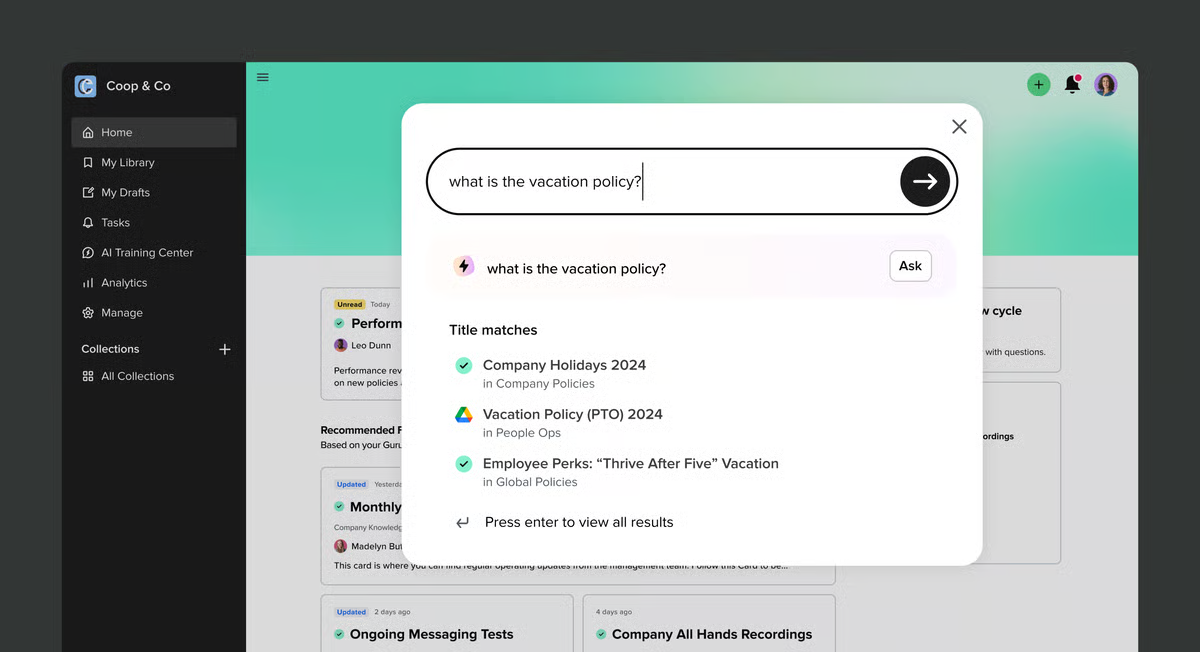
Guru is a dynamic platform designed to ensure your team always has the right information, right when they need it. Imagine a system where answers actively find your employees, eliminating endless searching through scattered documents.
This platform is designed to be the single source of truth for your organization, making information accessible and trustworthy across departments. Guru also emphasizes on verified knowledge and seamless workflow integration.
Instead of a static repository, Guru uses AI to suggest relevant information and empowers experts to maintain and verify content, ensuring accuracy. It’s especially powerful for sales enablement, customer support, and internal communications, where having up-to-date information at your fingertips can make all the difference.
A G2 review says:
Guru makes it super easy to access trusted information without breaking your workflow. The browser extension is clutch, it surfaces answers right inside tools like Gmail and Zendesk. Search is fast and reliable, and the verification system helps keep content accurate and up to date. It’s saved our CS team a ton of time and improved consistency across the board.
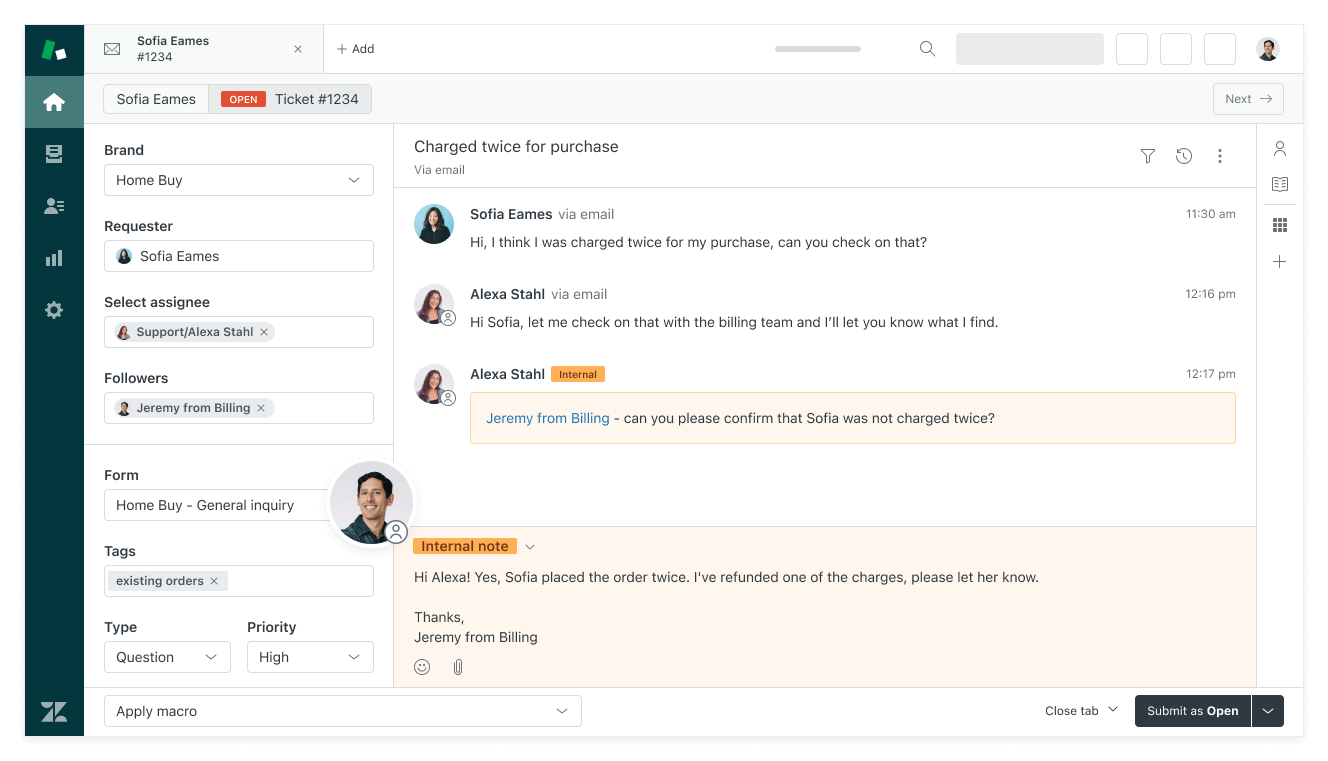
Zendesk is a vast ecosystem designed to handle every facet of customer service. For businesses, especially those scaling rapidly or managing complex customer interactions, Zendesk offers a robust suite of tools that seamlessly blend traditional support channels with cutting-edge AI and automation. Its goal is to make support efficient for agents and effortless for customers, all from a unified interface.
Its ability to centralize diverse support functions, from ticketing and live chat to knowledge bases and sophisticated AI agents, into one intuitive system makes it Zendesk standout among its competitor. It’s built to empower self-service, reduce agent workload, and provide a personalized customer experience, whether through automated responses or streamlined human interactions.
A Capterra review says:
I got better control over customer interactions plus it made the team’s workflow clearer. And also helping to reduce missed tickets and keep our responses organized.
➡️ Read More: Best Knowledge Management Software Tools
Knowledge base chatbots move beyond simple automation, offering intelligent, scalable solutions that provide instant answers, empower self-service, and free up human agents for more complex and empathetic interactions.
We’ve explored a range of top-tier knowledge base chatbots, each with its unique strengths, from deep CRM integration and developer-focused customization to all-in-one help desk solutions. The right choice for your business ultimately hinges on your specific needs: the complexity of your inquiries, your existing tech stack, your budget, and your growth ambitions.
Ultimately, investing in a robust knowledge base chatbot isn’t just about cutting costs; it’s about elevating your entire customer experience. With ClickUp’s everything app for work, you can build reliable support around the clock, fostering greater customer satisfaction, and building a more efficient, future-ready support team.
Sign up for a free ClickUp account today and do more with your knowledge workflows!

Manasi Nair
Max 14min read
Manasi Nair
Max 9min read

Arya P Dinesh
Max 17min read

© 2026 ClickUp