

Made with in ClickUp
ClickUp vs. Monday.com

Run every client and every team from one Workspace.

The monday.com alternative with projects, docs, chat, and AI in one place, and every seat billed per person.

4.6 stars25,000+ reviews from
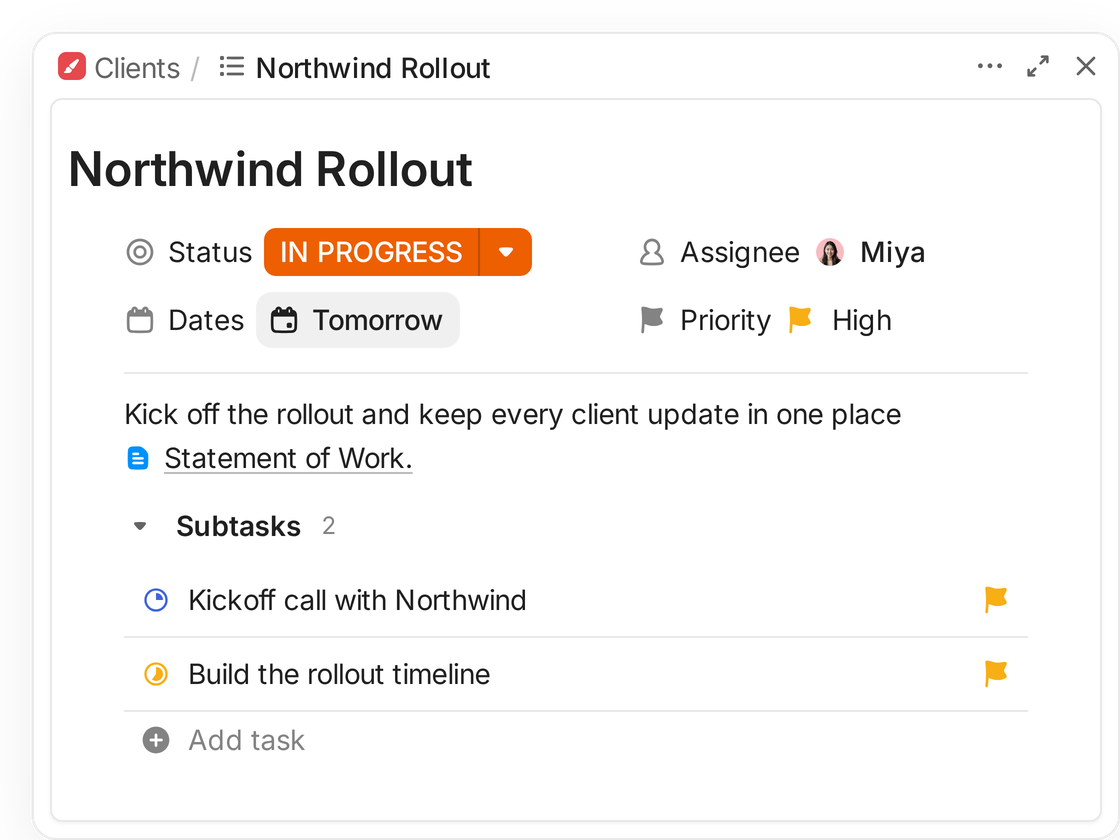
A ClickUp task, Northwind Rollout, with a statement of work and client subtasks
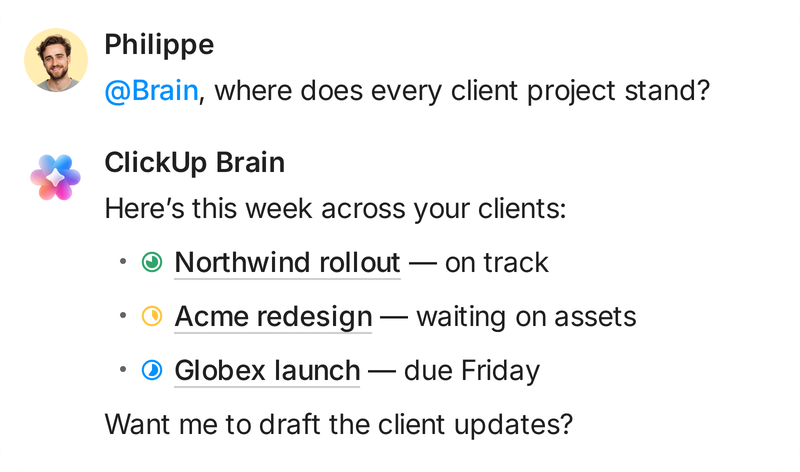
Asked where every client project stands, ClickUp Brain summarizes three client projects
Super Agent: I sent Friday status updates to all 6 client projects
The verdict

Choose ClickUp when work spans teams

When work spans teams and projects, one shared workspace can ease coordination. ClickUp fits that stage. Monday.com remains a sound choice when a small team prefers visual boards.

“We needed genuinely custom workflows without hitting a ceiling, flexible automation, and custom fields that reflect how a project actually moves.”

Kateryna BrikSenior Project Manager, Plus972Customer story
See the difference

ClickUp vs. Monday.com compared

Prices use the same annual billing basis. Seat buckets may mean monday.com bills for more seats than a team has people.
Pricing checked September 28, 2026

ClickUp

Monday.com

At a glance
Built forA high-level view of how each platform organizes everyday project and team work.
Tasks, Docs, and projects
Visual workflows on boards
Free planWhat each vendor provides before a team pays for a subscription.
Unlimited members and tasks60 MB storage
Up to 2 seats3 boards and 3 Docs
How paid seats are soldA seat bucket is seats bought together. monday.com starts at 3, then sells groups of 5.
Per memberNo seat bucket
3-seat minimumThen 5, 10, 15, and so on
G2 ease of setupG2's score out of 10 for setup, based on product reviews.
8.2 / 105,410 ClickUp reviews
8.8 / 107,285 monday.com reviews
Features
Native time trackingWhich plan first includes task time tracking, and the annual seat rate. See ClickUp time tracking
Unlimited plan and up$7/user/month, billed annually
Pro plan and up$19/seat/month, billed annually
Task dependenciesWhich plan lets teams link tasks that block each other. See ClickUp Dependencies
Every plan, including Free
Pro and Enterprise
Workload and capacity planningWhen each product makes workload views or capacity planning available. See ClickUp Workload
Business plan and upUnlimited Workload uses
Workload view on Pro and upResource Management on Enterprise
Sprints and agile reportingWhere teams can plan work in sprints and review sprint progress. See ClickUp Sprints
Sprints on every planSprint cards and automations on Business
monday devSeparate product
Built-in team chatHow each product handles task discussions or a dedicated platform chat. See ClickUp Chat
Unlimited plan and up
Board updates and integrations
Automation on $12 annual tiersMonthly automation limits at the published $12 per-seat annual rate, not total account cost.
5,000 executions/monthBusiness, $12/user/month
250 automation actions/monthStandard, $12/seat/month, plus 250 integration actions
Highest published automation limitPublished paid plans below custom Enterprise terms, monthly automation counts only.
5,000 executions/monthBusiness, $12/user/month, billed annually
25,000 automation actions/monthPro, $19/seat/month, plus 25,000 integration actions
Pricing
Free planWhat each vendor makes available to evaluate the product without paying.
$0Free Forever, unlimited members
$0Up to 2 seats, 3 boards
Entry paid tierPublished per-member or per-seat price per month, billed annually. monday.com requires a seat bucket.
$7/user/monthUnlimited, billed annually
$9/seat/monthBasic, billed annually
Mid tierAnnual prices use the same billing period but may cover different numbers of paid seats.
$12/user/monthBusiness, billed annually
$12/seat/monthStandard, billed annually
EnterprisePublished list prices are not available for either vendor's Enterprise plan.
CustomContact sales
CustomContact sales
AI usage and price basisA monday.com AI credit is deducted for supported AI use. ClickUp Brain AI has a separate add-on price.
$9/user/monthBrain AI add-on, billed annually
$0.01 per creditAnnual rate. Monthly minimums: 1,000 Basic, 2,000 Standard, 3,000 Pro, before promotions

Start on ClickUp's free plan and run the Monday.com importer before you commit to anything.

Sources: monday.com/pricing, monday.com Support, clickup.com/pricing, ClickUp Help, and G2 comparison. Checked September 28, 2026. Annual seat rates shown, and monday.com promotions may change checkout totals.

What actually sets them apart

What the differences mean in daily work

Choose by how your team plans, shares context, and budgets as needs grow. These four details show where each platform fits beyond its feature list.

Monday.com seat buckets shape team costs

Planning a paid team of six? monday.com Work Management starts with a three-seat minimum, then sells paid seats in groups of five. A six-person team therefore needs ten seats. ClickUp charges paid plans per member, so six paid members need six seats. Compare annual totals, not just per-seat rates, before you choose.
Monday.com6 people, 10-seat bucket
People on the team6
Seats billed10
ClickUp6 people, billed for 6
People on the team6
Seats billed6

The 10-seat bucket covers a six-person team.

Choose separate products or one Workspace

Teams that need work management, CRM, software development, and service can choose monday.com's four standalone products, each with its own plan. ClickUp brings project tasks, Docs, and Sprints into one Workspace, where a project team can keep those work types together. The distinction is separate specialist products versus shared project context, not identical tools.
Monday.comFour standalone products
monday work management
Own seatsOwn price
monday CRM
Own seatsOwn price
monday dev
Own seatsOwn price
monday service
Own seatsOwn price
ClickUpOne Workspace
Client pipelinesSprintsDocs
Project work and Docs share a Workspace.

Compare the AI meter before estimating use

ClickUp Brain AI is a separate add-on. Brain Assistant use is unlimited within fair use, and 1,500 monthly AI Super Credits cover agents and other credit-using features. Since May 6, 2026, new monday.com Work Management signups must buy shared monthly credit bundles: 1,000 on Basic, 2,000 on Standard, and 3,000 on Pro.
Monday.com1,000 to 3,000 monthly credits
SidekickAgentsNotetaker
Credit-using AI features draw from this pool.
ClickUp Brain1,500 Super Credits per user/month
Brain AssistantUnlimited use
Agents and AI automationsCredits
AI Super Credits cover agents and other credit-using features.

Feature gates differ by plan

ClickUp task dependencies are available on every plan, while its time tracking is use-limited on Free and unlimited on Unlimited. monday.com lists time tracking and dependencies on Pro and Enterprise. ClickUp Workload view has unlimited uses on Business. monday Workload view starts on Pro, with Resource Management on Enterprise. Check which planning tools your team needs.
ClickUp plansWhere each tool turns on
Free
Unlimited
Business
Enterprise
Time tracking
Task links
Workload view
Timesheets
Monday.com
Time tracking and dependencies on Pro. Workload view on Pro. Resource Management on Enterprise.
From teams that switched

How customers use ClickUp at scale

30+Active and recurring client engagements Plus972 runs through one ClickUp Workspace across project, development, and design teams.
6,000Applicants Sorbonne International screened before choosing 20 finalists during its five-week admissions window with ClickUp.

“We were on Airtable, Monday, Trello, Notion... it was a mess. Nothing was working.”

Kris Levine · Director of Technology, Made In Cookware · Customer story

How G2 reviewers score ClickUp

G2's comparison page lists ClickUp at 4.7 out of 5 from 11,438 reviews and monday Work Management at 4.7 from 15,104. The bars show ClickUp's category scores only, not a head-to-head feature result.
  • Meets requirements8,291 ClickUp reviews8.9
  • Ease of use8,496 ClickUp reviews8.5
  • Ease of setup5,410 ClickUp reviews8.2
  • Ease of admin4,807 ClickUp reviews8.6
  • Quality of support6,714 ClickUp reviews8.9

Scores out of 10. Source: G2 comparison page, checked September 28, 2026.

Which is right for you

Pick the work system that fits your team

Choose ClickUp for cross-team work. Monday.com is a better buy for a small team that prefers visual boards and needs only its current workflow.

Why teams pick ClickUp

  • You coordinate projects, Docs, and Sprints across teams and want those workflows in one Workspace.
  • Your team wants paid seats to follow member count, not a larger seat bucket.
  • You need to compare specific plan gates for time tracking, dependencies, or workload before you buy.

When Monday.com is enough

  • Your team has two people and Monday.com Free's 3 boards and 3 Docs cover the work you need today.
  • A visual board and an easier setup matter more to you than consolidating several work types in one Workspace.
Verdict by team typeBetter fit
  • Agency coordinating client work across projectsClickUp
  • Cross-functional group connecting project workClickUp
  • Engineering team working with marketing and supportClickUp
  • Two-person team tracking one visual boardMonday.com
Make the switch

How to move from Monday.com to ClickUp

2 to 10 minutesto start an import. The transfer takes about 1 minute to a few hours, depending on data volume and Monday.com's rate limits.
A Space is ClickUp's top-level home for related work. The importer brings supported items, people, dates, statuses, custom fields, and time tracking. Attachments generally do not import, and connected boards, dependencies, formulas, mirrors, and tags are not supported. Sub-items become tasks, not nested subtasks.
  1. 1Create a SpaceCreate a ClickUp Space first, or choose an existing one. Boards import into Folders and Lists within that Space.
  2. 2Authorize and mapSelect Monday.com and authorize with an API token. Choose a ClickUp Space, then map board fields and statuses.
  3. 3Match usersMap Monday.com users to ClickUp members to preserve assignees and item history. Unmapped users may leave assignments unlinked.
Your questions, answered

Frequently asked questions

Pricing and seats

Monday.com paid Work Management starts at three seats, then uses seat buckets such as five, ten, and fifteen. A six-person team therefore needs a ten-seat bucket. ClickUp charges paid plans per member, so six paid members need six seats. Check the total at checkout.

Monday.com Free Work Management supports up to two seats, three boards, and three Docs. ClickUp Free Forever supports unlimited members and unlimited tasks, with 60 MB of storage. If your team is larger than two or stores many attachments, compare those limits before importing.

ClickUp Free Forever includes unlimited members and tasks, 60 MB of storage, and 100 automation executions per month. Monday.com Free has up to two seats, three boards, and three Docs. Check file volume and monthly automation needs as well as team size before choosing.

Use annual prices for both. ClickUp Unlimited is $7 per user per month and Business is $12. Monday.com Basic is $9 per seat, Standard is $12, and Pro is $19. Monday.com's paid plans use a three-seat minimum and then seat buckets, so a per-seat rate is not the total for every team.

Monday.com says existing customers should give 30 days' notice before the subscription end date to avoid auto-renewal. Refunds do not apply after a term renews. ClickUp's 30-day satisfaction guarantee applies to eligible first-time purchases, with exclusions. Check both vendors' current terms before scheduling a migration.

Yes. ClickUp Free Forever has unlimited members and tasks, subject to its storage and feature-use limits. Monday.com Free is limited to two seats, three boards, and three Docs. You can create a ClickUp account, import a test board, and review it before asking the full team to adopt the new workflow.

Features and AI

Monday.com lists dependencies on Pro and Enterprise. ClickUp task dependencies are available on every plan, including Free. That means a team can map blocking relationships on ClickUp Free, while a Monday.com team must choose Pro or Enterprise for the dependency column. Confirm the plan details before purchase.

Monday.com lists time tracking on its Pro plan and above. ClickUp time tracking is available on Unlimited and above without the Free plan's use limit. Compare the annual rates too: ClickUp Unlimited is $7 per user per month, while monday.com Pro is $19 per seat per month.

ClickUp Workload view has limited uses on Free and Unlimited, then unlimited uses on Business and higher. Monday.com Workload view starts on Pro. Its broader Resource Management tools are listed on Enterprise. Check whether you need a workload view or enterprise capacity management before comparing tiers.

ClickUp Sprints are available on every plan. Sprint cards and sprint automations start on Business. Monday.com offers sprint and roadmap workflows in monday dev, a separate product with its own plans. Compare the exact development features and product price you need rather than treating monday dev as part of Work Management.

ClickUp Chat is listed on the Unlimited plan and above. Monday.com Work Management offers board updates and integrations, which are not the same as a dedicated team chat interface. If chat is important, compare how your team communicates today instead of assuming comments and chat are interchangeable.

ClickUp permits 100 automation executions monthly on Free, 1,000 on Unlimited, 5,000 on Business, and 250,000 on Enterprise. Monday.com Basic has no automation actions. Standard has 250 automation and 250 separate integration actions monthly, Pro has 25,000 of each, and Enterprise 250,000 of each. The meters differ.

ClickUp Brain AI is a separate add-on. Brain Assistant use is unlimited within fair use, and 1,500 monthly AI Super Credits cover agents and other credit-using features. Since May 6, 2026, new monday.com Work Management signups must buy shared monthly credit bundles: 1,000 on Basic, 2,000 on Standard, and 3,000 on Pro.

No. Monday.com describes Work Management, CRM, dev, and service as four standalone products with their own plans. ClickUp's comparison here covers project work, Docs, and Sprints in one Workspace. It does not claim that ClickUp includes a native CRM, monday dev, or monday service product.

Switching and your data

ClickUp's Monday.com importer brings boards into ClickUp Folders and Lists with supported items, assignees, comments, dates, statuses, custom fields, and time tracking. Attachments generally are not imported. Connected boards, dependencies, formulas, mirrors, timelines, and tags are not supported. Review the import report and rebuild unsupported pieces.

ClickUp imports Monday.com sub-items as individual tasks, not nested subtasks. Review the resulting ClickUp List and recreate parent-child structure where your workflow needs it. The importer supports other fields too, but a successful transfer does not mean every source-board relationship or column has an equivalent destination.

ClickUp says starting an import generally takes two to ten minutes. After confirmation, the transfer can take from about one minute to a few hours, depending on the amount of data and Monday.com's rate limits. Treat setup time and completed data transfer as separate milestones.

ClickUp lists custom exporting on its Business plan and above. Export options and supported data types can differ from Monday.com's, so confirm the current export documentation and test the fields you rely on. A successful Monday.com import does not guarantee that every field will export in the same format later.

No. Creating an account, importing boards, validating fields, and helping a team adopt its new workflow are separate steps. ClickUp's importer supports a test before the full move, and unsupported fields need attention after transfer. Keep the Monday.com workspace available until people confirm their work is ready in ClickUp.

Test a ClickUp import before switching