
Sorry, there were no results found for “”
Sorry, there were no results found for “”
Sorry, there were no results found for “”
For many of us, it starts with one MCP server. A developer connects GitHub to Claude or Cursor, and it works. Then someone adds Slack, then Jira, then an internal database.
Six months later, every developer has their own config file, API keys, and list of servers.
Now you don’t know which agents can reach production data. An engineer leaves, and you have to track down every token they created. Adding a new server means updating 15 client configs by hand.
The scary part: when an agent does something unexpected, there’s no single log that can explain why it happened in the first place.
Tokens are the second cost. Every connected server loads its tool definitions into the context window. In one five-server setup, Anthropic measured about 55,000 tokens of tool definitions before the agent read a single request.
So, managing multiple MCP servers comes down to two jobs: controlling access in one place and keeping each agent’s tool list small. An MCP gateway handles the first by default. It handles the second only when it filters or searches tools. We’re looking at five gateways worth evaluating, what each costs, and how to roll one out without breaking your agents.
TL;DR: To manage multiple MCP servers at scale, put them behind one MCP gateway. The gateway controls who can call each tool, holds the credentials, and logs every tool call. Before you connect anything, cut unused tools and give each team only the tools it needs. A gateway shrinks the model’s context only when it filters or searches tools. Move read-only servers first, and test everything through the gateway before switching production traffic.
Pick a gateway based on where your agents run:
An MCP gateway is a single endpoint that sits between your AI clients and your MCP servers. Claude, Cursor, or your own agent connects to it once, with one credential. The gateway handles every server behind it.
When a request comes in, the gateway checks who is asking and which tools that user or agent can see. It pulls tool definitions from each upstream server and prefixes names so github_create_issue and jira_create_issue don’t collide. Anything you’ve filtered out gets dropped, so the model sees one clean list.
When the model picks a tool, the gateway routes the call to the server that owns it and attaches that server’s credentials. In most products, the agent never holds them. Every call passes through one point, so the gateway can log what was called, by whom, and what came back.
Tool selection and server safety still depend on how you configure filtering and permissions, which we’ll cover in the how-to section below.
Note: To learn more about the client side of the connection, see how an MCP client works. For protocol basics, start with our Model Context Protocol primer.
All four sit between a client and something it needs, which is why teams mix them up.
The difference is the traffic each one handles. An MCP gateway decides whether an agent can call a tool, while a registry only tells clients which servers exist and never carries a request. LLM and API gateways handle different traffic: the first picks which model answers a prompt, and the second guards ordinary HTTP calls to your services.
| Layer | What it moves | Question it answers | Examples |
| MCP gateway | Tool calls to MCP servers | Can this agent call this tool? | Docker MCP Gateway, IBM ContextForge, Amazon Bedrock AgentCore Gateway |
| MCP registry | Metadata about servers | Which servers exist, and where? | Official MCP Registry |
| LLM gateway | Model inference requests | Which model answers, and at what cost? | Kong AI Gateway, LiteLLM |
| API gateway | HTTP and gRPC traffic | Is this request authorized? | Kong Gateway, Amazon API Gateway |
In practice, the lines blur. For example, tools like Kong AI Gateway send LLM and MCP traffic through one control plane, and ContextForge runs a registry alongside its gateway. When you compare products, check which layers each one actually covers.
The official MCP Registry launched in September 2025, backed by Anthropic, GitHub, PulseMCP, and Microsoft. A year later, it’s still in preview. Use it to discover servers, but keep your own list of approved ones.
Yes, but only when it filters or searches tools. Every MCP server comes with a set of tools, and each tool has a written description that the AI has to read before it can use it. And those descriptions use up tokens. A gateway puts all your servers in one place. Unless you set it up to filter, it still shows the AI every tool from every server, so the AI reads the same pile of descriptions as before.
You only save tokens when the gateway hides the tools a task doesn’t need.
Example: Anthropic’s own numbers show where the weight sits. In a five-server setup, GitHub contributes 35 tools worth about 26,000 tokens, and Slack adds 11 tools worth about 21,000. Sentry, Grafana, and Splunk add 12 more tools between them for roughly 8,000. That comes to 58 tools and about 55,000 tokens before the conversation starts, and GitHub alone accounts for nearly half of it. Adding Jira costs another 17,000. Anthropic says it has seen tool definitions reach 134,000 tokens before optimization.
Cost is only half the problem. A common point of failure is when the model picks the wrong tool or passes the wrong parameters. This happens especially when tool names are close, like notification-send-user and notification-send-channel. Anthropic’s docs say tool selection starts to degrade past 30 to 50 available tools, and a few servers can push you past that on their own.
The recommended fix from Anthropic is to load a search tool up front and pull in only the three to five tools a task needs. In a test with more than 50 MCP tools, total context fell from about 77,000 tokens to about 8,700, which Anthropic reports as an 85% reduction. Accuracy on its internal MCP evaluations also rose: Opus 4 went from 49% to 74% with tool search enabled, and Opus 4.5 went from 79.5% to 88.1%.
The company’s findings on code execution with MCP go even further. When an agent browsed a folder of tool files and read only the definitions it needed, one Google Drive to Salesforce workflow dropped from 150,000 tokens to 2,000. But this approach needs a sandboxed environment for the code the agent writes, which is its own operational cost.
Gateways give you two ways to act on this.
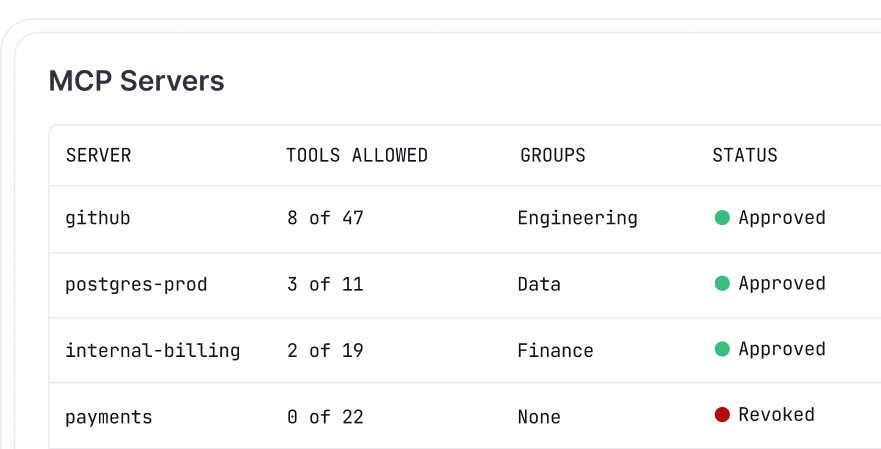
The first is trimming tool lists by hand. Docker’s profiles let you allowlist individual tools per server, ContextForge’s virtual servers publish a handpicked set drawn from several upstream servers, and Composio’s Tool Router can pin a session to a fixed list.
The second is searching at call time. AgentCore Gateway includes a built-in semantic search tool that agents query in plain language, and Composio can also find tools at runtime.
Anthropic’s guidance is to act once definitions pass 10,000 tokens or you have 10 or more tools. Most AI workflow automation setups cross that line fast, and multi-agent workflows cross it sooner.
Note: Search has its own limits. In a December 2025 benchmark across 2,792 tools, Stacklok, which sells a competing optimizer, found Anthropic’s tool search picked the right tool 34% of the time. Arcade, another vendor, reported 56% to 64% retrieval accuracy across 4,027 tools. Both tests ran while Anthropic’s tool search was in beta, so test any search layer against your own catalog before relying on it.
Plenty of products call themselves MCP gateways, and some are closer to server directories. This list sticks to tools that sit in the middle of your setup. Your agents connect to one endpoint, the gateway reaches your servers behind it, and you get at least one real control over what passes through.
That control could be a sign-in, a tool allowlist, or an audit log.
Five made the cut. They all solve the same problem, but in different ways. The right pick comes down to where your agents already run: a developer’s laptop, your own infrastructure, an existing Kong setup, AWS, or SaaS apps.
| Gateway | Best for | Standout feature | Starting price | Where it taps out |
| Docker MCP Gateway | Local development on Docker Desktop | Each server runs in its own container, with per-tool allowlists in profiles | Free, open source (MIT) | Governance version is invite-only through Docker Sales |
| IBM ContextForge | Platform teams that self-host | Virtual servers give each team its own tool set, and REST or gRPC APIs become MCP tools | Free, open source (Apache 2.0) | You run, patch, and scale it yourself |
| Kong AI Gateway | Teams already on Kong Konnect | One policy engine for API, LLM, and MCP traffic, with per-tool access control | $25/month per serverless control plane | SSO and platform audit logs are Enterprise-only |
| Amazon Bedrock AgentCore Gateway | Agents running on AWS | Built-in semantic tool search, with AgentCore Identity included at no extra charge | Pay per call, no minimum | Usage-based pricing across several AgentCore services makes monthly costs harder to forecast |
| Composio | Teams connecting agents to many SaaS apps without running servers | Managed auth for 1,500+ apps, plus fixed tool lists or runtime tool search in one Tool Router session | Free for 100,000 tool calls/month | Tool calls and stored credentials run through Composio’s cloud unless you set up a bring-your-own-cloud deployment |
Our editorial team follows a transparent, research-backed, and vendor-neutral process, so you can trust that our recommendations are based on real product value.
Here’s a detailed rundown of how we review software at ClickUp.
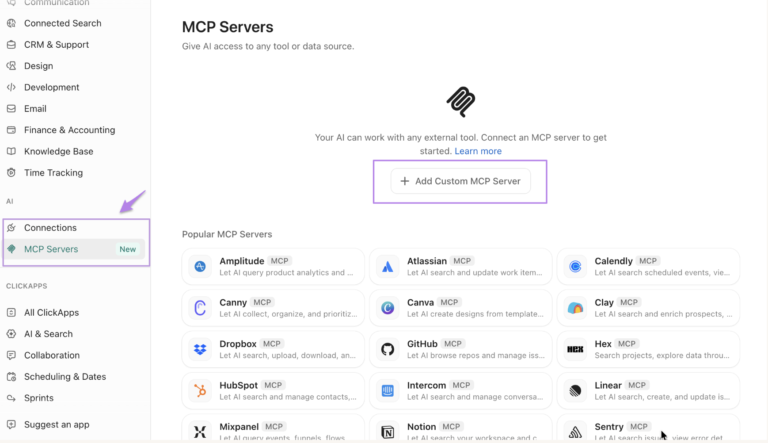
Docker MCP Gateway is the open-source engine behind the MCP Toolkit in Docker Desktop. If you already use Desktop with the toolkit turned on, the gateway runs in the background with no extra setup. Its answer to server sprawl is containers. Each MCP server runs in its own container with restricted privileges, network access, and resources, and the gateway starts it only when an agent needs one of its tools.
Profiles keep the setup in one place. A profile groups the servers a project needs, and every client you connect to, whether Cursor, VS Code, Claude Desktop, or Claude Code, uses that same setup. You can push a profile to an OCI registry for teammates to pull, which replaces 15 hand-edited config files with one shared definition.
Inside a profile, you can switch on individual tools, such as github.create_issue, and leave the rest of that server off. That’s how Docker keeps the model’s tool list short.
Credentials stay out of config files. The gateway pulls secrets from Docker Desktop’s secrets store and adds them when it starts a server, and it handles OAuth sign-in for servers that need it. Built-in logging and call tracing show which tools ran. The gateway only routes calls, and the thinking happens in the AI agents you run for automation. To get started, the Docker MCP Catalog lists more than 200 tools and services.
Where it taps out: The gateway is built for developers running servers on their own machines. The governance version, sold as part of Docker AI Governance, is invite-only through Docker Sales, so you can’t sign up for team-wide policy controls yourself. You can run the gateway without Docker Desktop through a manual install, but secrets management still depends on Desktop.
Best for: Developers and small teams who want every MCP server in its own container and one shared setup across their AI clients.
Skip it if: You need self-serve SSO, role-based access across teams, or compliance-grade audit logs for MCP calls.What are real-life users saying about Docker MCP Gateway
A user review says:
Docker’s mcp gateway is genuinely nice for local dev – container isolation per server, credential handling baked into docker desktop but it’s not really built for cross-team, crossregion enterprise governance.
IBM ContextForge is an open-source gateway and registry that you run on your own infrastructure. It puts MCP servers, agent-to-agent (A2A) services, and ordinary REST or gRPC APIs behind one endpoint. You can install it from PyPI, run it as a container, or deploy it to Kubernetes with the project’s Helm chart.
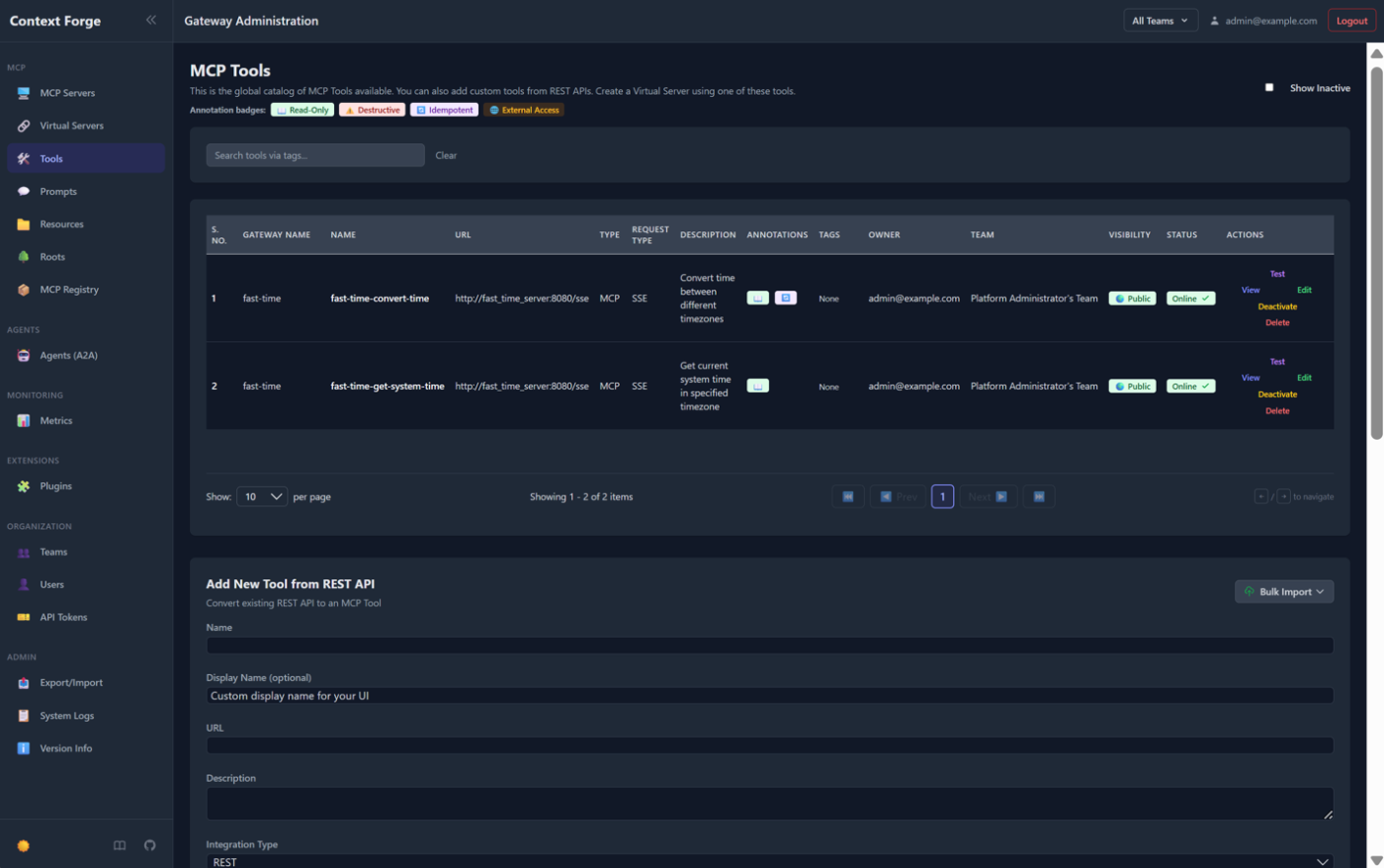
What sets it apart is the virtual server. You pick tools from everything registered in the gateway, bundle them under a single name, and point a client to that bundle’s endpoint. A finance agent gets the finance tools, a support agent gets a different set, and neither one loads the other’s definitions. Each virtual server can be private, shared with a team, or public.
It also turns APIs you already have into MCP tools. Point it at a REST endpoint, and it pulls the JSON schema automatically. The tool also translates gRPC services through server reflection. That saves you from writing a wrapper server for every internal API.
Each upstream server keeps its own OAuth settings, and ContextForge stores tokens per user, so two servers can use different identity providers. The admin UI includes a live log viewer, and traces are sent via OpenTelemetry to backends such as Jaeger, Zipkin, and Datadog. More than 40 plugins add extra transports and integrations.
Where it taps out: You run, patch, and scale it yourself. The gateway won’t start until you generate strong secret keys. The project recommends PostgreSQL for production, and support runs through GitHub issues and discussions.
Best for: Platform teams that want to self-host, give each team its own tool set, and turn internal APIs into MCP tools.
Skip it if: You want a managed service instead of running the gateway yourself.
A user review says:
Apache licensed, built for people already running serious Kubernetes infrastructure. It’s matured into something genuinely capable — real governance, monitoring, can manage MCP alongside your other company APIs. Heavier to stand up than the smaller options though, this isn’t a weekend project.
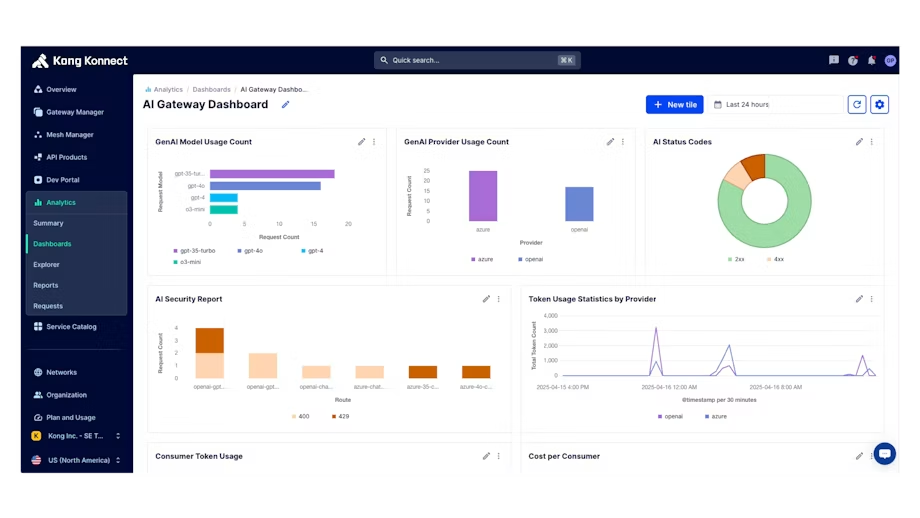
Kong treats MCP traffic as another kind of API traffic. If your team already runs Kong Gateway or Kong Konnect, MCP support comes as plugins on the gateway you already operate. It’ll use the same authentication, rate limiting, and logging you use for your APIs.
The core piece is the AI MCP Proxy plugin. It can sit in front of an MCP server you already run, or turn any API with an OpenAPI schema into MCP tools without custom code. You can also combine tools from several APIs into one MCP endpoint, so agents connect once instead of once per service.
Access control works tool by tool. You set allow and deny lists by consumer or consumer group, and when an agent asks for its tool list, Kong returns only the tools that specific caller can use. Every allowed or denied attempt goes to the plugin’s audit log. Because an agent never loads tools it can’t call, the filtered list also keeps its context smaller.
Sign-in runs through Kong’s authentication plugins, including OpenID Connect and the AI MCP OAuth2 plugin. MCP traffic logs record session IDs, JSON-RPC methods, payloads, latencies, and errors, and you can send traces to OpenTelemetry. If you also route LLM traffic through Kong’s AI Gateway, model traffic and tool traffic share one control plane.
Where it taps out: SSO and platform audit logs are Enterprise-only on Konnect. The AI MCP Proxy plugin doesn’t support WebSocket or gRPC upstreams, and AI guardrails don’t apply to MCP requests. REST conversion needs a valid OpenAPI schema for each API, and per-tool ACLs need Kong Gateway 3.13 or later. Pings from MCP clients also count toward your monthly request total.
Best for: Teams already running Kong that want MCP traffic under the same policies as their APIs.
Skip it if: You don’t use Kong today, or you need SSO without an Enterprise contract.
A user review says:
makes sense if you’re already running Kong. This isn’t just MCP tacked on anymore, it’s real purpose-built support including agent-to-agent traffic, and they partnered with an AI-governance company in mid-July to wire policy checks straight into the gateway. Some of the deeper features probably need a paid tier though.
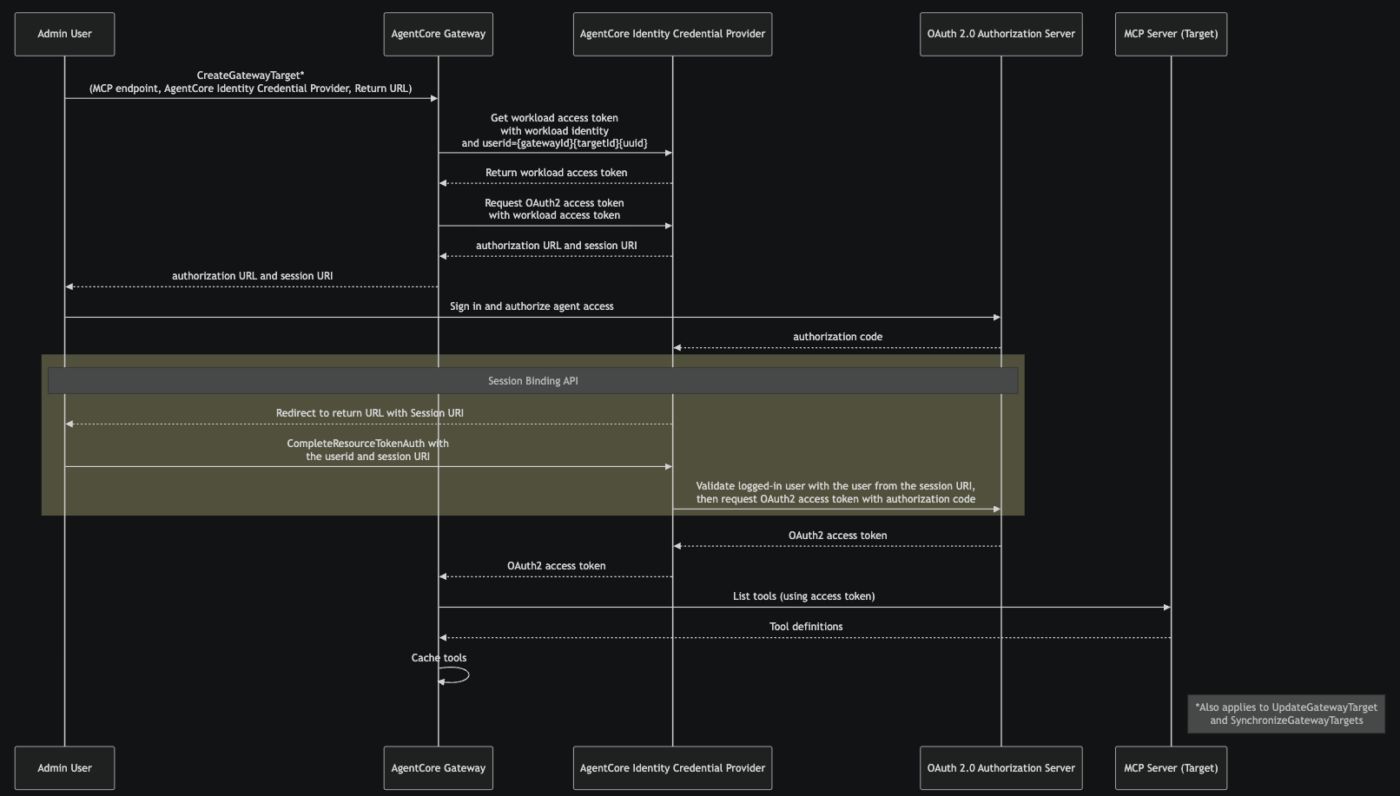
Amazon Bedrock AgentCore Gateway is AWS’s fully managed option, so there’s nothing to host or scale. It gives agents one endpoint for their tools. AgentCore also turns OpenAPI and Smithy specs, Lambda functions, and existing MCP servers into MCP tools without custom code. It includes one-click integrations for Salesforce, Slack, Jira, Asana, and Zendesk.
Tool search is built in. If you turn on semantic search when you create a gateway, agents get a search tool (x_amz_bedrock_agentcore_search) they can query in plain language. That way, they pull in only the tools a task needs instead of loading the full catalog. It’s the same on-demand pattern Anthropic describes, run at the gateway instead of in the client.
Authentication works in both directions. On the way in, the gateway checks who’s calling through AWS IAM or a JWT from your identity provider. On the way out, it signs in to each tool with OAuth, an API key, or an IAM role and adds those credentials itself, so agents never hold them. AgentCore Identity costs nothing extra when you use it through the gateway, and AgentCore Policy can check each tool call against rules written in Cedar.
The gateway works with open-source frameworks, including CrewAI, LangGraph, LlamaIndex, and Strands Agents, and with any model. A June 2026 update added MCP prompts and resources, streaming and session management, elicitation for mid-task approvals, and OAuth on-behalf-of token exchange.
Where it taps out: It runs only on AWS, so you can’t self-host it. Pricing is usage-based across several AgentCore services, which makes monthly costs harder to predict than a flat fee. In AWS’s own example, an agent handling 50 million interactions a month, with one search and four tool calls each, costs about $2,250 a month, and search accounts for more than half of that. Semantic search is available in 18 AWS Regions. Each gateway accepts only the MCP protocol versions you configure, and observability runs through CloudWatch at separate cost.
Best for: Teams running agents on AWS that want tool search and credential handling without operating a gateway.
Skip it if: You need to self-host, run across clouds, or want a flat, predictable monthly bill.
A user review says:
The complexity comes from several angles: 1) users need to set up AWS credentials and environments; 2) developers must fully write and annotate their agent code to use AgentCore; and 3) context management requires specific programming models that may not work with every framework.
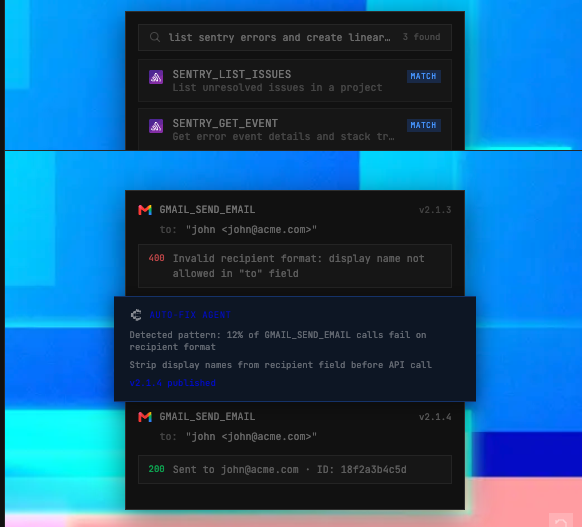
Composio is a managed platform that connects agents to more than 1,500 apps, including Gmail, Slack, GitHub, HubSpot, and Salesforce. There are no servers to run. Your agent or AI client connects to one MCP URL, and Composio handles sign-in for each app, from OAuth flows and API keys to token refresh.
Most of the gateway work happens in the Tool Router. You create a session for each user with the toolkits they need, and Composio returns a scoped MCP endpoint. Inside a session, you can pin an exact list of tools, block specific ones, or filter by MCP hints such as read-only or destructive. The tool can also search its catalog at runtime and load only the tools a task needs, which keeps the agent’s context small.
Permissions can require a person to approve tool calls on every call or once per session, with per-tool always-allow or always-deny overrides. Sessions are created per user, so each person’s connected accounts stay separate, and one person can connect more than one account for the same app. If an app isn’t in the catalog but has an MCP server, you can add it as a custom server for free.
It works with Claude, ChatGPT, Cursor, Claude Code, and any other MCP client, along with frameworks such as LangChain, LlamaIndex, CrewAI, and the OpenAI Agents SDK. For multi-step tasks, Composio offers a remote runtime where each execution runs in its own isolated sandbox. The company reports SOC 2 Type II compliance and ISO 27001:2022 certification.
Where it taps out: It’s a managed service, so your tool calls and users’ stored credentials run through Composio’s cloud unless you set up a bring-your-own-cloud deployment. When you connect over MCP, the SDK’s tool-call hooks and schema changes don’t run, and custom tools defined in your own code aren’t available at the MCP endpoint. In May 2026, Composio disclosed a security incident that exposed about 0.3% of active connections, most of them GitHub, and required customers to rotate their API keys. Include its report in your security review.
Best for: Teams whose agents need many SaaS apps and per-user sign-in, without running any servers.
Skip it if: Your tools are mostly internal APIs, or your security policy doesn’t allow a third party to hold users’ OAuth tokens.
A user review says:
a managed MCP platform with a huge library, almost 1,000+ apps like Gmail and Slack. The big advantage is that you don’t have to build and maintain every integration yourself, and Composio also supports self-hosting in VPC and embedded SDK for flexible deployment options.
The price depends on whether you pay for managed usage or run the infrastructure yourself.
Open-source gateways have no license fee, but you still pay for hosting, maintenance, and security. Managed gateways charge for tool calls, searches, control planes, or other usage.
| Cost line | Composio | Docker MCP Gateway | IBM ContextForge | Kong AI Gateway | Amazon Bedrock AgentCore Gateway |
| Gateway | 100,000 tool calls/month free | Free, open source (MIT) | Free, open source (Apache 2.0) | From $25/month per serverless control plane | No upfront fee or minimum |
| Paid usage | Scale: $29/month, custom quotes for enterprises | Docker plans are separate from the open-source gateway | Your hosting and operations costs | $200/month per additional 1M API requests | $0.005 per 1,000 API invocations |
| Tool filtering or search | Runtime search or fixed tool lists | Per-tool allowlists in profiles | Virtual servers with selected tools | Per-tool ACLs | $0.025 per 1,000 search calls; $0.02 per 100 tools indexed/month |
| Authentication | Managed OAuth, API keys, and token refresh | Docker secrets and OAuth flows | Gateway and upstream authentication options | Kong authentication plugins | IAM, JWT, OAuth, API keys, and AgentCore Identity |
| Logs and observability | Execution logs and controls vary by plan | Built-in logging and call tracing | Admin logs and OpenTelemetry | MCP audit logs and metrics; platform audit logs are Enterprise-only | CloudWatch observability at separate rates |
| Main operating cost | Managed-service and usage dependence | Docker environment and paid team controls | Hosting, database, maintenance, and scaling | Kong plan limits and Enterprise features | Usage across Gateway, search, CloudWatch, and connected AWS services |
Which gateway costs less depends on what you already run. Composio and Amazon Bedrock AgentCore Gateway shift more of the infrastructure work to the vendor and charge by usage. Docker MCP Gateway and IBM ContextForge have no license fee, but you take on the cost of hosting and maintaining them. Kong makes the most financial sense when your team already runs Kong, because adopting it only for MCP adds a new platform and licensing cost.
Pricing narrows the list, but it rarely makes the decision for you.
A better starting point is the problem that sent you looking. Most teams arrive with one of two: they can’t see or control who calls which tool, or their agents load so many tool definitions that they start picking the wrong ones. Some have both.
Once you know which problem hurts most, you know what the gateway has to do well and which features you can live without.
The five gateways in this guide cover the same basics, so the deciding factor is usually the stack you already have.
If your agents mostly act inside SaaS apps on behalf of individual users, Composio saves the most work, because it manages each user’s OAuth connections for you. The trade-off is that those credentials live in Composio’s cloud, which your security team will want to review.
For teams struggling with disconnected workflows spread across developer laptops, Docker MCP Gateway is the natural first step. It suits teams already on Docker Desktop, runs every server in its own container, and lets the whole team share one profile. If you later need team-wide governance, you’ll need a separate conversation with Docker Sales.
Platform teams that prefer to own their infrastructure will lean toward IBM ContextForge. Its virtual servers give each team its own tool set, and it can turn internal REST and gRPC services into MCP tools. You also take on the patching, scaling, and on-call work that comes with self-hosting.
Kong AI Gateway puts MCP traffic under the same policies your team already runs for its APIs. If you need SSO or platform audit logs, budget for Enterprise, since both are Enterprise-only.
For teams building on AWS, Amazon Bedrock AgentCore Gateway keeps everything managed and adds semantic tool search at the gateway. Model the usage-based bill early, because search calls, tool calls, and CloudWatch are each billed separately.
If you run a handful of stable servers for a small team, you may not need a gateway yet. A shared configuration in version control plus a secrets manager can cover the same ground until you need per-team permissions or central logs.
Once you have a front-runner, test it against your own setup before signing anything. Feature pages often skip the details that matter later, so walk through a few specific questions with your security and platform leads:
The answers usually settle it. If a gateway only records setting changes and can’t show you which tools your agents actually used, it won’t hold up in an audit. And if it connects your servers without trimming their tool lists, your agents still load every tool definition, so your token use stays the same.
The safest rollout moves one low-risk server first and keeps the old path working until the new one proves reliable.
Begin with an inventory
For each server, note who owns it, which tools it offers, what data it can reach, and roughly how many tokens its tool definitions cost. This is also the moment to prune. Most catalogs carry tools that no one has called in months, and removing them before migration shrinks what you’ll have to govern.
Group servers by trust boundary
Put servers that read private data, servers that handle untrusted content, and servers that can send data outward in separate tool sets, so one agent never holds all three. That combination is what made Invariant Labs’ GitHub MCP prompt-injection demo possible. Also, confirm that each server is still maintained. Several of the original MCP reference servers, including GitHub and Slack, now live in an archive and no longer receive updates.
With the groups in place, run a short pilot
Once the pilot passes, move write-capable servers over one at a time. Set rollback criteria before each move, so you don’t have to decide whether to revert in the middle of an incident. Keep the direct configuration in place until the gateway path has run cleanly for a few weeks, then revoke the old credentials and client connections.
One rule applies to whichever gateway you choose. The MCP specification forbids token passthrough. The gateway should accept only tokens issued for it, and it should call downstream servers with their own separately authorized credentials instead of forwarding the client’s token. Check that your gateway’s configuration follows this rule before you move production traffic.
ClickUp connects to MCP from both sides of the gateway.
AI apps outside ClickUp, like Claude, Cursor, and ChatGPT, reach your workspace through the ClickUp MCP server, which sits behind your gateway like any other server. Inside ClickUp, Super Agents and Brain² can use tools from external MCP servers you connect to, and your gateway can be one of them.
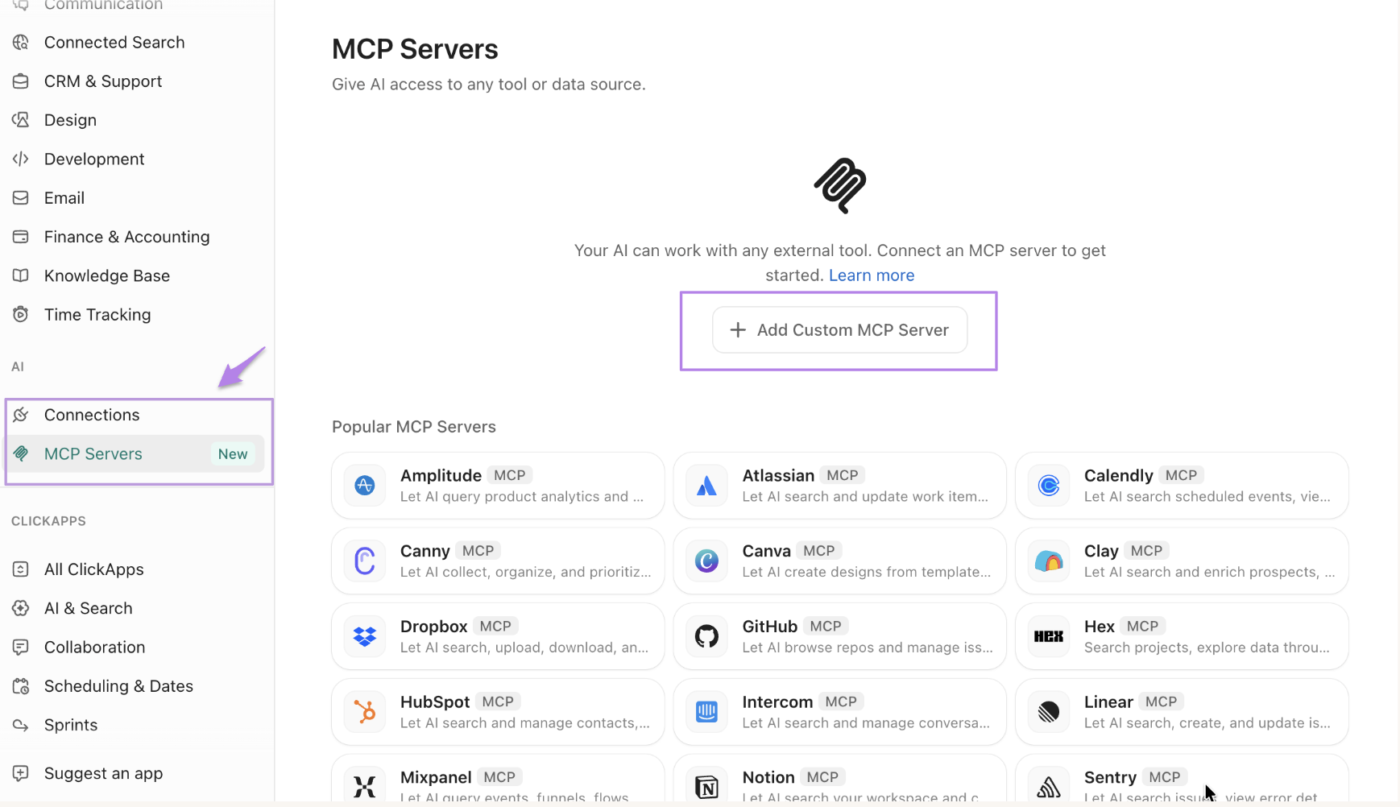
The ClickUp MCP server runs at https://mcp.clickup.com/mcp and is available on every plan, including Free Forever. It only accepts OAuth, so your gateway never has to store personal API keys or rotate them when someone leaves. If you’re building your own client, it has to support OAuth 2.1 with PKCE. ClickUp keeps an allowlist of approved clients, so any client not on the list needs to be submitted for review first.
Once connected, your agents can create and route tasks, build status updates from tasks and Docs, log time, search tasks, Docs, and comments, and summarize Chat threads. That way an agent can look up the project context itself instead of needing it pasted into every prompt.
Rate limits deserve a closer look behind a gateway. The limit covers your whole workspace, and every connected client uses up the same shared allowance. Without the Everything AI add-on, ClickUp caps MCP calls per rolling 24 hours, from 100 on Free Forever up to 5,000 on Enterprise.
With the add-on, MCP requests follow the public API’s per-minute limits instead. Those range from 100 requests per minute on Free Forever, Unlimited, and Business up to 10,000 on Enterprise. ClickUp doesn’t show MCP usage yet. If several teams reach ClickUp through one gateway, set per-team limits at the gateway so one busy agent can’t use up the allowance for everyone else.
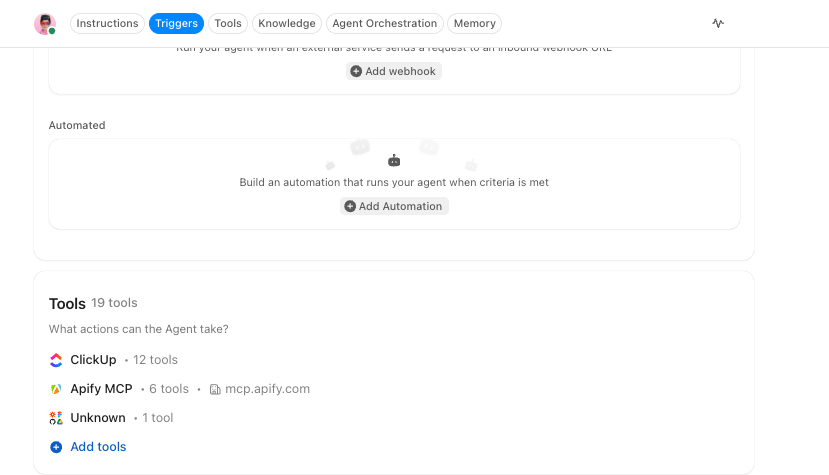
Going the other way, you can connect external MCP servers from the ClickUp App Center, either for the whole workspace, or just for yourself. Admins decide who can add each connection type. After a server is connected, you choose which of its tools each Super Agent gets: all of them, or specific ones. That’s the same idea as trimming tool lists earlier in this guide, applied to the agents inside your workspace.
If the server you connect to is your gateway, check two details first. ClickUp connects from changing cloud IP addresses, so an IP allowlist won’t let it through. Your gateway also needs a public URL secured with OAuth or an API key. ClickUp’s workspace audit logs record who connected, updated, or disconnected a server. For a record of which tools each agent actually called, you’ll need your gateway’s logs.
The inventory and pilot steps above produce lots of small decisions that are easy to lose track of. Add each server as a task in a List, with Custom Fields for owner, data access, trust group, and token cost. Then write the rollback criteria in a Doc linked to each migration task. If a pilot fails or an upstream server gets archived, the owner and the full history are all in one place.
Every section of this guide comes back to the same two jobs.
The first is control: one endpoint, one place for credentials, and one record of which agent called which tool. All five gateways in this guide cover that in some form, and the bigger difference is how much of the infrastructure you run yourself. The second job is keeping each agent’s tool list small, and a gateway only helps there when you set up filtering or search.
Before you sign anything, count your tools and measure how many tokens their definitions use.
Cut the ones no one calls, group the rest by trust boundary, and move one read-only server through the gateway first. If ClickUp is one of those servers, connect it through the ClickUp MCP server and see how an agent handles your tasks, Docs, and Chat with the full project context.
The best MCP gateway depends on where your agents already run. Docker MCP Gateway fits local development. IBM ContextForge fits teams that want to self-host. Kong AI Gateway fits teams already on Kong, and Amazon Bedrock AgentCore Gateway fits agents on AWS. Composio fits agents working across many SaaS apps. For regulated industries, look for self-hosting or a private deployment option, per-tool access controls, and logs of individual tool calls.
No. Model Context Protocol is a specification that defines how AI apps connect to tools and data. An MCP gateway is software built on that specification. It sits between agents and MCP servers and handles access, credentials, and logging. It works like HTTP and an API gateway: HTTP sets the rules for requests, and the gateway decides which requests get through.
You need an MCP gateway if you want to control who can call which tools across several servers, or keep a central record of what agents did. If a small team runs a handful of stable servers, a shared configuration in version control plus a secrets manager covers most of the same ground. A gateway starts to pay off when you need per-team tool access or one place to manage credentials.
A gateway makes MCP servers easier to secure. It doesn’t make them safe on its own. It keeps credentials in one place, limits which tools each caller can use, and logs calls centrally. Prompt injection can still arrive through a trusted server, as Invariant Labs showed with GitHub’s MCP server. Tools that read private data, handle untrusted content, or send data out should be kept in separate tool sets. Make sure the gateway never forwards a client’s token. And stop using servers that no longer receive updates.
No. Tool search decides which tools an agent sees for a task. Access control decides whether that agent is allowed to call them. Amazon Bedrock AgentCore Gateway, for example, handles semantic search and authentication as separate features. Run search only across the tools a caller is allowed to use, and check permissions again when the tool actually runs. If hiding a tool from search is its only protection, it isn’t protected.
MCP gateway audit logs should record who made each call, which agent and tool were involved, which server handled it, whether the call was allowed or denied, when it happened, and what came back. Kong’s AI MCP Proxy plugin, for example, logs every allowed and denied tool access attempt. Before you buy, confirm that the logs cover individual tool calls and not just account and configuration changes, then check how long they’re kept and whether you can export them.

Manasi Nair
Max 27min read
Manasi Nair
Max 27min read

Sean Hardy
Max 26min read

© 2026 ClickUp




