


Evernote, at one point in time, was the definitive note-taking app available in the market. Launched in 2008, it garnered around half a million users that year. Its popularity peaked in 2013 when it had over 75 million active users.
Since then, a slew of problems combined with a rise in competition have led to its steady decline in popularity.
If you are one of those Evernote users looking to migrate to a better alternative and are wondering how to delete an Evernote account, this blog is for you.
How to Permanently Delete Your Evernote Account

 Summarize this article for me please
Deactivating vs Deleting: What’s the Difference?
If you have decided to move on from Evernote, you have two options. You can either deactivate your Evernote account or delete it altogether. But what is the difference between them, and which one should you choose?
The deactivate account option will temporarily turn off your Evernote service. You will, however, have the option to reactivate your account at a later date if the need arises.
If you delete your account, you will effectively erase all your information permanently. After four weeks, even Evernote’s customer service cannot access your account information. So, keep in mind that account deletion is a one-way street.
A few key takeaways:
- Opt for deactivation if you think you might return to Evernote in the future or want to keep your saved information safe while taking a break
- Choose deletion if you’re sure you no longer need Evernote and want to remove your data permanently
Summarize this article for me pleaseHow to Delete an Evernote Account?
If you have decided to delete your Evernote account, follow the steps below.
1. Sign in to your Evernote account
The first step to deleting your Evernote account is to log into it. Once logged in, click on the ‘Account Info’ menu option, which will appear when you click on your user name in the top left-hand corner of the page.
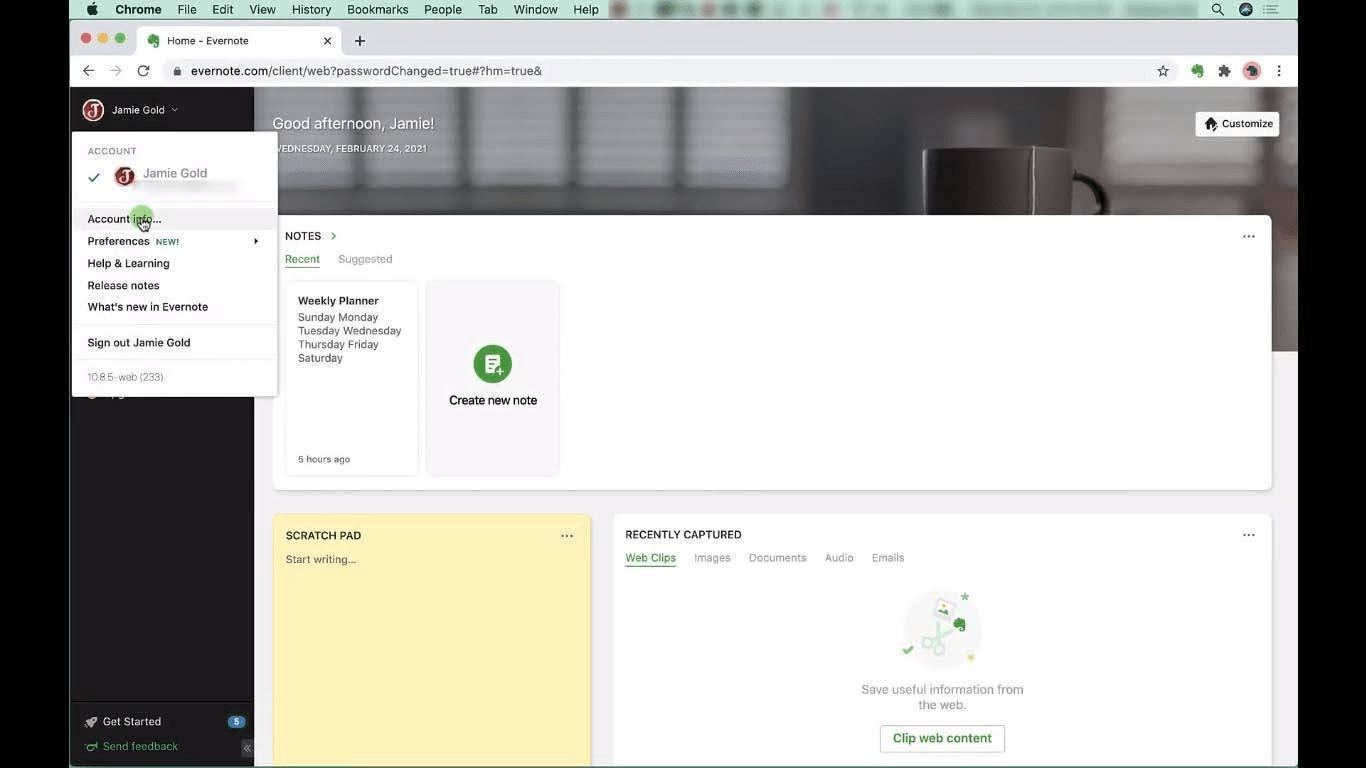
You will then be directed to a new tab displaying your Account Summary.

2. Navigate to the ‘Account Status’ section
Once on the ‘Account Summary’ page, navigate to the ‘Account Status’ menu item on the left navigation menu and click on it. Once you do, you will be asked to enter your password again.
This page will give you two options: deactivate or permanently delete your Evernote account.
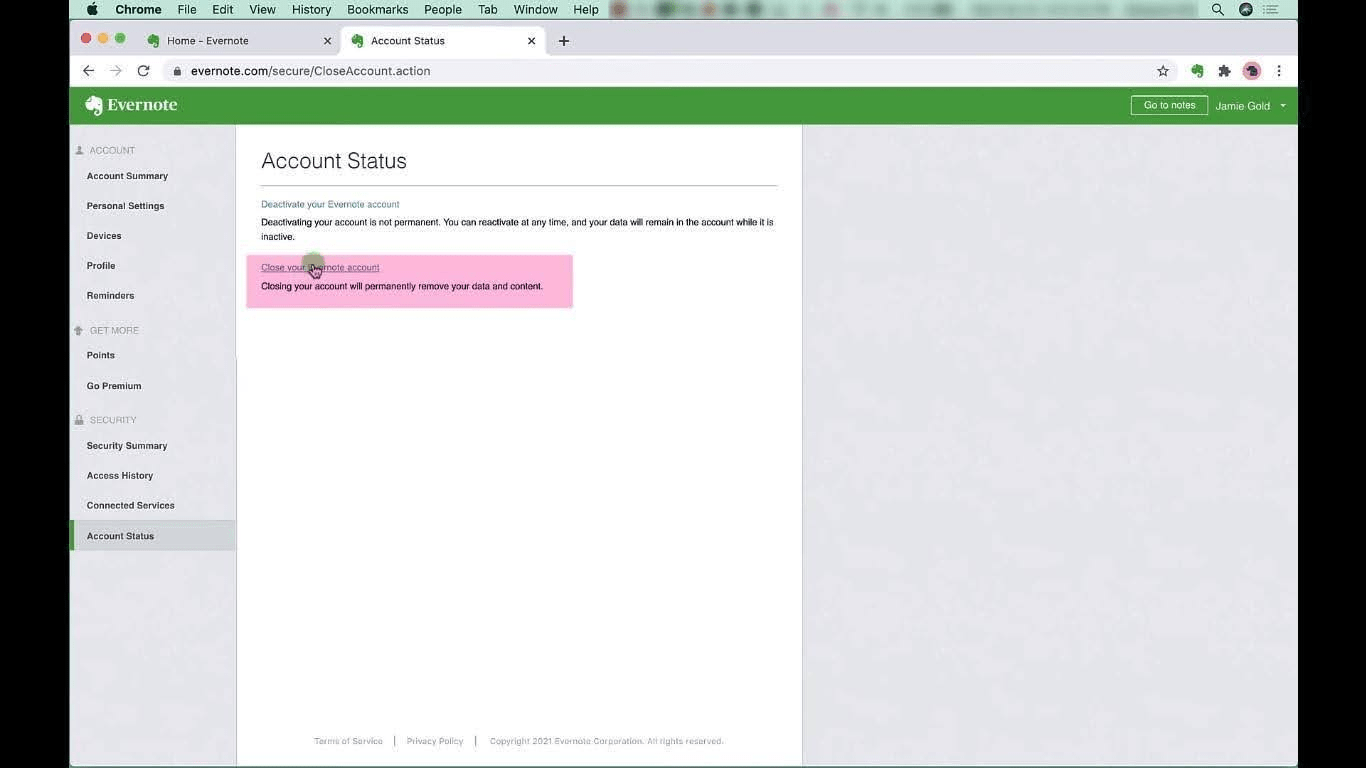
3. Close your Evernote account
Once you click on the ‘Close your Evernote account’ option, you will be shown a popup to double-check if you are willing to close your Evernote account permanently. Click on ‘Continue’.

Once you click on continue, a second dialog box will be displayed asking you to verify your subscription status and if you want to export your existing notes with a link to additional information on how to do so.

Once you hit continue here, you will be directed to the final dialog box asking why you are leaving Evernote. Click on the check box to confirm, and you will be asked to verify your password again.

You can click the close account button and be directed to a confirmation page below.
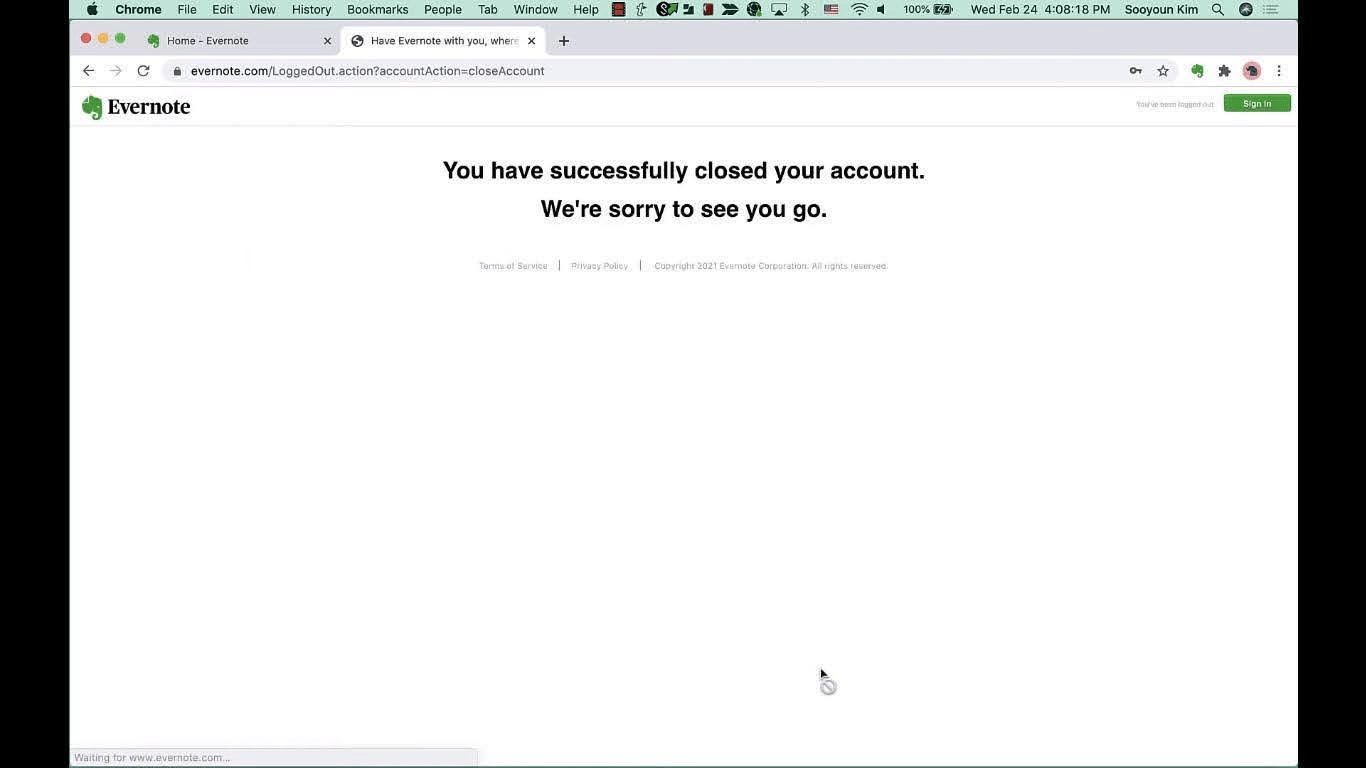
Note: If you are on a paid subscription, you must cancel your subscription first before you delete your Evernote account.
Summarize this article for me pleaseReasons for Users Deleting Their Evernote Accounts
Several factors prompt users to delete their Evernote accounts and migrate to better alternatives. Key among them are:
- Evernote’s free version has become severely limited in what it offers. Users are now restricted to creating one notebook and up to 50 notes. They are also limited to a 60 MB data upload limit per month
- Their premium plans have seen a steady hike in prices and are at a point where it has become difficult to justify the cost
- A common consensus among users is that the app UI is starting to show its age, and performance has become sluggish
- Several security breaches over the years have raised privacy concerns among its users
Summarize this article for me pleaseClickUp: The Best Alternative To Evernote for Note-Taking
ClickUp is a powerful productivity platform that lets you manage your projects, tasks, and notes in one place. So why is ClickUp a superior alternative to Evernote? Let’s find out.
Since we are talking about Evernote alternatives, the first feature we must look at is ClickUp’s Notepad. Like Evernote, this feature allows you to create rich text notes effortlessly to jot down your thoughts or take detailed meeting notes.
However, ClickUp’s Notepad has several advantages over Evernote. You can integrate the notes you create with ClickUp with any tasks, projects, or relevant documents in your workspace.
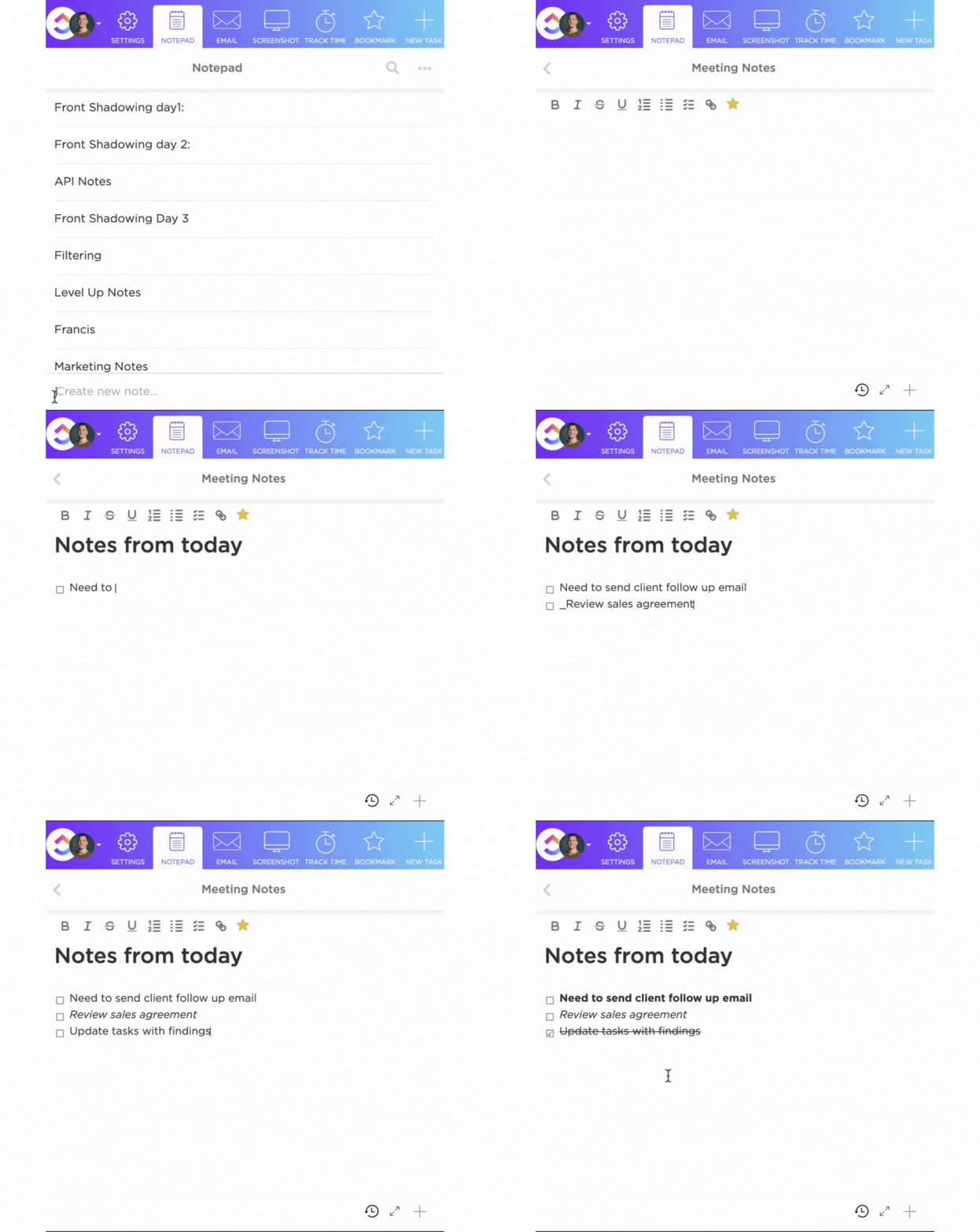
Unlike Evernote, in ClickUp, you can add features such as images, videos, emojis, checklists, code blocks, and more to your notes. Finally, Clickup also boasts numerous AI-powered tools that aid in improving your productivity levels. Another useful feature that this platform offers is called ClickUp Docs. This feature allows you to create collaborative documents stored within any space, folder, or list within the ClickUp ecosystem.

You can use this feature to create and organize your knowledge base, SOPs, reports, and even meeting notes (with several meeting note templates to choose from).
Moreover, ClickUp allows you to share your docs with anyone by generating a public or private link or inviting them to your ClickUp workspace. This feature also supports version history and lets you keep track of any changes made to your docs.
Key highlights of ClickUp
- AI-powered Assistance: ClickUp offers numerous AI power tools for note-taking that help you work faster and more efficiently. Features such as voice dictation and automatic transcription make note-taking a breeze. ClickUp’s smart search feature allows you to find any information within your workspace in an instant
- Seamless integration with third-party apps: ClickUp seamlessly integrates with popular apps such as Google Drive, Slack, and Dropbox, thus eliminating the problems that arise with siloed information
- Powerful Android App: ClickUp has a native app for Android devices on Google Play that lets you access and edit your notes on the go. The app also supports push notifications that help you stay on top of things wherever you are
Limitations of ClickUp
- The sheer list of features ClickUp offers over and above the basic note-taking features, such as AI-powered tools for meetings, templates for daily planners, and so on, may result in a learning curve
- In its current form, ClickUp’s Android app does not support the extensive list views that are currently available on the web and desktop versions of ClickUp
ClickUp pricing
- Free Forever: $0
- Unlimited: $7 per member per month
- Business: $12 per member per month
- Enterprise: Custom pricing
- ClickUp Brain: $5 per member per month available on all paid plans
Summarize this article for me pleaseDeleting Evernote and the Way Forward
So, there you have all the information you need on how to delete your Evernote account and why ClickUp should be your first choice among all the other Evernote alternatives on the market. Opting for ClickUp will allow you to take notes more effectively, and its host of AI assistance and collaborative tools will also help you take your productivity levels to new highs.
Ready for the change? Sign up for a free trial today and discover a world of possibilities beyond note-taking.
Summarize this article for me pleaseCommon FAQs
1. How do I permanently delete my Evernote account?
You can delete your Evernote account permanently by following the steps below:
- Log into your Evernote account and navigate to the account status section via the Account Info menu option
- From here, select the close your account option, cancel your subscription if you are on the paid plan, take a backup of your existing notes if you need them, and once done, verify your credentials to delete your account permanently
2. How do I unlink my Evernote account?
Follow the below steps to unlike your Evernote account from any device:
Log into your ‘Evernote Account’ and navigate to the ‘Applications Menu’. (This view will show you a list of all the devices that can currently access your Evernote account)
Click on the ‘Revoke Access’ option next to the device on which you want to unlink your Evernote account.
3. How do I cancel Evernote?
To cancel your Evernote subscription:
- Sign in to your account, navigate to account settings, click Billing
- Click on ‘Cancel your Evernote subscription’ and click on the ‘Downgrade to Free’ option at the very bottom of the page


Everything you need to stay organized and get work done.

Recent Articles
10 Best ChatGPT Alternatives We Tested for Work in 2026 
10 Best ChatGPT Alternatives We Tested for Work in 2026
