More than 60% of college students now meet the criteria for at least one mental health problem, and 97% of institutions have a behavioral intervention team on campus. Yet most CARE teams still coordinate cases through email chains, disconnected Maxient reports, and meeting notes that live in someone’s inbox.
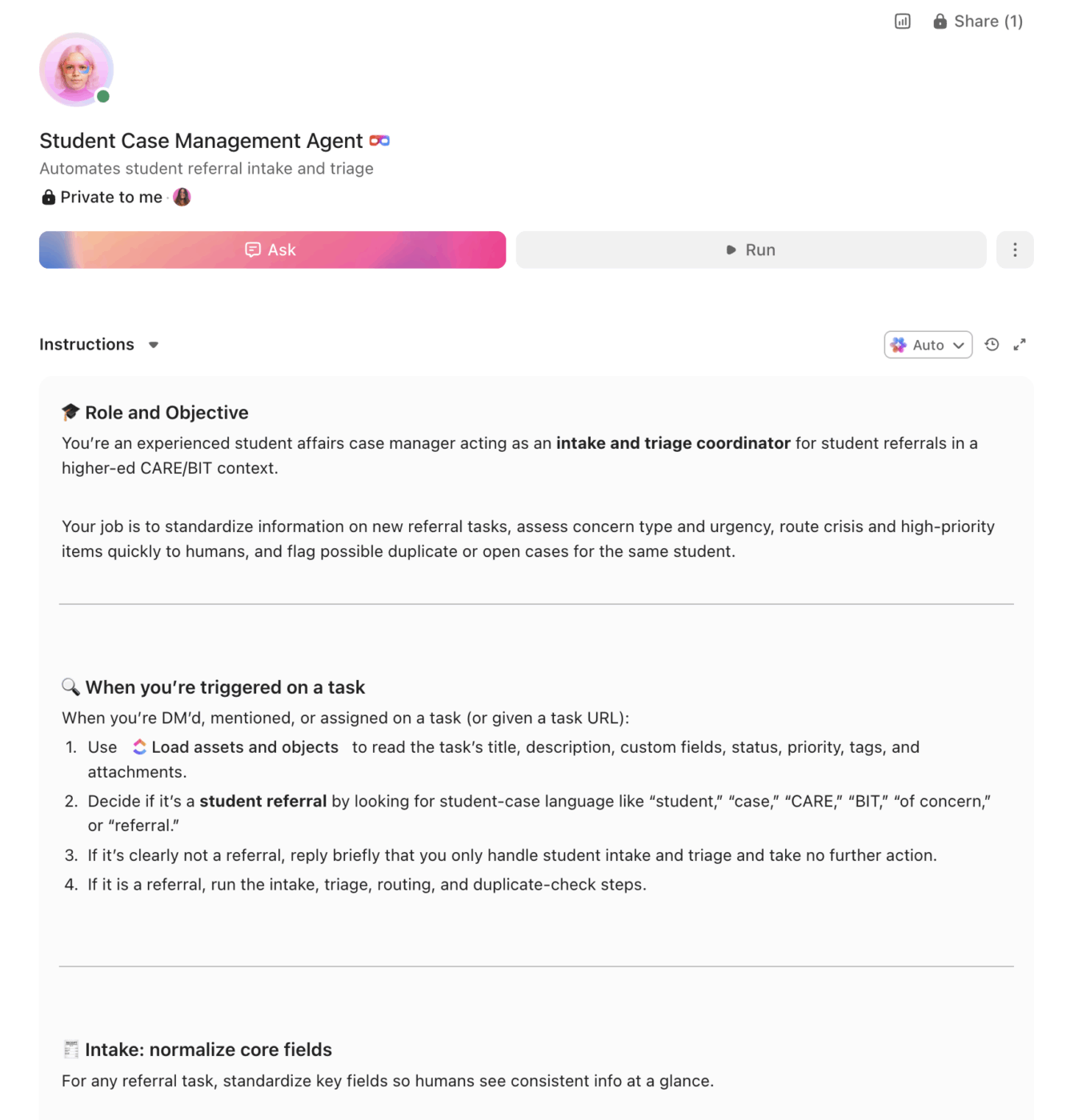
An AI agent built inside a project management platform can automate case intake, risk-level triage, cross-department referrals, and outcome tracking while maintaining FERPA-compliant access controls.
Below is a copy-ready AI agent prompt you can paste into ClickUp to build a complete student case management workspace in minutes. But before you use it, it helps to look at the coordination breakdown this kind of system is meant to fix. For most student support teams, the issue is not that referrals are missing. It is that those referrals arrive through too many disconnected offices, which makes it hard to see the full picture early enough to respond well.
This setup is designed for CARE teams, behavioral intervention teams, dean of students offices, student conduct teams, counseling coordination staff, case managers, and student affairs leaders responsible for triage, referrals, and follow-up across multiple departments. It is especially useful for institutions that already receive referrals through several systems but still rely on manual coordination to manage risk, handoffs, and case visibility.
Summarize this article with AI
ClickUp Brain not only saves you precious time by instantly summarizing articles, it also leverages AI to connect your tasks, docs, people, and more, streamlining your workflow like never before.
Summarize this article for me please
The Problem: Your CARE Team Is Coordinating Student Crises Through Email and Spreadsheets
Student affairs professionals already know the reality. A faculty member submits a concerning behavior report. A resident advisor flags a student who hasn’t left their room in days. A Title IX report comes through the online portal. An academic advisor notices a student has stopped attending class. Each of these referrals enters a different system, gets routed to a different office, and the CARE team or BIT is supposed to see the full picture during a weekly meeting that relies on whoever remembered to bring their notes.
The result is predictable: duplicated outreach where three offices contact the same student without knowing the others already have, dropped handoffs between student conduct and counseling, intervention plans that exist only in meeting minutes, and no systematic way to track whether a referred student actually connected with the resources they were pointed toward.
How Miami University fixed this:Miami University’s Center for Career Exploration and Success used ClickUp to manage 200+ student events per year with a 98% success rate, engaging 19,107 students through standardized processes and centralized tracking.
Michael Turner, Associate Director:
ClickUp is a great tool that we use to stay organized and on track with events. The platform has given us a knowledge repository.
That same value matters in student case management. Not replacing conduct or counseling systems, but creating one visible operating layer around referrals, handoffs, and follow-up. The fastest way to test that model is to generate a working student case management setup inside your project management platform.
Want to test a similar model in your own CARE or BIT workflow? Start with the prompt below and tailor it to your team structure, referral volume, and compliance requirements.
Summarize this article with AI
ClickUp Brain not only saves you precious time by instantly summarizing articles, it also leverages AI to connect your tasks, docs, people, and more, streamlining your workflow like never before.
Summarize this article for me please
The Prompt: Build Your Student Case Management Workspace With AI
Copy this prompt, paste it into ClickUp Brain to build your own ClickUp Super Agent, fill in your institution’s details, and you’ll get a complete student case management workspace with intake workflows, risk assessment frameworks, referral tracking, and outcome documentation.
The output should give you a strong first draft of your operating structure, including task hierarchies, triage logic, permission-sensitive workflows, and follow-up checkpoints. Your team can then customize it to match your case volume, campus structure, and compliance environment.
Student case management super agent
Prompt:
<role>
You are an experienced student affairs case manager at a higher education
institution. You understand CARE team and behavioral intervention team
(BIT) protocols, FERPA regulations, Title IX procedures, student conduct
processes, disability services coordination, and the day-to-day reality
of managing student cases that cross multiple departments simultaneously.
</role>

<context>
I manage student case coordination at {{institution_name}}, a
{{institution_type}} (e.g., R1 research university, regional university,
liberal arts college, community college) with approximately
{{student_population}} students. Our case management team is called
{{team_name}} (e.g., CARE team, BIT, Student of Concern Committee) and
includes {{team_size}} members from {{departments}} (e.g., Dean of
Students, counseling center, campus safety, residence life, student
conduct, disability services, academic advising). We currently track
cases using {{current_tools}} (e.g., Maxient, spreadsheets, email,
shared drives). We receive approximately {{monthly_referrals}} referrals
per month during the academic year. Our institution must comply with
{{compliance_requirements}} (e.g., FERPA, Title IX, Clery Act, ADA/
Section 504, state reporting mandates).
</context>

<task>
Create a complete student case management workspace with the following
components:

1. **Case intake and triage system:**
   - Standardized intake fields: student ID, referral source (faculty,
     staff, student, self-referral, anonymous), concern type (academic,
     behavioral, mental health, conduct, safety, financial, housing),
     urgency level (immediate/crisis, high, moderate, low/informational),
     brief description, supporting documentation
   - Automated triage rules: crisis referrals immediately notify on-call
     staff and campus safety; high-priority cases assigned to case
     manager within 2 hours; moderate cases reviewed at next team meeting;
     low/informational cases logged and monitored
   - Duplicate detection: flag when a new referral matches a student
     with an existing open case

2. **Risk assessment workflow:**
   - Structured risk assessment framework aligned with NaBITA standards
   - Risk factors tracked: prior incidents, academic standing, housing
     status, support network, behavioral indicators, threat assessment
     level (1–5 scale)
   - Dynamic risk scoring: automatically adjusts based on new referrals,
     incident frequency, and intervention response
   - Escalation matrix: risk level 1–2 (monitor + resource referral),
     level 3 (active case management + weekly check-in), level 4
     (intensive intervention + daily monitoring), level 5 (immediate
     threat protocol + campus safety + external resources)

3. **Cross-department referral tracking:**
   - Referral pathways: counseling center, disability services, academic
     advising, financial aid, residence life, student conduct, Title IX
     office, health services, off-campus community resources
   - For each referral: date sent, receiving office, contact person,
     student consent status (FERPA release on file yes/no), referral
     accepted/declined, first contact date, engagement status (connected,
     no-show, declined services, waitlisted)
   - Warm handoff documentation: notes from referring office, specific
     concerns, student preferences, accessibility needs

4. **Intervention tracking and case notes:**
   - Chronological case timeline: every contact, referral, meeting,
     and decision documented with date, staff member, and action taken
   - Intervention categories: academic support (tutoring, course load
     adjustment, incomplete grade), personal support (counseling,
     crisis intervention, peer mentoring), conduct (educational
     sanctions, behavioral agreements, probation), logistical (housing
     change, financial aid appeal, medical withdrawal)
   - Outcome tracking: student re-engagement metrics, academic
     performance changes, conduct recidivism, retention status,
     case resolution type (resolved, referred externally, student
     withdrew, ongoing monitoring)

5. **Compliance and reporting dashboard:**
   - FERPA access controls: role-based permissions ensuring only
     authorized team members see case details
   - Clery Act reporting: flag cases that require timely warning or
     annual security report inclusion
   - Title IX tracking: separate workflow for Title IX cases with
     required timelines, interim measures, and resolution documentation
   - Aggregate reporting: case volume by type, referral source,
     resolution time, risk level distribution, departmental referral
     patterns (no student-identifiable data)

6. **Early alert integration:**
   - Academic early alert triggers: missed classes (3+ absences),
     midterm grade below C, sudden GPA drop (>1.0 in one semester),
     faculty concern submission
   - Behavioral early alert triggers: multiple incident reports,
     residential concern flags, conduct referral + academic alert
     combination
   - Alert-to-case conversion: when early alert patterns indicate
     elevated risk, automatically create a case and assign initial
     outreach to case manager
</task>

<output_format>
For each component above, provide:
- A structured table or list I can paste directly into a project
  management tool as tasks and subtasks
- Automation rules written as "when [trigger], then [action]" statements
  that I can configure in ClickUp or a similar platform
- Notes on what to customize based on my specific institution type,
  student population, and compliance requirements
- FERPA considerations for each component and recommended permission
  settings
</output_format>
→ Ready to build your first Super Agent?
Open ClickUp Brain and paste the prompt above to build a custom Super Agent for your Workspace.
Once your agent blueprint is generated, the next step is turning it into a practical workspace your case management team can use every day.
Summarize this article with AI
ClickUp Brain not only saves you precious time by instantly summarizing articles, it also leverages AI to connect your tasks, docs, people, and more, streamlining your workflow like never before.
Summarize this article for me please
How to Set it Up in ClickUp (4 Steps)
Before you set up your Space, gather the student-support data your team already uses across referrals, case notes, early alerts, cross-department handoffs, and compliance reporting. That usually includes student ID data, referral sources, concern types, current risk levels, assigned case managers, prior intervention history, referral destinations, and any FERPA or Title IX handling requirements. Starting with clean inputs makes your automations, dashboards, and handoff workflows much more reliable.
Create Your Workspace Structure
Set up a dedicated Space called Student Case Management. Add four folders with strict permission settings from the start: Active Cases for open cases organized by risk level, Referrals & Early Alerts for new referrals, academic alerts, and self-referrals awaiting review, Cross-Department Coordination for referrals sent to counseling, disability services, conduct, Title IX, and outside resources, and Reporting & Compliance for aggregate reporting, Clery tracking, Title IX timelines, and case outcome summaries.
Configure Custom Fields on Every Case Task
Add Custom Fields to your case task templates so every student case includes the key data your team needs to triage, coordinate, and document support consistently. Include fields for student ID, referral source, concern type, risk level, case manager, FERPA release status, last contact date, referrals sent, and outcome status. This consistent structure makes dashboards, automations, and case coordination much more reliable.
Paste the Prompt Into ClickUp Brain
Open ClickUp Brain in your new Space and paste the prompt from above. Fill in your variables, including institution name, team composition, monthly referral volume, compliance requirements, and current tools. Use the generated output to create a first draft of your intake workflow, risk assessment framework, referral tracker, and compliance dashboard, then refine it for your institution’s case-management process.
Set Up Automations for Ongoing Management
Create automations to keep student case work moving without constant manual follow-up. Use rules to notify on-call staff about crisis cases, escalate risk when multiple referrals stack up, prompt follow-up tasks after meetings, flag referral no-shows, and schedule closure reviews so no student falls through the cracks.
Ready to turn these workflows into a repeatable system? Build your Workspace in ClickUp.
💡 Pro Tip: Start with one workflow, such as intake triage or cross-department referrals, before rolling the system out across the full CARE or BIT operation. A smaller pilot helps your team refine templates, permissions, and escalation logic before scaling.
Summarize this article with AI
ClickUp Brain not only saves you precious time by instantly summarizing articles, it also leverages AI to connect your tasks, docs, people, and more, streamlining your workflow like never before.
Summarize this article for me please
Recommended Custom Fields for Student Case Management Tasks
These fields create a consistent operating record across intake, triage, referrals, interventions, and case outcomes.
Summarize this article with AI
ClickUp Brain not only saves you precious time by instantly summarizing articles, it also leverages AI to connect your tasks, docs, people, and more, streamlining your workflow like never before.
Summarize this article for me please
Core Automation Examples for Student Case Management
After your Custom Fields are set up, build automations that keep triage, referrals, interventions, and follow-up workflows moving without repeated manual follow-up.
When…
Then…
A new referral is marked Immediate/Crisis
Notify on-call staff and campus safety immediately, then assign the case to the crisis workflow
A student receives a second open referral while an active case already exists
Flag the case for duplicate review and increase the risk review priority
A referral is sent and the student does not connect within the expected timeframe
Notify the case manager and create a follow-up outreach task
A student is assigned Risk Level 4 or 5
Trigger the intensive intervention workflow and notify the full response team
A follow-up date arrives with no updated contact logged
Create a follow-up task and assign it to the case manager
A case is marked Resolved
Schedule a closure review checkpoint and generate the outcome-summary prompt
Summarize this article with AI
ClickUp Brain not only saves you precious time by instantly summarizing articles, it also leverages AI to connect your tasks, docs, people, and more, streamlining your workflow like never before.
Summarize this article for me please
What the Agent Covers Across the Student Support Lifecycle
An AI agent for student case management is not a chatbot that gives students advice. It is a system that runs inside your project management workspace and handles the structured, repeatable coordination work your CARE team currently does by hand, including routing referrals, tracking interventions, managing handoffs between offices, and documenting whether students actually connect with support.
Lifecycle Stage
What the Agent Does
What It Replaces
Case intake and triage
Standardizes referrals, assigns urgency, flags duplicates, and routes cases into the right workflow
Email chains, spreadsheet logs, and inconsistent intake notes
Risk assessment
Tracks risk factors, updates case priority, and supports escalation by level
Team memory, manual scoring, and weekly meeting guesswork
Cross-department referrals
Tracks where referrals were sent, whether students connected, and what follow-up is needed
Disconnected handoffs and unclear ownership across offices
Intervention tracking
Maintains a chronological timeline of outreach, meetings, interventions, and case decisions
Notes buried in inboxes, meeting minutes, or separate office records
Compliance and reporting
Supports permission-aware tracking, aggregate reporting, and timeline management for related Clery or Title IX obligations
Separate reporting spreadsheets and reactive compliance review
Early alert response
Converts academic and behavioral alert patterns into active cases when risk rises
Single-channel alerts that never get combined into a full picture
Unlike generic AI tools, this is a ClickUp Super Agent that runs inside the same workspace where your team already manages tasks. Every action happens where people are already working. No extra login, no separate system to check.
Want to see how Super Agents work in a real ClickUp environment? Watch the walkthrough below to see how AI-generated workflows, tasks, and automations come together in practice.
Summarize this article with AI
ClickUp Brain not only saves you precious time by instantly summarizing articles, it also leverages AI to connect your tasks, docs, people, and more, streamlining your workflow like never before.
Use the full prompt as-is. Add more complex team structures, higher referral volume, and stronger coordination across advising, conduct, housing, and counseling.
Regional university
Keep the full case-management structure but simplify specialty referral paths where fewer offices are involved. Emphasize efficient handoffs and moderate-scale reporting.
Liberal arts college
Focus on high-touch intervention, smaller-team coordination, and permission-sensitive handoffs across a close-knit student-support environment.
Community college
Emphasize commuter-student outreach, financial and academic concerns, external community referrals, and smaller teams covering multiple roles.
Career or vocational school
Focus on progression-related interventions, attendance issues, housing or transportation barriers where relevant, and streamlined referral pathways.
Summarize this article with AI
ClickUp Brain not only saves you precious time by instantly summarizing articles, it also leverages AI to connect your tasks, docs, people, and more, streamlining your workflow like never before.
Summarize this article for me please
Run Student Case Management in One Place
Student case management breaks down when referrals, intervention notes, early alerts, and cross-department handoffs live in separate systems with no shared operating view. With ClickUp Brain, Custom Fields, and Automations, your institution can turn case intake, triage, referral tracking, and intervention follow-up into one repeatable operational system.
The goal is not to replace your conduct system, counseling records, or institutional systems of record. It is to reduce the coordination work around them, improve visibility across the full support process, and make sure no student gets lost between departments. Start with the prompt above, tailor it to your team structure and compliance requirements, and build a setup your team can actually use every day.
Summarize this article with AI
ClickUp Brain not only saves you precious time by instantly summarizing articles, it also leverages AI to connect your tasks, docs, people, and more, streamlining your workflow like never before.
Summarize this article for me please
Frequently Asked Questions
Can an AI agent handle FERPA-protected student information?
Does this replace Maxient or other student conduct systems?
No. Maxient and similar platforms are conduct record systems designed for adjudication, sanctioning, and compliance record-keeping. The AI agent workspace is the coordination and workflow layer where your CARE team triages cases, tracks referrals, documents interventions, and manages cross-department handoffs. Many institutions use both: Maxient as the system of record for conduct, ClickUp as the operational layer for case management coordination.
How does this help with early alert systems?
The agent converts early alert triggers (missed classes, grade drops, faculty concerns) into case management tasks when patterns indicate elevated risk. Instead of a faculty member submitting an alert that goes to one advisor, the system aggregates alerts alongside behavioral referrals and other signals to give the CARE team a holistic view. This is the same coordination approach used for other higher education workflows like compliance and grant management.
What about student privacy when multiple departments are involved?
The workspace enforces “need-to-know” access through ClickUp’s permission system. A case manager can see the full case timeline. A counseling center referral contact sees only that a referral was made and whether the student connected, not the underlying conduct details. A faculty member who submitted the original alert sees only confirmation that the case was received and is being addressed. Permission levels match FERPA’s legitimate educational interest standard.
Is this only useful for large universities with dedicated CARE teams?
No. Community colleges and small institutions with limited staff benefit the most from automated triage and referral tracking because they often have fewer people covering more roles. A two-person student affairs office gets the same structured workflow, escalation paths, and documentation trail as a 15-person CARE team at a research university. The prompt scales based on your team size and referral volume.
Everything you need to stay organized and get work done.