How an agency actually puts AI into client work (without losing the plot)
Sorry, there were no results found for “”
Sorry, there were no results found for “”
Sorry, there were no results found for “”
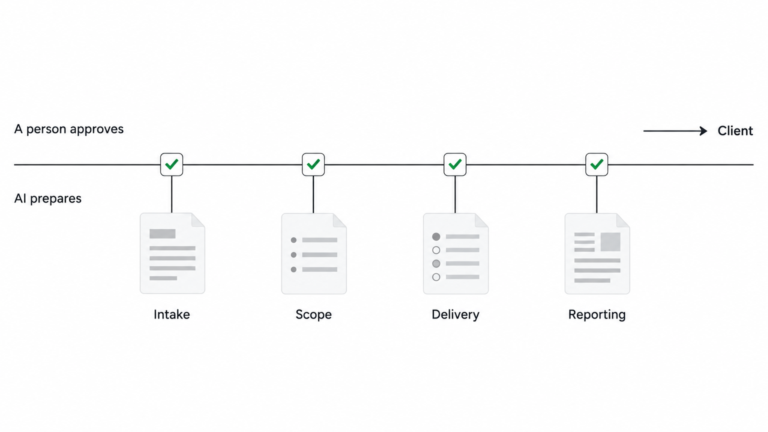
AI can help an agency prepare work faster. It cannot take responsibility for a client promise. The safest operating model starts with one repeatable delivery workflow, clear owners, and a human approval point anywhere the work changes scope, makes a recommendation, or speaks for the agency.
The hard part is not finding another place to use AI. It is making sure intake, scope, status, and reporting mean the same thing to the people handing work off. If those rules are fuzzy, automation just moves the confusion faster.
Key Takeaways
- Let AI prepare and organize work; keep people responsible for scope, judgment, escalation, and client communication.
- Standardize shared definitions and handoffs before automating them.
- Keep one source record for each client job, with clear stage owners and evidence for status.
- Start with one low-risk pilot and measure quality, correction time, and where saved time goes.
Before adding an AI assistant to delivery, define what counts as a complete brief, a ready scope, a blocked job, and finished work. Name the person who owns each decision and the record everyone checks. Keep specialist craft flexible, but make the shared handoff easy to recognize.
That sequence matters. In an October 19, 2026 practitioner article, Susan Westwater puts it this way: “Automate first and you encode the differences. Standardize first and you decide which differences deserve to survive.” Her article supports aligning scope readiness, brief structure, status meanings, owners, and artifact locations before automating delivery operations.
The team-reported discovery-call notes point to the same operational fault line: work can disappear when required setup steps are missed; people want a reliable way to sort work by due date; adoption drops when the process gets too complex; and one estimate can end up twice the original expectation.
The practical rule is simple: make a handoff legible before asking AI to repeat it. An assistant can draft a summary from a record. It cannot make a missing owner, unclear scope, or conflicting status definitions correct.
Related: agency project management workflow
Use intake to capture the decision and the work, not just a description of the request. At minimum, record the client goal, requested deliverables, audience, deadline, approver, dependencies, source material, constraints, and how the client will judge completion. Make “missing information” a visible state instead of letting the team fill gaps by guesswork.
The Deliver client services in ClickUp guide, checked Nov 5, 2026, describes a reusable intake task template with sections for goals, scope, constraints, stakeholders, timelines, and key success metrics. Use those as a starting point for your intake fields, then add only what your own delivery process needs.
AI can turn supplied notes into a structured summary, extract requested deliverables, identify missing fields, and propose follow-up questions. A person checks whether the summary reflects what the client meant, confirms who can answer open questions, and decides whether the request is ready to scope.
The intake gate: Do not move work forward until a named owner confirms the goal, approver, requested outcome, and unresolved dependencies. If a request is incomplete, send back the questions. Do not let a polished AI summary make an incomplete brief look ready.
A useful scope says what the agency will deliver, what it will not deliver, what assumptions the estimate depends on, which client inputs are required, and what counts as accepted work. It also names the route for handling a change request.
AI can draft a scope outline from approved call notes and existing templates. It can compare the request against the agency’s standard checklist and flag missing assumptions, unclear deliverables, or dependencies that have no owner. It should not set the fee, promise a delivery date, decide whether a request is in scope, or negotiate a change on the agency’s behalf.
A delivery lead or account lead owns those choices. They review the assumptions, check capacity with the people doing the work, resolve tradeoffs, and get the right approval before work begins. When a client adds a request, record the change and its impact before treating it as part of the original commitment.
The scope gate: A person approves the final deliverables, exclusions, timing, dependencies, and acceptance criteria. If any one is still a guess, label it and resolve it before the team commits.
Keep the status system boring. Use a short set of shared meanings, such as not started, in progress, blocked, and ready for review. Define what each one means and who is allowed to move work between them. A team can keep different craft methods; the client and account lead should not need to translate what “done” means from one project to another.
The Help Center article How can Super Agents help your team?, checked Nov 5, 2026, gives examples such as daily due-date reports, weekly overdue reports, priority or due-date suggestions based on service-level agreements, and answers about project status, blockers, critical decisions, and milestones. Treat an agent’s summary as a prompt for review, not a client promise: an owner checks the source work, confirms whether the summary is current, and decides whether a blocker needs escalation.
A useful weekly internal view answers four questions: what shipped, what is next, what is blocked, and what decision is needed. Each item should point back to a task, artifact, or decision. That keeps the status update short and makes it possible to check.
The status gate: The owner reviews the update against the source work before it becomes a client promise. A system-generated change is not proof that the work is complete.
Related: agency operations setup
Reports need consistent definitions before they need AI. Agree on the reporting period, metric names, source of each number, and what comparisons are useful for that client. If a definition changes, note it. If a required source is missing, leave the value missing and say what is unavailable.
The Run your small business on ClickUp guide, checked Nov 5, 2026, recommends Dashboards for business metrics and AI-powered summaries for standups, weekly updates, or executive views. Keep the period and source visible, and have an account lead check the summary against the underlying work before it reaches a client.
AI can assemble verified figures, draft a concise summary, group work by outcome, and surface questions for the account lead. The account lead checks every number and period, adds context the data cannot show, distinguishes association from cause, and decides what the client should do next. A person approves and sends the report.
A practical report answers: what changed, what work is complete, what is blocked, what the change means for this client, and what happens next. It should show its source and date range so the client can follow the reasoning rather than trusting a fluent paragraph.
The Spark AI report summary published Nov 5, 2026 reports that 44% of agencies have an AI policy nobody checks and 9% have redesigned a workflow end to end. The summary says the report draws on more than 350 qualitative and quantitative responses gathered through work with 2,500 agency professionals, but it does not give the denominator for each finding.
The reporting gate: A person checks the data, meaning, recommendation, and client wording. Keep the report in draft until that review is complete.
Related: consistent client reporting
Reported friction: In the supplied September discovery-call notes, teams described work disappearing when required setup steps were missed and adoption falling as processes became more complex. One person said, “If you don’t click every box and add people in all of the exact right places, it’s gone.” Another said, “The more complex it gets for the team, the less the system is followed.”
Recommended operating model: Make required intake fields visible, give each handoff a named owner, keep status meanings short, and let AI organize only the information the team supplied. A person confirms the request is ready, approves scope and timing, and checks any client-facing update. This is an illustrative process change, not an observed customer result or measured before-and-after. No verified customer-story passage or comparable baseline was available for this draft, so no customer outcome figures are included.
Pick one recurring, low-risk task that already has a stable process, such as turning an approved meeting note into a draft internal status summary. Keep client sends, scope changes, budget commitments, and strategic recommendations with a person.
Before the pilot, record how long the manual task takes and what errors or rework it creates. During the pilot, track time spent reviewing and correcting the draft, missing inputs, incorrect summaries, and whether the team actually follows the workflow. Afterward, decide where the saved time should go: more client work, deeper analysis, better quality, or less pressure on the team. Do not assume that saved minutes automatically become value.
Write down the conditions for stopping. Stop or narrow the pilot if the source records are unreliable, review takes longer than the manual process, errors repeat, or people work around the process. Fix the workflow before adding another agent or another automation.
Start with a draft that a named account owner checks. Keep a person in charge of deadlines, scope, risks, and client-specific context. Consider broader automation only after the source data, approval process, and client expectations are clear.
Start with the most repetitive handoff that already has clear inputs and a clear owner. Measure the manual baseline, keep the first output internal, and scale only when the team trusts and follows the process.
Explore the Agency Management template as a starting point for your pilot.
Brett Helling
Max 8min read

Pavitra M
Max 10min read

Arya P Dinesh
Max 27min read
© 2026 ClickUp