Free Guide · Migration Checklist

The Monday-to-ClickUp Migration Checklist for Growing Teams

Your hands-on guide to building a cleaner, connected operations workflow for intake, execution, reporting, and collaboration.

Quick Overview


Your Monday workspace looks like a system of record. Spend a week watching how the work moves, and you'll find the real one scattered around it.

It happens by accretion. A board can't do something, so a spreadsheet picks up the slack. A plan needs more room, so it moves to a doc. Every patch was reasonable on its own. Together they became the operating system, and keeping them in sync turned is now a full-time job.

The operational tax you're paying:

  • Board sprawl: A board for every team, project, and exception, with no connecting layer
  • Spreadsheet reporting: The weekly export-and-reconcile ritual that people don't really trust
  • Scattered docs: Plans, SOPs, and briefs exist in disconnected tools, separate from work
  • Brittle workflow logic: Formulas, mirrors, and connected boards that need constant manual upkeep

That brings you to:

⚡ ~4 hours a week lost to reorienting information, with workers toggling between apps about 1,200 times a day. That's the running cost of a setup spread across tools.[1]

At this point, your move is much bigger than swapping boards. Treat it as a rebuild, and the migration becomes the moment which will cut through all that tax. Better yet, it will pull four scattered jobs (intake, execution, reporting, and collaboration) back into one operating system.

Kris Made In

Kris LevineDirector of Technology, Made In Cookware

"We were on Airtable, Monday, Trello, Notion... it was a mess. Nothing was working."

The First Surprise

The Import Is the Easy Part


When a team commits, the first relief is that ClickUp has a built-in Monday importer. The surprise comes a few clicks later, when you see what it carries and what it leaves on the floor.

It brings your data across cleanly: each Monday board arrives as its own ClickUp List, with the fields that describe a task attached. The wiring between those tasks stays in Monday.

✅ Imports cleanly:

  • Boards → separate Lists
  • Assignees
  • Comments
  • Custom fields
  • Due dates
  • Statuses
  • Time tracking

🔧 Needs a rebuild after import:

  • Attachments
  • Connected boards
  • Dependencies
  • Formulas
  • Mirrors
  • Timeline
  • Tags

Look down the second list. Every item on it—the formulas, the mirrors, the connected boards—is a piece of the brittle logic from the tax you've been paying. The importer's limits and your reasons for leaving point at the same things. Recreating that logic on the other side would carry the fragility along with it, so the unsupported list is a redesign list.

Two things to plan around

ClickUp's embedded Monday importer does not include attachments. And Monday sub-items import as separate tasks in a separate list, rather than nested under their parent item. If your boards lean on sub-items or attached files, that's redesign work. Catch it before you migrate.

One decision happens mid-import: You choose whether Monday group names become statuses, or whether the default status column does. That single choice shapes how every status reads on the other side. Make it deliberately, so your reporting doesn't inherit a structure you never picked.

By the time you reach the importer, the real decision is behind you. It was made earlier, the day the tool stopped keeping up with the work.

Juan pablo
Rebuild: Execution

Rebuild the Structure Before You Move the Work


Monday keeps everything on one plane: boards beside boards, groups inside them. ClickUp adds layers above them, and that's where the sprawl gets some order.

The hierarchy:

Workspace → Space → Folder → List → Task → Subtask

The same workspace also holds Docs, Dashboards, Forms, and Whiteboards. In Monday terms, a board maps to a List. The Spaces and Folders above it give you the structure you've been approximating with naming conventions and extra boards.

ClickUp Hierarchy

📋 Your project scope 🛠️ The ClickUp structure
📋 Small project (single team, one deliverable) 🛠️ A single List with statuses tracking the workflow end-to-end
📋 Medium project (multiple workstreams, one client or initiative) 🛠️ A Folder containing one List per workstream, sharing the same Custom Fields
📋 Large project (cross-functional, multi-phase) 🛠️ A Folder with multiple Lists split by phase or team, rolled up into one Dashboard

The real test of a structure is the work two or more teams touch at once. In Monday, that's the job of mirrors and connected boards, and it's where they turn fragile. ClickUp handles it without copies: a single task can live in several Lists at once (Tasks in Multiple Lists), with edits and comments synced across all of them.

Cris Bangsal

Cris BangsalAssociate Director, etaily

"Monday.com was great for basic task tracking, but it lacked the depth we needed for complex workflows. ClickUp gave us everything in one platform: task management, documentation, dashboards, automations, and workload views. We can customize almost everything and it's better suited for managing fast-paced, multi-channel eCommerce and customer service work."

Rebuild: Reporting

Make Statuses and Custom Fields Your Reporting Layer


Here's where migrations break. The import finishes, the dashboards fill in, and everything looks right. A week later, two teams cannot seem to reconcile their numbers and no one can say which board is telling the truth.

The cause is structural. Statuses and custom fields came across exactly as they were, before anyone decided what each one is for.

Statuses describe stages. ClickUp groups them into Active, Done, and Closed by default, with an optional Not Started group. You can define custom statuses at the Space, Folder, or List level.

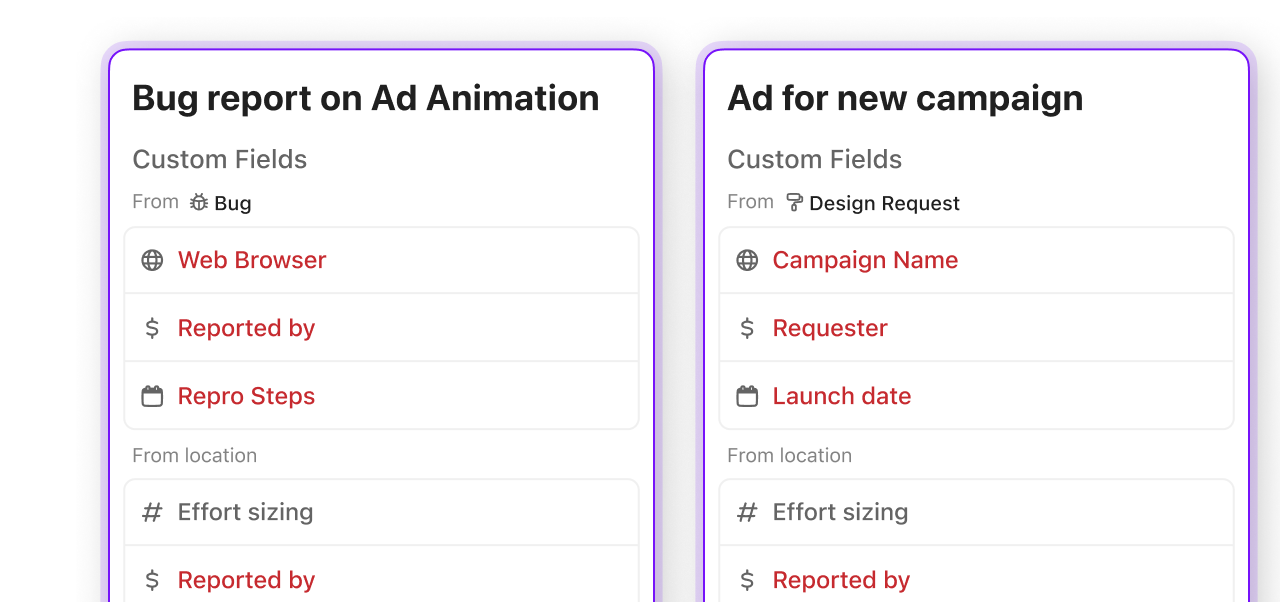
Custom Fields describe properties. Priority, client name, budget, service line, deal size. These are the fields your Dashboards will filter and group by. Define them at the Space level so every List beneath reports consistently.

📋 Monday column 🛠️ ClickUp equivalent
📋 Status column (lifecycle stages like "Working on it", "Done") 🛠️ Status: maps directly to ClickUp's built-in status groups (Active, Done, Closed)
📋 Priority column (urgency labels) 🛠️ Priority field: built-in, filterable in every view and dashboard
📋 Person column (ownership) 🛠️ Assignee: built-in, supports multiple assignees per task
📋 Date column (deadlines, milestones) 🛠️ Due date for deadlines, or a Custom Field (date type) for non-deadline dates
📋 Text/Number column (metadata like budget, client name) 🛠️ Custom Field: the property your dashboards group and filter by
📋 Formula column (calculated values across rows) 🛠️ Formula Custom Field: rebuilt natively, updates in real time
📋 Mirror column (data pulled from other boards) 🛠️ Tasks in Multiple Lists: one task, many views, no copies to maintain

The rule: If you can group or filter by it in a dashboard, it needs to be a Custom Field. If it describes where a task is in its lifecycle, it's a status.

Custom fields by task type

Jonathan Rawlins

Jonathan RawlinsManaging Director, Pixel Pixel Ltd

"ClickUp far outweighs Monday.com especially with how good the platform is at giving you a high-level view of all the tasks you have. As soon as we switched over, our productivity increased by around 68%! The team loves it, our clients love it and collaboration is on another level now."

Rebuild: Intake & Collaboration

Bring the Scattered Work Back Into One System


Go back to the patches from the first section. Each one is a job the board couldn't hold, and each has a native home in ClickUp. Rebuilt once, they stop needing your hands.

Docs live inside the workspace, next to the tasks they describe. They take comments, link to and from tasks, turn a highlighted line into a task, import and export, and sit in a searchable Docs Hub. The planning doc that drifted two tabs over comes back to the work.

Dashboards give a high-level visual representation of your team's work and turn workspace data into charts and reports. The weekly export-and-reconcile ritual ends here; the report stays live and updates as the work does.

Forms turn intake into structured tasks. A request that used to arrive in Slack lands as a task with its fields already filled, so nothing starts as an untracked message.

Automations run on a trigger → optional conditions → action pattern, built at the List, Folder, or Space level. The handoffs you've been doing by hand—reassigning on a status change, nudging an overdue owner—start happening on their own. Save these for last, once the structure beneath them is solid.

Put those four back in one place and the stack you've been straddling collapses into a single tool. For anyone who's juggled several tools at once, that's the headline.

Digitalli Forms

Kateryna Brik

Kateryna BrikSenior Project Manager, Plus972

"Monday.com gave us surface-level visibility but couldn't hold the depth of an agency running 30-plus concurrent client projects. After a six-month evaluation, we moved to ClickUp. Dashboards now give us a real-time read on capacity and blockers, so what used to require a status meeting or a round of Slack messages is visible at a glance."

The Plan

A Phased Migration That Doesn't Break What's Running


Phase 1: Audit (Day 1-2)

  1. List every Monday board, its owner, and what spreadsheet/doc/Slack channel supplements it
  2. Identify which boards are active vs. archive
  3. Map each board's columns to either a status or a Custom Field
  4. Flag sub-item-heavy and attachment-heavy boards for manual migration

Phase 2: Structure (Day 3-4)

  1. Create your Space and Folder hierarchy in ClickUp
  2. Define statuses at the Space level (keep it to 5-7 max)
  3. Create Custom Fields at the Space level for cross-team reporting
  4. Build your intake Form and connect it to the right List
  5. Set up one Dashboard with widgets pulling from your new fields

Phase 3: Pilot (Week 2)

  1. Pick one team or one project to migrate first
  2. Run the Monday importer for that board
  3. Rebuild the unsupported items (dependencies, automations, timeline)
  4. Run both systems in parallel for 5 days
  5. Fix what breaks before migrating the next team

Phase 4: Scale (Week 3-4)

  1. Migrate remaining boards in priority order
  2. Rebuild automations using ClickUp Automations
  3. Move docs and SOPs into ClickUp Docs, linked to the tasks they support
  4. Sunset Monday access once each team confirms their workflow runs clean
David Sunnock

David SunnockMarketing Director, Victory Life Church

Monday.com was great, but the price vs. the features we were getting couldn't hold up to ClickUp. We have a lot of different project styles, and ClickUp gives us the views we need, when we need them. It also allows us to quickly track projects without dropping the ball on important events or losing details.

The Payoff

What the Rebuild Pays Back


When the rebuild is done, the change shows up in two places: the upkeep is gone, and the capacity it was eating comes back. The numbers are specific.

⚡ +10% more work capacity

Talent Plus had teams using different tools, including Monday.com and Jira, which left leadership without a holistic view of client project progress. After moving to ClickUp as the one source of truth for work management, 100+ employees used ClickUp for day-to-day work, and the company estimated teams could take on 10% more work thanks to the efficiencies created.[2]

⚡ 4–6 hrs/week saved

Mayo Clinic's Clinical Systems Education team used ClickUp to improve onboarding and training, saving 4–6 hours per week through workflow automation and consolidating 12 forms from separate tools into a single source of truth.[2]

⚡ +30% more team capacity

DISH Network's Commercial Services PMO unlocked 30% more team capacity after adopting ClickUp, streamlining workflows and unifying tools and teams.[2]

Not sure where to start?

Every company's stack is different. If none of these map cleanly to your situation, or you want help planning the migration sequence, book a 15-minute working session with our team. We'll audit your Monday workspace, identify the highest-leverage rebuild point, and map out a phased rollout that fits your team's capacity.

Sources

[1] ATD: Switching Between Apps Is Killing Your Productivity (Qatalog + Cornell research; ~4 hrs/week lost, 1,200 app toggles/day)

[2] Customer outcomes: Talent Plus, Mayo Clinic, DISH Network via ClickUp customer stories.

[3] Import specifications from ClickUp Help Center: Import from monday.com

Trusted by the best